EHADRCBDRCB
Intermec Technologies Corporation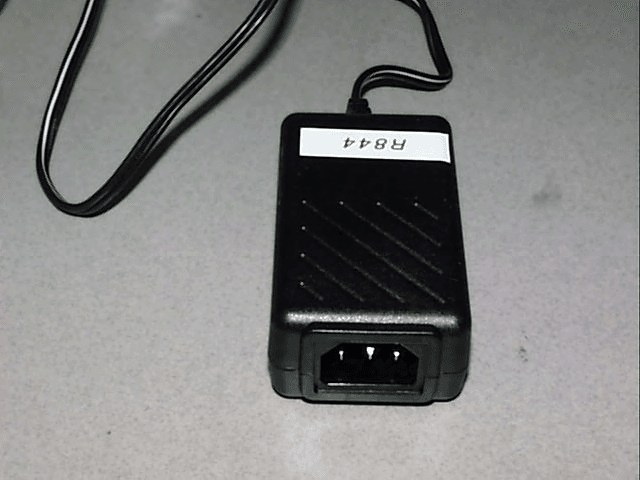
Click to zoom
Application Details
- Equipment Class
- DTS - Digital Transmission System
- Date of Grant
- Mar 19, 2006
- Application Purpose
- Original Equipment
- Date of Application
- Mar 19, 2006
- Equipment Note
- DRCB
- Frequency Range
- 2412.00000000 - 2462.00000000
- Country
- United States
Documents & Files
Document Text
Text extracted from the exhibit documents filed with the FCC. Open a document above to read the original.
Users Manual
578-100-138 Revision B Page 1 of 2 *578-100-138B* *578-100-138B* Compliance Statement Insert Device Name: Data Collection Computer Model Number: CN2B The responsible party for the compliance of this device is: Intermec Technologies Corporation 6001 36 th Avenue West Everett, WA 98203 USA (425) 348-2600 This product conforms to the following approvals. The user(s) of this product are cautioned to use accessories and peripherals approved by Intermec Technologies Corporation. The use of accessories other than those recommended, or changes to this product that are not approved by Intermec Technologies Corporation, may void the compliance of this product and may result in the loss of the users authority to operate the equipment. FCC Digital Emissions Compliance This equipment has been tested and found to comply with the limits for a Class B digital device, pursuant to Part 15 of the FCC Rules. These limits are designed to provide reasonable protection against harmful interference in a residential installation. This equipment generates, uses and can radiate radio frequency energy and, if not installed and used in accordance with the instructions, may cause harmful interference to radio communications. However, there is no guarantee that interference will not occur in a particular installation. If this equipment does cause harmful interference to radio or television reception, which can be determined by turning the equipment off and on, the user is encouraged to try to correct the interference by one or more of the following measures: • Reorient or relocate the radio or television receiving antenna. • Increase the separation between the computer equipment and receiver. • Connect the equipment into an outlet on a circuit different from that to which the radio or television receiver is connected. • Consult the dealer or an experienced radio television technician for help. 15.19(a)(3) This device complies with part 15 of the FCC Rules. Operation is subject to the following two conditions: (1) This device may not cause harmful interference, and (2) this device must accept any interference received, including interference that may cause undesired operation. Canadian Digital Apparatus Compliance This Class B digital apparatus meets all requirements of the Canadian Interference-Causing Equipment Regulations. Cet appareil numérique de la classe B respecte toutes les exigences du Règlement sur le matériel brouilleur du Canada. Radio Wave Exposure and Specific Absorption Rate (SAR) Information for Model CN2B The Model CN2B Mobile Computer has been designed to comply with applicable safety requirements for exposure to radio waves. These requirements are based on scientific guidelines that include safety margins designed to assure the safety of all persons, regardless of age and health. The radio wave exposure guidelines employ a unit of measurement known as the Specific Absorption Rate or SAR. Tests for SAR are conducted using standardized methods with the device transmitting at its highest certified power level. While there may be difference between the SAR levels of various products, they are all designed to meet the relevant guidelines for exposure to the radio waves. This radio has been tested and meets the FCC RF exposure guidelines when used with the Intermec accessories supplied or designated for this product. Use of other accessories may not ensure compliance with the FCC RF exposure guidelines. The highest SAR value for the CN2B Mobile Computer, as tested by Compliance Certification Services, for single or collocated configuration is 0.442 W/kg. Compliance Battery Recycling Information This product contains a lithium ion (Li-ion) main battery. When the battery reaches the end of its useful life, the spent battery should be disposed of by a qualified recycler or hazardous materials handler. Do not mix this battery with the solid waste stream. Contact your Intermec Technologies Service Center for recycling or disposal information. This product contains a Nickel Metal Hydride (NiMH) backup battery. When the battery reaches the end of its useful life, the spent battery should be disposed of by a qualified recycler or hazardous materials handler. Do not mix this battery with the solid waste stream. Contact your Intermec Technologies Service Center for recycling or disposal information. Note: In the U.S., the EPA does not consider spent Li-ion or NiMH batteries as hazardous waste. Caution: The battery pack used in this device may present a fire or chemical burn hazard if mistreated. Do not disassemble, heat above 100°C (212°F) or incinerate. Dispose of used battery pack promptly. Keep away from children. Use Intermec battery pack Model number 074201 only. Use of another pack may present a risk of fire or explosion. Vorsicht: Der in diesem Gerät verwendete Akkusatz kann bei Missbrauch eine Brand- oder Verätzungsgefahr darstellen. Nicht zerlegen, über 100 °C erwärmen oder verbrennen. Den gebrauchten Akkusatz sofort entsorgen. Von Kindern fern halten. Nur Intermec-Akkusatz, Modellnummer 074201 verwenden. Bei Verwendung eines anderen Akkusatzes besteht Brand- oder Explosionsgefahr. NiMH NiMH 578-100-138 Revision B Page 2 of 2 *578-100-138B* *578-100-138B* DECLARATION OF CONFORMITY (According to ISO/IEC Guide 22 and EN 45014) PAGE ONE OF ONE THE PRODUCT HEREWITH COMPLIES WITH THE REQUIREMENTS OF : THE LOW-VOLTAGE DIRECTIVE 73/23/EEC. THE EMC DIRECTIVE 89/336/EEC. THE R&TTE DIRECTIVE 1999/05/EC. Manufacturer’s Name: European Representative: Intermec Technologies Corporation Intermec International Incorporated 6001 36 th Avenue West Sovereign House, Vastern Road Everett, WA 98203 Reading, Berkshire RG1 8BT England Declares that the product listed below: Product Type: ITE/Residential, Commercial, and Light Industrial Product Name: CN2B Model Number: CN2B Options: All Beginning Serial Number: All Date Issued: December 23, 2005 Conforms to the following product specifications: Safety: IEC 60950-1 / EN 60950-1 IE…
Text truncated - open the document above for the full version.
Users Manual
CN2 Handheld Computer User’s Manual 1 Using the CN2 Handheld Computer Use this chapter to familiarize yourself with the CN2 handheld computer. In this chapter you will find these sections: • Introducing the CN2 Handheld Computer • Using the Battery • Using the Keypad • Using the Touch Screen • Understanding the Screen Icons • Understanding the Status Lights • Understanding the Beeps • Running Multiple Applications on the CN2 • Scanning Bar Codes • Increasing File Storage With the Optional SD Card • Using the Optional USB Keyboard 1 Chapter 1 — Using the CN2 Handheld Computer 2 CN2 Handheld Computer User’s Manual Introducing the CN2 Handheld Computer The Intermec CN2 handheld computer is an ergonomically- designed handheld computer built on the Microsoft ® Windows ® CE .NET operating system. It is a semi-rugged, lightweight computer that runs client/server applications and browser-based applications. Stylus (not visible from front) Side Scan button (2 places) Good Read light USB/Serial port Battery light CN2 T A B 0 . 7 9 1 3 4 6 8 2 5 ESC E N T E R F1F3LockF2 F4F6F5 F7F9F8 F12F10F11 DEFCapsABC GHIMNOJKL PQRSWXYZTUV SpaceAlt CN2 Handheld Computer With Numeric Keypad The CN2 handheld computer with an IEEE 802.11b/g radio installed is Wi-Fi ® certified for interoperability with other 802.11b/g wireless LAN devices. What’s New in This Release? This release of CN2 includes these new features: • You can use Task Manager (page 22). • You can customize the behavior of the keypad (page 41). • Funk Security is the default security choice (page 52). Chapter 1 — Using the CN2 Handheld Computer CN2 Handheld Computer User’s Manual 3 • You can double-tap the or icon in the taskbar to view information about your wireless network regardless of your security choice (page 68). • You can allow FTP transfers to and from the CN2 (page 70). • You can make sure that your applications are reinstalled after a cold boot (page 90). • You can run LED and keypad diagnostic tests (page 102). CN2 Features, Applications, and Accessories The CN2 includes these features and applications: Features Installed Applications 802.11b/g radio (optional) CE Internet Explorer 6 1D linear imager (optional) CE Media Player CCX v1.0 certification Inbox IPv6 support ScanDemo (optional) .NET Compact Framework Transcriber 64MB flash/128MB RAM memory Wavelink Avalanche Enabler 400 MHz Intel ® XScale ™ processor WordPad 18-key numeric keypad or 10-key scroll keypad Quarter VGA color display with touch screen For a complete list of accessories, see “Accessories for the CN2” on page 115. Identifying the Optional Features Installed in Your CN2 Before you continue learning to use your CN2, you need to determine which optional features are installed in your CN2: • 802.11b/g radio • Numeric or scroll keypad • 1D linear imager Chapter 1 — Using the CN2 Handheld Computer 4 CN2 Handheld Computer User’s Manual Does Your CN2 Contain an 802.11b/g Radio? How to Determine Description In This Manual Look at the Configuration Number (CN) on the label inside the battery compartment. For help removing the battery door and the battery, see page 8. If the CN ends in 8xx, your CN2 contains a radio. For example, CN2A21E10N2804. You have a wireless CN2, which can communicate in a wireless network. For details about wireless communications, see “Configuring 802.11b/g Radio Communications” on page 47. If the CN ends in 000, your CN2 does not contain a radio. For example, CN2A11E10N2000. You have a batch CN2, which requires a modem dock or communications dock to communicate with a network. For details about batch communications, see “Configuring USB Communications” on page 46. Does Your CN2 Contain a Numeric or Scroll Keypad? How to Determine Description In This Manual The numeric keypad has 18 keys. You can type numbers and letters, and you can access function keys (such as F1). For details, see “Using the Numeric Keypad” on page 11. The scroll keypad has 10 keys. You can use the arrow keys to move through applications, and you can access function keys (such as F1). For details, see “Using the Scroll Keypad” on page 13. Does Your CN2 Scan Bar Codes? How to Determine Description In This Manual The top of the CN2 contains a clear scanner window. You can scan bar codes with your CN2. For details, see “Scanning Bar Codes” on page 25. The top of the CN2 does not contain a clear scanner window. You cannot scan bar codes with your CN2. Ignore all references to scanning bar codes in this manual. Chapter 1 — Using the CN2 Handheld Computer CN2 Handheld Computer User’s Manual 5 Using the Battery The CN2 uses a lithium-ion battery as its main power source. You must fully charge the main battery before you can use the CN2. While you change the battery, the backup battery maintains the computer’s status, memory, and real-time clock for at least 5 minutes. The lithium-ion battery pack that is used in this device may present a fire or chemical burn hazard if it is mistreated. Do not disassemble it, heat it above 100°C (212°F), or incinerate it. Avertissement: Le paquet de piles d’ions de lithium qui est utilisé dans cet appareil peut presenter un risque de feu ou un risque chimique de brûlure s’il est maltraité. Il ne faut pas le désassembler, le réchauffer à une température plus élevée que 100°C (212°F) ou l’incinérer. Warnung: Der Lithiumionen-Akku, der in diesem Gerät verwendet wird, kann eine Brandgefahr oder chemische Brandgefahr darstellen, falls ee missbräuchlich verwendet wird. Nicht zerlegen, über 100°C (212°F) erwärmen oder verbrennen. Removing the main battery when the backup battery low or critically low icon appears on the status bar may cause your CN2 to cold boot and you may lose data. Attention: Si vous enlevez la batterie principale quand l’icône de batterie de secours dans la barre de statut indique bas ou bas critique, cela peut causer une botte froide à votre CN2 et vous risquez de perdre des données. Vorsicht: Das Entfernen des Hauptakkus bei schwacher Reser…
Text truncated - open the document above for the full version.
Users Manual
CN2 Handheld Computer User’s Manual 33 Configuring the CN2 Use this chapter to understand how to configure the CN2. In this chapter, you will find these sections: • How to Configure the CN2 Parameters • Configuring the CN2 With the Setup Assistant • Configuring the CN2 Locally With Intermec Setting • Configuring the CN2 Remotely With Intermec Settings • Customizing the Keypad 2 Chapter 2 — Configuring the CN2 34 CN2 Handheld Computer User’s Manual How to Configure the CN2 Parameters You can configure many parameters on the CN2, such as the bar code symbologies it decodes or the network settings. These characteristics are controlled by configuration parameters. The values you set for these configuration parameters determine how the computer operates. There are several ways to configure the CN2: Use Setup Assistant Use Intermec Settings Locally Use Intermec Settings on the CN2 to set most parameters. Use Setup Assistant to quickly enter network parameters. Use Intermec Settings Remotely Use Intermec Settings on your desktop PC to remotely configure network parameters. Configuring the CN2: The CN2 provides several ways for you to configure the communications, device, and imaging parameters. Chapter 2 — Configuring the CN2 CN2 Handheld Computer User’s Manual 35 Configuring the CN2 W ith the Setup Assistant The Setup Assistant runs on the CN2 the first time you turn on the computer. Use the Setup Assistant to set or enable basic network parameters and connect your CN2 to the network. The Setup Assistant guides you through setting the following basic network parameters: • Date and time • 802.11b/g radio and SSID (Network name) • 802.1x security • DHCP server or IP address, subnet mask, and default router • Primary and secondary DNS addresses • Primary and secondary WINS addresses • Device name To set other parameters, use Intermec Settings or another configuration method. The Setup Assistant Start Screen After you complete the Setup Assistant, the CN2 should be communicating with your network. A Network Connection icon ( or ) appears on your taskbar. For more information on the network icons, see “Understanding the Screen Icons” on page 19. Chapter 2 — Configuring the CN2 36 CN2 Handheld Computer User’s Manual Configuring the CN2 Locally W ith Intermec Settings Use Intermec Settings to configure the CN2 and view system information. You can access Intermec Settings while running any application. Opening Intermec Settings To open Intermec Settings 1 Tap the Start icon. The Start menu appears. 2 Tap Intermec Settings. The Intermec Settings application appears. Chapter 2 — Configuring the CN2 CN2 Handheld Computer User’s Manual 37 3 Make changes to the settings as necessary. For help, see the next section, “Navigating Through Intermec Settings.” 4 Save your changes. For help, see “Saving Your Settings” on page 39. 5 Exit Intermec Settings. For help, see “Exiting Intermec Settings” on page 39. Navigating Through Intermec Settings Use this table to understand how to navigate and enter information in Intermec Settings. Navigating in Intermec Settings Function Choose a Method Select or expand an option • Tap the option. • On the scroll keypad, press U or D to select an option. Expand an option • Tap the option. • On the scroll keypad, press U or D to select the option, and then press R. Enter information • Tap in the text box. The soft keyboard appears. Tap the keyboard keys to enter information. Tap outside the box or tap Enter when you are finished. Select text in a text box • Tap in the text box and drag the stylus over the text. Save settings • Tap File > Save Settings. • Tap the Save icon in the upper right corner. Use the following diagram to help find the commands you need to use to configure your CN2. These screens do not represent the exact information you will see on your CN2. They have been modified to show you how the information is structured. Chapter 2 — Configuring the CN2 38 CN2 Handheld Computer User’s Manual Intermec Settings Menus: Use this diagram to help navigate through the Intermec Settings application. This diagram should only be used as a guide; it does not accurately represent all of the information you will see on your screen. Learning About the Configuration Commands in Intermec Settings For detailed information on most of the commands available in Intermec Settings, see the Intermec Computer Command Reference Manual (P/N 073529). A copy of this online manual is on the CD attached inside the front cover of this user’s manual. You should check the Intermec web site at www.intermec.com to determine if a more recent version is available for download. Chapter 2 — Configuring the CN2 CN2 Handheld Computer User’s Manual 39 Saving Your Settings You can save the changes you make in Intermec Settings at any time. After you save your changes, you can continue making changes or you can exit Intermec Settings. To save your settings • Tap the Save icon at the top of the screen. Or, • From the Main Menu, tap File > Save Settings. Exiting Intermec Settings When you are done modifying your device configuration and have saved your settings, you should exit Intermec Settings. To exit Intermec Settings • Tap the X in the upper right corner of the window. Or, • From the Main Menu, tap File > Exit. If you try to exit Intermec Settings without saving your changes, a message box appears asking if you want to save your configuration changes. Tap Yes. Restoring the CN2 Default Settings You can restore the CN2 to factory default settings. Note: Restoring the CN2 to factory default settings resets all network parameters. As a result, you may lose network communications. This option should only be used by network administrators or by Intermec support personnel. For a complete list of the default settings, see “Default Configuration” on page 120. To restore default settings 1 Tap Start > Intermec Settings. The Intermec Settings application appears. Chapter 2 — Configuring the CN2 40 CN2 Handheld Comput…
Text truncated - open the document above for the full version.
Cover Letter(s)
October 12, 2005 To Who It May Concern: Intermec Technologies Corporation, the undersigned, hereby authorizes Northwest EMC, Inc., to act on our behalf, as our agent, in the following matters related to the FCC and Industry Canada approval of our products: report submittal, related correspondence, the signing of all documents related to these matters, and any other lawful activity necessary to obtain such certification. Any act carried out by Northwest EMC, Inc. within the scope of this authorization shall have the same affect as our own. This authorization shall expire 12 months from original date. If you have any questions regarding this application, please feel free to contact me via phone at 425-356-1765, via fax at 425-348-2633 or via email at [email protected]. Sincerely, Katie Molina Compliance Engineer Intermec Technologies Corporation Safety & Compliance 6001 36 th Avenue West Everett, Washington 98203 United States tel 425 356 1765 fax 425 348 2633
Cover Letter(s)
Northwest EMC TCB Compliance Opinion Rev. 9/15/03 ITRM0109 Information about the Applicant Company Name Intermec Technologies Corporation Grantee Dave Fry Address 550 Second St. SE City, State, Zip Cedar Rapids, IA 52401-2023 Job Number ITRM0109 Model DRCB FCC ID EHADRCB Agent Northwest EMC, Inc. Approval Type Original Equipment Class DTS Digital Transmission System Rule Part 15.247DSSS Industry Canada Information Model DRCB Industry Canada ID 1223A-DRCB Rule Part RSS210 Overview This application is for a limited modular approval of the Wistron 802.11(b)/(g) radio, M/N: DRCB, in Intermec's CN2B handheld device. The 802.11(b)/(g) radio, FCC ID: EHADRCB, will be co- located with a previously certified Bluetooth module, FCC ID: EHABTM210. The 802.11(b)/(g) radio operates in the 2400-2483.5 MHz band. It will be used for Local Area Networks and inventory control applications. The radio will be considered a portable device because accessories are provided that allow the EUT to be within 20 cm of the head or torso of the user. SAR reports have been included with the exhibits. The radio utilizes a single internal Centurion Wireless P/N CAF94656 antenna. This configuration satisfies the requirements of 47 CFR 15.203. Recommendation All items have been resolved and completed to my satisfaction; therefore I recommend this application for approval. Signature 3/16/2006 Dave Tolman, TCB Committee
Cover Letter(s)
6001 36 th Avenue West Everett, Washington 98203 United States tel 425.348.2600 fax 425.355.9551 www.intermec.com 8-MAR-2006 CONFIDENTIALITY REQUEST CONTAINED WITHIN Federal Communications Commission Authorization and Evaluation Division 7435 Oakland Mills Road Columbia, Maryland 21046 Re: Application for Direct Sequence Spread Spectrum Transceiver Certification To whom it may concern, Application: Intermec Technologies Corporation, 550 Second Street SE, Cedar Rapids, Iowa 52401-2029 herein submits for Certification of a Direct Sequence Spread Spectrum Transceiver FCC ID: EHADRCB. Intermec is also the manufacturer of this equipment. Confidentiality: Pursuant to Section 0.459 of the Commission's rules (CFR 47), Intermec requests confidentiality for portions of the material contained in this application and that the identified material be withheld from public inspection following the grant of this authorization. This material contains Intermec trade secrets and confidential information that Intermec does not customarily release to the public and which is otherwise not generally available to the pubic. Confidentiality is requested for the following exhibits: • Theory of Operation • Schematics • Frequency Block Diagram Description: This equipment is an 802.11b/g DSSS radio module, which operates in the 2400-2483.5 MHz band. Limited modular approval is requested since the radio design allows use in multiple hosts of various configurations. Contact Information: Please contact me by telephone at (319) 369-3865 or by e-mail ([email protected]) if there are questions or additional information needed concerning this filing. Yours truly, Scott J. Holub Engineering Supervisor Intermec Technologies Corporation 550 Second Street S.E. Cedar Rapids, IA 52401 USA
Cover Letter(s)
NORTHWEST EMC, INC. 22975 NW Evergreen Parkway, Suite 400 Hillsboro, OR 97124 March 8, 2006 Dear Application Examiner: On behalf of Intermec Technologies Corporation, Northwest EMC, Inc. is submitting this application for a limited modular approval of the Wistron 802.11(b)/(g) radio, M/N: DRCB, in Intermec's CN2B handheld device. The 802.11(b)/(g) radio, FCC ID: EHA- DRCB, will be co-located with a previously certified Bluetooth module, FCC ID: EHABTM210. The 802.11(b)/(g) radio operates in the 2400-2483.5 MHz band. It will be used for Local Area Networks and inventory control applications. The radio will be considered a portable device because accessories are provided that allow the EUT to be within 20 cm of the head or torso of the user. SAR reports have been included with the exhibits. The radio utilizes a single internal Centurion Wireless P/N CAF94656 antenna. This configuration satisfies the requirements of 47 CFR 15.203. The receiver portion of this radio transceiver has been verified to FCC 15B. Please note that there are two EMC test reports. The Northwest EMC Report #ITRM0112 includes spurious radiated emissions testing with the radio installed in the CN2B handheld and co-located with the Bluetooth module. The Sporton International Inc. test report #FR5D1908 is for the Wistron radio and includes all the required direct connect testing for the radio. The technical reports and exhibits demonstrate compliance with FCC rules 47 CFR 15.247. Your efforts in reviewing this application are greatly appreciated. Best regards, Northwest EMC, Inc.
External Photos
Radio Module Location in the Intermec CN2B Hand Held Computer Scott Holub 14-MAR-06 CN2B Unit front view CN2B Unit back view CN2B Unit top view CN2B Unit bottom view CN2B Unit side views CN2B Charging dock front views CN2B Charging dock rear view and connectors CN2B Charging dock AC Adapter
ID Label/Location Info
FCC Product Label
Internal Photos
Radio Module Location in the Intermec CN2B Hand Held Computer Scott Holub 28-FEB-06 CN2B Unit with: Actiontec BTM210 Bluetooth Module Wistron DRCB 802.11b/g Module CN2B Unit with: Actiontec BTM210 Bluetooth Module Wistron DRCB 802.11b/g Module CN2B Unit with: Actiontec BTM210 Bluetooth Module Wistron DRCB 802.11b/g Module CN2B Unit with: Actiontec BTM210 Bluetooth Module Wistron DRCB 802.11b/g Module CN2B Unit with: Actiontec BTM210 Bluetooth Module Wistron DRCB 802.11b/g Module
Internal Photos
SPORTON International Inc. PAGE NUMBER : A6 OF A9 TEL : 886-2-2696-2468 ISSUED DATE : Dec,28,2005 FAX : 886-2-2696-2255 SPORTON International Inc. PAGE NUMBER : A7 OF A9 TEL : 886-2-2696-2468 ISSUED DATE : Dec,28,2005 FAX : 886-2-2696-2255 SPORTON International Inc. PAGE NUMBER : A8 OF A9 TEL : 886-2-2696-2468 ISSUED DATE : Dec,28,2005 FAX : 886-2-2696-2255 SPORTON International Inc. PAGE NUMBER : A9 OF A9 TEL : 886-2-2696-2468 ISSUED DATE : Dec,28,2005 FAX : 886-2-2696-2255
Operational Description
Antenna Info Exhibit The Wistron 802.11(b)/(g) radio installed in Intermec's CN2B handheld device will utilize a single internal antenna. The antenna used is Centurion Wireless CAF94656. The peak gain of the antenna is +2 dBi. This antenna meets the requirements of Part 15.203 of the FCC rules. The antenna is internal and factory installed. The connector is an I-PEX MHF right angle plug, compatible with Hirose UFL connectors.
RF Exposure Info
Date/Time: 2/1/2006 12:28:29 PM Test Laboratory: Compliance Certification Services System Performance Check @ 2450MHz (Body Tissue) DUT: Dipole 2450 MHz; Type: D2450V2; Serial: D2450V2 - SN:748 Communication System: CW - 2450 MHz; Frequency: 2450 MHz;Duty Cycle: 1:1 Medium parameters used: f = 2450 MHz; σ = 2.03 mho/m; ε r = 52.6; ρ = 1000 kg/m 3 Phantom section: Flat Section Room Ambient Temperature: 23.0deg. C; Liquid Temperature: 21.5 deg. C DASY4 Configuration: - Area Scan setting - Find Secondary Maximum Within: 2.0 dB and with a peak SAR value greater than 0.0012W/kg - Probe: EX3DV3 - SN3531; ConvF(8.29, 8.29, 8.29); Calibrated: 7/21/2005 - Sensor-Surface: 4mm (Mechanical Surface Detection) - Electronics: DAE3 Sn500; Calibrated: 2/7/2005 - Phantom: SAM 2; Type: SAM 2; Serial: 1050 - Measurement SW: DASY4, V4.6 Build 23; Postprocessing SW: SEMCAD, V1.8 Build 160 d=10mm, Pin=250mW/Area Scan (7x7x1): Measurement grid: dx=15mm, dy=15mm Maximum value of SAR (measured) = 14.5 mW/g d=10mm, Pin=250mW/Zoom Scan (5x5x7)/Cube 0: Measurement grid: dx=7.5mm, dy=7.5mm, dz=5mm Reference Value = 84.8 V/m; Power Drift = -0.035 dB Peak SAR (extrapolated) = 26.6 W/kg SAR(1 g) = 12.7 mW/g; SAR(10 g) = 5.78 mW/g 0 dB = 14.5mW/g Date/Time: 2/1/2006 12:39:03 PM Test Laboratory: Compliance Certification Services System Performance Check @ 2450MHz (Body Tissue) DUT: Dipole 2450 MHz; Type: D2450V2; Serial: D2450V2 - SN:748 Communication System: CW - 2450 MHz; Frequency: 2450 MHz;Duty Cycle: 1:1 d=10mm, Pin=250mW/Z Scan (1x1x41): Measurement grid: dx=20mm, dy=20mm, dz=2.5mm Maximum value of SAR (measured) = 14.4 mW/g
RF Exposure Info
Date/Time: 2/1/2006 2:11:29 PM Test Laboratory: Compliance Certification Services 1_Body worn DUT: Intermec; Type: CN2B; Serial: 3189050009 Communication System: 802.11bg; Frequency: 2412 MHz;Duty Cycle: 1:1.02 Medium parameters used (interpolated): f = 2412 MHz; σ = 1.98 mho/m; ε r = 52.7; ρ = 1000 kg/m 3 Phantom section: Flat Section Room Ambient Temperature: 23.0deg. C; Liquid Temperature: 21.5 deg. C DASY4 Configuration: - Area Scan setting - Find Secondary Maximum Within: 2.0 dB and with a peak SAR value greater than 0.0012W/kg - Probe: EX3DV3 - SN3531; ConvF(8.29, 8.29, 8.29); Calibrated: 7/21/2005 - Sensor-Surface: 4mm (Mechanical Surface Detection) - Electronics: DAE3 Sn500; Calibrated: 2/7/2005 - Phantom: SAM 2; Type: SAM 2; Serial: 1050 - Measurement SW: DASY4, V4.6 Build 23; Postprocessing SW: SEMCAD, V1.8 Build 160 11b_L-ch/Area Scan (9x8x1): Measurement grid: dx=15mm, dy=15mm Info: Interpolated medium parameters used for SAR evaluation. Maximum value of SAR (measured) = 0.284 mW/g 11b_L-ch/Zoom Scan (5x5x7)/Cube 0: Measurement grid: dx=7.5mm, dy=7.5mm, dz=5mm Reference Value = 0.664 V/m; Power Drift = 0.053 dB Peak SAR (extrapolated) = 0.593 W/kg SAR(1 g) = 0.294 mW/g; SAR(10 g) = 0.137 mW/g Info: Interpolated medium parameters used for SAR evaluation. Maximum value of SAR (measured) = 0.330 mW/g Date/Time: 2/1/2006 2:31:29 PM Test Laboratory: Compliance Certification Services 1_Body worn DUT: Intermec; Type: CN2B; Serial: 3189050009 Communication System: 802.11bg; Frequency: 2437 MHz;Duty Cycle: 1:1.02 Medium parameters used (interpolated): f = 2437 MHz; σ = 2.01 mho/m; ε r = 52.7; ρ = 1000 kg/m 3 Phantom section: Flat Section Room Ambient Temperature: 23.0deg. C; Liquid Temperature: 21.5 deg. C DASY4 Configuration: - Area Scan setting - Find Secondary Maximum Within: 2.0 dB and with a peak SAR value greater than 0.0012W/kg - Probe: EX3DV3 - SN3531; ConvF(8.29, 8.29, 8.29); Calibrated: 7/21/2005 - Sensor-Surface: 4mm (Mechanical Surface Detection) - Electronics: DAE3 Sn500; Calibrated: 2/7/2005 - Phantom: SAM 2; Type: SAM 2; Serial: 1050 - Measurement SW: DASY4, V4.6 Build 23; Postprocessing SW: SEMCAD, V1.8 Build 160 11b_M-ch/Area Scan (9x8x1): Measurement grid: dx=15mm, dy=15mm Info: Interpolated medium parameters used for SAR evaluation. Maximum value of SAR (measured) = 0.229 mW/g 11b_M-ch/Zoom Scan (5x5x7)/Cube 0: Measurement grid: dx=7.5mm, dy=7.5mm, dz=5mm Reference Value = 0.761 V/m; Power Drift = -0.214 dB Peak SAR (extrapolated) = 0.589 W/kg SAR(1 g) = 0.282 mW/g; SAR(10 g) = 0.129 mW/g Info: Interpolated medium parameters used for SAR evaluation. Maximum value of SAR (measured) = 0.314 mW/g Date/Time: 2/1/2006 2:46:33 PM Test Laboratory: Compliance Certification Services 1_Body worn DUT: Intermec; Type: CN2B; Serial: 3189050009 Communication System: 802.11bg; Frequency: 2437 MHz;Duty Cycle: 1:1.02 11b_M-ch/Z Scan (1x1x41): Measurement grid: dx=20mm, dy=20mm, dz=…
Text truncated - open the document above for the full version.
Contact Information
Applicant
Brian Rudick(VP & GC, Honeywell Scanning & Mobility)
Test Firm
Northwest EMC, Inc.Greg Kiemel
Technical Specifications
| # | Rule Parts | Frequency Range | Power Output |
|---|---|---|---|
| 1 | 15C | 2.41 GHz - 2.46 GHz | 78.00 mW |
Other Applications from Intermec Technologies Corporation
EHA-1015CP01X1
Sep 29, 20131015CP01
Equipment Class
NII - Unlicensed National Information Infrastructure TX
EHA-1015CP01SX1
Sep 08, 20131015CP01S
Equipment Class
PCE - PCS Licensed Transmitter held to ear
EHA-RC12ABGN
Aug 19, 2013WLAN board
Equipment Class
DSS - Part 15 Spread Spectrum Transmitter
EHA-1000CP01F
Feb 19, 20131000CP01F9, 1000CP02F9, 1001CP01F9
Equipment Class
DTS - Digital Transmission System
EHA-INBT02
Dec 11, 2012BT Board
Equipment Class
DSS - Part 15 Spread Spectrum Transmitter