EHASMC46GSM Radio Module in 700C Host
Intermec Technologies Corporation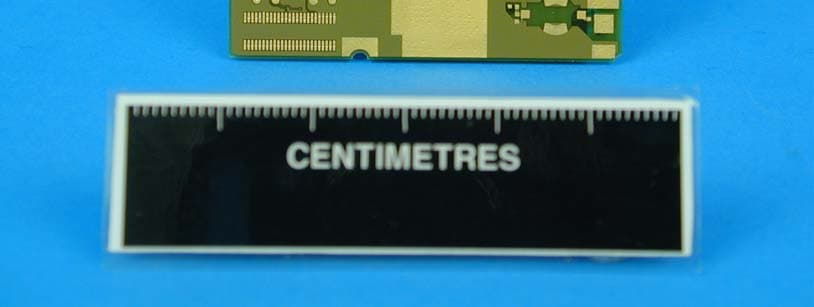
Click to zoom
Application Details
- Equipment Class
- PCE - PCS Licensed Transmitter held to ear
- Date of Grant
- Dec 19, 2004
- Application Purpose
- Original Equipment
- Date of Application
- Dec 19, 2004
- Equipment Note
- GSM Radio Module in 700C Host
- Frequency Range
- 824.20000000 - 848.80000000
- Country
- United States
Documents & Files
Document Text
Text extracted from the exhibit documents filed with the FCC. Open a document above to read the original.
Users Manual
578-100-083 Revision F Page 1 of 4 *578-100-083F* *578-100-083F* Compliance Statement Insert Device Name: Pen Notepad Computer Model Number: Model 700C (740/741, 750/751, & 760/761 Configurations) The responsible party for the compliance of this device is: Intermec Technologies Corporation 6001 36 th Avenue West Everett, WA 98203 USA (425) 348-2600 CAUTION: See users guide instructions for handling, charging, and replacing batteries. Failure to follow those instructions can result in personal injury, fire, or battery explosion. This product conforms to the following approvals. The user(s) of this product are cautioned to use accessories and peripherals approved by Intermec Technologies Corporation. The use of accessories other than those recommended, or changes to this product that are not approved by Intermec Technologies Corporation, may void the compliance of this product and may result in the loss of the users authority to operate the equipment. FCC Digital Emissions Compliance This equipment has been tested and found to comply with the limits for a Class B digital device, pursuant to Part 15 of the FCC Rules. These limits are designed to provide reasonable protection against harmful interference in a residential installation. This equipment generates, uses and can radiate radio frequency energy and, if not installed and used in accordance with the instructions, may cause harmful interference to radio communications. However, there is no guarantee that interference will not occur in a particular installation. If this equipment does cause harmful interference to radio or television reception, which can be determined by turning the equipment off and on, the user is encouraged to try to correct the interference by one or more of the following measures: • Reorient or relocate the radio or television receiving antenna. • Increase the separation between the computer equipment and receiver. • Connect the equipment into an outlet on a circuit different from that to which the radio or television receiver is connected. • Consult the dealer or an experienced radio television technician for help. Canadian Digital Apparatus Compliance This Class B digital apparatus meets all requirements of the Canadian Interference-Causing Equipment Regulations. Cet appareil numérique de la classe B respecte toutes les exigences du Règlement sur le matériel brouilleur du Canada. Radio Wave Exposure and Specific Absorption Rate (SAR) Information for Model 700C Configurations with GSM/GPRS Radio The Model 700C Pen Notepad computer has been designed to comply with applicable safety requirements for exposure to radio waves. These requirements are based on scientific guidelines that include safety margins designed to assure the safety of all persons, regardless of age and health. The radio wave exposure guidelines employ a unit of measurement known as the Specific Absorption Rate or SAR. Tests for SAR are conducted using standardized methods with the device transmitting at its highest certified power level. While there may be differences between the SAR levels of various products, they are all designed to meet the relevant guidelines for exposure to the radio waves. For residents of the European Union and other countries/regions that have adopted the International Commission on Non-Ionizing Radiation Protection (ICNIRP) SAR limit of 2W/Kg averaged over 10 grams of tissue for uncontrolled general population exposure, the highest SAR value for the Model 700C Pen Notepad computer, as tested by BABT/TÜV Product Service, for use at the ear is 0.544W/Kg (10g). For residents of Canada and the United States and other countries/regions that have adopted the SAR limit recommended by Industry Canada RSS-102 and Federal Communications Commission Office of Engineering and Technology (OET) Bulletin 65, which is 1.6W/kg averaged over one (1) gram of tissue for uncontrolled general population exposure, the highest SAR value for the Model 700C Pen Notepad computer, as tested by TÜV Product Service, for use at the ear is 0.355W/kg. Radio Wave Exposure and Specific Absorption Rate (SAR) Information for Model 700C Configurations with CDMA Radio The Model 700C Pen Notepad computer has been designed to comply with applicable safety requirements for exposure to radio waves. These requirements are based on scientific guidelines that include safety margins designed to assure the safety of all persons, regardless of age and health. The radio wave exposure guidelines employ a unit of measurement known as the Specific Absorption Rate or SAR. Tests for SAR are conducted using standardized methods with the device transmitting at its highest certified power level. While there may be differences between the SAR levels of various products, they are all designed to meet the relevant guidelines for exposure to the radio waves. For residents of Canada and the United States and other countries/regions that have adopted the SAR limit recommended by Industry Canada RSS-102 and Federal Communications Commission Office of Engineering and Technology (OET) Bulletin 65, which is 1.6W/Kg averaged over one (1) gram of tissue for uncontrolled general population exposure, the highest SAR value for the Model 700C Pen Notepad computer, as tested by Celltech Lab Inc., for use at the ear is 1.47W/kg. 578-100-083 Revision F Page 2 of 4 *578-100-083F* *578-100-083F* Compliance Statement Insert Device Name: Pen Notepad Computer Model Number: Model 700C (740, 750, & 760 Configurations) The responsible party for the compliance of this device is: Intermec Technologies Corporation 6001 36 th Avenue West Everett, WA 98203 USA (425) 348-2600 Laser Compliance and Precaution The 700C is registered with the CDRH as a Class II Laser Product (CFR 21 Subpart J). This product has a maximum output of 1.0 mW at 630-680 nm. Warning There are no user serviceable parts inside the 700C. Use of controls or adjustments, or performance of procedures other than those specified herein, may resu…
Text truncated - open the document above for the full version.
Users Manual
Quick Start 700 Color Mobile Computer With Guide Windows Mobile 2003 2700 Color with Windows Mobile 2003 Thank youfor purchasing the Intermec 700 Series Color Mobile Computer. You will find your 700 Col- or useful in a variety of data collection and data man- agement applications. Its integrated peripherals and rugged design ensure reliable service for years to come. This guide provides information needed to get started using your 700 Color. For more detailed information refer to “Where to Find More Information” of this guide. Note that the hardware configuration of your 700 Color may differ from the descriptions in this guide. Software operation descriptions are based on factory defaults. 3700 Color with Windows Mobile 2003 Contents 700 Series Color Mobile Computer Description5......................... Setting Up Your 700 Color7................ Learning About The Keypad11.............. Gold Plane Keys11................ Alpha (Blue) Plane Keys-Numeric Keypad11....................... Alpha (Blue) Plane Keys-Alphanumeric Keypad11..................... Ambient Light Sensor12............ Scanning/Keypad Shift and Notification LED12............... Action and Up/Down Navigational Buttons12....................... Battery Status LED13.............. About Microsoft Windows Mobile 2003 Software for Pocket PC13....................... The Today Screen14.............. Navigation Bar and Command Bar 15.. Pop-up Menus15................. Entering Information into Your 700 Color16...................... Setting the Time and Date17........ Ownership Registration18.......... Battery Management19.................... Synchronizing With Your Desktop Computer22......................... Checking Your Scanning Options21......... Data Collection Applet21........... Wireless Printing22............... Wireless Network22............... Warm Resetting Your 700 Color23.......... 4700 Color with Windows Mobile 2003 Cold Resetting Your 700 Color23........... Troubleshooting24....................... Cleaning Your 700 Color25................ Case and Display25............... Where to Find More Information25.......... Radio Use Safety Precautions26............. End User License Agreement27............. Microsoft Windows Mobile 2003 for Pocket PC27.................. Intermec Technologies Corporation End User License Agreement31................... Product Warranty32...................... Obtaining Warranty Service32....... Global Services and Support32.............. Warranty Information32........... Web Support32.................. Telephone Support33..................... Patent Information34..................... 5700 Color with Windows Mobile 2003 700 Series Color Mobile Computer Description Front light (Gold + 3) Gold plane key On/Off Navigational keys (up and down controls) Scanning/Alpha LED Power status Ambient light sensor Alpha (Blue) plane key Action button Alphanumeric Keypad Model Power status Action button Alpha (Blue) plane key Ambient light sensor Gold/White plane key On/Off Scanning/ Alpha LED Navigational keys (up and down controls) Numeric Keypad Model Front light (Gold + I) 6700 Color with Windows Mobile 2003 Battery compartment Stylus Hand strap Speaker IrDA Scanner trigger Scanner lens Charging/Docking connector Microphone Headset jack CompactFlash, Secure Digital, SIM card compartment ScannertriggerorRe- corder button left side of unit 7700 Color with Windows Mobile 2003 Setting Up Your 700 Color 1Remove 700 Color from its packaging. 2Release hand strap. Slide bottom of strap forward to release Strap retaining slot 3Install battery and reattach hand strap. 3a Tilt, insert, and place battery into compartment. Ensure battery compartment latch clicks so battery is secure in compartment. Battery compartment latch Battery compartment Battery pack 3b 8700 Color with Windows Mobile 2003 4Install acrylic adhesive pull tabs on SD or SIM cards (if applicable). Ensure the pull tab does not cover any metal contacts on the card. Split paper adhesive backing Pull tab Peel and stick to card Card 4a 4b 9700 Color with Windows Mobile 2003 5Insert CF, SD, or SIM cards. Remove the two cover screws and lift cover off. Slide card into slot. Reinstall cover SD Card, with adhesive pull tab, insert with contacts toward key- pad SIM Card with adhesive pull tab, insert with con- tacts toward back of unit and facing away from the keypad. CF card with extractor and insertion orientation. Leave card extractor installed on CF card. Note: 700 Color models with 802.11b radio have a card permanently installed in the CF Card slot. If this card is present, it should not be removed. Removal of the card may damage your mobile computer. 5a 5b 5c 10700 Color with Windows Mobile 2003 6Install antenna (if applicable). Remove the antenna from packaging Install by turning in a clockwise motion 6a 6b 7Connect to AC adapter or dock (dock not shown). 8Charge battery pack (4 hours) before using. How- ever, to ensure proper charging, perform the re- maining steps first, with the AC adapter or dock connected. 9The first time you turn on your 700 Color it boots to the operating system. After a few seconds you see the Windows Mobile 2003 Welcome screen. Tap your stylus to advance to the next display on the screen. 10You will be prompted through the several screens to complete the setup process. Read the display mes- sages and follow the instructions. When you reach the Windows Mobile Today screen, you have com- pleted the setup. 11700 Color with Windows Mobile 2003 Learning About The Keypad Gold Plane Keys TheGoldbplane keys provide you access to display controls, special characters, and Windows Mobile 2003 options. Press the goldbkey for each gold plane key stroke you wish to make. For example to turn on the front light, press and hold the goldbkey plus the3 key. To turn the front light off press the gold and the 3key again. TheGold/Whiteckey (Alphanumeric keypad) mo- mentarily shifts between planes to allow entry of nu- meric characters in the same input f…
Text truncated - open the document above for the full version.
Users Manual
700 Series Color Mobile Computer User's Manual ii700 Series Color Mobile Computer User’s Manual Intermec Technologies Corporation Corporate HeadquartersTechnical Communications Department 6001 36th Ave. W.550 Second Street SE Everett, WA 98203Cedar Rapids, IA 52401 U.S.A.U.S.A. www.intermec.com The information contained herein is proprietary and is provided solely for the purpose of allowing customers to operate and service Intermec-manufactured equipment and is not to be released, reproduced, or used for any other purpose without written permission of Intermec. Information and specifications contained in this document are subject to change without prior notice and do not represent a commitment on the part of Intermec Technologies Corporation. E2002-2004 by Intermec Technologies Corporation. All rights reserved. The word Intermec, the Intermec logo, Norand, ArciTech, CrossBar, Data Collection Browser, dcBrowser, Duratherm, EasyCoder, EasyLAN, Enterprise Wireless LAN, EZBuilder, Fingerprint, i-gistics, INCA (under license), InterDriver, Intermec Printer Network Manager, IRL, JANUS, LabelShop, Mobile Framework, MobileLAN, Nor*Ware, Pen*Key, Precision Print, PrintSet, RoutePower, TE 2000, Trakker Antares, UAP, Universal Access Point, and Virtual Wedge are either trademarks or registered trademarks of Intermec Technologies Corporation. Throughout this manual, trademarked names may be used. Rather than put a trademark (™or®) symbol in every occurrence of a trademarked name, we state that we are using the names only in an editorial fashion, and to the benefit of the trademark owner, with no intention of infringement. There are U.S. and foreign patents pending. Microsoft, Windows, and the Windows logo are registered trademarks of Microsoft Corporation in the United States and/or other countries. Bluetooth is a trademark of Bluetooth SIG, Inc., U.S.A. This product includes software developed by the OpenSSL Project for use in the OpenSSL Toolkit (www.opensssl.org). This product includes cryptographic softwarewritten by Eric Young ([email protected]). Wi-Fi is a registered certification mark of the Wi-Fi Alliance. iii700 Series Color Mobile Computer User’s Manual Document Change Record This page records changes to this document. The document was originally released as Revision A. RevisionDateDescription of Change B11/2002Added information about the Siemens MC45 radio module, the tethered scanner, CAB extraction, FTP Server parameters, and Data Collection control panel applet imager op- tions. C04/2003Added information about the ambient light sensor, the beeper, keypad sequences, the alphanumeric keypad, the vibrator, an accessories list, programming notifications, the MaxiCode symbology, the Utilities control panel applet, and the Wireless Network con- trol panel applet. D08/2003Upgraded Pocket PC 2002 information to Windows Mobile 2003, upgraded all illustra- tions to gray-scale, added new Imager functions, moved the Automatic Data Collection COM Interface material to the SDK User’s Manual. E01/2004Added 730 Computer information, revised CDMASetup information, and revised Wire- less Area Network Printing information. F04/2004Updated 802.11 security supplicant information. Added new network selection APIs. Incorporated information about the Intermec Settings control panel applet for PSM Builds 3.00 or newer. Added information about the PhoneUtility application. Revised Chapter 4, “Network Support.” Added tethered scanner and internal scanner configura- tion and troubleshooting information to Chapter 6, “Scanner Support.” G10/2004Added information about resetting the 700 Series Computer. Updated the Profile Wizard information in Appendix A, “Configurable Settings.” Revised information about using Sprint Watcher and added information about a Phone application for units with CDMA or GSM radios in Chapter 4, “Network Support.” Added information about the MC46 Radio. iv 700 Series Color Mobile Computer User’s Manual Contents v700 Series Color Mobile Computer User’s Manual Contents Before You Beginxix............................................................. Safety Summaryxix....................................................... Donotrepairoradjustalonexix....................................... First aidxix....................................................... Resuscitationxix................................................... Energized equipmentxix............................................. Safety Iconsxx........................................................... Global Services and Supportxxi.............................................. Warranty Informationxxi............................................ Web Supportxxi................................................... Telephone Supportxxi............................................... WhoShouldReadthisManual?xxii.......................................... Related Documentsxxii.................................................... Introduction1............................................................... Ambient Light Sensor2.......................................................... Audio System3................................................................. Speaker3............................................................... Microphone4........................................................... External Headset Jack4.................................................... Battery5...................................................................... Beeper7...................................................................... Enable the Beeper7....................................................... Disable the Scanner Mute8................................................. Select a Beeper Volume9................................................... Disable the Beeper10..................................................... Keypad11..................................................................... Backlight for Keypad11...........................…
Text truncated - open the document above for the full version.
Users Manual
199700 Series Color Mobile Computer User’s Manual Scanner Support 6 The 700 Series Color Mobile Computer is available with imaging or laser scanning technologies, including the following: APS Linear Imager:(standard for 730 Computers) — includes the EV10 Scan Engine Reads 1D symbologies and PDF417 bar codes. Linear imag- ing using Vista Scanning technology reads low-contrast bar codes, laminated bar codes, and bar codes displayed on CRT or TRT displays. This imaging uses harmless LEDs for illu- mination and does not require any warning labels. Vista Scan- ning is more reliable than lasers as it is a completely solid state with no moving parts or oscillating mirrors. 2D Imager:(not supported on 730 Computers) — includes the IT4000 Scan Engine This decodes several stacked 1D and 2D symbologies, includ- ing PDF417, Data Matrix, and MaxiCode without “paint- ing.” It can also read 1D codes from any orientation, for ex- ample the scan beam does not need to align perpendicular to the symbol to read it. Photography is a secondary application; the lens in the device favors bar code reading. Photos are 640x480, 256 gray-scale. 1D Laser Scanner:(not supported on 730 Computers) — includes the SE900, SE900HS, SE900-S6, and SE900HS-S6 scan engines Traditional laser scanner that decodes 1D bar codes. PDF417 Laser Scanner:(not supported on 730 Computers) Higher speed laser scanner that can read PDF417 labels by “painting” the label. A 700 Color Imager Demo application demonstrates the more common features of the 700 Color Computer imager. See theImager Demo V1.0 User’s Guideon theIntermec Developer’s Library CDfor information. Note: “700 Color” pertains to 740, 741, 750, 751, 760, and 761 Com- puters unless otherwise noted. Scanner SupportChapter —6 200700 Series Color Mobile Computer User’s Manual Scanner Control and Data Transfer Note: To use the methods described below, enable Data Collection func- tionality on the 700 Computer using the bootloader configuration menu. The Data Server and associated software provide several ways to manipu- late scanner control and data transfer between the scanner subsystem and user applications: SAutomatic Data Collection COM Interfaces: These COM interfaces allow user applications to receive bar code data, and configure and control the bar code reader engine. SITCAxBarCodeReaderControl functions: These ActiveX controls allow user applications to collect bar code data from the scanner, to configure the scanner, and to configure audio and visual notification when data arrives. SITCAxReaderCommand functions: Use these ActiveX controls to modify and retrieve configuration infor- mation using the reader interface commands. SScanning EasySet bar code labels: You can use the EasySet R bar code creation software from Intermec Technologies Corporation to print configuration labels. Scan the labels to change the scanner configuration and data transfer settings. Use the Intermec EasySet software to print configuration labels you can scan to change your configuration settings. For more information, see the EasySet online help. EasySet is available from the Intermec Data Capture web site. For more information, see theSDK User’s Manualprovided with your Windows CE/PocketPC SDK. 6 Scanner Support—Chapter 201700 Series Color Mobile Computer User’s Manual Data Collection Configuration For Units with PSM Builds Older than 3.00 Scanner settings for the 700 Color Computer can be configured via the Data Collectioncontrol panel applet. From the 700 Color Computer, tap Start>Settings>theSystemtab >Data Collection.SeeAppendix A, “Configurable Settings” for more information about the following parame- ters. Note that these are in alphabetical order. SCodabar(page 298) SCode 11(page 312) SCode 128(page 301) SCode 128 Options(page 302) SCode 128 FNC1 Character(page 303) SCode 39(page 296) SCode 93(page 300) SCode 93 Length(page 300) SData Matrix(page 314) SInterleaved 2 of 5(page 309) SMatrix 2 of 5(page 310) SMaxiCode(page 315) SMSI(page 305) SPDF417(page 306) SMacro PDF(page 306) SMicro PDF417(page 308) SPlessey(page 304) SQR Code(page 313) SStandard 2 of 5(page 297) STelepen(page 311) SUPC/EAN(page 299) For Units With PSM Build 3.00 or Newer You can configure scanner settings for the 700 Color Computer via the Intermec Settings control panel applet. From the 700 Color Computer, tapStart>Settings>theSystemtab>theIntermec Settingsicon. See the Intermec Computer Command Reference Manual(P/N: 073529) for infor- mation about the settings you can configure with this applet. This online manual is available from the Intermec web site at www.intermec.com. Scanner SupportChapter —6 202700 Series Color Mobile Computer User’s Manual Internal Scanners The Intermec Internal Scanner feature allows Automatic Data Collection (ADC) by accepting data from the COM1 port and wedging it into the keyboard interface. You can enable or disable this feature from the Today screen on the 700 Color Computer. For Units With PSM Build 3.00 or Newer Do the following before you configure your internal scanner from the In- termec Settings control panel applet. Information about the settings you can configure with this applet is described in theIntermec Computer Com- mand Reference Manual. The online manual is available from the Intermec web site at www.intermec.com. 1From the 700 Color Computer, tapStart>Settings>theSystemtab > theIntermec Settingsicon. 2Tap theScanners, Symbologiesoption, then tap (+) to expandInternal Scanner.This sample screen is for the IT4000 scan engine. 6 Scanner Support—Chapter 203700 Series Color Mobile Computer User’s Manual Scanner and Imager Settings Depending on what is selected as the scanner model, image settings, de- code security, scanner settings, and virtual wedge are configured from the Intermec Settings applet. See the theIntermec Computer Command Refer- ence Manual, available from the Intermec web site at www.intermec.com, for more information about each enabled option. Internal Scann…
Text truncated - open the document above for the full version.
Cover Letter(s)
19 Nov 2004 BABT 34 Molesey Road Walton on Thames Surrey KT12 4RQ Dear Sir or Madam: We, Intermec Technologies Corporation, Cedar Rapids, Iowa, hereby authorize TÜV Product Service Limited, Segensworth Road, Fareham, Hampshire, United Kingdom, PO15 5RH, to act as our agent in all matters relating to applications for equipment authorization, including the signing of all documents relating to these matters. I further certify that the applicant nor any party to the application is subject to a denial of Federal benefits, that includes FCC benefits, pursuant to Section 5301 of the Anti-Drug Abuse Act of 1988, 21 U.S.C. Section 862. This authorization expires on 19-Mar-2005. Sincerely, Scott Holub Regulatory Compliance Engineer III Telephone Number +319 369 3865 Fax Number +319 369 3299 6001 36 th Avenue West Everett, Washington 98203 United States tel 425.348.2600 fax 425.355.9551 www.intermec.com
Cover Letter(s)
1-DEC-2004 BABT 34 Molesey Road Walton on Thames Surrey KT12 4RQ RE: Hardware status for FCC ID: EHASMC46 GSM/GPRS Module To whom it may concern, The MC46 tri-band GSM module in Intermec’s FCCID:EHASMC46 filing is electrically identical to the MC46 module that Siemens has approved under FCCID:QIPMC46. No modifications have been made to the MC46 radio module by Intermec. Please Contact me if there are any questions. Yours truly, Scott J. Holub Regulatory Compliance Engineer III Intermec Technologies Corporation 550 Second Street S.E. Cedar Rapids, IA 52401 USA 6001 36 th Avenue West Everett, Washington 98203 United States tel 425.348.2600 fax 425.355.9551 www.intermec.com
External Photos
FCC ID EHASMC46 © Not to be reproduced without the permission of TÜV Product Service Limited. Page 1 of 10 PHOTOGRAPHS OF EQUIPMENT FOR INTERMEC 700C PHOTOGRAPHS OF EQUIPMENT MC-46 GSM/GPRS Module – Top View – without Circuit Board FCC ID EHASMC46 © Not to be reproduced without the permission of TÜV Product Service Limited. Page 2 of 10 PHOTOGRAPHS OF EQUIPMENT MC-46 GSM/GPRS Module – Bottom View
External Photos
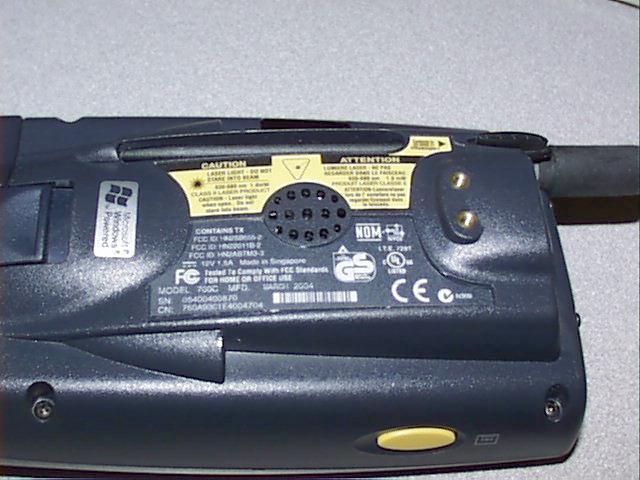
FCC ID EHASMC46 © Not to be reproduced without the permission of TÜV Product Service Limited. Page 1 of 8 PHOTOGRAPHS OF EQUIPMENT FOR INTERMEC 700C PHOTOGRAPHS OF EQUIPMENT 700C – Front View FCC ID EHASMC46 © Not to be reproduced without the permission of TÜV Product Service Limited. Page 2 of 8 PHOTOGRAPHS OF EQUIPMENT 700C – Rear View FCC ID EHASMC46 © Not to be reproduced without the permission of TÜV Product Service Limited. Page 3 of 8 PHOTOGRAPHS OF EQUIPMENT 700C – Rear View – Battery removed FCC ID EHASMC46 © Not to be reproduced without the permission of TÜV Product Service Limited. Page 4 of 8 PHOTOGRAPHS OF EQUIPMENT Battery View FCC ID EHASMC46 © Not to be reproduced without the permission of TÜV Product Service Limited. Page 5 of 8 PHOTOGRAPHS OF EQUIPMENT 700C Holster FCC ID EHASMC46 © Not to be reproduced without the permission of TÜV Product Service Limited. Page 6 of 8 PHOTOGRAPHS OF EQUIPMENT Adjustable 700C Holster FCC ID EHASMC46 © Not to be reproduced without the permission of TÜV Product Service Limited. Page 7 of 8 PHOTOGRAPHS OF EQUIPMENT Adjustable 700C Holster FCC ID EHASMC46 © Not to be reproduced without the permission of TÜV Product Service Limited. Page 8 of 8 PHOTOGRAPHS OF EQUIPMENT 700C with Belt Clip
Internal Photos
FCC ID XXXXXXXXX © Not to be reproduced without the permission of TÜV Product Service Limited. Page 1 of 5 PHOTOGRAPHS OF EQUIPMENT FOR INTERMEC 700C PHOTOGRAPHS OF EQUIPMENT 700C – Internal Front View FCC ID XXXXXXXXX © Not to be reproduced without the permission of TÜV Product Service Limited. Page 2 of 5 PHOTOGRAPHS OF EQUIPMENT 700C – Internal Rear View Location of MC-46 Module FCC ID XXXXXXXXX © Not to be reproduced without the permission of TÜV Product Service Limited. Page 3 of 5 PHOTOGRAPHS OF EQUIPMENT MC-46 GSM/GPRS Module – Top View – with Circuit Board FCC ID XXXXXXXXX © Not to be reproduced without the permission of TÜV Product Service Limited. Page 4 of 5 PHOTOGRAPHS OF EQUIPMENT MC-46 GSM/GPRS Module – Top View – without Circuit Board Antenna Connector FCC ID XXXXXXXXX © Not to be reproduced without the permission of TÜV Product Service Limited. Page 5 of 5 PHOTOGRAPHS OF EQUIPMENT MC-46 GSM/GPRS Module – Bottom View
Internal Photos
CETECOM ICT Services GmbH Test report no.: 2_3350-01-01/03Issue Date: 2003-08-01Page 86 (90) Photographs of the equipment CETECOM ICT Services GmbH Test report no.: 2_3350-01-01/03Issue Date: 2003-08-01Page 87 (90) Photographs of the equipment CETECOM ICT Services GmbH Test report no.: 2_3350-01-01/03Issue Date: 2003-08-01Page 88 (90) Photographs of the equipment CETECOM ICT Services GmbH Test report no.: 2_3350-01-01/03Issue Date: 2003-08-01Page 89 (90) Photographs of the equipment CETECOM ICT Services GmbH Test report no.: 2_3350-01-01/03Issue Date: 2003-08-01Page 90 (90) Photographs of the equipment
Operational Description
805-624-001 COMPONENT SPECIFICATION APPROVED SUPPLIERS Manufacturer Address/Telephone 805-624 Manufacturer’s Part No. Centurion International, Inc. P.O. Box 82846 -001 CAF28958 Lincoln, NE 68501 (402) 467-4491 1.0 Scope: This specification describes the requirements for a triband antenna designed for the Model 761 handheld computer supplied as follows: Intermec P/N Description -001 Antenna, North America CDMA and GPRS 2.0 Quality Assurance: Intermec Receiving Inspection reserves the right to use AQL sampling techniques when inspecting a lot. REVISION HISTORY Rev. File No. Description of Change Date Approved 1 - - - Prerelease 3/23/04 S K A C4328 Release spec, Add manufacturer P/N, Revise ¶1.0 7/13/04 H R E REVISION LEVEL A A A SHEET NUMBER 1 2 3 4 5 6 7 8 9 10 11 12 13 14 15 16 17 18 19 20 21 22 23 24 25 COMPONENT ENGR. DATE TITLE J. McROBERTS 7/09/04 Intermec Technologies Corp. ANTENNA, CDMA/GPS/PCS TRIBAND COGNIZANT ENGR. DATE 550 Second Street S.E. DRAWING NO. S. KELLY - - - Cedar Rapids, IA 52401 805-624-001 APPROVED DATE Telephone No. (319) 369-3100 K. VORHIES by HE 7/13/04 Facsimile No. (319) 369-3453 Sheet 1 Of 3 3.0 Packaging: All antennas will be packaged in containers capable of p…
Text truncated - open the document above for the full version.
Contact Information
Applicant
Brian Rudick(VP & GC, Honeywell Scanning & Mobility)
Technical Specifications
| # | Rule Parts | Frequency Range | Power Output | Emission | Tolerance |
|---|---|---|---|---|---|
| 2 | 22H | 824.2 MHz - 848.8 MHz | 1.995 W | 300KGXW | 0.01 ppm |
Other Applications from Intermec Technologies Corporation
EHA-1015CP01X1
Sep 29, 20131015CP01
Equipment Class
NII - Unlicensed National Information Infrastructure TX
EHA-1015CP01SX1
Sep 08, 20131015CP01S
Equipment Class
PCE - PCS Licensed Transmitter held to ear
EHA-RC12ABGN
Aug 19, 2013WLAN board
Equipment Class
DSS - Part 15 Spread Spectrum Transmitter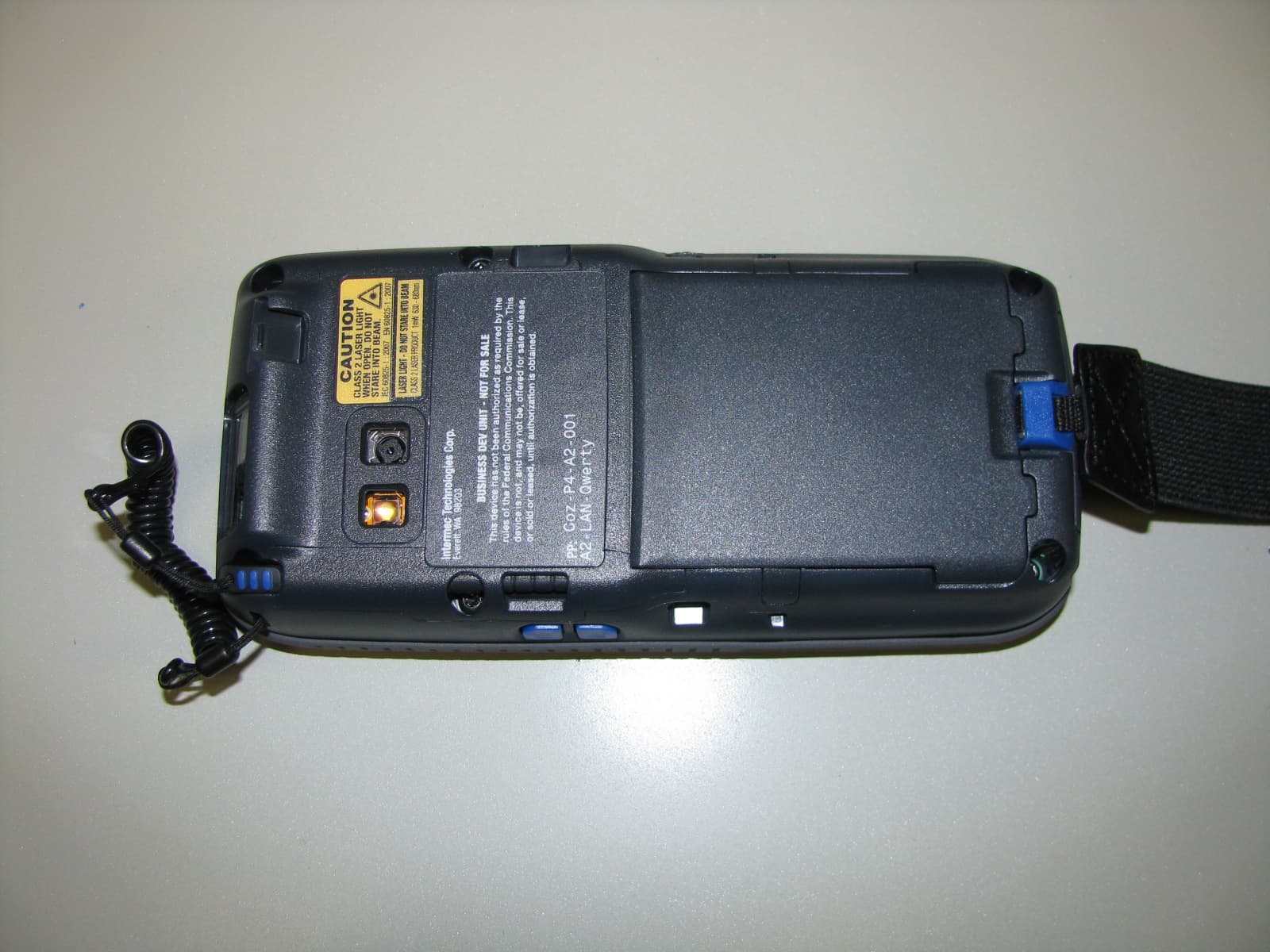
EHA-1000CP01F
Feb 19, 20131000CP01F9, 1000CP02F9, 1001CP01F9
Equipment Class
DTS - Digital Transmission System
EHA-INBT02
Dec 11, 2012BT Board
Equipment Class
DSS - Part 15 Spread Spectrum Transmitter