N6MMAYCOMUR1000USB Reader
Maycom Co Ltd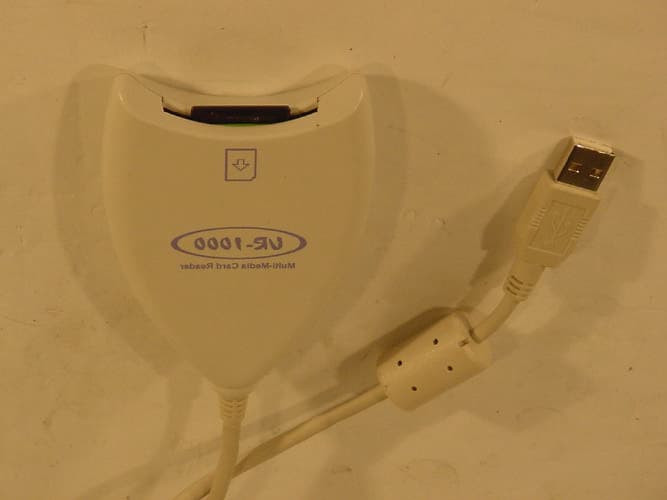
Click to zoom
Application Details
- Equipment Class
- JBP - Part 15 Class B Computing Device Peripheral
- Date of Grant
- Jun 24, 2002
- Application Purpose
- Original Equipment
- Date of Application
- Jun 24, 2002
- Equipment Note
- USB Reader
- Company
- Maycom Co Ltd
- Country
- South Korea
Documents & Files
Document Text
Text extracted from the exhibit documents filed with the FCC. Open a document above to read the original.
Users Manual
Multi Media Card Reader USB Type MMC Card Reader USB Type MMC Card ReaderUSB Type MMC Card Reader USB Type MMC Card Reader 2 Information to user : Part 15, Paragraph 15.21 and 15.105(b) Changes or modifications not expressly approved by the party responsible for compliance could void the user’s authority to operate the equipment FCC Notice NOTE : This equipment has been tested and found to comply with the limits for a Class B digital device, pursuant to Part 15 of the FCC Rules. These limits are designed to provide reasonable protection against harmful interference in a residential installation. This equipment generates, uses and can radiate radio frequency energy and, if not installed and used in accordance with the instructions, may cause harmful interference to radio communications. However, there is no guarantee that interference will not occur in a particular installation. If this equipment does cause harmful interference to radio or television reception, which can be determined by turning the equipment off and on, the user is encouraged to try to correct the interference by one or more of the following measures: - Reorient or relocate the receiving antenna. - Increase the separation between the equipment and receiver - Connect the equipment into an outlet on a circuit different from that to which the receiver is connected. - Consult the dealer or an experienced radio/TV technician for help. ----------------------------------------------- This device complies with Part 15 of the FCC Rules. Operation is subject to the following two conditions: (1)this device may not cause harmful interference, and (2) this device must accept any interference received, including interference that may cause undesired operation. UR-1000 Reader 3 - -- - Contents ContentsContents Contents - -- - Package The UR-1000 which is being supplied with maycom MP3 player is a MMC card reader to download the MP3 file form the PC(or Mac.) which has USB port. Package ----------------------------------------------------- 3 Installing in Windows XP -------------------------------- 4 How to use MultiMedia Card (MMC) ----------------- 6 Installing in Macintosh ------------------------------------ 7 4 UR-1000 Card Reader Install CD Installing in Windows XP 5 1) After booting OS, insert the CD-ROM into your CD-ROM drive. 2) After connecting UR-1000 card reader to your USB port, select "install the software automatically" and click "next". 3) Like below picture, the Windows XP should be displayed correctly in installed CD-ROM. Installing in Windows XP 6 4) During processing installation, if it show the certification like below picture click the “Continue Anyway” to proceed. 5) On the picture as follow, click "finish" and complete the driver installation. 6) If you open searcher, there is moveable disk. Using MMC card 7 1) Connect UR-1000 card reader to the PC. (Refer to the former page about installation.) 2) Insert MMC card to UR-1000 card reader. 3) Check the moveable disk in searcher of Windows. Windows XP Other versions 4) Copy MP3 file or others to MMC card through searcher. 5) After complete copy, take out the MMC card from UR-1000 card reader and insert it to MP3 player. Installing in Macintosh MP3 file can work well in MP3 player when the expander of file is .mp3. Caution Removable(E:) 8 1) Connect UR-1000 to USB port of your Mac and insert CD-ROM of installation into CD-ROM Drive. 2) Practice "SD installer" in CD-ROM. 3) Click "install" on the following screen. * If you want to remove the driver of UR-1000 card reader, click "remove". 4) On the following screen, Clack the “ restart ” when the installation is finished 9 Installing in Macintosh 5) After restarting, insert the MMC card into card reader. The moveable disk icon will be appeared on the screen. Windows XP Other versions 6) Copy MP3 file or others to the disk by drag with mouse. 7) After finish the copy, put the moveable disk, MMC card to trash box and remove MMC card from reader. 8) After finish all of upper working, insert it to MP3 player and use it. UR-1000 card reader works well in Mac OS 9.0 or more version. You can get the information and detail from our home page, www.emaycom.com. Reference 10 Memo 11 Maycom B/D, 280-5, Seoksu 2-Dong, Manan-Gu, Anyang-City, Kyongki-Do, Korea Tel : +82 (0)31-470-7700 Fax : +82 (0)31-472-3700 Homepage : www.emaycom.com E-mail : [email protected]
External Photos
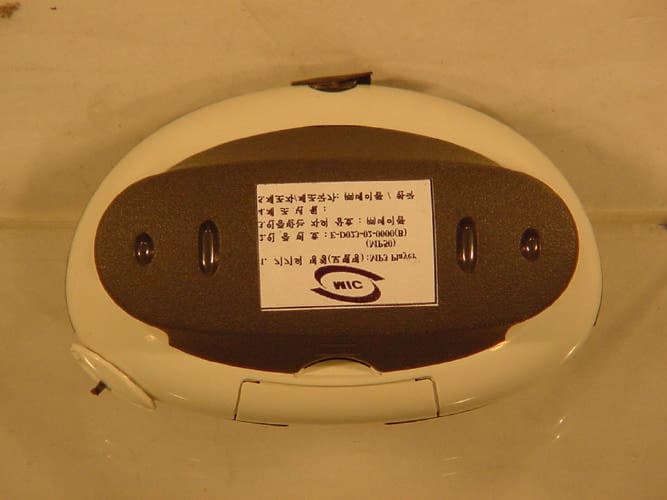
FRONT VIEW REAR VIEW
ID Label/Location Info
LABEL LOCATION LABEL
Internal Photos
INSIDE VIEW COMPONENTS VIEW OF MAIN BOARD SOLDER VIEW OF MAIN BOARD
Contact Information
Applicant
Su-won Bae(President)
Test Firm
SGS Korea Co., Ltd.Julia Choi
Technical Specifications
| # | Rule Parts | Frequency Range | Power Output |
|---|---|---|---|
| 1 | 15B | - | - |
Other Applications from Maycom Co Ltd
N6MMAYCOMMP50
Apr 25, 2002MP3 Player
Equipment Class
JBP - Part 15 Class B Computing Device Peripheral
N6MMAYCOMVR-2000
Jun 13, 2001Digital Voice Recorder
Equipment Class
JBP - Part 15 Class B Computing Device Peripheral
N6MFR-100
May 10, 20015 Band Communications Receiver
Equipment Class
CSR - Scanning Receiver
N6MMAYCOMMP-2000
Jan 17, 2001Digital Audio Player
Equipment Class
JBP - Part 15 Class B Computing Device Peripheral
N6MEH-465
Jul 27, 2000Family Radio Transceiver
Equipment Class
FRF - Part 95 Family Radio Face Held Transmitter