N7TAC1300RVideo Baby Monitor - Parent Unit
Angelcare Canada Inc.
Click to zoom
Application Details
- Equipment Class
- DSS - Part 15 Spread Spectrum Transmitter
- Date of Grant
- Dec 02, 2015
- Application Purpose
- Original Equipment
- Date of Application
- Dec 02, 2015
- Equipment Note
- Video Baby Monitor - Parent Unit
- Frequency Range
- 2410.87500000 - 2471.62500000
- Company
- Angelcare Canada Inc.
- Country
- Canada
Documents & Files
Document Text
Text extracted from the exhibit documents filed with the FCC. Open a document above to read the original.
Users Manual
OWNER’S MANUAL MOVEMENT, VIDEO, & SOUND MONITOR ES 39 FR 19 EN 2 & SOUND MONITOR Model AC1300 ES 39 FR 19 EN 2 FOR YOUR PEACE OF MIND TABLE OF CONTENTS WARNINGS ..................................................................................................................................................3 AC1300 SETUP REQUIREMENTS ..................................................................................................................5 STEP 1 - Charging the Parent Unit (9 hours) .............................................................................................6 STEP 2 - Installing the Sensor Pad ...............................................................................................................7 STEP 3 - Setting up the Nursery Unit ..........................................................................................................9 STEP 4 - Turning on your monitor ................................................................................................................9 STEP 5 - Testing and getting to know your monitor ............................................................................10 STEP 6 - Activating and deactivating additional functions ............................................................... 13 Troubleshooting ................................................................................................................................................ 17 Limited warranty ............................................................................................................................................... 18 Technical specifications .................................................................................................................................. 18 FRANÇAIS ........................................................................................................................................................... 19 ESPAÑOL ............................................................................................................................................................ 39 OWNER’S MANUAL KEEP YOUR OWNER’S MANUAL FOR FUTURE REFERENCE. PLEASE READ THE WARNINGS AND INSTRUCTIONS CAREFULLY BEFORE ASSEMBLING & USING THE PRODUCT. FAILURE TO FOLLOW THE WARNINGS AND THE INSTRUCTIONS COULD RESULT IN SERIOUS INJURY OR DEATH OR DAMAGES TO THE PRODUCT. THE SENSOR PAD FEATURE IS NOT FOR USE WITH ADULTS, CHILDREN OR INFANTS OLDER THAN 24 MONTHS. THE SENSOR PAD IS NOT INTENDED TO BE USED TO DETERMINE IF A CHILD IS OUT OF THE CRIB. WARNING Adult assembly required. Keep small parts away from children when assembling. We, at Angelcare ® , stand behind all of our products. If you are not completely satisfied or have any questions, United States and Canada: Please contact us at: [email protected] Other countries: Please contact your local distributor. FCC AND IC REGULATIONS RF radiation exposure statement The Nursery Unit complies with FCC RF radiation exposure limits set forth for an uncontrolled environment. Caution: To maintain the compliance with the FCC’s and Industry Canada’s RF exposure guideline, install the Nursery Unit at least 20 cm from ALL persons. The transmitter of this device must not be co-located or operating in conjunction with any other antenna or transmitter. Industry Canada This product meets the applicable Industry Canada technical specifications. CAN ICES-3 (B)/NMB-3 (B) 2 02mf8_Manuel_AC1300_NA_12301.indd 22015-10-09 11:11 AM 1. THIS PRODUCT CANNOT REPLACE RESPONSIBLE ADULT SUPERVISION. This product is designed to aid in the monitoring of your child. When using the monitor, you must still provide the supervision necessary for the continued safety of your child. Monitoring of premature babies, or those considered to be at risk, should always be carried out under the supervision of a health professional. This monitor is not intended to be used as a medical monitor. 2. WARNING Strangulation Hazard — Children have STRANGLED in cords. Keep adapter cords out of the reach of children (more than 3 feet [0.9 meter] away). NEVER use Sensor Pad(s) without the protective cord covering. Check protective cord covering before each use. Immediately discontinue use of Sensor Pad(s) if protective covering is damaged or broken. 3. Never use extension cords with adapters. ONLY use the adapters provided. 4. When an adapter is plugged into an electrical outlet, DO NOT touch the exposed end. 5. ALWAYS be sure that both the transmitter and receiver are working properly and are within range of each other. Test the monitor before fi rst use, periodically and when changing location of the Nursery Unit. 6. ALWAYS be sure to immediately check on baby whenever an alarm sounds. 7. DO NOT use monitor near water (such as bath tub, sink, etc.). CAUTION RISK OF ELECTRIC SHOCK DO NOT OPEN DO NOT EXPOSE TO RAIN OR MOISTURE 8. Keep monitor AWAY from heat sources (such as stoves, radiators, etc.). 9. ALWAYS place both the Nursery Unit and the Parent Unit on a fl at surface in an upright position and allow for proper ventilation. DO NOT place on sofas, cushions, beds, etc. which may block ventilation. 10. This monitor uses public airwaves to transmit signals. The Parent Unit may pick up signals or interference from other nursery monitors in your area. Your monitor may even be picked up by other households. To protect your privacy, make sure both units are turned OFF when not in use. If you experience interference, change the channel on both units. 11. This product is NOT a toy. DO NOT allow children to play with it. 12. This product contains small parts. Adult assembly required. Exercise care when unpacking and assembling the product and keep small parts away from children. 13. When using the monitor, the room temperature should be between 50°F (10°C) and 104°F (40°C). BATTERY WARNING 14. Use ONLY the enclosed lithium rechargeable battery that came with the Parent Unit. In the Nursery Unit, DO NOT mix old and new batteries…
Text truncated - open the document above for the full version.
Users Manual
1) Press Menu/Select button to access main menu. 2) Select the Settings icon to access sub-menu. 3) Select the Movement Sensitivity icon. 4) Use the up and down arrows to choose the desired sensitivity level (1 to 5). 5) Press Menu/Select button to confi rm. TO ADJUST THE SENSOR PAD SENSITIVITY LEVEL: TO STOP THE ALARM On the Parent Unit, press any key to stop the alarm. Press the Pager/Hold button on the Nursery Unit. OR NOTE: NOTE: If you are receiving false alarms, adjust the sensitivity level. adjust the sensitivity level. ON 1 4 2 3 TO ACTIVATE THE TIC FUNCTION: Allows you to hear a TIC sound when Sensor Pad function is activated. 1) Press Menu/Select button to access the main menu. 2) Select the TIC icon. 3) Use the up and down arrows to activate or deactivate the TIC function. 4) Press Menu/Select button to confi rm. Regular TIC sound will emit from Parent Unit and a pendulum will appear on the Parent Unit indicator bar. 1 3 2 4 IMPORTANT • The Sensor Pad is not designed for use with adults, children or infants older than 24 months. • Once you are fi nished using the Sensor Pad, deactivate the movement function and please remove it from the baby’s crib and store it away. 1) Press Menu/Select button to access main menu. 2) Select the Sound icon. 3) Use the up and down arrows to activate or deactivate the sound. 4) Press Menu/Select button to confi rm. 5.2 - SOUND TO TEST THE SOUND: Ask someone to speak into the Nursery Unit or place the unit near a radio to ensure that sound is being picked up. IF YOU HEAR NO SOUND: TO ACTIVATE SOUND: • Check that both units are powered ON. • Check that both units are plugged into functioning electrical outlets. • Check the batteries in both units (replace or recharge them if necessary). • Bring the Parent Unit closer to the Nursery Unit. IMPORTANT To avoid feedback (whistling), keep both units at least 10 feet apart (3 meter). 1 2 3 4 5 11 E N Press the down arrow for 2 seconds to mute sound. Mute icon will fl ash. PUT IN SILENT/MUTE MODEADJUST SOUND LEVEL Increase volume (Up arrow) Lower volume (Down arrow) 5.3 - BATTERIES HOW TO CHECK THE BATTERIES: Unplug the adapters from both units. • If the green light on the Nursery Unit does not show, replace the batteries. • If the Parent Unit and its screen do not light up, recharge the batteries. HOW TO CHARGE THE BATTERIES IN THE PARENT UNIT: Leave the Parent Unit plugged to fully charge the unit. Although the batteries at 1/3 capacity works normally, we recommend that you fully recharge them. 1/3 full2/3 fullfull PARENT UNIT BATTERY ALARM • Alarm activates when the batteries need to be recharged. • Parent Unit will emit a beep sound every 15 seconds. • Battery Alarm icon will show on LCD screen. Sound Mode: ON Speaker Volume: Level 3 (of 6) Movement Mode: ON Sensor Pad Sensitivity: Level 3 (of 5) TIC: ON Temperature Unit: Fahrenheit USA/Celsius Canada Temperature Alarm: OFF VOX: OFF VOX Level: Level 2 (of 4) Screen Saver Timer: ON (after 3 minutes) LCD Brightness: Level 3 (of 5) Key Tone: ON DEFAULT SETTINGS YOU ARE NOW READY TO USE YOUR MONITOR The Angelcare ® monitor can be used with the pre-program factory settings or you can also customise your settings to your preference. IMPORTANT • Test your monitor before fi rst use. • Test your monitor regularly to ensure it is functioning correctly. • Test your monitor every time you move the Sensor Pad to a different place. Fahrenheit USA/Celsius Canada 12 TO ADJUST THE SOUND SENSITIVITY (VOX): Allows you to determine the sound level needed to trigger sound transmission to the Parent Unit. This means that sound will only transmit based on the level that you set. TO ACTIVATE VOX MODE: 1) Press Menu/Select button to access the main menu. 2) Select the Settings icon to access sub-menu. 3) Select the VOX Sensitivity icon. 4) Use the up and down arrows to choose the desired sensitivity level (1 to 5) 5) Press Menu/Select button to confi rm. 1) Press Menu icon to access the main menu. 2) Select the Settings icon to access sub-menu. 3) Select the VOX icon to activate or deactivate the VOX function. 4) Press Menu/Select button to confi rm. 20 sec ONON 1 2 34 5 6.2 - HOLD Allows you to put your monitor on hold. 1) Press Menu/Select button to access main menu. 2) Select the Hold icon. OR Press and hold the Nursery Unit Pager/ Hold button for at least 2 seconds. 1 2 6.1 - VOICE ACTIVATION (VOX) OR CONTINUOUS SOUND MODE Allows you to select your option on how you monitor sound: VOX (voice activation picks up sound based on the setting of the sensitivity level) or Continuous (sound monitoring is continuously on, picking up all sounds). STEP 6 - ACTIVATING AND DEACTIVATING ADDITIONAL FUNCTIONS IMPORTANT When in the menu or sub-menu modes, sound transmission between Parent and Nursery Units will be temporarily deactivated. ONLY the movement detection alarm will remain active (if function is activated). 3) Hold icon will appear on the screen. 4) Press and hold the Nursery Unit Pager/Hold again to return to normal operation. Nursery Unit Night Light will blink. Parent Unit will emit 3 consecutive beeps every 30 seconds to remind you that monitor is on Hold. IMPORTANT When your monitor is on Hold, the movement- detection feature and movement alarm are disabled. 73 F 32 NOTE: By deactivating VOX the Continuous setting is ON. 13 E N 1) Press Menu/Select button to access main menu. 2) Select the Temperature icon to access sub-menu. 3) Select the Temperature Alarm icon. 4) Use the up and down arrows to activate or deactivate the Temperature Alarm. 5) Press Menu/Select button to confi rm. o C ºC ºF o F ºC ºF CelsiusFahrenheit Temperature Alarm icon: Indicates temperature alarm is ON. TO ACTIVATE THE TEMPERATURE ALARM: 6.3 - THERMOMETER TO CHANGE THE MEASUREMENT UNIT: 1) Press Menu/Select button to access main menu. 2) Select the Temperature icon to access sub-menu. 3) Select the ̊C ̊F icon. 4) Use the up and down arrows to change from Celsius to Fahrenheit. 5) Press Menu/Select b…
Text truncated - open the document above for the full version.
Users Manual
1. CE PRODUIT NE REMPLACE PAS LA SUPERVISION RESPONSABLE D’UN ADULTE. Ce produit est conçu pour aider à la surveillance de votre enfant. Lors de l’utilisation du moniteur, vous devez continuer d’assurer la supervision nécessaire pour la sécurité ininterrompue de votre enfant. La surveillance de bébés prématurés ou considérés à risque doit toujours se faire sous la supervision d’un professionnel de la santé. Ce moniteur n’est pas conçu pour utilisation à titre de moniteur médical. 2. AVERTISSEMENT Danger d’étranglement — Des enfants se sont ÉTRANGLÉS avec des fils. Gardez les fils des adaptateurs hors de la portée des enfants (éloignés de plus de 0.9 mètre [3 pieds]). N’utilisez JAMAIS le(s) détecteur(s) de mouvements sans les baguettes de protection du fil. Vérifiez les baguettes de protection du fil avant chaque utilisation. Cessez immédiatement l’utilisation du (des) détecteur(s) de mouvements si les baguettes de protection sont brisées ou endommagées. 3. N’utilisez jamais de rallonges avec les adaptateurs. Utilisez UNIQUEMENT les adaptateurs fournis. 4. Lorsqu’un adaptateur est branché à une prise de courant, NE touchez PAS l’extrémité exposée. 5. Veuillez TOUJOURS vous assurer que l’émetteur et le récepteur fonctionnent correctement et sont à la portée l’un de l’autre. Testez le moniteur avant la première utilisation, périodiquement et chaque fois que vous changez l’emplacement de l’unité du nourrisson. 6. Assurez-vous TOUJOURS d’aller immédiatement jeter un coup d’œil sur le bébé lorsqu’une alarme sonne. 7. N’utilisez PAS le moniteur près de l’eau (bain, évier, etc.). ATTENTION RISQUE DE CHOC ÉLECTRIQUE NE PAS OUVRIR NE PAS EXPOSER À LA PLUIE OU À L’HUMIDITÉ. 8. Gardez le moniteur LOIN des sources de chaleur (poêles, radiateurs, etc.). 9. Placez TOUJOURS l’unité du nourrisson et celle des parents sur une surface plane, en position verticale, et prévoyez suffisamment d’espace pour assurer une bonne ventilation. NE placez PAS les unités sur des fauteuils, des coussins, des lits, etc., qui pourraient nuire à la ventilation. 10. Ce moniteur utilise des ondes publiques pour transmettre des signaux. L’unité des parents pourrait capter des signaux ou des interférences provenant d’autres moniteurs pour nourrisson dans votre voisinage. D’autres foyers pourraient même capter votre moniteur. Afin de protéger votre vie privée, assurez-vous que les deux unités sont ÉTEINTES lorsqu’elles ne sont pas utilisées. Si vous captez des interférences, changez le canal sur les deux unités. 11. Ce produit N’est PAS un jouet. NE permettez PAS aux enfants de jouer avec ce produit. 12. Ce produit contient des petites pièces. L’assemblage doit être fait par un adulte. Veuillez déballer et assembler ce produit avec précaution, et vous assurer de garder les petites pièces hors de la portée des enfants. 13. Lorsque vous utilisez ce moniteur, la température ambiante doit se situer entre 10 °C (50 °F) et 40 °C (104 °F). AVERTISSEMENT AU SUJET DES PILES AU SUJET DES PILES 14. Utilisez UNIQUEMENT la pile rechargeable au lithium intégrée dans l’unité des parents. Dans l’unité du nourrisson, N’utilisez PAS de piles usagées et neuves. N’utilisez PAS de piles alcalines et rechargeables. Insérez les piles en respectant la polarité. NE court-circuitez PAS les bornes d’alimentation. Utilisez UNIQUEMENT les piles recommandées ou des piles équivalentes (en tension et en taille), ainsi que le bon adaptateur. Retirez les piles lorsque vous entreposez l’unité du nourrisson pour une période prolongée ou lorsqu’elles sont à plat. Jetez de manière convenable les piles déchargées. Gardez toutes les piles hors de la portée des enfants. 15. INSTRUCTIONS IMPORTANTES DE SÉCURITÉ 15.1 Tenez compte de tous les avertissements. Vous devez respecter tous les avertissements sur le produit et dans les instructions de fonctionnement. 15.2 Suivez toutes les instructions. Vous devez suivre toutes les instructions de fonctionnement et d’utilisation. 15.3 Eau et humidité – N’utilisez PAS cet appareil près de l’eau. Par exemple : près d’un bain, d’un lavabo, d’un évier, d’une lessiveuse, dans un environnement humide, près d’une piscine, etc. - Portez une attention particulière à ce que des objets NE tombent PAS sur les unités, ni que des liquides se renversent sur les unités ou dans les ouvertures du détecteur de mouvements. 15.4 Nettoyage – Débranchez toutes les unités avant de procéder à leur nettoyage. N’immergez AUCUNE partie du moniteur. Nettoyez uniquement avec un linge sec. 15.5 Ventilation – N’obstruez PAS les ouvertures de ventilation. Prévoyez une ventilation adéquate lorsque les unités sont en fonction. NE recouvrez PAS l’unité du nourrisson ou celle des parents d’un objet tel qu’une couverture. NE placez PAS l’une ou l’autre unité dans un tiroir ou encore à un endroit qui pourrait étouffer les sons ou entraver la circulation normale de l’air. AVERTISSEMENTS 21 F R 15.6 Sources de chaleur – N’installez PAS l’une ou l’autre unité près d’une source de chaleur, telle qu’un radiateur, une bouche d’air chaud, une cuisinière, un téléviseur ou tout autre appareil (y compris un amplificateur) qui produit de la chaleur. La chaleur peut endommager le boîtier ou les pièces électriques. 15.7 Protection du fil d’alimentation – Protégez le fil du détecteur de mouvements et celui des adaptateurs. Placez les fils d’alimentation électrique de manière à empêcher que l’on marche dessus ou qu’ils se trouvent coincés par ou contre quelque chose; portez une attention particulière aux fils, aux fiches et prises de courant, et aux endroits précis où ils sortent du produit. La prise de courant doit être près de l’équipement et doit être facilement accessible. Assurez- vous de brancher l’adaptateur dans une prise facile d’accès à proximité de l’unité. Pour vous déconnecter du secteur, débranchez l’adaptateur. 15.8 Accessoires – N’utilisez que des accessoires recommandés par le fabricant. Ne placez PAS ce produit sur un chariot, un socle, un trépied, un support ou …
Text truncated - open the document above for the full version.
Cover Letter(s)
02 Nov 2015 To whom it may concern, Request for Permanent Confidentiality Under FCC Part 15 Certification FCC ID: N7TAC1300R Request is hereby submitted by Angelcare Monitors Inc. to withhold permanently from public review certain portions of the application for equipment certification for the referenced FCC identifiers. This request for confidentiality is made pursuant to 47 CFR § 0.457(d) and 0.459 of the FCC Rules. In particular, the following sections of the application are to be kept permanently confidential and Angelcare Monitors Inc. reserves the right to discern which parties can obtain access to these information: Schematics Detailed Block diagrams Detailed Operational/Functional Description The rationale for request for confidentiality is as followings: This information represents intellectual property of Angelcare Monitors Inc. and it is subject to competition. We have invested considerable time and materials in research and development to produce the referenced product. Disclosure of the permanently confidential portions of this application to competitors would not only give them significant competitive advantages in developing similar products, but would also disclose successful implementation of unpublished, leading edge technology developed by us. If you have questions or need further information, please contact the undersigned.
External Photos
INTERTEK TESTING SERVICE Report No.: 15071310HKG-002 FCC ID: N7TAC1300R IC: 5786A-AC1300R Equipment Photographs (External)
ID Label/Location Info
3015U1F lot #: Made in China for ANGELCARE MONITORS INC. Montreal, Quebec, Canada www.angelcarebaby.com AC1300 FCC/CE Rev.2 09/15/2015 Sensor Pad 5V500mA MODEL: AC1300 FCC ID: N7TAC1300T IC: 5786A-AC1300T Australia: N10499 5mm7mm 30mm Use only power supplies and batteries listed on the user instructions Inside ZOOM VIDEO ON/OFF VOX AC1300 FCC/CE Rev.2 09/15/2015 3015U1F BC 5V500mA MODEL: AC1300-P Made in China FCC ID: N7TAC1300R IC: 5786A-AC1300R Australia: N10499 lot #: for Canada 5mm5mm 30mm Use only power supplies listed on the user instructions 3015U1F BC 5V500mA MODEL: AC1300 Made in China FCC ID: N7TAC1300R IC: 5786A-AC1300R Australia: N10499 lot #: Use only power supplies listed on the user instructions 3015U1F lot #: Made in China for ANGELCARE MONITORS INC. Montreal, Quebec, Canada www.angelcarebaby.com AC1320 FCC/CE Rev.1 09/15/2015 5V500mA MODEL: AC1320 FCC ID: N7TAC1300T IC: 5786A-AC1300T Australia: N10499 5mm7mm 30mm Use only power supplies and batteries listed on the user instructions Inside Emboss Rubber color Cool Gray 6C ZOOM VIDEO ON/OFF VOX AC1320 FCC/CE Rev.1 09/15/2015 for Canada 5mm5mm 30mm Use only power supplies listed on the user instructions BC 5V500mA MODEL: AC1320 Made in China FCC ID: N7TAC1300R IC: 5786A-AC1300R Australia: N10499 Use only power supplies listed on the user instructions 3015U1F lot #: BC 5V500mA MODEL: AC1320-P Made in China FCC ID: N7TAC1300R IC: 5786A-AC1300R Australia: N10499 3015U1F lot #:
Internal Photos
INTERTEK TESTING SERVICE Report No.: 15071310HKG-002 FCC ID: N7TAC1300R IC: 5786A-AC1300R Equipment Photographs (Internal) INTERTEK TESTING SERVICE Report No.: 15071310HKG-002 FCC ID: N7TAC1300R IC: 5786A-AC1300R Equipment Photographs (Internal) INTERTEK TESTING SERVICE Report No.: 15071310HKG-002 FCC ID: N7TAC1300R IC: 5786A-AC1300R Equipment Photographs (Internal) INTERTEK TESTING SERVICE Report No.: 15071310HKG-002 FCC ID: N7TAC1300R IC: 5786A-AC1300R Equipment Photographs (Internal) INTERTEK TESTING SERVICE Report No.: 15071310HKG-002 FCC ID: N7TAC1300R IC: 5786A-AC1300R Equipment Photographs (Internal) INTERTEK TESTING SERVICE Report No.: 15071310HKG-002 FCC ID: N7TAC1300R IC: 5786A-AC1300R Equipment Photographs (Internal) INTERTEK TESTING SERVICE Report No.: 15071310HKG-002 FCC ID: N7TAC1300R IC: 5786A-AC1300R Equipment Photographs (Internal) INTERTEK TESTING SERVICE Report No.: 15071310HKG-002 FCC ID: N7TAC1300R IC: 5786A-AC1300R Equipment Photographs (Internal) INTERTEK TESTING SERVICE Report No.: 15071310HKG-002 FCC ID: N7TAC1300R IC: 5786A-AC1300R Equipment Photographs (Internal)
RF Exposure Info
FCC ID APPLI C PRODU BRAND MODEL CLIENT DATE O STAND REPOR A CAUTIO This rep laborato CAT I O N P UR UCT DESIGN D NAME L NAME T OF ISSUE DARD(S) RT VERSION Attestat ON: port shall n ory and sha SA Rep : RPOSE : NAT I O N : : : : : : : tion of G ot be repro all not be qu R Te port No.: A N7TAC13 Original E Baby Mo n Angelcar e AC1300. A Angelcar e Oct. 21,20 IEEE Std. FCC 47C F IEEE/ANS V1.0 Global C oduced exc uoted out o est AGC0416 00R Equipment nitor e AC1320 e Monitors In 015 1528:2013 FR § 2.1093 SI C95.1:199 Complia ept in full w of context. Rep 64150801 nc. 92 ance(Sh without the port 1FH01 henzhen e written pe t n) Co., L ermission o Page 1 Ltd. of the test of 38 Report No.: AGC04164150801FH01 Page 2 of 38 Report Revise Record Report Version Revise Time Issued Date Valid Version Notes V1.0 / Oct. 21,2015 Valid Original Report App App Man Man Prod Bran Mod Diffe EUT App Te st Perf Rep plicant Name plicant Addre nufacturer N nufacturer A duct Design nd Name del Name erent Descri T Voltage plicable Stan t Date formed Loca port Templat e : ess : Name : Address : nation : : : iption : ndard : : ation te A Tes Ange 9975 Artco Unit 3 Kong Baby Ange AC13 See P DC3. IEEE FCC IEE E Sep. Attes 2 F, B Stree AGC Tested By Checked B y Authorized B st Rep elcare Monito , Av. De Cat om Limited 301, 3/F, He g y Monitor elcare 300, AC1320 Page 9, The 7V by batte E Std. 1528:2 47CFR § 2. E/ANSI C95. 22,2015 station of Glo Building 2, N et, Bao'an D RT-US-2.4G Thea H y A By Solger A port C ors Inc. tania, Local ewlett Cente 0 e test model ry 2013 .1093 1:1992 obal Complia No.1-No.4, C istrict, Shen G/SAR (2015 uang(Huan g Angela Li(Li J Zhang(Zha n Authorized O Certific B, Brossard r, 52-54 Hoi is AC1300 ance(Shenz Chaxi Sanwe nzhen, China 5-05-01) g Qianqian) Jiao) ng Hongyi) ffice r Report cation d, Quebec, J Yuen Road zhen) Co., L ei Technical a Oct. 21,20 Oct. 21,20 Oct. 21,20 No.: AGC04 n J4Z 3V6, Ca d, Kwun Tong td. Industrial Pa 015 015 015 4164150801 Page 3 anada. g, Kowloon, ark, Gushu, FH01 of 38 Hong Xixiang Report No.: AGC04164150801FH01 Page 4 of 38 TABLE OF CONTENTS 1. SUMMARY OF MAXIMUM SAR VALUE .................................................................................................... 5 2. GENERAL INFORMATION ............................................................................................................................ 6 2.1. EUT DESCRIPTION ...................................................................................................................................... 6 2.2. TEST PROCEDURE ...................................................................................................................................... 8 2.3. TEST ENVIRONMENT .................................................................................................................................... 8 3. SAR MEASUREMENT SYSTEM ..................................................................................................................... 9 3.1. SATIMO SYSTEM DESCRIPTION ................................................................................................................... 9 3.2. COMOSAR E-FIELD PROBE ..................................................................................................................... 10 3.3. ROBOT ..................................................................................................................................................... 10 3.4. VIDEO POSITIONING SYSTEM ...................................................................................................................... 11 3.5. DEVICE HOLDER ........................................................................................................................................ 11 3.6. SAM TWIN PHANTOM ................................................................................................................................ 12 4. SAR MEASUREMENT PROCEDURE ........................................................................................................... 13 4.1. SPECIFIC ABSORPTION RAT E (SAR) ........................................................................................................... 13 4.2. SAR MEASUREMENT PROCEDURE ............................................................................................................. 14 4.3. RF EXPOSURE CONDITIONS ....................................................................................................................... 16 5. TISSUE SIMULATING LIQUID ..................................................................................................................... 17 5.1. THE COMPOSITION OF THE TISSUE SIMULATING LIQUID(BY WEIGHT %) ............................................................. 17 5.2. TISSUE DIELECTRIC PARAMETERS FOR HEAD AND BODY PHANTOMS .............................................................. 17 5.3. TISSUE CALIBRATION RESULT ..................................................................................................................... 18 6. SAR SYSTEM CHECK&VALIDATION PROCEDURE ................................................................................. 19 6.1. SAR SYSTEM CHECK PROCEDURES ........................................................................................................... 19 6.2. SAR SYSTEM CHECK ................................................................................................................................ 20 6.3. SAR SYSTEM VALIDATION .......................................................................................................................... 21 7. EUT TEST POSITION .................................................................................................................................. 22 7.1. BODY PART POSITION ................................................................................................................................ 22 8. SAR EXPOSURE LIMITS .............…
Text truncated - open the document above for the full version.
RF Exposure Info
CALIBRATION DATA PROBE CALIBRATION DATA DIPOLE CALIBRATION DATA
RF Exposure Info
Report No.: AGC04164150801FH01 Page 1 of 12 TEST SETUP PHOTOGRAPHS &EUT PHOTOGRAPHS Test Setup Photographs Body Back 0mm Body Front 0mm Report No.: AGC04164150801FH01 Page 2 of 12 Report No.: AGC04164150801FH01 Page 3 of 12 Edge 1(Top) Edge 2(Right) Report No.: AGC04164150801FH01 Page 4 of 12 Edge 3(Bottom) Edge 4(Left) Report No.: AGC04164150801FH01 Page 5 of 12 DEPTH OF THE LIQUID IN THE PHANTOM—ZOOM IN Note:The position used in the measurement were according to IEEE 1528-2013 2450MHz head 2450MHz body Report No.: AGC04164150801FH01 Page 6 of 12 EUT PHOTOGRAPHS TOP VIEW OF EUT BOTTOM VIEW OF EUT Report No.: AGC04164150801FH01 Page 7 of 12 FRONT VIEW OF EUT BACK VIEW OF EUT Report No.: AGC04164150801FH01 Page 8 of 12 Report No.: AGC04164150801FH01 Page 9 of 12 LEFT VIEW OF EUT RIGHT VIEW OF EUT Report No.: AGC04164150801FH01 Page 10 of 12 OPEN VIEW OF EUT-1 OPEN VIEW OF EUT-2 Report No.: AGC04164150801FH01 Page 11 of 12 OPEN VIEW OF EUT-3 OPEN VIEW OF EUT-4 Report No.: AGC04164150801FH01 Page 12 of 12 INTERNAL VIEW OF EUT-1 INTERNAL VIEW OF EUT-2
Test Report
- Intertek’s standard Terms and Conditions can be obtained at our website: http://www.intertek.com/terms/. - The test report only allows to be revised within the retention period unless further standard or the requirement was noticed. - This report is for the exclusive use of Intertek's Client and is provided pursuant to the agreement between Intertek and its Client. Intertek's responsibility and liability are limited to the terms and conditions of the agreement. Intertek assumes no liability to any party, other than to the Client in accordance with the agreement, for any loss, expense or damage occasioned by the use of this report. Only the Client is authorized to permit copying or distribution of this report and then only in its entirety. Any use of the Intertek name or one of its marks for the sale o…
Text truncated - open the document above for the full version.
Contact Information
Applicant
Mark Buckle(Technical Manager)
Technical Contact
Intertek Testing Services Hong Kong Ltd.Terry Chan
[email protected](852) 2173 8888
2/F., Garment Centre · Kowloon · Hong Kong
Non-Technical Contact
Intertek Testing Services Hong Kong Ltd.Terry Chan
[email protected](852) 2173 8888
Test Firm
Intertek Testing Services Hong Kong Ltd.Billy Chow
Technical Specifications
| # | Rule Parts | Frequency Range | Power Output |
|---|---|---|---|
| 1 | 15C | 2.41 GHz - 2.47 GHz | 39.30 mW |
Other Applications from Angelcare Canada Inc.
N7TAC1300T
Dec 02, 2015Video Baby Monitor - Baby Unit
Equipment Class
DSS - Part 15 Spread Spectrum Transmitter
N7TAC423R
Jan 09, 2014900MHz Superheterodyne Receiver (Parent Unit)
Equipment Class
CYY - Communications Receiver used w/Pt 15 Transmitter
N7TAC423T
Jan 09, 2014900MHz Analog Modulation Baby Monitor (Baby Unit)
Equipment Class
DXX - Part 15 Low Power Communication Device Transmitter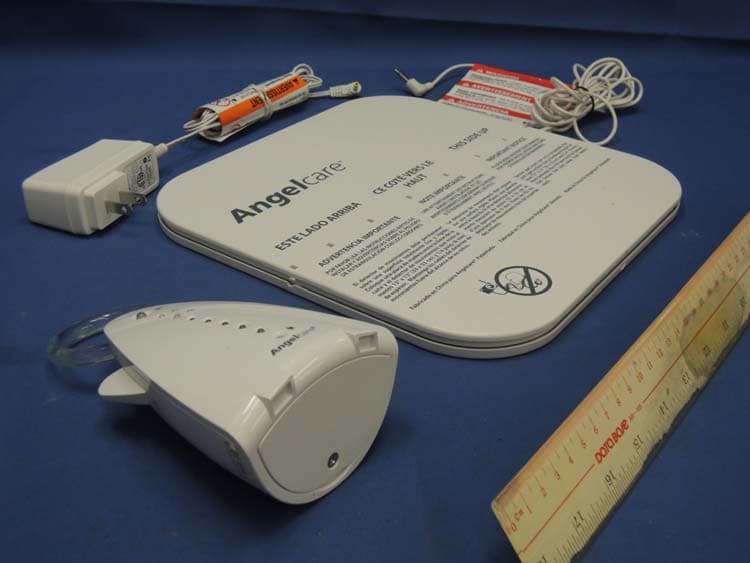
N7TAC701T
Jan 01, 20141.9GHz DECT Baby Monitor - Baby Unit
Equipment Class
PUB - Part 15 Unlicensed PCS Base Station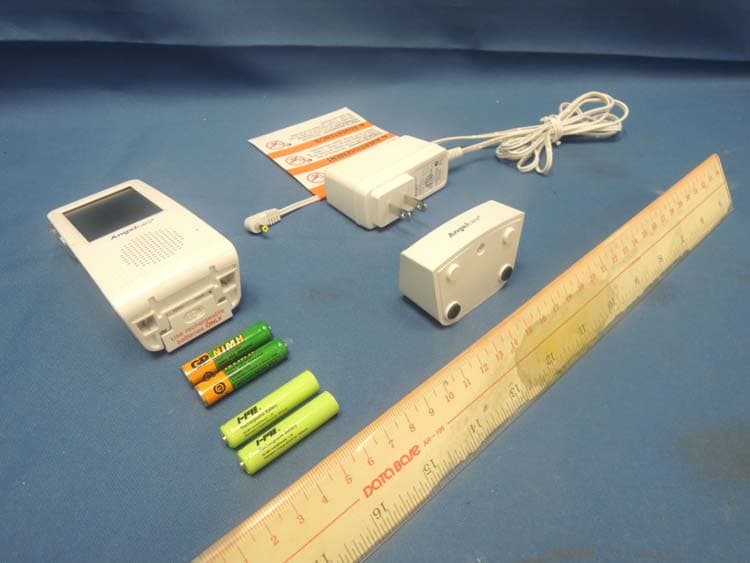
N7TAC701R
Jan 01, 20141.9GHz DECT Baby Monitor - Parent Unit
Equipment Class
PUT - Part 15 Unlicensed PCS portable Tx worn on body