NCMOCF1Wireless Pack
Option (Crescent NV)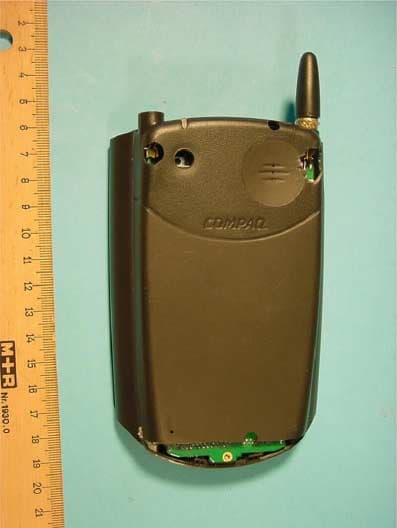
Click to zoom
Application Details
- Equipment Class
- PCE - PCS Licensed Transmitter held to ear
- Date of Grant
- Oct 18, 2001
- Application Purpose
- Original Equipment
- Date of Application
- Aug 14, 2001
- Equipment Note
- Wireless Pack
- Frequency Range
- 1850.00000000 - 1910.00000000
- Company
- Option (Crescent NV)
- Country
- Belgium
Documents & Files
Document Text
Text extracted from the exhibit documents filed with the FCC. Open a document above to read the original.
Users Manual
Wireless Pack User’s Guide1–1 1 Getting Started Congratulations on the purchase of your new Compaq iPAQ Pocket PC GSM/GPRS Wireless Data and Voice Pack. Your Wireless Pack integrates the power of a state-of-the-art digital mobile Wireless Pack with the simplicity of your Compaq iPAQ handheld computer. To use your Wireless Pack, you must first activate your account with your network provider. See page 9 of this chapter. Your account information is located on your SIM (Subscriber Identity Module) card. If a SIM card did not come with your Wireless Pack, your network provider will provide one when you subscribe to their service. Your SIM card must be inserted into your Wireless Pack before you can use it. Just follow the seven easy steps in this chapter to get up and running quickly. 1–2Wireless Pack User’s Guide Getting Started Step 1: Setting up your handheld computer 1.If you haven’t already set up your handheld, follow the steps that came with your handheld to set it up. 2.(Recommended) Synchronize your handheld with your com- puter. If you need additional information about synchronizing, refer to the User manual that came with your handheld. Getting Started Wireless Pack User’s Guide1–3 Step 2: Getting to know your Wireless Pack 1–4Wireless Pack User’s Guide Getting Started Jacket Components ComponentFunction AntennaReceives and sends signals on your Wireless Pack. The antenna does not telescope out of the Wireless Pack. Audio jackEnables you to connect a headset so you can view your handheld screen while you are on a voice call. Internal BatteryBattery is incorporated into the sleeve and powers your Wireless Pack. PowerTurns on your Wireless Pack and activates the signal. Getting Started Wireless Pack User’s Guide1–5 Power ButtonYour Wireless Pack stays on until you remove it from your handheld or press the power button to turn it off. SpeakerFunctions as the earpiece on your Wireless Pack. LEDProvides status information for your Wireless Pack for GSM / GPRS. The color of the light and the blink state indicate the status as follows: Green/Blinking slow = On and in service No light = Off or battery depleted Red/Blinking slow = Low battery voltage also shown in WCS display Red/solid = Charging Green/solid = Charged Green/Blinking fast = Indicates SMS or Voicemail message is waiting Red/Blinking fast = Shows unit is powered on but not registered on network. Jacket Components ComponentFunction 1–6Wireless Pack User’s Guide Getting Started To adjust the volume during a voice call, press the scroll buttons on the front of your handheld. Getting Started Wireless Pack User’s Guide1–7 Step 3: Insert your SIM card The SIM (Subscriber Identity Module) card is a small rectangular plastic piece. The SIM card is included with your service provider’s documentation and is often referred to as a “smartcard”. If your SIM card is already inserted in your Wireless Pack, skip to Step 4. Insert the SIM card into the slot. Since calls are billed to your telephone number, you can move your SIM card to any mobile device that uses a SIM card, and the calls will be billed to your account. Step 4: Connect the Wireless Pack to your handheld Slide the iPAQ into the Wireless Pack until it clicks into place. The Pocket PC will alert you when the sleeve is ready to be used. You can disable the sound made when you insert the iPAQ into the Wireless Pack. Press the Qmenu button, tap Expansion Pack, then select Disable Insertion Sound. To view the Expansion Pack properties, press the Qmenu button, then tap Expansion Pack. If the Expansion Pack is installed properly, the name of the Expansion Pack will appear in the Expansion Pack Properties screen. 1–8Wireless Pack User’s Guide Getting Started To remove your Wireless Pack from your handheld, slide the sleeve down and off your iPAQ. Getting Started Wireless Pack User’s Guide1–9 Step 5: Charge the battery 1.Plug the travel charger into a wall outlet. 2.Insert the travel charger cable into the connector on your handheld. You can also put your handheld with the Wireless Pack into the cradle and insert the travel charger into the con- nector on the cradle. When your Wireless Pack is on, the charge icon appears in the software application while your Wireless Pack charges. Note that your Wireless Pack must be in your handheld while charging, and that it takes about 90 minutes to charge the battery. It’s time to recharge the battery when you observe one of the following: •The LED turns red and blinks slowly •The LED does not turn on when you turn on your Wireless Pack. 1–10Wireless Pack User’s Guide Getting Started Step 6: Turn on your Wireless Pack After the battery is charged, you can begin using your Wireless Pack 1.Press the Power button on your Wireless Pack for two seconds until you hear a beep. 2.Wait maximum two minutes for your Wireless Pack to locate your service provider’s network. Do not tap OK. When your Wireless Pack locates the network, the Network Search dialog displays a Welcome message and your network provider’s name appears in the upper-left corner of the Voice application. If you are in an area without coverage, the Network Search dialog displays an “Unable to register to the network” message and “No Service” appears in the upper-left corner of the Voice application. Getting Started Wireless Pack User’s Guide1–11 Step 7: Activate your account If you received a new SIM card with your Wireless Pack, you need to call your network provider to activate your account. Your network provider’s telephone number is located on the materials that came with your Wireless Pack Once you receive your telephone number, it may take a few hours to become fully active. Some network providers send a special message with your telephone number. Follow these steps to check the telephone number: 1.Make sure your phone is on for at least 30 seconds. 2.Press the Phone button on your Wireless Pack for GSM / GPRS to access the Phone application. 3.Tap the Menu icon. 4.Under Options, tap …
Text truncated - open the document above for the full version.
Users Manual
Third Draft Compaq CONFIDENTIAL—For Internal Use Only Wireless Pack User’s Guide1–1 1 Getting Started Congratulations on the purchase of your new Compaq iPAQ Pocket PC GSM/GPRS Wireless Data and Voice Pack. Your Wireless Pack integrates the power of a state-of-the-art digital mobile Wireless Pack with the simplicity of your Compaq iPAQ handheld computer. To use your Wireless Pack, you must first activate your account with your network provider. See step 7 of this chapter. Your account information is located on your SIM (Subscriber Identity Module) card. If a SIM card did not come with your Wireless Pack, your network provider will provide one when you subscribe to their service. Your SIM card must be inserted into your Wireless Pack before you can use it. Just follow the seven easy steps in this chapter to get up and running quickly. 1–2Wireless Pack User’s Guide Getting Started Compaq CONFIDENTIAL—For Internal Use Only Third Draft Step 1: Setting up your handheld computer 1.If you haven’t already set up your handheld, follow the steps that came with your handheld to set it up. 2.(Recommended) Synchronize your handheld with your com- puter. If you need additional information about synchronizing, refer to the User manual that came with your handheld. Getting Started Compaq CONFIDENTIAL—For Internal Use Only Wireless Pack User’s Guide1–3 Third Draft Step 2: Getting to know your Wireless Pack Front view 1–4Wireless Pack User’s Guide Getting Started Compaq CONFIDENTIAL—For Internal Use Only Third Draft Back-view Getting Started Compaq CONFIDENTIAL—For Internal Use Only Wireless Pack User’s Guide1–5 Third Draft Jacket Components ComponentFunction Internal BatteryBattery is incorporated into the sleeve and powers your Wireless Pack. DC-connectorUsed to connect to a power source. Headset jackEnables you to connect a headset so you can view your handheld screen while you are on a voice call. SIM ejectorUsed to eject the SIM card from the Wireless Pack. SIM holderHolds the SIM card. 1–6Wireless Pack User’s Guide Getting Started Compaq CONFIDENTIAL—For Internal Use Only Third Draft Status LEDProvides status information for your Wireless Pack for GSM / GPRS. The color of the light and the blink state indicate the status as follows: Green/Blinking slow = On and in service No light = Off or battery depleted Red/Blinking slow = Low battery voltage also shown in WCS display Red/solid = Charging Green/solid = Charged Green/Blinking fast = Indicates SMS or Voicemail message is waiting Red/Blinking fast = Shows unit is powered on but not registered on network. Jacket Components ComponentFunction Getting Started Compaq CONFIDENTIAL—For Internal Use Only Wireless Pack User’s Guide1–7 Third Draft To adjust the volume during a voice call, press the scroll buttons on the front of your handheld. AntennaReceives and sends signals on your Wireless Pack. The antenna does not telescope out of the Wireless Pack. Power ButtonTurns on your Wireless Pack and activates the signal. Your Wireless Pack stays on until you remove it from your handheld or press the power button to turn it off. SpeakerFunctions as the earpiece on your Wireless Pack. Jacket Components ComponentFunction 1–8Wireless Pack User’s Guide Getting Started Compaq CONFIDENTIAL—For Internal Use Only Third Draft Step 3: Insert your SIM card The SIM (Subscriber Identity Module) card is a small rectangular plastic piece. The SIM card is included with your service provider’s documentation and is often referred to as a “smartcard”. If your SIM card is already inserted in your Wireless Pack, skip to Step 4. Insert the SIM card into the slot. Since calls are billed to your telephone number, you can move your SIM card to any mobile device that uses a SIM card, and the calls will be billed to your account. Step 4: Connect the Wireless Pack to your handheld Slide the iPAQ into the Wireless Pack until it clicks into place. The Pocket PC will alert you when the sleeve is ready to be used. You can disable the sound made when you insert the iPAQ into the Wireless Pack. Press the Qmenu button, tap Expansion Pack, then select Disable Insertion Sound. To view the Expansion Pack properties, press the Qmenu button, then tap Expansion Pack. If the Expansion Pack is installed properly, the name of the Expansion Pack will appear in the Expansion Pack Properties screen. Getting Started Compaq CONFIDENTIAL—For Internal Use Only Wireless Pack User’s Guide1–9 Third Draft To remove your Wireless Pack from your handheld, slide the sleeve down and off your iPAQ. 1–10Wireless Pack User’s Guide Getting Started Compaq CONFIDENTIAL—For Internal Use Only Third Draft Step 5: Charge the battery 1.Plug the travel charger into a wall outlet. 2.Insert the travel charger cable into the connector on your handheld. You can also put your handheld with the Wireless Pack into the cradle and insert the travel charger into the con- nector on the cradle. When your Wireless Pack is on, the charge icon appears in the software application while your Wireless Pack charges. Note that your Wireless Pack must be in your handheld while charging, and that it takes about 90 minutes to charge the battery. It’s time to recharge the battery when you observe one of the following: ¥The LED turns red and blinks slowly ¥The LED does not turn on when you turn on your Wireless Pack. Getting Started Compaq CONFIDENTIAL—For Internal Use Only Wireless Pack User’s Guide1–11 Third Draft Step 6: Turn on your Wireless Pack After the battery is charged, you can begin using your Wireless Pack 1.Press the Power button on your Wireless Pack for two seconds until you hear a beep. 2.Wait maximum two minutes for your Wireless Pack to locate your service provider’s network. Do not tap OK. When your Wireless Pack locates the network, the Network Search dialog displays a Welcome message and your network provider’s name appears in the upper-left corner of the Voice application. If you are in an area without coverage, the Network Search di…
Text truncated - open the document above for the full version.
External Photos
CETECOM ICT Services GmbH Test report nr.: 2-2608-A/01 Issue date:27.07.2001 Page 46 (52) Photographs of the equipment Photograph no.: 1 CETECOM ICT Services GmbH Test report nr.: 2-2608-A/01 Issue date:27.07.2001 Page 47 (52) Photographs of the equipment Photograph no.: 2 CETECOM ICT Services GmbH Test report nr.: 2-2608-A/01 Issue date:27.07.2001 Page 48 (52) Photographs of the equipment Photograph no.: 3 CETECOM ICT Services GmbH Test report nr.: 2-2608-A/01 Issue date:27.07.2001 Page 49 (52) Photographs of the equipment Photograph no.: 4
ID Label/Location Info
Wireless Pack ID Label & Location Info Wireless Pack ID Label Location Info
Internal Photos
CETECOM ICT Services GmbH Test report nr.: 2-2608-A/01 Issue date:27.07.2001 Page 50 (52) Photographs of the equipment Photograph no.: 5 CETECOM ICT Services GmbH Test report nr.: 2-2608-A/01 Issue date:27.07.2001 Page 51 (52) Photographs of the equipment Photograph no.: 6 CETECOM ICT Services GmbH Test report nr.: 2-2608-A/01 Issue date:27.07.2001 Page 52 (52) Photographs of the equipment Photograph no.: 7
RF Exposure Info
CETECOM ICT Services GmbH Untertuerkheimer Str. 6-10, 66117 Saarbruecken, German yPhone: +49 (0) 681 598-0Fax: -9075 SAR-LaboratoryPhone: +49 (0) 681 598-8454Fax: -8475 Test report no.: 2-2608/01_1_3 Type identification : GSM 1900 Mobile Phone transmitting unit for Compaq PDA Test specification: Supplement C to OET Bulletin 65 and AS 2772.1 Accredited EMC-Test-Laboratory accredited by: Regulatory Authority for Telecommunications and Posts (Reg TP) DAR-No.: TTI-P-G-166/98 Federal Motor Transport Authority (KBA) DAR registration number: KBA- P00070-97 from January –19-1999 Listed by FEDERAL COMMUNICATIONS COMMISSION (FCC ) Registration Number: 90462 FCC Website: WWW.FCC.GOV CETECOM ICT Services GmbH Test report no.: 2-2608/01_1_3date: 08.08.01Page 2 of 9 Table of Content 1 General Information .......................................................................................................3 1.1 Notes............................................................................................................................................... 3 1.2 Testing laboratory........................................................................................................................... 4 1.3 Details of applicant......................................................................................................................... 4 1.4 Application details.......................................................................................................................... 4 1.5 Test item......................................................................................................................................... 5 1.5.1 Operating conditions ............................................................................................................... 5 1.6 Test specifications .......................................................................................................................... 5 2 Technical test..................................................................................................................6 2.1. Summar yof test results ................................................................................................................. 6 2.2 Test environment............................................................................................................................ 6 2.3 Test equipment used....................................................................................................................... 6 2.4 Test results...................................................................................................................................... 7 2.5 Parameter of the tissue simulating liquid ....................................................................................... 8 2.6 Combined measurement uncertainties............................................................................................8 3 Photo documentation......................................................................................................9 CETECOM ICT Services GmbH Test report no.: 2-2608/01_1_3date: 08.08.01Page 4 of 9 1.2 Testing laboratory CETECOM ICT Services GmbH Untertürkheimer Straße 6-10, D-66117 Saarbrücken Germany Telephone: +49 681 598 - 0 Fax:+ 49 681 598 - 9075 e-mail: [email protected] Internet: http://www.cetecom.com State of accreditation: The Test laborator ySAR is accredited according to DIN EN 45001. DAR-No.:TTI-P-G-166/98 Test location, if different from CETECOM ICT Services GmbH Name: --- Street: --- Town: --- Country: --- Phone: --- Fax: --- 1.3 Details of applicant Name: Option International nv sa Street: Kolonel Begaultlaan 45 Town: 3012 Leuven Country: Belgium Phone: +32 16 317 411 Fax: +32 16 207 164 Contact: Mr. Kjell Cools Phone: +32 16 311 605 1.4 Application details Date of receipt of application: Jul y22, 2001 Date of receipt of test item: Jul y23, 2001 Date of test: Jul y23, 2001 Person(s) who have been present during the test: Mr Xiao-Hai Shen CETECOM ICT Services GmbH Test report no.: 2-2608/01_1_3date: 08.08.01Page 5 of 9 1.5 Test item Description of test item: GSM 1900 Mobile Phone transmitting unit for Compaq PDA Type designation: Wireless Pack Serial No IMEI No: FIZPVT0124300004 Hw software version: 001025000010100 V1.1 Purpose: 04.06/07.18.2001 12:54:21 Manufacturer: see applicant Name: --- Street: --- Town: --- Country: --- Additional information: --- 1.5.1 Operating conditions The test device used the maximum output power. PCN 1900 PCN1900 – power class 1 RF channel 512 RF channel 661 RF channel 810 1.6 Test specifications Supplement C (Edition 97-01) to OET Bulletin 65 (Edition 97-01) AS 2772.1:1998 ANSI C95.1:1992 CETECOM ICT Services GmbH Test report no.: 2-2608/01_1_3date: 08.08.01Page 6 of 9 2 Technical test 2.1. Summary of test results No deviations from the technical specification(s) were ascertained in the course of the tests performed. The deviations as specified in 2.4 were ascertained in the course of the tests performed. 2.2 Test environment Ambient temperature: 22°C – 24°C Tissue simulating liquid: 22°C – 24°C 2.3 Test equipment used ManufacturerDeviceTypeSerial numberDate of last calibration Schmid & Partner Engineering AG Dosimetric E-Fiel Probe ET3DV61558Februar y20, 2001 Schmid & Partner Engineering AG Dosimetric E-Fiel Probe ET3DV61559Februar y20, 2001 Schmid & Partner Engineering AG 900 MHz System Validation Dipole D900V2102Februar y13, 2001 Schmid & Partner Engineering AG 1800 MHz System Validation Dipol D1800V2287Februar y13, 2001 Schmid & Partner Engineering AG Data acquisition electronics DAE3V1413Januar y15, 2001 Schmid & Partner Engineering AG SoftwareDASY 3 V3.1c ---Calibration isn’t necessary Schmid & Partner Engineering AG PhantomPre SAM---Calibration isn’t necessary Rohde & Schwarz Digital Radio- communication Test Set CRTC862485/001Mai 15, 2000 Rohde & Schwarz Digital Radio- communication Test Set CRTC analog unit 833727/010Mai 15, 2000 Hewlett Pa…
Text truncated - open the document above for the full version.
RF Exposure Info
Exposure to Radio Frequency Energy Your Wireless Pack Radio Product is designed to comply with the following national and international standards and guidelines regarding exposure of human beings to radio frequency electromagnetic energy: • United States Federal Communications Commission, Code of Federal Regulations; 47 CFR part 2 sub-part • American National Standards Institute (ANSI) IEEE. C95. 1-1992 To comply with the above FCC Regulations governing human exposure to radio frequency energy, users MUST adhere to the following procedure: • To comply with FCC RF exposure guidelines during body-worn operation, use the Compaq Belt Clip or the Compaq Holster. Use of other body worn accessories that have not been tested with the Wireless Pack for RF exposure compliance may not comply. To assure optimal radio performance, always adhere to the following procedures: • When placing or receiving a phone call hold the radio as you would a telephone. • Speak directly into the microphone and position the antenna up over your shoulder. • DO NOT hold the antenna when the radio is “IN USE.” Holding the antenna affects call quality and may cause the radio to operate at a higher power level than needed.
RF Exposure Info
CETECOM ICT Services GmbH Untertuerkheimer Str. 6-10, 66117 Saarbruecken, Germany Phone: +49 (0) 681 598-0 Fax: -9075 SAR-Laboratory Phone: +49 (0) 681 598-8454 Fax: -8475 Test report no.: 2-2608a/01_1_3 Type identification : GSM 1900 Mobile Phone Transmitting unit for Compaq PDA FCC ID: NCMOCF1 Accredited EMC-Test-Laboratory accredited by: Regulatory Authority for Telecommunications and Posts (Reg TP) DAR-No.: TTI-P-G-166/98 Federal Motor Transport Authority (KBA) DAR registration number: KBA-P 00070-97 from January –19-1999 Listed by FEDERAL COMMUNICATIONS COMMISSION (FCC ) Registration Number: 90462 FCC Website: WWW.FCC.GOV CETECOM ICT Services GmbH Test report no.: 2-2608a/01_1_3 date: 17.10.01 Page 2 of 30 Table of Content 1 General Information ........................................................................................... 3 1.1 Notes ................................................................................................................................. 3 1.2 Statement of Compliance.................................................................................................. 3 1.3 Testing laboratory ............................................................................................................. 4 1.4 Details of applicant ........................................................................................................... 4 1.5 Application details ............................................................................................................ 4 1.6 Test item ........................................................................................................................... 5 1.7 Test specifications ............................................................................................................ 5 1.7.1 RF exposure limits..................................................................................................... 5 2 Technical test...................................................................................................... 6 2.1. Summary of test results....................................................................................................6 2.2 Test environment .............................................................................................................. 6 2.3 Test equipment used .........................................................................................................6 2.4 Test results (Head SAR) ................................................................................................... 7 2.5 Test results (Body SAR) ................................................................................................... 7 2.6 Tissue dielectric properties ...............................................................................................8 2.7 Tissue parameters ............................................................................................................. 8 2.8 Measurement uncertainties ............................................................................................... 9 2.9 System validation............................................................................................................ 10 Appendix 1: System performance verification ................................................... 11 Appendix 2: Measurement results (printout from DASY TM )............................. 12 Appendix 3: Photo documentation...................................................................... 21 Appendix 4: Calibration parameters of E-field probe ........................................ 29 CETECOM ICT Services GmbH Test report no.: 2-2608a/01_1_3 date: 17.10.01 Page 3 of 30 1 General Information 1.1 Notes The test results of this test report relate exclusively to the test item specified in 1.6. The CETECOM ICT Services GmbH does not assume responsibility for any conclusions and generalisations drawn from the test results with regard to other specimens or samples of the type of the equipment represented by the test item. The test report may only be reproduced or published in full. Reproduction or publication of extracts from the report requires the prior written approval of the CETECOM ICT Services GmbH. 1.2 Statement of Compliance The SAR values found for the GSM 1900 mobile phone transmitting unit for Compaq PDA are below the maximum recommended levels of 1.6 W/Kg as averaged over any 1 g tissue according the FCC rule §2.1093, the ANSI/IEEE C 95.1:1992 and the NCRP Report Number 86 for uncontrolled environment. Tester operator: 17.10.2001 Bernd Rebmann Date Name Signature Technical responsibility for area of testing: 17.10.2001 Ralf Höhn Date Name Signature CETECOM ICT Services GmbH Test report no.: 2-2608a/01_1_3 date: 17.10.01 Page 4 of 30 1.3 Testing laboratory CETECOM ICT Services GmbH Untertürkheimer Straße 6-10, D-66117 Saarbrücken Germany Telephone: +49 681 598 - 0 Fax: + 49 681 598 - 8475 e-mail: [email protected] Internet: http://www.cetecom.com State of accreditation: The Test laboratory SAR is accredited according to DIN EN 45001. DAR-No.:TTI-P-G-166/98 Test location, if different from CETECOM ICT Services GmbH Name: --- Street: --- Town: --- Country: --- Phone: --- Fax: --- 1.4 Details of applicant Name: Option International nv sa Street: Kolonel Begaultlaan 45 Town: 3012 Leuven Country: Belgium Phone: +32 16 317 411 Fax: +32 16 207 164 Contact: Mr. Kjell Cools Phone: +32 16 311 605 1.5 Application details Date of receipt of application: October 11, 2001 Date of receipt of test item: October 15, 2001 Date of test: October 15-16, 2001 Person who have been present during the test: --- CETECOM ICT Services GmbH Test report no.: 2-2608a/01_1_3 date: 17.10.01 Page 5 of 30 1.6 Test item Description of test item: GSM 1900 Mobile Phone transmitting unit for Compaq PDA Type designation: Wireless Pack Serial No: Q919KD41S003 IMEI No: 001025000080340 HW version: 1.3 SW version: I0T/014 Frequency: 1850.2 MHz (channel 5…
Text truncated - open the document above for the full version.
Test Report
CETECOM ICT Services GmbH Radio Satelite Communication Untertürkheimer Straße 6-10 . D-66117 Saarbrücken Telefon: +49 (0)681 598-9100 Telefax: -9075 RSC11 issue test report consist of 52 Pages Page 1 (52) Test report no.: 2-2608-A/01 FCC Part 24 GSM1900 Accredited Testing Laboratory DAR-Registration number: TTI-P-G 166/98-00 CETECOM ICT Services GmbH Test report nr.: 2-2608-A/01 Issue date:27.07.2001 Page 2 (52) Table of Contents 1 General information 1.1 Notes 1.2 Testing laboratory 1.3 Details of applicant 1.4 Application details 1.5 Test item 1.6 Test standards 2 Technical test 2.1 Summary of test results 2.2 Test report 1 General information 1.1 Notes The test results of this test report relate exclusively to the test item specified in 1.5. The CETECOM ICT Services GmbH does not assume responsibility for any conclusions and generalisations drawn from the test results with regard to other specimens or samples of the type of the equipment represented by the test item. The test report may only be reproduced or published in full. Reproduction or publication of extracts from the report requires the prior written approval of the CETECOM ICT Services GmbH. 1.2 Testing laboratory CETECOM ICT Services GmbH Untertürkheimer Straße 6 - 10 66117 Saarbrücken Germany Telefone : + 49 681 598 - 9100 Telefax : + 49 681 598 - 9075 E-mail : [email protected] Internet : www.cetecom.de Accredited testing laboratory DAR-registration number : TTI-P-G 166/98-00 CETECOM ICT Services GmbH Test report nr.: 2-2608-A/01 Issue date:27.07.2001 Page 3 (53) 1.3 Details of applicant Name : Option International nv sa Street : Kolonel Begaultlaan 45 City : 3012 Leuven Country : Belgium Telephone : +32-16-317.411 Telefax : +32-16-207.164 Contact : Kjell Cools Telephone : +32-16-311.605 1.4 Application details Date of receipt of application : 23.07.2001 Date of receipt of test item : 23.07.2001 Date of test : 23.07. – 26.07.2001 1.5 Test item Type of equipment : GSM 1900 Mobile Phone transmitting unit for Compaq PDA Type designation : Wireless Pack Manufacturer : applicant Street : City : Country : Serial number : Additional informations: : Frequency : 1850 - 1910 MHz Type of modulation : 300KF2D Number of channels : 300 Antenna : integral antenna and socket Power supply : 3.6 VDC accu Li-Polymer Output power : 28.4 dBm Peak / ERP : 26.3 dBm (Burst); EIRP: 28.3 dBm (Burst) Type of equipment : Temperature range : -10°C - +55°C FCC – ID : NCMOCF1 Hardware : V1.1 Software : 04.06/07.25.2001 12:09:31 1.6 Test standards: FCC Part 24 CETECOM ICT Services GmbH Test report nr.: 2-2608-A/01 Issue date:27.07.2001 Page 4 (52) 2 Technical test 2.1 Summary of test results All radiated measurements were performed vertical, horizontal measurements were about 6 to 10 dB lower over the whole spectrum range. No deviations from the technical specification(s) were ascertained in the course of the tests performed. FINAL VERDICT: PASS Technical responsibility for area of testing : 09.08.01 RSC 8411 Berg M. Date Section Name Signature Technical responsibility for area of testing : 09.08.01 RSC8414 Ames Date Section Name Signature CETECOM ICT Services GmbH Test report nr.: 2-2608-A/01 Issue date:27.07.2001 Page 5 (52) 2.2 Testreport TEST REPORT Testreport no. : 2-2608-A/01 CETECOM ICT Services GmbH Test report nr.: 2-2608-A/01 Issue date:27.07.2001 Page 6 (52) TEST REPORT REFERENCE LIST OF MEASUREMENTS PARAMETER TO BE MEASURED Paragraph PAGE POWER OUTPUT SUBCLAUSE § 24.232 7 FREQUENCY STABILITY SUBCLAUSE § 24.235 9 EMISSIONS LIMITS §24.238 11 CONDUCTED SPURIOUS EMISSIONS 27 OCCUPIED BANDWIDTH §2.989 36 CONDUCTED EMISSIONS § 15.107/207 40 TEST EQUIPMENT AND ANCILLARIES USED FOR TESTS 41 TEST SITE 43 PHOTOGRAPHS OF THE EQUIPMENT 46 CETECOM ICT…
Text truncated - open the document above for the full version.
Contact Information
Applicant
Joost van der Velden(CEO)
Technical Contact
Test Firm
CETECOM GmbHWolfgang Richter
Technical Specifications
| # | Rule Parts | Frequency Range | Power Output | Emission | Tolerance |
|---|---|---|---|---|---|
| 1 | 24E | 1.85 GHz - 1.91 GHz | 691.83 mW | 300KF2D | 1.0000000000 ppm |
Other Applications from Option (Crescent NV)

NCM-CG2132
Sep 21, 2022LoRaWAN 86x/9xx Expansion card
Equipment Class
DTS - Digital Transmission System
NCM-WT500
Jun 06, 2021Water and Temperature Sensor
Equipment Class
DSS - Part 15 Spread Spectrum Transmitter
NCMOCG2101
Feb 27, 2013CloudGate 802.11abgn Wireless LAN Card
Equipment Class
NII - Unlicensed National Information Infrastructure TX
NCMOMO6792
Feb 24, 2013GTM679W
Equipment Class
JBP - Part 15 Class B Computing Device PeripheralNCMOGI0644
Jun 17, 2012GSM/UMTS/WLAN USB Modem GI0644
Equipment Class
PCB - PCS Licensed Transmitter