NCMOGE0441GSM/EDGE/WCDMA/HSDPA/HSUPA PCI Express Card
Option (Crescent NV)
Click to zoom
Application Details
- Equipment Class
- PCB - PCS Licensed Transmitter
- Date of Grant
- May 24, 2009
- Application Purpose
- Original Equipment
- Date of Application
- May 19, 2009
- Equipment Note
- GSM/EDGE/WCDMA/HSDPA/HSUPA PCI Express Card
- Frequency Range
- 826.40000000 - 846.60000000
- Company
- Option (Crescent NV)
- Country
- Belgium
Documents & Files
Document Text
Text extracted from the exhibit documents filed with the FCC. Open a document above to read the original.
Users Manual
GlobeTrotter ® Express 441/2 User Guide Super-fast, multi-band HSPA ExpressCard Compact and transportable wireless broadband GlobeTrotter ® Express 441/2 User Guide Version: v017ext Page: 2 of 28 GlobeTrotter ® Express 441/2 User Guide Version: v017ext Page: 3 of 28 NOTICE The information in this User Guide is subject to change without notice. The contents herein are provided "as is". Except as required by applicable law, no warranties of any kind, either express or implied, including, but not limited to, the implied warranties of merchantability and fitness for a particular purpose, are made in relation to the accuracy, reliability or contents of this document. COPYRIGHT Reproduction, transfer, distribution or storage of part or all of the contents in this User Guide in any form is prohibited without the prior written permission of Option ® nv. TRADEMARK Copyright 2009 ©. Option nv. All rights reserved. Option, GlobeTrotter, Zero-CD and the Option logo are registered trademarks of Option. All third-party trademarks are the property of their respective owners. GlobeTrotter ® Express 441/2 User Guide Version: v017ext Page: 4 of 28 CONTENTS 1 WELCOME 5 2 FEATURES 6 3 SYSTEM REQUIREMENTS 6 4 GLOBETROTTER ® EXPRESS 441/2 PACKAGE CONTENT 6 5 INSTALLING AND SETTING UP YOUR GLOBETROTTER ® EXPRESS 441/2 7 6 USING YOUR GLOBETROTTER ® EXPRESS 441/2 9 6.1 Air safe (Offline) Mode 11 7 LED STATUS INDICATOR 12 7.1 Roaming 12 8 SAFE REMOVAL 12 9 GLOBETROTTER ® CONNECT 3 SOFTWARE 13 9.1 Product Features 13 9.2 Short Description And Intended Use 13 9.2.1 Basic Use 13 9.3 Installing And Setting Up Globetrotter ® Connect 3 13 9.3.1 Installation 13 9.3.2 Installation process 14 9.3.3 Running GlobeTrotter ® Connect 3 14 9.3.4 Entering your PIN code 15 9.3.5 Checking Status 15 9.3.6 Exit GlobeTrotter ® Connect 3 16 9.4 Setting Up A Connection To The Internet 16 9.4.1 Connecting to the Internet 16 9.4.2 Disconnecting 17 9.4.3 Changing the program options 17 9.4.3.1 APN 18 9.4.3.2 Enable / Disable the Pin Code 18 9.4.3.3 Technology Selection 18 9.5 Additional Features 19 9.5.1 Using the SMS Centre 19 9.5.2 Network Selection 20 9.5.3 Auto (Re)Connect 20 10 TROUBLESHOOTING 21 11 DETAILED TECHNICAL SPECIFICATIONS 22 12 PRODUCT SUPPORT AND ADDITIONAL HELP 23 12.1 Technical Support 23 12.2 Help 23 APPENDIX A: LIMITED WARRANTY 24 APPENDIX B: HEALTH AND SAFETY TIPS 25 GlobeTrotter ® Express 441/2 User Guide Version: v017ext Page: 5 of 28 1 WELCOME Thank you for choosing the GlobeTrotter ® Express 441/2. The GlobeTrotter ® Express 441/2 gives you super-fast mobile Internet speeds in an ExpressCard format. Its combination of unique technology and design offers new levels of freedom and convenience. We trust you will enjoy the experience! GlobeTrotter ® Express 441/2 User Guide Version: v017ext Page: 6 of 28 2 FEATURES • Super-fast ADSL like speeds – uploads up to 5.76Mbps, downloads up to 7.2Mbps • Quad band HSPA and Quad band EDGE for worldwide connectivity • Retractable Traveler Antenna with Auto-connect and Air safe modes • Plug 'n' Play Zero-CD ® technology • User-friendly front access SIM slot • Optional Cardbus converter ensures legacy PC compatibility 3 SYSTEM REQUIREMENTS • Windows Vista ® , Windows ® XP, Windows ® XP Pro, Windows ® XP Home Edition, Windows ® 2000 SP4 or Mac OS ® 10.4, Mac OS ® 10.5 • Free ExpressCard slot • 5Mb of free hard disk space • SIM-card from your local operator 4 GLOBETROTTER ® EXPRESS 441/2 PACKAGE CONTENT • GlobeTrotter ® Express 441/2 ExpressCard • Quick Start Guide In some cases the package may contain: • A SIM card supplied by your Mobile Operator. • A GE005 Cardbus to ExpressCard converter • A protective carry case SmArt™ Traveler Antenna Stowed; it hugs the laptop (≈ 15mm*). Deployed; it extends by 18mm. Can be used for Airplane safe mode and connect/disconnect from internet. Top Performance - Ultimate Transportability - Fit & Forget convenience Robust design Strength and quality All-metal slide mechanics Better feedback Shine through Status LED and Roaming Indicator SmArt™ interfaces User friendly access with recessed push-push SIM slot *depends on laptop design 12-18 mm GlobeTrotter ® Express 441/2 User Guide Version: v017ext Page: 7 of 28 5 INSTALLING AND SETTING UP YOUR GLOBETROTTER ® EXPRESS 441/2 Step 1 – Pull out the antenna Step 2 – Insert the SIM Until it clicks in to position.... Step 3 – Power up your laptop and Insert the GlobeTrotter ® Express 441/2. Your GlobeTrotter ® Express 441/2 includes Option ® ’s unique Zero-CD ® feature. By inserting the device in to your PC the software installation will start automatically. Software is provided for both Windows ® and Mac ® operating systems. GlobeTrotter ® Express 441/2 User Guide Version: v017ext Page: 8 of 28 Step 4 – Installing the software If your machine has CD-auto run disabled you will need to start the installation yourself: View the Zero-CD ® folder that has now appeared on your machine Windows ® - look in “My Computer” for the Zero-CD ® drive, Mac ® - the folder will appear on your desktop Double-click the application file to start the installation process. An installer window will open. Simply click “Next” and follow the installation instructions. When the “Installation Completed” screen appears, click “Exit” and you are ready to connect to the internet. GlobeTrotter ® Express 441/2 User Guide Version: v017ext Page: 9 of 28 6 USING YOUR GLOBETROTTER ® EXPRESS 441/2 Step 1 – Start up your computer. Insert the GlobeTrotter ® Express 441/2 in to the ExpressCard slot Step 2 – Enter your SIM PIN code (not necessary if you disabled the PIN code on your SIM card) Windows ® OS Mac OS ® Step 3 – Connecting Pull out the antenna. The GlobeTrotter ® Express 441/2 will register on a network and connect automatically to the Internet. Note: If your GlobeTrotter ® Express 441/2 has registered on to a foreign network (e.g. it is roaming) then the auto-connect feature is disabled Windows ® OS You can also connect to the Internet…
Text truncated - open the document above for the full version.
External Photos
Photographs of EUT Report No.: EP931930 Model Name: GE 0441 SPORTON INTERNATIONAL INC. Page Number : 1 of 21 TEL : 886-3-327-3456 Issued Date : Apr. 17, 2009 FAX : 886-3-328-4978 Report Version : Rev. 01 FCC ID : NCMOGE0441 1. External Photographs of EUT Photographs of EUT Report No.: EP931930 Model Name: GE 0441 SPORTON INTERNATIONAL INC. Page Number : 2 of 21 TEL : 886-3-327-3456 Issued Date : Apr. 17, 2009 FAX : 886-3-328-4978 Report Version : Rev. 01 FCC ID : NCMOGE0441 Photographs of EUT Report No.: EP931930 Model Name: GE 0441 SPORTON INTERNATIONAL INC. Page Number : 3 of 21 TEL : 886-3-327-3456 Issued Date : Apr. 17, 2009 FAX : 886-3-328-4978 Report Version : Rev. 01 FCC ID : NCMOGE0441 Photographs of EUT Report No.: EP931930 Model Name: GE 0441 SPORTON INTERNATIONAL INC. Page Number : 4 of 21 TEL : 886-3-327-3456 Issued Date : Apr. 17, 2009 FAX : 886-3-328-4978 Report Version : Rev. 01 FCC ID : NCMOGE0441 Photographs of EUT Report No.: EP931930 Model Name: GE 0441 SPORTON INTERNATIONAL INC. Page Number : 5 of 21 TEL : 886-3-327-3456 Issued Date : Apr. 17, 2009 FAX : 886-3-328-4978 Report Version : Rev. 01 FCC ID : NCMOGE0441 Photographs of EUT Report No.: EP931930 Model Name: GE 0441 SPORTON INTERNATIONAL INC. Page Number : 6 of 21 TEL : 886-3-327-3456 Issued Date : Apr. 17, 2009 FAX : 886-3-328-4978 Report Version : Rev. 01 FCC ID : NCMOGE0441 Photographs of EUT Report No.: EP931930 Model Name: GE 0441 SPORTON INTERNATIONAL INC. Page Number : 7 of 21 TEL : 886-3-327-3456 Issued Date : Apr. 17, 2009 FAX : 886-3-328-4978 Report Version : Rev. 01 FCC ID : NCMOGE0441 Photographs of EUT Report No.: EP931930 Model Name: GE 0441 SPORTON INTERNATIONAL INC. Page Number : 8 of 21 TEL : 886-3-327-3456 Issued Date : Apr. 17, 2009 FAX : 886-3-328-4978 Report Version : Rev. 01 FCC ID : NCMOGE0441
ID Label/Location Info
Label_Location (480x640x16M jpeg)
Internal Photos
Photographs of EUT Report No.: EP931930 Model Name: GE 0441 SPORTON INTERNATIONAL INC. Page Number : 9 of 21 TEL : 886-3-327-3456 Issued Date : Apr. 17, 2009 FAX : 886-3-328-4978 Report Version : Rev. 01 FCC ID : NCMOGE0441 2. Internal Photographs of EUT Photographs of EUT Report No.: EP931930 Model Name: GE 0441 SPORTON INTERNATIONAL INC. Page Number : 10 of 21 TEL : 886-3-327-3456 Issued Date : Apr. 17, 2009 FAX : 886-3-328-4978 Report Version : Rev. 01 FCC ID : NCMOGE0441 Photographs of EUT Report No.: EP931930 Model Name: GE 0441 SPORTON INTERNATIONAL INC. Page Number : 11 of 21 TEL : 886-3-327-3456 Issued Date : Apr. 17, 2009 FAX : 886-3-328-4978 Report Version : Rev. 01 FCC ID : NCMOGE0441 Photographs of EUT Report No.: EP931930 Model Name: GE 0441 SPORTON INTERNATIONAL INC. Page Number : 12 of 21 TEL : 886-3-327-3456 Issued Date : Apr. 17, 2009 FAX : 886-3-328-4978 Report Version : Rev. 01 FCC ID : NCMOGE0441 Photographs of EUT Report No.: EP931930 Model Name: GE 0441 SPORTON INTERNATIONAL INC. Page Number : 13 of 21 TEL : 886-3-327-3456 Issued Date : Apr. 17, 2009 FAX : 886-3-328-4978 Report Version : Rev. 01 FCC ID : NCMOGE0441 Photographs of EUT Report No.: EP931930 Model Name: GE 0441 SPORTON INTERNATIONAL INC. Page Number : 14 of 21 TEL : 886-3-327-3456 Issued Date : Apr. 17, 2009 FAX : 886-3-328-4978 Report Version : Rev. 01 FCC ID : NCMOGE0441 Photographs of EUT Report No.: EP931930 Model Name: GE 0441 SPORTON INTERNATIONAL INC. Page Number : 15 of 21 TEL : 886-3-327-3456 Issued Date : Apr. 17, 2009 FAX : 886-3-328-4978 Report Version : Rev. 01 FCC ID : NCMOGE0441 Photographs of EUT Report No.: EP931930 Model Name: GE 0441 SPORTON INTERNATIONAL INC. Page Number : 16 of 21 TEL : 886-3-327-3456 Issued Date : Apr. 17, 2009 FAX : 886-3-328-4978 Report Version : Rev. 01 FCC ID : NCMOGE0441 Photographs of EUT Report No.: EP931930 Model Name: GE 0441 SPORTON INTERNATIONAL INC. Page Number : 17 of 21 TEL : 886-3-327-3456 Issued Date : Apr. 17, 2009 FAX : 886-3-328-4978 Report Version : Rev. 01 FCC ID : NCMOGE0441 Photographs of EUT Report No.: EP931930 Model Name: GE 0441 SPORTON INTERNATIONAL INC. Page Number : 18 of 21 TEL : 886-3-327-3456 Issued Date : Apr. 17, 2009 FAX : 886-3-328-4978 Report Version : Rev. 01 FCC ID : NCMOGE0441 Photographs of EUT Report No.: EP931930 Model Name: GE 0441 SPORTON INTERNATIONAL INC. Page Number : 19 of 21 TEL : 886-3-327-3456 Issued Date : Apr. 17, 2009 FAX : 886-3-328-4978 Report Version : Rev. 01 FCC ID : NCMOGE0441 WWAN Ant. <Tx/Rx> Photographs of EUT Report No.: EP931930 Model Name: GE 0441 SPORTON INTERNATIONAL INC. Page Number : 20 of 21 TEL : 886-3-327-3456 Issued Date : Apr. 17, 2009 FAX : 886-3-328-4978 Report Version : Rev. 01 FCC ID : NCMOGE0441 WWAN Ant. <Tx/Rx> Photographs of EUT Report No.: EP931930 Model Name: GE 0441 SPORTON INTERNATIONAL INC. Page Number : 21 of 21 TEL : 886-3-327-3456 Issued Date : Apr. 17, 2009 FAX : 886-3-328-4978 Report Version : Rev. 01 FCC ID : NCMOGE0441 WWAN Ant. <Tx/Rx>
RF Exposure Info
SPORTON INTERNATIONAL INC. TEL : 886-3-327-3456 Report Issued Date : May 06, 2009 FAX : 886-3-328-4978 Report Version : Rev. 01 FCC ID : NCMOGE0441 FCC SAR Test Report Report No. : FA931930 Appendix D - Product Photos <Retracted Mode> <Extended Mode> SPORTON INTERNATIONAL INC. TEL : 886-3-327-3456 Report Issued Date : May 06, 2009 FAX : 886-3-328-4978 Report Version : Rev. 01 FCC ID : NCMOGE0441 FCC SAR Test Report Report No. : FA931930 Antenna Location : SPORTON INTERNATIONAL INC. TEL : 886-3-327-3456 Report Issued Date : May 06, 2009 FAX : 886-3-328-4978 Report Version : Rev. 01 FCC ID : NCMOGE0441 FCC SAR Test Report Report No. : FA931930 Appendix E - Test Setup Photos Notebook Bottom Touching Mode with 0 cm Air Gap (Air gap between the DUT and the phantom is 10 mm)
RF Exposure Info
SPORTON INTERNATIONAL INC. Calibration Certificate of DASY SPORTON INTERNATIONAL INC. Calibration Certificate of DASY SPORTON INTERNATIONAL INC. Calibration Certificate of DASY SPORTON INTERNATIONAL INC. Calibration Certificate of DASY SPORTON INTERNATIONAL INC. Calibration Certificate of DASY SPORTON INTERNATIONAL INC. Calibration Certificate of DASY SPORTON INTERNATIONAL INC. Calibration Certificate of DASY SPORTON INTERNATIONAL INC. Calibration Certificate of DASY SPORTON INTERNATIONAL INC. Calibration Certificate of DASY SPORTON INTERNATIONAL INC. Calibration Certificate of DASY SPORTON INTERNATIONAL INC. Calibration Certificate of DASY SPORTON INTERNATIONAL INC. Calibration Certificate of DASY SPORTON INTERNATIONAL INC. Calibration Certificate of DASY SPORTON INTERNATIONAL INC. Calibration Certificate of DASY SPORTON INTERNATIONAL INC. Calibration Certificate of DASY SPORTON INTERNATIONAL INC. Calibration Certificate of DASY SPORTON INTERNATIONAL INC. Calibration Certificate of DASY SPORTON INTERNATIONAL INC. Calibration Certificate of DASY SPORTON INTERNATIONAL INC. Calibration Certificate of DASY SPORTON INTERNATIONAL INC. Calibration Certificate of DASY SPORTON INTERNATIONAL INC. Calibration Certificate of DASY SPORTON INTERNATIONAL INC. Calibration Certificate of DASY SPORTON INTERNATIONAL INC. Calibration Certificate of DASY SPORTON INTERNATIONAL INC. Calibration Certificate of DASY SPORTON INTERNATIONAL INC. Calibration Certificate of DASY SPORTON INTERNATIONAL INC. Calibration Certificate of DASY SPORTON INTERNATIONAL INC. Calibration Certificate of DASY SPORTON INTERNATIONAL INC. Calibration Certificate of DASY SPORTON INTERNATIONAL INC. Calibration Certificate of DASY SPORTON INTERNATIONAL INC. Calibration Certificate of DASY SPORTON INTERNATIONAL INC. Calibration Certificate of DASY SPORTON INTERNATIONAL INC. Calibration Certificate of DASY
RF Exposure Info
SPORTON INTERNATIONAL INC. TEL : 886-3-327-3456 Report Issued Date : May 06, 2009 FAX : 886-3-328-4978 Report Version : Rev. 01 FCC ID : NCMOGE0441 FCC SAR Test Report Report No. : FA931930 Appendix F - FCC 3G SAR Measurement Procedures Conducted Output Power: The PBA is fulfilled. The EUT was tested according to the requirements of the FCC 3G procedures and the TS 34.121. The EUT's WCDMA and HSPA function is Release 6 version supporting HSDPA Category 8, and HSUPA Category 5. A detailed analysis of the output power for all WCDMA, HSPDA, and HSPA (HSUPA & HSDPA) modes is provided in the tables below. According to the FCC 3G procedures, handsets with both HSDPA and HSUPA should be tested according to Release 6 HSPA test procedures, and the EUT does not support VOIP function over the HSPA function. Device was tested according to procedure KDB941225 - section Release 6 HSPA Data Devices as documented/evaluated in the following table. Power values for HSPA are less than ¼ dB higher than the basic 12.2 kbps RMC configurations in WCDMA. WCDMA SAR Test mode - Conducted Power Cell band (850) PCS band (1900) CH4132CH4182CH4233CH9262 CH9400 CH9538 Mode Setup 826.4 (MHz) 836.4 (MHz) 846.6 (MHz) 1852.4 (MHz) 1880.0 (MHz) 1907.6 (MHz) R99 - WCDMA RMC 12.2Kbps 21.46 21.47 21.44 21.79 21.63 21.57 HSDPA - subtest 1 21.34 21.34 21.37 21.62 21.57 21.39 HSDPA - subtest 2 21.19 21.28 21.21 21.51 21.49 21.44 HSDPA - subtest 3 21.21 21.27 21.25 21.18 21.09 21.04 R5 - HSDPA HSDPA - subtest 4 21.25 21.24 21.26 21.12 21.05 21.02 HSUPA - subtest 1 21.20 21.17 21.24 21.23 21.33 21.13 HSUPA - subtest 2 19.68 19.60 19.65 19.67 19.82 19.60 HSUPA - subtest 3 20.31 20.41 20.32 20.36 20.32 20.00 HSUPA - subtest 4 20.23 20.10 20.21 20.37 20.31 20.03 R6 - HSPA (HSUPA & HSDPA) HSUPA - subtest 5 20.88 20.75 20.65 21.40 21.18 21.24 SPORTON INTERNATIONAL INC. TEL : 886-3-327-3456 Report Issued Date : May 06, 2009 FAX : 886-3-328-4978 Report Version : Rev. 01 FCC ID : NCMOGE0441 FCC SAR Test Report Report No. : FA931930 WCDMA Setup Configuration: a. The EUT was connected to Base Station referred to the drawing of Setup Configuration. b. The RF path losses were compensated into the measurements. c. A call was established between EUT and Base Station with following setting i. Data rates: Varied from RMC 12.2Kbps. ii. RMC Test Loop=Loop Mode 1 iii. Power Ctrl Mode= All Up bits. d. The transmitted maximum output power was recorded. Setup Configuration HSDPA Setup Configuration: a. The EUT was connected to Base Station referred to the drawing of Setup Configuration. b. The RF path losses were compensated into the measurements. c. A call was established between EUT and Base Station with following setting: i. Set Gain Factors(βc,and βd) and parameters were set according to each ii. Specific sub-test in the following table, C10.1.4, quoted from the TS 34.121. iii. Set RMC12.2Kbps + HSDPA mode. iv. Set Cell Power = -86 dBm v. Set HS-DSCH Configuration Type to FRC (H-set 1, QPSK) vi. Select HSDPA Uplink Parameters. vii. Set DeltaACK , DeltaNACK and DeltaCQI =8. viii. Set Ack-Nack Repetition Factor to 3 ix. Set CQI Feedback Cycle (k) to 4 ms x. Set CQI Repetition Factor to 2 . xi. Power Ctrl Mode= All Up bits. d. The transmitted maximum output power was recorded. Setup Configuration SPORTON INTERNATIONAL INC. TEL : 886-3-327-3456 Report Issued Date : May 06, 2009 FAX : 886-3-328-4978 Report Version : Rev. 01 FCC ID : NCMOGE0441 FCC SAR Test Report Report No. : FA931930 HSPA (HSUPA & HSPDA) Setup Configuration: a. The EUT was connected to Base Station referred to the drawing of Setup Configuration. b. The RF path losses were compensated into the measurements. c. A call was established between EUT and Base Station with following setting * : i. Call Configs = 5.2B, 5.9B, 5.10B, and 5.13.2B with QPSK ii. Set the Gain Factors (βc,and βd) and parameters (AG Index) were set according to each specific sub-test in the following table, C11.1.3, quoted from the TS 34.121. iii. Set Cell Power = -86 dBm iv. Set Channel Type = 12.2k + HSPA v. Set UE Target Power vi. Power Ctrl Mode= Alternating bits. vii. Set and observe the E-TFCI viii. Confirm that E-TFCI is equal to the target E-TFCI of 75 for sub-test 1, and other subtests’ E-TFCI. d. The transmitted maximum output power was recorded. Setup Configuration Note: For details settings in the Agilent 8960 test equipment, please refer to the user guide “ HSUPA Measurement Guide with 8960 V7.5.0 Release 7 (2007-06) Ver.: v.02.18” SPORTON INTERNATIONAL INC. TEL : 886-3-327-3456 Report Issued Date : May 06, 2009 FAX : 886-3-328-4978 Report Version : Rev. 01 FCC ID : NCMOGE0441 FCC SAR Test Report Report No. : FA931930 Example for HSPA Subtest 1, and other subtests following table, C11.1.3 (Gain Factors (βc = 11 and βd = 15)) Example: AG – Index = 20 for HSPA subtest 1 SPORTON INTERNATIONAL INC. TEL : 886-3-327-3456 Report Issued Date : May 06, 2009 FAX : 886-3-328-4978 Report Version : Rev. 01 FCC ID : NCMOGE0441 FCC SAR Test Report Report No. : FA931930 Example: Confirm that E-TFCI is equal to the target E-TFCI of 75 for sub-test 1 Reference: [1] 941225 D01 SAR test for 3G devices v02, SAR Measurement Procedures for 3G Devices CDMA 2000/Ev-Do/WCDMA/HSDPA/HSPA Oct. 2007 Laboratory Division Office of Engineering and Technology Federal Communications Commission [2.] TS 34.121 Universal Mobile Telecommunications System (UMTS); Terminal Conformance Specification, Radio Transmission and Reception (FDD) [3.] HSUPA Measurement Guide with 8960 V7.5.0 Release 7 (2007-06) Ver.: v.02.18
Test Setup Photos
SPORTON INTERNATIONAL INC. Page Number : B1 of B2 TEL : 886-3-327-3456 Report Issued Date : May 07, 2009 FAX : 886-3-328-4978 Report Version : Rev. 01 FCC ID : NCMOGE0441 FCC Test Report Report No. : FG931930 <Radiated Emission> Front View Rear View Appendix B. Setup Photographs SPORTON INTERNATIONAL INC. Page Number : B2 of B2 TEL : 886-3-327-3456 Report Issued Date : May 07, 2009 FAX : 886-3-328-4978 Report Version : Rev. 01 FCC ID : NCMOGE0441 FCC Test Report Report No. : FG931930 Remote View
Contact Information
Applicant
Joost van der Velden(CEO)
Test Firm
Sporton International Inc.Alex Chen
Technical Specifications
| # | Rule Parts | Frequency Range | Power Output | Emission | Tolerance |
|---|---|---|---|---|---|
| 6 | 22H | 826.4 MHz - 846.6 MHz | 93.00 mW | 4M20F9W | 2.5 ppm |
Other Applications from Option (Crescent NV)

NCM-CG2132
Sep 21, 2022LoRaWAN 86x/9xx Expansion card
Equipment Class
DTS - Digital Transmission System
NCM-WT500
Jun 06, 2021Water and Temperature Sensor
Equipment Class
DSS - Part 15 Spread Spectrum Transmitter
NCMOCG2101
Feb 27, 2013CloudGate 802.11abgn Wireless LAN Card
Equipment Class
NII - Unlicensed National Information Infrastructure TX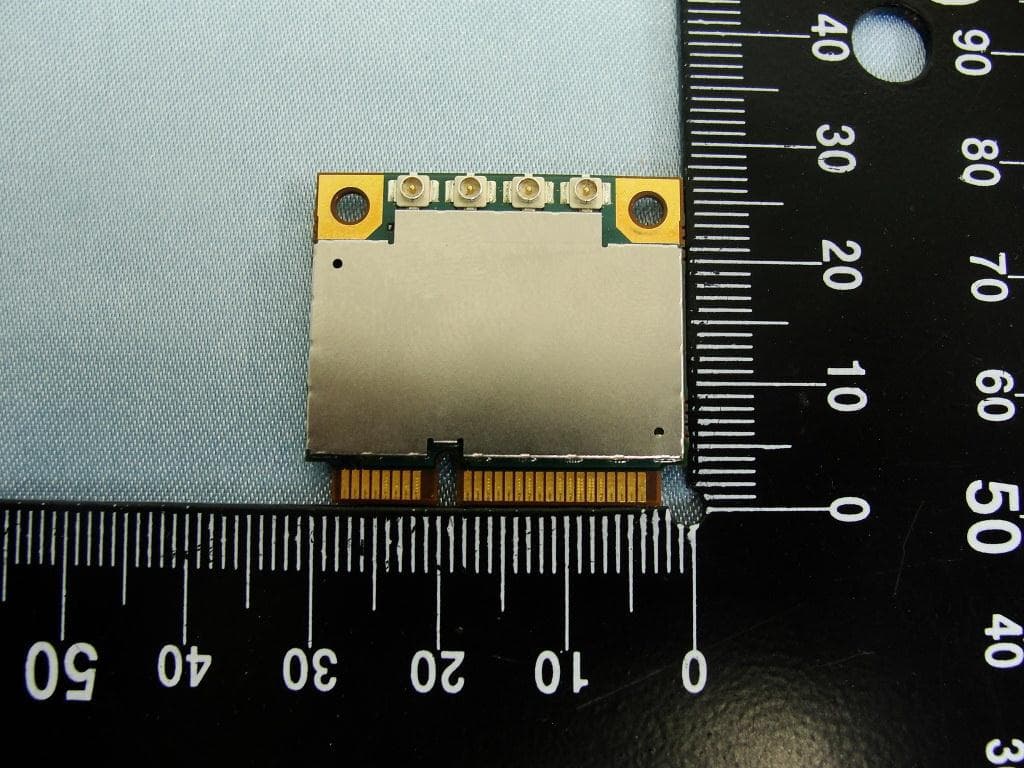
NCMOMO6792
Feb 24, 2013GTM679W
Equipment Class
JBP - Part 15 Class B Computing Device PeripheralNCMOGI0644
Jun 17, 2012GSM/UMTS/WLAN USB Modem GI0644
Equipment Class
PCB - PCS Licensed Transmitter