NPQMTD-3500Dual-Mode Cellular Telephone
Telian Corporation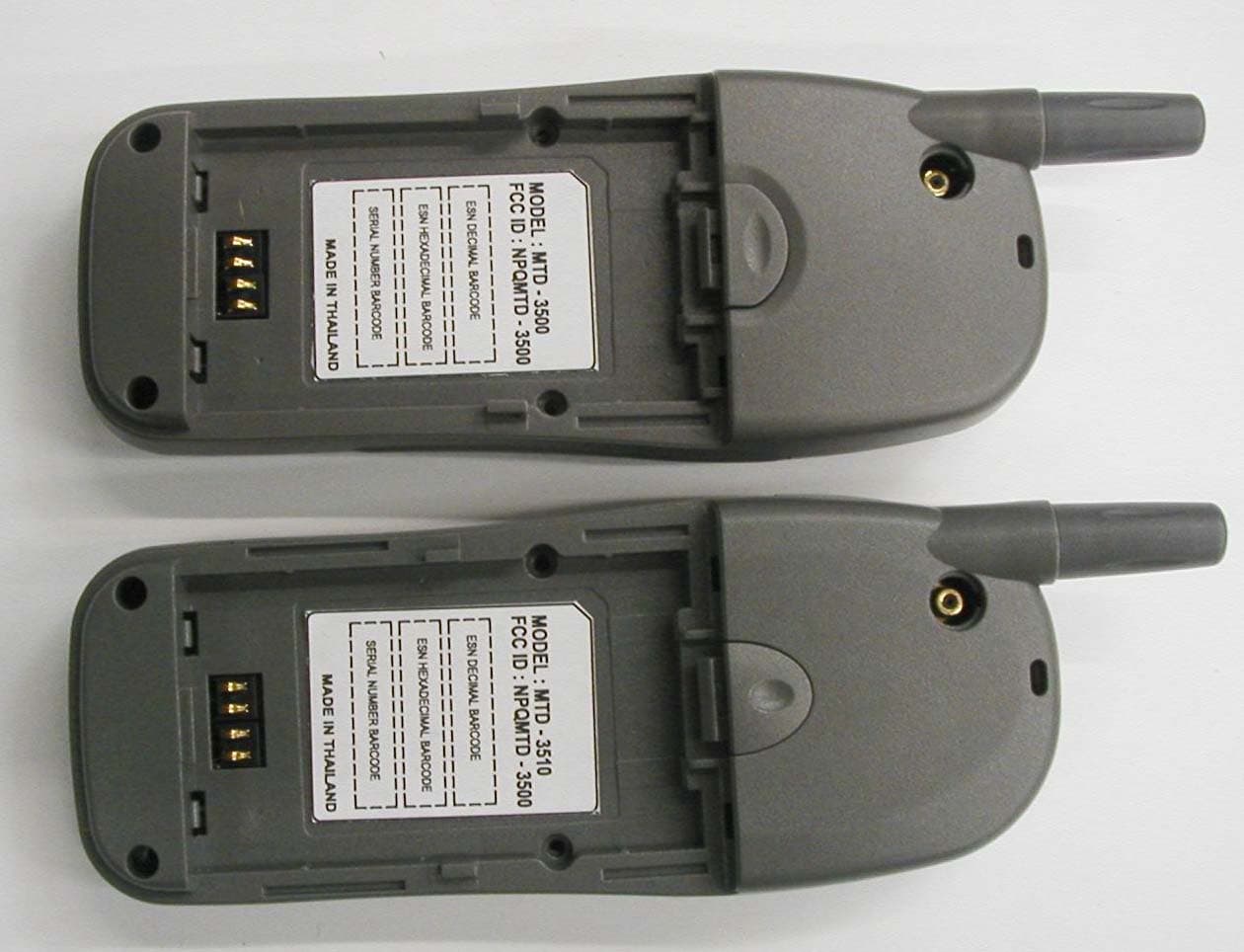
Click to zoom
Application Details
- Equipment Class
- TNE - Licensed Non-Broadcast Transmitter Held to Ear
- Date of Grant
- Feb 25, 2003
- Application Purpose
- Original Equipment
- Date of Application
- Feb 25, 2003
- Equipment Note
- Dual-Mode Cellular Telephone
- Frequency Range
- 824.04000000 - 848.97000000
- Company
- Telian Corporation
- Country
- South Korea
Documents & Files
Document Text
Text extracted from the exhibit documents filed with the FCC. Open a document above to read the original.
Users Manual
- 1 - D D U U A A L L - - M M O O D D E E T T D D M M A A P P H H O O N N E E MODEL : MTD-3500 / 3510 PRELIMINARY Rev : 1.46 Date : September 30, 2002 - 2 - C o n t e n t s 1. SAFETY INFORMATION··············································································8 2. PREPARING YOUR PHONE FOR USE ·······················································13 2.1 Install the battery ---------------------------------------------------------------------------- 13 2.2 Remove the battery ------------------------------------------------------------------------- 13 2.3 Charge the battery--------------------------------------------------------------------------- 13 3. HIGHLIGHTS OF FEATURES······································································15 4. ABOUT THE PHONE····················································································18 4.1 Name and function -------------------------------------------------------------------------- 18 4.2 Key functions --------------------------------------------------------------------------------- 20 4.2.1 Selection keys..................................................................................................20 4.2.2 Key .............................................................................................................................20 4.2.3 Key .............................................................................................................................20 4.2.4 ~ Number keys .....................................................................21 4.2.5 Scroll keys .......................................................................................................22 4.2.6 Using the selection keys ......................................................................................................22 4.2.7 Using the scroll keys ............................................................................................................22 4.3 About display indicators and icons --------------------------------------------------- 23 4.3.1 Start screen...........................................................................................................................23 4.3.2 Scroll bar ...............................................................................................................................23 4.4 Indicators and icons ------------------------------------------------------------------------ 23 5. BASIC OPERATIONS ··················································································26 - 3 - 5.1 Switch the phone ON or OFF ------------------------------------------------------------ 26 5.2 Make a call ------------------------------------------------------------------------------------- 26 5.3 Answering a call------------------------------------------------------------------------------ 27 5.4 Adjusting the earpiece volume ---------------------------------------------------------- 27 5.5 Redial the last-dialed number ----------------------------------------------------------- 27 5.6 Use Caller ID----------------------------------------------------------------------------------- 28 5.7 Keep calls private---------------------------------------------------------------------------- 28 6. USE PHONE MENUS ···················································································30 6.1 Navigate menus ------------------------------------------------------------------------------ 30 6.1.1 Scroll through menus...........................................................................................................30 6.1.2 Use a shortcut.......................................................................................................................30 6.1.3 Exit menu levels ...................................................................................................................30 6.2 List of shortcuts------------------------------------------------------------------------------ 31 7. ENTER LETTERS AND NUMBERS·····························································34 7.1 Enter letters------------------------------------------------------------------------------------ 34 7.1.1 Exit name...............................................................................................................................35 7.1.2 Change from capital (uppercase) letters ............................................................................35 7.1.3 Use punctuation and special characters ............................................................................35 7.2 Enter number---------------------------------------------------------------------------------- 36 7.2.1 List of special characters.....................................................................................................37 8. USE THE PHONE BOOK ·············································································38 8.1 About the phone book --------------------------------------------------------------------- 38 8.2 Use phone book menus ------------------------------------------------------------------- 38 8.3 Add names and numbers ----------------------------------------------------------------- 39 8.4 Change a stored telephone number --------------------------------------------------- 40 8.5 Recall and redial numbers ---------------------------------------------------------------- 40 8.6 Erase stored names and numbers ----------------------------------------------------- 41 8.7 Erase the entire phone book ------------------------------------------------------------- 41 9. WORK WITH THE CALL LOG ·····································································43 - 4 - 9.1 Call the call log ------------------------------------------------------------------------------- 43 9.1.1 Check missed calls...............................................................................................................44 9.1.2 Check received calls ......................................…
Text truncated - open the document above for the full version.
Users Manual
marked with an exclamation point in front of it. The following is a list of message prioritization: Very Urgent Urgent Normal Bulk Messages not specifying a priority shall be assumed to be normal. 1.1.1 Send Options for a message The Outbox Details menu has several sub menus from which you can choose. These menus appear when you press Soft SELECT Key. Use the scroll keys to move to the menu you want to use. Send and Discard Send and Save Save Set Urgency Delivery Report 1.1.2 Delivery report If you want to know your message was delivered, you can turn on the Delivery Report options. Scroll to Delivery Report. Press ON. If you do not want to use Delivery Report, you can turn them off by switching to OFF. 1.2 Receive a text message When you receive a text message, the phone sounds a message alert tone and the text message icon appears, along with one of the following messages: New Message: Indicates that you have an unread message or page. If you have more than one message or page, the appropriate number is listed before this message 1.2.1 Read a text message Press READ. Scroll to the message, then press OPTIONS. Scroll to the Details, and press SELECT. Press OPTIONS for a list of choices you have while reading the message. Press SELECT when the option you want is highlighted. 1.2.2 Choose options for a message When you press Options while reading a message, the following choices are available. Details Takes the user to the detailed view for the message. New Message Allows the user to create a new SMS message. New From Template Allows the user to create a new SMS message based on a predefined list of messages, such as “Meeting cancelled” or “Call me please”. Delete Delete the message being viewed. The user will be asked to confirm the deletion. Delete All Deletes all received SMS messages. The user will be asked to confirm the deletion. 1.2.3 Read options for a message The Inbox Details menu has several sub menus from which you can choose. These menus appear when you press Soft SELECT Key. Use the scroll keys to move to the menu you want to use. Reply Provides a screen where you can write a reply. Forward Forwards the call to another person. That person must have the appropriate message service. Delete Delete the message being viewed. The user will be asked to confirm the deletion. Lock Lets you lock your received messages to phone. Call Number Calls the person who sent you the text message, if their phone number is included in the message. 1.2.4 Call Number Calls the person who sent you the text message, if their phone number is included in the message. You can also press while the message is displayed to dial the number. If more than one number is on the screen, the numbers appear in a list. Scroll to the phone number you want to call and press . 1.3 When your phone’s memory is full When your phone’s message memory is full, one or more messages of the lowest priority are automatically deleted. These messages are usually deleted from your phone’s outbox. If after deleting messages the memory is still full, your phone shows the message error “No space: Message waiting” appear. 1.4 Delete a message While reading a message, press OPTIONS. Scroll Delete, then press SELECT. Your phone asks you to confirm that you want to delete the message. Press OK. 1.5 USE VOICE MAIL Voice mail is a network services feature. Colleagues who miss you when they call can leave a voice message, which you can retrieve later. 1.5.1 When you have a message Your phone beeps when you receive a voice message. Also, the message New voice message appears on your phone’s screen, along with the icon. Note: To use voice mail, you need to learn the voice mail system’s various greetings, passwords, and prompts. Your service provider can provide instructions. 1.5.2 Set up your voice mailbox As part of your network’s voice mail feature, your service provider gives you a voice mailbox phone number. Save this number in your phone to make getting your voice messages quick and convenient. Press MENU 3 > 6 > 2 (Messages > Voice Mail > Voice mail Num). Enter your mailbox phone number. Press ENTER. Your voice mailbox number can be up to 20 digits long and is used until it’s changed. Therefore, if your phone number changes, you may need to change your voice mailbox number along with it. 1.5.3 Listen to your voice messages Note: The way you listen to your voice messages may vary depending upon your service provider. Call your service provider if you have any questions. When your phone alerts you to new voice messages, press LISTEN and follow the instructions given on the phone. If you’d rather listen to your messages later, press EXIT. To Listen to your voice messages at a later time: Press and hold the 1 key. OR Press MENU 3 > 6 > 1 (Messages > Voice Mail > Call Voicemail). 2. Send and receive e-mail messages You can use your phone to send and receive e-mail messages. This means you no longer need to be at your computer to send or receive messages. 2.1 Send an e-mail address You can add an e-mail address to a name you’ve already saved in the phone book. Or, you can add a name and address as a new entry. 2.1.1 Save an e-mail address for an existing name At the Start screen, press NAMES or press MENU > 1 (Phonebook). Enter the first one letters of the name or scroll to the name you want and press OPTIONS. Scroll to Details, then press SELECT to view the number. Press OPTIONS. If Edit is not highlighted, scroll to it and press SELECT. The associated name appears. Press SELECT. The associated number appears. Press SELECT. The E-mail address entry screen appears. Enter the address, and then press ENTER to save the new e-mail address. 2.1.2 Add a new e-mail address At the Start screen, press NAMES, press OPTIONS, scroll to New and press SELECT. Enter the name and press ENTER. The Number entry screen appears. Enter the phone number and press ENTER. The E-mail address entry screen appears. En…
Text truncated - open the document above for the full version.
Attestation Statements
NAMJEUN BID 4F 53-3 HAAN DONG, KW ANG MYUNG SI KYUNGGI DO KOREA. +8228900233 +822890 0331(fax) Ref No. : PUR020812 911 Call Processing Procedure: 911 Only Calling Mode. Mobile Phone Model # MTD-3500 / 3510 incorporates a special procedure for proc~ssing " 9-1-1" calls. Such procedure must recognize when a "9-1-1" call is made and, at such time, must override any programming in the mobile unit that determines the handling of a non-911 call. < Operation Procedure > 1. Programming Emergency No into the Mobile. *#NAM PROGRAM# -? Emergency No Menu Selection -? Save 2. Activate the emergency key 9. Menu 4 ~ 1 ~ 1 CSetting ~ Call Setting ~ Emergency Key 9 7 Press ON. 3. When it needs to dial the Emergency No. Press 9 and send key.
Attestation Statements
Telian Corporation. MTD-3500 & MTD-351 O FCC ID : NPQMTD-3500 Statement of Compliance With Electrical Serial Number (ESN) Regulations The Electrical Serial Number (ESN) is encrypted and stored in a non-volatile memory location. A non encrypted version of the ESN is stored in a separate location in the memory. Upon power up the software decrypts the encrypted ESN, using a key known only to Telian, and compares it to the non-encrypted version ofESN. If they do not match, the board sets ESN to all zeros and powers the board down. The ESN is set only by Telian factory and cannot otherwise be altered, transferred or removed. Any attempts to manipulate the ESN will render the phone inoperative.
Block Diagram
ANT Switch Sync. Serial Data RXI_OP RXQ_OP AMPS Audio AMPS RSSI TXI_IP TXQ_IP AGC_RX1 RF Detector AFC TXCO2 AGC_TX TX_LEVEL Rev.01 Oct 1. 2002 MTD-3500/3510_RF Part Dual-Mode Cellular Phone 1/324 RSSI Processing 1/7980 1/1296 Serial Control 1/2 1/2 45/-45 0/90 VCC_TX VCC_VCO TX RX Power Amplifier BPF 824~850MHz IF PLL RF PLL VCTCXO 19.44MHz RX BPF 869~894MHz VCO 985-1015MHz 239.40MHz 090 0 90 329.28MHz VCC_RX VCC_VCO VCC_RX VCC_RX1 Duplexer VCC_VCO 60kHz 60kHz Design: 9 -Vbias 988.65~1013.61MHz PA_CEL 119.64MHz FM Discrim TxFM TXI TXQ 164.64M High side 119.7M MODE AMPS TDMA/800 Tx Freq. 824.01~848.97MHz 824.01~848.97MHz Rx Freq. 869.01~893.97MHz 869.01~893.97MHz LO1 Freq. 988.65~1013.61MHz 988.65~1013.61MHz LO1 •ƒ f 30kHz 30kHz TxIF 164.64MHz 164.64MHz Txref 30kHz 30kHz TxLO 329.28MHz 329.28MHz nTr 648 648 TXIFref 240K 240K
Cover Letter(s)
Telian Corporation December 27, 2002 FCC ID: NPQMTD-3500 MTD-3500 & MTD-351 0 Federal Communications Commission Authorization and Evaluati.on Division Laboratory Division 7435 Oakland Mills Road Columbia, MD 21046 Subject: Telian, Cel]lular Handset Model MTD-3500 / MTD-3510 Request for withholdi:ng from public disclosure proprietary information submitted Pursuant to an application for certification of a Cellular Handset Model MTD-3500 / MTD-3510 FCC ID: NPQMTD-:)500 Sir / Madam, Telian Corporation request~~ that certain materials submitted with this application for certification of the Cellular Handset Model MTD-3500 / MTD-3510 be withheld from public disclosure. .Circuit Diagram: Confidential .Operation Description: Confidential .Tune up Procedure: Confidential .Part List: Confidential The items marked " Confidential" as above contain detailed Cellular Handset Model MTD-3500 / MTD-351 0, submitted to the FCC for review with this application. The information contains proprietary information (Trade secrets) regarding the circuit operation and capabilities (specific values of components, circuit design details and system architecture) which: are the result of our extensive investment in research and development. Without the disclosed a workable competitive product. Therefore, we believe that disclosure of tlllese company guarded materials would compromise our leading position in this market. We therefore formally request that materials marked "Confidential" be kept strictly confidential and not made available for inspection by any other party, except on a need to know basis for the sole pur]pose of the certification process. Sincerely yours, /t;~ Marketing Manager I Telian Overseas Marketing Team
Cover Letter(s)
From: Roland Gubisch ITS/ES-Box Sent: Friday, January 31, 2003 12:54 PM To: David Chernomordik ITS/ES-Mpk Cc: Danielle Gravelle ITS/ES-Box Subject: Review Comments Telian FCC ID: NPQMTD-3500 David: Technical review of this application is complete. Please respond to the comments below: ADMINISTRATIVE 1) Form 731 rated RF power - should be ERP, 0.263 W as shown in test report for both AMPS and TDMA modes 2) From 731 emissions designators a) Please provide necessary bandwidth calculations Bn = 2(M + DK) to justify selection of 40K0 and 30K0. b) Most 22H grants include emission 40K0F1D (wideband data) for AMPS mode; consider adding with same ERP. 3) Cannot locate information on DC power into final RF stages per 2.1033(c)(8); please provide. 4) Cannot locate attestation to system interoperability for AMPS mode per OET-53, see 22.933. EMC REPORT 1) The Table under section 1.2 shows TDMA conducted power as 26.3 dBm. Test results under section 2.3, and plot 2.6, show 849 MHz power in TDMA mode as 26.6 dBm. Please comment on difference. 2) Plots 6.4 and 6.5 do not appear to indicate compliance with -26 dB attenuation at - 20 kHz for 22.917(b)-(c); plot resolution is marginal. 3) It is not clear if spurious conducted emissions were measured at low power as well as high power. FCC guidance: "Tests to be done at one operating frequency at maximum power output - except for antenna terminals measurements to be done at both highest and lowest power output levels." 4) For measurement of conducted output in base frequency range per 22.917(f), noise floor of plots is above -80 dBm requirement. Please indicate how requirement is met. 5) Report should indicate that accessory headset was attached during cabinet radiation measurement. The setup photos appear to confirm. SAR REPORT 1) User manual page 9 says: " Extend your antenna fully." SAR tests show only one antenna position. Please resolve difference. 2) Section 19 of User manual refers to "up to 600 mW" maximum power. This does not agree with EMC report or SAR measurements. 3) EMC conducted measurement of 26.6 dBm at 849 MHz TDMA is not replicated in SAR report; corresponding SAR report value at that frequency is 26.3 dBm. Conducted values in SAR report should be => values in EMC report. 4) Please indicate how ambient RF emissions were considered in SAR testing. 5) Cannot find flat phantom physical parameters (size, shell thicknesses, bottom sag, tolerances) in test report. 6) Was EUT tested in both orientations to flat phantom (keyboard facing, and away from, phantom? Please clarify. Thank you, Roland
Cover Letter(s)
Here are answers/comments to your review. 1) Form 731 rated RF power - should be ERP, 0.263 W as shown in test report for both AMPS and TDMA modes 731 Form is corrected. New Form is attached 2) From 731 emissions designators a) Please provide necessary bandwidth calculations Bn = 2(M + DK) to justify selection of 40K0 and 30K0. b) Most 22H grants include emission 40K0F1D (wideband data) for AMPS mode; consider adding with same ERP. Calculation for F3E and F1D is included in the Part 22 report (page23). No calculation is done for TDMA. 3) Cannot locate information on DC power into final RF stages per 2.1033(c)(8); please provide. The info is added (page 5 of the Part 22 report). 4) Cannot locate attestation to system interoperability for AMPS mode per OET-53, see 22.933. The Statement is attached. EMC REPORT 1) The Table under section 1.2 shows TDMA conducted power as 26.3 dBm. Test results under section 2.3, and plot 2.6, show 849 MHz power in TDMA mode as 26.6 dBm. Please comment on difference. Table 1.2 (page 5) is corrected. 2) Plots 6.4 and 6.5 do not appear to indicate compliance with -26 dB attenuation at - 20 kHz for 22.917(b)-(c); plot resolution is marginal. These two plots are replaced with new plots (pages 27 and 28). 3) It is not clear if spurious conducted emissions were measured at low power as well as high power. FCC guidance: "Tests to be done at one operating frequency at maximum power output - except for antenna terminals measurements to be done at both highest and lowest power output levels." Additional tests were performed; new plots are in the report (plots 7.5.a - 7.5.d, pages 51-54, see also page 38) 4) For measurement of conducted output in base frequency range per 22.917(f), noise floor of plots is above -80 dBm requirement. Please indicate how requirement is met. See plots 7.4.a, 7.4.b, 7.4.c., pages 55-57 and 38. 5) Report should indicate that accessory headset was attached during cabinet radiation measurement. The setup photos appear to confirm. The require statement is added to test procedure (page 58). SAR REPORT 1) User manual page 9 says: " Extend your antenna fully." SAR tests show only one antenna position. Please resolve difference. The corrected User manual is attaced. 2) Section 19 of User manual refers to "up to 600 mW" maximum power. This does not agree with EMC report or SAR measurements. The corrected User manual is attaced. 3) EMC conducted measurement of 26.6 dBm at 849 MHz TDMA is not replicated in SAR report; corresponding SAR report value at that frequency is 26.3 dBm. Conducted values in SAR report should be => values in EMC report. Page 10 is corrected 4) Please indicate how ambient RF emissions were considered in SAR testing. The sec "e" is added to the sec 2.4 (page 28). 5) Cannot find flat phantom physical parameters (size, shell thicknesses, bottom sag, tolerances) in test report. Page 33 is corrected and Phantom certificate (Appendix C) is added. We could not get the "bottom sag" from manufacturer, only the certificate. 6) Was EUT tested in both orientations to flat phantom (keyboard facing, and away from, phantom? Please clarify. Additional tests were performed, and the test date is in the report on page 32. and in appendix A (pages 73-75); page 9 is also corrected. Thanks David Chernomordik 2-24-2003
External Photos
MODEL : MTD-3500 / MTD-3510 FCC ID : NPQMTD-3500 TELIAN CO. MTD-3500 MTD-3510 MODEL : MTD-3500 / MTD-3510 FCC ID : NPQMTD-3500 TELIAN CO. MTD-3500 MTD-3510 MODEL : MTD-3500 / MTD-3510 FCC ID : NPQMTD-3500 TELIAN CO. MTD-3500 MTD-3510 MODEL : MTD-3500 / MTD-3510 FCC ID : NPQMTD-3500 TELIAN CO. MTD-3500 MTD-3510
Internal Photos
MODEL : MTD-3500 / MTD-3510 FCC ID : NPQMTD-3500 TELIAN CO. MTD-3500 / MTD-3510 1/ 6 MODEL : MTD-3500 / MTD-3510 FCC ID : NPQMTD-3500 TELIAN CO. MTD3500 / MTD-3510 2/ 6 MODEL : MTD-3500 / MTD-3510 FCC ID : NPQMTD-3500 TELIAN CO. 5/ 6 MTD-3500 MTD-3510 MODEL : MTD-3500 / MTD-3510 FCC ID : NPQMTD-3500 TELIAN CO. 6/ 6 MTD-3500 MTD-3510
RF Exposure Info
Test Report: 30360051 Date of Report: December 26, 2002 Revised: February 19, 2003 J ob #: 3036005 Date ofTest: December 16 to 19,2002 and February 18,2003 A2LA Certificate Number: 1755-01 Warnock Hersey --- .i~- Tested by:l ( ~ ...\~-"L~- Revl~'d' ~~k. David Chemomordik, Ph.D., EMC Technical Manager R~~i~wr Da~e-: -~ 71"/'0 "'<' " ~ ...,-- ..& .. .~ ~"j enx:: ~ .-" ,cC,o"" ! cl -) "0,-= Intertek Testing Services NA, Inc. 1365 Adams Court, Menlo Park, CA 94025 Telephone 650-463-2900 Fax 650-463-2910 Home Page www.etlsemko.com Telian Corporation on the Cellular Phone Model Number: MTD-3500 & MTD-3510 FCC ID: NPQMTD-3500 1365 Adams Court, Menlo Park, CA 94025 Telian Corporation., Model No: MTD-3500 & MTD-3510 FCC ID: NPQMTD-3500 Date of Test: December 16 to 19, 2002and February 18, 2003 File: 30360051 Page 2 of 89 RSS-102 & FCC Part 2 SAR Evaluation TABLE OF CONTENTS STATEMENT OF COMPLIANCE .......................................................................................................... 3 1.0 JOB DESCRIPTION ..................................................................................................................... 4 1.1 Client Information............................................................................................................... 4 1.2 Equipment under test (EUT) ............................................................................................... 4 1.3 Test Plan Reference ............................................................................................................5 1.4 System Test Configuration ................................................................................................. 6 1.4.1 System Block Diagram & Support equipment....................................................... 6 1.4.2 Test Position for Head ........................................................................................... 7 1.4.3 Test Position for Body ........................................................................................... 9 1.4.4 Test Condition ..................................................................................................... 10 1.5 Modifications required for compliance............................................................................. 10 1.6 Additions, deviations and exclusions from standards ....................................................... 10 2.0 SAR EVALUATION ................................................................................................................... 11 2.1 SAR Limits ....................................................................................................................... 11 2.2 Configuration Photographs ............................................................................................... 12 2.3 System Verification .......................................................................................................... 28 2.4 Evaluation Procedures ...................................................................................................... 28 2.5 Results............................................................................................................................... 29 3.0 TEST EQUIPMENT.................................................................................................................... 33 3.1 Equipment List..................................................................................................................33 3.2 Tissue Simulating Liquid.................................................................................................. 34 3.3 E-Field Probe Calibration ................................................................................................. 35 3.4 Measurement Uncertainty ................................................................................................. 36 3.5 Measurement Tractability ................................................................................................. 39 4.0 WARNING LABEL INFORMATION - USA........................................................................... 40 5.0 REFERENCES............................................................................................................................. 41 5.0 DOCUMENT HISTORY ............................................................................................................ 42 APPENDIX A - SAR Evaluation Data .................................................................................................... 43 APPENDIX B - E-Field Probe Calibration Data ................................................................................... 76 APPENDIX C – Phantom Certification.................................................................................................. 89 1365 Adams Court, Menlo Park, CA 94025 Telian Corporation., Model No: MTD-3500 & MTD-3510 FCC ID: NPQMTD-3500 Date of Test: December 16 to 19, 2002and February 18, 2003 File: 30360051 Page 3 of 89 RSS-102 & FCC Part 2 SAR Evaluation STATEMENT OF COMPLIANCE The Telian Co. sample device, FCC ID: NPQMTD-3500 was evaluated for SAR in accordance with the requirements for RF Exposure compliance testing defined in FCC OET Bulletin 65, Supplement C (Edition 01-01). Testing was performed at the Intertek Testing Services facility in Menlo Park, California. For the evaluation, the dosimetric assessment system DASY3 was used. The phantom employed was the "SAM Twin Phantom". The total uncertainty for the evaluation of the spatial peak SAR values averaged over a cube of 1g tissue mass had been assessed for this system to be ±27.8%. The device was tested at their maximum output power declared by the Telian Co. In summary, the maximum spatial peak SAR value for the sample device averaged over 1g was found to be: Phantom Position SAR 1g , mW/g Head Section Left hand, cheek 1.11 Flat Section 1.5 cm from phantom 0.65 In conclusion, the tested sample device was found to be in compliance with the requirements…
Text truncated - open the document above for the full version.
RF Exposure Info
1365 Adams Court, Menlo Park, CA 94025 Telian Corporation., Model No: MTD-3500 & MTD-3510 Date of Test: December 16 to 19, 2002 FCC ID: NPQMTD-3500 File: 30360051 Page 73 of 85 RSS-102 & FCC Part 2 SAR Evaluation APPENDIX B - E-Field Probe Calibration Data See attached. 1365 Adams Court, Menlo Park, CA 94025 Telian Corporation., Model No: MTD-3500 & MTD-3510 Date of Test: December 16 to 19, 2002 FCC ID: NPQMTD-3500 File: 30360051 Page 74 of 85 RSS-102 & FCC Part 2 SAR Evaluation 1365 Adams Court, Menlo Park, CA 94025 Telian Corporation., Model No: MTD-3500 & MTD-3510 Date of Test: December 16 to 19, 2002 FCC ID: NPQMTD-3500 File: 30360051 Page 75 of 85 RSS-102 & FCC Part 2 SAR Evaluation 1365 Adams Court, Menlo Park, CA 94025 Telian Corporation., Model No: MTD-3500 & MTD-3510 Date of Test: December 16 to 19, 2002 FCC ID: NPQMTD-3500 File: 30360051 Page 76 of 85 RSS-102 & FCC Part 2 SAR Evaluation 1365 Adams Court, Menlo Park, CA 94025 Telian Corporation., Model No: MTD-3500 & MTD-3510 Date of Test: December 16 to 19, 2002 FCC ID: NPQMTD-3500 File: 30360051 Page 77 of 85 RSS-102 & FCC Part 2 SAR Evaluation 1365 Adams Court, Menlo Park, CA 94025 Telian Corporation., Model No: MTD-3500 & MTD-3510 Date of Test: December 16 to 19, 2002 FCC ID: NPQMTD-3500 File: 30360051 Page 78 of 85 RSS-102 & FCC Part 2 SAR Evaluation 1365 Adams Court, Menlo Park, CA 94025 Telian Corporation., Model No: MTD-3500 & MTD-3510 Date of Test: December 16 to 19, 2002 FCC ID: …
Text truncated - open the document above for the full version.
Contact Information
Applicant
Wayne Hwang(CTO)
Technical Contact
Intertek Testing ServicesDavid Chernomordik
[email protected]650-463-2900
1365 Adams Court · Menlo Park, California · United States
Non-Technical Contact
Intertek Testing ServicesStephenie J Smith
[email protected]650-463-2900
Test Firm
Intertek Testing Services NA Inc.John Quigley
Technical Specifications
| # | Rule Parts | Frequency Range | Power Output | Emission | Tolerance |
|---|---|---|---|---|---|
| 3 | 22.901(d) | 824.04 MHz - 848.97 MHz | 263.00 mW | 30K0DXW | 0.5 ppm |
Other Applications from Telian Corporation
NPQK1000
Jan 24, 2008GSM850/PCS1900 Dual Band GPRS Terminal Equip. w/BT
Equipment Class
PCE - PCS Licensed Transmitter held to ear
NPQI405
Aug 06, 2007GSM850 / PCS1900 Dual Band GPRS Terminal with BT
Equipment Class
DSS - Part 15 Spread Spectrum Transmitter
NPQI170
Jun 05, 2007GSM850/PCS1900 Dual Band GPRS Terminal with BT
Equipment Class
PCE - PCS Licensed Transmitter held to ear
NPQMGQ9180
Mar 13, 2007Quad-Band GSM/GPRS Handset with Bluetooth
Equipment Class
DSS - Part 15 Spread Spectrum Transmitter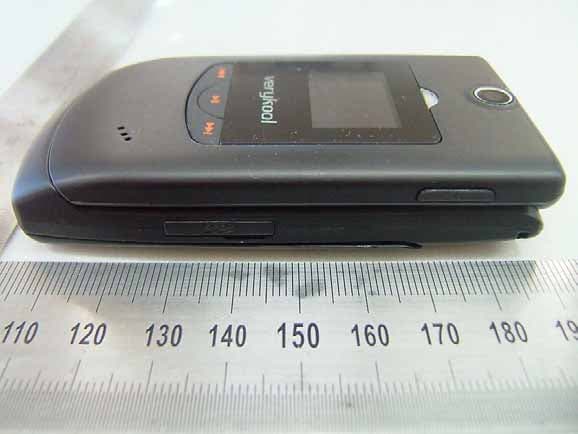
NPQMGQ7180
Feb 27, 2007Quad-Band GSM/GPRS Handset with Bluetooth
Equipment Class
PCE - PCS Licensed Transmitter held to ear