O3W7100001900MHz GSM/GPRS PDA Communicator
Palm Inc
Click to zoom
Application Details
- Equipment Class
- PCT - PCS Licensed Transmitter worn on body
- Date of Grant
- Oct 24, 2002
- Application Purpose
- Original Equipment
- Date of Application
- Oct 24, 2002
- Equipment Note
- 1900MHz GSM/GPRS PDA Communicator
- Frequency Range
- 1850.20000000 - 1909.80000000
- Company
- Palm Inc
- Country
- United States
Documents & Files
Document Text
Text extracted from the exhibit documents filed with the FCC. Open a document above to read the original.
Users Manual
Handbook for Palm ™ Tungsten ™ W i710 Handhelds Copyright © 2002 Palm, Inc. All rights reserved. HotSync, MultiMail, PalmModem, and Palm OS are registered trademarks, and the HotSync logo, Palm, the Palm logo, Palm Powered, and VersaMail are trademarks of Palm, Inc. Palm, Inc. uses the Bluetooth trademark under express license from Bluetooth SIG, Inc., U.S.A. All other brand names are trademarks or registered trademarks of their respective owners. Disclaimer and Limitation of Liability Palm, Inc. assumes no responsibility for any damage or loss resulting from the use of this handbook. Palm assumes no responsibility for any loss or claims by third parties which may arise through the use of this software. Palm, Inc. assumes no responsibility for any damage or loss caused by deletion of data as a result of malfunction, dead battery, or repairs. Be sure to make backup copies of all important data on other media to protect against data loss. IMPORTANTPlease read the End User Software License Agreement with this product before using the accompanying software program(s). Using any part of the software indicates that you accept the terms of the End User Software License Agreement. Software Download Available Palm™ Desktop software is supplied on a CD-ROM disc. If you do not have access to a CD-ROM drive for your computer, you can download the Palm Desktop software from www.palm.com/support/intl . PN: 406-4534A-IE iii About This Book . . . . . . . . . . . . . . . . . . . . . . . . . . . . . . . . . . . . . . . . . . . . . . . . 1 Chapter 1: Welcome . . . . . . . . . . . . . . . . . . . . . . . . . . . . . . . . . . . . . . . . . . . . . 3 System requirements . . . . . . . . . . . . . . . . . . . . . . . . . . . . . . . . . . . . . . . . . . . . . . . . 4 Minimum requirements: Windows computers . . . . . . . . . . . . . . . . . . . . . . . . 4 Minimum requirements: Mac computers . . . . . . . . . . . . . . . . . . . . . . . . . . . . . 4 Wireless service . . . . . . . . . . . . . . . . . . . . . . . . . . . . . . . . . . . . . . . . . . . . . . . . . . . . . 5 Making a call in a medical or safety emergency . . . . . . . . . . . . . . . . . . . . . . . . . . 6 Software Download Available . . . . . . . . . . . . . . . . . . . . . . . . . . . . . . . . . . . . . . . . 6 Compatibility of third-party applications . . . . . . . . . . . . . . . . . . . . . . . . . . . . . . . 6 Finding information . . . . . . . . . . . . . . . . . . . . . . . . . . . . . . . . . . . . . . . . . . . . . . . . . 7 Chapter 2: Exploring Your Handheld . . . . . . . . . . . . . . . . . . . . . . . . . . . . . . . 9 Locating handheld components . . . . . . . . . . . . . . . . . . . . . . . . . . . . . . . . . . . . . . 10 Locating front panel controls . . . . . . . . . . . . . . . . . . . . . . . . . . . . . . . . . . . . . . 10 Using the indicator light . . . . . . . . . . . . . . . . . . . . . . . . . . . . . . . . . . . . . . . . . . 12 Locating back panel components . . . . . . . . . . . . . . . . . . . . . . . . . . . . . . . . . . 13 Adding an expansion card . . . . . . . . . . . . . . . . . . . . . . . . . . . . . . . . . . . . . . . . . . . 14 Using the backlight . . . . . . . . . . . . . . . . . . . . . . . . . . . . . . . . . . . . . . . . . . . . . . . . . 15 Chapter 3: Navigating and Entering Data . . . . . . . . . . . . . . . . . . . . . . . . . . 17 Tapping . . . . . . . . . . . . . . . . . . . . . . . . . . . . . . . . . . . . . . . . . . . . . . . . . . . . . . . . . . . 17 Using the navigator . . . . . . . . . . . . . . . . . . . . . . . . . . . . . . . . . . . . . . . . . . . . . . . . . 18 Using the keyboard . . . . . . . . . . . . . . . . . . . . . . . . . . . . . . . . . . . . . . . . . . . . . . . . . 19 Typing capital letters . . . . . . . . . . . . . . . . . . . . . . . . . . . . . . . . . . . . . . . . . . . . . 20 Accessing international and special characters . . . . . . . . . . . . . . . . . . . . . . . 20 Using the Function key . . . . . . . . . . . . . . . . . . . . . . . . . . . . . . . . . . . . . . . . . . . 22 Using menu commands . . . . . . . . . . . . . . . . . . . . . . . . . . . . . . . . . . . . . . . . . . 23 Using ShortCuts . . . . . . . . . . . . . . . . . . . . . . . . . . . . . . . . . . . . . . . . . . . . . . . . . 24 Using elements of the handheld interface . . . . . . . . . . . . . . . . . . . . . . . . . . . . . . 24 Beaming data . . . . . . . . . . . . . . . . . . . . . . . . . . . . . . . . . . . . . . . . . . . . . . . . . . . . . . 26 Using your computer keyboard . . . . . . . . . . . . . . . . . . . . . . . . . . . . . . . . . . . . . . 29 Contents Contents iv Importing data . . . . . . . . . . . . . . . . . . . . . . . . . . . . . . . . . . . . . . . . . . . . . . . . . . . . . 29 Importing data from a Windows computer . . . . . . . . . . . . . . . . . . . . . . . . . . 29 Importing data from a Mac computer . . . . . . . . . . . . . . . . . . . . . . . . . . . . . . 31 Chapter 4: Working with Applications . . . . . . . . . . . . . . . . . . . . . . . . . . . . . 33 Opening applications . . . . . . . . . . . . . . . . . . . . . . . . . . . . . . . . . . . . . . . . . . . . . . . 33 Other ways to open applications . . . . . . . . . . . . . . . . . . . . . . . . . . . . . . . . . . . 34 Opening expansion card applications . . . . . . . . . . . . . . . . . . . . . . . . . . . . . . . 34 Switching between applications . . . . . . . . . . . . . . . . . . . . . . . . . . . . . . . . . . . . . . 34 Categorizing applications . . . . . . . . . . . . . . . . . . . . . . . . . . . . . . . . . . . . . . . . . . . 35 Changing the Applications Launcher display . . . . . . . . . . . . . . . . . . . . . . . . . . 36 Copying applications to or from an expansion card . . . . . . . . . . . . . . . . . . . . . 37 Selecting copy settings . . . . . . . . . . . . . . . . . . . . . . . . . . . . . . . . . . . . . . . . . . . . . . 39 Using menus . . . . . . . . . . . . . . . . . . . . . . . . . . .…
Text truncated - open the document above for the full version.
Users Manual
Getting, sending, and managing e-mail 187 3.Press Command + the number of the account you want from the list. Alternately, tap the name of the account. 4.Tap the folders pick list, and tap Inbox if the Inbox is not displayed. TIP Alternately, you can press the VersaMail button repeatedly to scroll through the accounts you have configured in the VersaMail application until you get to the account you want. Getting e-mail by subject or getting the entire message When you get e-mail messages, you can choose to get the subject only or to get the entire message. You can also use the Details dialog box to select options for getting unread e-mail only, downloading attachments, and using filters. To get e-mail messages: 1.Tap Get Mail. If you have e-mail stored in your Outbox, tap Get & Send. 2.In the Get Mail dialog box, tap Subjects Only to download subjects only or tap Messages to download entire messages. TIP You can turn off the Get Mail dialog box in VersaMail Preferences. See “Setting preferences for getting and deleting e-mail” later in this chapter. 3.(Optional) Tap Details and select options for retrieving unread e-mail, attachments, using filters, auto-disconnect, maximum download size, and default connection type for this account. Up to ten attachments may be retrieved with a message. Tap OK. Chapter 17 Using Palm™ VersaMail™ Personal E-mail Software 188 NOTE See “Setting VersaMail connection preferences” earlier in this chapter for information on the auto-disconnect feature. See “Selecting a different service for a given e-mail account” earlier in this chapter for information on setting a default connection type. See “Creating mail filters” later in this chapter for more information about filters. NOTE The maximum size of an incoming message is 5KB by default. 4.Press Function + Enter , or tap OK. The Getting Messages dialog box shows updates as your e-mail is downloaded. When the Getting Messages dialog box disappears, another dialog box appears and displays the number of new e-mail messages. 5.Press Function + Enter , or tap OK. A list of your e-mail appears in the Inbox. Envelope icons indicate whether a message or subject has been downloaded, and whether there are any attachments Shows unread/ total messages Displays the time for messages received today and the date for all other messages Getting, sending, and managing e-mail 189 Icons in the VersaMail application The icons to the left of a message in the Inbox indicate the message’s status. Reading e-mail To read e-mail, tap the e-mail message in the Inbox or the folder where the message is located. If you chose to get messages by subjects only, tap the More button to view the body of the e-mail message, plus any attachments. See “Getting e-mail by subject or getting the entire message” earlier in this chapter. If you chose to get entire messages, the body of the e-mail message is displayed. However, if the downloaded message exceeds your maximum message size, only a partial message is displayed. Tap the More button to view the entire message. Only the subject header information is downloaded. Only the subject header and attachment information are downloaded. Part or all of the message text is downloaded. Part or all of the message text and attachment information are downloaded. Tap to read Tap More to view the entire message Chapter 17 Using Palm™ VersaMail™ Personal E-mail Software 190 To read a message: 1.Press Up or Down on the navigator to scroll to the message you want to read. 2.Press Select to select the message, and then press Select again to open the message. 3.After reading the message, press Select to close the message. Viewing other folders When you get new e-mail, it appears in the account’s Inbox folder. You can move e-mail between folders and then view it in the other folder. To view other folders: 1.Tap the folders pick list in the upper-right corner of the screen. 2.Tap the folder you want to view. Managing columns in the folder’s list view The columns in each folder display various types of information, such as the subject, date, or size of a message. You can display or hide specific columns or change the width of the columns in the folder ’s list view. To display or hide a column in a folder’s list view: 1.Tap Show. 2.Tap the check box for each column that you want to show. NOTE If you select Date, the Date column displays the message time for any messages received today—that is, any message received after 12:01 A.M. Otherwise, the Date column shows the date the message was received. 3.Tap the Font letter to display information in a larger or smaller font size. Available folders Getting, sending, and managing e-mail 191 To change the sort order: 1.Tap the Sort By pick list, and then tap the column name. 2.Tap Descend or Ascend to change the sort order. To change the size of a column in the folder’s list view: 1.Tap and hold the stylus on the column divider. 2.Drag the column divider to change the width of the column. Moving e-mail between folders You can move one or more e-mail messages between folders. To move one e-mail message: 1.Press Right on the navigator to move to and open the folders pick list in the upper-right corner of the screen. Press Up or Down to move to the folder you want, and the press Select to select the folder. Alternately, tap the folders pick list in the upper-right corner of the screen, and then tap the folder name. 2.Tap the icon to the left of the message, press Right on the navigator to open the Message menu, press Down to move to the Move To option, and then press Select to select this option. Drag the column divider left or right to make the column narrower or wider Chapter 17 Using Palm™ VersaMail™ Personal E-mail Software 192 Alternately, tap the icon to the left of the message, and then tap Move To from the pop-up menu. The folders pick list appears. 3.Press Up or Down on the navigator to move to the folder you want, and then press Select to select the folder. Alternately, tap…
Text truncated - open the document above for the full version.
Users Manual
Palm Solutions Group 400 N. McCarthy Blvd Milpitas, CA 95035-5112 D D a a v v i i d d W W o o o o Global Compliance Manager Palm Solutions Group 400 N. McCarthy Blvd Milpitas, CA 95035-5112 T T e e l l : : 4 4 0 0 8 8 - - 5 5 0 0 3 3 - - 1 1 5 5 8 8 7 7 F F a a x x : : 4 4 0 0 8 8 - - 5 5 0 0 3 3 - - 8 8 3 3 3 3 0 0 E E m m a a i i l l : : D D a a v v i i d d . . W W o o o o @ @ C C o o r r p p . . P P a a l l m m . . C C o o m m Attestation of future FCC user manual amendment This is to confirm the following user manual amendment will be immediately incorporated into Palm’s Tunsten W (FCCID# 03W710000) manual: We will add the following into the FCC statement currently in our manual: “use only with the specific Palm accessories that this phone has been tested for compliance with" or "SAR compliance for body-worn operating configurations is limited to the specific belt-clips/holsters/accessories tested for this filing". Replacing the following statement” " Use of accessories not provided by Palm”. If there is any question with this, please contact me immediately. Best regards, David Woo Palm Solutions Group
Cover Letter(s)
Palm Solutions Group 400 N. McCarthy Blvd Milpitas, CA 95035-5112 Sept 25, 2002 Federal Communications Commission Authorization and Evaluation Division 7435 Oakland Mills Road Columbia, MD 21046 Re: Request for Confidentiality In reference to the application under FCC ID: O3W710000, and pursuant to Sections 0.457(d)(1)(ii) and 0.459 of the Commission's Rules, the Applicant hereby requests confidential treatment of the accompanying information as outlined below: Document titled "TungstenW system block diagram", total 1 page. Document titled "TungstenW RF system block diagram”, total 1 page. Document titled "TungstenW circuit diagram”, total 12 page. Document titled "TungstenW Tuning Description”, total 1 page. The above materials contain trade secrets and proprietary information not customarily released to the public. The public disclosure of these matters might be harmful to the Applicant and provide unjustified benefits to its competitors. The Applicant understands that pursuant to Rule 0.457(d)(1)(ii), disclosure of this Application and all accompanying documentation will not be made before the date of the Grant for this application. Sincerely, David Woo Manager – Global Compliance
Cover Letter(s)
From: Martin Perrine [[email protected]] Sent: Friday, November 22, 2002 11:30 AM To: [email protected] Cc: Rich Fabina; Tim Harrington; [email protected] Subject: RE: Request for additional information Dear Mike and David I spoke to Tim and Kwok regarding their previous discussions with you. Per there guidance to you at the time I will not be requesting zero gap data in this case. Please refer to this email as you respond to the RT that I sent. Very best regards Martin Perrine >>> David Woo 11/21/02 11:38AM >>> Dear Martin: I would have applied much earlier after finishing Tungsten W's FCC testing at Compliance Certification Services around May timeframe. But there are significant pre-launch risk involved as there are many companies prying on FCC website. See the following link to see my point here: http://www.palminfocenter.com/view_Story.asp?ID=3467. The headline of "FCC leaks ..." also is a reputation detriment to FCC which I would want to avoid to uphold the FCC image. Also, be to competitively fair, will FCC require Handspring to do zero-gap measurement on its 270 product? My contact information starting 8/26 is: David Woo Tel # 408-503-1587 Fax # 408-503-8330 Email: [email protected] 400 N. McCarthy Blvd Milpitas, CA 95035 -----Original Message----- From: Martin Perrine [mailto:[email protected]] Sent: Thursday, November 21, 2002 6:08 AM To: [email protected] Cc: Tim Harrington; David Woo Subject: RE: Request for additional information Dear Mike and David I'll discuss further with Kwok and Tim The main difference I see between handspring and Palm applications is the grant date. We are asking for zero gap data for current applications. I'll get back to you Best Regards Martin Perrine >>> David Woo 11/20/02 08:07PM >>> Hi Martin Perrine: This is David Woo, compliance manager of Palm. I have the following to add regarding question #2 D), zero-gap SAR measurements. I reviwed the entire FCC test report of Handspring Treo270, FCCID# 08FNYNY2, and was quite aware that Handspring, Palm's direct competitor, did not do any zero-gap SAR measurements. Our similar-feature product with FCC ID # 03W710000 completed the FCC SAR testing at CCS around the same time (i.e. May) that Handsprings receives its FCC grants from American TCB. Soon after finishing all the FCC SAR testing at CCS, just to be sure, I visited Tim Harrington and Rich Fabina @ FCC to discuss a) confidentiality of submitted information as part of the FCC filing; and b) correct SAR measurements. From that meeting, I was advised that Palm can use our belt clip accessory with our handheld device as part of the SAR measurements, similar to what Handspring has done in its FCC filing. This makes perfect sense to me as it ensures competitive fairness as using belt clip is an acceptable SAR measurement method. By the way, this meeting is in addition to a separate, independent confirmation that I have with Mr. Kwok Chan prior to my starting the entire FCC testing at CCS for FCCID# 03W710000 product. I want to emphasize that Palm has taken very deliberate measures to ensure product confidentiality and we follow the correct prevailing SAR measurements acceptable to FCC. I knew nothing about the zero-gap SAR measurement from Tim, Rich, Kwok. By the way, it's worth mentioning that our belt clip contains no metal, it's entirely leather. My contact information starting 8/26 is: David Woo Tel # 408-503-1587 Fax # 408-503-8330 Email: [email protected] 400 N. McCarthy Blvd Milpitas, CA 95035 -----Original Message----- From: Mike Kuo [mailto:[email protected]] Sent: Tuesday, November 19, 2002 7:17 PM To: '[email protected]' Cc: David Woo Subject: FW: Request for additional information Hi Martin: There are some issues and questions that I need to discuss with you first. After I have clear direction from you, I will follow the procedures to get back to your questions via FCC web site. I copied this e-mail to Mr. David Woo who is the primary contact at Palm. Due to nature of questions, I would like to request the information discussed herein as confidential information between FCC/CCS and Palm. After we have agreement on how to take the actions, we will provide all the necessary information to FCC web site. Reply to question #1: Palm has agreed to modify the statement in the user manual per your instruction. Revised portion of user manual will be provided to FCC web site. Reply to question #2: A) We have examined the both version, there is no variations in metallic components in both version. B) Verify with Palm and have physically examined the holster, the PDA can only be inserted into holster in one way which is LCD panel faced away from the body ( same position as demonstrated during SAR tests.) C) SAR tests were performed with headset plugged into the PDA. Has confirmed with Palm that PDA can only with headset to establish voice communication. This PDA does not equip with option to allow head to head or face operation. D) Attached please find TCB Q and A file. As indicated in the question #7. The SAR tests were done in May 01, 2002. Due to confidentiality of product announcement, Palm requested this product can only be disclosed after Oct.25, 2002. David did discuss this project with Kwon Chan, Tim and Steven during his FCC visit in April and July. He has confirmed with them about the test position. In addition to the confirmation, I also reviewed the Handspring FCC ID:O8FNYNY2 application certified by American TCB and Audited by FCC. In this application, there is no request from FCC for zero gap lap held SAR tests. David Woo will try to call you tomorrow to discuss this application. I will work with David Woo to gather all the responses to address your questions. Best Regards Mike Kuo Confidential between CCS/FCC and Palm. -----Original Message----- From: [email protected] [mailto:[email protected]] Sent: Tuesday, November 19, 2002 2:18 PM To: [email protected] Subject: Request for additional information To: Mike Kuo From: Mar…
Text truncated - open the document above for the full version.
External Photos
02U1278 Palm Tungsten W 02U1278 Palm Tungsten W 02U1278 Palm Tungsten W 02U1278 Palm Tungsten W 02U1278 Palm Tungsten W
ID Label/Location Info
07 Artwork Notes: (Unless otherwise specified) 1) PAD PRINTED OUTLINE DOES NOT PRINT, FOR REFERENCE ONLY. 2) LOCATION DIMENSIONS PROVIDED ON ASSEMBLY PRINT. Part #: xxx-xxxx-x 07Bolder intrinsic safety marksxxxx07/16/02 06Updated CE Markxxxx07/16/02 A/W, Rear Hsg Pacific COLOR: PANTONE 433c (near black)
Internal Photos
02U1278 Palm Tungsten W 02U1278 Palm Tungsten W 02U1278 Palm Tungsten W 02U1278 Palm Tungsten W
Operational Description
Overview of the Global System for Mobile Communications John Scourias [email protected] Table of Contents 1. History of GSM 2. Services provided by GSM 3. Architecture of the GSM network 3.1. Mobile Station 3.2. Base Station Subsystem 3.3. Network Subsystem 4. Radio link aspects 4.1. Multiple access and channel structure 4.1.1. Traffic channels 4.1.2. Control channels 4.1.3. Burst structure 4.2. Speech coding 4.3. Channel coding and modulation 4.4. Multipath equalization 4.5. Frequency hopping 4.6. Discontinuous transmission 4.7. Discontinuous reception 4.8. Power control 5. Network aspects 5.1. Radio resources management 5.1.1. Handover 5.2. Mobility management 5.2.1. Location updating 5.2.2. Authentication and security 5.3. Communication management 5.3.1. Call routing 6. Conclusion and comments Page 1 of 15Overview of the Global System for Mobile Communications 6/6/02file://G:\Emc\Projects\CMCS\251-2002%20Newton\FCC%20documnetation\gsmreport.htm History of GSM During the early 1980s, analog cellular telephone systems were experiencing rapid growth in Europe, particularly in Scandinavia and the United Kingdom, but also in France and Germany. Each country developed its own system, which was incompatible with everyone else's in equipment and operation. This was an undesirable situation, because not only was the mobile equipment limited to operation within national boundaries, which in a unified Europe were increasingly unimportant, but there was also a very limited market for each type of equipment, so economies of scale and the subsequent savings could not be realized. The Europeans realized this early on, and in 1982 the Conference of European Posts and Telegraphs (CEPT) formed a study group called the Groupe Spécial Mobile (GSM) to study and develop a pan- European public land mobile system. The proposed system had to meet certain criteria: l Good subjective speech quality l Low terminal and service cost l Support for international roaming l Ability to support handheld terminals l Support for range of new services and facilities l Spectral efficiency l ISDN compatibility In 1989, GSM responsibility was transferred to the European Telecommunication Standards Institute (ETSI), and phase I of the GSM specifications were published in 1990. Commercial service was started in mid-1991, and by 1993 there were 36 GSM networks in 22 countries [6] . Although standardized in Europe, GSM is not only a European standard. Over 200 GSM networks (including DCS1800 and PCS1900) are operational in 110 countries around the world. In the beginning of 1994, there were 1.3 million subscribers worldwide [18], which had grown to more than 55 million by October 1997. With North America making a delayed entry into the GSM field with a derivative of GSM called PCS1900, GSM systems exist on every continent, and the acronym GSM now aptly stands for Global System for Mobile communications. The developers of GSM chose an unproven (at the time) digital system, as opposed to the then-standard analog cellular systems like AMPS in the United States and TACS in the United Kingdom. They had faith that advancements in compression algorithms and digital signal processors would allow the fulfillment of the original criteria and the continual improvement of the system in terms of quality and cost. The over 8000 pages of GSM recommendations try to allow flexibility and competitive innovation among suppliers, but provide enough standardization to guarantee proper interworking between the components of the system. This is done by providing functional and interface descriptions for each of the functional entities defined in the system. Services provided by GSM From the beginning, the planners of GSM wanted ISDN compatibility in terms of the services offered and the control signalling used. However, radio transmission limitations, in terms of bandwidth and cost, do not allow the standard ISDN B-channel bit rate of 64 kbps to be practically achieved. Page 2 of 15Overview of the Global System for Mobile Communications 6/6/02file://G:\Emc\Projects\CMCS\251-2002%20Newton\FCC%20documnetation\gsmreport.htm Using the ITU-T definitions, telecommunication services can be divided into bearer services, teleservices, and supplementary services. The most basic teleservice supported by GSM is telephony. As with all other communications, speech is digitally encoded and transmitted through the GSM network as a digital stream. There is also an emergency service, where the nearest emergency-service provider is notified by dialing three digits (similar to 911). A variety of data services is offered. GSM users can send and receive data, at rates up to 9600 bps, to users on POTS (Plain Old Telephone Service), ISDN, Packet Switched Public Data Networks, and Circuit Switched Public Data Networks using a variety of access methods and protocols, such as X.25 or X.32. Since GSM is a digital network, a modem is not required between the user and GSM network, although an audio modem is required inside the GSM network to interwork with POTS. Other data services include Group 3 facsimile, as described in ITU-T recommendation T.30, which is supported by use of an appropriate fax adaptor. A unique feature of GSM, not found in older analog systems, is the Short Message Service (SMS). SMS is a bidirectional service for short alphanumeric (up to 160 bytes) messages. Messages are transported in a store-and-forward fashion. For point-to-point SMS, a message can be sent to another subscriber to the service, and an acknowledgement of receipt is provided to the sender. SMS can also be used in a cell-broadcast mode, for sending messages such as traffic updates or news updates. Messages can also be stored in the SIM card for later retrieval [2] . Supplementary services are provided on top of teleservices or bearer services. In the current (Phase I) specifications, they include several forms of call forward (such as call forwarding when the mobile subscriber …
Text truncated - open the document above for the full version.
RF Exposure Info
in accordance with the requirements of FCC Report and Order: ET Docket 93-62, and OET Bulletin 65 Supplement C for 1900MHZ GSM/GPRS PDA COMMUNICATOR MODEL: Tungsten W (aka Palm i710) FCC ID: O3W710000 May 1, 2002 REPORT NO: 02U1278-2 Prepared for PALM SOLUTIONS GROUP 400 N. McCarthy Blvd. Milpitas, CA 95035-5112 USA Prepared by COMPLIANCE CERTIFICATION SERVICES 561F MONTEREY ROAD, MORGAN HILL, CA 95037, USA TEL: (408) 463-0885 REPORT NO: 02U1278-2 DATE: May 1, 2002 FCC ID: O3W710000 COMPLIANCE CERTIFICATION SERVICES Page: 2 of 21 This report shall not be reproduced except in full, without the written approval of CCS. This document may be altered or revised by Compliance Certification Services personnel only, and shall be noted in the revision section of the document. CERTIFICATE OF COMPLIANCE (SAR EVALUATION) Dates of Tests: May 1, 2002 Report No: 02U1278-2 APPLICANT: PALM SOLUTIONS GROUP 400 N. McCarthy Blvd. Milpitas, CA 95035-5112, USA TRADE NAME: PALM MODEL: Tungsten W FCC ID: O3W710000 DEVICE CATEGORY: PORTABLE DEVICES EXPOSURE CATEGORY: GENERAL POPULATION/UNCONTROLLED EXPOSURE Test Sample is a: Production unit Operating Mode: Maximum continuous output Tx Frequency: 1850.2 ~ 1909.8 MHz Rx Frequency: 1930.2 ~ 1989.8 MHz Max. RF Output Power (Conducted): 29.4 dBm (1850.2 MHz) Max. SAR (1g): 0.215 mW/g (1850.2 MHz) Application Type: Certification FCC Rule Part(s): 24E Note: Both units are identical to each other except keyboard panel. And the two keyboard panels are droved by same IC except different layouts. Due to the facts that this variation is in low power and low frequency digital circuit and will not likely affect the SAR reading, the engineering rational has been made to test only the version with full function keyboard. (The right unit with alphanumerical key as shown on the above photo) This wireless portable device has been shown to be capable of compliance for localized specific absorption rate (SAR) for uncontrolled environment/general population exposure limits specified in ANSI/IEEE Std. C95.1-1992 and had been tested in accordance with the measurement procedures specified in FCC OET 65 Supplement C (released on 6/29/2001 see Test Report). I attest to the accuracy of data. All measurements reported herein were performed by me or were made under my supervision and are correct to the best of my knowledge and belief. I assume full responsibility for the completeness of these measurements and vouch for the qualifications of all persons taking them. Steve Cheng EMC Engineering Manager REPORT NO: 02U1278-2 DATE: May 1, 2002 FCC ID: O3W710000 COMPLIANCE CERTIFICATION SERVICES Page: 3 of 21 This report shall not be reproduced except in full, without the written approval of CCS. This document may be altered or revised by Compliance Certification Services personnel only, and shall be noted in the revision section of the document. TABLE OF CONTENT 1. EUT DESCRIPTION.............................................................................................................4 2. REQUIREMENTS FOR COMPLIANCE TESTING DEFINED BY THE FCC......................5 3. DOSIMETRIC ASSESSMENT SETUP...........…
Text truncated - open the document above for the full version.
Contact Information
Applicant
David Woo(Sr Regulatory Engineer)
Test Firm
Compliance Certification Services IncSteve Cheng
Technical Specifications
| # | Rule Parts | Frequency Range | Power Output | Emission | Tolerance |
|---|---|---|---|---|---|
| 1 | 24E | 1.85 GHz - 1.91 GHz | 1.27 W | 250KGXW | 2.5000000000 ppm |
Other Applications from Palm Inc
O3W820
Oct 03, 2004PDA With Bluetooth
Equipment Class
DSS - Part 15 Spread Spectrum Transmitter
O3W810
Apr 27, 2004PDA With Bluetooth
Equipment Class
DSS - Part 15 Spread Spectrum Transmitter
O3W800
Sep 30, 2003Bluetooth PDA, M/N:Tungsten T3
Equipment Class
DSS - Part 15 Spread Spectrum Transmitter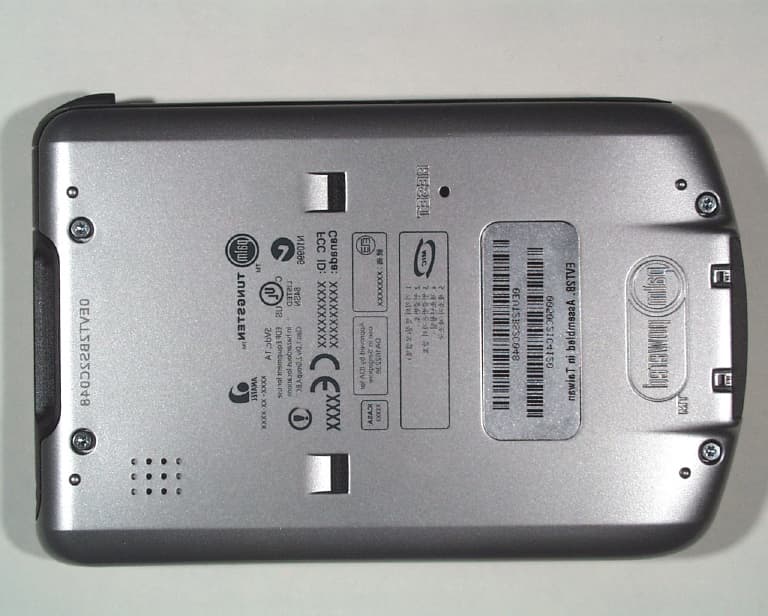
O3W200000
Apr 22, 2003PDA With 802.11b WLAN
Equipment Class
DTS - Digital Transmission System
O3W550000
Oct 24, 2002Handhelds PDA With Bluetooth Transceiver
Equipment Class
DSS - Part 15 Spread Spectrum Transmitter