O9C-SL1020Wireless Lan card
Hewlett Packard Enterprise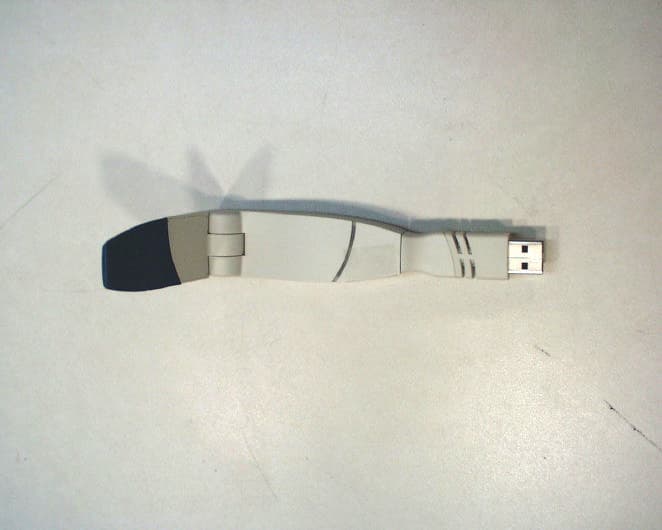
Click to zoom
Application Details
- Equipment Class
- DSS - Part 15 Spread Spectrum Transmitter
- Date of Grant
- Jul 29, 2001
- Application Purpose
- Original Equipment
- Date of Application
- Jul 29, 2001
- Equipment Note
- Wireless Lan card
- Frequency Range
- 2402.00000000 - 2480.00000000
- Company
- Hewlett Packard Enterprise
- Country
- United States
Documents & Files
Document Text
Text extracted from the exhibit documents filed with the FCC. Open a document above to read the original.
Users Manual
http://www.3com.com/ http://www.3com.com/productreg Bluetooth Wireless USB Device User Guide Published April 2001 Version 1.1.1 SL-1020, SL-1021 3Com Corporation n 5400 Bayfront Plaza n Santa Clara, California n 95052-8145 Copyright © 2001 3Com Corporation. All rights reserved. No part of this documentation may be reproduced in any form or by any means or used to make any derivative work (such as translation, transformation, or adaptation) without written permission from 3Com Corporation. 3Com Corporation reserves the right to revise this documentation and to make changes in content from time to time without obligation on the part of 3Com Corporation to provide notification of such revision or change. 3Com Corporation provides this documentation without warranty, term, or condition of any kind, either implied or expressed, including, but not limited to, the implied warranties, terms or conditions of merchantability, satisfactory quality, and fitness for a particular purpose. 3Com may make improvements or changes in the product(s) and/or the program(s) described in this documentation at any time. If there is any software on removable media described in this documentation, it is furnished under a license agreement included with the product as a separate document, in the hard copy documentation, or on the removable media in a directory file named LICENSE.TXT or !LICENSE.TXT. If you are unable to locate a copy, please contact 3Com and a copy will be provided to you. UNITED STATES GOVERNMENT LEGEND If you are a United States government agency, then this documentation and the software described herein are provided to you subject to the following: All technical data and computer software are commercial in nature and developed solely at private expense. Software is delivered as “Commercial Computer Software” as defined in DFARS 252.227-7014 (June 1995) or as a “commercial item” as defined in FAR 2.101(a) and as such is provided with only such rights as are provided in 3Com’s standard commercial license for the Software. Technical data is provided with limited rights only as provided in DFAR 252.227-7015 (Nov 1995) or FAR 52.227-14 (June 1987), whichever is applicable. You agree not to remove or deface any portion of any legend provided on any licensed program or documentation contained in, or delivered to you in conjunction with, this User Guide. Unless otherwise indicated, 3Com registered trademarks are registered in the United States and may or may not be registered in other countries. 3Com and DynamicAccess are registered trademarks and the 3Com logo is a trademark of 3Com Corporation. XTNDConnect PC is a registered trademark of Extended Systems. Microsoft and Windows are registered trademarks of Microsoft Corporation. The BLUETOOTH trademarks are owned by their proprietor and used by 3Com Corporation under license. All other company and product names may be trademarks of the respective companies with which they are associated. C ONTENTS I NTRODUCTION TO B LUETOOTH W IRELESS T ECHNOLOGY Overview Bluetooth Wireless USB Device Optimized Antenna Software and Firmware Upgradeable I NSTALLING Y OUR B LUETOOTH USB D EVICE AND C ONNECTION M ANAGER Bluetooth Installation CD Installing Your External Bluetooth USB Device and Virtual COM Ports Using Bluetooth Connection Manager Confirming Device Installation Reinstalling Drivers for Your Embedded Bluetooth USB Device Uninstalling Your Bluetooth USB Device and Virtual COM Ports Technical Support R EGULATORY I NFORMATION 1 I NTRODUCTION TO B LUETOOTH W IRELESS T ECHNOLOGY Overview Bluetooth wireless technology allows you to make short-range wireless connections to Bluetooth devices such as cellular phones, personal digital assistants (PDA), and desktop and notebook computers. Because Bluetooth wireless technology uses radio transmission, voice and data transmission are immediate. The mode of transmission that Bluetooth wireless technology uses ensures both protection from interference and secure data transfers. You might use Bluetooth wireless technology in these ways: n Dial up to the Internet on your notebook over your Bluetooth cellular phone n Send a fax from your notebook over your Bluetooth cellular phone n Synchronize your Bluetooth PDA with your notebook n Send your business card to anyone in a meeting who has a Bluetooth device n Send or receive files from anyone in a meeting who has a Bluetooth notebook or PDA n Chat with anyone in a meeting who has a Bluetooth notebook n Play a one-on-one serial game without a cable n Send an e-mail from your training session without being wired to the network Bluetooth Wireless USB Device The Bluetooth USB device uses a reliable radio frequency to transmit data wirelessly. Optimized Antenna The Bluetooth antenna provides powerful performance in all directions. Software and Firmware Upgradeable Current software and firmware upgrades are available on the 3Com Web site at: www.support.3com.com 2 C HAPTER 1: I NTRODUCTION TO B LUETOOTH W IRELESS T ECHNOLOGY 2 I NSTALLING Y OUR B LUETOOTH USB D EVICE AND C ONNECTION M ANAGER Bluetooth Installation CD The Bluetooth Installation CD contains the following: n Microsoft Windows 98 Second Edition (SE), 2000, and Millennium Edition (Me) setup programs and drivers n Bluetooth Connection Manager by 3Com n XTNDConnect PC mobile synchronization and management software n 3Com Mobile Connection Manager n README.TXT file with updated information about your Bluetooth USB device n This Bluetooth Wireless USB Device User Guide n Adobe Acrobat Reader Installing Your External Bluetooth USB Device and Virtual COM Ports 1 With the computer on and Windows 98 SE, 2000, or Me running,insert the Bluetooth Installation CD into the CD-ROM drive. The auto-start feature starts the installation. If auto-start is disabled on your computer, click Start>Run and type D:\SETUP.EXE (where D: is your CD-ROM drive). 2 Select Install Bluetooth Hardware . 3 Attach the USB device to the USB port (see the …
Text truncated - open the document above for the full version.
Cover Letter(s)
3Com Corporation July 23, 2001 3930 W. Parkway Blvd. West Valley, UT 84120 FCC TCB Application Reviewer Communication Certification Laboratories 1940 W. Alexander St. Salt Lake City, Utah 84120 Subject:Application for Processing 3Com Model SL-1020 through CCL’s FCC Authorized TCB. Reference: FCC ID # O9C-SL1020 Dear Application Examiner: 3Com Corporation is submitting this application for the certification of the 3Com SL- 1020 wireless USB Device. It operates in the 2400 – 24835 MHz band, with a peak output power of 1.48 mW. The SL-1020 is a wireless transceiver that connects via an USB interface to a PC or laptop computer. This device provides data and voice exchange capabilities with other standard protocol enabled devices. The SL-1020 enables wireless communications with Palms, Palm-PC's, Mobile Phones, LAN Access Points, PSTN Access Points, Cordless Headsets, and other Standard protocol enabled PC's. The SL-1020 transmitter was connected to the PC through a 6 foot cable and a direct connect USB adapter. An 18 inch cable may also be provided. The technical report and exhibits demonstrate compliance with FCC rules 47 CFR 15.24. To facilitate the review process an index of exhibits has been provided within this same file. Thank you for reviewing this application. Best regards, Kaan L. Gregersen Regulatory Engineer 3Com Corporation Index of Exhibits for 3Com SL-1020 Wireless Module FCC ID: O9C-SL1020 EXHIBITDESCRIPTIONFILE NAMECONFIDENTIAL Exhibit 1Labeling and PlacementExhibit_1.pdf Exhibit 2Letter of AttestationExhibit_2.pdf Exhibit 3External View PhotographsExhibit_3.pdf Exhibit 4Block DiagramExhibit_4.pdfYES Exhibit 5SchematicsExhibit_5.pdfYES Exhibit 6Test ReportExhibit_6.pdf Exhibit 7Test Set-up PhotographsExhibit_7.pdf Exhibit 8User Manual and Installation GuideExhibit_8.pdf Exhibit 9Internal View PhotographsExhibit_9.pdf Exhibit 10(Not Applicable)(Not Applicable) Exhibit 11RF Exposure InformationExhibit_11.pdf Exhibit 12Description of OperationExhibit_12.pdfYES Exhibit 13Cover LettersExhibit_13.pdf 3Com Corporation July 23, 2001 3930 W. Parkway Blvd. West Valley, UT 84120 FEDERAL COMMUNICATIONS COMMISSION 7435 Oakland Mills Road Columbia, MD 21046 Subject: Request for Confidentiality Regarding FCC ID: O9C-SL1020 To Whom It May Concern: In accordance with § 0.459 of CFR 47, 3Com Corporation requests confidentiality for the following items: 1. Block Diagram (Exhibit 4) 2. Schematic Diagrams (Exhibit 5) 3. Operational Description (Exhibit 12) These items contain detailed system and equipment description and related information about the product which 3Com Corporation considers to be proprietary, confidential and a custom design which otherwise would not be released to the general public. Since this design is a basis from which future technological products will evolve, 3Com Corporation also feels that this information would be of benefit to its competitors, and that the disclosure of the information in these exhibits would give our competitors an unfair advantage in the market. Any information for which 3Com has requested confidentiality, but which the FCC may not grant, should be returned to 3Com. Best Regards, Kaan L. Gregersen Regulatory Engineer 3930 West Parkway Blvd. West Valley City, UT 84120 (801) 320-7515
External Photos
EXHIBIT 3: External Photographs Page 1 of 2 Top View of the SL-1020 EXHIBIT 3: External Photographs Page 2 of 2 Bottom View of the SL-1020
ID Label/Location Info
EXHIBIT 1: Labeling and Placement Page 1 of 1
Internal Photos
EXHIBIT 9: Internal Photographs Page 1 of 2 Front View of the SL-1020 PCB EXHIBIT 9: Internal Photographs Page 2 of 2 Back View of the SL-1020 PCB
RF Exposure Info
EXHIBIT 11: RF Statement Page 1 of 1 RF Exposure Compliance Requirements Per 47 CFR 15.247 (b)(4), the EUT meets the requirement that it be operated in a manner that ensures the public is not exposed to radio frequency energy levels in excess of the Commission’s guidelines (ref. 47 CFR 1.1307, 1.1310, and 2.1093. See also OET Bulletin 65, Supplement C). The EUT will be used in personal computers and peripherals and can therefore be considered a portable transmitter per 47 CFR 2.1093. The EUT supports the connection of only one antenna at a time. The MPE estimates are as follows: Table 1 in 47 CFR 1.1310 defines the maximum permissible exposure (MPE) for the general population as 1mW/cm 2 . The distance from the EUT’s transmitting antenna where the exposure level reaches the maximum permitted level is calculated using the general equation: S = (PG)/4πR 2 . Where: S = power density (1 mW/cm 2 maximum permitted level) P = power input to the antenna (1.48 mW) G = linear power gain relative to an isotropic radiator (2.9 dBi = numeric gain of 1.95) R = distance to the center of the radiation of the antenna Solving for R, the 1 mW/cm 2 limit is reached 0.48 cm or closer to the transmitting antenna. Therefore, no warning labels, no RF exposure warnings in the user manual, or other protection measures will be used with the EUT. Installation instructions will include the following information: “This device generates and radiates radio-frequency energy. In order to comply with FCC radio-frequency radiation exposure guidelines for an uncontrolled environment, this device must be installed and operated while maintaining a minimum body to antenna distance of 0.48 cm (0.189 inch), based on an antenna gain of 2.9 dBi.”
Test Report
TEST REPORT FROM: COMMUNICATION CERTIFICATION LABORATORY 1940 W. Alexander Street Salt Lake City, Utah 84119-2039 Type of Report: Certification TEST OF: SL-1020 FCC ID: O9C-SL1020 To FCC PART 15.247, Subpart C Test Report Serial No: 73-7546 Applicant: 3Com Corporation 3930 West Parkway Blvd. West Valley City, UT 84120 Date(s) of Test: May 29 - 31, 2001 Issue Date: June 15, 2001 Equipment Receipt Date: May 29, 2001 COMMUNICATION CERTIFICATION LABORATORY TEST REPORT: 73-7546 FCC ID: O9C-SL1020 Page 1 of 60 CERTIFICATION OF ENGINEERING REPORT This report has been prepared by Communication Certification Laboratory to determine compliance of the device described below with the requirements of FCC PART 15.247, Subpart C. This report may be reproduced in full, partial reproduction may only be made with the written consent of the laboratory. The results in this report apply only to the sample tested. - Applicant: 3Com Corporation - Manufacturer’s: 3Com Corporation - Brand Name: 3Com - Model Number: SL-1020 - FCC ID: O9C-SL1020 On this 15 th day of June 2001, I, individually, and for Communication Certification Laboratory, certify that the statements made in this engineering report are true, complete, and correct to the best of my knowledge, and are made in good faith. COMMUNICATION CERTIFICATION LABORATORY Tested by: Kirk P. Thomas Project Engineer COMMUNICATION CERTIFICATION LABORATORY TEST REPORT: 73-7546 FCC ID: O9C-SL1020 Page 2 of 60 TABLE OF CONTENTS PAGE SECTION 1. CLIENT INFORMATION AND MANUFACTURER: .................3 SECTION 2. EQUIPMENT UNDER TEST (EUT) ...........................4 SECTION 3. TEST SPECIFICATION, METHODS & PROCEDURES .............7 SECTION 4. OPERATION OF EUT DURING TESTING. ....................12 SECTION 5. SUMMARY OF TEST RESULTS: ............................13 SECTION 6. MEASUREMENTS, EXAMINATIONS AND DERIVED RESULTS: .....14 APPENDIX 1 TEST PROCEDURES AND TEST EQUIPMENT ...................47 APPENDIX 2 Photographs ..........................................55 COMMUNICATION CERTIFICATION LABORATORY TEST REPORT: 73-7546 FCC ID: O9C-SL1020 Page 3 of 60 SECTION 1. CLIENT INFORMATION AND MANUFACTURER: 1.1 Client Information: Company Name: 3Com Corporation 3930 West Parkway Blvd. West Valley City, UT 84120 Contact Name: Kaan Gregersen Title: Regulatory Engineer 1.2 Manufacturer: Company Name: 3Com Corporation 3930 West Parkway Blvd. West Valley City, UT 84120 Contact Name: Kaan Gregersen Title: Regulatory Engineer COMMUNICATION CERTIFICATION LABORATORY TEST REPORT: 73-7546 FCC ID: O9C-SL1020 Page 4 of 60 SECTION 2. EQUIPMENT UNDER TEST (EUT) 2.1 Identification of EUT: Trade Name: 3Com Corporation Model Name or Number: SL-1020 Serial Number: N/A Options Fitted: None Country of Manufacture: U.S.A. 2.2 Description of EUT: The SL-1020 is a wireless FHSS transceiver which connects via an USB interface to a pc or laptop computer. This provides the user with fast, secure, and reliable data and voice exchange capabilities with other standard protocol enabled devices. The SL-1020 enables wireless communications with Palms, Palm-PC's, Mobile Phones, LAN Access Points, PSTN Access Points, Cordless Headsets, and other Standard protocol -enabled PC's. The SL-1020 transmitter was connected to the PC through a 6 foot cable and a direct connect USB adapter (an 18 inch cable may also be provided). This report covers the transmitter only. The receiver and class B computer peripheral are covered under a separate declaration of conformity report. 2.3 Modification Incorporated/Special Accessories on EUT: There were no modifications or special accessories required to comply with the specification. 2.4 EUT and Support Equipment: The FCC ID numbers for all the EUT and support equipment used during the test (including inserted cards) are listed below: COMMUNICATION CERTIFICATION LABORATORY TEST REPORT: 73-7546 FCC ID: O9C-SL1020 Page 5 of 60 Brand Name Model Number FCC ID Number Description Name of Interface Ports / Interface Cables BN: 3Com (1) MN: SL-1020 O9C- SL1020 USB wireless transceiver See Section 2.5. BN: Dell MN: Inspiron 4000 SN: TW-07914H-12800- 11B-0882 DoC Laptop Computer USB / USB to Mini USB Note: (1) EUT. (2) Interface port connected to EUT (See Section 2.5) (3) Mouse cable permanently attached. The support equipment listed above was not modified in order to achieve compliance with this standard. 2.5 Interface Ports on EUT: Name of Ports No. of Ports Fitted to EUT. Cable Descriptions/Length USB 1 USB / 6 foot Antenna 1 N/A COMMUNICATION CERTIFICATION LABORATORY TEST REPORT: 73-7546 FCC ID: O9C-SL1020 Page 6 of 60 2.6 List of Channels: Channel Number Channel Frequency (MHz) Channel Number Channel Frequency (MHz) 1 2402.0 41 2442.0 2 2403.0 42 2443.0 3 2404.0 43 2444.0 4 2405.0 44 2445.0 5 2406.0 45 2446.0 6 2407.0 46 2447.0 7 2408.0 47 2448.0 8 2409.0 48 2449.0 9 2410.0 49 2450.0 10 2411.0 50 2451.0 11 2412.0 51 2452.0 12 2413.0 52 2453.0 13 2414.0 53 2454.0 14 2415.0 54 2455.0 15 2416.0 55 2456.0 16 2417.0 56 2457.0 17 2418.0 57 2458.0 18 2419.0 58 2459.0 19 2420.0 59 2460.0 20 2421.0 60 2461.0 21 2422.0 61 2462.0 22 2423.0 62 2463.0 23 2424.0 63 2464.0 24 2425.0 64 2465.0 25 2426.0 65 2466.0 26 2427.0 66 2467.0 27 2428.0 67 2468.0 28 2429.0 68 2469.0 29 2430.0 69 2470.0 30 2431.0 70 2471.0 31 2432.0 71 2472.0 32 2433.0 72 2473.0 33 2434.0 73 2474.0 34 2435.0 74 2475.0 35 2436.0 75 2476.0 36 2437.0 76 2477.0 37 2438.0 77 2478.0 38 2439.0 78 2479.0 39 2440.0 79 2480.0 40 2441.0 COMMUNICATION CERTIFICATION LABORATORY TEST REPORT: 73-7546 FCC ID: O9C-SL1020 Page 7 of 60 SECTION 3. TEST SPECIFICATION, METHODS & PROCEDURES 3.1 Test Specification: Title: FCC PART 15.247, Subpart C (47 CFR 15). Limits and methods of measurement of radio interference characteristics of radio frequency devices. Operation within the bands 902-928 MHz, 2400-2483.5 MHz and 5725-5850 MHz. Purpose of Test: The tests were performed to demonstrate Initial compliance. 3.2 Methods & Procedures: 3.2.1 § 15.247 (a) …
Text truncated - open the document above for the full version.
Test Setup Photos
EXHIBIT 7: Test Set-up Photographs Page 1 of 2 Front View of Radiated Test Setup EXHIBIT 7: Test Set-up Photographs Page 2 of 2 Back View Of Radiated Test Setup
Contact Information
Applicant
Jim Taylor(Manager, Hardware Support Engineering)
Technical Contact
3Com CorporationKaan L Gregersen
[email protected]801-320-7515
3930 West Parkway Blvd. · West Valley City, Utah · United States
Non-Technical Contact
3Com CorporationKaan L Gregersen
[email protected]801-320-7515
Test Firm
Communication Certification Lab.Scott Earl
Technical Specifications
| # | Rule Parts | Frequency Range | Power Output |
|---|---|---|---|
| 1 | 15C | 2.40 GHz - 2.48 GHz | 1.48 W |
Other Applications from Hewlett Packard Enterprise

O9C-BJNGABB0038
Oct 29, 2015HPE MSR954-W 1GbE+SFP LTE (AM) Rtr
Equipment Class
DTS - Digital Transmission System
O9C-BJNGAFB0008
Jul 30, 2015Wireless LAN Access Point
Equipment Class
JBP - Part 15 Class B Computing Device Peripheral
O9C-BJNGAFB0005
Nov 06, 2014Unified Wired-WLAN Walljack
Equipment Class
JBP - Part 15 Class B Computing Device Peripheral
O9C-BJNGAFB0004
Sep 04, 2014Wireless LAN Access Point
Equipment Class
JBP - Part 15 Class B Computing Device Peripheral
O9C-BJNGAFB0003
Jul 02, 2014Unified Wired-WLAN Walljack
Equipment Class
DTS - Digital Transmission System