Q3QLE1600T004BG802.11 b/g radio
Xplore Technologies Corp of America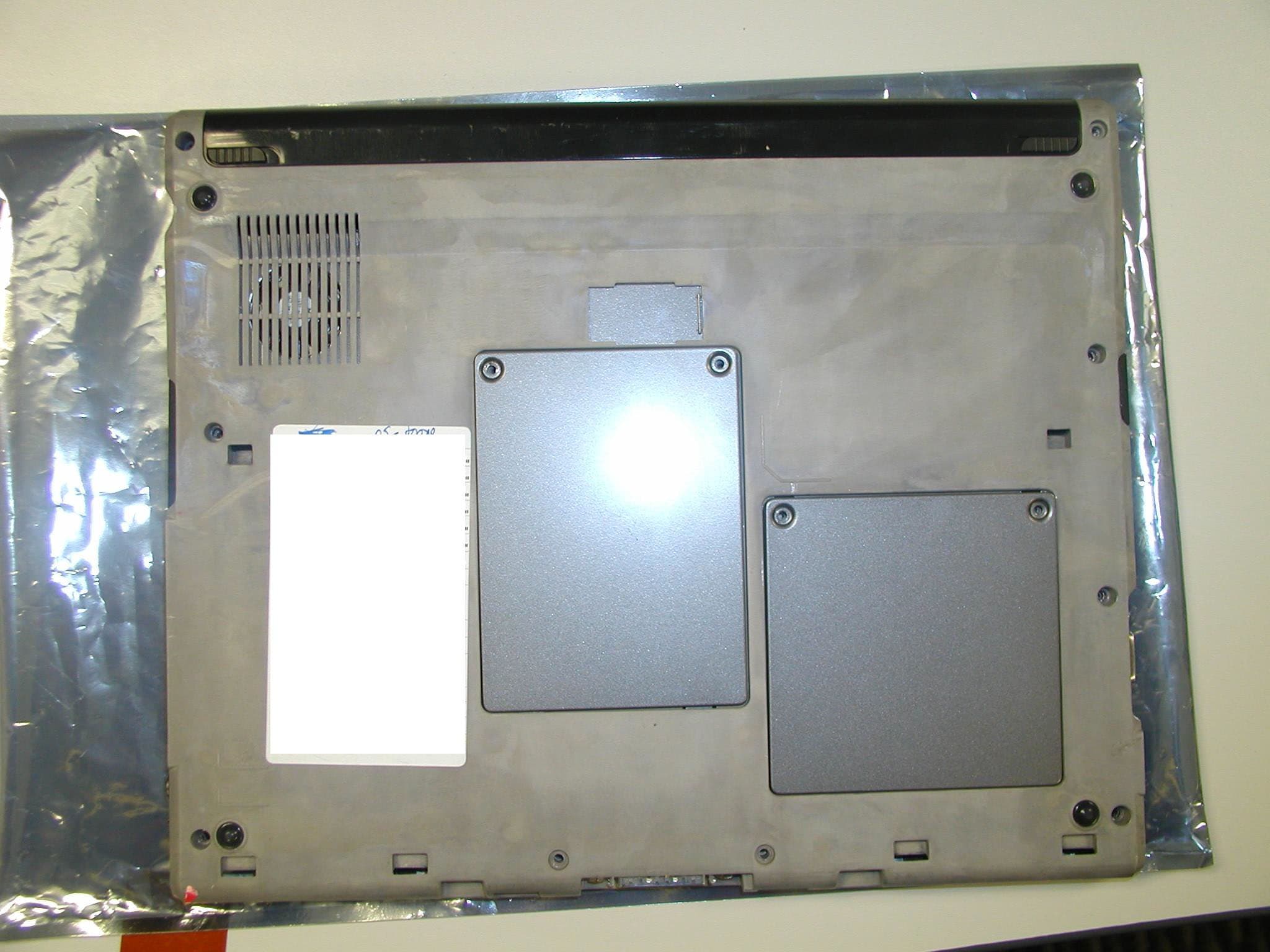
Click to zoom
Application Details
- Equipment Class
- DTS - Digital Transmission System
- Date of Grant
- Sep 15, 2005
- Application Purpose
- Original Equipment
- Date of Application
- Sep 15, 2005
- Equipment Note
- 802.11 b/g radio
- Frequency Range
- 2412.00000000 - 2462.00000000
- Country
- United States
Documents & Files
Document Text
Text extracted from the exhibit documents filed with the FCC. Open a document above to read the original.
Users Manual
Safety and Regulatory Guide For Motion Tablet PCs and Accessories Product Safety Information Safety Compliance Notices Regulatory Notices Guide de sécurité et de réglementation Pour PC tablettes et accessoires Motion Informations relatives à la sécurité du produit Avis de conformité aux normes de sécurité Avis relatifs aux réglementations Sicherheits- und Vorschriftshandbuch Für Motion Tablet PCs und Zubehör Produktsicherheitshinweise Sicherheitseinhaltungserklärung Vorschriftseinhaltungserklärung Product Safety Information Motion Tablet PCs and accessories are designed to optimize safety, minimize strain, and withstand the rigors of portability. However, to further reduce the risk of personal injury or damage to the unit, certain precautions should be observed. Basic Personal Safety Precautions ■ Do not attempt to service the Tablet PC nor its components yourself. Perform only those service installations for which Motion provides special instructions, for example, swapping the battery, changing memory modules. See the Motion web site at www.motioncomputing.com for a list of serviceable accessories for your Tablet PC. ■ To avoid personal injury from electric shock or fire: • Completely power down the Tablet PC when replacing memory modules, cleaning the Tablet PC, its components, or chassis, or performing operations requiring similar steps. To do this, first turn the power off at the power switch, remove the battery, then disconnect the AC adapter from the electrical outlet or from any other type of external power source, such as an external battery • Do not operate the Tablet PC near water, for example, near a bathtub, kitchen sink or laundry tub, in a wet basement, by a swimming pool, or in the rain. The cases, portfolios, and other accessories currently offered by Motion are not designed to be water resistant nor water tight. Visit the Motion website to see the most current list of accessories. • Do not connect or disconnect any cables or perform maintenance or reconfiguration of this product during an electrical storm. • Avoid using the wired modem or LAN during an electrical storm, as a remote risk of electric shock from lightning exists. • Do not push foreign objects into air vents or other openings of the Tablet PC or accessories, such as the PCA card slots or the optical disk drive bays. Doing so can short out interior components and may cause fire or electric shock. • When installing memory modules, ground yourself by touching a grounded conductive surface, such as a device with a grounded plug. Avoid touching the pins and leads on the memory module or internal circuitry of the Tablet PC. ■ If the Motion battery pack leaks and the fluid get in your eyes, do not rub them. Instead, rinse your eyes with clean running water and immediately seek medical attention. Otherwise, eye injury may result. ■ If acid leaking from the battery pack contacts your skin or clothing, immediately wash it away with running water. Otherwise, skin inflammation can occur. English 1 Set Up Precautions ■ When setting up the Tablet PC in the Motion FlexDock, Desktop Stand, or Hardtop Keyboard (M Series only), place it on a level surface so it does not fall over and damage the unit, docking station, keyboard, connectors, or other components. ■ When you move the Tablet PC between environments with very different humidity and/or temperature ranges, allow sufficient time to adjust to the new humidity or temperature. ■ Do not drop the Tablet PC or subject it to other mechanical shocks. ■ Do not apply heavy pressure to the Tablet PC or subject it to strong impact. Excessive pressure or impact can cause damage to Tablet PC components or otherwise cause malfunctions. ■ See the Installation Instructions before connecting to the power supply. Tablet PC Precautions ■ Do not attempt to service the Tablet PC yourself, disassemble nor modify it nor its components. You may damage the unit or its components. ■ Operate the Tablet PC at the recommended temperature range of +5 o C to +35 o C (+41 o F to +95 o F). Store it at a temperature of -20 o C to +60 o C (+4 o F to +140 o F) ■ Certain environments may contain particles or debris that can adhere to the Tablet PC display or to the Tablet PC pen tip. To avoid damaging the display, clean it frequently with the cleaning cloth provided or with a soft cloth. You may spray a window-type cleaner or apply water to the cloth, but do not spray liquids directly on the display. ■ Change pen tips regularly, especially if you work in an environment that contains particles or debris. Dropping the pen onto a rough surface may damage the pen tip or embed particles in it that can damage the Tablet PC display. For instructions about changing the pen tips, see Chapter 4 of the Motion Tablet PC User Guide found on the Tablet PC or go to the Motion website at www.motioncomputing.com to download the latest version of this Guide. ■ Store the pen in the pen bay of the Tablet PC. Carrying it in a pocket, toolbox, or similar receptacle that contains particles or debris may damage the pen tip or embed particles in it that can damage the Tablet PC display. High Risk and Dangerous Activity Warning ■ This computer system is not intended to be used as a medical device or for use in high-risk or dangerous activities, including without limitation, the operation of nuclear facilities, aircraft navigation or communications systems, hospital or medical operations, air traffic control machines, treating, diagnosing, or monitoring patients, or for any other uses where the failure of the computer system could lead to death, personal injury, or severe environmental damage . English 2 Cabling and Power Cord Precautions ■ Power cord sets for use in other countries must meet the requirements of that country. Use the appropriate AC adapter and power cord for your locale. For information about power cord set requirements, contact the Motion Reseller from whom you purchased the product, or contact Motion Computi…
Text truncated - open the document above for the full version.
Users Manual
MOTION COMPUTING LE1600 AND LS800 TABLET PC MICROSOFT WINDOWS XP TABLET PC EDITION 2005 USER GUIDE iiMotion Computing LE1600 and LS800 Tablet PC User Guide How To Search The PDF Documentation You can search for and locate information in this user guide by using the following methods: • In the Bookmark navigation tab (left frame of PDF), select the sec- tion of the user guide you want to view. The section opens in the right frame of the PDF window. • In the Table of Contents, click on the section of the user guide you want to open. The section opens in the right frame of the window. • In the tool bar at the top of the PDF window, click the binoculars icon or select the menu Edit > Search, and enter the text describing the topic you want to view, and then tap (click) Search. Narrow your search by selecting the search settings options. • From the menu, select Edit > Find or press Ctrl+F, and type the text describing the topic you want to view, and then tap (click) Next Motion Computing LE1600 and LS800 Tablet PC User Guideiii Copyright Information Acrobat is a registered trademark of Adobe Systems Incorporated. Atheros. the Atheros logo, Super G, Super A/G, Wake-on-Wireless, and Wake-on-Theft are registered trademarks of Atheros Communications, Inc. AuthenTec is a registered trademark of AuthenTec, Inc. BLUETOOTH is a registered trademark owned by the Bluetooth SIG, Inc., U.S.A. and licensed to Motion Computing, Inc. Intel, Intel Inside, the Intel Inside logo, Pentium, and PROSet are trademarks or registered trademarks of Intel Corporation or its subsidiaries in the United States and other countries. Knowles and IntelliSonic are trademarks or registered trademarks of Knowles Acoustics, Inc. Microsoft Windows, Windows XP, Windows XP Tablet PC Edition, and Windows Journal are either registered trademarks or trademarks of Microsoft Corporation in the United States and/ or other countries. Motion, Motion Computing, Speak Anywhere, and View Anywhere are trademarks or registered trademarks of Motion Computing, Inc. in the U.S. and other countries. OmniPass is a trademark of Softex, Inc. Realtek is a trademark of Realtek Semiconductor Corporation. SigmaTel is a registered trademark and Universal Jacks is a trademark of SigmaTel Corporation. Wi-Fi is a registered trademark of the Wi-Fi Alliance. Motion Computing, Inc. has made every effort to identify trademarked properties and owners on this page. All brands and product names used in this document are for identification purposes only and may be trademarks or registered trademarks of their respective companies. PATENTS: The Motion Computing products and services may be covered by one or more of the following protected inventions. Additional patents may also be pending. US PATENTS: D480,730. OTHER PATENTS: GB3009545, BG3009546, AUS154529, CAN101617, J1188539. For more information, see www.motioncomputing.com/info/patents. NOTICE: The information in this publication is subject to change without notice. MOTION COMPUTING, INC. SHALL NOT BE HELD LIABLE FOR TECHNICAL OR EDITORIAL ERRORS OR OMISSIONS CONTAINED HEREIN NOR FOR ACCIDENTAL OR CONSEQUENTIAL DAMAGES RESULTING FROM THE FURNISHING, PERFORMANCE, OR USE OF THIS MATERIAL. The information contained in this document is provided “as is” without warranty of any kind and is subject to change without notice. The warranties for Motion Products are set forth in the express limited warranty statements accompanying such products. Nothing herein should be construed as constituting an additional warranty. This publication contains information protected by copyright. No part of this publication may be photocopied or reproduced in any form without prior written consent from Motion Computing, Inc. © 2005 Motion Computing, Inc. (July 2005) All Rights Reserved P/N 024-02-0061 Rev. A00 ivMotion Computing LE1600 and LS800 Tablet PC User Guide About This User Guide CAUTIONS, W ARNINGS AND NOTICES The following notices are found in this user guide: WARNING: Text set off in this way indicates that failure to follow directions in the warning could result in bodily harm or loss of life. CAUTION: Text set off in this way indicates that failure to follow directions in the CAUTION could result in damage to the equipment or loss of information. IMPORTANT: Text set off in this way presents information or instructions that should be followed or information of particular interest. NOTE: Text set off in this way presents information or instructions. M ENU ITEMS, B UTTONS, I CONS Menu items, icons, and instructions found in the procedures in this user guide are set apart by capitalizing them exactly as shown on screen. Examples are the Start menu, Dashboard, Tablet and Pen Settings icon, and Apply buttons. W RITING ON THE DISPLAY Writing on the Motion Tablet PC digitizer display in this user guide refers to any handwritten input using the specially-designed Motion digitizer pen, that is provided. The display responds only to this pen and not to any other type of pen or to a stylus or other device such as those used with personal digital assistants (PDAs). The display surface may be damaged by ink pens or other pointed objects. I NKThe term ink refers to digital ink, i.e., hand-drawn or handwritten input and that can be displayed or converted into text. R EFERENCES TO USING THE P EN AND P EN FUNCTION B UTTON Notations for using the Motion Digitizer Pen, which are found throughout this user guide, are described below: • Tap — Firmly tap the pen on the Tablet PC display, without pressing the function button on the pen; a tap equals a mouse left-click • Double-tap — Tap the pen twice on the display, without pressing the function button on the pen • Right-click — Press the function button on the pen and tap the pen on the display (equals a mouse right-click) • Press and hold — Press and hold the tip of the pen to the display without pressing the pen function button (equals a mouse right-click) • Tap and drag — Tap and drag the pen on th…
Text truncated - open the document above for the full version.
Attestation Statements
Federal Communications Commission 7435 Oakland Mills Road Columbia, MD 21046 USA Authority to Act as Agent to the Federal Communications Commission On our behalf, I appoint Nemko USA, Inc. to act as agent in the preparation of this application for equipment authorization to the Federal Communications Commission. I certify that submitted Exhibits properly describe the device or system for which equipment authorization is sought. I also certify that each unit manufactured, imported or marketed, as defined in the Commission's regulations will have affixed to it a label identical to that submitted for approval with this application. APPLICANT ANTI-DRUG ABUSE CERTIFICATION: In signing this letter, Applicant certifies that, in the case of an individual applicant, he or she is not subject to a denial of federal benefits, that includes FCC benefits, pursuant to Section 5301 of the Anti-Drug Abuse Act of 1988, 21 U.S.C. 853(a), or, in the case of a non-individual applicant (e.g. corporation, partnership or other unincorporated association), no party to the application is subject to a denial of federal benefits, that includes FCC benefits, pursuant to that section. For the definition of a "party" for these purposes, see 47 CFR 1.2002(b). Date: August 1, 2005 Agreement expiration date: August 1, 2006 By: Contact Name: Don Bobo Contact Title: International Regulatory Engineer Telephone: 512-637-1149 Applicant Company Name: Motion Computing Inc.
Cover Letter(s)
Motion Computing, Inc. 8601 Ranch Road 2222, Building 2, Austin, TX 78730 512-637-1100 (Main); 512-637-1199 (Fax) 1-866-MTABLET (Sales) www.motioncomputing.com December 15, 2004 ATTN: Reviewing Engineer Federal Communications Commission 7435 Oakland Mills Road Columbia, MD 21046 RE: Confidentiality Request For: Motion Tablet PC Series LE1600 Model T004 FCC ID: Q3QLE1600T004BG To Whom It May Concern: This letter serves as an official request for confidentiality under FCC Rule Sections 0.457 and 0.459. We have requested that the Schematics, Block Diagrams, and Pecos Product Specification for the Motion Tablet PC LE1600 series, model T004 required for submission along with this application be kept from General Public review. The reason for this confidentiality request is due to information requested for this submission contains company proprietary information that could never get into the hands of our competitors of which could pose loss of revenue and possible patent infringements. Please contact me if there is any further information you may need. Sincerely, Don Bobo Motion Computing Inc. 8601 Ranch Road 2222 Building 2; Austin, TX 78730 512-637-1149 (Direct) 512-637-1199 (Fax) [email protected]
Internal Photos
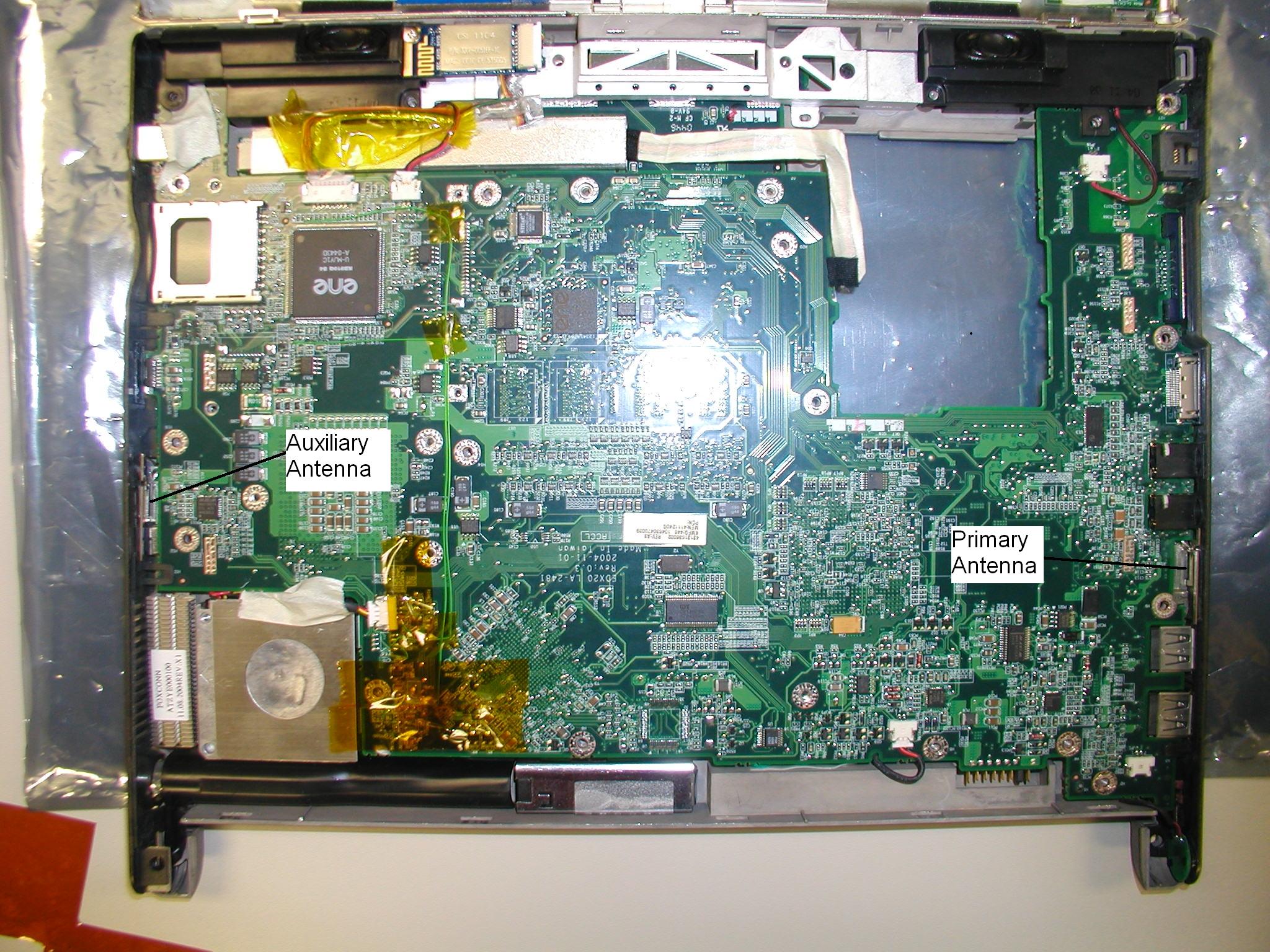
Top View “Shielding removed”
Internal Photos
Top View “With Shield” Bottom View
RF Exposure Info
2867 Progress Place, Suite 4D • Escondido, CA 92029 • U.S.A. TEL (760) 737-3131 • FAX (760) 737-9131 http://www.rfexposurelab.com CERTIFICATE OF COMPLIANCE SAR EVALUATION Motion Computing Dates of Test: September 7,2005 8601 RR2222 Bldg. 2 Test Report Number: SAR.20050902 Austin, TX 78730 Revision - FCC ID: Q3QLE1600T004BG Industry Canada Cert: 4587A-LE1600 Model(s): T004 Serial No.: Prototype (Identical to Production Unit) Equipment Type: PC Tablet Classification: Certification TX Frequency Range: 2412 - 2462 MHz Maximum RF Output: 14 dBm Signal Modulation: DSSS/OFDM Antenna Type (Length): (2) Internal, Part Number DC330018100 Battery: Sanyo Model BATEDX20L4 Standard : Part 15E, RSS102 with Safety Code 6 This wireless mobile and/or portable device has been shown to be compliant for localized specific absorption rate (SAR) for uncontrolled environment/general exposure limits specified in ANSI/IEEE Std. C95.1-1999 and had been tested in accordance with the measurement procedures specified in IEEE 1528-2003, RSS102 with Safety Code 6 and OET Bulletin 65 Supp. C (See test report). I attest to the accuracy of the data. All measurements were performed by myself or were made under my supervision and are correct to the best of my knowledge and belief. I assume full responsibility for the completeness of these measurements and vouch for the qualifications of all persons taking them. Jay M. Moulton Vice President © 2005 RF Exposure Lab, LLC This report shall not be reproduced except in full without the written approval of RF Exposure Lab, LLC. FCC ID: Q3QLE1600T004BG Table of Contents 1. Introduction...........................................................................................................................3 SAR Definition [5]......................................................................................................................3 2. SAR Measurement Setup.....................................................................................................4 Robotic System.........................................................................................................................4 System Hardware.....................................................................................................................4 System Description...................................................................................................................4 E-Field Probe ALS-E-020.........................................................................................................5 3. Robot Specifications.............................................................................................................7 4. Probe and Dipole Calibration................................................................................................8 5. Phantom & Simulating Tissue Specifications........................................................................9 SAM Phantom...........................................................................................................................9 Brain & Muscle Simulating Mixture Characterization................................................................9 Device Holder...........................................................................................................................9 6. Body Worn Configurations..................................................................................................10 7. ANSI/IEEE C95.1 – 1999 RF Exposure Limits [2]...............................................................11 Uncontrolled Environment.......................................................................................................11 Controlled Environment.......................................................................................................... 11 8. Measurement Uncertainty...................................................................................................12 9. System Validation...............................................................................................................13 Tissue Verification...................................................................................................................13 Test System Verification......................................................................................................... 13 10. SAR Test Data Summary................................................................................................14 See Measurement Result Data Pages....................................................................................14 Procedures Used To Establish Test Signal.............................................................................14 Device Test Condition............................................................................................................. 14 Device Information on Test Conditions...................................................................................14 SAR Data Summary – 2450 MHz Muscle...............................................................................15 SAR Data Summary – 2450 MHz Muscle...............................................................................16 11. Test Equipment List........................................................................................................17 12. Conclusion......................................................................................................................18 13. References......................................................................................................................19 Appendix A – System Validation Plots and Data........................................................................20 Appendix B – SAR Test Data Plots.............................................................................................25 Appendix C – SAR Test Setup Photos.......................................................................................82 Appendix D – Probe Cali…
Text truncated - open the document above for the full version.
RF Exposure Info
FCC ID: Q3QLE1600T004BG Appendix D – Probe Calibration Data Sheets © 2005 RF Exposure Lab, LLC Page 87 of 109 This report shall not be reproduced except in full without the written approval of RF Exposure Lab, LLC. NCL CALIBRATION LABORATORIES Calibration File No.: CP-606 Client.: RFEL C E R T I F I C A T E OF C A L I B R A T I O N It is certified that the equipment identified below has been calibrated in the NCL CALIBRATION LABORATORIES by qualified personnel following recognized procedures and using transfer standards traceable to NRC/NIST. Equipment: Miniature Isotropic RF Probe 2450 MHz Manufacturer: APREL Laboratories Model No.: E-020 Serial No.: 215 Calibration Procedure: SSI/DRB-TP-D01-032-E020-V2 Project No: RFEL-Probe-215-Calibration-5166 BODY Calibration Calibrated: 10 th June 2005 Released on: 10 th June 2005 This Calibration Certificate is Incomplete Unless Accompanied with the Calibration Results Summary Released By: ______________________________________________________ NCL CALIBRATION LABORATORIES 51 SPECTRUM WAY Division of APREL Lab. NEPEAN, ONTARIO TEL: (613) 820-4988 CANADA K2R 1E6 FAX: (613) 820-4161 Signature On File NCL Calibration Laboratories Division of APREL Laboratories. Page 2 of 10 This page has been reviewed for content and attested to on Page 2 of this document. Introduction This Calibration Report reproduces the results of the calibration performed in line with the SSI/DRB-TP-D01-032-E020-V2 E-Field Probe Calibration Procedure. The results contained within this report are for APREL E-Field Probe E-020 215. References SSI/DRB-TP-D01-032-E020-V2 E-Field Probe Calibration Procedure IEEE 1528 “Recommended Practice for Determining the Peak Spatial-Average Specific Absorption Rate (SAR) in the Human Body Due to Wireless Communications Devices: Experimental Techniques” SSI-TP-011 Tissue Calibration Procedure Conditions Probe 215 was a new probe taken from stock prior to calibration. Ambient Temperature of the Laboratory: 22 °C +/- 0.5°C Temperature of the Tissue: 21 °C +/- 0.5°C We the undersigned attest that to the best of our knowledge the calibration of this probe has been accurately conducted and that all information contained within this report has been reviewed for accuracy. ------------------------------------------------------------ Stuart Nicol Director Product Development ------------------------------------------------------------ Janusz Lokaj Member of Engineering Staff (Calibration Engineer) NCL Calibration Laboratories Division of APREL Laboratories. Page 3 of 10 This page has been reviewed for content and attested to on Page 2 of this document. Calibration Results Summary Probe Type: E-Field Probe E-020 Serial Number: 215 Frequency: 2450 MHz Sensor Offset: 1.56 mm Sensor Length: 2.5 mm Tip Enclosure: Ertalyte* Tip Diameter: <5 mm Tip Length: 60 mm Total Length: 290 mm *Resistive to recommended tissue recipes per IEEE-1528 Sensitivity in Air Channel X: 1.2 μV/(V/m) 2 Channel Y: 1.2 μV/(V/m) 2 Channel Z: 1.2 μV/(V/m) 2 Diode Compression Point: 95 mV NCL Calibration Laboratories Division of APREL Laboratories. Page 4 of 10 This page has been reviewed for content and attested to on Page 2 of this document. Sensitivity in Body Tissue Frequency: 2450 MHz Epsilon: 39.2 (+/-5%) Sigma: 1.80 S/m (+/-10%) ConvF Channel X: 4.6 Channel Y: 4.6 Channel Z: 4.6 Tissue sensitivity values were calculated using the load impedance of the APREL Laboratories Daq-Paq. Boundary Effect: Uncertainty resulting from the boundary effect is less than 2% for the distance between the tip of the probe and the tissue boundary, when less than 2.44mm. Spatial Resolution: The measured probe tip diameter is 5 mm (+/- 0.01 mm) and therefore meets the requirements of SSI/DRB-TP-D01-032 for spatial resolution. NCL Calibration Laboratories Division of APREL Laboratories. Page 5 of 10 This page has been reviewed for content and attested to on Page 2 of this document. Receiving Pattern 2450 MHz (Air) Receiving Pattern Probe s/n 215 2450MHz 0 0.2 0.4 0.6 0.8 1 1.2 0 10 20 30 40 50 60 70 80 90 100 110 120 130 140 150 160 170 180 190 200 210 220 230 240 250 260 270 280 290 300 310 320 330 340 350 Ch1Ch2Ch3Tot NCL Calibration Laboratories Division of APREL Laboratories. Page 6 of 10 This page has been reviewed for content and attested to on Page 2 of this document. Isotropy Error 2450 MHz (Air) Isotropy Error Probe s/n 215 2450MHz -10 -9 -8 -7 -6 -5 -4 -3 -2 -1 0 1 2 3 4 5 6 7 8 9 10 0100200300 Error [dB] Isotropy Plot Probe s/n 215 2450MHz 0 0.1 0.2 0.3 0.4 0.5 0.6 0.7 0.8 0100200300 Degrees (x10) Voltage (mV) Ch1Ch2Ch3 Isotropicity in Tissue: 0.10 dB NCL Calibration Laboratories Division of APREL Laboratories. Page 7 of 10 This page has been reviewed for content and attested to on Page 2 of this document. Dynamic Range Probe 215 Dynamic Range 0.01 0.1 1 10 100 1000 10000 1.0010.00100.001,000.0010,000.00100,000.001,000,000.0010,000,000.00 Electric Field [(V/m)^2] Voltage [microV] Uncompensated Compensated NCL Calibration Laboratories Division of APREL Laboratories. Page 8 of 10 This page has been reviewed for content and attested to on Page 2 of this document. Video Bandwidth Probe Frequency Characteristics -6 -5 -4 -3 -2 -1 0 1 110100100010000 Frequency (Hz) Video Bandwidth at 500 Hz 1 dB Video Bandwidth at 1.02 KHz: 3 dB NCL Calibration Laboratories Division of APREL Laboratories. Page 9 of 10 This page has been reviewed for content and attested to on Page 2 of this document. Conversion Factor Uncertainty Assessment Frequency: 2450MHz Epsilon: 39.2 (+/-5%) Sigma: 1.80 S/m (+/-10%) ConvF Channel X: 4.6 7%(K=2) Channel Y: 4.6 7%(K=2) Channel Z: 4.6 7%(K=2) To minimize the uncertainty calculation all tissue sensitivity values were calculated using a load impedance of 5 MΩ. Boundary Effect: For a distance of 2.4mm the evaluated uncertainty (increase in the probe sensitivity) is less than 2%. NCL Calibration Laboratories Division of APREL Laboratories. Page 10 of 10 This page has been reviewed for …
Text truncated - open the document above for the full version.
Test Report
Nemko Test Report: 4L0613RUS3 Applicant: Motion Computing, Inc. 8601 RR 2222 Bldg 2 Building 1, Suite 250 Austin, TX 78730 Equipment Under Test: LE1600 Series, Model T004 with Intel 2200 BG card (E.U.T.) In Accordance With: FCC Part 15, Subpart C, 15.247 Digital Transmission System Transceiver Tested By: Nemko Dallas Inc. 802 N. Kealy Lewisville, Texas 75057-3136 Authorized By: John Fish, EMC Engineer Date: 14 Apr 2005 Nemko Dallas FCC PART 15, SUBPART C EQUIPMENT: LE 1600 Series, Model T004 TEST REPORT NO.: 4L0613RUS3 Page 2 of 48 Table of Contents Section 1. Summary of Test Results .....................................................................3 Section 2. Equipment Under Test (E.U.T.) ...........................................................5 Section 3. Powerline Conducted Emissions ..........................................................7 Section 4. Occupied Bandwidth ..........................................................................11 Section 5. Maximum Peak Output Power ...........................................................18 Section 6. RF Exposure .......................................................................................19 Section 7 Spurious Emissions at Antenna Terminals ........................................20 Section 8. Radiated Emissions............................................................................23 Section 9. Peak Power Spectral Density .............................................................27 Section 10. Test Equipment List .............................................................................34 ANNEX A - TEST DETAILS .................................................................................35 ANNEX B - TEST DIAGRAMS.............................................................................46 Nemko Dallas FCC PART 15, SUBPART C EQUIPMENT: LE 1600 Series, Model T004 TEST REPORT NO.: 4L0613RUS3 Page 3 of 48 Section 1. Summary of Test Results Manufacturer: Motion Computing, Inc. Model No.: T004 Serial No.: None General: All measurements are traceable to national standards. These tests were conducted on a sample of the equipment for the purpose of demonstrating compliance with Part 15, Subpart C, Paragraph 15.247 for Direct Sequence Spread Spectrum devices. Radiated tests were conducted is accordance with ANSI C63.4-2003. Radiated emissions are made on an open area test site. A description of the test facility is on file with the FCC. New Submission Production Unit Class II Permissive Change Pre-Production Unit THIS TEST REPORT RELATES ONLY TO THE ITEM(S) TESTED. THE FOLLOWING DEVIATIONS FROM, ADDITIONS TO, OR EXCLUSIONS FROM THE TEST SPECIFICATIONS HAVE BEEN MADE. NONE See “ Summary of Test Data”. NVLAP LAB CODE: 100426-0 Nemko Dallas Inc. authorizes the above named company to reproduce this report provided it is reproduced in its entirety and for use by the company’s employees only. Any use which a third party makes of this report, or any reliance on or decisions to be made based on it, are the responsibility of such third parties. Nemko Dallas Inc. accepts no responsibility for damages, if any, suffered by any third party as a result of decisions made or actions based on this report. This report applies only to the i…
Text truncated - open the document above for the full version.
Contact Information
Applicant
David J Ball(Senior Regulatory and Compliance Specialist)
Technical Contact
Motion Computing, Inc.Don Bobo
[email protected]512-637-1149
8601 Ranch Road 2222 · Austin, Texas · United States
Test Firm
Nemko Dallas, Inc.Michael Cantwell
Technical Specifications
| # | Rule Parts | Frequency Range | Power Output |
|---|---|---|---|
| 1 | 15C | 2.41 GHz - 2.46 GHz | 25.00 mW |
Other Applications from Xplore Technologies Corp of America
Q3QHMRKB001
Jul 30, 2014Wireless Keyboard
Equipment Class
DSS - Part 15 Spread Spectrum Transmitter
Q3QHOK6321
Mar 25, 2014RFID Tag Reader
Equipment Class
DXX - Part 15 Low Power Communication Device Transmitter
Q3QUHFRFID
Dec 12, 2013RFID Module
Equipment Class
DSS - Part 15 Spread Spectrum Transmitter
Q3QTIRFID7960
Feb 01, 2012MC-C5/MC-F5
Equipment Class
DXX - Part 15 Low Power Communication Device Transmitter
Q3QIHWM622ANH
May 05, 2010Tablet PC MC-C5 / MC-F5
Equipment Class
DTS - Digital Transmission System