Q87-EA9500Linksys Tri-Band Wireless-AC Router
LINKSYS LLC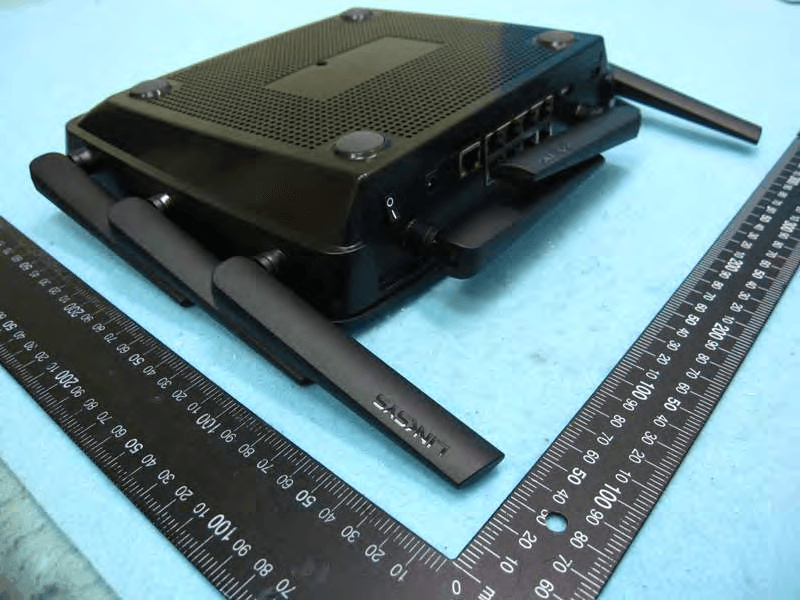
Click to zoom
Application Details
- Equipment Class
- DTS - Digital Transmission System
- Date of Grant
- Oct 07, 2015
- Application Purpose
- Original Equipment
- Date of Application
- Oct 06, 2015
- Equipment Note
- Linksys Tri-Band Wireless-AC Router
- Frequency Range
- 5745.00000000 - 5825.00000000
- Company
- LINKSYS LLC
- Country
- United States
Documents & Files
Document Text
Text extracted from the exhibit documents filed with the FCC. Open a document above to read the original.
Users Manual
Regulatory Information EA9500 MAX-STREAM ™ TRI-BAND AC5400 Wi-Fi ROUTER Model# EA9500 Regulatory Information EA9500 Table of Contents i Table of Contents Wireless Regulatory Information FCC Statement . . . . . . . . . . . . . . . . . . . . . . . . . . . . . . . . . . . . . .1 Mexico Regulatory Statement . . . . . . . . . . . . . . . . . . . . . . . . . . . . . 1 EAC Mark of Conformity for Russia, Kazakhstan and Belarus . . . . . . . . . . 1 Avis d’Industrie Canada . . . . . . . . . . . . . . . . . . . . . . . . . . . . . . . . . 2 Safety Notices . . . . . . . . . . . . . . . . . . . . . . . . . . . . . . . . . . . . . . 3 Declaration of Conformity with Regard to EU Directive 1999/5/EC (R&TTE Directive) . . . . . . . . . . . . . . . . . . . . . . . . . . . . . 7 Wireless Equipment (Wireless-AC/N/G/A/B Products) . . . . . . . . . . . . . . . 8 National Restrictions . . . . . . . . . . . . . . . . . . . . . . . . . . . . . . . . . . 8 Product Usage Restrictions . . . . . . . . . . . . . . . . . . . . . . . . . . . . . . 9 Technical Documents on www .linksys .com . . . . . . . . . . . . . . . . . . . . . .9 WEEE Information User Information for Consumer Products Covered by EU Directive 2002/96/EC on Waste Electric and Electronic Equipment (WEEE) . . . . . . 10 Wireless Regulatory Information 1 Wireless Regulatory Information FCC Statement This device complies with Part 15 of the FCC Rules . Operation is subject to the following two conditions: (1) This device may not cause harmful interference, and (2) this device must accept any interference received, including interference that may cause undesired operation . This product has been tested and complies with the specifications for a Class B digital device, pursuant to Part 15 of the FCC Rules . These limits are designed to provide reasonable protection against harmful interference in a residential installation . This equipment generates, uses, and can radiate radio frequency energy and, if not installed and used according to the instructions, may cause harmful interference to radio communications . Ho wever, there is no guarantee that interference will not occur in a particular installation . If this equipment does cause harmful interference to radio or television reception, which is found by turning the equipment off and on, the user is encouraged to try to correct the interference by one or more of the following measures: •R eorient or relocate the receiving antenna •Increase the separation between the equipment and devices •Connect the equipment to an outlet other than the receiver’s •Consult a dealer or an experienced radio/TV technician for assistance FCC Caution: Any changes or modifications not expressly approved by the party responsible for compliance could void the user’s authority to operate this equipment . IEEE 802 .11b or 802 .11g operation of this product in the USA is firmware-limited to channels 1 through 11 . The device for the band 5150-5250 MHz is only for indoor usage to reduce the potential for harmful interference to co-channel mobile satellite systems . Mexico Regulatory Statement La operación de este equipo está sujeta a las siguientes dos condiciones: (1) es posible que este equipo o dispositivo no cause interferencia perjudicial y (2) este equipo o dispositivo debe aceptar cualquier interferencia, incluyendo la que pueda causar su operación no deseada . EAC Mark of Conformity for Russia, Kazakhstan and Belarus FCC Radiation Exposure Statement This equipment complies with FCC radiation exposure limits set forth for an uncontrolled environment . This equipment should be installed and operated with minimum distance 28 cm between the radiator and your body . T his device and it’s antennas(s) must not be co- located or operating in conjunction with any other antenna or transmitter except in accordance with FCC multi-transmitter product procedures . Industry Canada Statement CAN ICES-3 (B)/NMB-3 (B) Operation is subject to the following two conditions: (1) This device may not cause interference, and (2) this device must accept any interference, including interference that may cause undesired operation of the device . F or product available in the USA/Canada market, only channel 1~11 can be operated . Selection of other channels is not possible . The de vice could automatically discontinue transmission in case of absence of information to transmit, or operational failure . Note that this is not intended to prohibit transmission of control or signaling information or the use of repetitive codes where required by the technology . Industry Canada Radiation Exposure Statement This equipment complies with IC radiation exposure limits set forth for an uncontrolled environment . This equipment should be installed and operated with minimum distance 28 cm between the radiator & your body . This device and it’s antennas(s) must not be co-located or operating in conjunction with any other antenna or transmitter except in accordance with IC multi-transmitter product procedures . Restrictions in the 5 GHz Band The device for the band 5150-5250 MHz is only for indoor usage to reduce potential for harmful interference to co-channel mobile satellite systems . This device has been designed to operate with an antenna having a maximum gain of 2 .25 dBi and 2 .3 dBi at 2 .4 GHz and 5 GHz respectively . Antenna having a higher gain is strictly prohibited per regulations of Industry Canada . The required antenna impedance is 50 ohms . The maximum antenna gain (Please see the table belo w) permitted (for devices in the bands 5250-5350 MHz and 5470-5725 MHz) to comply with the EIRP limit and because high power radars are allocated as primary users (meaning they have priority) in 5250-5350 MHz and Wireless Regulatory Information 2 5650-5850 MHz, these radars could cause interference and/or damage to license exempt LAN devices . No. Antenna Type For 2.4 GHz Gain (dBi) For 5 GHz Gain (dBi) Antenna Connector 1DipoleN/A2 .18N/A 2DipoleN/A2N/A 3DipoleN/…
Text truncated - open the document above for the full version.
Users Manual
دليل المستخدم رقم الطراز المحتويات المنتج على عامة نظرة ........................................................................................................ 00 59EE.................................................................................................................................................... 3 ا .عداد :ساسيات.ا............................................................................................................. المزيد على العثور مكانمنالتعليمات .................................................................................................................... 6 ه تركيب كيفية ِّ الموج ........................................................................................................................................ 6 استخدام كيفيةi L tmam s ysk i L-iL.................................................................................. التوصيل كيفيةبـ iL t mam s ysk i L-iL ........................................................................................................... 9 الشبكة مخطط .............................................................................................................................................. 10 الضيوف وصول .......................................................................................................................................... 10 م ّ ي التحكالأبو .............................................................................................................................................. 11 الوسائط أولوية تحديد ..................................................................................................................................... 11 السرعة اختبار ............................................................................................................................................. 12 الخارجي التخزين ......................................................................................................................................... 12 تصالالا .................................................................................................................................................... 13 خطاء استكشافالأحها لاوإص ........................................................................................................................... 13 سلكيلا ...................................................................................................................................................... 14 انلأما ....................................................................................................................................................... 14 خطاء استكشافلأحها اوإصلا ............................................................................................. لمبنجاح الموجه إعداد يتم ................................................................................................................................ 15 نترنت كبل" رسالةالإ"متصل غير ..................................................................................................................... 15 "الموجه إلى الوصول تعذر" رسالة ..................................................................................................................... 17 عداد بعدالإ ................................................................................................................................................. 18 نترنت يظهرالإمتوفر كغير .............................................................................................................................. 18 iL t mam s ysk i L-iL لا يفتح فيالويب مستعرض ............................................................................................ 19 المواصفات ................................................................................................................... iL t mam 00 59EE..................................................................................................................................... 20 البيئية المعطيات ........................................................................................................................................... 20 نظرة عامة على المنتج عرض الجزء العلوي مؤشر حالة النظام أبيض ( –مؤشر الحالة 1 )—نترنت. يتوقف عن التشغيل لإل تشغيل الموجه، يومض في حالة وجود خطأ في اتصال الاا. خ ً ل بدء تشغيل الموجه يبقى ثابتلاخ في حالة إيقاف تشغيل Wi-Fi . مؤشرات MU-MIMO *- أزرق (2)—زوج من مؤشرات LED ل بدء تشغيل لاسفل) يومض بالتسلسل (من اليسار لليمين) خلألى واالأع(مؤشر حالة ب ا من مؤشرات ً ل تشغيل الموجه، يوضح زوجلال تحديث البرنامج الثابت. خلاا، بالتسلسل خ ً الموجه. يضيء ويبقى ثابتLED الثابتة أن أجهزة MU-MIMO متصلة. *قد تتطلب وظائف MU-MIMO تحديث البرنامج الثابت/البرنامج المتوفر على linksys.com/support/ea9500. شعار Linksys المضيء - يوضح أن الموجه موصول الطاقة وقيد التشغيل. منظر خلفي ن للضبط (بلاالهوائيان القا1 )- للحصول على أفضل أداء، ضع الهوائيين باتجاه عمودي على زاوية 90 درجة. منافذ () - لاتقم بتوصيل كب Ethernet بمنافذ gigabit ( 10 / 100 / 1000 ) الزرقاء هذه، وبأجهزة سلكية على شبكتك. حظة لا -م ذات تصنيف لاتللحصول على أفضل أداء، استخدم كب CAT5e أو أعلى على منافذ Ethernet . منفذ الطاقة ( 3 )- قم بتوصيل محول طاقة التيار المتردد. منفذ ( )- قم بتوصيل محركات أقراص نترنت.لإومشاركتها على شبكتك أو على ا منفذ ( )- قم بتوصيل محركات أقراص نترنت.لإومشاركتها على شبكتك أو على ا نترنت لإ(منفذ ا )- قم بتوصيل كبل بمنفذ (//صفر هذا، وكبل إنترنت ذي نطاق ترددي واسع/لأ) اأو بمودم ألياف. حظة لا -م ذا تصنيف ً لاللحصول على أفضل أداء، استخدم كب CAT5e أو أعلى على منافذ Ethernet . زر إعادة ضبط ( 7 )- اضغط باستمرار حتى يتوقف شعار Linksys المضيء عن التشغيل وتبدأ مؤشرات MU-MIMO ادة ضبط لإعالزرقاء في الوميض ا استعادة إعدادات المصنع باستخدام ً الموجه إلى إعدادات المصنع. يمكنك أيض Linksys Smart Wi-Fi نترنت أو تطبيق المحمول.لإعلى ا مفتاح الطاقة ( 8 )- اضغط على | (تشغيل) لتشغيل الموجه. جانبيمنظر زراضغط—يقافلإتشغيلالشبكاتسلكيةلااليبدأمؤشرفيضاءةلإااضغطمرةأخرىلتشغيلالشبكاتسلكيةلااليتوقفمؤشر LED عن ضاءةلإا زر ) - ن بها َّ سلكي على أجهزة الشبكة الممكلامان اللأاضغط عليه لتكوين ا Wi-Fi Protected Setup . ا .عداديات.ساسا مكانالعثورعلىالمزيدمنالتعليمات ماكن التالي…
Text truncated - open the document above for the full version.
Users Manual
Bemærk – Der er ikke adgang til internettet, før installationen af routeren er fuldført. ®®®® ® ®®®® ® . Οδηγός Χρήσης ΤΡΙΠΛΗΣ ΖΩΝΗΣ Μοντέλο Περιεχόμενα Ε ισκόησηροϊόντος Επάνω όψη .............................................................................................................................................................................................. 3 Πίσω όψη.................................................................................................................................................................................................. 4 Πλαϊνή όψη.............................................................................................................................................................................................. 5 ΡυθμίσειςΒασικά στοιχεία Πού θα βρείτε περισσότερη βοήθεια ........................................................................................................................................ 6 Πώς να εγκαταστήσετε το router σας ..................................................................................................................................... 6 Πώς ναχρησιμο οιήσετε το Πώς να συνδεθείτε στο Linksys Smart Wi-Fi ....................................................................................................................... 9 Χάρτης δικτύου ................................................................................................................................................................................. 10 Πρόσβαση επισκεπτών ................................................................................................................................................................. 10 Γονικός έλεγχος................................................................................................................................................................................. 11 Προτεραιότητα στα πολυμέσα ................................................................................................................................................. 11 Έλεγχος ταχύτητας ......................................................................................................................................................................... 12 Εξωτερική αποθήκευση ................................................................................................................................................................ 12 Συνδεσιμότητα .................................................................................................................................................................................. 13 Αντιμετώπιση προβλημάτων .................................................................................................................................................... 13 Ασύρματη σύνδεση ......................................................................................................................................................................... 14 Ασφάλεια .............................................................................................................................................................................................. 14 Αντιμετώ ισηροβλημάτων Το router σας δεν εγκαταστάθηκε επιτυχώς .................................................................................................................... 15 Μήνυμα Τοκαλώδιοδενείναι συνδεδεμένο .................................................................................................................................................................................................................... 15 Μήνυμα Δενείναι δυνατή ηρόσβαση στοσας ..................... 17 Μετά την εγκατάσταση ................................................................................................................................................................ 18 Δενείναι διαθέσιμοτο ............................................................................................................................................... 18 Τοδεν ανοίγει στορόγραμμαεριήγησης .......................................................... 19 Τεχνικά χαρακτηριστικά Linksys EA9500 ................................................................................................................................................................................ 20 Χαρακτηριστικά περιβάλλοντος λειτουργίας ................................................................................................................... 20 Εισκόησηροϊόντος Επάνω όψη Ένδειξη κατάστασης συστήματος Ένδειξη κατάστασης λευκήΚατά τηδιάρκεια της εκκίνησης τουαραμένεισταθερήΚατά τηδιάρκεια της λειτουργίαςτου αναβοσβήνειεάνυάρχεικάοιοσφάλμα σύνδεσης στοΣβήνειεάντοείναιαενεργοοιημένο ΕνδείξειςμπλεΤαζεύγη των λυχνιώνεάνωκαι κάτω αότην ένδειξη κατάστασηςαναβοσβήνουνδιαδοχικά αόαριστερά στα δεξιάκατάτηδιάρκεια της εκκίνησης τουΑνάβουνδιαδοχικά καιαραμένουναναμμένα κατά τηδιάρκει ατης ενημέρωσης του υλικολογισμικούΚατάτηδιάρκεια της λειτουργίαςτουταζεύγη των σταθερών λυχν ιώνυοδεικνύουνότι είναι συνδεδεμένεςσυσκευές Ηλειτουργικότητατωνενδέχεταιναχρειάζεται μία ενημέρωση του λογισμικούυλικολογισμικούηοοίαείναι διαθέσιμη στο Φωτεινό ΛογότυποΔείχνει ότι τοτροφοδοτείταικαι λειτουργεί Πίσω όψη Ρυθμιζόμενεςκεραίες Για καλύτερη αόδοσητοοθετήστετις κεραίες κάθετα σε γωνίαμοιρών ΘύρεςΣυνδέστε καλώδιασεαυτές τις μλεθύρεςκαιτοάλλο άκρο τους στις ενσύρματες συσκευές στο δίκτυό σας ΣημείωσηΓια καλύτερη αόδοσηχρησιμοοιήστεκαλώδια κατηγορίαςήυψηλότερης στις θύρες Θύρα τροφοδοσίαςΣυνδέστε τοναρεχόμενομετασχηματιστή ΘύραΣυνδέστε και μοιραστείτεμονάδες δίσκουστοδίκτυό σας ήστο Θύρα ΘύραΣυνδέστε ένα καλώδιοσεαυτήν την κίτρινη θύρακαιτοάλλο άκρο σε ένα καλωδιακόμόντεμευρυζωνικούήμόντεμ οτικήςίνας ΣημείωσηΓια καλύτερη αόδοσηχρησιμοοιήστεκαλώδια κατηγορίαςήυψηλότερης στη θύρα Κουμπί επαναφοράςΠατήστεαρατε…
Text truncated - open the document above for the full version.
Users Manual
®®®® ® Stream AC5400 Linksys
Users Manual
®®®® ® ®®®® ® ®®®® ®
Users Manual
®®®® ® ®®®® ®
Users Manual
®®®® ® ț ț ț țț ț ț ț ț ț țț țț țțț ț țțț ț ț ț țț ț ț ț ț ț ț ț ț ț ț ț țțț ț ț țț ț ț ț ț ®®®® ®ț ț ț țțț ț
Users Manual
Если вы не видите инструкций, введитев адресную строку. Совет Последнии версии®®®® ® Индикатор Статуса, Индикаторы Чтобы задать вопрос или запросить исходный код GPL посетите ®®®® ®
Users Manual
®®®® ® คู่มือผู้ใช ้ เราเตอร์ Wi-Fi MAX -STREAM™ สามความถี่ AC5400 รุ่น # EA9500 สารบัญ ภาพรวมผลิตภัณฑ์ ...................................................................................... 3 มุมมองด้านบน ............................................................................................................................. 3 มุมมองด้านหลัง ............................................................................................................................ 4 มุมมองด้านข้าง ............................................................................................................................ 5 การตั ้ งค่า : ข้อมูลเบื ้ องต้น ......................................................................................... 6 มีวิธีใช้เพิ ่ มเติมที่ใด ......................................................................................................................... 6 วิธีการติดตั ้ งเราเตอร์ของคุณ.................................................................................................................. 6 วิธีการใช้ Linksys Smart Wi-Fi ......................................................................... 9 วิธีการเชื่อมต่อกับ Linksys Smart Wi-Fi ............................................................................................. 9 แผนผังเครือข่าย .......................................................................................................................... 10 การเข้าถึงของแอคเคาท์ Guest ........................................................................................................... 10 การควบคุมของผู้ปกครอง ................................................................................................................. 11 การจัดล าดับความส าคัญของสื่อจัดเก็บ ....................................................................................................... 11 ทดสอบความเร็ว ......................................................................................................................... 12 อุปกรณ์จัดเก็บข้อมูลภายนอก .............................................................................................................. 12 การเชื่อมต่อ ............................................................................................................................. 13 การแก้ไขปัญหา .......................................................................................................................... 13 Wireless (ระบบไร้สาย) .............................................................................................................. 14 การรักษาความปลอดภัย ................................................................................................................... 14 การแก้ไขปัญหา ....................................................................................... 15 การตั ้ งค่าเราเตอร์ของคุณไม่เสร็จสมบูรณ์ .................................................................................................... 15 ข้อความ Your Internet cable is not plugged in (คุณยังไม่ได้เสียบสายเคเบิลอินเทอร์เน็ต) ...................................... 15 ข้อความ Cannot access your router (ไม่สามารถเข้าถึงเราเตอร์ของคุณได้) ........................................................ 16 หลังการตั ้ งค่า ............................................................................................................................ 18 ปรากฏว่าอินเทอร์เน็ตไม่สามารถใช้งานได้ ................................................................................................... 18 Linksys Smart Wi-Fi ไม่เปิดในเว็บเบราเซอร์ของคุณ ................................................................................ 19 คุณสมบัติเฉพาะ ....................................................................................... 20 Linksys EA9500 .................................................................................................................... 20 คุณสมบัติภายนอก ........................................................................................................................ 20 ภาพรวมผลิตภัณฑ์ มุมมองด้านบน ไฟแสดงสถานะระบบ ไฟแสดงสถานะ – ส ี ขาว (1)—ระหว่างการเริ่มท างานของเราเตอร์ ไฟจะสว่างนิ่ง ระหว่างการท างานของเราเตอร์ ไฟจะกะพริบหากมีความผิดพลาดของการเช ื่ อมต่ออินเทอร์เน็ต ไฟจะดับลงหาก Wi-Fi ปิดอยู่ ไฟแสดงสถานะ MU-MIMO* - ส ี น ้าเงิน (2)—ไฟ LED สองดวง (ด้านบนและด้านล่างไฟบอกสถานะ) กะพริบตามล าดับ (จากซ ้ ายไปขวา) ระหว่างการเริ่มท างานของเราเตอร์ ไฟจะเปิดขึ้นแล้วสว่างนิ่งตามล าดับระหว่างการอัปเดตเฟิร์มแวร์ ระหว่างการท างานของเราเตอร์ ไฟ LED สองดวงสว่างนิ่ง แสดงว่าอุปกรณ์ MU-MIMO ได้เช ื่ อมต่อแล้ว ฟังก์ช ั น *MU-MIMO อาจต้องใช ้ การอัปเดตซอฟต์แวร์/เฟิร์มแวร์ซ ึ่ งมีให้ที่ linksys.com/support/ea9500 โลโก้ของ Linksys สว่างอยู่—แสดงว่าเราเตอร์เปิดอยู่และสามารถใช ้ งานได้ มุมมองด้านหลัง เสาอากาศแบบปรับได้ (1)—เพื่อประส ิ ทธิภาพการท างานที่ดีที่สุด เลื่อนเสาอากาศให้อยู่ในแนวตั้งโดยท ามุม 90 องศา พอร์ตอีเธอร์เน็ต (2)—เช ื่ อมต่อสายเคเบิลอีเธอร์เน็ตเข้ากับพอร์ต Gigabit (10/100/1000) ส ี น ้าเงิน และกับอุปกรณ์ผ่านสายบนเครือข่ายของคุณ หมายเหตุ—เพื่อประส ิ ทธิภาพการท างานที่ดีที่สุด ให้ใช ้ CAT5e หรือสายเคเบิลที่มีอัตราที่สูงกว่าบนพอร์ตอีเธอร์เน็ต พอร์ตจ่ายไฟ (3)—เช ื่ อมต่ออะแดปเตอร์ AC ที่ให้มา พอร์ต USB 3.0 (4)—เช ื่ อมต่อและแชร์ไดรฟ์ USB บนเครือข่ายของคุณหรือบนอินเทอร์เน็ต พอร์ต USB 2.0 (5)—เช ื่ อมต่อและแชร์ไดรฟ์ USB บนเครือข่ายของคุณหรือบนอินเทอร์เน็ต พอร์ตอินเทอร์เน็ต (6)—เช ื่ อมต่อสายเคเบิลอีเธอร์เน็ตเข้ากับพอร์ต Gigabit (10/100/1000) ส ี เหลืองนี้ และกับสายเคเบิลอินเทอร์เน็ตบรอดแบรนด์/DSL หรือโมเด็มไฟเบอร์ หมายเหตุ—เพื่อประส ิ ทธิภาพการท างานที่ดีที่สุด ให้ใช ้ CAT5e หรือสายเคเบิลที่มีอัตราที่สูงกว่าบนพอร์ตอีเธอร์เน็ต ปุ่มรีเซ ็ ต (7)—กดค้างไว้จนกว่าโลโก้ Linksys ที่สว่างอยู่จะดับลง และไฟแสดงสถานะ MU-MIMO ส ี น ้าเงินเริ่มกะพริบ เพื่อรีเซ ็ ตเราเตอร์ให้เป็นค่าจากโรงงาน คุณสามารถเรียกคืนค่าดีฟอลต์จากโรงงานโดยใช ้ Linksys Smart Wi-Fi บนอินเทอร์เน็ตหรือแอปพลิเคช ั นมือถือได้ด้วย สวิตช ์ เปิด/ปิด (8)—กด | (เปิด) เพื่อเปิดเราเตอร์ มุมมองด้านข้าง ปุ่ม Wi-Fi (1)—กดเพื่อปิดเครือข่ายแบบไร้สาย (ไฟ LED ติดขึ้น) กดอีกครั้งเพื่อเป…
Text truncated - open the document above for the full version.
Cover Letter(s)
LINKSYS LLC 121 Theory Drive, Irvine, CA 92617, USA Power of Attorney Date: 2015/8/14 Dear Sir, I hereby have entrusted the following person to be a proxy regarding application for Type Certification. Sporton International Inc. Address : No.8, Lane 724, Bo-ai St., Jhubei City, HsinChu County 302, Taiwan, R.O.C. Name : Leo Huang Job Title : Manager e-mail : [email protected] I am therefore responsible for the contents of the application. Brand name and model type of the specified radio equipment: LINKSYS / EA9500 FCC ID: Q87-EA9500 Product name: Linksys Tri-Band Wireless-AC Router FCC Grantee contact person information. Applicant’s company name : LINKSYS LLC Applicant’s company address : 121 Theory Drive, Irvine, CA 92617, USA Signature : Name and Job Title : Daniel Wesey / Director of Global Regulatory Compliance E-Mail : [email protected] Tel : 310-751-2816 Fax : 310-751-5100
Cover Letter(s)
LINKSYS LLC 121 Theory Drive, Irvine, CA 92617, USA DoC Attestation Letter Date: 2015/8/14 We LINKSYS LLC, as the grantee of this project (FCC ID: Q87-EA9500 / Brand Name: LINKSYS / Model No.: EA9500), would like to declare that the composite portion categorized as computer peripheral has been authorized under the Declaration of Conformity procedures (Sporton report No.: FD581108, FCC designation number: TW1024). The final product shall consequently comply with the FCC rule applied for DoC Procedure. Regards, FCC Grantee contact person information. Applicant’s company name : LINKSYS LLC Applicant’s company address : 121 Theory Drive, Irvine, CA 92617, USA Signature : Name and Job Title : Daniel Wesey / Director of Global Regulatory Compliance E-Mail : [email protected] Tel : 310-751-2816 Fax : 310-751-5100
Cover Letter(s)
LINKSYS LLC 121 Theory Drive, Irvine, CA 92617, USA Confidentiality Request Letter Date: 2015/8/14 Federal Communications Commission 7435 Oakland Mills Road Columbia MD 21046 Subject: Request for Confidentiality FCC ID:Q87-EA9500 To Whom It May Concern: Long Term Confidentiality Pursuant to Sections 0.457 and 0.459 of the Commission’s Rules, we hereby respectfully request confidential treatment of information accompanying this application as outlined below: ● Block Diagrams ● Schematics ● Operational Description The above materials contain trade secrets and proprietary information not customarily released to the public. The public disclosure of these matters might be harmful to the Applicant and provide unjustified benefits to its competitors. We understand that pursuant to Rule 0.457, disclosure of this Application and all accompanying documentation will not be made before the date of the Grant for this application. Sincerely, Applicant’s company name : LINKSYS LLC Applicant’s company address : 121 Theory Drive, Irvine, CA 92617, USA Signature : Name and Job Title : Daniel Wesey / Director of Global Regulatory Compliance E-Mail : [email protected] Tel : 310-751-2816 Fax : 310-751-5100
External Photos
Report No.: 581108 SPORTON International Inc. PAGE NUMBER : A1 of A6 TEL : 886-3-327-3456 FAX : 886-3-327-0973 Appendix A. Photographs of EUT Report No.: 581108 SPORTON International Inc. PAGE NUMBER : A2 of A6 TEL : 886-3-327-3456 FAX : 886-3-327-0973 Report No.: 581108 SPORTON International Inc. PAGE NUMBER : A3 of A6 TEL : 886-3-327-3456 FAX : 886-3-327-0973 Report No.: 581108 SPORTON International Inc. PAGE NUMBER : A4 of A6 TEL : 886-3-327-3456 FAX : 886-3-327-0973 Report No.: 581108 SPORTON International Inc. PAGE NUMBER : A5 of A6 TEL : 886-3-327-3456 FAX : 886-3-327-0973 Adapter Model No.: DA-60M12 Report No.: 581108 SPORTON International Inc. PAGE NUMBER : A6 of A6 TEL : 886-3-327-3456 FAX : 886-3-327-0973 Power Cable
ID Label/Location Info
7.0 mm 46.37 R2.25 0.25 102.56 5.0 mm SCALE 1:1 DATE: 2015.08.04 REVISION: A00 Revision Notes: A00 INITIAL RELEASE DESIGNER: MW ALL DIMENSIONS IN MM. 8830-22908 LINKSYS EA9500 Router [US and CA] PRODUCT ID LABEL DO NOT MAKE CHANGES WITHOUT PERMISSION FROM BELKIN IDG. ELEMENTS IN ORANGE PRINTED IN PMS WHITE, MATTE FINISH ELEMENTS IN BLUE: PRINTED IN CARBON BLACK #SDBK0908_D01, MATTE FINISH ELEMENTS IN GREEN: PRINTED IN PMS COOL GRAY 8C, MATTE FINISH ARTWORK TO PRINT ON LAYER ‘ARTWORK’ ELEMENTS IN ORANGE PRINTED IN PMS WHITE, MATTE FINISH ELEMENTS IN GREEN PRINTED IN PMS COOL GRAY 8C, MATTE FINISH ELEMENTS IN BLUE: PRINTED IN CARBON BLACK #SDBK0908_D01, MATTE FINISH GRAPHICS IN RED PRINTED ON PRODUCTION LINE FOR EACH PRODUCT Label Here
Internal Photos
Report No.: 581108 SPORTON International Inc. PAGE NUMBER : A1 of A27 TEL : 886-3-327-3456 FAX : 886-3-327-0973 Appendix A. Photographs of EUT Report No.: 581108 SPORTON International Inc. PAGE NUMBER : A2 of A27 TEL : 886-3-327-3456 FAX : 886-3-327-0973 Report No.: 581108 SPORTON International Inc. PAGE NUMBER : A3 of A27 TEL : 886-3-327-3456 FAX : 886-3-327-0973 Report No.: 581108 SPORTON International Inc. PAGE NUMBER : A4 of A27 TEL : 886-3-327-3456 FAX : 886-3-327-0973 Report No.: 581108 SPORTON International Inc. PAGE NUMBER : A5 of A27 TEL : 886-3-327-3456 FAX : 886-3-327-0973 Report No.: 581108 SPORTON International Inc. PAGE NUMBER : A6 of A27 TEL : 886-3-327-3456 FAX : 886-3-327-0973 Report No.: 581108 SPORTON International Inc. PAGE NUMBER : A7 of A27 TEL : 886-3-327-3456 FAX : 886-3-327-0973 Report No.: 581108 SPORTON Internati…
Text truncated - open the document above for the full version.
Contact Information
Applicant
Po-Wen Cheng(Regulatory Compliance Manager)
Test Firm
Sporton International Inc.Alex Chen
Technical Specifications
| # | Rule Parts | Frequency Range | Power Output |
|---|---|---|---|
| 2 | 15C | 5.75 GHz - 5.83 GHz | 791.00 mW |
Other Applications from LINKSYS LLC

Q87-WDS060
Aug 11, 2020WiFi Smart Light Switch with Dimmer
Equipment Class
DTS - Digital Transmission System
Q87-03564
Jun 28, 2020Linksys Tri-Band Wireless-AC Router
Equipment Class
NII - Unlicensed National Information Infrastructure TX
Q87-03566
Jun 23, 2020Linksys Tri-Band Wireless-AC Router
Equipment Class
NII - Unlicensed National Information Infrastructure TX
Q87-03530
Apr 29, 2020Linksys MAX-STREAM AC1900+ WiFi Range Extender
Equipment Class
NII - Unlicensed National Information Infrastructure TX
Q87-08151
Mar 30, 2020Linksys Dual-Band 802.11ax Wireless Router
Equipment Class
DTS - Digital Transmission System