Q87-USBBT100V2Bluetooth USB Adapter
LINKSYS LLC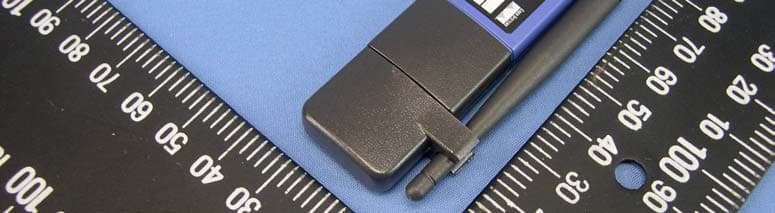
Click to zoom
Application Details
- Equipment Class
- DSS - Part 15 Spread Spectrum Transmitter
- Date of Grant
- Mar 07, 2005
- Application Purpose
- Original Equipment
- Date of Application
- Mar 07, 2005
- Equipment Note
- Bluetooth USB Adapter
- Frequency Range
- 2402.00000000 - 2480.00000000
- Company
- LINKSYS LLC
- Country
- United States
Documents & Files
Document Text
Text extracted from the exhibit documents filed with the FCC. Open a document above to read the original.
Users Manual
USB Adapter Manual and Application note 3.0 Index INTRODUCTION 1 CHAPTER 1 Package 2 Features 2 Bluetooth profile support 2 Drivers support 3 CHAPTER 2 Setup for Windows 98SE/ME/2000/XP 4 CHAPTER 3 Application note for Windows 98SE/ME/2000/XP 11 Icons used for Bluetooth devices and services 11 Network sharing setting for Windows 13 File transfer setting for Windows 24 Dial-up networking setting for Windows 27 FAX setting 30 PIM Item Transfer setting 31 PIM Synchronization setting 33 Serial Port setting 35 ActiveSync setting 36 Audio Gateway setting for windows 39 Personal area network setting for Windows 41 CHAPTER 4 Advanced features 46 How to setup Hyper Terminal for Bluetooth transfer 46 How to HotSync with Palm Bluetooth SDIO and Tungsten T 52 How to dial-up from Palm Tungsten T to my PC’s modem to surf the internet 55 Sending FAX via mobile phone with WinFAXPro 56 TROUBLESHOOTING Troubleshooting 61 1 Introduction Bluetooth is an open specification for a cutting-edge technology that enables short-range wireless connections between desktop and laptop computers, personal digital assistants, cellular phones, printers, scanners, digital cameras and even home appliances — on a globally available band (2.4GHz) for worldwide compatibility. In a nutshell, Bluetooth unplugs your digital peripherals and makes cable clutter a thing of the past. Now you can connect your PDA or PC to Bluetooth™ enabled mobile phone with this Bluetooth™ adapter. You can access e-mail & Internet no matter where you are with just a little help from your Bluetooth™ mobile phone. Plus, when you are back in the office, you can hook yourself up to your office network as well as communicate with other Bluetooth™-enabled devices. i 2 Chapter1 Package z One Bluetooth adapter z One driver and software disk z This user manual Features z Bluetooth v1.2 compliant z USB Bluetooth adapter support full speed USB v1.1 Interface. z Wireless communication within a radius of 32 Feet (10 Meters) for Class 2 Bluetooth devices. z Wireless communication within a radius of 328 Feet (100 Meters) for Class 1 Bluetooth devices. z Connect up to 7 different Bluetooth enabled devices z Encryption and authentication to ensure safe, secure communications z Low power consumption Bluetooth profile support Generic Access Profile (GAP) Serial Port Profile (SPP) Service Discovery Application Profile (SDAP) Generic Object Exchange Profile (GOEP) Object Push Profile (OPP) File Transfer Profile (FTP) Dial-up Network Profile (DUN) LAN Access Profile (LAP) 1 3 Fax Profile (FAX) Synchronization Profile Headset Profile Personal Area Network (PAN) Human Interface Device (HID) BIP Basic Image Profile (BBIP) Drivers support Windows 98SE, ME, 2000, XP 4 Chapter 2 Setup for Windows 98SE/ME/2000/XP Installing Bluetooth software for Windows (1) Place installation CD into PC and the setup menu should launch automatically. If the setup menu does not launch automatically, use Windows Explorer to navigate to the appropriate CD-ROM drive and run "bsetup". (2) Select “Install Drivers and Application Software”. 2 5 (3) Please select your device from the menu. 6 (4) Complete the following steps to install Bluetooth software: (a) Exit all applications. (b) InstallShield Wizard setup dialog box will automatically be displayed. (c) Follow the instructions on screen: (d) On the Welcome screen, click the “Next“ button. 7 (e) When the License Agreement screen is displayed, read the License Agreement, then click the radio button to the left of "I accept the terms in the license agreement" and click the “Next“ button. 8 (f) You can choose the destination folder in your system, if you do not want to change the destination folder please click “Next“. On the Destination Folder screen, click the Change button to browse to a new destination folder for the Bluetooth software. Otherwise, click the “Next“ button to accept the default folder. 9 (g) The system is ready to install the Bluetooth software. If you need to review or change any settings, click the "Back" button. Click the "Cancel" button to exit the Wizard. Otherwise, click the "Install" button. (h) For Windows 2000/XP users, system will popup a "Driver Signature Notice", please click the "OK" button. 10 (i) During the installation, system will try to detect your Bluetooth device, please plug in your Bluetooth device when the following message is displayed. Then click "OK" to continue, or you can click "Cancel" to continue the installation without the Bluetooth device. (j) When the installation is completed, please click the "Finish" button. For more information of Bluetooth software Configuration & User’s Guide, please refer to Chapter 3 of this application note. 11 Chapter 3 Application note for Windows 98SE/ME/2000/XP 3.1 Icons used for Bluetooth devices and services Bluetooth icons provide at-a-glance feedback about a device or service's status by changing appearance. The Bluetooth icon in the Windows system tray provides feedback about Bluetooth status. Basic Bluetooth Icon Device Icons for Windows 98SE, Me and 2K Service Icons for Windows 98SE, Me and 2K 3 12 Device Icons for Windows XP Service Icons for Windows XP 13 NOTE: Only available services are displayed in the menus 14 3.2. Network sharing setting for Windows The Network Access service permits a Bluetooth enabled PC (client) to access the Internet via another Bluetooth enabled PC (Server) that already has an Ethernet connection. Windows network sharing setting PC to PC (Windows 2000 or Windows XP) 1. To enable Internet Connection Sharing on the server PC. 2. Click on Start menu → Network Connections and find your Local Area Connection (LAN) that is connected to the Internet. 3. Right click the active LAN connection to open the "Properties" dialog box. 15 4. Click on "Advanced" tab and select the "Internet Connection Sharing" checkbox to enable Internet sharing. 16 5. Click on "Settings..." button and select the services you wish to provide other Bluetooth devices. C…
Text truncated - open the document above for the full version.
Cover Letter(s)
Cisco-Linksys LLC 121 Theory Drive Irvine, CA 92617 (USA) Phone: 949-261-1288 Fax: 949-823-3002 Federal Communications Commission Authorization and Evaluation Division Confidentiality Request FCC ID: Q87-USBBT100V2 Pursuant to Sections 0.457 and 0.459 of the Commission’s Rules, the Applicant hereby requests confidential treatment of information accompanying this Application as outlined below: Schematics Block Diagram The above materials contain trade secrets and proprietary information not customarily released to the public. The public disclosure of these matters might be harmful to the Applicant and provide unjustified benefits to its competitors. The Applicant understands that pursuant to Rule 0.457, disclosure of this Application and all accompanying documentation will not be made before the date of the Grant for this application. Sincerely yours, ------------------------------------------------------------------------------ Jennifer Yu / Associate Engineer Cisco-Linksys LLC Phone: 949-823-3188 Fax: 949-823-3002 [email protected]
Cover Letter(s)
Cisco-Linksys LLC 121 Theory Drive Irvine, CA 92617 (USA) Phone: 949-261-1288 Fax: 949-823-3002 Power of Attorney To whom it may concern: We, the undersigned Cisco-Linksys LLC hereby authorize Advance Data Technology Corporation (ADT) of Taiwan to act on our behalf in all matters relating to all processes required in the FCC Part 15C approval and any communication needed with the national authority. Any and all acts carried out by ADT on our behalf shall have the same effects as acts of our own. If you have any questions regarding the authorization, please don’t hesitate to contact us. Thank you! Sincerely yours, ------------------------------------------------------------------------------- Jennifer Yu / Associate Engineer Cisco-Linksys LLC Tel.: ( 949 ) 823-3188 Fax: (949) 823-3002 [email protected]
Cover Letter(s)
From: [email protected] [mailto:[email protected]] Sent: Tuesday, March 08, 2005 12:50 AM To: steve.cheng Cc: [email protected]; [email protected] Subject: 回信: RE: Two new FCC approval projects, FCC ID:Q87-USBBT100V2 Dear Steve, FCC ID:Q87-USBBT100V2 Question #1: Users manual revised! Question #2: Operational description revised! If you have any further question, please contact us. Thanks! Best Regards, Amanda Chu / 朱芳誼 ~~~~~~~~~~~~~~~~~~~~~~~~~ Certification Specialist ADT Corp. (Hsin Chu Office) TEL: 03-5935343 ext. 1737 FAX: 03-5934728 ~~~~~~~~~~~~~~~~~~~~~~~~~ "steve.cheng" <[email protected]> 2005/03/08 上午 09:24 收件人 [email protected] 副本抄送 [email protected], [email protected] 主旨 RE: Two new FCC approval projects -EMC- Question #1: Users manual p 72; RF exposure statement does not include specific information. FCC Radiation Exposure Statement: This equipment ............ End users must follow the specific operation instructions for satisfying RF exposure compliance. Need to use more specific language to the user. Question #2: Operational description; stated different power then measured. Please clarify. Best regards, Steve Cheng North American EMC Certification Services Inc. 359 Hawkland Cir., NW. Calgary, Alberta Canada T3G 3R3 Tel: (403) 241-8826 Email: [email protected]
External Photos
Page 1 CONSTRUCTION PHOTOS OF EUT
ID Label/Location Info
FCC ID: Q87-USBBT100V2 FCC LABEL LOCATION The label will be permanently affixed at a conspicuous location on the device. Label
Internal Photos
Page 2 Page 3 Page 4 Page 5
Operational Description
FCC ID: Q87-USBBT100V2 ADT No.: 940127H01 Operational Description The transmitter of the EUT (Bluetooth USB Adapter) is powered by host equipment. The antenna is Dipole antenna without connector, the user has to keep at least 2.5cm separation distance between radiator and the body of the user. The other instruction, please have a look at the users manual. This device is a Frequency Hopping device with 79 hopping frequencies. The declared output power is only +8.96 dBm.
RF Exposure Info
FCC ID: Q87-USBBT100V2 ADT No.: SA940127H01 1 No SAR Evaluation Required if power is below the following threshold: Tunable Range F(GHz) LowF(GHz) High Center of Tunable Band (GHz) 60/f SAR Limitation (mW) 2.4022.4802.44124.58 Maximum measured transmitter power: Pout Conducted (mW) Maximum Antenna Gain (dBi) Pout EIRP (mW) 7.8701.89.384 Threshold for no SAR evaluation is 24.58 mW Maximum TX Power is 7.870 mW Conducted and 9.384 mW EIRP Conclusion: No SAR evaluation required since maximum Transmitter Pout (both conducted and EIRP) is below FCC threshold
Test Report
FCC ID: Q87-USBBT100V2 Report No.: RF940127H011Issued: Mar. 01, 2005 FCC TEST REPORT REPORT NO.:RF940127H01 MODEL NO.:USBBT100 ver.2 RECEIVED:Jan. 27, 2005 TESTED:Feb. 21, 2005 APPLICANT:Cisco-Linksys, LLC ADDRESS:121 Theory Drive Irvine, CA 92617 (USA) ISSUED BY:Advance Data Technology Corporation LAB LOCATION:No. 81-1, Lu Liao Keng, 9 Ling, Wu Lung Tsuen, Chiung Lin Hsiang, Hsin Chu Hsien, Taiwan, R.O.C. This test report consists of 54 pages in total. It may be duplicated completely for legal use with the approval of the applicant. It should not be reproduced except in full, without the written approval of our laboratory. The client should not use it to claim product endorsement by CNLA, A2LA or any government agencies. The test results in the report only apply to the tested sample. The test results in this report are traceable to the national or international standards. 0536No. 2177-01 ILAC MRA FCC ID: Q87-USBBT100V2 Report No.: RF940127H012Issued: Mar. 01, 2005 TABLE OF CONTENTS 1CERTIFICATION ............................................................................................4 2SUMMARY OF TEST RESULTS....................................................................5 3GENERAL INFORMATION ............................................................................6 3.1GENERAL DESCRIPTION OF EUT...............................................................6 3.2DESCRIPTION OF TEST MODES.................................................................7 3.3GENERAL DESCRIPTION OF APPLIED STANDARDS ................................7 3.4DESCRIPTION OF SUPPORT UNITS...........................................................8 3.5CONFIGURATION OF SYSTEM UNDER TEST ............................................8 4TEST PROCEDURES AND RESULTS ..........................................................9 4.1CONDUCTED EMISSION MEASUREMENT .................................................9 4.1.1LIMITS OF CONDUCTED EMISSION MEASUREMENT ............................. 9 4.1.2TEST INSTRUMENTS .................................................................................. 9 4.1.3TEST PROCEDURES................................................................................. 10 4.1.4DEVIATION FROM TEST STANDARD ....................................................... 10 4.1.5TEST SETUP ...............................................................................................11 4.1.6EUT OPERATING CONDITIONS.................................................................11 4.1.7TEST RESULTS.......................................................................................... 12 4.2NUMBER OF HOPPING FREQUENCY USED ............................................14 4.2.1LIMIT OF HOPPING FREQUENCY USED ................................................. 14 4.2.2TEST INSTRUMENTS ................................................................................ 14 4.2.3TEST PROCEDURES................................................................................. 15 4.2.4DEVIATION FROM TEST STANDARD ....................................................... 15 4.2.5TEST SETUP .............................................................................................. 16 4.2.6TEST RESULTS.......................................................................................... 16 4.3DWELL TIME ON EACH CHANNEL ............................................................18 4.3.1LIMIT OF DWELL TIME USED ................................................................... 18 4.3.2TEST INSTRUMENTS ................................................................................ 18 4.3.3TEST PROCEDURES................................................................................. 19 4.3.4DEVIATION FROM TEST STANDARD ....................................................... 19 4.3.5TEST SETUP .............................................................................................. 19 4.3.6TEST RESULTS.......................................................................................... 20 4.4CHANNEL BANDWIDTH .............................................................................24 4.4.1LIMITS OF CHANNEL BANDWIDTH .......................................................... 24 4.4.2TEST INSTRUMENTS ................................................................................ 24 4.4.3TEST PROCEDURE ................................................................................... 25 4.4.4DEVIATION FROM TEST STANDARD ....................................................... 25 4.4.5TEST SETUP .............................................................................................. 25 4.4.6EUT OPERATING CONDITION .................................................................. 25 4.4.7TEST RESULTS.......................................................................................... 26 FCC ID: Q87-USBBT100V2 Report No.: RF940127H013Issued: Mar. 01, 2005 4.5HOPPING CHANNEL SEPARATION ...........................................................29 4.5.1LIMIT OF HOPPING CHANNEL SEPARATION .......................................... 29 4.5.2TEST INSTRUMENTS ................................................................................ 29 4.5.3TEST PROCEDURES................................................................................. 30 4.5.4DEVIATION FROM TEST STANDARD ....................................................... 30 4.5.5TEST SETUP .............................................................................................. 30 4.5.6TEST RESULTS.......................................................................................... 31 4.6MAXIMUM PEAK OUTPUT POWER ...........................................................34 4.6.1LIMITS OF MAXIMUM PEAK OUTPUT POWER MEASUREMENT ........... 34 4.6.2INSTRUMENTS .......................................................................................... 34 4.6.3TEST PROCEDURES............................................................…
Text truncated - open the document above for the full version.
Test Setup Photos
FCC ID: Q87-USBBT100V2 Report No.: RF940127H0152Issued: Mar. 01, 2005 5 PHOTOGRAPHS OF THE TEST CONFIGURATION CONDUCTED EMISSION TEST FCC ID: Q87-USBBT100V2 Report No.: RF940127H0153Issued: Mar. 01, 2005 RADIATED EMISSION TEST
Contact Information
Applicant
Po-Wen Cheng(Regulatory Compliance Manager)
Technical Contact
Advance Data Technology CorporationEric Lin
[email protected]886-3-593-5343
81-1 Luliaoken, 9th Lin, Wulung Tsuen Chiunglin · Hsinchu · Taiwan
Non-Technical Contact
Advance Data Technology CorporationEric Lin
[email protected]886-3-593-5343
Test Firm
Advance Data Tech. Corp. Hsin Chu EMCStephen Chen
Technical Specifications
| # | Rule Parts | Frequency Range | Power Output |
|---|---|---|---|
| 1 | 15C | 2.40 GHz - 2.48 GHz | 7.80 mW |
Other Applications from LINKSYS LLC

Q87-WDS060
Aug 11, 2020WiFi Smart Light Switch with Dimmer
Equipment Class
DTS - Digital Transmission System
Q87-03564
Jun 28, 2020Linksys Tri-Band Wireless-AC Router
Equipment Class
NII - Unlicensed National Information Infrastructure TX
Q87-03566
Jun 23, 2020Linksys Tri-Band Wireless-AC Router
Equipment Class
NII - Unlicensed National Information Infrastructure TX
Q87-03530
Apr 29, 2020Linksys MAX-STREAM AC1900+ WiFi Range Extender
Equipment Class
NII - Unlicensed National Information Infrastructure TX
Q87-08151
Mar 30, 2020Linksys Dual-Band 802.11ax Wireless Router
Equipment Class
DTS - Digital Transmission System