RIIBTC-88ABluetooth Car Kit
Unifat Technology Limited
Click to zoom
Application Details
- Equipment Class
- DSS - Part 15 Spread Spectrum Transmitter
- Date of Grant
- Jun 06, 2007
- Application Purpose
- Original Equipment
- Date of Application
- Jun 05, 2007
- Equipment Note
- Bluetooth Car Kit
- Frequency Range
- 2402.00000000 - 2480.00000000
- Company
- Unifat Technology Limited
- Country
- Hong Kong
Documents & Files
Document Text
Text extracted from the exhibit documents filed with the FCC. Open a document above to read the original.
Users Manual
1 The BTC88A Operations 1. Power up : At every time’s powering up , the LCD screen will display the screen as below : The whole screen will be shown around 2 sconds then proceed to the next screen . 2. Seaching the Bluetooth Mobile: Car kit will start to search and connect with BT mobiles in the pairing list , the screen will be diplayed as below: The seaching logo will be flashed one and another continuously, if ca kit can not find the paired mobile or user press No key , car kit will enter the disconnected idle mode , the screen will be like below: Press Yes key , car kit will repeat the search and connection , and display the searching screen again. Searching logo Figure 1 Display No Yes Smart key SIM Card 2 In disconnected idle mode , BT mobile can perform the Bluetooth paring with car kit, the passcode is 1234 , if pairing is successful , the screen will be shown as below for 2 seconds : When car kit builds the Bluetooth connection with the BT mobile, it will enter the working idle mode . 3. Working idle mode : the screen will be like following : In the working idle screen , the car kit will totally open the service and data records for the member user . In the upper middle zone of the working idle screen is the Bluetooth mobile phone name , which was saved in the Bluetooth setting up menu of the mobile phone and can be edited by the user , the information can be read by car kit . In both sides are Antenna and Battery status logos indicating the Signal and Battery level of the BT mobile, the function will be subjected to the Bluetooth mobile phone can send out these data by Bluetooth. In the main function zone , default is set to “Phone Book “ function as the logo shown in the picture, user can rotate the Smart key to select the other functions which include “Voice dialing” , “Number Dial” , and “Settings “, their screen logo are shown as below: Guest user: When the 2 nd user was connected , it will be regarded as a guest , the LCD screen will show like following: Mobile phone name Antenna status logo Battery status logo Main function zone: default is phone book . 3 For the guest user , it can only display the income caller ID ( number) and it will not be saved after power down, if it wants to become the member user , he can press the Smart key to enter the setting menu , and select the Advanced setting menu to delete or replace the member user , which will be described in the later chapter for Settings. Bluetooth disconnection operation: At the setting function zone screen as below: Long press No key for more than 3 seconds , will disconnect the Bluetooth link between the car kit and the Bluetooth mobile phone , LCD screen will return to the disconnected idle mode. 4. Phone book DownLoad: there are 3 options for user to download the phone book to the car kit: Download from the SIM card reader in LCD display (unniversal), wireless reading from mobile phone SIM card(only part of phone can support), send wireless from mobile phone by OPP profile to car kit(only part of phone can support). 4.1 Download phonebook from the SIM card reader: during the BT disconnected mode as below : Note: PIN code for the SIM card must be disabled first through you mobile phone. Plug in the SIM card from your mobile phone to the SIM card reader in LCD display , the direction please refer to the figure 1(display), then press the Smart key will prompt the inquiring screen: Press Yes Key to start the the phone book download from the SIM card reader, the screen will be like below: 4 After downloading complete , it will exit automatically. The maximum phone book records number from SIM card reader is 255. 4.2 wireless phone book downloading from Mobile phone or mobile phone SIM card : please refer to the phone book settings in the settings chapter. *Note: this function will be subjected to the BT mobile phone which can support AT command ( Typical Brand : Sony Ericsson , Motorola,Nokia S40 3 rd series). 4.3 Send the phone books from the BT mobile phone to car kit by OPP profile ( Object Push Profile) : some BT mobile phones each time can only support one phone book record sending (Typical Brand: Nokia, Motorola), some BT mobile phones support whole phone book records sending by one time ( Typical Brand: Sony Ericsson , Samsung) During the BT disconnected mode: Entering the phone book contacts menu in your BT mobile phone, from the options, you can select “send “ then “by Bluetooth”, the mobile phone will prompt the paired BT device list ,please select “BlueRadio”, the BT mobile will start to send the record. If you select send “All contacts ” , BT mobile will send the whole records , when car kit receives the records , the screen will be like below: After the records sending ended , screen will exit automatically. The phone book records will be saved under the current member user. 5. Incoming call : when there is an incoming call , LCD screen will be like below : 5 User can press Yes key to receive or No key to reject the call. If the incoming call number is in the phonebook records ,the related name will be displayed : When the call was received and the line is active , LCD screen will be shown as : During incoming call line is activate, the user can perform the Microphone muting ,Speaker volume adjust , Call transfer functions, and Microphone gain adjust. 5.1 Muting Microphone: Press and hold the Yes key for 1.5 seconds in the line active mode , will mute the microphone ,so the other party was not able to hear what you said , the screen will be like : press and hold Yes key for 1.5 seconds again, the microphone will be returned to normal . 5.2 Speaker volume adjust: Rotate the Smart key right or left during line is active , will increase or decrease the speaker volume ,and will prompt the following screen : the screen will auto exit within 2 seconds after no adjusting action. 5.3 Call Transfer: Press the Smart key in this time can have the options for the connection line as shown below screen: Line Connectio…
Text truncated - open the document above for the full version.
Test Report
Report No.: GLEMR070501390RFF Page: 1 of 39 FCC ID: RIIBTC-88A Authorized Signature: Stephen Guo Manager This report refers to the General Conditions for Inspection and Testing Services, printed overleaf This report details the results of the testing carried out on one sample. The results contained in this test report do not relate to other samples of the same product. The manufacturer should ensure that all products in series production are in conformity with the product sample detailed in this report. This report may only be reproduced and distributed in full. If the product in this report is used in any configuration other than that detailed in the report, the manufacturer must ensure the new system complies with all relevant standards. Any mention of SGS International Electrical Approvals or testing done by SGS International Electrical Approvals in connection with, distribution or use of the product described in this report must be approved by SGS International Electrical Approvals in writing. Member of the SGS Group (Société Générale de Surveillance) SGS-CSTC Standards Technical Services Ltd. No.198 Kezhu Road, Science Town Economic& Technology Development District Guangzhou, China 510663Telephone: Telephone: +86 (0) 20 82155555 Fax: +86 (0) 20 82075059 Email: [email protected] FEDERAL COMMUNICATIONS COMMISSION Registration number: 282399 TEST REPORT Application No. : GLEMR070501390RF Applicant: UNIFAT TECHNOLOGY LTD FCC ID: RIIBTC-88A Fundamental Carrier Frequency : 2.402GHz to 2.480GHz Equipment Under Test (EUT): Name: Professional Bluetooth Handsfree Car Kit Model No.: BTC88A Standards: FCC PART 15, SUBPART C: 2006 (Section 15.247); FCC PART 15, SUBPART B: 2006. Date of Receipt: 21 May 2007 Date of Test: 21 May to 1 June 2007 Date of Issue: 1 June 2007 Test Result : PASS * * In the configuration tested, the EUT detailed in this report complied with the standards specified above. Please refer to section 2 of this report for further details. SGS-CSTC Standards Technical Services Ltd. Report No.: GLEMR070501390RFF Page: 2 of 39 FCC ID: RIIBTC-88A 2 Test Summary For Bluetooth Function: Test Test Requirement Standard Paragraph Result Maximum Peak Output Power FCC PART 15 :2006Section 15.247(b)(1) PASS Conducted Emission FCC PART 15 :2006 Section 15.207 &15.107 N/A Conducted Spurious Emission (30MHz to 25GHz) FCC PART 15 :2006 Section 15.209 &15.247(d) PASS Radiated Spurious Emission (30MHz to 25GHz) FCC PART 15 :2006 Section 15.209 &15.247(d) &15.109 PASS Band Edges Measurement FCC PART 15 :2006 Section 15.247 (d) &15.205 PASS Hopping Channel Number FCC PART 15 :2006 Section 15.247(a)(1)(iii) PASS Carrier Frequencies Separated FCC PART 15 :2006Section 15.247(a)(1) PASS Dwell Time FCC PART 15 :2006 Section 15.247(a)(1)(iii) PASS Antenna Requirement FCC PART 15 :2006Section 15.247 (c) PASS SGS-CSTC Standards Technical Services Ltd. Report No.: GLEMR070501390RFF Page: 3 of 39 FCC ID: RIIBTC-88A 3 Contents Page 1 COVER PAGE ...........................................................................................................................................1 2 TEST SUMMARY ....................................................................................................................................... 2 3 CONTENTS ................................................................................................................................................ 3 4 GENERAL INFORMATION ........................................................................................................................ 4 4.1 C LIENT INFORMATION.............................................................................................................................. 4 4.2 G ENERAL DESCRIPTION OF E.U.T. .......................................................................................................... 4 4.3 D ESCRIPTION OF SUPPORT UNITS........................................................................................................... 4 4.4 S TANDARDS APPLICABLE FOR TESTING.................................................................................................... 4 4.5 T EST LOCATION...................................................................................................................................... 4 4.6 O THER INFORMATION REQUESTED BY THE CUSTOMER............................................................................. 4 4.7 T EST FACILITY........................................................................................................................................ 5 5 EQUIPMENTS USED DURING TEST........................................................................................................ 6 6 TEST RESULTS ......................................................................................................................................... 7 6.1 E.U.T. OPERATION................................................................................................................................. 7 6.2 M AXIMUM PEAK OUTPUT POWER............................................................................................................ 7 6.3 C ONDUCTED EMISSIONS MAINS TERMINALS, 150KHZ TO 30MHZ............................................................ 10 6.4 C ONDUCTED SPURIOUS EMISSIONS....................................................................................................... 10 6.5 R ADIATED SPURIOUS EMISSIONS........................................................................................................... 18 6.5.1 Radiated Emissions which fall in the restricted bands ............................................................... 24 6.6 B AND EDGES REQUIREMENT................................................................................................................. 27 6.6.1 100 kHz Bandwidth Outside the Frequency Band...................................................................... 27 6.7 H OPPI…
Text truncated - open the document above for the full version.
Contact Information
Applicant
Eric Lau(Director)
Technical Contact
SGS-CSTA Standards Technical Services Ltd.Stephen Guo
[email protected]+86 20 82155301
198 KEZHU Road, SCIENTECH Park · Guangzhou, Guangdong · China
Non-Technical Contact
SGS-CSTA Standards Technical Services Ltd.Cherrry Li
[email protected]+86 20 82155301
Test Firm
SGS-CSTC Standards Technical Services Co., LtdJerry Chan
Technical Specifications
| # | Rule Parts | Frequency Range | Power Output |
|---|---|---|---|
| 1 | 15C | 2.40 GHz - 2.48 GHz | 2.23 mW |
Other Applications from Unifat Technology Limited
RIIVCMRFV01
Sep 24, 20122.4G DIGITAL REVIEW CAMERA WITH MONITOR
Equipment Class
DSS - Part 15 Spread Spectrum Transmitter
RIIMCR28V01
Apr 16, 2012Rearview camera mirror with Bluetooth
Equipment Class
DSS - Part 15 Spread Spectrum Transmitter
RII24RFMDLV01
Apr 11, 20122.4GHz 15dBm GFSK Transceiver module
Equipment Class
DTS - Digital Transmission System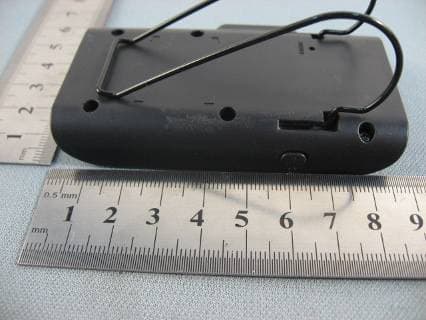
RIIBTS30V01
May 10, 2011Mini Speakerphone
Equipment Class
DSS - Part 15 Spread Spectrum Transmitter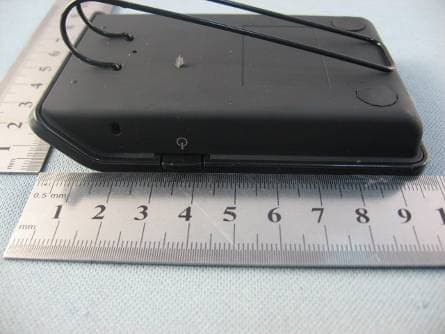
RIIBTS90V01
Dec 01, 2010Bluetooth speakerphone with TTS
Equipment Class
DSS - Part 15 Spread Spectrum Transmitter