SGI-WL002BTEBTE Hearing Aid
Sivantos GmbH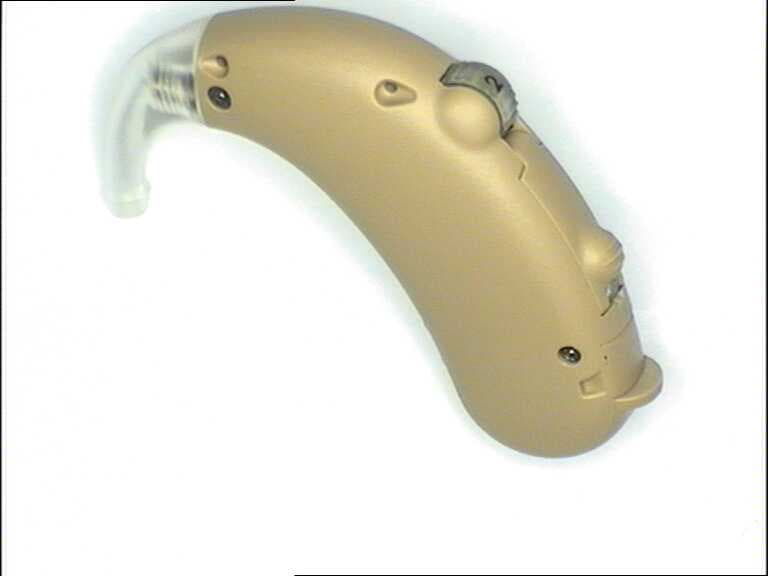
Click to zoom
Application Details
- Equipment Class
- DXX - Part 15 Low Power Communication Device Transmitter
- Date of Grant
- Mar 02, 2008
- Application Purpose
- Original Equipment
- Date of Application
- Mar 02, 2008
- Equipment Note
- BTE Hearing Aid
- Frequency Range
- 3.28390000 - 3.28390000
- Company
- Sivantos GmbH
- Country
- Germany
Documents & Files
Document Text
Text extracted from the exhibit documents filed with the FCC. Open a document above to read the original.
Users Manual
www.siemens.com /hearing Siemens Audiologische Technik GmbH Gebbertstrasse 125 91058 Erlangen Germany Phone +49 9131 308 0 © Siemens AG, 02.2008 · SB Document No. A91SAT-00461-99T1-7600 Order/Item No. 104 174 47 Printed in Germany Kids_en.indb 36Kids_en.indb 3613.02.2008 15:19:0313.02.2008 15:19:03 Explorer 500 P User Guide Kids_en.indb 1Kids_en.indb 113.02.2008 15:19:0413.02.2008 15:19:04 Kids_en.indb 2Kids_en.indb 213.02.2008 15:19:0413.02.2008 15:19:04 Dear customer, Congratulations! You have selected the new Explorer hearing instruments from Siemens. These hearing in- struments were individually designed for babies and children and fitted specially to meet your child's indivi- dual needs. These instructions, together with the guidance from your Hearing Care Professional, will help you understand how the hearing instrument works. If you have further questions, please contact your Hea- ring Care Professional. Introduction 1 3 Kids_en.indb 3Kids_en.indb 313.02.2008 15:19:0413.02.2008 15:19:04 A A The Explorer 500 P hearing instruments 6 Intended use 7 Children with hearing instruments 8 Why hearing is important 8 First hearing instruments 8 General notes on safety 9 Handling batteries 11 Low battery indicator 1 1 Inserting the battery: 1 2 Removing the battery 1 3 Locking the battery compartment 1 4 Inserting and removing your hearing instruments 15 Inserting 1 5 Removing 1 6 Turning your hearing instrument on and off 16 Using the battery compartment door 1 6 Using the volume control 1 6 Using the push button 1 6 Power-on delay 1 6 Checking the hearing instrument's performance 17 Changing the hearing program 18 Contents 2 3 4 5 6 7 8 9 10 4 Kids_en.indb 4Kids_en.indb 413.02.2008 15:19:0413.02.2008 15:19:04 A B2 Adjusting the volume 19 Using the audio input 20 Attaching the audio shoe 2 1 Removing the audio shoe 2 1 e2e wireless 2.0 22 Automatic telephone program 23 Maintenance and care 25 Accessories 26 Colors and stickers 2 6 Remote control 2 7 Tek wireless enhancement 2 8 Troubleshooting tips 29 Technical information 31 Disposal information 33 Your hearing instrument configuration 34 11 12 13 14 15 16 17 18 19 20 5 Kids_en.indb 5Kids_en.indb 513.02.2008 15:19:0413.02.2008 15:19:04 Features: 1 Earhook 2 Battery compartment 3 Microphone openings 4 Audio input 5 Volume control 6 Program button with ON/OFF function 7 optional LED 8 Cover for programming socket 9 Typeplates Explorer 500 (battery type: 13) 1 3 4 5 6 7 8 The Explorer 500 P hearing instruments 3 2 9 6 Kids_en.indb 6Kids_en.indb 613.02.2008 15:19:0413.02.2008 15:19:04 Hearing instruments are intended to improve the hearing of hearing impaired persons. Diagnosis and prescription of a hearing instrument must be performed by hearing health specialists, e.g. ENT doctors, audiologists or acou- sticians. Read and follow the instructions of this user guide to avoid injuries or damage to the hearing instrument. Symbols: Be aware of information marked with the warning symbol WARNING, CAUTION or NOTICE! WARNING points out a situation that could lead to serious injuries, CAUTION indicates a situation that could lead to minor and moderate injuries. NOTICE NOTICE indicates possible property damage. Advice and tips on how to handle your hearing instrument better. Instruction. Indicates that something has to be done. Intended use 4 7 Kids_en.indb 7Kids_en.indb 713.02.2008 15:19:0413.02.2008 15:19:04 Why hearing is important Children need all of their senses to discover and expe- rience the world. Hearing is not only mandatory for a proper speech and language acquisition, but also has a major influence on a child’s mental, social and emotional development. First hearing instruments If your baby receives its first hearing instruments, they will be in the beginning considered as foreign objects. It is absolutely normal that the child will pull out the hearing instruments every once in a while, as it is curious and will possibly examine them very carefully. Give your child some time to get used to the hearing instruments and to feel the benefit in wearing them. If it does not accept them, do not enforce wearing the hearing instruments but try to provide them consistently. Nevertheless, always keep in mind that if a child does not accept his or her hearing instruments over a longer period of time, this might also have other reasons. Contact your Hearing Care Professional to check the child’s hearing as well as the hearing instrument fitting and performance. For further information on hearing, hearing loss and hearing instruments for children, please check out our Pediatric Website on http://www.hearing-siemens.com. 5 Children with hearing instruments 8 Kids_en.indb 8Kids_en.indb 813.02.2008 15:19:0513.02.2008 15:19:05 NOTICE Hearing instruments are sensitive to extreme heat, high humidity, strong magnetic fields (> 0.1T), X-rays and mechanical stress. Do not expose the hearing instrument to extreme X temperature or high humidity. Do not leave it in direct sunlight. X Do not wear it in the shower or when you apply X make-up, perfume, aftershave, hairspray or suntan lotion. Do not wear the hearing instrument when you are ex- X posed to short-waves, a strong magnetic field, a high frequency field or X-rays. NOTICE Turn the hearing instrument off when not in use to X preserve the battery. Leaking batteries damage the instrument. Remove X batteries when the instrument is not in use for a pro- longed period of time. WARNING Risk in explosive environments, e.g. mining areas! Don't use the hearing instruments (and remote con- X trol) in areas where there is a danger of explosions. 6 General notes on safety 9 Kids_en.indb 9Kids_en.indb 913.02.2008 15:19:0513.02.2008 15:19:05 General notes on safety WARNING Choking hazard posed by small parts. Ensure appropriate supervision when your child is X wearing the hearing instruments. Check the integrity of the hearing instruments regula- X ry. Ensure that your child does not detach the hearing instrument from the…
Text truncated - open the document above for the full version.
Cover Letter(s)
SGI-WL002BTE Pure 500, Pure 700, Explorer 500
ID Label/Location Info
Operating frequencies: F c =3.28 MHz This Class B digital apparatus complies with Canadian ICES- 003. Changes or modifications not expressly approved by the party responsible for compliance could void the users aut- hority to operate the equipment. Siemens Explorer 500 P FCC ID: SGI-WL002BTE IC: 267AB-WL002 This device complies with Part 15 of the FCC Rules and with RSS-210 of Industry Canady. Operation is subject to the following conditions: (1) this device may not cause harmful interference, and (2) this device must accept any interference received, including interference that may cause undesired operation. 18 Technical information 31 Kids_en.indb 31Kids_en.indb 3113.02.2008 15:19:0913.02.2008 15:19:09
Test Report
CETECOM ICT Services GmbH Untertürkheimer Str. 6-10, 66117 Saarbruecken Phone: +49 (0) 681 598-0 Fax: -9075 RSC-Laboratory Phone: +49 (0) 681 598-8412 Fax: -8484 Test report no.: 2-4839-01-05/07 Date: 2008-01-22 Page 1 of 23 Recognized by the Federal Communications Commission Anechoic chamber registration no.: 90462 (FCC) Anechoic chamber registration no.: IC 3463A-1 TCB ID: DE 0001 Accredited by the German Accreditation Council DAR–Registration Number DAT-P-176/94-D1 Accredited Bluetooth ® Test Facility (BQTF) Test report no. : 2-4839-01-05/07 Applicant : SIEMENS Audiologische Technik GmbH Type : Hearing Aid BTE Test Standard : FCC Part 15.223 RSS-210 Issue 7 FCC ID : SGI-WL002BTE Certification No. IC : 267AB-WL002 The Bluetooth word mark and logos are owned by the Bluetooth SIG, Inc. and any use of such marks by Cetecom ICT is under license CETECOM ICT Services GmbH Untertürkheimer Str. 6-10, 66117 Saarbruecken Phone: +49 (0) 681 598-0 Fax: -9075 RSC-Laboratory Phone: +49 (0) 681 598-8412 Fax: -8484 Test report no.: 2-4839-01-05/07 Date: 2008-01-22 Page 2 of 23 Table of contents 1. ADMINISTRATIVE DATA ......................................................................................................................................3 1.1. ADMINISTRATIVE DATA OF THE TEST FACILITY..................................................................................................... 3 1.1.1 Identification of the testing laboratory ......................................................................................................... 3 1.1.2 Organizational items.....................................................................................................................................3 1.1.3 Applicant ́s details ........................................................................................................................................ 4 1.1.4 APPLICATION DETAILS...................................................................................................................................... 4 1.2 ADMINISTRATIVE DATA OF MANUFACTURER / MEMBER........................................................................................ 4 1.3 DESCRIPTION OF THE EQUIPMENT UNDER TEST (EUT) .......................................................................................... 5 1.3.1 EUT: Type, S/N etc. ......................................................................................................................................5 1.4 TEST SETUP........................................................................................................................................................... 5 1.5 TEST SPECIFICATIONS............................................................................................................................................ 5 2 STATEMENT OF COMPLIANCE .......................................................................................................................... 6 2.1 SUMMARY OF MEASUREMENT RESULTS................................................................................................................ 6 2.1.1 CFR 47 Part 15 Radio frequency devices ..................................................................................................... 6 3 MEASUREMENTS AND RESULTS ....................................................................................................................... 7 4 FCC PART 15 SUBPART C...................................................................................................................................... 8 4.1 Timing of the transmitter .................................................................................................................................. 8 4.2 Field strength of the fundamental ..................................................................................................................... 9 4.3 Field strength of the harmonics and the spurious........................................................................................... 10 4.4 Plots of measurements ....................................................................................................................................11 4.5 Receiver spurious emission (radiated)............................................................................................................ 15 4.6 Conducted Limits ............................................................................................................................................ 16 5 USED TESTEQUIPMENT ...................................................................................................................................... 17 6 ANNEX B: PHOTOGRAPHS OF TEST SITE ..................................................................................................... 20 7 ANNEX C: EXTERNAL PHOTOGRAPHS OF THE EQUIPMENT ................................................................ 22 ANNEX 1: TECHNICAL PRODUCT DESCRIPTION CETECOM ICT Services GmbH Untertürkheimer Str. 6-10, 66117 Saarbruecken Phone: +49 (0) 681 598-0 Fax: -9075 RSC-Laboratory Phone: +49 (0) 681 598-8412 Fax: -8484 Test report no.: 2-4839-01-05/07 Date: 2008-01-22 Page 3 of 23 1. Administrative data 1.1. Administrative data of the test facility 1.1.1 Identification of the testing laboratory Company name: Cetecom ICT Services GmbH Address: Untertürkheimerstr. 6-10 D-66117 Saarbruecken Germany Laboratory accreditation: DAR-Registration No. DAT-P-176/94-D1 Bluetooth Qualification Test Facility (BQTF) Responsible for testing laboratory: Michael Berg Phone: +49 681 598 0 Fax: +49 681 598 9075 email: [email protected] ........................................................................................... Responsible for testing (Harro Ames) 1.1.2 Organizational items Reference No.: 2-4839-01-05/07 Order No.: Receipt of EUT: 2008-01-21 Date(s) of test: 2008-01-21 to 2008-01-22 Date of report: 2008-01-22 Number of report pages: 23 Number of diagr…
Text truncated - open the document above for the full version.
Test Setup Photos
CETECOM ICT Services GmbH Untertürkheimer Str. 6-10, 66117 Saarbruecken Phone: +49 (0) 681 598-0 Fax: -9075 RSC-Laboratory Phone: +49 (0) 681 598-0 Fax: -9075 Test report no.: 2-4839-01-05/07 Date: 2008-01-222008-01-22 Page 20 of 23 6 Annex B: Photographs of Test site Photo 1 (Radiated Emissions): CETECOM ICT Services GmbH Untertürkheimer Str. 6-10, 66117 Saarbruecken Phone: +49 (0) 681 598-0 Fax: -9075 RSC-Laboratory Phone: +49 (0) 681 598-0 Fax: -9075 Test report no.: 2-4839-01-05/07 Date: 2008-01-222008-01-22 Page 21 of 23 Photo 2 (Radiated Emissions):
Contact Information
Applicant
Juergen Reithinger
Test Firm
cetecom advanced GmbHGerald Schmidt
Technical Specifications
| # | Rule Parts | Frequency Range | Power Output |
|---|---|---|---|
| 1 | 15C | 3.2839 MHz - 3.2839 MHz | - |
Other Applications from Sivantos GmbH
SGI-MIM002
Mar 17, 2020NFMI Module 2
Equipment Class
DXX - Part 15 Low Power Communication Device Transmitter
SGI-WL401
Apr 23, 2015Remote Controller
Equipment Class
DXX - Part 15 Low Power Communication Device Transmitter
SGI-WL003BTE
Jul 15, 2014BTE Hearing Aid
Equipment Class
DXX - Part 15 Low Power Communication Device Transmitter
SGI-WL700
Feb 04, 2013easyPocket remote control 3.28 MHz
Equipment Class
DXX - Part 15 Low Power Communication Device TransmitterSGI-WL201AP
Jun 27, 2011Remote Control Device
Equipment Class
DXX - Part 15 Low Power Communication Device Transmitter