TA7-B400Wi-Fi Location Tag
AiRISTA Flow, Inc.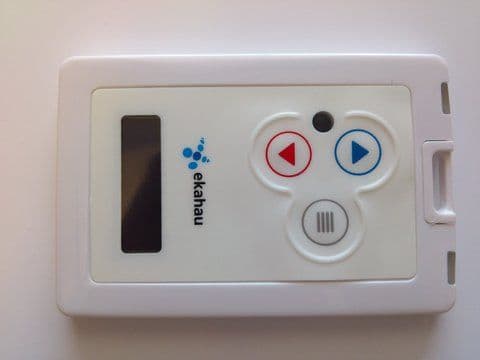
Click to zoom
Application Details
- Equipment Class
- DTS - Digital Transmission System
- Date of Grant
- Jul 24, 2012
- Application Purpose
- Original Equipment
- Date of Application
- Jul 22, 2012
- Equipment Note
- Wi-Fi Location Tag
- Frequency Range
- 2412.00000000 - 2462.00000000
- Company
- AiRISTA Flow, Inc.
- Country
- United States
Documents & Files
Document Text
Text extracted from the exhibit documents filed with the FCC. Open a document above to read the original.
Users Manual
B4 User Guide Ekahau,the Ekahaulogo,EkahauSite Survey, EkahauMobileSurvey, EkahauLocationSurvey, EkahauHeatMapper, EkahauRTLS Controller, EkahauActivator, EkahauVision,EkahauT201, EkahauT301,EkahauA4, EkahauB4, EkahauNIC-54,EkahauNIC-300,EkahauClient,and EkahauPositioningClientare trademarksor registeredtrademarksof Ekahau. Otherproductand companynamesmay be trademarksor tradenamesof their respectiveowners. The enclosedsoftwarecontainsimplementationsof Ekahau’s patentpendinginventions. This manualand the Ekahausoftwaredescribedin it are copyrighted,with all rightsreserved.This manualand the Ekahausoftwaredescribedin it may not be copied,exceptas otherwiseprovided in your softwarelicense. The contentsof this documentare provided“as is.” Exceptas may be requiredby applicablelaw, no warrantiesof any kind,eitherexpressor implied,including,but not limitedto, the impliedwar- rantiesof merchantabilityand fitnessfor a particularpurpose,are madein relationto the accuracy, reliabilityor contentsof this document.Ekahaureservesthe right to revisethis documentor withdraw it at any time withoutprior notice. Exportof this technologymay be controlledby the UnitedStatesGovernment.Diversioncontrary to U.S. law prohibited. Your use of the Ekahausoftwaredescribedin this user manualand its documentationare governed by the termsset forth in your licenseagreement.Your use of this Ekahausoftwarecontraryto the termsof this UserManualmay void the warranty, if any, describedin your licenseagreement. Underno circumstancesshall Ekahaube responsiblefor any loss of data or income,or any special, incidental,punitive,consequentialor indirectdamageshowsoevercaused. You may not use any Ekahausoftwareor hardwareproductsin hazardousenvironments(such as operationof nuclearfacilities,aircraftnavigationor control,environmentscontaininghigh levels of dust,or mines)or in Life-CriticalSolutions,unlessyou haveadvisedEkahauthat they will be usedin a hazardousenvironmentor in a Life-CriticalSolutionandEkahauhas had an opportunity to evaluatefurtherwhether, and on whattermsand conditions,the softwareor hardwareproducts may be licensedfor your intendeduse. The term “Life-CriticalSolution”meansan application softwarepackageor hardwaredevicewhosefunctioningor malfunctioningmay resultdirectlyor indirectlyin physicalinjuryor loss of humanlife. Ekahautags mustalwaysbe usedin compliancewith the user environmentand instructionscon- tainedin the UserManualfor the tags. Copyright© Ekahau,Inc. 2000-2012.All rightsreserved. Table of Contents 1 Introduction.......................................................................................................................1 1.1 SoftwareReleaseLevel...........................................................................................1 1.2 Featuresof B4 .........................................................................................................1 1.3 UserInterface..........................................................................................................2 1.4 StatusIndicationLEDs.............................................................................................2 2 InitialActivationof the Tag ..............................................................................................5 2.1 InstallingEkahauTag Activator3 .............................................................................5 2.2 SupportedWi-FiAdapters........................................................................................5 2.3 ActivationProcedure................................................................................................5 2.3.1ConfiguringEkahauRTLS ControllerSettings............................................6 2.3.2ConfiguringWLANSettings.........................................................................7 2.3.3ConfiguringWi-FiChannelsin Use ..............................................................8 2.3.4ConfiguringIP Settings................................................................................9 2.3.5Activation...................................................................................................10 2.3.6List of AvailableSettingsin the Activator...................................................14 3 ConfigurationAfter InitialActivation............................................................................17 3.1 Tag ConfigurationSettingsin ERCConfigsPage..................................................17 3.2 Tag ActionsAvailablein ERCTags PropertiesPage.............................................19 4 Tag Operation.................................................................................................................21 4.1 ButtonActivatedLocationUpdateand MaintenanceCall ......................................21 4.2 SafetySwitchActivatedLocationUpdate..............................................................21 4.3 Workingwith the Display........................................................................................21 4.3.1InstantMessages.......................................................................................22 4.3.2StandardMessages...................................................................................22 4.4 Resettingto FactorySettings.................................................................................23 4.5 FirmwareUpdate...................................................................................................23 4.6 OptimizingBatteryLife ...........................................................................................24 4.7 Turningoff the B4 Tag ............................................................................................24 4.8 Chargingthe B4 tag ...............................................................................................25 5 TechnicalSpecifications................................................................................................27 5.1 General............................................…
Text truncated - open the document above for the full version.
Users Manual
B4 Wi-Fi Badge Tag User Guide Ekahau,the Ekahaulogo,EkahauSite Survey, EkahauMobileSurvey, EkahauLocationSurvey, EkahauHeatMapper, EkahauRTLS Controller, EkahauActivator, EkahauVision,EkahauT201, EkahauT301,EkahauA4, EkahauB4, EkahauNIC-54,EkahauNIC-300,EkahauClient,and EkahauPositioningClientare trademarksor registeredtrademarksof Ekahau. Otherproductand companynamesmay be trademarksor tradenamesof their respectiveowners. The enclosedsoftwarecontainsimplementationsof Ekahau’s patentpendinginventions. This manualand the Ekahausoftwaredescribedin it are copyrighted,with all rightsreserved.This manualand the Ekahausoftwaredescribedin it may not be copied,exceptas otherwiseprovided in your softwarelicense. The contentsof this documentare provided“as is.” Exceptas may be requiredby applicablelaw, no warrantiesof any kind,eitherexpressor implied,including,but not limitedto, the impliedwar- rantiesof merchantabilityand fitnessfor a particularpurpose,are madein relationto the accuracy, reliabilityor contentsof this document.Ekahaureservesthe right to revisethis documentor withdraw it at any time withoutprior notice. Exportof this technologymay be controlledby the UnitedStatesGovernment.Diversioncontrary to U.S. law prohibited. Your use of the Ekahausoftwaredescribedin this user manualand its documentationare governed by the termsset forth in your licenseagreement.Your use of this Ekahausoftwarecontraryto the termsof this UserManualmay void the warranty, if any, describedin your licenseagreement. Underno circumstancesshall Ekahaube responsiblefor any loss of data or income,or any special, incidental,punitive,consequentialor indirectdamageshowsoevercaused. You may not use any Ekahausoftwareor hardwareproductsin hazardousenvironments(such as operationof nuclearfacilities,aircraftnavigationor control,environmentscontaininghigh levels of dust,or mines)or in Life-CriticalSolutions,unlessyou haveadvisedEkahauthat they will be usedin a hazardousenvironmentor in a Life-CriticalSolutionandEkahauhas had an opportunity to evaluatefurtherwhether, and on whattermsand conditions,the softwareor hardwareproducts may be licensedfor your intendeduse. The term “Life-CriticalSolution”meansan application softwarepackageor hardwaredevicewhosefunctioningor malfunctioningmay resultdirectlyor indirectlyin physicalinjuryor loss of humanlife. Ekahautags mustalwaysbe usedin compliancewith the user environmentand instructionscon- tainedin the UserManualfor the tags. Copyright© Ekahau,Inc. 2000-2012.All rightsreserved. Table of Contents 1 Introduction.......................................................................................................................1 1.1 SoftwareReleaseLevel...........................................................................................1 1.2 Featuresof B4 .........................................................................................................1 1.3 UserInterface..........................................................................................................2 1.4 StatusIndicationLEDs.............................................................................................2 2 InitialActivationof the Tag ..............................................................................................5 2.1 InstallingEkahauTag Activator3 .............................................................................5 2.2 SupportedWi-FiAdapters........................................................................................5 2.3 ActivationProcedure................................................................................................5 2.3.1ConfiguringEkahauRTLS ControllerSettings............................................6 2.3.2ConfiguringWLANSettings.........................................................................7 2.3.3ConfiguringWi-FiChannelsin Use ..............................................................8 2.3.4ConfiguringIP Settings................................................................................9 2.3.5Activation...................................................................................................10 2.3.6List of AvailableSettingsin the Activator...................................................14 3 ConfigurationAfter InitialActivation............................................................................17 3.1 Tag ConfigurationSettingsin ERCConfigsPage..................................................17 3.2 Tag ActionsAvailablein ERCTags PropertiesPage.............................................19 4 Tag Operation.................................................................................................................21 4.1 ButtonActivatedLocationUpdateand MaintenanceCall ......................................21 4.2 SafetySwitchActivatedLocationUpdate..............................................................21 4.3 Workingwith the Display........................................................................................21 4.3.1InstantMessages.......................................................................................22 4.3.2StandardMessages...................................................................................22 4.4 Resettingto FactorySettings.................................................................................23 4.5 FirmwareUpdate...................................................................................................23 4.6 OptimizingBatteryLife ...........................................................................................24 4.7 Turningoff the B4 Tag ............................................................................................24 4.8 Chargingthe B4 tag ...............................................................................................25 5 TechnicalSpecifications................................................................................................27 5.1 General............................…
Text truncated - open the document above for the full version.
Block Diagram
G2C547 WLAN SoC Renesas R5F21258 Co-Processor 40MHz Crystal 32,768kHz Crystal Serial FLASH Magnetic Buzzer 2*Bi-color LED OLED Display 3D Motion Sensor 3*Metal Dome Buttons IR Receiver Security Strap SPI Ekahau B4 WLAN Tag Block Diagram UART SPI GPIO Antenna Tx/Rx Switch Charger/Buck Boost Gas Gauge 600mAh Li-Pol Battery +5v 500mA
Cover Letter(s)
Ekahau_BDrev_4_5_SCH.pdf B4_Block_Diagram.pdf B4_Tag_Operational_Info.pdf Hardware schematic Block Diagram Operational information
External Photos
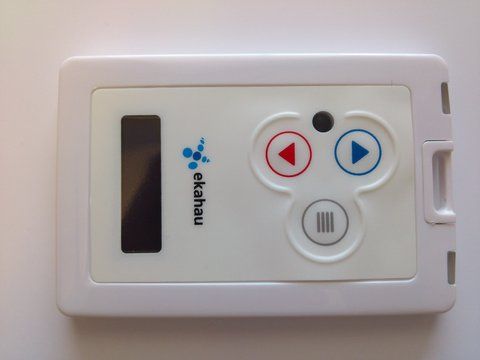
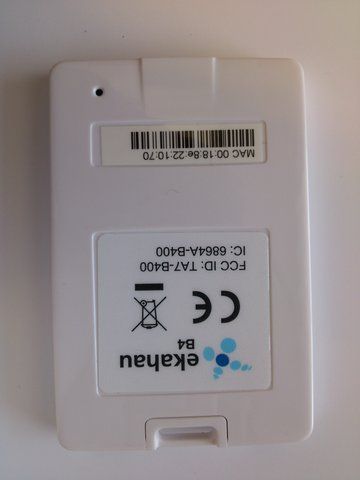
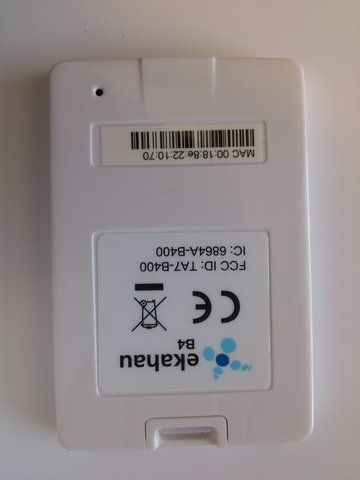
MiCOM Labs, 440 Boulder Court, Suite 200, Pleasanton, CA 94566 Tel: +1 (925) 462-0304, Fax: +1 (925) 462-0306, Web: www.micomlabs.com the wireless lab 20 July 2012 External Photographs Model: B4 EUT Back Page 2 of 2 the wireless lab EUT FRONT
Internal Photos
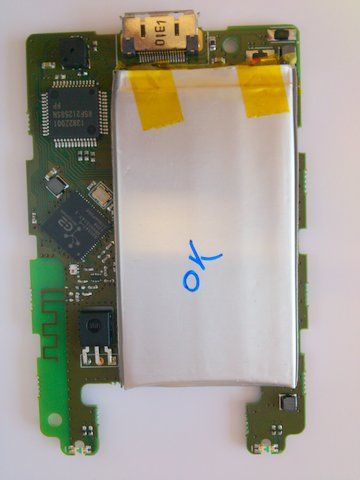
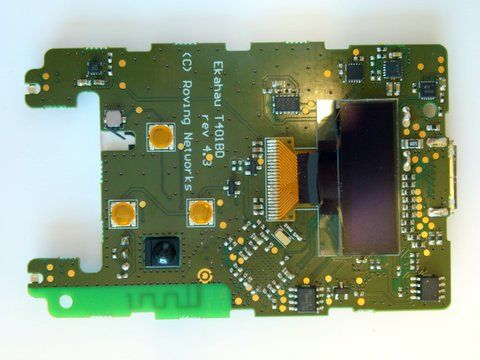
MiCOM Labs, 440 Boulder Court, Suite 200, Pleasanton, CA 94566 Tel: +1 (925) 462-0304, Fax: +1 (925) 462-0306, Web: www.micomlabs.com the wireless lab 23 July 2012 Internal Photographs Model: B4 EUT Back with battery Page 2 of 3 the wireless lab EUT Back with battery removed Page 3 of 3 the wireless lab EUT Front
Test Report
COVER PAGE Test of Ekahau B4 Wi-Fi Location Tag To: FCC 47 CFR Part 15.247 & IC RSS-210 Test Report Serial No.: ROVN06-U1 Rev A TITLE PAGE TEST REPORT FROM Test of Ekahau B4 Wi-Fi Location Tag to To FCC 47 CFR Part 15.247 & IC RSS-210 Test Report Serial No.: ROVN06-U1 Rev A This report supersedes: NONE Applicant: Ekahau Inc. Hiilikatu 3 00180 Helsinki Finland Product Function: Wi-Fi Location Tag Copy No: pdf Issue Date: 19th June 2012 This Test Report is Issued Under the Authority of; MiCOM Labs, Inc. MiCOM Labs is an ISO 17025 Accredited Testing Laboratory 440 Boulder Cour t, Suite 200 Pleasanton, CA 94566 USA Phone: +1 (925) 462-0304 Fax: +1 (925) 462-0306 www.micomlabs.com TEST CERTIFICATE #2381.01 This test report may be reproduced in full only. The document may only be updated by MiCOM Labs personnel. Any changes will be noted in the Document History section of the report. Title: Ekahau B4 Wi-Fi Location Tag To: Serial #: Issue Date: Page: FCC 47 CF R Part 15.247 & IC RSS-210 ROVN06-U1 Rev A 19th June 2012 3 of 81 This test report may be reproduced in full only. The document may only be updated by MiCOM Labs personnel. Any changes will be noted in the Document History section of the report. MiCOM Labs, 440 Boulder Court, Suite 200, Pleasanton, CA 94566 USA, Phone: 925.462.0304, Fax: 925.462.0306, www.micomlabs.com This page has been left intentionally blank Title: Ekahau B4 Wi-Fi Location Tag To: Serial #: Issue Date: Page: FCC 47 CF R Part 15.247 & IC RSS-210 ROVN06-U1 Rev A 19th June 2012 4 of 81 This test report may be reproduced in full only. The document may only be updated by MiCOM Labs p ersonnel. Any changes will be noted in the Document History section of the report. MiCOM Labs, 440 Boulder Court, Suite 200, Pleasanton, CA 94566 USA, Phone: 925.462.0304, Fax: 925.462.0306, www.micomlabs.com TABLE OF CONTENTS COVER PAGE .................................................................................................................... 1 TITLE PAGE ....................................................................................................................... 2 ACCREDITATION, LISTINGS & RECOGNITION ............................................................ 5 RECOGNITION ................................................................................................................. 6 PRODUCT CERTIFICATION ............................................................................................ 7 1. TEST RESULT CERTIFICATE ................................................................................... 9 2. REFERENCES AND MEASUREMENT UNCERTAINTY ........................................ 10 2.1. Normative References ............................................................................................. 10 2.2. Test and Uncertainty Procedures ............................................................................ 11 3. PRODUCT DETAILS AND TEST CONFIGURATIONS .......................................... 12 3.1. Technical Details ..................................................................................................... 12 3.2. Scope of Test Program ............................................................................................ 13 3.3. EUT Configurations ................................................................................................. 14 3.4. Equipment Details.................................................................................................... 14 3.5. Test Configurations.................................................................................................. 14 3.6. Equipment Modifications.......................................................................................... 14 3.7. Deviations from the Test Standard .......................................................................... 14 3.8. Subcontracted Testing or Third Party Data ............................................................. 14 4. TEST SUMMARY ...................................................................................................... 15 5. TEST RESULTS ........................................................................................................ 17 5.1. Device Characteristics ............................................................................................. 17 5.1.1. 6 dB and 99 % Bandwidth ........................................................................17 5.1.2. Peak Output Power ..................................................................................27 5.1.3. Peak Power Spectral Density...................................................................31 5.1.4. Maximum Permissible Exposure ..............................................................41 5.1.5. Conducted Spurious Emissions ...............................................................42 5.1.6. Radiated Emissions .................................................................................52 5.1.7. AC Wireline Conducted Emissions (150 kHz – 30 MHz)..........................74 6. PHOTOGRAPHS....................................................................................................... 76 6.1. Radiated Emissions Equipment Configuration ........................................................ 76 6.2. Radiated Emissions > 1GHz.................................................................................... 77 6.3. Radiated Emissions < 1GHz.................................................................................... 78 6.4. Conducted RF Measurement Test Set-Up .............................................................. 79 7. TEST EQUIPMENT DETAILS................................................................................... 80 Title: Ekahau B4 Wi-Fi Location Tag To: Serial #: Issue Date: Page: FCC 47 CF R Part 15.247 & IC RSS-210 ROVN06-U1 Rev A 19th June 2012 5 of 81 This test report may be reproduced in full only. The document may only be updated by MiCOM Labs p ersonnel. Any…
Text truncated - open the document above for the full version.
Test Setup Photos
MiCOM Labs, 440 Boulder Court, Suite 200, Pleasanton, CA 94566 Tel: +1 (925) 462-0304, Fax: +1 (925) 462-0306, Web: www.micomlabs.com the wireless lab 20 July 2012 Test Setup Photographs Model: B4 Radiated Emissions Equipment Configuration Page 2 of 4 the wireless lab Radiated Emissions > 1GHz Page 3 of 4 the wireless lab Radiated Emissions < 1GHz Page 4 of 4 the wireless lab Conducted RF Measurement Test Set-Up
Contact Information
Applicant
Sy Sajjad(Chief Executive Officer)
Test Firm
Micom LabsGordon Hurst
Technical Specifications
| # | Rule Parts | Frequency Range | Power Output |
|---|---|---|---|
| 1 | 15C | 2.41 GHz - 2.46 GHz | 17.00 mW |
Other Applications from AiRISTA Flow, Inc.
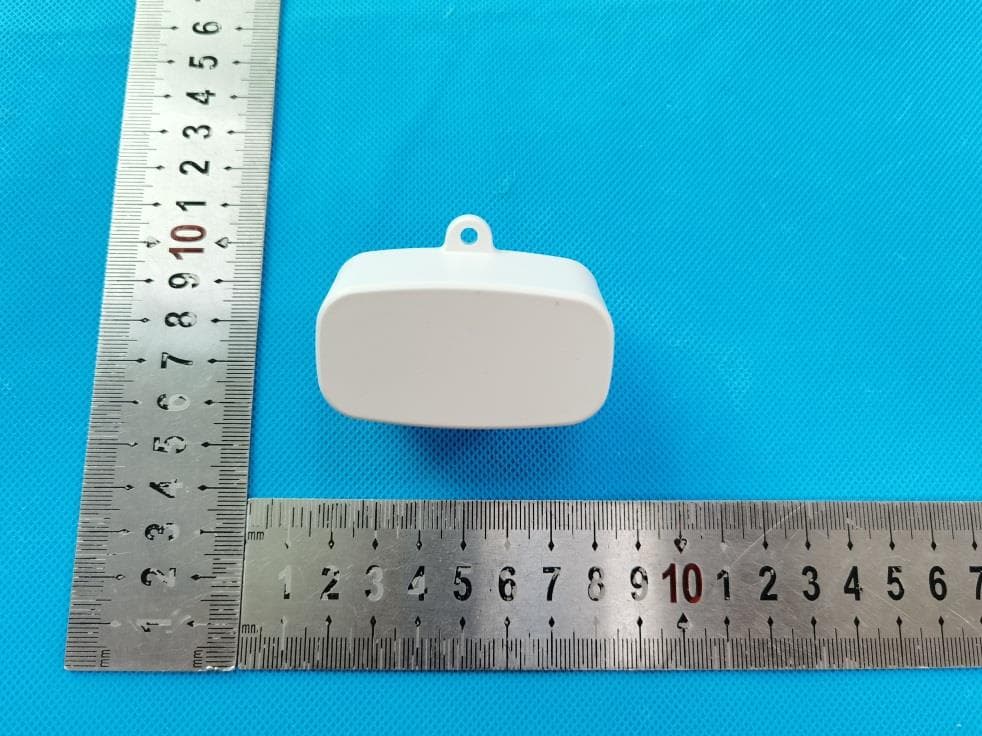
TA7-G3
Feb 24, 2021Wi-Fi/BLE Gateway
Equipment Class
DTS - Digital Transmission System
TA7-A100
Jul 14, 2020Airista Flow A1 Tag
Equipment Class
DTS - Digital Transmission System
TA7-A400
Sep 11, 2011Wi-Fi Tag
Equipment Class
DTS - Digital Transmission System
TA7-T301-W1
Jul 13, 2011WiFi Location Tag Transmitter
Equipment Class
DTS - Digital Transmission System
TA7-T301-A1
Feb 06, 2007WiFi Location Tag
Equipment Class
DTS - Digital Transmission System