TKHSP-100TRI-BAND GSM 850/1800/1900 MHz MOBILE PHONE
Vitelcom Mobile Technology, S.A.
Click to zoom
Application Details
- Equipment Class
- PCE - PCS Licensed Transmitter held to ear
- Date of Grant
- Oct 12, 2005
- Application Purpose
- Original Equipment
- Date of Application
- Oct 12, 2005
- Equipment Note
- TRI-BAND GSM 850/1800/1900 MHz MOBILE PHONE
- Frequency Range
- 824.20000000 - 848.80000000
- Country
- Spain
Documents & Files
Document Text
Text extracted from the exhibit documents filed with the FCC. Open a document above to read the original.
Users Manual
3. Buttons 0 ~ 9 are used for number, text and sign. * and # buttons have various functions, which are used on the phone menu. 4. Select button Left ( ) and Right ( ) Select buttons are used to perform the option positioned right above. Ref) Select button is displayed in capital letters in thick color in this manual. For example, ACEPTAR (Confirm) 5. Call button Press the phone number and then Call ( ) button to start to make a call to the number. Telephone 1. On/Off button Press ( ) button to turn the mobile phone on or off. Press this button to finish the call. If the button is pressed for long, you will be back to the previous screen from the present screen where a certain menu is applied. 2. Move button Keep pressing ( ) button to move to the mobile phone menu. Press Move button downward to display the menu where SMS message can be sent. On the basic screen press Move button upward to display the call records. Installation of SIM card Prior to installation of SIM card, make sure the mobile phone is powered off and then remove the battery. Since the SIM card can be easily damaged if scratched or bent, be careful when installing on or removing from the phone. Introduction 1. Let the back of the phone directed toward the user, and press the open lever (as pointed by the arrow in the figure). The battery is put together with the cover as a single unit. 2. Take the battery out as shown in the figure. 3. Let the yellow connector of the SIM card directed downward as shown in the figure and then put inside onto the corner. Ref) Hold and take out the SIM card carefully to remove from the slot. 4. Install the battery. Charging the battery 1. Insert the charger as shown in the figure. (The phone is available during charging the battery.) If the mobile phone is turned off, the sign “Battery being charged” will be displayed continuously. 2. If the battery is charged, it will not blink as in the figure of the screen. In order to remove the battery, hold and press the both ends of the charger to take out. In order to turn the phone on or off, keep pressing ( ). Start If the phone is turned off, 8-digit password will be required. Input the password and press OK button. If the date is correct, press OK button, if not, input new date and time and then press OK button. Main screen Ref) For 1 minute and 30 seconds after the phone turned on, its image and menu may be displayed later than usual, which is because the menu setting environment needs such time when the menu is not visible. After this period of time, the speed will be back to normal condition. Stand-by screen is displayed if the phone is ready to answer and make the phone call. The stand-by screen is divided into 4 icon areas. • Icon area: displays each different icon used to show the state of the phone. Phone ON/OFF • User’s option screen area: displays connection status to the communication network including service provider and service type. • Date & time area: shows the present time year, month and day. • Functions key area: shows Select keys. Directory allows you to move to the directory if the button pressed. Menu shows the main menu if the button pressed. Press the downward arrow to move to a new text message. Press the upward arrow to display the calling list menu. You will mainly use the arrow keys with these functions available. Keep pressing End button to turn the phone off. Press Call (green) button to move to the call records screen. Press the number you want to make a call to and then press Call (green) button. Keep pressing a number button where a phone number is saved if you want to make a call thereto. Keep pressing *button to set the lock. Keep pressing #button to display Notice mode menu in the sound setting environment. You can set the notice mode as desired. Press 1 on the basic screen to make a call to voice message box. 1) Battery capacity 2) Frequency strength 3) Receive new text message 4) Notice message, message box capacity insufficient 5) Receive new voice message 6) Battery left 7) Roaming 8) Alarm & Schedule notice 9) Bell mode 10) Vibration mode 11) Bell-vibration mode 12) Mute Icons used on the basic screen Make a call In order to make a call, press the number on the stand-by screen and then press Call(green) ( ) button. If a wrong number has been pressed, press Clear (CLR) button to delete the wrong number. Press End (red) ( ) button to finish the call. Answer the phone Press Call(Answer) ( ) button to answer the phone. Press End/Start ( ) button not to answer the phone. Setting the manner mode This function is designed to mute the sound of the bell or the melody for you to answer the phone while not turned off. Through the mute function, the user can make the phone call sound mute or withhold the notice function if a call comes in when the user is not available. In the stand-by state, press Menu button to go to the basic menu. The basic menu includes details of Menu with all available functions. Press Up/Down Move button to go to the desired type of menu. In addition, with the menu button being pressed, press the applicable number to go to the category for the number. Figures of icons, names of categories and description of each menu and shortcut buttons are as follows; Lock keypad Keep pressing ( ) the button to lock the keypad. Press Cancel button and ( ) button to cancel Lock. Basic menu Structure of function menu * Contact your communication provider and ask if the service is available. Movistar menu Customer service Charge 2424 service Leisure News Chatting Emergency Roaming On-line game Details Send message New Find Delete Delete all Make a call • Operator •Check balance •Change payment system •Other cards •Advance-paid card • Fortune • Movies, TV • Humor • Daily bible • Self therapy •Chatting information •Chatting channel •Go chatting •Game of the month •Finding game •Catalog •Roaming1 •Roaming2 •Ambulance •Fire engine •Police car •Edit •Delete •Copy to FDN • Assistant • Stock market • Find roads • Phon…
Text truncated - open the document above for the full version.
Users Manual
Delete Event If an event is made, other events can be added on the calendar. Add more events • Types of events are alarm, meeting, birthday or notice. Go to the specific date on the calendar 2. Go to the calendar and press Select button. 3. Press Option button on Event item. 4. Select the desired option. 1. Press Menu button on the basic screen to move to E-book and press Select button. 2. Go to the calendar and press Select button. 3. Press Select button on Event item. 4. Press Option button. 5. Go to Delete and press Select button. 6. Press OK button. 1. Press Menu button on the basic screen to move to E-book and press Select button. 2. Go to the calendar and press Select button. 3. Press Option button. 4. Go to Event add item and press Select button. 5. Select the desired type of event. 1. Press Menu button on the basic screen to move to E-book and press Select button. 2. Press Select button on the calendar. 3. Press Option button on Event item. 4. Press Select button on Go to item. 5. Select the desired date to go to. Delete the past event Delete all events You can check the whole calendar to see the specified events. View the whole calendar View the date only with event on the calendar 1. Press Menu button on the basic screen to move to E-book and press Select button. 2. Go to the calendar and press Select button. 3. Press Option button. 4. Go to Erase past event and press Select button. 5. Press OK button to confirm. 1. Press Menu button on the basic screen to move to E-book and press Select button. 2. Go to the calendar and press Select button. 3. Press Option button. 4. Go to Erase all events and press Select button. 5. Press OK button to confirm. 1. Press Menu button on the basic screen to move to E-book and press Select button. 2. Go to the calendar and press Select button. 3. Select View date item. 4. Press Next button if you want to move forward on the calendar. Press Previous button if you want to move backward on the calendar. 1. Press Menu button on the basic screen to move to E-book and press Select button. 2. Go to the calendar and press Select button. 3. Select Date with event item. 4. Press Next button if you want to move forward on the calendar. Press Previous button if you want to move backward on the calendar. Return to the present date Calculator Through the calculator menu, basic calculation and conversion into foreign currency are available. •Add (+) •Subtract (-) •Multiply (x) •Divide (/) Add/Subtract /Multiply/Divide Ref) Use «*» button to change the sign. Ref) Use «#» button to input the decimal point or comma. 1. Press Menu button on the basic screen to move to E-book and press Select button. 2. Go to the calendar and press Select button. 3. Select Today item and press Select button. 1. Press Menu button on the basic screen and select E-book. 2. Move to Calculator through the menu and press Select button. 3. Input the first digit. 4. Use the move keys to select +, -, x or / and press Select button. 5. Input the second digit. 6. Press <=> button. World time Adjust date Date format setting Adjust time Time format setting 1. Press Menu button on the basic screen to move to E-book and press Select button. 2. Go to World time and press Select button. 3. Press Environment setting button. 4. Move to Standard area item and press Select button. 5. Move to Date item and press Select button. 6. Input the applicable date and press OK button. 1. Press Menu button on the basic screen to move to E-book and press Select button. 2. Go to World time and press Select button. 3. Press Environment setting button. 4. Move to Date format item and press Select button. 5. Select the desired date format and press OK button. 1. Press Menu button on the basic screen to move to E-book and press Select button. 2. Go to World time and press Select button. 3. Press Environment setting button. 4. Move to Standard area item and press Select button. 5. Move to Time item and press Select button. 6. Input the applicable time and press OK button. 1. Press Menu button on the basic screen to move to E-book and press Select button. 2. Go to World time and press Select button. 3. Press Environment setting button. 4. Move to Time format item and press Select button. 5. Select the desired time format and press OK button. City setting Local summer time setting Standard city setting Summer time setting of standard city 1. Press Menu button on the basic screen to move to E-book and press Select button. 2. Go to World time and press Select button. 3. Press Environment setting button. 4. Move to Local setting item and press Select button. 5. Move to the desired item and press Select button. 6. Select the desired local city and press OK button. 1. Press Menu button on the basic screen to move to E-book and press Select button. 2. Go to World time and press Select button. 3. Press Environment setting button. 4. Move to Local setting item and press Select button. 5. Move to Summer time item and press Select button. 6. Select the option of available/unavailable as necessary and press OK button. 1. Press Menu button on the basic screen to move to E-book and press Select button. 2. Go to World time and press Select button. 3. Press Environment setting button. 4. Move to Local setting item and press Select button. 5. Move to Standard city setting item and press Select button. 6. Select the desired standard city and press OK button. 1. Press Menu button on the basic screen to move to E-book and press Select button. 2. Go to World time and press Select button. 3. Press Environment setting button. 4. Move to Standard city setting item and press Select button. 5. Move to Summer time item and press Select button. 6. Select the option of available/unavailable as necessary and press OK button. Change menu makes you change and check the value specified in the phone. • Sound - The volume of bell and sound can be changed and displayed. The sound of bell, message, key, error or connection can be available or unavailable. • N…
Text truncated - open the document above for the full version.
Cover Letter(s)
VITELCOM MOBILE TECHNOLOGY S. A. Rm 1008. Hyundai yeoksam Venturetel, 642-1 Yeoksam-Dong, Kangnam –ku, Seoul 135-910, Korea Date: September 5, 2005 Federal Communications Commission Authorization and Evaluation Division Equipment Authorization Branch 7435 Oakland Mills Road, Columbia, MD 21046, U.S.A. Subject: Authorization Letter FCC ID: TKHSP-100 Company : VITELCOM MOBILE TECHNOLOGY S. A. EUT Type: Tri- Mode GSM Phone (GSM850/DCS1800/GSM1900) – Prototype Part 22/ 24 Certification To whom it may concern: We, the undersigned. hereby authorized HYUNDAI Calibration & Certification Technologies Co., Ltd. to act on our behalf in all manners relating to application for equipment authorization, including signing of all documents relating to these manners. Any and all acts carried out by HYUNDAI Calibration & Certification Technologies Co., Ltd. on our behalf shall have the same effect as acts of our own. This authorization is valid until Dec. 31, 2005. Sincerely Yours, --------------------------------- Mr. Dong Wan Shin / Director VITELCOM MOBILE TECHNOLOGY S. A.
Cover Letter(s)
VITELCOM MOBILE TECHNOLOGY S. A. Rm 1008. Hyundai yeoksam Venturetel, 642-1 Yeoksam-Dong, Kangnam –ku, Seoul 135-910, Korea Date: September 5, 2005 Federal Communications Commission Authorization and Evaluation Division Equipment Authorization Branch 7435 Oakland Mills Road, Columbia, MD 21046, U.S.A. Subject: Request for Confidentiality FCC ID: TKHSP-100 Company : VITELCOM MOBILE TECHNOLOGY S. A. EUT Type: Tri- Mode GSM Phone (GSM850/DCS1800/GSM1900) – Prototype Part 22/ 24 Certification Gentlemen: In accordance with 0.459 of CFR 47, VITELCOM MOBILE TECHNOLOGY S. A. hereby requests confidentiality of the Block Diagrams attachment, Schematic Diagrams attachment, Operational Description attachment, and Part List/Tune-Up Procedure attachment for the above-referenced Certification application. These documents contain detailed system and equipment description and related information about the product which VITELCOM MOBILE TECHNOLOGY S. A. considers to be proprietary, confidential, and a custom design and, otherwise, would not release to the general public. Since this design is a basis from which future technological products will evolve, VITELCOM MOBILE TECHNOLOGY S. A. feels this information would be of benefit to its competitors, and that the disclosure of the information in these documents would give our competitors an unfair advantage in the market. Sincerely Yours, --------------------------------- Mr. Dong Wan Shin / Director VITELCOM MOBILE TECHNOLOGY S. A.
External Photos
Report No.: HCT-SAR05-0912 FCC ID: TKHSP-100 DATE: September 15, 2005 HYUNDAI CALIBRATION & CERTIFICATION TECHNOLOGIES CO., LTD. SAN 136-1, AMI-RI , BUBAL-EUP, ICHEON-SI,KYOUNKI-DO, 467-701,KOREA TEL : +82 31 639 8518 FAX : +82 31 639 8525 www.hct.co.kr of 9 ATTACHMENT G – EXTERNAL PHOTOGRAPHS Report No.: HCT-SAR05-0912 FCC ID: TKHSP-100 DATE: September 15, 2005 HYUNDAI CALIBRATION & CERTIFICATION TECHNOLOGIES CO., LTD. SAN 136-1, AMI-RI , BUBAL-EUP, ICHEON-SI,KYOUNKI-DO, 467-701,KOREA TEL : +82 31 639 8518 FAX : +82 31 639 8525 www.hct.co.kr of 9 EXTERNAL PHOTO Report No.: HCT-SAR05-0912 FCC ID: TKHSP-100 DATE: September 15, 2005 HYUNDAI CALIBRATION & CERTIFICATION TECHNOLOGIES CO., LTD. SAN 136-1, AMI-RI , BUBAL-EUP, ICHEON-SI,KYOUNKI-DO, 467-701,KOREA TEL : +82 31 639 8518 FAX : +82 31 639 8525 www.hct.co.kr of 9 EXTERNAL PHOTO Report No.: HCT-SAR05-0912 FCC ID: TKHSP-100 DATE: September 15, 2005 HYUNDAI CALIBRATION & CERTIFICATION TECHNOLOGIES CO., LTD. SAN 136-1, AMI-RI , BUBAL-EUP, ICHEON-SI,KYOUNKI-DO, 467-701,KOREA TEL : +82 31 639 8518 FAX : +82 31 639 8525 www.hct.co.kr of 9 EXTERNAL PHOTO Report No.: HCT-SAR05-0912 FCC ID: TKHSP-100 DATE: September 15, 2005 HYUNDAI CALIBRATION & CERTIFICATION TECHNOLOGIES CO., LTD. SAN 136-1, AMI-RI , BUBAL-EUP, ICHEON-SI,KYOUNKI-DO, 467-701,KOREA TEL : +82 31 639 8518 FAX : +82 31 639 8525 www.hct.co.kr of 9 EXTERNAL PHOTO Report No.: HCT-SAR05-0912 FCC ID: TKHSP-100 DATE: September 15, 2005 HYUNDAI CALIBRATION & CERTIFICATION TECHNOLOGIES CO., LTD. SAN 136-1, AMI-RI , BUBAL-EUP, ICHEON-SI,KYOUNKI-DO, 467-701,KOREA TEL : +82 31 639 8518 FAX : +82 31 639 8525 www.hct.co.kr of 9 EXTERNAL PHOTO Report No.: HCT-SAR05-0912 FCC ID: TKHSP-100 DATE: September 15, 2005 HYUNDAI CALIBRATION & CERTIFICATION TECHNOLOGIES CO., LTD. SAN 136-1, AMI-RI , BUBAL-EUP, ICHEON-SI,KYOUNKI-DO, 467-701,KOREA TEL : +82 31 639 8518 FAX : +82 31 639 8525 www.hct.co.kr of 9 EXTERNAL PHOTO Report No.: HCT-SAR05-0912 FCC ID: TKHSP-100 DATE: September 15, 2005 HYUNDAI CALIBRATION & CERTIFICATION TECHNOLOGIES CO., LTD. SAN 136-1, AMI-RI , BUBAL-EUP, ICHEON-SI,KYOUNKI-DO, 467-701,KOREA TEL : +82 31 639 8518 FAX : +82 31 639 8525 www.hct.co.kr of 9 EXTERNAL PHOTO
ID Label/Location Info
Report No.: HCT-SAR05-0912 FCC ID: TKHSP-100 DATE: September 15, 2005 HYUNDAI CALIBRATION & CERTIFICATION TECHNOLOGIES CO., LTD. SAN 136-1, AMI-RI , BUBAL-EUP, ICHEON-SI,KYOUNKI-DO, 467-701,KOREA TEL : +82 31 639 8518 FAX : +82 31 639 8525 www.hct.co.kr 1 of 3 ATTACHMENT E – FCC ID LABEL/ LOCATION Report No.: HCT-SAR05-0912 FCC ID: TKHSP-100 DATE: September 15, 2005 HYUNDAI CALIBRATION & CERTIFICATION TECHNOLOGIES CO., LTD. SAN 136-1, AMI-RI , BUBAL-EUP, ICHEON-SI,KYOUNKI-DO, 467-701,KOREA TEL : +82 31 639 8518 FAX : +82 31 639 8525 www.hct.co.kr 2 of 3 LABELLING REQUIREMENTS PER §§ 2.925 The Label shown shall be permanently affixed at a conspicuous location on the device and be readily visible to the user at the time of purchase. (SEE NEXT PAGE ) Report No.: HCT-SAR05-0912 FCC ID: TKHSP-100 DATE: September 15, 2005 HYUNDAI CALIBRATION & CERTIFICATION TECHNOLOGIES CO., LTD. SAN 136-1, AMI-RI , BUBAL-EUP, ICHEON-SI,KYOUNKI-DO, 467-701,KOREA TEL : +82 31 639 8518 FAX : +82 31 639 8525 www.hct.co.kr 3 of 3
Internal Photos
Report No.: HCT-SAR05-0912 FCC ID: TKHSP-100 DATE: September 15, 2005 HYUNDAI CALIBRATION & CERTIFICATION TECHNOLOGIES CO., LTD. SAN 136-1, AMI-RI , BUBAL-EUP, ICHEON-SI,KYOUNKI-DO, 467-701,KOREA TEL : +82 31 639 8518 FAX : +82 31 639 8525 www.hct.co.kr of 10 ATTACHMENT H – INTERNAL PHOTOGRAPHS Report No.: HCT-SAR05-0912 FCC ID: TKHSP-100 DATE: September 15, 2005 HYUNDAI CALIBRATION & CERTIFICATION TECHNOLOGIES CO., LTD. SAN 136-1, AMI-RI , BUBAL-EUP, ICHEON-SI,KYOUNKI-DO, 467-701,KOREA TEL : +82 31 639 8518 FAX : +82 31 639 8525 www.hct.co.kr of 10 INTERNAL PHOTO Report No.: HCT-SAR05-0912 FCC ID: TKHSP-100 DATE: September 15, 2005 HYUNDAI CALIBRATION & CERTIFICATION TECHNOLOGIES CO., LTD. SAN 136-1, AMI-RI , BUBAL-EUP, ICHEON-SI,KYOUNKI-DO, 467-701,KOREA TEL : +82 31 639 8518 FAX : +82 31 639 8525 www.hct.co.kr of 10 INTERNAL PHOTO Report No.: HCT-SAR05-0912 FCC ID: TKHSP-100 DATE: September 15, 2005 HYUNDAI CALIBRATION & CERTIFICATION TECHNOLOGIES CO., LTD. SAN 136-1, AMI-RI , BUBAL-EUP, ICHEON-SI,KYOUNKI-DO, 467-701,KOREA TEL : +82 31 639 8518 FAX : +82 31 639 8525 www.hct.co.kr of 10 INTERNAL PHOTO Report No.: HCT-SAR05-0912 FCC ID: TKHSP-100 DATE: September 15, 2005 HYUNDAI CALIBRATION & CERTIFICATION TECHNOLOGIES CO., LTD. SAN 136-1, AMI-RI , BUBAL-EUP, ICHEON-SI,KYOUNKI-DO, 467-701,KOREA TEL : +82 31 639 8518 FAX : +82 31 639 8525 www.hct.co.kr of 10 INTERNAL PHOTO Report No.: HCT-SAR05-0912 FCC ID: TKHSP-100 DATE: September 15, 2005 HYUNDAI CALIBRATION & CERTIFICATION TECHNOLOGIES CO., LTD. SAN 136-1, AMI-RI , BUBAL-EUP, ICHEON-SI,KYOUNKI-DO, 467-701,KOREA TEL : +82 31 639 8518 FAX : +82 31 639 8525 www.hct.co.kr of 10 INTERNAL PHOTO Report No.: HCT-SAR05-0912 FCC ID: TKHSP-100 DATE: September 15, 2005 HYUNDAI CALIBRATION & CERTIFICATION TECHNOLOGIES CO., LTD. SAN 136-1, AMI-RI , BUBAL-EUP, ICHEON-SI,KYOUNKI-DO, 467-701,KOREA TEL : +82 31 639 8518 FAX : +82 31 639 8525 www.hct.co.kr of 10 INTERNAL PHOTO Report No.: HCT-SAR05-0912 FCC ID: TKHSP-100 DATE: September 15, 2005 HYUNDAI CALIBRATION & CERTIFICATION TECHNOLOGIES CO., LTD. SAN 136-1, AMI-RI , BUBAL-EUP, ICHEON-SI,KYOUNKI-DO, 467-701,KOREA TEL : +82 31 639 8518 FAX : +82 31 639 8525 www.hct.co.kr of 10 INTERNAL PHOTO Report No.: HCT-SAR05-0912 FCC ID: TKHSP-100 DATE: September 15, 2005 HYUNDAI CALIBRATION & CERTIFICATION TECHNOLOGIES CO., LTD. SAN 136-1, AMI-RI , BUBAL-EUP, ICHEON-SI,KYOUNKI-DO, 467-701,KOREA TEL : +82 31 639 8518 FAX : +82 31 639 8525 www.hct.co.kr of 10 INTERNAL PHOTO Report No.: HCT-SAR05-0912 FCC ID: TKHSP-100 DATE: September 15, 2005 HYUNDAI CALIBRATION & CERTIFICATION TECHNOLOGIES CO., LTD. SAN 136-1, AMI-RI , BUBAL-EUP, ICHEON-SI,KYOUNKI-DO, 467-701,KOREA TEL : +82 31 639 8518 FAX : +82 31 639 8525 www.hct.co.kr of 10 INTERNAL PHOTO
RF Exposure Info
HYUNDAI CALIBRATION & CERTIFICATION TECH. CO., LTD. PRODUCT COMPLIANCE DIVISION SAN 136-1, AMI-RI , BUBAL-EUP, ICHEON-SI, KYOUNGKI-DO, 467-701, KOREA TEL : +82 31 639 8518 FAX : +82 31 639 8525 www.hct.co.kr CERTIFICATE OF COMPLIANCE (SAR EVALUATION) EUT Type: Tri- Mode GSM Phone (GSM850/DCS1800/GSM1900)– Prototype GPRS class 8 and GPRS mode class B(GPRS and GSM, but not simultaneously) Tx Frequency: 824.20 — 848.80 MHz (GSM850) 1850.20 — 1909.80 MHz (GSM1900) Rx Frequency: 869.20 — 893.80 MHz (GSM850) 1930.20 — 1989.80 MHz (GSM1900) Max. RF Output Power: 0.518 W ERP GSM850 (27.14 dBm) / 0.566 W EIRP GSM1900 (27.53 dBm) Trade Name/Model(s): VITELCOM / SP-100 FCC Classification: Licensed Portable Transmitter Held to Ear (PCE) Application Type: Certification FCC Rule Part(s): §2.1093; FCC/ OET Bulletin Supplement C [July 2001] Maximum SAR: 1.30W/kg GSM850 Head SAR; 0.405W/kg GSM850 Body SAR; 1.37W/kg GSM1900 Head SAR; 0.518W/kg GSM1900 Body SAR This wireless portable device has been shown to be capable of compliance for localized specific absorption rate (SAR) for uncontrolled environment/general population exposure limits specified in ANSI/ IEEE Std. C95.1- 1992 and had been tested in accordance with the measurement procedures specified in ANSI/ IEEE Std. C95.3- 1992. (See Test Report). I attest to the accuracy of data. All measurements reported herein were performed by me or were made under my supervision and are correct to the best of my knowledge and belief. I assume full responsibility for the completeness of these measurements and vouch for the qualifications of all persons taking them. Hyundai C-Tech Co., Ltd. Certifies that no party to this application has been denied FCC benefits pursuant to section 5301 of the Anti- Drug Abuse Act of 1998, 21 U.S. C. 853(a) Report prepared by : Ki-Soo Kim Manager of Product Compliance Team This report only responds to the tested sample and may not be reproduced, except in full, without written approval of the HCT Co., Ltd. FCC ID : APPLICANT : TKHSP-100 VITELCOM MOBILE TECHNOLOGY S. A. Date of Issue: September 15, 2005 Test Report No.: HCT-SAR05-0912 Test Site: HYUNDAI CALIBRATION & CERTIFICATION TECHNOLOGIES CO., LTD. FRN: 0005866421 VITELCOM MOBILE TECHNOLOGY S. A. Rm 1008. Hyundai yeoksam Venturetel, 642-1 Yeoksam-Dong, Kangnam –ku, Seoul 135-910, Korea FRN: 0013892781 Report No.: HCT-SAR05-0912 FCC ID: TKHSP-100 DATE: September 15, 2005 HYUNDAI CALIBRATION & CERTIFICATION TECHNOLOGIES CO., LTD. SAN 136-1, AMI-RI , BUBAL-EUP, ICHEON-SI,KYOUNKI-DO, 467-701,KOREA TEL : +82 31 639 8518 FAX : +82 31 639 8525 www.hct.co.kr 2 of 21 Table of Contents 1.1 SCOPE ---------------------------------------------------------------------------------------------------------- 2.1 INTRODUCTION / SAR DEFINITION --------------------------------------------------------------------- 3.1 SAR MEASUREMENT SET-UP --------------------------------------------------------------------------- 4.1 E-FIELD PROBE SYSTEM --------------------------------------------------------------------------------- 5.1 EUT ARRANGEMENT ------------------------------------------------------------------------------------- 6.1 E-FIELD PROBE CALIBRATION PROCESS -------------------------------------------------------- 7.1 PHANTOM, HOLDER, & EQUIVALENT TISSUE --------------------------------------------------- 8.1 SYSTEM SPECIFICATIONS ------------------------------------------------------------------------------ 9.1 MEASUREMENT PROCESS ------------------------------------------------------------------------------ 10.1 ANSI/ IEEE C95.1 - 1992 RF EXPOSURE LIMITS -------------------------------------------------------- 11.1 MEASUREMENT UNCERTAINTIES ------------------------------------------------------------------- 12.1 TEST DATA SUMMARY ---------------------------------------------------------------------------------- 13.1 SAR TEST EQUIPMENT LIST --------------------------------------------------------------------------- 14.1 CONCLUSION ------------------------------------------------------------------------------------------------ 15.1 REFERENCES -------------------------------------------------------------------------------------------- 3 4 5 6 7-8 9-10 11 12 13 14 15 16-18 19 20 21 Report No.: HCT-SAR05-0912 FCC ID: TKHSP-100 DATE: September 15, 2005 HYUNDAI CALIBRATION & CERTIFICATION TECHNOLOGIES CO., LTD. SAN 136-1, AMI-RI , BUBAL-EUP, ICHEON-SI,KYOUNKI-DO, 467-701,KOREA TEL : +82 31 639 8518 FAX : +82 31 639 8525 www.hct.co.kr 3 of 21 SAR MEASUREMENT REPORT 1.1 SCOPE Environmental evaluation measurements of specific absorption rate 1 (SAR) distributions in emulated human head and body tissues exposed to radio frequency (RF) radiation from wireless portable devices for compliance with the rules and regulations of the U.S. Federal Communications Commission (FCC). 2 1. 2 Applicant • EUT Type: Tri- Mode GSM Phone (GSM850/DCS1800/GSM1900) – Prototype GPRS class 8 and GPRS mode class B(GPRS and GSM, but not simultaneously) • Trade Name: VITELCOM • Model(s): SP-100 • FCC ID: TKHSP-100 • Serial Number(s): TKHSP-100-20050900001 • Tx Frequency: 824.20 – 848.80 MHz (GSM850) 1850.20 – 1909.80 MHz (GSM1900) • Rx Frequency: 869.20 – 893.80 MHz (GSM850) 1930.20 – 1989.80 MHz (GSM1900) • Application Type: Certification • FCC Classification: Licensed Portable Transmitter Held to Ear (PCE) • FCC Rule Part(s): §2.1093; FCC/ OET Bulletin Supplement C [July 2001] • Modulation(s): GSM • Αntenna Type: Fixed • Max RF Output Power: 0.518 W ERP GSM850 (27.14 dBm) 0.566 W EIRP GSM1900 (27.53 dBm) • Date(s) of Tests: September 13 - 14, 2005 • Place of Tests: Hyundai C-Tech. EMC Lab. Icheon, Kyounki-Do, KOREA • Report Serial No.: HCT-SAR05-0912 Figure 1. SAR System 1 Specific Absorption Rate (SAR) is a measure of the rate of energy absorption due to exposure to an RF transmitting source (wireless portable device). 2 IEEE/ANSI Std. C95.1-1992 limits are used to determine compliance with FCC ET Docket 93-62. Company Name: …
Text truncated - open the document above for the full version.
RF Exposure Info
Report No.: HCT-SAR05-0912 FCC ID: TKHSP-100 DATE: September 15, 2005 HYUNDAI CALIBRATION & CERTIFICATION TECHNOLOGIES CO., LTD. SAN 136-1, AMI-RI , BUBAL-EUP, ICHEON-SI,KYOUNKI-DO, 467-701,KOREA TEL : +82 31 639 8518 FAX : +82 31 639 8525 www.hct.co.kr of 37 ATTACHMENT O – SAR TEST PLOTS Report No.: HCT-SAR05-0912 FCC ID: TKHSP-100 DATE: September 15, 2005 HYUNDAI CALIBRATION & CERTIFICATION TECHNOLOGIES CO., LTD. SAN 136-1, AMI-RI , BUBAL-EUP, ICHEON-SI,KYOUNKI-DO, 467-701,KOREA TEL : +82 31 639 8518 FAX : +82 31 639 8525 www.hct.co.kr of 37 Report No.: HCT-SAR05-0912 FCC ID: TKHSP-100 DATE: September 15, 2005 HYUNDAI CALIBRATION & CERTIFICATION TECHNOLOGIES CO., LTD. SAN 136-1, AMI-RI , BUBAL-EUP, ICHEON-SI,KYOUNKI-DO, 467-701,KOREA TEL : +82 31 639 8518 FAX : +82 31 639 8525 www.hct.co.kr of 37 Report No.: HCT-SAR05-0912 FCC ID: TKHSP-100 DATE: September 15, 2005 HYUNDAI CALIBRATION & CERTIFICATION TECHNOLOGIES CO., LTD. SAN 136-1, AMI-RI , BUBAL-EUP, ICHEON-SI,KYOUNKI-DO, 467-701,KOREA TEL : +82 31 639 8518 FAX : +82 31 639 8525 www.hct.co.kr of 37 Report No.: HCT-SAR05-0912 FCC ID: TKHSP-100 DATE: September 15, 2005 HYUNDAI CALIBRATION & CERTIFICATION TECHNOLOGIES CO., LTD. SAN 136-1, AMI-RI , BUBAL-EUP, ICHEON-SI,KYOUNKI-DO, 467-701,KOREA TEL : +82 31 639 8518 FAX : +82 31 639 8525 www.hct.co.kr of 37 Report No.: HCT-SAR05-0912 FCC ID: TKHSP-100 DATE: September 15, 2005 HYUNDAI CALIBRATION & CERTIFICATION TECHNOLOGIES CO., LTD. SAN 136-1, AMI-RI , BUBAL-EUP, ICHEON-SI,KYOUNKI-DO, 467-701,KOREA TEL : +82 31 639 8518 FAX : +82 31 639 8525 www.hct.co.kr of 37 Report No.: HCT-SAR05-0912 FCC ID: TKHSP-100 DATE: September 15, 2005 HYUNDAI CALIBRATION & CERTIFICATION TECHNOLOGIES CO., LTD. SAN 136-1, AMI-RI , BUBAL-EUP, ICHEON-SI,KYOUNKI-DO, 467-701,KOREA TEL : +82 31 639 8518 FAX : +82 31 639 8525 www.hct.co.kr of 37 Report No.: HCT-SAR05-0912 FCC ID: TKHSP-100 DATE: September 15, 2005 HYUNDAI CALIBRATION & CERTIFICATION TECHNOLOGIES CO., LTD. SAN 136-1, AMI-RI , BUBAL-EUP, ICHEON-SI,KYOUNKI-DO, 467-701,KOREA TEL : +82 31 639 8518 FAX : +82 31 639 8525 www.hct.co.kr of 37 Report No.: HCT-SAR05-0912 FCC ID: TKHSP-100 DATE: September 15, 2005 HYUNDAI CALIBRATION & CERTIFICATION TECHNOLOGIES CO., LTD. SAN 136-1, AMI-RI , BUBAL-EUP, ICHEON-SI,KYOUNKI-DO, 467-701,KOREA TEL : +82 31 639 8518 FAX : +82 31 639 8525 www.hct.co.kr of 37 Report No.: HCT-SAR05-0912 FCC ID: TKHSP-100 DATE: September 15, 2005 HYUNDAI CALIBRATION & CERTIFICATION TECHNOLOGIES CO., LTD. SAN 136-1, AMI-RI , BUBAL-EUP, ICHEON-SI,KYOUNKI-DO, 467-701,KOREA TEL : +82 31 639 8518 FAX : +82 31 639 8525 www.hct.co.kr of 37 Report No.: HCT-SAR05-0912 FCC ID: TKHSP-100 DATE: September 15, 2005 HYUNDAI CALIBRATION & CERTIFICATION TECHNOLOGIES CO., LTD. SAN 136-1, AMI-RI , BUBAL-EUP, ICHEON-SI,KYOUNKI-DO, 467-701,KOREA TEL : +82 31 639 8518 FAX : +82 31 639 8525 www.hct.co.kr of 37 Report No.: HCT-SAR05-0912 FCC ID: TKHSP-100 DATE: September 15, 2005 HYUNDAI CALIBRATION & CERTIFICATION TECHNOLOGIES CO., LTD. SAN 136-1, AMI-RI , BUBAL-EUP, ICHEON-SI,KYOUNKI-DO, 467-701,KOREA TEL : +82 31 639 8518 FAX : +82 31 639 8525 www.hct.co.kr of 37 Report No.: HCT-SAR05-0912 FCC ID: TKHSP-100 DATE: September 15, 2005 HYUNDAI CALIBRATION & CERTIFICATION TECHNOLOGIES CO., LTD. SAN 136-1, AMI-RI , BUBAL-EUP, ICHEON-SI,KYOUNKI-DO, 467-701,KOREA TEL : +82 31 639 8518 FAX : +82 31 639 8525 www.hct.co.kr of 37 Report No.: HCT-SAR05-0912 FCC ID…
Text truncated - open the document above for the full version.
Contact Information
Applicant
Rafael Abad(Validation Manager)
Technical Contact
HYNDAI CALIBRATION & CERTIFICATION TECH. CO., LTDKi-Soo Kim
[email protected]+82-31-639-8518
SAN 136-1, AMI-RI, BUBAL-EUP · ICHEON-SI, KYOUNKI-DO · South Korea
Non-Technical Contact
HYNDAI CALIBRATION & CERTIFICATION TECH. CO., LTDMoon-Jin Jeoung
[email protected]+82-31-639-8518
Test Firm
HCT Co., LTDSang Lee
Technical Specifications
| # | Rule Parts | Frequency Range | Power Output | Emission | Tolerance |
|---|---|---|---|---|---|
| 2 | 22H | 824.2 MHz - 848.8 MHz | 518.00 mW | 300KGXW | 0.08726 ppm |
Other Applications from Vitelcom Mobile Technology, S.A.

TKH-A109-TSM2
Jul 19, 2006Tri-Band GSM Phone TSM2, A109
Equipment Class
PCE - PCS Licensed Transmitter held to ear
TKH-A155
May 30, 2006TRI-BAND GSM MOBILE PHONE (Model: A155)
Equipment Class
PCE - PCS Licensed Transmitter held to ear
TKH-M350
May 15, 2006Quad Band GSM Handset with Bluetooth, Model E660
Equipment Class
PCE - PCS Licensed Transmitter held to ear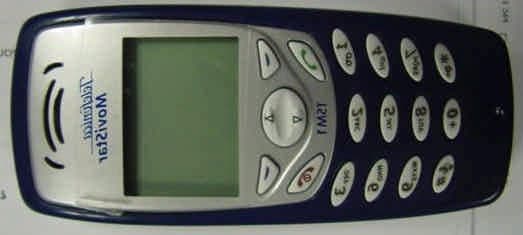
TKHSP102
Mar 16, 2006TSM1/M110 Dual Band GSM 850/1900 Handset
Equipment Class
PCE - PCS Licensed Transmitter held to ear