WP3PWRMCOMPLETEV2Control panel of wireless alarm control system
Visonic Ltd.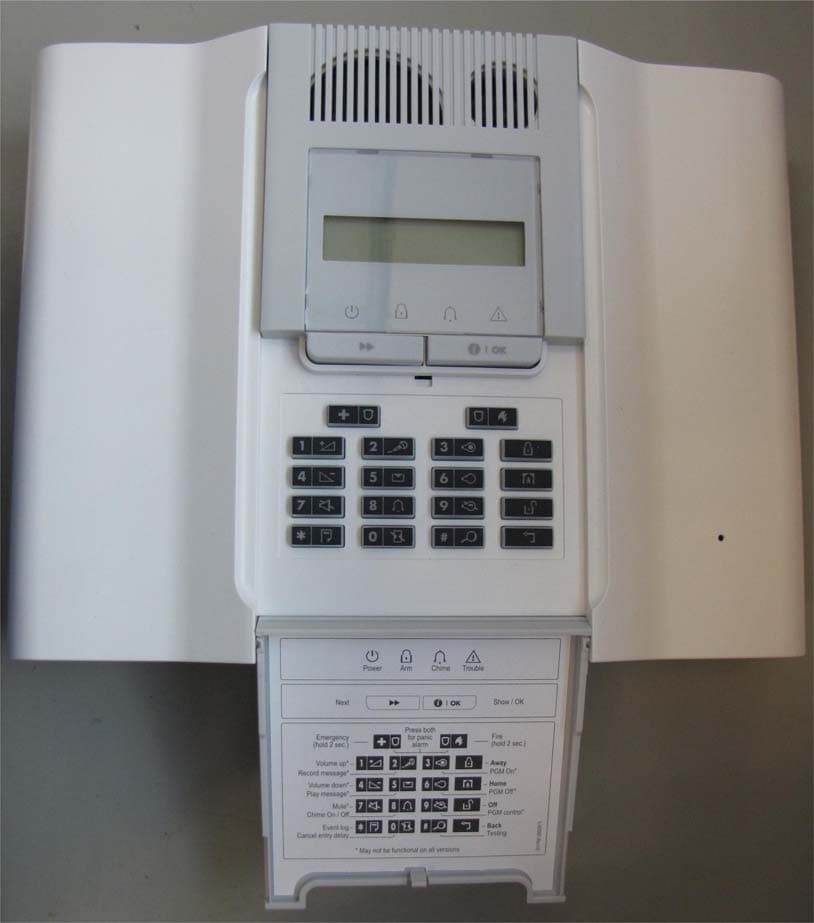
Click to zoom
Application Details
- Equipment Class
- DSR - Part 15 Remote Control/Security Device Transceiver
- Date of Grant
- Jan 05, 2012
- Application Purpose
- Original Equipment
- Date of Application
- Jan 04, 2012
- Equipment Note
- Control panel of wireless alarm control system
- Frequency Range
- 315.00000000 - 315.00000000
- Company
- Visonic Ltd.
- Country
- Israel
Documents & Files
Document Text
Text extracted from the exhibit documents filed with the FCC. Open a document above to read the original.
Users Manual
D-300886 1 PowerMaxComplete User Guide Table of Contents Quick Guide To Primary Alarm Control Operations...........................................................2 Contact list form..................................................2 Luminous Indicator Signals...............................2 Siren Signals.......................................................3 Useful Hints For PowerMaxComplete Users.3 1. Introduction .................................................... 4 Overview..............................................................4 System Features................................................5 Terms of the Trade.............................................6 Control Pushbuttons...........................................6 Multi-Function Transmitter................................7 Voice Announcements.......................................7 Screen Saver Option..........................................7 2. Securing The Protected Site ......................... 8 Security-Related Pushbuttons..........................8 Preparing to Arm................................................8 Arming ‘AWAY’...................................................8 Arming ‘HOME’...................................................8 Switching from ‘HOME’ to ‘AWAY’...................8 Switching from ‘AWAY’ to ‘HOME’...................9 Arming ‘Instant’...................................................9 Forced Arming....................................................9 Arming in the Latchkey Mode.........................10 Initiating a Panic Alarm....................................10 Initiating Fire Alarm..........................................10 Initiating Emergency Alarm.............................10 Disarming and Stopping Alarms.....................10 Siren Behavior..................................................11 3. Speech And Sound Control......................... 12 Speech & Sound Cont. Push-buttons............12 Adjusting the Speech Volume.........................12 Voice ON/OFF..................................................12 Recording a Message......................................12 Message Playback...........................................13 Chime ON/OFF.................................................13 4. Electrical Appliance Control ....................... 14 Control Options and Pushbuttons..................14 Automatic ON/OFF Control.............................14 5. Reading Alarm Memory And Trouble Data. 15 Reviewing Alarm/Tamper Memory.................15 Reviewing Trouble Information.......................15 Reviewing Memory & Troubles at the Same Time...................................................................16 Correcting Trouble Situations.........................16 6. Special Functions ......................................... 17 Looking after People Left at Home................ 17 Emergency Calls for Help............................... 17 Remote Control by Telephone....................... 17 Reporting to Private Telephone..................... 18 Remote Control by SMS................................. 19 Reporting by SMS............................................ 19 Reporting Messages to a Pager.................... 20 Conducting a Walk Test.................................. 20 7. User Settings ................................................ 21 What are the Settings You Need?................. 21 Entering the User Settings Menu................... 21 Bypassing Zones............................................. 22 Reviewing the Bypassed Zone List............... 22 Recalling the Last Bypass Scheme............... 23 Programming 4 Telephone Numbers............ 23 Setting the User Codes................................... 23 Enrolling Keyfob Transmitters........................ 25 Deleting Keyfob................................................ 26 Enrolling Proximity Tags (optional)................ 26 Deleting Proximity Tags.................................. 26 Setting the Voice Options............................... 27 Automatic Arming Option................................ 27 Setting Arming Time........................................ 27 Enabling the Squawk Option.......................... 27 Setting Time and Time Format...................... 28 Setting the Date and Date Format................. 28 Scheduler Function.......................................... 29 Installer Mode................................................... 29 8. Reading The Event Log................................ 30 Event Log Description..................................... 30 Reading Procedure.......................................... 30 9. Maintenance.................................................. 31 Replacing the Backup Battery........................ 31 Replacing Wireless Devices Batteries.......... 31 Periodic Testing............................................... 32 Cleaning the Control Panel............................ 32 10. Performance Limits .................................... 33 APPENDIX A. GLOSSARY................................ 34 APPENDIX B. HOME FIRE ESCAPE PLANNING ........................................................................ 36 2 D-300886 Quick Guide To Primary Alarm Control Operations Quick Guide To Primary Alarm Control OperationsQuick Guide To Primary Alarm Control Operations Quick Guide To Primary Alarm Control Operations QUICK REFERENCE TO PRIMARY ALARM CONTROL OPERATIONS Arming AWAY ........................................ + + [Code]* Arming AWAY-INSTANT........................ + + [Code]* + + Arming HOME ........................................ + + [Code]* Arming HOME-INSTANT ....................... + + [Code]* + + Arming AWAY-LATCHKEY ................... + + [Code]* + + Force Arming AWAY (system not ready) + + [Code]* + + (to silence the protest buzz) Force Arming HOME (system not ready) + + [Code]* + + (to silence the protest buzz) Disarming and stopping alarms ............ + + [Code] * The factory default master user code is 1 1 1 1. The code is not required …
Text truncated - open the document above for the full version.
Cover Letter(s)
Declaration of Authorization We Name: Visonic Ltd. Address: Habarzel street 24, City: Tel Aviv 69710, Country: Israel . Declare that: Agent Company name: Hermon Laboratories Ltd. Address: Harakevet Industrial Zone City: Binyamina 30500 Country Israel is authorized to apply for Certification of the following product(s): Product description: Control panel of wireless alarm control system . Type designation: Powermax Complete Trademark: Visonic . on our behalf. Date: 9/21/2011 Name: Arik Elshtein .. (2) Function: International Standards Department Manager Signature:
Cover Letter(s)
FCC, Request for non-disclosure Date: 16-Jul-10 RF_501, Issue 6 Page 1 of 1 Company Name: Visonic Ltd. Address : Habarzel street 24 City: Tel Aviv 69710 Country: Israel To: Telefication B.V ., Dept. FCC TCB Edisonstraat 12A 6902 PK ZEVENAAR The Netherlands Subject: Request for confidentiality FCC ID: WP3PWRMCOMPLETEV2 Reference number: ###### Dear FCC TCB, 1. Long-Term Confidentiality Pursuant to 47 CFR Section 0.459(a) & (b), we hereby requests non-disclosure and confidential treatment of the following materials submitted in support of FCC certification application: Bill(s) of Material Block Diagrams Operational Description Schematic Diagrams Tune-up Procedure Above materials contain secrets, proprietary and technical information, which would customarily be guarded from competitors under 47 CFR, section 0.457(d)(2). Disclosure or publication or any portion of this company confidential material to other parties could cause substantial competitive harm and provide unjustified benefits for competitors. 2. Short-Term Confidentiality (STC) Pursuant to Public Notice DA 04-1705 of the Commission’s policy, in order to comply with the marketing regulations in 47 CFR §2.803 and the importation rules in 47 CFR §2.1204, a pplicant hereby requests Short-Term Confidential treatment of the following materials (note 1): Internal Photos User’s Manual Test Set-up Photos External Photos Justification: Planned Release Date STC: (notes 2, 3, 4, 5) Date: December 25, 2011 Name and signature of applicant: Mr. Arik Elshtein Notes: 1) A document or type of document can only have ONE type of confidentiality! 2) Short-Term confidentiality is in principle for 45 days from date of grant; it can be extended max 3 times (total time 180 days max.)! 3) FCC must be informed when marketing begins earlier. 4) Release takes place automatically thus extension must be requested in time. Telefication does not remind you of this! 5) Request for extension or for release must be received by Telefication at least 7 days before date of actual marketing or before expiration of the STC period
External Photos
Visonic Ltd. FCC ID:WP3PWRMCOMPLETEV2 Page 1 of 4 EXTERNAL PHOTOGRAPHS This document contains 3 photographs Visonic Ltd. FCC ID:WP3PWRMCOMPLETEV2 Page 2 of 4 Photograph No.1 PowerMaxComplete control panel general view Visonic Ltd. FCC ID:WP3PWRMCOMPLETEV2 Page 3 of 4 Photograph No.2 PowerMaxComplete external view with open keypad cover Visonic Ltd. FCC ID:WP3PWRMCOMPLETEV2 Page 4 of 4 Photograph No.3 PowerMaxComplete rear side view
ID Label/Location Info
Visonic Ltd. FCC ID:WP3PWRMCOMPLETEV2 Page 1 of 1 Label Label location Label with FCC ID:WP3PWRMCOMPLETEV2 and containing FCC ID:RI7GE864Q2 is located at the rear side panel.
Internal Photos
Visonic Ltd. FCC ID:WP3PWRMCOMPLETEV2 Page 1 of 22 INTERNAL PHOTOGRAPHS This document contains 21 photographs Visonic Ltd. FCC ID:WP3PWRMCOMPLETEV2 Page 2 of 22 Photograph No.1 PowerMaxComplete control panel internal view Visonic Ltd. FCC ID:WP3PWRMCOMPLETEV2 Page 3 of 22 Photograph No.2 PowerMaxComplete GSM modem view GSM modem Visonic Ltd. FCC ID:WP3PWRMCOMPLETEV2 Page 4 of 22 Photograph No.3 PowerMaxComplete GSM modem with cover removed view Visonic Ltd. FCC ID:WP3PWRMCOMPLETEV2 Page 5 of 22 Photograph No.4 PowerMaxComplete main part with cover removed Visonic Ltd. FCC ID:WP3PWRMCOMPLETEV2 Page 6 of 22 Photograph No.5 PowerMaxComplete main PCB view Visonic Ltd. FCC ID:WP3PWRMCOMPLETEV2 Page 7 of 22 Photograph No.6 PowerMaxComplete with main PCB removed view Visonic Ltd. FCC ID:WP3PWRMCOMPLETEV2 Page 8 of 22 Photograph No.7 PowerMaxComplete main PCB second side view Visonic Ltd. FCC ID:WP3PWRMCOMPLETEV2 Page 9 of 22 Photograph No.8 Main PCB front side view with shield removed Visonic Ltd. FCC ID:WP3PWRMCOMPLETEV2 Page 10 of 22 Photograph No.9 RF 315 MHz module removed from the main PCB Visonic Ltd. FCC ID:WP3PWRMCOMPLETEV2 Page 11 of 22 Photograph No.10 RF 315 MHz module without shield Visonic Ltd. FCC ID:WP3PWRMCOMPLETEV2 Page 12 of 22 Photograph No.11 RF 315 MHz module second side view Visonic Ltd. FCC ID:WP3PWRMCOMPLETEV2 Page 13 of 22 Photograph No.12 Proximity module in the EUT case Visonic Ltd. FCC ID:WP3PWRMCOMPLETEV2 Page 14 of 22 Photograph No.13 Proximity module removed from the EUT case Visonic Ltd. FCC ID:WP3PWRMCOMPLETEV2 Page 15 of 22 Photograph No.14 Proximity module PCB front view Visonic Ltd. FCC ID:WP3PWRMCOMPLETEV2 Page 16 of 22 Photograph No.15 Proximity module PCB second side view Visonic Ltd. FCC ID:WP3PWRMCOMPLETEV2 Page 17 of 22 Photograph No.16 GSM modem rear side view Visonic Ltd. FCC ID:WP3PWRMCOMPLETEV2 Page 18 of 22 Photograph No.17 GSM modem main PCB second side view Visonic Ltd. FCC ID:WP3PWRMCOMPLETEV2 Page 19 of 22 Photograph No.18 GSM modem main PCB front view Visonic Ltd. FCC ID:WP3PWRMCOMPLETEV2 Page 20 of 22 Photograph No.19 GE864-Quad V2 module internal view Visonic Ltd. FCC ID:WP3PWRMCOMPLETEV2 Page 21 of 22 Photograph No.20 GE864-Quad V2 module PCB front view Visonic Ltd. FCC ID:WP3PWRMCOMPLETEV2 Page 22 of 22 Photograph No.21 GE864-Quad V2 module PCB second side view
Test Setup Photos
Visonic Ltd. FCC ID:WP3PWRMCOMPLETEV2 Page 1 of 9 SETUP PHOTOGRAPHS This document contains 8 photographs Visonic Ltd. FCC ID:WP3PWRMCOMPLETEV2 Page 2 of 9 Photograph No.1 Setup for spurious emission field strength measurements in anechoic chamber below 30 MHz Visonic Ltd. FCC ID:WP3PWRMCOMPLETEV2 Page 3 of 9 Photograph No.2 Setup for spurious emission field strength measurements in anechoic chamber from 30 to 1000 MHz Visonic Ltd. FCC ID:WP3PWRMCOMPLETEV2 Page 4 of 9 Photograph No.3 Setup for spurious emission field strength measurements in anechoic chamber above 1000 MHz Visonic Ltd. FCC ID:WP3PWRMCOMPLETEV2 Page 5 of 9 Photograph No.4 Setup for output power measurements as per section 15.209 at OATS Visonic Ltd. FCC ID:WP3PWRMCOMPLETEV2 Page 6 of 9 Photograph No.5 Setup for output power as per section 15.231 and spurious emission field strength measurements at OATS from 30 to 1000 MHz Visonic Ltd. FCC ID:WP3PWRMCOMPLETEV2 Page 7 of 9 Photograph No.6 Setup for occupied bandwidth test Visonic Ltd. FCC ID:WP3PWRMCOMPLETEV2 Page 8 of 9 Photograph No.7 Setup for spurious emission field strength measurements at OATS above 1000 MHz Visonic Ltd. FCC ID:WP3PWRMCOMPLETEV2 Page 9 of 9 Photograph No.8 Setup for conducted emission measurements on AC power lines
Contact Information
Applicant
Zuri Rubin(Certification Manager)
Technical Contact
Test Firm
Hermon Laboratories Ltd.Alexander Usoskin
Technical Specifications
| # | Rule Parts | Frequency Range | Power Output |
|---|---|---|---|
| 1 | 15.231 | 315 MHz - 315 MHz | - |
Other Applications from Visonic Ltd.
WP3NEXTCAMPGP
Dec 21, 2023Wireless Motion detector with integrated camera
Equipment Class
DSS - Part 15 Spread Spectrum Transmitter
WP3RP600PGP
May 16, 2023Wireless Repeater for PowerG Communications
Equipment Class
DSS - Part 15 Spread Spectrum Transmitter
WP3PGMODIQREM
Jun 02, 2021Power-G Modem iQ Remote
Equipment Class
DSS - Part 15 Spread Spectrum Transmitter
WP3SD304EPG2
Jan 03, 2021PowerG Wireless Shock Detector
Equipment Class
DSS - Part 15 Spread Spectrum Transmitter
WP3MP843
Jun 30, 2020PIR detector ZigBee
Equipment Class
DTS - Digital Transmission System