YLF-ABGN-EYE-APU37Signal Sapphire
7signal
Click to zoom
Application Details
- Equipment Class
- NII - Unlicensed National Information Infrastructure TX
- Date of Grant
- Aug 17, 2011
- Application Purpose
- Original Equipment
- Date of Application
- Aug 17, 2011
- Equipment Note
- 7Signal Sapphire
- Frequency Range
- 5745.00000000 - 5805.00000000
- Company
- 7signal
- Country
- United States
Documents & Files
Document Text
Text extracted from the exhibit documents filed with the FCC. Open a document above to read the original.
Users Manual
7signal Ltd, Panuntie 6, FI-00620 HELSINKI, FINLAND, +358 40 777 7611, [email protected], www.7signal.com 7signal Sapphire Carat Carat User Guide Release 3.1 Preface i 7signal Ltd, Panuntie 6, FI-00620 HELSINKI, FINLAND, +358 40 777 7611, [email protected], www.7signal.com 7signal Sapphire Carat Carat User Guide Release 3.1 PREFACE Document scope This document is aimed for people that shall manage and configure 7signal Sapphire quality tests on wlan networks. The test pattern configuration and 7signal Sapphire system administration are explained in this document. This document does not describe how the software is installed and how to handle the monitoring station. This is found in 7signal Sapphire Deployment Guide. To get guidance on how to interpret the measurements, please turn to 7signal Sapphire Loupe User Guide. FCC Warning The radiated output power of the 7signal Sapphire Eye complies with the FCC RF exposure limits. To avoid the possibility of exceeding the FCC radio frequency exposure limits, a distance of at least 20 cm should be kept with the user and the device while operating. The FCC ID for 7signal Sapphire Eye is YLF-2010-08-APU2 for IEEE802.11a/b/g FCC APPROVAL PENDING ON RELEASE DATE The FCC ID for 7signal Sapphire Eye is YLF-EYE-ABGN-APU3 for IEEE802.11a/b/g/n This device is restricted to indoor-only use in 5150.0-5250.0 MHz and 5470.0 -5725.0 MHz bands Note to the user Any uninstructed modification to the 7signal products may result in violation of FCC requirements. Preface ii 7signal Ltd, Panuntie 6, FI-00620 HELSINKI, FINLAND, +358 40 777 7611, [email protected], www.7signal.com 7signal Sapphire Carat Carat User Guide Release 3.1 Contact information Contact us at 7signal by mail: Panuntie 6, FI-00620 Helsinki, Finland by email: [email protected] by phone: +358 40 777 7611 (exchange) report defects by email: [email protected] any other request: [email protected] Table of Contents iii 7signal Ltd, Panuntie 6, FI-00620 HELSINKI, FINLAND, +358 40 777 7611, [email protected], www.7signal.com 7signal Sapphire Carat Carat User Guide Release 3.1 TABLE OF CONTENTS 1 7signal sapphire – WQA Solution .......................................................................................1 1.1 System overview ............................................................................................................. 2 2 Sapphire Eye .....................................................................................................................3 3 Sapphire Carat ..................................................................................................................5 4 Sonar ................................................................................................................................6 5 Sapphire Loupe .................................................................................................................7 6 Carat user Interface ..........................................................................................................8 6.1 Menus ............................................................................................................................. 8 6.1.1 Navigation ............................................................................................................ 8 6.2 Network Topology ........................................................................................................... 9 7 Starting the Carat configuration ...................................................................................... 11 7.1 How To Create The Minimum Set Of Users .................................................................. 11 7.2 Automated Tests ........................................................................................................... 12 7.3 Access Rights ................................................................................................................. 12 8 User Management .......................................................................................................... 13 8.1 User Groups And Object Permissions ........................................................................... 13 8.2 User Group Hierarchy ................................................................................................... 13 8.3 User Access Levels ......................................................................................................... 14 8.4 User Group And User Management ............................................................................. 14 8.5 User Groups .................................................................................................................. 14 8.5.1 Related icons ...................................................................................................... 14 8.5.2 User Group Parameters ..................................................................................... 14 8.5.3 Adding User Groups ........................................................................................... 15 8.5.4 Editing User Groups ........................................................................................... 15 8.5.5 Removing User Groups ...................................................................................... 15 8.5.6 User Group Status .............................................................................................. 16 8.6 Users ............................................................................................................................. 16 8.6.1 Related icons ...................................................................................................... 16 Parameters .................................................................................................................. 16 8.6.2 Adding Users (New) ........................................................................................... 16 Table of Contents iv 7signal Ltd, Panuntie 6, FI-00620 …
Text truncated - open the document above for the full version.
Users Manual
7signal Ltd, Panuntie 6, FI-00620 HELSINKI, FINLAND, +358 40 777 7611, [email protected], www.7signal.com 7signal Sapphire Deployment Guide Release 3.1 Preface i 7signal Ltd, Panuntie 6, FI-00620 HELSINKI, FINLAND, +358 40 777 7611, [email protected], www.7signal.com 7signal Sapphire Deployment Guide Release 3.1 PREFACE Document scope This document is aimed for people familiarizing themselves with 7signal Sapphire before deployment and to aid the actual deployment. After completion of this document 7signal Sapphire is installed, up and running ready for Wireless Quality Advancement. This document does not describe how the software operates, how to configure testing or how to read the measurements. The actual use of 7signal Sapphire applications is explained in documents 7signal Sapphire Carat User Guide and 7signal Sapphire Loupe User Guide. FCC Warning The radiated output power of the 7signal Sapphire Eye complies with the FCC RF exposure limits. To avoid the possibility of exceeding the FCC radio frequency exposure limits, a distance of at least 20 cm should be kept with the user and the device while operating. The FCC ID for 7signal Sapphire Eye is YLF-2010-08-APU2 for IEEE802.11a/b/g. FCC APPROVAL PENDING ON RELEASE DATE The FCC ID for 7signal Sapphire Eye is YLF-EYE-ABGN-APU3 for IEEE802.11a/b/g/n. This device is restricted to indoor-only use in 5150.0-5250.0 MHz and 5470.0 -5725.0 MHz bands Note to the user Any uninstructed modification to the 7signal products may result in violation of FCC requirements. Preface ii 7signal Ltd, Panuntie 6, FI-00620 HELSINKI, FINLAND, +358 40 777 7611, [email protected], www.7signal.com 7signal Sapphire Deployment Guide Release 3.1 Contact information Contact us at 7signal by mail: Panuntie 6, FI-00620 Helsinki, Finland by email: [email protected] by phone: +358 40 777 7611 (exchange) report defects by email: [email protected] any other request: [email protected] Table of Contents iii 7signal Ltd, Panuntie 6, FI-00620 HELSINKI, FINLAND, +358 40 777 7611, [email protected], www.7signal.com 7signal Sapphire Deployment Guide Release 3.1 TABLE OF CONTENTS 1 7signal WQA solution ........................................................................................................1 1.1 Solution Overview ........................................................................................................... 2 1.2 Hardware......................................................................................................................... 2 1.2.1 802.11a/b/g ......................................................................................................... 2 1.2.2 802.11a/b/g/n ...................................................................................................... 3 2 Requirements ...................................................................................................................4 2.1 Carat server requirements .............................................................................................. 4 2.2 Sonar server requirements ............................................................................................. 4 2.3 Firewall settings .............................................................................................................. 5 3 7signal Sapphire Connectivity ............................................................................................6 3.1 Communication security ................................................................................................. 6 3.2 Supportive connections .................................................................................................. 6 3.2.1 SSH for Eye ........................................................................................................... 6 4 Installing 7signal Sapphire .................................................................................................7 4.1 Operating System installation tips .................................................................................. 7 4.1.1 Hard disk partitioning .......................................................................................... 7 4.2 Setting up Eyes ................................................................................................................ 8 4.3 Mounting Eyes ................................................................................................................ 9 4.3.1 Roof Install ......................................................................................................... 10 4.3.2 Wall Install (optional) ......................................................................................... 10 4.3.3 Pole Install (optional) ......................................................................................... 11 4.3.4 Eye installation examples .................................................................................. 12 4.4 Installing 7signal Sapphire software ............................................................................. 13 4.4.1 Carat server install (Linux) ................................................................................. 13 4.4.2 DBMS install (Linux) ........................................................................................... 17 4.4.3 Loupe server install (Linux) ................................................................................ 20 4.4.4 Sonar install (Linux) ............................................................................................ 22 4.4.5 Sonar install (Windows) ..................................................................................... 24 4.4.6 Carat GUI install (Linux) ..................................................................................... 28 4.4.7 Carat GUI install (Windows) ............................................................................... 30 5 Upgrading Sapphire .............................................................…
Text truncated - open the document above for the full version.
Users Manual
7signal Ltd, Panuntie 6, FI-00620 HELSINKI, FINLAND, +358 40 777 7611, [email protected], www.7signal.com 7signal Sapphire Loupe User Guide Release 3.1 Preface i 7signal Ltd, Panuntie 6, FI-00620 HELSINKI, FINLAND, +358 40 777 7611, [email protected], www.7signal.com 7signal Sapphire Loupe User Guide Release 3.1 PREFACE Document scope This document is aimed for people familiarizing themselves with 7signal Sapphire measurements and the use of 7signal Sapphire Loupe. Case studies are included to introduce typical analysis paths of wlan network quality shortcomings. This document does not describe how the software operates or how to configure testing. The actual use of various 7signal Sapphire applications is explained in detail in 7signal Sapphire Carat User Guide. Software and hardware installation is explained in 7signal Sapphire Deployment Guide. FCC Warning The radiated output power of the 7signal Sapphire Eye complies with the FCC RF exposure limits. To avoid the possibility of exceeding the FCC radio frequency exposure limits, a distance of at least 20 cm should be kept with the user and the device while operating. The FCC ID for 7signal Sapphire Eye is YLF-2010-08-APU2 for IEEE802.11a/b/g FCC APPROVAL PENDING ON RELEASE DATE The FCC ID for 7signal Sapphire Eye is YLF-EYE-ABGN-APU3 for IEEE802.11a/b/g/n This device is restricted to indoor-only use in 5150.0-5250.0 MHz and 5470.0 -5725.0 MHz bands NOTE TO THE USER Any uninstructed modification to the 7signal products may result in violation of FCC requirements. Preface ii 7signal Ltd, Panuntie 6, FI-00620 HELSINKI, FINLAND, +358 40 777 7611, [email protected], www.7signal.com 7signal Sapphire Loupe User Guide Release 3.1 CONTACT INFORMATION Contact us at 7signal by mail: Panuntie 6, FI-00620 Helsinki, Finland by email: [email protected] by phone: +358 40 777 7611 (exchange) For handling of software defects, send email to: [email protected] In case of other requests, send email to: [email protected] Table of Contents iii 7signal Ltd, Panuntie 6, FI-00620 HELSINKI, FINLAND, +358 40 777 7611, [email protected], www.7signal.com 7signal Sapphire Loupe User Guide Release 3.1 TABLE OF CONTENTS 1 Loupe ...............................................................................................................................1 1.1 Loupe login ...................................................................................................................... 1 1.2 Loupe at a first-glance ..................................................................................................... 1 2 Using Loupe ......................................................................................................................2 2.1 Channel aggregation and selection ................................................................................. 4 2.2 Saving the Charts ............................................................................................................ 4 2.3 Advanced Chart Settings ................................................................................................. 4 3 Tabs .................................................................................................................................6 3.1 Tabs and analysis ............................................................................................................ 6 3.2 Tab memory .................................................................................................................... 6 4 Summary ..........................................................................................................................7 4.1 SLA Compliance KPI ......................................................................................................... 7 4.1.1 Traffic-light SLA .................................................................................................... 8 4.1.2 SLA Compliance over time ................................................................................... 8 4.1.3 Element level SLA Compliance over time ............................................................ 9 5 Service Level Agreement, SLA .......................................................................................... 10 5.1 Three-basket principle .................................................................................................. 11 5.2 SLA table active cells ..................................................................................................... 12 6 TP/SNR ........................................................................................................................... 13 7 Network Performance Indicators ..................................................................................... 14 8 Radio congestion ............................................................................................................ 15 9 Client performance Indicators ......................................................................................... 16 10 Data rate Codec Indicators ............................................................................................ 17 10.1 Codec and channel history .......................................................................................... 17 11 Spectrum ...................................................................................................................... 18 11.1 Over period chart ........................................................................................................ 18 11.2 Time-axis chart ............................................................................................................ 19 12 Top ............................................................................................................................... 20 Table of Contents iv 7signal Ltd, Panuntie 6, FI-00620 HELSINKI, FINLAND, +358 40 777 7611, [email protected], www.7signal.com 7signal Sapphire Loupe User Guide Release 3.1 13 Alar…
Text truncated - open the document above for the full version.
External Photos
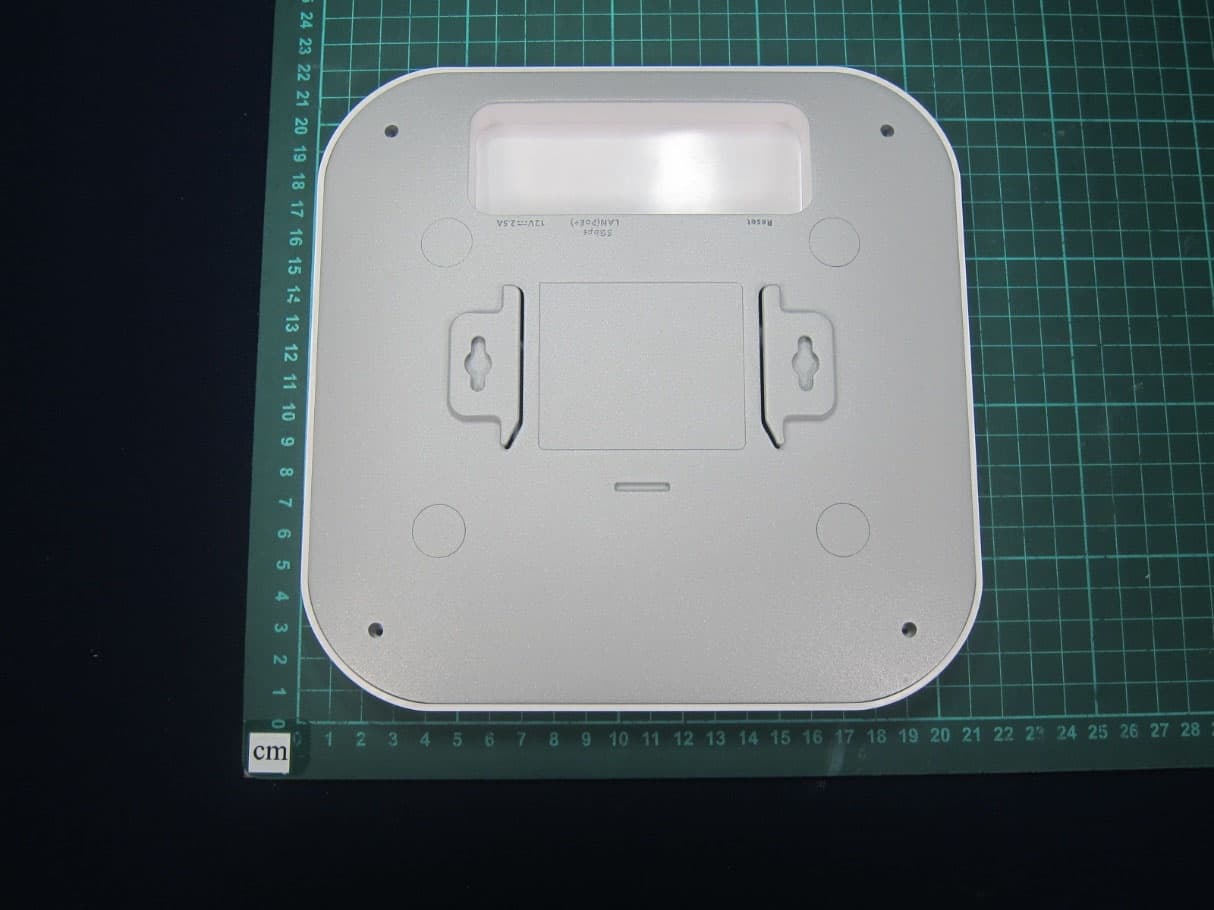
7signal Sapphire Eye 7signal Sapphire Eye – the external connectros DC input (left), Ethernet (middle), the external antenna (right) NOTE: External antenna is disabled for US markets 7signal Sapphire Eye – top-lid removed NOTE: The end-users are not expected to remove the outer lid in any use case. Removing the inner lid voids warranty. The outer lid contains connectors for dc input, ethernet cable and external antenna. In the picture above the external antenna connector is both in the outer lid and in the unit, too. The actual installation has one cable only. The battery (blue) and the GPS antenna (black square on the right) are optional. 7signal Sapphire Eye – internal connectors When properly assembled the external antenna connector is attached to the outer lid.
ID Label/Location Info
FCC ID sticker location on 7signal Sapphire Eye FCC ID YLF-
Internal Photos
7signal Sapphire Eye - Explosion 7signal Sapphire Eye – Top covers and computer card removed, RF control card with the shield visible. 7signal Sapphire Eye - RF circuit – top 7signal Sapphire Eye - RF circuit – bottom combined with bottom antenna 7signal Sapphire Eye - Computer card – bottom without wlan card 7signal Sapphire Eye - Computer card bottom with a wlan card. 7signal Sapphire Eye - Computer card – top 7signal Sapphire Eye - Computer card – top with RF shield on 7signal Sapphire Eye - Computer card – bottom connectors 7signal Sapphire Eye - Computer card – bottom connectors for the battery and reset button. 7signal Sapphire Eye - Computer card bottom with a wlan card and RF monitor card (the latter is optional and when installed, it resides in the upper mini-PCI slot) 7signal Sapphire Eye – Side antenna panel - top 7signal Sapphire Eye – Side antenna panel - bottom 7signal Sapphire Eye – Antenna array mechanics 7signal Sapphire Eye – Antenna array assembled 7signal Sapphire Eye – Middle lid - bottom 7signal Sapphire Eye – Middle lid - bottom 7signal Sapphire Eye – Outside cover for antenna array FCC ID TV7R52HN contained in 7signal Sapphire Eye Nvision (FCC ID YLF-ABGN-EYE-APU3) Back with shield Back without the shield FCC ID TV7R52HN contained in 7signal Sapphire Eye Nvision (FCC ID YLF-ABGN-EYE-APU3) Front side with shield Front side without the shield
RF Exposure Info
Prediction of MPE limit at a given distance Equation from page 18 of OET Bulletin 65, Edition 97-01where: S = power density P = power input to the antennaG = power gain of the antenna in the direction of interest relative to isotropicR = distance to the center of radiation of the antenna Maximum peak output power at antenna input terminal: 8.3 (dBm) Maximum peak output power at antenna input terminal: 6.8 (mW) Antenna gain(typical): 7.5 (dBi) Maximum antenna gain: 5.62 (numeric) Prediction distance: 20 (cm) Sourse Based Time Average Duty Cycle: 100 (%) Prediction frequency: 5805 (MHz) MPE limit for uncontrolled exposure at prediction frequency: 1 (mW/cm^2) Power density at prediction frequency: 0.008 (mW/cm^2) Power density at prediction frequency: 0.08 (W/m^2) Margin of Compliance: 21.2 (dB) 2 4 R PG S π =
Test Report
Nemko Oy P.O.Box 19, FI-02601 Espoo, Finland Street address: Perkkaantie 11, FI-02600 Espoo Telephone +358 (0)424 5454 1 Telefax +358 (0)9 5489 6371 TEST REPORT Date: ESPOO 16.08.2011 Page: 1 (50) Appendices Date of handing in: 17.01.2011 Number: 183922B No. 1 / 1 Tested by: Timo Hietala, Test Engineer Reviewed by: Janne Nyman, Compliance Specialist SORT OF EQUIPMENT: 7signal Sapphire Eye WLAN Unit 2.4/5GHz MARKETING NAME: 7signal Sapphire Eye 802.11a/b/g/n TYPE: 7signal Sapphire Eye APU3B-1101-000318 MANUFACTURER: 7signal Ltd. CLIENT: 7signal Ltd ADDRESS: Panuntie 6, FI-00620 Helsinki, Finland TELEPHONE: +358 45 1234020 / TEST LABORATORY: Nemko Oy SUMMARY: In regard to the performed tests the equipment under test fulfils the requirements defined in the test specifications, see page 2 for details The test results are valid for the tested unit only. Without a written permission of Nemko Oy it is allowed to copy this report as a whole, but not partially. Version f1.00 Type: 7signal Sapphire Eye APU3B-1101-000318 Test report: 183922B Page 2 (50) Date 16.08.2011 Summary of performed tests and test results Test Section in CFR 47 Result 1 15.207 AC power line conducted emissions PASS, margin 7.6 dB 2 15.209 / 15.407 (b) Electric Field Strength Spurious Emissions, 30MHz ~ 40000MHz PASS, margin 0.3 dB 3 15.407 (a) 26dB Bandwidth PASS 4 15.407 (a) Maximum peak output power PASS 5 15.407 (a) Peak Power Spectral Density PASS 6 15.407 (a) Peak excurcion PASS 7 15.407 (b) Band Edge compliance PASS 8 15.407 (g) Frequency Stability PASS Explanations: PASS The EUT passed that particular test. FAIL The EUT failed that particular test. Type: 7signal Sapphire Eye APU3B-1101-000318 Test report: 183922B Page 3 (50) Date 16.08.2011 Contents Summary of performed tests and test results .......................................................................................... 2 1. EUT and Accessory Information ......................................................................................................... 4 1.1 EUT description ........................................................................................................................ 4 1.2 EUT and accessories ................................................................................................................ 5 2. Standards and measurement methods ............................................................................................... 6 2.1 AC power line conducted emissions ......................................................................................... 6 2.1.1 Test method and limit ............................................................................................................... 6 2.1.2 Test results ............................................................................................................................... 7 3. Test results .......................................................................................................................................... 9 3.1 Radiated emissions .................................................................................................................. 9 3.1.1 Test method and limit ............................................................................................................... 9 3.1.2 Test results ............................................................................................................................. 10 3.2 Maximum conducted peak output power ................................................................................ 15 3.2.1 Test method and limit ............................................................................................................. 15 3.2.2 Test results ............................................................................................................................. 16 3.3 26dB Bandwidth ...................................................................................................................... 20 3.3.1 Test method ............................................................................................................................ 20 3.3.2 Test results ............................................................................................................................. 20 3.4 Band-edge compliance ........................................................................................................... 27 3.4.1 Test method ............................................................................................................................ 27 3.4.2 Test results ............................................................................................................................. 28 3.5 Peak power spectral density ................................................................................................... 34 3.5.1 Test method and limit ............................................................................................................. 34 3.5.2 Test results ............................................................................................................................. 34 3.6 Peak power excursion ............................................................................................................ 40 3.6.1 Test method and limit ............................................................................................................. 40 3.6.2 Test results ............................................................................................................................. 41 3.7 Frequency stability .................................................................................................................. 49 3.7.1 Test method ............................................................................................................................ 49 3.7.2 Test results ...........................................................................................................…
Text truncated - open the document above for the full version.
Test Report
Nemko Oy • P.O.Box 19, FI-02601 Espoo, Finland Street address: Perkkaantie 11, FI-02600 Espoo Telephone +358 (0)424 5454 1 • Telefax +358 (0)9 5489 6371 TEST REPORT Date: ESPOO 22.03.2011 Page: 1 (16) Appendices − −− − Date of handing in: 17.01.2011 Number: 1640308 No. 1 / 1 Tested by: THt, Test Engineer Reviewed by: Timo Leismala, Test Manager SORT OF EQUIPMENT: 7signal Sapphire Eye WLAN Unit 2.4/5GHz MARKETING NAME: 7signal Sapphire Eye 802.11a/b/g/n TYPE: 7signal Sapphire Eye APU3B-1101-000318 MANUFACTURER: 7signal Ltd. CLIENT: 7signal Ltd. ADDRESS: Panuntie 6, FI-00620 Helsinki, Finland TELEPHONE: +358 45 1234020 / Anton Puolakka TEST LABORATORY: Nemko Oy SUMMARY: In regard to the performed tests the equipment under test fulfils the requirements defined in the test specifications, see page 2 for details The test results are valid for the tested unit only. Without a written permission of Nemko Oy it is allowed to copy this report as a whole, but not partially. Version f1.00 Type: 7signal Sapphire Eye APU3B-1101-000318 Test report: 1640308 Page 2 (16) Date 22.03.2011 Summary of performed tests and test results Section in CFR 47 Result 15.407 (h)(2) Dynamic Frequency Selection (DFS) PASS 1) 1) EUT type Client without radar detection. Explanations: PASS The EUT passed that particular test. FAIL The EUT failed that particular test. Type: 7signal Sapphire Eye APU3B-1101-000318 Test report: 1640308 Page 3 (16) Date 22.03.2011 Contents Summary of performed tests and test results .......................................................................................... 2 1. EUT and Accessory Information ......................................................................................................... 4 1.1 EUT description ........................................................................................................................ 4 1.2 EUT and accessories ................................................................................................................ 4 2. Standards and measurement methods ............................................................................................... 5 2.1 Technical requirements for DFS in the 5250-5350 MHz and 5470-5725 MHz bands ............. 5 2.1.1 DFS Overview ........................................................................................................................... 5 2.1.2 Master Devices ......................................................................................................................... 6 2.1.3 Client Devices ........................................................................................................................... 6 2.1.4 DFS Detection Thresholds ........................................................................................................ 7 2.1.5 Response Requirements .......................................................................................................... 7 2.1…
Text truncated - open the document above for the full version.
Contact Information
Applicant
Ted Schneider(CTO)
Test Firm
NEMKO OyJyrki Leino
Technical Specifications
| # | Rule Parts | Frequency Range | Power Output |
|---|---|---|---|
| 4 | 15E | 5.75 GHz - 5.80 GHz | 4.40 mW |
Other Applications from 7signal
YLF7S6300
Oct 30, 2023Wi-Fi 6/6E Sensor
Equipment Class
6XD - 15E 6 GHz Low Power Indoor Client
YLF-INDR-EYE01
Mar 18, 2014Access point
Equipment Class
DTS - Digital Transmission System
YLF-ABG-EYE-APU2
Apr 14, 2011Sapphire
Equipment Class
NII - Unlicensed National Information Infrastructure TX
YLF-2010-08-APU2
Nov 17, 2010Sapphire
Equipment Class
DTS - Digital Transmission System