DZL131836MCordless Keyboard
Logitech Inc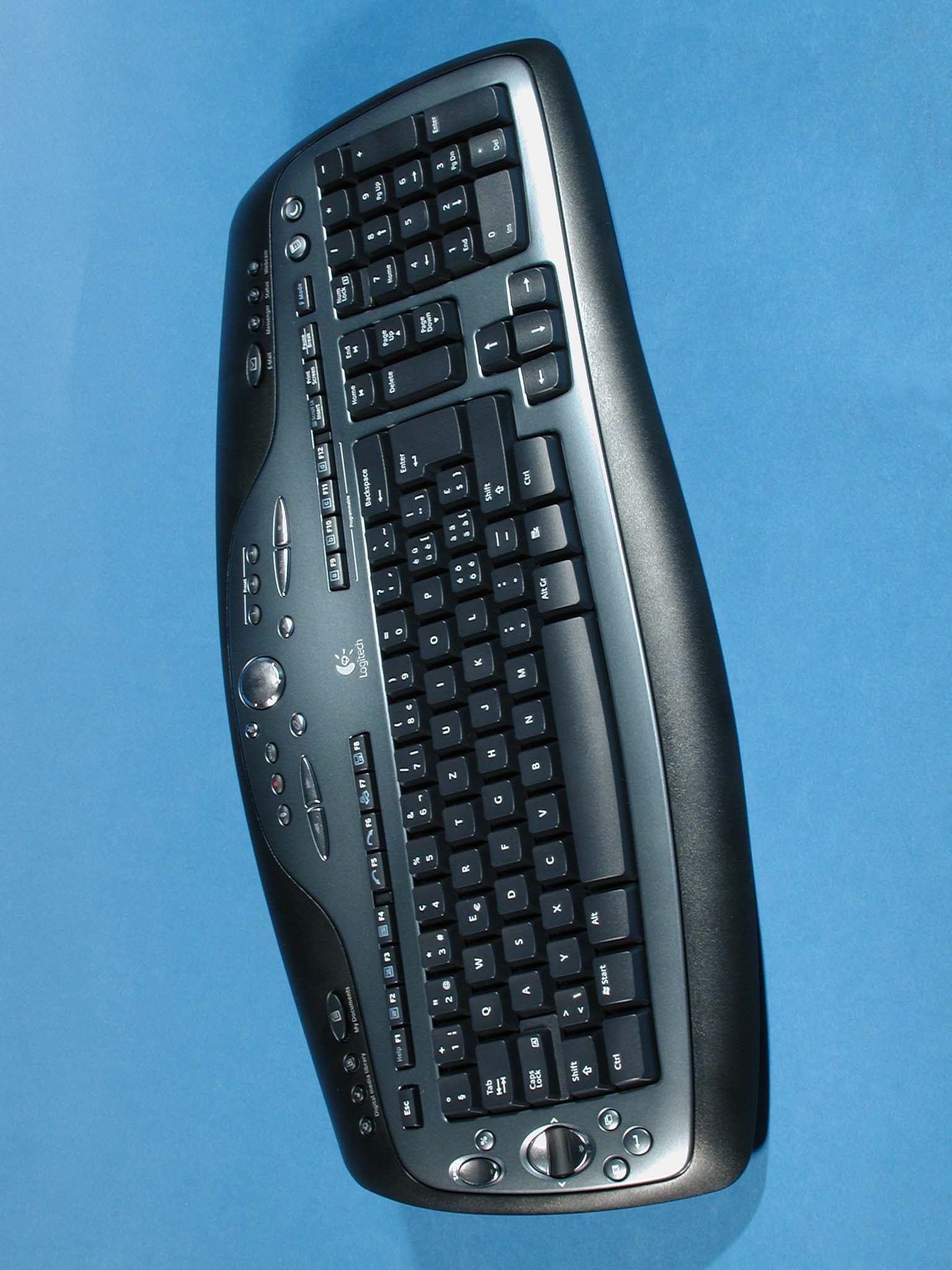
Click to zoom
Application Details
- Equipment Class
- DXX - Part 15 Low Power Communication Device Transmitter
- Date of Grant
- Aug 10, 2004
- Application Purpose
- Original Equipment
- Date of Application
- Aug 10, 2004
- Equipment Note
- Cordless Keyboard
- Frequency Range
- 27.09500000 - 27.14500000
- Company
- Logitech Inc
- Country
- United States
Documents & Files
Document Text
Text extracted from the exhibit documents filed with the FCC. Open a document above to read the original.
Users Manual
9 Installation Guide Guide d'Installation 1 2 7 3 4 5 6 OFF USB PS/2 8 8 in. 20 cm LEDLED 3 1 2 20 sec. 4 ON English Plug AC cable into back of Base Station. Plug AC adapter into outlet. Español Conecte el cable CA a la parte posterior de la estación base. Conecte el adaptador CA a la toma de alimentación. Français Branchez le cordon d'alimentation électrique sur le panneau arrière de la base. Branchez l’adaptateur secteur dans la prise électrique. Português Ligue o cabo CA à parte de trás da central. Ligue o adaptador CA à tomada de parede. English Turn OFF computer. Español Apague el ordenador. Français Mettez l’ordinateur hors tension. Português Desligue o computador. English Plug Base Station cable(s) into computer. PC desktops use green mouse and purple keyboard connectors (PS/2). PC notebooks use black connector (USB) only. Español Conecte al ordenador el cable de la estación base. Los PC de sobremesa usan el conector PS/2 verde. Los PC portátiles usan sólo el conector USB negro. Français Branchez le câble de la base sur l’ordinateur. Les ordinateurs de bureau utilisent le connecteur PS/2 vert. Les ordinateurs portables utilisent un connecteur USB noir. Português Ligue o cabo da central ao computador. Os PCs de secretária utilizam um conector PS/2 verde. Os PCs portáteis utilizam um conector USB preto. English Place Base Station away from electrical devices. Avoid metallic surfaces. Español NO coloque la estación base cerca de dispositivos eléctricos. Evite las superficies metálicas. Français Eloignez la base de tout appareil électrique. Evitez toute surface métallique. Português Coloque a central longe de aparelhos eléctricos. Evite superfícies metálicas. English Remove yellow label from mouse battery compartment. Mouse uses only a Logitech ® rechargeable NiMH battey pack. Keyboard: insert 2 AA alkaline batteries. Español Debe quitar la etiqueta amarilla del compartimento de las pilas del ratón. El ratón utiliza sólo pilas NiMH recargables Logitech ® . Teclado: introduzca 2 pilas alcalinas AA. Français Enlevez l’étiquette jaune du compartiment des piles de la souris. La souris utilise uniquement un bloc de piles rechargeables NiMH Logitech ® . Clavier: insérez deux piles alcalines AA. Português Remova a etiqueta amarela do compartimento de baterias do rato. O rato só utiliza o pacote de baterias NiMH recarregáveis da Logitech ® . Teclado: introduza 2 baterias AA alcalinas. English Place mouse in Base Station to charge batteries. Charging: LED is solid green. Charged: LED turns Off. Low battery: LED is solid red. Important: for full battery capacity, one complete charge is needed. Français Placez la souris sur sa base pour recharger ses piles. Chargement en cours: le témoin vert reste allumé en continu. Chargement terminé: le témoin lumineux s’éteint. Niveau faible: le témoin rouge reste allumé en continu. Important: pour parvenir à une charge totale, il faut effectuer trois cycles de chargement complets. Español Coloque el ratón en la estación base para cargar las pilas. Carga en curso: el diodo permanece verde. Carga completada: el diodo se apaga. Pilas descargadas: el diodo permanece rojo. Importante: se necesitan tres operaciones completas de carga para obtener la carga plena. Português Coloque o rato na central para carregar as baterias. A carregar: a luz verde do LED acende-se. Carregado: a luz do LED desliga-se. Bateria fraca: a luz vermelha do LED acende-se. Importante: para a capacidade máxima, são necessárias três cargas completas. English Try using the mouse and keyboard. If they do not work, press the Connect button on the Base Station, and then press the Connect button on the mouse. Wait 20 seconds. Press the Connect button on the Base Station, and then press the Connect button on the keyboard. Français Testez la souris et le clavier. S'ils ne fonctionnent pas, appuyez sur le bouton Connect de la base, puis sur le bouton Connect de la souris. Patientez 20 secondes. Appuyez sur le bouton Connect de la base, puis sur le bouton Connect du clavier. Español Trate de usar el ratón y el teclado. Si no funcionan, pulse el botón Connect de la estación base y, a continuación, pulse el botón Connect del ratón. Espere 20 segundos. Pulse el botón Connect de la estación base y, a continuación, pulse el botón Connect del teclado. Português Tente utilizar o rato e o teclado. Se não funcionarem, prima o botão Connect na central e, em seguida, prima o botão Connect no rato. Aguarde 20 segundos. Prima o botão Connect na central e, em seguida, prima o botão Connect no teclado. English To enjoy all the features of the mouse and keyboard, install the software. Español Para disponer de todas las funciones del ratón y del teclado, debe instalar el software. Français Pour profiter pleinement de toutes les fonctions du clavier et de la souris, vous devez installer le logiciel. Português Para utilizar todas as funções do rato e do teclado, instale o software. English Turn ON computer. Español Encienda el ordenador. Français Mettez l’ordinateur sous tension. Português Ligue o computador.
Cover Letter(s)
Logitech Europe S.A. Z.I Moulin du Choc D 1122 Romanel sur Morges Switzerland To: Telefication B.V. Attn: Dept. FCC TCB Edisonstraat 12A 6902 PK ZEVENAAR The Netherlands Subject: Request for short-term FCC confidentiality (FCC ID: DZL131836M) Reference number: Y-RR54 Date: July 15,2004 Dear FCC TCB, Persuant to 47 CFR Section 0.459(a) & (b), Logitech Europe S.A. hereby requests short-term FCC confidentiality of the following materials submitted in support of FCC certification application for FCC ID : DZL131836M a. Label and Label placement b. Photographs of overall appearance c. Test report d. Test set-up photographs e. User’s manual f. Internal photographs g. RF exposure/Environmental Evaluation h. Cover letters Above materials contain secrets, proprietary and technical information, which would customarily be quarded from competitors under 47 CFR, section 0.457(d)(2). Disclosure or publication or any portion of this company confidential material to other parties could cause substantial competitive harm and provide unjustified benefits for competitors. Logitech Europe S.A. understands that pursuant to 47 CFR section 0.457(d)(1)(ii) disclosure of the applicant and all accompanying documentation will not be made before the date of the grant. Pascal Bornel Compliance engineer
Cover Letter(s)
Logitech Europe S.A. Z.I Moulin du Choc D 1122 Romanel sur Morges Switzerland To: Telefication B.V. Attn: Dept. FCC TCB Edisonstraat 12A 6902 PK ZEVENAAR The Netherlands Subject: Request for permanent FCC confidentiality (FCC ID: DZL131836M) Reference number: Y-RR54 Date: July 15,2004 Dear FCC TCB, Persuant to 47 CFR Section 0.459(a) & (b), Logitech Europe S.A. hereby requests permanent FCC confidentialty of the following materials submitted in support of FCC certification application for FCC ID : DZL131836M a. Block diagram b. Schematic diagrams c. Operational description d. Bill of Material Above materials contain secrets, proprietary and technical information, which would customarily be quarded from competitors under 47 CFR, section 0.457(d)(2). Disclosure or publication or any portion of this company confidential material to other parties could cause substantial competitive harm and provide unjustified benefits for competitors. Logitech Europe S.A. understands that pursuant to 47 CFR section 0.457(d)(1)(ii) disclosure of the applicant and all accompanying documentation will not be made before the date of the grant. Pascal Bornel Compliance engineer
External Photos
External photographs Page: 1 of 2 FCC ID: DZL131836M Photograph 1: Y-RR54 top view External photographs Page: 2 of 2 FCC ID: DZL131836M Photograph 2: Y-RR54 bottom view
ID Label/Location Info
Label location FCC ID: DZL131836M Page 1 of 1 Label location for model Y-RR54: Location of FCC ID: DZL131836M
ID Label/Location Info
MAY/26/04 Y.NSOK MAY/26/04 Y . N S O K N . U E N O T . N K G W N.UENO A/W ,LABEL,KB ID LTMD 1/1 NEW ISSUE / KE-XXXX 132257 XXXXXX-XXXX DWS A0 A01 A02 JUN/14/04 Y.NSOK N.UENO CHANGE /KE-XXXX A02
Internal Photos
Internal photographs module Page: 1 of 3 FCC ID: DZL131836M Photograph 1: Y-RR54 internal view (membrane) Internal photographs module Page: 2 of 3 FCC ID: DZL131836M Photograph 2: Y-RR54 internal view (RF part) Internal photographs module Page: 3 of 3 FCC ID: DZL131836M Photograph 3: Y-RR54 internal view (keys)
Internal Photos
Addendum report: internal photos FCC ID: DZL131836M Page 1 of 3 Internal photos model Y-RR54: Internal photos model Y-RR54: Page 2 of 3 Internal photos model Y-RR54: Page 3 of 3
Test Report
Radio test report 99529334 based on: FCC part 15; subpart C; section 15.227 (10-1-03 edition) Cordless Keyboard Logitech Cordless Keyboard Y-RR54 Logitech AGY-734664-0000.A0 Report number: 99529334 Logitech AGY-734664-0000.A0 Contents MAIN MODULE............................................................................................................................................3 1 I NTRODUCTION ....................................................................................................................................3 2 P RODUCT .............................................................................................................................................4 3 T EST SCHEDULE ...................................................................................................................................4 4 P RODUCT DOCUMENTATION .................................................................................................................5 5 O BSERVATIONS AND COMMENTS .........................................................................................................6 6 M ODIFICATIONS TO THE SAMPLE ..........................................................................................................6 7 S UMMARY ............................................................................................................................................6 8 C ONCLUSIONS ......................................................................................................................................7 TEST RESULTS MODULE .........................................................................................................................8 1 G ENERAL INFORMATION ......................................................................................................................8 1.1 Equipment information ...................................................................................................................8 2 E MISSION TESTS ...................................................................................................................................9 2.1 Field strength of intentional signal .................................................................................................9 2.2 Field strength of unwanted emissions...........................................................................................10 USED TEST EQUIPMENT MODULE .....................................................................................................11 This report comprises of three modules. The total number of pages is: 11 Main module Page: 3 of 11 Report number: 99529334 Logitech AGY-734664-0000.A0 Main module 1 Introduction This report contains the result of tests performed by: Telefication bv Edisonstraat 12a 6902 PK Zevenaar The Netherlands Telefication complies with the accreditation criteria for test laboratories as laid down in ISO/IEC 17025:1999. The accreditation covers the quality system of the laboratory as well as the specific activities as described in the authorized annex bearing the accreditation number L021 and is granted on 30 November 1990 by the Dutch Council For Accreditation (RvA: Raad voor Accreditatie). The contents of this test report, if reproduced, shall be copied in full, unless special consent in writing for reproduction in part is granted by Telefication. Copyright of this test report is reserved to Telefication. Ordering party: Company name : Logitech Europe S.A. Address : Z.I. Moulin du Choc D Zipcode : CH-1122 City/town : Romanel sur Morges Country : Switzerland Date of order : 3 March 2004 Main module Page: 4 of 11 Report number: 99529334 Logitech AGY-734664-0000.A0 2 Product A sample of the following product was submitted for testing: Product description : Cordless Keyboard Manufacturer : Logitech Europe S.A. Trade mark : Logitech Cordless Keyboard Type designation : Y-RR54 FCC ID : DZL131836M Hardware version : -- Serial number : 0406100016 Software release : -- 3 Test schedule Tests were carried out in accordance with the specification detailed in chapter 7 “Summary” of this report. Tests were carried out at the following location: • TNO Electronic Products & Services (EPS) B.V Smidshornerweg 18 9822 TL Niekerk The Netherlands FCC listed : 90828 Industry Canada : IC3501 The samples of the product were received on: • 28 June 2004 Tests were carried out on: • 30 June 2004 Main module Page: 5 of 11 Report number: 99529334 Logitech AGY-734664-0000.A0 4 Product documentation For production of this report the following product documentation was used: Description: Date: Identification: Testing indications June 2004 Cordless Keyboard Y-RR54 Product Description June 2004 Y-RR54 Block diagram -- Midas Lite (Y-RR54) PCB lay out 8 May 2004 P/No 131836 PAS, 10 pages Circuit diagram vDial module 26 January 2004 MidasLite: vDial module Circuit diagram RF 3 June 2004 Y-RR54 MIDAS LITE - RF The above-mentioned documentation will be filed at Telefication for a period of 10 years following the issue of this test report. Main module Page: 6 of 11 Report number: 99529334 Logitech AGY-734664-0000.A0 5 Observations and comments During the tests the product was set in continuous transmit mode (CH1 & CH2 selectable), by means of a test mode. 6 Modifications to the sample No modifications were made to the sample. 7 Summary The product is intended for use in the following application area(s): INDUCTIVE DATA TRANSMISSION APPLICATION IN THE 27 MHz BAND The samples were tested according to the following specification(s): FCC part 15; subpart C; section 15.227 (10-1-03 edition) Main module Page: 7 of 11 Report number: 99529334 Logitech AGY-734664-0000.A0 8 Conclusions The samples of the product showed NO NON-COMPLIANCES to the specification stated in chapter 7 of this report. The results of the tests as stated in this report, are exclusively applicable to the product items as identified in this test report. Telefication does not acce…
Text truncated - open the document above for the full version.
Test Setup Photos
Test setup photographs Page: 1 of 3 FCC ID: DZL131836M Photograph page 1: Test set up Y-RR54: on turntable (X-POS) Test setup photographs Page: 2 of 3 FCC ID: DZL131836M Photograph page 2: Test set up Y-RR54: on turntable (X-POS) Test setup photographs Page: 3 of 3 FCC ID: DZL131836M Photograph page 3: Test set up Y-RR54: on turntable (Y-POS)
Contact Information
Applicant
Paul Zahra(Regulatory Compliance Manager)
Technical Contact
Logitech Europe S.A.Pascal Bornel
[email protected]+41 21 863 50 67
Z.I. Moulin du choc D · Romanel sur Morges · Switzerland
Test Firm
TUV Rheinland Nederland B.V.Ties E. T Koning
Technical Specifications
| # | Rule Parts | Frequency Range | Power Output |
|---|---|---|---|
| 1 | 15C | 27.095 MHz - 27.145 MHz | - |
Other Applications from Logitech Inc
DZLS00118
Oct 06, 2011AIR SPEAKER
Equipment Class
DTS - Digital Transmission System
DZLA00032
Aug 07, 2011Nano Receiver
Equipment Class
DSS - Part 15 Spread Spectrum Transmitter
DZLA00031
Jul 24, 2011Wireless Headset H600
Equipment Class
DSS - Part 15 Spread Spectrum Transmitter
DZLS00114
Jul 20, 2011Wireless module
Equipment Class
DSS - Part 15 Spread Spectrum Transmitter
DZLA00033
Jul 18, 2011Wireless Headset H800
Equipment Class
DSS - Part 15 Spread Spectrum Transmitter