DZL201385Cordless Mouse
Logitech Inc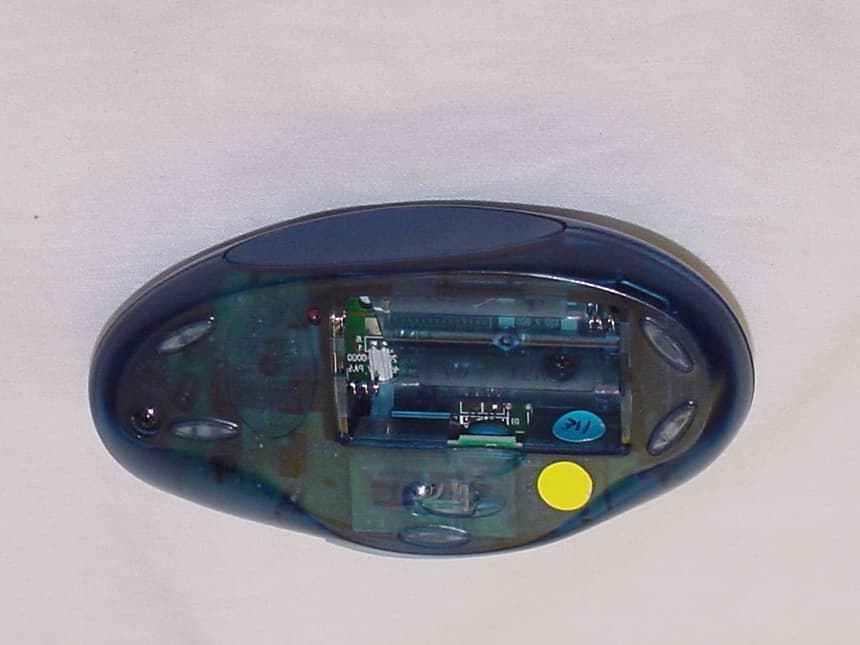
Click to zoom
Application Details
- Equipment Class
- DXX - Part 15 Low Power Communication Device Transmitter
- Date of Grant
- Apr 03, 2001
- Application Purpose
- Original Equipment
- Date of Application
- Apr 03, 2001
- Equipment Note
- Cordless Mouse
- Frequency Range
- 27.04500000 - 27.19500000
- Company
- Logitech Inc
- Country
- United States
Documents & Files
Document Text
Text extracted from the exhibit documents filed with the FCC. Open a document above to read the original.
Users Manual
ADDEMDUM TO USERS MANUEL FCC COMPLIANCE AND ADVISORY STATEMENT This hardware device complies with Part 15 of the FCC Rules. Operation is subject to the following two conditions: 1) This device may not cause harmful interference, and 2) This device must accept any interference received, including interference that may cause undesired operation. This equipment has been tested and found to comply with the limits for a Class B digital device, pursuant to Part 15 of the FCC Rules. These limits are designed to provide reasonable protection against harmful interference in a residential installation. This equipment generates, uses, and can radiate radio frequency energy and, if not installed or used in accordance with the instructions, may cause harmful interference to radio communications. However, there is no guarantee that interference will not occur in a particular installation. If this equipment does cause harmful interference to radio or television reception, which can be determined by turning the equipment off and on, the user is encouraged to try to correct the interference by one or more of the following measures: 1) Reorient or relocate the receiving antenna; 2) Increase the separation between the equipment and the receiver; 3) Connect the equipment to an outlet on a circuit different from that to which the receiver is connected; 4) Consult the dealer or an experienced radio/TV technician for help. Any changes or modifications not expressly approved by the party responsible for compliance could void the user’s authority to operate the equipment. Where shielded interface cables have been provided with the product or specified additional components or accessories elsewhere defined to be used with the installation of the product, they must be used in order to ensure compliance with FCC regulations. CANADIAN DOC STATEMENT This digital device does not exceed the Class B limits for radio noise emissions from digital apparatus specified in the interference-causing equipment standard entitled “Digital Apparatus,” ICES-003 of the Department of Communications. This device complies with RSS-210 of Industry and Science Canada. Operation is subject to the following two conditions: 1) This device may not cause interference, and 2) This device must accept any interference, including interference that may cause undesired operation of the device. Logitech ® Cordless MouseMan ® Optical Getting Started Guide 1 Important Safety Information Before using your mouse, please read the Comfort Guidelines that come with your product. 2 Install the Battery 1. Use your finger to remove the battery compartment cover. 2. Insert the battery. Follow the diagram inside the battery compartment. 3. Replace the cover. 3 Connect the Receiver 1. For installation on a PS/2 mouse port, turn off the computer. Connect the receiver cable to the PS/2 mouse port on the computer, then turn on your system. 2. For USB-port installation (Windows ® 98 or higher or Macintosh ® OS 8.6 or higher required) remove the PS/2 adapter. Connect the receiver cable to the USB port on the computer. For Windows, you may be prompted to insert the Windows software CD. Insert this software CD into the computer’s CD-ROM drive when asked to do so, then follow the on-screen instructions. 4 Install the Software 1. For PCs, start Windows ® , insert the Logitech ® software CD into the computer’s CD-ROM drive, then follow the on-screen instructions. (If Autorun is not enabled, select Run from the Start Menu on the Taskbar. Next, type D:\Setup.exe, where D: is the designation of the CD-ROM drive.) 2. For the Macintosh ® , start the Macintosh operating system, insert the Logitech software CD into the computer’s CD-ROM drive, find the Installer icon in the appropriate language folder, double-click the icon, then follow the on-screen instructions. USB PortPS/2 PortPS/2 Port Adapter © 2000 Logitech. All Rights Reserved. Logitech, the Logitech logo, and the Logitech products referred to herein are either the trademarks or the registered trademarks of Logitech. All other trademarks are the property of their respective owners. Logitech assumes no responsibility for any errors that may appear in this manual. Information contained herein is subject to change without notice. Part Number: 622757-0403 English Español FrançaisPortuguês 5 Establish Communication between Mouse and Receiver Press the connect button on the receiver, then press the connect button on the bottom of the mouse. 6 Battery Life The surface on which you use the mouse can significantly affect battery life. Lighter surfaces extend battery life, darker ones shorten it. Bright, matt surfaces (not glossy ones) are recommended. 7 Get More Information! To help you get the most from your mouse, a User’s Guide is located on the Logitech ® software CD. This User’s Guide contains valuable information about your product, and it has Logitech world-wide addresses and telephone numbers. During software installation, this User’s Guide is copied to your hard drive automatically. For PCs 1. From the Windows ® Taskbar, select Start, Programs, Logitech ® , MouseWare ® , then User’s Guide. 2. The User’s Guide displays automatically. To view a topic, click one of the bookmarks listed on the left side of the title page. For Macintosh ® 1. On your desktop, find the MouseWare ® folder, then open the folder by double-clicking it. 2. Find the icon for the User’s Guide, then double-click the icon to open the document. 8 Troubleshooting The Mouse Does Not Work after Installation or Is Not Detected • Make sure you have connected the receiver correctly. The receiver cable goes into the computer’s USB port or PS/2 mouse port. For optimal performance, place the receiver at least 8 inches or 20 centimeters away from other electrical devices, such as the computer, the computer monitor, or external storage drives. If you are working on a metallic surface, try turning the receiver on its side for better reception. • For PCs, make sure th…
Text truncated - open the document above for the full version.
Cover Letter(s)
Yuriy Litvinov Intertek Testing Services NA Inc. 7250 Hudson Blvd., Suite 100 Oakdale, MN 55128 Tele :(651) 730-1188 Fax (651) 730-1282 Bharat Shah March 6, 2001 Sub. Request for Making some information Confidential on FCC file for FCC ID # DZL201385. Hello Litvinov, Could you please make following information confidential on Logitech File? * Circuit diagram It proprietary circuit and we do not want our competitor to see this information. Thank you for your anticipated assistance. Regards, Bharat Shah EMC Engineer 6505 Kaiser Drive Fremont, CA 94555 Voice: 510-713-4777 Fax: 419-828-4405
External Photos
FCC ID: DZL201385 FCC ID: DZL201385
Internal Photos
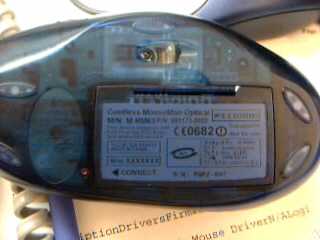
FCC ID: DZL201385 FCC ID: DZL201385 FCC ID: DZL201385 FCC ID: DZL201385
Operational Description
M-RM63 : Product Description Purpose:M-RM63 is a wireless mouse, identical to current mice, with the added convenience of being free of cable. The system uses the 27 MHz ISM band. The transmitter implement a low power mode for batteries saving. System:This wireless mouse (M-RM63) works with the C-BA4-MSE or all compatible receiver. Radio transmission:Mono directional, from mouse to computer only. Number of channels:1 Carrier frequencies:27.045 MHz. Modulation:FSK Data Rate:2400 bit/s. Transmission range:2m typical, free space. Power Consumption:100 mW typical when in movement. Effective radiated power:200nW typical. Antenna:Inductive loop of 25 cm2, integrated on printed circuit board. LOGITECH CONFIDENTIAL Olivier Pochon / 23 January 2001.
Test Report
Intertek Testing Services ETL SEMKO FCC Part 15.227 Emissions Test Report for Logitech on the Wireless RF Mouse Model: M-RR63 & M-RM63 FCC ID: DZL201385 Test Report #: 20400502 Date of Report: February 24,2001 Job #: )20040050 Date ofIest: February 13,2001 Total No of Pages Contained in this Report: .f.i Data Sheets eroc - ""'" , gJ , - \,,-,,~;,' Intertek Testing Services NA, Inc. 1365 Adams Court, Menlo Park, CA 94025 Telephone 650-463-2900 Fax 650-463-2910 Home Page www.etlsemko.com 1365 Adams Court Menlo Park, CA 94025 Logitech, Model No. M-RR63 & M-RM63Date of Test: February 13, 2001 FCC ID: DZL201385 File: 20400502Page 1 of 25 Table of Contents 1.0Summary of Tests................................................................................................................2 2.0General Description............................................................................................................3 2.1 Product Description.........................................................................................................3 2.2 Related Submittal(s) Grants............................................................................................3 2.3 Test Methodology............................................................................................................4 2.4 Test Facility......................................................................................................................4 3.0System Test Configuration.................................................................................................5 3.1 Support Equipment.........................................................................................................5 3.2 Block Diagram of Test Setup..........................................................................................5 3.3 Justification......................................................................................................................6 3.4 Software Exercise Program.............................................................................................6 3.5 Mode of Operation during Test......................................................................................6 3.6 Modifications Required for Compliance........................................................................6 4.0Measurement Results.........................................................................................................7 4.1 Radiated Emission test results........................................................................................8 FCC Part 15 Class B Radiated Emissions...................................................................................9 4.2 Radiated Emission Configuration Photograph............................................................19 4.3 AC Line Conducted Emission test results...................................................................21 4.4 AC Line Conducted Configuration Photograph..........................................................23 4.4 AC Line Conducted Configuration Photograph Continued.......................................24 5.0Document History..............................................................................................................25 1365 A dams Court Menlo Park, {.~ 94025 Logitech, Model No. M-RR63 & M-RM63 FCC ID: DZL201385 Date arrest: February 13, 2001 .0 SummaryofTests MODEL: M-RR63 & M-RM63 FCC ID: DZL201385 TEST REFERENCERESULTS Field Strength on the fundamental frequency 15.227(a) Passed Out of Band Radiated Emission 15.227(b) Passed AC Conducted Emission15.207 Passed Antenna Requirement15.203Passed Date: Lj t --;( t o \ C;- ~ i- "'"' 1!; ,.-- M~SROdri~leU d' UI( Test Engineer :J)~(~ ~~~ David Chemomordik, Ph.D., EMC Site Manager Date: File: 20400502 Page 2 of 25 1365 Adams Court Menlo Park, CA 94025 Logitech, Model No. M-RR63 & M-RM63Date of Test: February 13, 2001 FCC ID: DZL201385 File: 20400502Page 3 of 25 2.0General Description 2.1Product Description Overview of the EUT ApplicantLogitech 6505 Kaiser Dr., Fremont, CA 94555 USA Trade Name & Model No.Logitech M-RR63 & M-RM63 FCC IdentifierDZL201385 Use of product The EUT is a computer mouse for personal computing applications. The primary purpose of the product is to track planer movements of the user’s hand on a desk and send them to a computer. Several buttons also allow to generate content specific events. The M-RR63 and M-RM63 are identical except that the M-RR63 has two channels for transmitting and the M-RM63 has only one channel. Frequency Range (MHz)27.045 MHz – 27.195 MHz Radiated Power (ERP)200 nW (-37 dBm) Antenna RequirementThe EUT uses a permanently connected antenna. Manufacturer name & addressLogitech 6505 Kaiser Dr., Fremont, CA 94555 USA 2.2Related Submittal(s) Grants This is an Application for Certification of a low power transmitter. Two transmitters are included in this Application. A separate DoC test report was issued to show compliance with the FCC Part 15, Subpart B Requirements. 1365 Adams Court Menlo Park, CA 94025 Logitech, Model No. M-RR63 & M-RM63Date of Test: February 13, 2001 FCC ID: DZL201385 File: 20400502Page 4 of 25 2.3Test Methodology Both AC mains line-conducted and radiated emissions measurements were performed according to the procedures in ANSI C63.4 (1992). Radiated tests were performed at an antenna to EUT distance of 3 meters, unless stated otherwise in the "Data Sheet" of this Application. All other measurements were made in accordance with the procedures in part 2 of CFR 47. 2.4Test Facility The test site and conducted measurement facility used to collect the radiated data is located at Menlo Park, California, Site 1. This test facility and site measurement data have been fully placed on file with the FCC. 1365 Adams Court Menlo Park, CA 94025 Logitech, Model No. M-RR63 & M-RM63Date of Test: February 13, 2001 FCC ID: DZL201385 File: 20400502Page 5 of 25 3.0System Test Configuration 3.1Support Equipment Item #DescriptionM…
Text truncated - open the document above for the full version.
Test Setup Photos
1365 Adams Court Menlo Park, CA 94025 Logitech, Model No. M-RR63 & M-RM63Date of Test: February 13, 2001 FCC ID: DZL201385 File: 20400502Page 20 of 25 1365 Adams Court Menlo Park, CA 94025 Logitech, Model No. M-RR63 & M-RM63Date of Test: February 13, 2001 FCC ID: DZL201385 File: 20400502Page 23 of 25 4.4AC Line Conducted Configuration Photograph Line-Conducted Emission Test Setup 1365 Adams Court Menlo Park, CA 94025 Logitech, Model No. M-RR63 & M-RM63Date of Test: February 13, 2001 FCC ID: DZL201385 File: 20400502Page 24 of 25 4.4AC Line Conducted Configuration Photograph Continued Line-Conducted Emission Test Setup
Contact Information
Applicant
Paul Zahra(Regulatory Compliance Manager)
Technical Contact
Intertek Testing ServicesDavid Chernomordik
[email protected](650) 463-2900
1365 Adams Court · Menlo Park, California · United States
Non-Technical Contact
Intertek Testing ServicesCourtney Kemp
[email protected](650) 463-2900
Test Firm
Intertek Testing Services NA Inc.John Quigley
Technical Specifications
| # | Rule Parts | Frequency Range | Power Output |
|---|---|---|---|
| 1 | 15C | 27.045 MHz - 27.195 MHz | - |
Other Applications from Logitech Inc
DZLS00118
Oct 06, 2011AIR SPEAKER
Equipment Class
DTS - Digital Transmission System
DZLA00032
Aug 07, 2011Nano Receiver
Equipment Class
DSS - Part 15 Spread Spectrum Transmitter
DZLA00031
Jul 24, 2011Wireless Headset H600
Equipment Class
DSS - Part 15 Spread Spectrum Transmitter
DZLS00114
Jul 20, 2011Wireless module
Equipment Class
DSS - Part 15 Spread Spectrum Transmitter
DZLA00033
Jul 18, 2011Wireless Headset H800
Equipment Class
DSS - Part 15 Spread Spectrum Transmitter