DZL201657ABluetooth Transceiver
Logitech Inc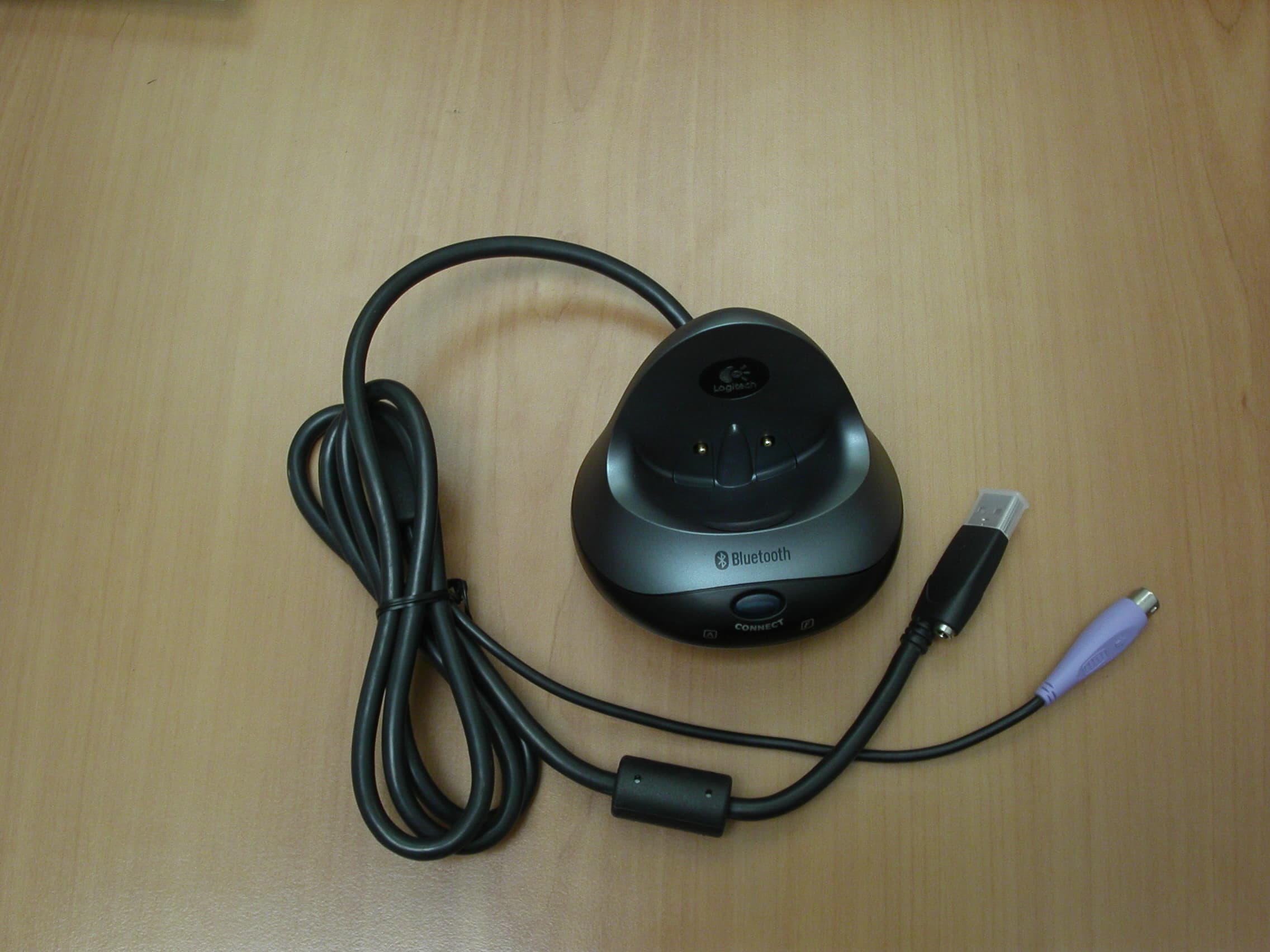
Click to zoom
Application Details
- Equipment Class
- DSS - Part 15 Spread Spectrum Transmitter
- Date of Grant
- Sep 26, 2004
- Application Purpose
- Original Equipment
- Date of Application
- Sep 26, 2004
- Equipment Note
- Bluetooth Transceiver
- Frequency Range
- 2402.00000000 - 2480.00000000
- Company
- Logitech Inc
- Country
- United States
Documents & Files
Document Text
Text extracted from the exhibit documents filed with the FCC. Open a document above to read the original.
Users Manual
22 33 ©2004 Logitech. All rights reserved. Logitech, the Logitech logo, and other Logitech marks are owned by Logitech and may be registered. All other trademarks are the property of their respective owners. Logitech assumes no responsibility for any errors that may appear in this manual. Information contained herein is subject to change without notice. 623627-0914.A www.logitech.com/bluetooth/howto USB Bluetooth USB Bluetooth LED Bluetooth 1 2 CONNECT MEDIAPAD 44 1 2 Bluetooth 2 Bluetooth 1 2 CONNECT MEDIAPAD 1 1 2 Bluetooth 2 Bluetooth 1 2 1 ? 2 1 2 1 2 3 12 CONNECT KEYBOARD CHECK BASE STATIONCHECK BATTERIES CONNECT MOUSECONNECT MEDIAPAD – + + – • Check that cables are connected. • Kabel angeschlossen? • Vérifiez la connexion des cábles. • Compruebe la conexión de los cables. • Press Connect buttn under the device, then press the Base Station Connect button. • Drucken Sie erst "Connect" auf der Gerateunterseite, dann an der Base Station. • Pressez le bouton Connect sous la souris puis pressez le bouton Connect de la Base Station. • Puisé el botón Connect bajo el dispositivo, pulse el botón Connect de la Base Station. • Check batteries. • Batterien uberpruft? • Vérifiez les piles. • Compruebe las pilas. - - - 1 11 ? PS/2 i i English Important Ergonomic Information. Read£Comfort Guidelines in software help system or at http://www.logitech.com/comfort . Deutsch Wichtige Hinweise zur Arbeitsplatzeinrichtung. Lesen Sie die "Richtlinien zur Vermeidung von Gesundheitsschäden" in der Online-Hilfe oder auf£http://www.logitech.com/comfort. Français Informations importantes relatives au confort. Veuillez lire le guide Logitech et votre confort dans l’Aide du logiciel ou sur le site Web http://www.logitech.com/comfort. Italiano Importanti informazioni sul comfort. Leggere le Indicazioni per il massimo comfort nella guida in linea del software o all'indirizzo http://www.logitech.com/comfort. Español Información sanitaria importante. Lea£las£recomendaciones para evitar el cansancio, en el sistema de£ayuda del software o en la dirección http://www.logitech.com/comfort. Português Informações importantes sobre ergonomia. Leia as directrizes de conforto no sistema de ajuda do software ou£no endereço http://www.logitech.com/comfort. Nederlands Over verantwoord gebruik. Lees£de£comfortrichtlijnen in de online-Help of op http://www.logitech.com/comfort. Svenska Viktig ergonomisk information. Läs igenom riktlinjerna för en god arbetsmiljö i den elektroniska hjälpen eller på http://www.logitech.com/comfort . Dansk Vigtige oplysninger om arbejdsfysiologi. Læs Vigtige oplysninger om arbejdsfysiologi i den elektroniske hjælp eller hent dokumentet på http://www.logitech.com/comfort . Norsk Viktig informasjon om arbeidsstilling. Les Logitechs retningslinjer for komfortabel bruk i programvarens Hjelp-system, eller gå til "Comfort Guidelines" på http://www.logitech.com/comfort . Suomi Tärkeää tietoa ergonomiasta. Lue Comfort Guidelines -opas ohjelmiston ohjejärjestelmässä tai osoitteessa http://www.logitech.com/comfort . Ελληνικά Σημαντικές πληρρίες για την εργνμία. ∆ιαάστε τις δηγίες "Comfort Guidelines" για άνετ ειρισμ στ σύστημα ήθειας τυ λγισ μικύ ή στη διεύθυνση http://www.logitech.com/comfort. По-русски Важные сведения по эргономике. Ознакомьтесь с разделом о комфортной работе (Comfort Guidelines) во встроенной справке программного обеспечения или на веб-странице по адресу http://www.logitech.com/comfort. Magyar Fontos ergonómiai tudnivalók. Olvassa el A kényelmes munkavégzés feltételei című útmutatót a szoftver súgójában vagy a http://www.logitech.com/comfort webhelyen. Česká verze Důležité informace týkající se ergonomického uspořádání: Informace naleznete v pokynech pro usnadnění práce (Comfort Guidelines) v systému nápovědy k softwaru nebo na adrese http://www.logitech.com/comfort. Po polsku Wzmianka o ergonomii pracy. Zapoznaj się z treścią dokumentu "Comfort Guidelines" w systemie pomocy oprogramowania lub na stronie http://www.logitech.com/comfort . English Your product comes with a limited warranty. See help system. Deutsch Für dieses Produkt gilt eine beschränkte Garantie (siehe Online-Hilfe). Français Ce produit est doté d'une garantie limitée. Reportez-vous à l’Aide. Italiano Il prodotto viene fornito con una garanzia limitata. Vedere la guida in linea del sistema. Español Este producto tiene una garantía limitada. Consulte el sistema de ayuda. Português Este produto tem uma garantia limitada. Consulte o sistema de ajuda. Nederlands Uw product wordt met een beperkte garantie geleverd. Zie online-Help. Svenska Denna produkt omfattas av en garanti. Se den elektroniska hjälpen. Dansk Dette produkt leveres med en begrænset garanti. Læs mere i den elektroniske hjælp. Norsk Dette produktet leveres med en begrenset garanti. Dette kan du lese mer om i Hjelp-systemet. Suomi Tällä tuotteella on rajoitettu takuu. Lisätietoja saat ohjejärjestelmästä. Ελληνικά Τ πρϊν συνδεύεται απ περιρισμένη εγγύηση. Ανατρέτε στ σύστημα ήθειας. По-русски Данный продукт поставляется с ограниченной гарантией. См. справку. Magyar A termék korlátozott garanciával kerül forgalomba. További információkat a súgóban olvashat. Česká verze Na produkt se vztahuje omezená záruka. Další informace naleznete v systému nápovědy. Po polsku Produkt ten objęty jest ograniczoną gwarancją. Szczegóły w systemie pomocy. English Learn more: watch the Logitech ® diNovo Media Desktop ™ QuickTour tutorial. Deutsch Weitere Informationen bietet Ihnen die QuickTour zu diNovo Media Desktop ™ von Logitech ® . Français Pour en savoir plus: suivez le didacticiel Logitech ® diNovo Media Desktop ™ QuickTour. Italiano Ulteriori informazioni: guardare l'esercitazione Logitech ® diNovo Media Desktop ™ QuickTour. Español Más información: vea el Recorrido rápido de diNovo Media Desktop ™ de Logitech ® . Português Saber mais: consulte o tutorial QuickTour de Logitech ® diNovo Media Desktop ™ . Nederlands Meer informatie: bekijk de QuickTour-…
Text truncated - open the document above for the full version.
Users Manual
Installation 3 1 2 8 LED 5 6 7 English Remove yellow label from mouse battery compartment. Mouse uses only 2 RECHARGEABLE NiMH batteries. Keyboard bottom: insert 4 AA alkaline batteries. MediaPad bottom: insert 2 AA alkaline batteries. Español Debe quitar la etiqueta amarilla del compartimento de las pilas del ratón. El ratón necesita 2 pilas NiMH RECARGABLES. Parte inferior del teclado: introduzca 4 pilas alcalinas AA. Parte inferior del MediaPad: introduzca 2 pilas alcalinas AA. Français Enlevez l’étiquette jaune du compartiment des piles de la souris. La souris n’utilise que 2 piles RECHARGEABLES NiMH. Dessous du clavier: insérez 4 piles alcalines AA. Dessous du MediaPad: insérez 2 piles alcalines AA. Português Remova a etiqueta amarela do compartimento de baterias do rato. O rato utiliza apenas 2 baterias NiMH RECARREGÁVEIS. Parte de baixo do teclado: introduza 4 baterias AA alcalinas. Parte de baixo do MediaPad: introduza 2 baterias AA alcalinas. 4 1 2 CONNECT MEDIAPAD 1 2 1 ? 2 1 2 1 2 3 12 CONNECT KEYBOARD CHECK BASE STA TIO NCHECK BATTERIES CONNECT MOUSECONNECT MEDIAPAD – + + – • Check that cables are connected. • Kabel angeschlossen? • Vérifiez la connexion des cábles. • Compruebe la conexión de los cables. • Press Connect buttn under the device, then press the Base Station Connect button. • Dru cken Sie erst "Connect" auf der Gerateunterseite, dann an der Base Station. • Pressez le bouton Connect sous la souris puis pressez le bouton Connect de la Base Station. • Puisé el botón Connect bajo el dispositivo, pulse el botón Connect de la Base Station. • Check batteries. • Batterien uberpruft? • Vérifiez les piles. • Compruebe las pilas. - - - ON Bluetooth USB Bluetooth USB Bluetooth 9 OFF PS/2 1 2 English Try using your mouse and keyboard to make sure they are working. If they are not working, read "Solving Setup Problems" on back of document (step 4). Also for future reference, read the Connection Assistance label under the keyboard. Español Pruebe el ratón, el teclado y MediaPad para comprobar que funcionan. Si no funcionan, consulte "Resolución de problemas de instalación" al final del documento (paso 4). Lea también la etiqueta con información sobre conexión en la parte inferior del teclado. Français Utilisez la souris, le clavier et le MediaPad pour vérifier leur fonctionnement. S'ils ne fonctionnent pas, lisez la section Résolution des problèmes d'installation figurant au verso du document (étape 4). Veuillez lire également le contenu de l'étiquette d'assistance de connexion figurant sous le clavier. Português Experimente utilizar o rato, o teclado e o MediaPad para certificar-se de que estão a funcionar. Se não estiverem a funcionar, leia "Resolvendo problemas de configuração" no fim do documento (passo 4). Para uma referência no futuro, leia também o rótulo Assistência de Ligação de baixo do teclado. English Please follow the Logitech Connection Wizard to connect securely your mouse, keyboard, and MediaPad. Español Siga las instrucciones del Asistente para conexión de Logitech para conectar debidamente el ratón, el teclado y MediaPad. Français Veuillez suivre les étapes de l'Assistant de connexion Logitech pour connecter votre souris, votre clavier et votre MediaPad en toute sécurité. Português Siga o assistente de ligação da Logitech para ligar com segurança o rato, o teclado e o MediaPad. English Plug Bluetooth wireless hub cable(s) into computer. PC desktops use black connector (USB) and purple keyboard connector (PS/2). PC notebook computers use black connector (USB) only. Español Conecte al ordenador los cables del concentrador inalámbrico Bluetooth. Los PC de sobremesa usan conectores de teclado morados (PS/2) y negros (USB). Los PC portátiles usan sólo conectores negros (USB). Français Branchez le ou les câbles du hub Bluetooth sans fil sur l'ordinateur. Les ordinateurs de bureau utilisent un connecteur USB noir pour la souris et violet pour le clavier (PS/2). Les ordina- teurs portables utilisent un connecteur USB noir uniquement. Português Ligue o cabo do concentrador sem fio Bluetooth ao computador. PC de secretária utiliza os conectores preto (USB) e roxo de teclado (PS/2). Computadores PC notebook utilizam somente o conector preto (USB). English Turn OFF computer. Español Apague el ordenador. Français Mettez l’ordinateur hors tension. Português Desligue o computador. English Plug AC cable into black USB connector. Plug AC adapter into outlet. Español Conecte el cable CA al conector USB negro. Conecte el adaptador CA a la toma de alimentación. Français Branchez le cordon d’alimentation électrique dans le connecteur USB noir. Branchez l’adaptateur secteur dans la prise électrique. Português Ligue o cabo AC ao conector USB preto. Ligue o adaptador AC à tomada de parede. English Place mouse in Bluetooth wireless hub to charge its batteries. Charging: mouse LED blinks green. Charged: LED turns solid green for 5 minutes. Low battery: LED blinks red. Important: for full capacity, three complete charges are needed. Español Coloque el ratón en el concentrador inalámbrico Bluetooth para cargar las pilas. Carga en curso: el diodo del ratón parpadea con luz verde. Carga completada: el diodo del ratón permanece verde durante 5 minutos. Pilas descargadas: el diodo parpadea con luz roja. Importante: se necesitan tres operaciones completas de carga para obtener la carga plena. Français Placez la souris sur le hub Bluetooth sans fil pour charger ses piles. En cours de chargement: le témoin vert clignote. Chargement effectué: le témoin vert de la souris reste allumé en continu pendant 5 minutes. Niveau faible: le témoin rouge clignote. Important: pour parvenir à une charge totale, il faut effectuer trois cycles de chargement complets. Português Coloque o rato no concentrador sem fio Bluetooth para carregar as baterias. Carregando: a luz verde do LED do rato pisca. Carregado: a luz verde do LED fica estável durante 5 minutos. Bateria fraca: a luz vermelha do LED pisca. Importante…
Text truncated - open the document above for the full version.
Cover Letter(s)
attn: Reviewing Engineer Federal Communications Commission 7435 Oakland Mills Road Columbia, MD 21046 RE: LETTER OF AGENT AUTHORIZATION September 17, 2004 To Whom It May Concern: We, the undersigned, hereby authorize MET Laboratories, Inc. to act on our behalf in all matters relating to application for equipment authorizations (FCC ID: DZL201657A ; FCC ID: DZL201828A ; FCC ID: DZL201658A ; FCC ID: DZL201678A), including the signing of all documents relating to these matters. We also hereby certify that no party to the application authorized hereunder is subject to the denial of benefits, including FCC benefits, pursuant to Section 5301 of the Anti-Drug Abuse Act of 1988,21 U.S.C.853(a). This agreement expires one year from the current date. Sincerely, P.A. Mr. Bharat Shah Senior compliance engineer Logitech Inc. 6505 Kaiser Drive, Fremont, CA 94555, USA Phone: +1 510 795 85 00 E-mail: [email protected]
Cover Letter(s)
Federal Communication Commission Equipment Authorization Division, Application Processing Branch 7435 Oakland Mills Road Columbia, MD 21048 September, 2004 TO WHOM IT MAY CONCERN Pursuant to Paragraphs §0.457 and 0.459 of the Commission’s Rules (47 C.F.R.) and Section §552(b)(4) of the Freedom of Information Act, Logitech Inc. requests confidentiality for the following products: FCC ID Number Product Title/Model DZL201657A Bluetooth transceiver / C-BQ16A DZL201828A Bluetooth mouse / M-RAP81 DZL201658A Bluetooth keyboard / Y-RZ42 DZL201678A Bluetooth numpad / Y-RAA43 For the product stated above, we request that the following information be held confidential: 1) Circuit diagrams 2) Block Diagrams 3) Bill of materials 4) Operational Description No other items submitted as part of the equipment authorization filing process are deemed confidential. The above exhibits contain Logitech Inc. trade secrets and proprietary information that could be of benefit to our competitors regarding the design of our Bluetooth devices. This material is not customarily available to the general public and we request that it be withheld from public inspection. If you have any questions, please feel free to contact me at the address shown below. Sincerely, P.A. Mr. Bharat Shah Senior compliance engineer Logitech Inc. 6505 Kaiser Drive, Fremont, CA 94555, USA Phone: +1 510 795 85 00 E-mail: [email protected]
Cover Letter(s)
© 2003 Logitech. All Rights Reserved. Logitech, the Logitech logo, and other Logitech marks are owned by Logitech and may be registered. All other trademarks are the property of their respective owners. Logitech assumes no responsibility for any errors that may appear in this manual. Information contained herein is subject to change without notice. Document Part Number: The following "FCC Compliance and Advisory Statement" apply in general to all Logitech devices, and specifically to the devices listed there: Logitech 2.4 GHz devices ( power 3 mW max) : Model namesFCC IDModel namesFCC ID Y-RM42DZL201658Y-RZ42DZL201658A Y-RN43DZL201678Y-RAA43DZL201678A Y-RP20DZL201661 M-RAB81DZL201662M-RAP81DZL201828A C-BM16ADZL201657C-UJ16ADZL201657 C-BQ16ADZL201657A Logitech 27 MHz devices ( power 1 mW max): Model namesFCC IDModel namesFCC ID M-RY81JNZ211596M-RAJ89AJNZ201779 M-RAA88DZL211647M-RAK89BJNZ201780 M-RAA89DZL211646M-RAJ88AJNZ201798 M-RAA93DZL201705M-RAF95JNZ201740 M-RR95JNZ201721M-RAG97DZL201758 M-RAM99DZL201843 Y-RK56JNZRK56587Y-RQ53DZL131139 Y-RK56AJNZRK56587Y-RR53DZL131836 Y-RQ57JNZ201774Y-RQ52DZL131836 Y-RX43DZL201824Y-RR57DZL131836 Y-RW42DZL201801Y-RR54DZL131836M FCC Compliance and Advisory Statement. This hardware device complies with Part 15 of the FCC Rules. Operation is subject to the following two conditions: 1) this device may not cause harmful interference, and 2) this device must accept any interference received, including interference that may cause undesired operation. This equipment has been tested and found to comply with the limits for a Class B digital device, pursuant to Part 15 of the FCC Rules. These limits are designed to provide reasonable protection against harmful interference in a residential installation. This equipment generates, uses, and can radiate radio frequency energy and, if not installed or used in accordance with the instructions, may cause harmful interference to radio communications. However, there is no guarantee that interference will not occur in a particular installation. If this equipment does cause harmful interference to radio or television reception, which can be determined by turning the equipment off and on, the user is encouraged to try to correct the interference by one or more of the following measures: 1) reorient or relocate the receiving antenna; 2) increase the separation between the equipment and the receiver; 3) connect the equipment to an outlet on a circuit different from that to which the receiver is connected; 4) consult the dealer or an experienced radio/TV technician for help. Any changes or modifications not expressly approved by the party responsible for compliance could void the user's authority to operate the equipment. Where shielded interface cables have been provided with the product or specified additional components or accessories elsewhere defined to be used with the installation of the product, they must be used in order to ensure compliance with FCC regulations. © 2003 Logitech. Tous droits réservés. Logitech, le logo Logitech et les autres marques Logitech sont la propriété exclusive de Logitech et sont susceptibles d’être des marques déposées. Toutes les autres marques sont la propriété exclusive de leurs détenteurs respectifs. Logitech décline toute responsabilité en cas d'erreurs dans ce manuel. Les informations énoncées dans le présent document peuvent faire l’objet de modifications sans avis préalable. La "Déclaration FCC" suivante, s'applique à tous les produits Logitech en général et spécifiquement aux produits listés ci-dessous: Produits Logitech 2.4 GHz: ( puissance émise 3 mW max) Model namesFCC IDModel namesFCC ID Y-RM42DZL201658Y-RZ42DZL201658A Y-RN43DZL201678Y-RAA43DZL201678A Y-RP20DZL201661 M-RAB81DZL201662M-RAP81DZL201828A C-BM16ADZL201657C-UJ16ADZL201657 C-BQ16ADZL201657A Produits Logitech 27 MHz: ( puissance émise 1 mW max) Model namesFCC IDModel namesFCC ID M-RY81JNZ211596M-RAJ89AJNZ201779 M-RAA88DZL211647M-RAK89BJNZ201780 M-RAA89DZL211646M-RAJ88AJNZ201798 M-RAA93DZL201705M-RAF95JNZ201740 M-RR95JNZ201721M-RAG97DZL201758 M-RAM99DZL201843 Y-RK56JNZRK56587Y-RQ53DZL131139 Y-RK56AJNZRK56587Y-RR53DZL131836 Y-RQ57JNZ201774Y-RQ52DZL131836 Y-RX43DZL201824Y-RR57DZL131836 Y-RW42DZL201801Y-RR54DZL131836M Déclaration FCC. Cet équipement a été testé et déclaré conforme à la section 15 du règlement de la FCC. Son fonctionnement est soumis aux conditions suivantes: 1) l'équipement concerné ne doit pas causer d'interférences dangereuses, et 2) il doit accepter toute interférence reçue, y compris les interférences risquant d'engendrer un fonctionnement indésirable. Cet équipement a été testé et déclaré conforme aux limitations prévues dans le cadre de la catégorie B des appareils numériques défini par la section 15 du règlement de la FCC. Ces limitations sont stipulées aux fins de garantir une protection raisonnable contre les interférences gênantes en installation résidentielle. Cet équipement génère, utilise et diffuse des ondes radio, et s'il n'est pas installé ni utilisé en conformité avec les instructions dont il fait l'objet, peut causer des interférences gênantes avec les communications radio. Cependant, nous ne pouvons vous garantir qu'une interférence ne se produira pas dans une installation particulière. Si cet équipement produit des interférences graves lors de réceptions radio ou télévisées qui peuvent être détectées en allumant et en éteignant l'équipement, vous êtes invités à les supprimer de plusieurs manières: 1) Réorienter ou déplacer l'antenne de réception; 2) Augmenter la distance séparant l'équipement et le récepteur; 3) Connecter l'équipement à un circuit différent de celui auquel le récepteur est connecté; 4) Contacter votre revendeur ou un technicien radio/TV qualifié. Toutes modifications ou tous changements effectués sans l'accord exprès de la partie responsable de la conformité aux normes pourraient contraindre l'utilisateur à ne plus utiliser son équipement. Afin d'assurer la conformité ave…
Text truncated - open the document above for the full version.
Cover Letter(s)
Federal Communication Commission Equipment Authorization Division, Application Processing Branch 7435 Oakland Mills Road Columbia, MD 21048 September, 2004 TO WHOM IT MAY CONCERN We, Logitech Inc. , declare that the following product FCC ID Number Product Title/Model DZL201657A Bluetooth transceiver / C-BQ16A Use the same radio module than the other following product FCC ID Number Product Title/Model DZL201661 Cordless Elite Keyboard for Bluetooth / Y-RP20 If you have any questions, please feel free to contact me at the address shown below. Sincerely, P.A. Mr. Bharat Shah Senior compliance engineer Logitech Inc. 6505 Kaiser Drive, Fremont, CA 94555, USA Phone: +1 510 795 85 00 E-mail: [email protected]
External Photos
PICT0377.JPG (2272 x 1704 x 24)
ID Label/Location Info
C-BQ16A label design.JPG (2048 x 1536 x 24)
Internal Photos
PICT0329.JPG (2272 x 1704 x 24)
Internal Photos
PICT0334.JPG (2272 x 1704 x 24)
Internal Photos
PICT0338.JPG (2272 x 1704 x 24)
RF Exposure Info
Attn: Reviewing Engineer Federal Commnunications Comisión 7435 Oakland Mills Road Columbia, MD 21046 September, 2004 RE: RF exposure information FCC ID: DZL201657A FCC ID: DZL201828A FCC ID: DZL201658A FCC ID: DZL201678A FCC ID Number Product Title / Model DZL201657A Bluetooth transceiver / C-BQ16A DZL201828A Bluetooth mouse / M-RAP81 DZL201658A Bluetooth keyboard / Y-RZ42 DZL201678A Bluetooth numpad / Y-RAA43 TO WHOM IT MAY CONCERN The product stated above complies with the FCC limits for Human exposure to RF emissions. This device is categorically excluded from routine environmental, because it operates at very low power level. The equipment is deemed to comply with the SAR or MPE limits without testing due to its very low power level (EIRP < 2.5 mW). Sincerely, P.A. Mr. Bharat Shah Senior compliance engineer Logitech Inc. 6505 Kaiser Drive, Fremont, CA 94555, USA Phone: +1 510 795 85 00 E-mail: [email protected]
Test Report
15.247 (a) (1) Statement CETECOM S.A. – ITA team Page 1 of 1 Bluetooth devices 15.247 (a) (1) Statement Bluetooth devices Date: 27/01/2003 15.247 (a) (1) Statement CETECOM S.A. – ITA team Page 2 of 2 Bluetooth devices 1. Pseudorandom hop selection The generation of the hopping sequence in connection mode depends essentially on two input values: 1. LAP/UAP of the master of the connection 2. Internal master clock The LAP (lower address part) are the 24 LSB’s of the 48 BD_ADDRESS. The BD_ADDRESS is an unambiguous number of every Bluetooth unit. The UAP (upper address part) are the 24 MSB’s of the 48 BD_ADDRESS. The internal clock of a Bluetooth unit is derived from a free running clock which is never adjusted and is never turned off. For synchronisation with other units only offset are used. It has no relation to the time of the day. Its resolution is at least half the RX/TX slot length of 312.5 μs. The clock has a cycle of about one day (23h 30’). In most case it is implemented as 28 bit counter. For the deriving of the hopping sequence the entire LAP (24 bits), 4 LSB’s (4 bits) (Input 1) and the 27 MSB’s of the clock (Input 2) are used. With this input values different mathematical procedures (permutations, additions, XOR-operations) are performed to generate the sequence. This will be done at the beginning of every new transmission. The output constitutes a pseudorandom sequence covering 79 hop channels. The exact procedures for the generation of the pseudorandom hopping sequence can be found in “Bluetooth specification Version 1.1 – Part B – Baseband Specification – Chapter 11: Hop selection”. The following is a sample of a pseudorandom hopping sequence of 20 sec. 32000 hops): 34 72 31 69 28 66 25 63 22 60 19 57 16 54 13 51 10 48 07 45 04 42 01 39 77 36 74 33 71 30 68 27 65 24 62 21 59 18 12 20 09 17 61 20 58 17 00 08 76 05 49 08 46 05 67 75 64 72 37 75 34 72 55 63 52 60 25 63 22 60 43 51 40 48 13 51 10 48 31 39 28 36 01 39 77 36 19 27 16 24 68 27 65 24 70 29 55 14 64 23 49 08 58 17 43 02 52 11 37 75 34 72 43 02 28 66 37 75 20 09 17 06 14 03 11 00 22 60 07 45 16 54 01 39 76 65 73 62 70 59 67 56 78 37 63 22 72 31 57 16 66 25 51 10 60 19 45 04 42 01 51 10 36 74 45 04 28 17 25 14 22 11 19 08 30 68 15 53 24 62 09 47 18 56 03 41 12 50 76 35 73 32 03 41 67 26 76 35 59 48 56 45 53 42 50 39 61 20 46 05 55 14 40 78 49 08 34 72 43 02 28 66 25 63 34 72 19 57 28 66 52 62 49 59 46 56 43 53 40 50 37 47 34 44 31 41 28 38 25 35 22 32 19 29 12 50 09 47 61 48 58 45 77 08 09 19 47 06 58 17 67 26 64 23 37 24 34 21 53 63 64 74 23 61 34 72 31 69 14 52 49 59 32 42 19 57 02 40 37 47 20 30 72 31 04 42 11 21 22 32 62 49 59 46 01 39 77 36 58 45 41 28 52 39 35 22 59 69 56 66 29 67 26 64 47 57 44 54 17 55 14 52 35 45 32 42 05 43 02 40 23 33 20 30 72 31 69 28 11 21 08 18 60 19 57 16 78 09 75 06 48 07 45 04 66 76 63 73 36 74 33 71 38 76 21 59 32 70 15 53 26 64 09 47 20 58 03 41 00 38 11 49 73 32 05 43 69 56 66 53 63 50 60 47 69 28 52 11 63 22 46 05 78 37 75 34 44 33 41 30 72 01 77 06 38 76 43 02 60 68 65 73 26 64 31 69 56 64 45 53 22 60 11 49 30 68 27 65 75 64 72 61 24 32 29 37 69 28 74 33 12 20 17 25 57 16 62 21 63 22 60 19 57 16 54 13 37 26 42 31 31 20 36 25 39 77 36 74 33 71 30 68 13 02 18 07 07 75 12 01 15 53 12 50 09 47 06 44 14 52 11 49 59 48 56 45 08 16 13 21 53 12 58 17 75 04 01 09 41 00 46 05 71 00 60 68 37 75 26 64 45 04 42 01 11 00 08 76 39 47 44 52 05 43 10 48 27 35 32 40 72 31 77 36 78 37 75 34 72 31 69 28 52 41 57 46 46 35 51 40 54 13 51 10 48 07 45 04 28 17 33 22 22 11 27 16 30 68 27 65 24 62 21 59 35 73 32 70 29 67 26 64 27 37 32 42 21 31 26 36 15 25 20 30 09 19 14 24 13 51 02 40 56 43 45 32 01 39 69 28 44 31 33 20 60 19 65 24 24 11 29 16 60 70 57 67 24 62 21 59 18 56 15 53 42 52 39 49 73 60 78 65 18 56 23 61 73 32 70 29 18 28 15 25 49 36 54 41 73 32 78 37 51 38 48 35 45 32 42 29 14 52 11 49 38 48 35 45 02 40 78 37 26 36 23 33 69 28 66 25 14 24 11 21 59 46 56 43 53 40 50 37 59 18 48 07 53 12 42 01 35 22 32 19 29 16 26 13 35 73 24 62 29 67 18 56 09 47 06 44 33 43 30 40 76 35 73 32 21 31 18 28 64 23 61 20 09 19 06 16 52 11 49 08 76 07 73 04 42 29 39 26 36 23 33 20 77 06 66 74 43 02 32 70 57 65 62 70 23 61 28 66 39 77 36 74 05 73 02 70 41 49 30 38 07 45 75 34 29 37 15.247 (a) (1) Statement CETECOM S.A. – ITA team Page 3 of 3 Bluetooth devices 18 26 74 33 63 22 09 17 14 22 54 13 59 18 70 29 67 26 36 25 33 22 72 01 61 69 38 76 27 65 60 68 49 57 26 64 15 53 40 48 45 53 06 44 11 49 22 60 19 57 67 56 64 53 24 32 13 21 69 28 58 17 50 39 47 36 72 31 69 28 52 11 41 00 74 03 63 71 40 78 29 67 62 70 51 59 18 07 23 12 12 01 17 06 06 74 11 00 00 68 05 73 02 70 70 59 75 64 64 53 75 34 72 31 69 28 66 25 51 10 56 15 73 02 78 07 33 22 30 19 55 14 52 11 35 73 24 62 57 65 46 54 23 61 12 50 45 53 34 42 01 69 06 74 74 63 00 68 32 42 19 27 71 30 68 27 10 18 07 15 59 18 56 15 77 06 74 03 47 06 44 03 65 73 62 70 35 73 32 70 53 61 50 58 23 61 20 58 59 18 56 15 53 12 50 09 47 06 44 03 41 00 38 76 35 73 32 70 29 67 26 64 23 61 20 58 17 55 14 52 11 49 08 46 05 43 02 40 78 37 75 34 72 31 69 28 66 25 63 22 60 19 57 16 54 13 51 10 48 07 45 04 42 01 39 77 36 74 33 71 30 68 27 65 24 62 21 59 18 56 15 53 12 50 09 47 06 44 03 41 00 38 76 35 47 34 30 17 41 28 24 11 33 71 30 68 27 65 24 62 23 10 06 72 17 04 00 66 09 47 06 44 03 41 00 38 78 65 61 48 72 59 55 42 64 23 61 20 58 17 55 14 54 41 37 24 48 35 31 18 56 66 67 77 26 64 37 75 46 05 43 02 16 03 13 00 46 56 29 39 16 54 78 37 34 44 17 27 04 42 66 25 08 18 19 29 57 16 68 27 20 58 17 55 38 48 35 45 08 46 05 43 26 36 23 33 75 34 72 31 14 24 11 21 59 46 56 43 53 40 50 37 45 04 56 15 39 77 50 09 35 22 32 19 29 16 26 13 21 59 32 70 15 53 26 64 15 53 12 50 33 43 30 40 03 41 00 38 21 31 18 28 70 29 67 26 09 19 06 16 58 17 55 14 76 07 73 04 42 29 39 26 36 23 33 20 20 28 25 33 65 24 70 29 16 24 05 13 61 20 50 09 69 28 66 25 35 24 32 21 63 71 68 76 29 67 34 72 51 59 56 64 17 55 22 60 47 55 36 44 13 51 02 40 21 59 18 56 66 55 63 52 15 23 20 28 60 19 65 24 03 11 08 16 48 07 53 12 78 07 67 75 44 03 33…
Text truncated - open the document above for the full version.
Test Report
15.247 (g) Statement CETECOM S.A. – ITA team Page 1 of 1 Bluetooth devices 15.247 (g) Statement – Bluetooth devices Date: 27/01/2003 According to Bluetooth specifications the channel hopping sequence which has a very long period length (23h 30’) does not show repetitive patterns over a short time interval, but distributes the hop frequencies equally over the 79 hopping channels during a short time interval. The generation of the hopping sequence in connection mode depends essentially on two input values: 1. LAP/UAP of the master of the connection 2. Internal master clock The LAP (lower address part) are the 24 LSB’s of the 48 BD_ADDRESS. The BD_ADDRESS is an unambiguous number of every Bluetooth unit. The UAP (upper address part) are the 24 MSB’s of the 48 BD_ADDRESS. The internal clock of a Bluetooth unit is derived from a free running clock which is never adjusted and is never turned off. For synchronisation with other units only offset are used. It has no relation to the time of the day. Its resolution is at least half the RX/TX slot length of 312.5 μs. The clock has a cycle of about one day (23h 30’). In most case it is implemented as 28 bit counter. For the deriving of the hopping sequence the entire LAP (24 bits), 4 LSB’s (4 bits) (Input 1) and the 27 MSB’s of the clock (Input 2) are used. With this input values different mathematical procedures (permutations, additions, XOR-operations) are performed to generate the sequence. This will be done at the beginning of every new transmission. The output constitutes a pseudorandom sequence covering 79 hop channels. For short transmissions the Bluetooth systems have the following behaviour: When the first connection between two devices is established, a hopping sequence is generated. If for transmitting the wanted data the complete hopping sequence is not used, the c…
Text truncated - open the document above for the full version.
Contact Information
Applicant
Paul Zahra(Regulatory Compliance Manager)
Test Firm
Centro de Tecnologia de las Comunicaciones, S.A.Alejandro Llamas
Technical Specifications
| # | Rule Parts | Frequency Range | Power Output |
|---|---|---|---|
| 1 | 15C | 2.40 GHz - 2.48 GHz | 2.50 mW |
Other Applications from Logitech Inc
DZLS00118
Oct 06, 2011AIR SPEAKER
Equipment Class
DTS - Digital Transmission System
DZLA00032
Aug 07, 2011Nano Receiver
Equipment Class
DSS - Part 15 Spread Spectrum Transmitter
DZLA00031
Jul 24, 2011Wireless Headset H600
Equipment Class
DSS - Part 15 Spread Spectrum Transmitter
DZLS00114
Jul 20, 2011Wireless module
Equipment Class
DSS - Part 15 Spread Spectrum Transmitter
DZLA00033
Jul 18, 2011Wireless Headset H800
Equipment Class
DSS - Part 15 Spread Spectrum Transmitter