DZL201658Bluetooth Wireless Keyboard
Logitech Inc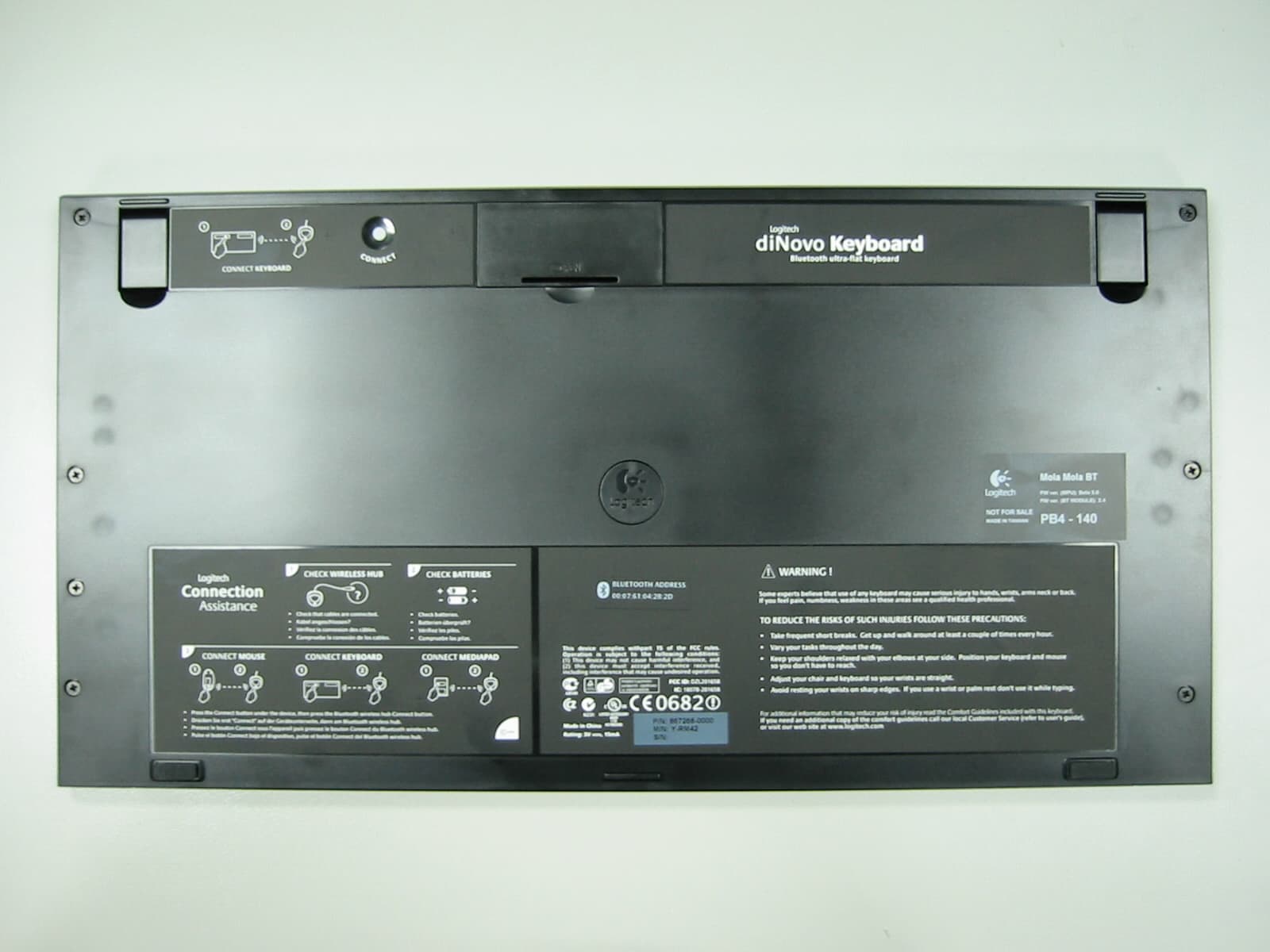
Click to zoom
Application Details
- Equipment Class
- DSS - Part 15 Spread Spectrum Transmitter
- Date of Grant
- Sep 23, 2003
- Application Purpose
- Original Equipment
- Date of Application
- Sep 23, 2003
- Equipment Note
- Bluetooth Wireless Keyboard
- Frequency Range
- 2402.00000000 - 2480.00000000
- Company
- Logitech Inc
- Country
- United States
Documents & Files
Document Text
Text extracted from the exhibit documents filed with the FCC. Open a document above to read the original.
Users Manual
Installation 3 1 2 8 LED 5 6 7 English Remove yellow label from mouse battery compartment. Mouse uses only 2 RECHARGEABLE NiMH batteries. Keyboard bottom: insert 4 AA alkaline batteries. MediaPad bottom: insert 2 AA alkaline batteries. Español Debe quitar la etiqueta amarilla del compartimento de las pilas del ratón. El ratón necesita 2 pilas NiMH RECARGABLES. Parte inferior del teclado: introduzca 4 pilas alcalinas AA. Parte inferior del MediaPad: introduzca 2 pilas alcalinas AA. Français Enlevez l’étiquette jaune du compartiment des piles de la souris. La souris n’utilise que 2 piles RECHARGEABLES NiMH. Dessous du clavier: insérez 4 piles alcalines AA. Dessous du MediaPad: insérez 2 piles alcalines AA. Português Remova a etiqueta amarela do compartimento de baterias do rato. O rato utiliza apenas 2 baterias NiMH RECARREGÁVEIS. Parte de baixo do teclado: introduza 4 baterias AA alcalinas. Parte de baixo do MediaPad: introduza 2 baterias AA alcalinas. 4 1 2 CONNECT MEDIAPAD 1 2 1 ? 2 1 2 1 2 3 12 CONNECT KEYBOARD CHECK BASE STATIONCHECK BATTERIES CONNECT MOUSECONNECT MEDIAPAD – + + – • Check that cables are connected. • Kabel angeschlossen? • Vérifiez la connexion des cábles. • Compr uebe la conexión de los cables. • Press Connect buttn under the device, then press the Base Station Connect button. • Drucken Sie erst "Connect" auf der Gerat eunterseite, dann an der Base Station. • Pressez le bouton Connect sous la souris puis pressez le bouton Connect de la Base Station. • Puisé el botón Connect bajo el dispositivo, pulse el botón Connect de la Base Station. • Check batteries. • Batterien uberpruf t? • Vérifiez les piles. • Compr uebe las pilas. - - - ON Bluetooth USB Bluetooth USB Bluetooth 9 OFF PS/2 1 2 English Try using your mouse and keyboard to make sure they are working. If they are not working, read "Solving Setup Problems" on back of document (step 4). Also for future reference, read the Connection Assistance label under the keyboard. Español Pruebe el ratón, el teclado y MediaPad para comprobar que funcionan. Si no funcionan, consulte "Resolución de problemas de instalación" al final del documento (paso 4). Lea también la etiqueta con información sobre conexión en la parte inferior del teclado. Français Utilisez la souris, le clavier et le MediaPad pour vérifier leur fonctionnement. S'ils ne fonctionnent pas, lisez la section Résolution des problèmes d'installation figurant au verso du document (étape 4). Veuillez lire également le contenu de l'étiquette d'assistance de connexion figurant sous le clavier. Português Experimente utilizar o rato, o teclado e o MediaPad para certificar-se de que estão a funcionar. Se não estiverem a funcionar, leia "Resolvendo problemas de configuração" no fim do documento (passo 4). Para uma referência no futuro, leia também o rótulo Assistência de Ligação de baixo do teclado. English Please follow the Logitech Connection Wizard to connect securely your mouse and keyboard. Español Siga las instrucciones del Asistente para conexión de Logitech para conectar debidamente el ratón, el teclado y MediaPad. Français Veuillez suivre les étapes de l'Assistant de connexion Logitech pour connecter votre souris, votre clavier et votre MediaPad en toute sécurité. Português Siga o assistente de ligação da Logitech para ligar com segurança o rato, o teclado e o MediaPad. English Plug Bluetooth wireless hub cable(s) into computer . PC desktops use black connector (USB) and purple keyboard connector (PS/2). PC notebook computers use black connector (USB) only. Español Conecte al ordenador los cables del concentrador inalámbrico Bluetooth. Los PC de sobremesa usan conector es de teclado morados (PS/2) y negros (USB). Los PC portátiles usan sólo conector es negros (USB). Français Br anchez le ou les câbles du hub Bluetooth sans fil sur l'ordinateur. Les ordinateurs de bureau utilisent un connecteur USB noir pour la souris et violet pour le clavier (PS/2). Les ordina- teurs portables utilisent un connecteur USB noir uniquement. Português Ligue o cabo do concentrador sem fio Bluetooth ao computador. PC de secretária utiliza os conector es pret o (USB) e roxo de teclado (PS/2). Computadores PC notebook utilizam somente o conector pret o (USB). English Turn OFF computer. Español Apague el ordenador. Français Mettez l’ordinateur hors tension. Português Desligue o computador. English Plug AC cable into black USB connector. Plug AC adapter into outlet. Español Conecte el cable CA al conector USB negro. Conecte el adaptador CA a la toma de alimentación. Français Branchez le cordon d’alimentation électrique dans le connecteur USB noir. Branchez l’adaptateur secteur dans la prise électrique. Português Ligue o cabo AC ao conector USB preto. Ligue o adaptador AC à tomada de parede. English Place mouse in Bluetooth wireless hub to charge its batteries. Charging: mouse LED blinks green. Charged: LED turns solid green for 5 minutes. Low batter y: LED blinks red. Important: for full capacity, t hr ee complete charges ar e needed. Español Coloque el ratón en el concentrador inalámbrico Bluetooth para cargar las pilas. Carga en curso: el diodo del ratón parpadea con luz ver de. Carga completada: el diodo del ratón permanece ver de durante 5 minutos. Pilas descargadas: el diodo parpadea con luz roja. Importante: se necesitan tres operaciones completas de carga para obtener la carga plena. Français Placez la souris sur le hub Bluetooth sans fil pour charger ses piles. En cours de chargement: le témoin ver t clignote. Chargement effectué: le témoin ver t de la souris reste allumé en continu pendant 5 minutes. Niveau faible: le témoin rouge clignote. Important: pour parvenir à une charge totale, il faut effectuer tr ois cycles de chargement complets. Português Coloque o rat o no concentrador sem fio Bluetooth para carregar as baterias. Carregando: a luz ver de do LED do rat o pisca. Carregado: a luz ver de do LED fica estável durante 5 minutos. Bateria fraca: a luz ver melha do LED pisca.…
Text truncated - open the document above for the full version.
Users Manual
22 33 www.logitech.com/bluetooth/howto USB Bluetooth USB Bluetooth LED Bluetooth 1 2 CONNECT MEDIAPAD 44 1 2 Bluetooth 2 Bluetooth 1 2 CONNECT MEDIAPAD 1 1 2 Bluetooth 2 Bluetooth 1 2 1 ? 2 1 2 1 2 3 12 CONNECT KEYBOARD CHECK BASE STATIONCHECK BATTERIES CONNECT MOUSECONNECT MEDIAPAD – + + – • Check that cables a re connect ed. • K abel angesc hlossen? • Vérif ie z la connexion des cábl es. • Compruebe la conexión d e los cabl es. • P ress Connect butt n under the d evice, then press t he Base Statio n Connect button. • Drucken Sie er st "Connect " auf der Gerat eunterseit e, dann an der Base S tation. • P ressez le bout on Connect sous la souris puis p res sez le bout on Connect de la Base Station. • P uisé e l botón Connect bajo el dispositivo, pulse e l botón Connect de la B ase Station. • Check batteries. • B atterien uberpruft? • Vérif ie z les piles. • Compruebe las p il as. - - - 1 11 ? PS/2 i i © 2003 Logitech. All rights reserved. Logitech, the Logitech logo, and other Logitech marks are owned by Logitech and may be registered. All other trademarks are the property of their respective owners. Logitech assumes no responsibility for any errors that may appear in this manual. Information contained herein is subject to change without notice. © 2003 Logitech. Tous droits réservés. Logitech, le logo Logitech et les autres marques Logitech sont la propriété exclusive de Logitech et sont susceptibles d’être des marques déposées. Toutes les autres marques sont la propriété exclusive de leurs détenteurs respectifs. Logitech décline toute responsabilité en cas d'erreurs dans ce manuel. Les informations énoncées dans le présent document peuvent faire l’objet de modifications sans avis préalable. 623199-0403 English Learn more: watch the Logitech ® diNovo Media Desktop ™ QuickTour tutorial. Español Más información: vea el Recorrido rápido de diNovo Media Desktop ™ de Logitech ® . Français Pour en savoir plus: suivez le didacticiel Logitech ® diNovo Media Desktop ™ QuickTour. Português Saber mais: consulte o tutorial QuickTour de Logitech ® diNovo Media Desktop ™ . English Solving Setup Problems. 1. Check cable connections. Avoid USB hub or switch box. 2. Check batter y installation. Remove yellow label from mouse battery compartment. 3. Charge the mouse. Mouse LED turns solid green for 5 minutes, and then it turns off when batteries ar e charged. Rec harge mouse when mouse LED blinks red. Important: for a full capacity charge, three complete charges are needed. 4. Establish communications: press Connect button under the device, and then press the Connect button on Bluetooth wireless hub. Español Resolución de problemas de instalación. 1. Compruebe las conexiones de los cables. No utilice el conmutador o concentrador USB. 2. Compruebe la colocación de las pilas. Debe quitar la etiqueta amarilla del compartimento de las pilas del ratón. 3. Cargue el ratón. El diodo del ratón permanece verde durante 5 minutos y se apaga cuando se han cargado las pilas. Vuelva a cargar el ratón cuando parpadee la luz roja del diodo. Importante: se necesitan tres operaciones de carga para obtener la carga plena. 4. Establezca la comunicación: pulse el botón de conexión en la parte inferior del dispositivo y luego el botón de conexión del concentrador inalámbrico Bluetooth. Français Résolutions des problèmes d’installation. 1. Vérifiez les connexions des câbles. Evitez le hub USB ou le boîtier de l'interrupteur. 2. Vérifiez que les piles sont bien installées. Enlevez l’étiquette jaune du compartiment des piles de la souris. 3. Chargez la souris. Le témoin vert de la souris reste allumé en continu pendant 5 minutes, puis s'éteint lorsque les piles sont chargées. Rechargez la souris quand le témoin rouge clignote. Important: pour parvenir à une charge totale, il faut effectuer trois cycles de chargement complets. 4. Etablissez la communication: appuyez sur le bouton Connect situé sous le dispositif, puis sur le bouton Connect du hub Bluetooth sans fil. Português Resolvendo problemas de configuração. 1. Verifique as ligações dos cabos. Evite concentrador USB ou caixa do comutador. 2. Verifique a instalação das baterias. Remova a etiqueta amarela do compartimento de baterias do rato. 3. Carregue o rato. O LED verde do rato fica estável por 5 minutos e desliga-se quando as baterias estão carregadas. Recarregue o rato quando a luz vermelha do LED piscar. Importante: para a capacidade máxima, são necessárias três cargas completas. 4. Estabeleça comunicações: prima o botão Connect de baixo do dispositivo e, em seguida, prima o botão Connect no concentrador sem fio Bluetooth. English Important Ergonomic Information. Read Comfort Guidelines in software help system or at http://www.logitech.com/comfort. Español Información sanitaria importante. Lea las recomendaciones para evitar el cansancio, en el sistema de ayuda del software o en la dirección http://www.logitech.com/comfort. Français Informations importantes relatives au confort. Veuillez lire le guide Logitech et votre confort dans l’Aide du logiciel ou sur le site Web http://www.logitech.com/comfort. Português Informações importantes sobre ergonomia. Leia as directrizes de conforto no sistema de ajuda do software ou no endereço http://www.logitech.com/comfort. English Read battery warning in help system. The mouse has no serviceable parts and complies with International Standard IEC 825-1: 1993. CAUTION: Use of controls or adjustments or performance of procedures other than those specified herein may result in hazardous radiation exposure. Class 1 LED Product. Español Lea la advertencia sobre las pilas en el sistema de ayuda. Este ratón no incluye piezas que puedan repararse o sustituirse y cumple con la normativa internacional IEC 825-1: 1993. PRECAUCIÓN: La utilización de controles, ajustes o realización de procedimientos no especificados en este documento puede dar como resultado la exposición a radiaciones peligrosas. Producto LED de clase 1. Français Veuillez lire …
Text truncated - open the document above for the full version.
Cover Letter(s)
Federal Communication Commision Equipment Authorization Division, Application Processing Branch 7435 Oakland Mills Road Columbia, MD 21048 September 24, 2003 TO WHOM IT MAY CONCERN Pursuant to Paragraphs §0.457 and 0.459 of the Commission’s Rules (47 C.F.R.) and Section §552(b)(4) of the Freedom of Information Act, Logitech Inc. requests confidentiality for the following products: FCC ID Number Product Title/Model DZL201658 diNovo keyboard (Bluetooth ultra-flat keyboard) / Y-RM42 For the product stated above, we request that the following information be held confidential: 1) Circuit diagrams 2) Block Diagrams 3) Bill of materials 4) Operational Description No other items submitted as part of the equipment authorization filing process are deemed confidential. The above exhibits contain Logitech Inc. trade secrets and proprietary information that could be of benefit to our competitors regarding the design of our Bluetooth PC peripherals devices. This material is not customarily available to the general public and we request that it be withheld from public inspection. If you have any questions, please feel free to contact me at the address shown below. Sincerely, P.A. Mr. Bharatkumar Shah EMC/Safety engineer Logitech Inc. 6505, Kaiser Drive, Fremont, CA 94555, USA Phone: +1 510 713 4777 E-mail: [email protected]
Cover Letter(s)
att n: Reviewing Engineer Federal Communica tions Commission 7435 Oakland Mills Road Columbia, MD 21046 RE: LETTER OF AGENT AUTHORIZATION September 4, 2003 To Whom It May Concern: We, the undersigned, hereby authorize MET Laboratories, Inc. to act on our behalf in all matters relating to application for equipment authorization (FCC ID: DZL201658), including the signing of all documents relating to these matters. We also hereby certify that no party to the application authorized hereunder is subject to the denial of benefits, including FCC benefits, pursuant to Section 5301 of the Anti-Drug Abuse Act of 1988,21 U.S.C.853(a). This agreement expires one year from the current date. Sincerely, P.A. Mr. Bharatkumar Shah EMC/Safety engineer Logitech Inc. 6505 Kaiser Drive, Fremont, 94555 California, USA TEL: +1 510 713 4777 E-mail: [email protected]
External Photos
EXTERNAL PHOTOGRAPHS Y-RM42
ID Label/Location Info
LABEL AND LOCATION PHOTOGRAPHS Y-RM42
Internal Photos
INTERNAL PHOTOGRAPHS Y-RM42
RF Exposure Info
attn: Reviewing Engineer Federal Communications Commission 7435 Oakland Mills Road Columbia, MD 21046 September 4, 2003 RE: RF exposure information FCC ID: DZL201658 FCC ID Number Product Title/Model TO WHOM IT MAY CONCERN The product stated above, comply with the FCC limits for Human exposure to RF emissions. This device is categorically excluded from routine environmental because it operate at very low power level. The equipment is deemed to comply with the SAR or MPE limits without testing due to this very low power level (EIRP < 2.5 mW) Sincerely, P.A. Mr. Bharatkumar Shah EMC/Safety Engineer Logitech Inc. 6505 Kaiser Drive, Fremont, 94555, California, USA TEL: +15107134777 E-mail: [email protected]
Test Report
15.247 (a) (1) Statement CETECOM S.A. – ITA team Page 1 of 1 Bluetooth devices 15.247 (a) (1) Statement Bluetooth devices Date: 27/01/2003 15.247 (a) (1) Statement CETECOM S.A. – ITA team Page 2 of 2 Bluetooth devices 1. Pseudorandom hop selection The generation of the hopping sequence in connection mode depends essentially on two input values: 1. LAP/UAP of the master of the connection 2. Internal master clock The LAP (lower address part) are the 24 LSB’s of the 48 BD_ADDRESS. The BD_ADDRESS is an unambiguous number of every Bluetooth unit. The UAP (upper address part) are the 24 MSB’s of the 48 BD_ADDRESS. The internal clock of a Bluetooth unit is derived from a free running clock which is never adjusted and is never turned off. For synchronisation with other units only offset are used. It has no relation to the time of the day. Its resolution is at least half the RX/TX slot length of 312.5 μs. The clock has a cycle of about one day (23h 30’). In most case it is implemented as 28 bit counter. For the deriving of the hopping sequence the entire LAP (24 bits), 4 LSB’s (4 bits) (Input 1) and the 27 MSB’s of the clock (Input 2) are used. With this input values different mathematical procedures (permutations, additions, XOR-operations) are performed to generate the sequence. This will be done at the beginning of every new transmission. The output constitutes a pseudorandom sequence covering 79 hop channels. The exact procedures for the generation of the pseudorandom hopping sequence can be found in “Bluetooth specification Version 1.1 – Part B – Baseband Specification – Chapter 11: Hop selection”. The following is a sample of a pseudorandom hopping sequence of 20 sec. 32000 hops): 34 72 31 69 28 66 25 63 22 60 19 57 16 54 13 51 10 48 07 45 04 42 01 39 77 36 74 33 71 30 68 27 65 24 62 21 59 18 12 20 09 17 61 20 58 17 00 08 76 05 49 08 46 05 67 75 64 72 37 75 34 72 55 63 52 60 25 63 22 60 43 51 40 48 13 51 10 48 31 39 28 36 01 39 77 36 19 27 16 24 68 27 65 24 70 29 55 14 64 23 49 08 58 17 43 02 52 11 37 75 34 72 43 02 28 66 37 75 20 09 17 06 14 03 11 00 22 60 07 45 16 54 01 39 76 65 73 62 70 59 67 56 78 37 63 22 72 31 57 16 66 25 51 10 60 19 45 04 42 01 51 10 36 74 45 04 28 17 25 14 22 11 19 08 30 68 15 53 24 62 09 47 18 56 03 41 12 50 76 35 73 32 03 41 67 26 76 35 59 48 56 45 53 42 50 39 61 20 46 05 55 14 40 78 49 08 34 72 43 02 28 66 25 63 34 72 19 57 28 66 52 62 49 59 46 56 43 53 40 50 37 47 34 44 31 41 28 38 25 35 22 32 19 29 12 50 09 47 61 48 58 45 77 08 09 19 47 06 58 17 67 26 64 23 37 24 34 21 53 63 64 74 23 61 34 72 31 69 14 52 49 59 32 42 19 57 02 40 37 47 20 30 72 31 04 42 11 21 22 32 62 49 59 46 01 39 77 36 58 45 41 28 52 39 35 22 59 69 56 66 29 67 26 64 47 57 44 54 17 55 14 52 35 45 32 42 05 43 02 40 23 33 20 30 72 31 69 28 11 21 08 18 60 19 57 16 78 09 75 06 48 07 45 04 66 76 63 73 36 74 33 71 38 76 21 59 32 70 15 53 26 64 09 47 20 58 03 41 00 38 11 49 73 32 05 43 69 56 66 53 63 50 60 47 69 28 52 11 63 22 46 05 78 37 75 34 44 33 41 30 72 01 77 06 38 76 43 02 60 68 65 73 26 64 31 69 56 64 45 53 22 60 11 49 30 68 27 65 75 64 72 61 24 32 29 37 69 28 74 33 12 20 17 25 57 16 62 21 63 22 60 19 57 16 54 13 37 26 42 31 31 20 36 25 39 77 36 74 33 71 30 68 13 02 18 07 07 75 12 01 15 53 12 50 09 47 06 44 14 52 11 49 59 48 56 45 08 16 13 21 53 12 58 17 75 04 01 09 41 00 46 05 71 00 60 68 37 75 26 64 45 04 42 01 11 00 08 76 39 47 44 52 05 43 10 48 27 35 32 40 72 31 77 36 78 37 75 34 72 31 69 28 52 41 57 46 46 35 51 40 54 13 51 10 48 07 45 04 28 17 33 22 22 11 27 16 30 68 27 65 24 62 21 59 35 73 32 70 29 67 26 64 27 37 32 42 21 31 26 36 15 25 20 30 09 19 14 24 13 51 02 40 56 43 45 32 01 39 69 28 44 31 33 20 60 19 65 24 24 11 29 16 60 70 57 67 24 62 21 59 18 56 15 53 42 52 39 49 73 60 78 65 18 56 23 61 73 32 70 29 18 28 15 25 49 36 54 41 73 32 78 37 51 38 48 35 45 32 42 29 14 52 11 49 38 48 35 45 02 40 78 37 26 36 23 33 69 28 66 25 14 24 11 21 59 46 56 43 53 40 50 37 59 18 48 07 53 12 42 01 35 22 32 19 29 16 26 13 35 73 24 62 29 67 18 56 09 47 06 44 33 43 30 40 76 35 73 32 21 31 18 28 64 23 61 20 09 19 06 16 52 11 49 08 76 07 73 04 42 29 39 26 36 23 33 20 77 06 66 74 43 02 32 70 57 65 62 70 23 61 28 66 39 77 36 74 05 73 02 70 41 49 30 38 07 45 75 34 29 37 15.247 (a) (1) Statement CETECOM S.A. – ITA team Page 3 of 3 Bluetooth devices 18 26 74 33 63 22 09 17 14 22 54 13 59 18 70 29 67 26 36 25 33 22 72 01 61 69 38 76 27 65 60 68 49 57 26 64 15 53 40 48 45 53 06 44 11 49 22 60 19 57 67 56 64 53 24 32 13 21 69 28 58 17 50 39 47 36 72 31 69 28 52 11 41 00 74 03 63 71 40 78 29 67 62 70 51 59 18 07 23 12 12 01 17 06 06 74 11 00 00 68 05 73 02 70 70 59 75 64 64 53 75 34 72 31 69 28 66 25 51 10 56 15 73 02 78 07 33 22 30 19 55 14 52 11 35 73 24 62 57 65 46 54 23 61 12 50 45 53 34 42 01 69 06 74 74 63 00 68 32 42 19 27 71 30 68 27 10 18 07 15 59 18 56 15 77 06 74 03 47 06 44 03 65 73 62 70 35 73 32 70 53 61 50 58 23 61 20 58 59 18 56 15 53 12 50 09 47 06 44 03 41 00 38 76 35 73 32 70 29 67 26 64 23 61 20 58 17 55 14 52 11 49 08 46 05 43 02 40 78 37 75 34 72 31 69 28 66 25 63 22 60 19 57 16 54 13 51 10 48 07 45 04 42 01 39 77 36 74 33 71 30 68 27 65 24 62 21 59 18 56 15 53 12 50 09 47 06 44 03 41 00 38 76 35 47 34 30 17 41 28 24 11 33 71 30 68 27 65 24 62 23 10 06 72 17 04 00 66 09 47 06 44 03 41 00 38 78 65 61 48 72 59 55 42 64 23 61 20 58 17 55 14 54 41 37 24 48 35 31 18 56 66 67 77 26 64 37 75 46 05 43 02 16 03 13 00 46 56 29 39 16 54 78 37 34 44 17 27 04 42 66 25 08 18 19 29 57 16 68 27 20 58 17 55 38 48 35 45 08 46 05 43 26 36 23 33 75 34 72 31 14 24 11 21 59 46 56 43 53 40 50 37 45 04 56 15 39 77 50 09 35 22 32 19 29 16 26 13 21 59 32 70 15 53 26 64 15 53 12 50 33 43 30 40 03 41 00 38 21 31 18 28 70 29 67 26 09 19 06 16 58 17 55 14 76 07 73 04 42 29 39 26 36 23 33 20 20 28 25 33 65 24 70 29 16 24 05 13 61 20 50 09 69 28 66 25 35 24 32 21 63 71 68 76 29 67 34 72 51 59 56 64 17 55 22 60 47 55 36 44 13 51 02 40 21 59 18 56 66 55 63 52 15 23 20 28 60 19 65 24 03 11 08 16 48 07 53 12 78 07 67 75 44 03 33…
Text truncated - open the document above for the full version.
Test Report
15.247 (g) Statement CETECOM S.A. – ITA team Page 1 of 1 Bluetooth devices 15.247 (g) Statement – Bluetooth devices Date: 27/01/2003 According to Bluetooth specifications the channel hopping sequence which has a very long period length (23h 30’) does not show repetitive patterns over a short time interval, but distributes the hop frequencies equally over the 79 hopping channels during a short time interval. The generation of the hopping sequence in connection mode depends essentially on two input values: 1. LAP/UAP of the master of the connection 2. Internal master clock The LAP (lower address part) are the 24 LSB’s of the 48 BD_ADDRESS. The BD_ADDRESS is an unambiguous number of every Bluetooth unit. The UAP (upper address part) are the 24 MSB’s of the 48 BD_ADDRESS. The internal clock of a Bluetooth unit is derived from a free running clock which is never adjusted and is never turned off. For synchronisation with other units only offset are used. It has no relation to the time of the day. Its resolution is at least half the RX/TX slot length of 312.5 μs. The clock has a cycle of about one day (23h 30’). In most case it is implemented as 28 bit counter. For the deriving of the hopping sequence the entire LAP (24 bits), 4 LSB’s (4 bits) (Input 1) and the 27 MSB’s of the clock (Input 2) are used. With this input values different mathematical procedures (permutations, additions, XOR-operations) are performed to generate the sequence. This will be done at the beginning of every new transmission. The output constitutes a pseudorandom sequence covering 79 hop channels. For short transmissions the Bluetooth systems have the following behaviour: When the first connection between two devices is established, a hopping sequence is generated. If for transmitting the wanted data the complete hopping sequence is not used, the connection is ended. When a second connection is established. A new hopping sequence is generated. Due to the fact that the Bluetooth clock has a different value, because the period between the two transmission is longer (it cannot be shorter) than the minimum resolution of the clock (312,5 μs). The hopping sequence will always differ from the first one.
Test Report
15.247 (h) Statement CETECOM S.A. – ITA team Page 1 of 1 Bluetooth devices 15.247 (h) Statement – Bluetooth devices Date: 27/01/2003 Bluetooth units which want to communicate with other units must be organised in an structure called piconet. This piconet consist of max. 8 Bluetooth units. One unit it the master of the other seven are the slaves. The master co- ordinates frequency occupation in this piconet for all units, the master determines the hopping sequence and the slave follows this sequence. Both devices shift between RX and TX time slot according to the clock of the master. As the master hop sequence is derived from its BD address which is unique for each Bluetooth device, additional masters intending to establish new piconets will allways use different hop sequence.
Test Setup Photos
TEST SET UP PHOTOGRAPHS (Number of photographs: 3) General test set-up for radiated measurements. Test set-up for radiated measurements below 1 GHz. Test set-up for radiated measurements above 1 GHz.
Contact Information
Applicant
Paul Zahra(Regulatory Compliance Manager)
Test Firm
Centro de Tecnologia de las Comunicaciones, S.A.Alejandro Llamas
Technical Specifications
| # | Rule Parts | Frequency Range | Power Output |
|---|---|---|---|
| 1 | 15C | 2.40 GHz - 2.48 GHz | 2.50 mW |
Other Applications from Logitech Inc
DZLS00118
Oct 06, 2011AIR SPEAKER
Equipment Class
DTS - Digital Transmission System
DZLA00032
Aug 07, 2011Nano Receiver
Equipment Class
DSS - Part 15 Spread Spectrum Transmitter
DZLA00031
Jul 24, 2011Wireless Headset H600
Equipment Class
DSS - Part 15 Spread Spectrum Transmitter
DZLS00114
Jul 20, 2011Wireless module
Equipment Class
DSS - Part 15 Spread Spectrum Transmitter
DZLA00033
Jul 18, 2011Wireless Headset H800
Equipment Class
DSS - Part 15 Spread Spectrum Transmitter