DZL201780Cordless Mouse
Logitech Inc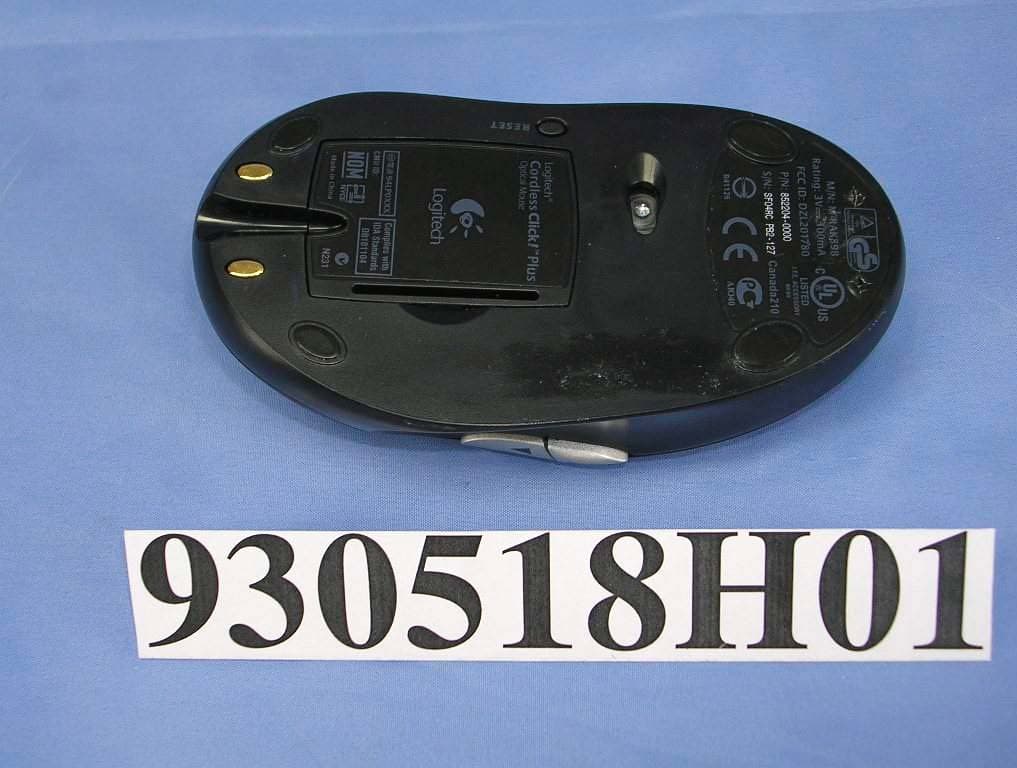
Click to zoom
Application Details
- Equipment Class
- DXX - Part 15 Low Power Communication Device Transmitter
- Date of Grant
- Jun 23, 2004
- Application Purpose
- Original Equipment
- Date of Application
- Jun 23, 2004
- Equipment Note
- Cordless Mouse
- Frequency Range
- 27.19500000 - 27.19500000
- Company
- Logitech Inc
- Country
- United States
Documents & Files
Document Text
Text extracted from the exhibit documents filed with the FCC. Open a document above to read the original.
Users Manual
Logitech ® Cordless Click! ™ Plus Optical Mouse Installation 1 SetPoint ™ For Microsoft ® Windows ® 98 Windows ® 2000 Windows ® ME Windows ® XP Macintosh ® OS X+ Installation: Insert CD into CD-ROM drive and follow on-screen instructions. Part #: 601691-0902 Pat. Pend. www.logitech.com Logitech 3 5 4 1 2 6 English 1. Cordless optical mouse. 2. Wireless mini-receiver. 3. Desktop USB stand. 4. AA alkaline bat ter i es. 5. USB to PS/2 adapter. 6. Mouse software. Español 1. Ratón óptico inalámbrico. 2. Minirreceptor inalámbrico. 3. Soporte USB de sobremesa. 4. Pilas alcalinas AA. 5. Adapt ador de US B a P S /2. 6. Software de ratón. Français 1. Souris optique sans fil. 2. Mini-r écepteur sans fil. 3. S uppor t US B de bureau. 4. Piles al c al i nes de t ype A A. 5. Ada pt a teur U S B - P S /2. 6. Pilote logiciel pour la souris. Português 1. Rato óptico sem fios. 2. Mini-receptor sem fios. 3. Suporte USB de secretária. 4. Pilhas alcalinas AA. 5. USB para adaptador PS/2. 6. S of t wa re do ra t o. 2 English Install AA alkaline batteries. Español Instale las pilas alcalinas AA. Français Installez des piles alcalines de type AA. Português Introduza as baterias alcalinas AA. © 2004 Logitech. All rights reserved. Logitech, the Logitech logo, and other Logitech marks are owned by Logitech and may be registered. All other trademarks are the property of their respective owners. Logitech assumes no responsibility for any errors that may appear in this manual. Information contained herein is subject to change without notice. © 2004 Logitech. Tous droits réservés. Logitech, le logo Logitech et les autres marques Logitech sont la propriété exclusive de Logitech et sont susceptibles d’être des marques déposées. Toutes les autres marques sont la propriété exclusive de leurs détenteurs respectifs. Logitech décline toute responsabilité en cas d'erreurs dans ce manuel. Les informations énoncées dans le présent document peuvent faire l’objet de modifications sans avis préalable. 623410-0403.A www.logitech.com 3 4 English Turn ON computer. Español Encienda el ordenador. Français Mettez l’ordinateur sous tension. Português Ligue o computador. 5 English Install the SetPoint™ software. Español Instale el software SetPoint™. Français Installez le logiciel SetPoint™. Português Instale o software SetPoint™. PC PC Macintosh ® English Plug wireless mini-receiver into computer's USB port. When you "share" the mouse between a desktop and notebook computer, use the desktop USB stand for greater convenience. (See other side for more details.) Español Conecte el minirreceptor inalámbrico al puerto USB del ordenador. Cuando el ratón se "comparte" entre un ordenador de sobremesa y un portátil, conviene utilizar el soporte USB de sobremesa. Consulte el reverso de este documento para más detalles. Français Branchez le mini-récepteur sans fil sur le port USB de l’ordinateur. Quand vous « partagez une souris entre un ordinateur de bureau et un ordinateur portable, utilisez le support USB pour une plus grande liberté. (Voir détails de l’autre côté.) Português Ligue o mini-receptor sem fios à porta USB do computador. Se "partilhar" o rato com o computador de secretária e o portátil, utilize o suporte USB de secretária para uma maior comodidade. (Consulte o outro lado para informações mais detalhadas.) i English 1. Vertical Scrolling: Roll wheel up to scroll up; roll wheel down to scroll down. 2. Horizontal Scrolling: Press wheel left and hold to scroll left; press wheel right and hold to scroll right. (Horizontal scroll bars must be present on screen.) Release wheel to stop scrolling. 3. Zooming: Press wheel down. Roll wheel up to zoom in; roll wheel down to zoom out. Press any button to release zoom. (Not all applications support zooming.) Español 1. Desplazamiento vertical: Gire el botón rueda hacia delante para ascender por el documento y hacia atrás para descender por él. 2. Desplazamiento horizontal: Mantenga inclinado el botón rueda hacia la izquierda o hacia la derecha para desplazarse en esa dirección. Las barras de desplazamiento horizontal deben ser visibles en pantalla. Para detener el desplazamiento, suelte el botón rueda. 3. Zoom: Pulse el botón rueda. Gírelo hacia delante para ampliar la vista, o hacia atrás para reducirla. Pulse un botón cualquiera para anular la función de zoom. Tenga en cuenta que algunas aplicaciones no disponen de función de zoom. Français 1. Défilement vertical: faites tourner la roulette vers le haut pour faire défiler vers le haut ou faites tourner la roulette vers le bas pour faire défiler vers le bas. 2. Défilement horizontal: poussez la roulette vers la gauche et maintenez-la dans cette position pour faire défiler vers la gauche ou poussez la roulette vers la droite et maintenez-la dans cette position pour faire défiler vers la droite. (Les barres de défilement horizontal doivent apparaître à l’écran.) Relâchez la roulette pour faire cesser le défilement. 3. Zoom: enfoncez la roulette. Faites tourner la roulette vers le haut pour zoomer vers l’avant ou vers le bas pour zoomer vers l’arrière. Appuyez sur n’importe quel bouton pour interrompre le zoom. (La fonction de zoom n’est pas prise en charge par toutes les applications.) Português 1. Deslocamento vertical: Desloque a roda para cima para deslocar o ecrã para cima; desloque a roda para baixo para deslocar o ecrã para baixo. 2. Deslocamento horizontal: Carregue e segure a roda para a esquerda para deslocar o ecrã para a esquerda; carregue e segure a roda para a direita para deslocar o ecrã para a direita. (As barras de deslocamento horizontal têm de estar no ecrã.) Solte a roda para parar o deslocamento. 3. Zoom: Carregue na roda para baixo. Desloque a roda para cima para ampliar; desloque a roda para baixo para reduzir. Prima qualquer botão para deixar de utilizar o zoom. (Nem todas as aplicações suportam o zoom.) 3 1 2 Souris optique sans fil Click! ™ Plus ON (Sous Tension)
Users Manual
i i English When you share the mouse between desktop and notebook computers, plug the desktop USB stand into the desktop computer's USB port. Then plug the wireless mini-receiver into the stand. If a USB port is unavailable, use mouse PS/2 port and supplied PS/2 port adapter. Español Si utiliza el mismo ratón con un ordenador de sobremesa y un portátil, conecte el soporte USB de sobremesa al puerto USB del ordenador. A continuación, conecte el minirreceptor inalámbrico al soporte. Si no hay un puerto USB disponible, use el puerto de ratón PS/2 y el adaptador de puerto PS/2 suministrado. Français Quand vous partagez une souris entre un ordinateur de bureau et un ordinateur portable, branchez le support USB dans le port USB de l’ordinateur de bureau. Puis branchez le mini-récepteur sans fil dans le support. Si vous ne disposez pas d’un port USB, utilisez le port souris PS/2 et l’adaptateur pour port PS/2 fourni. Português Se partilhar o rato com os computadores de secretária e portátil, ligue o suporte USB de secretária à porta USB do computador de secretária. Em seguida, ligue o mini-receptor sem fios ao suporte. Se não existir uma porta USB disponível, utilize a porta PS/2 do rato e adaptador de porta PS/2 fornecido. PC—PS/2 Macintosh ® —USB PC—USB PC—USB i ? English 1. Tilt wheel plus zoom. 2. Application switch button: switch between open documents. 3. Universal forward button. 4. Universal back button. Use both buttons in web pages, documents, and more. Español 1. Botón rueda inclinable y zoom. 2. Botón de cambio de aplicaciones: para pasar de un documento abierto a otro. 3. Botón de avance universal. 4. Botón de retroceso universal. Ambos botones son útiles con páginas Web y documentos diversos. Français 1. Roulette multidirectionnelle avec zoom. 2. Bouton de changement d’application pour passer d’un document ouvert à l’autre. 3. Bouton universel Suivante. 4. Bouton universel Précédente. Utilisez ces deux boutons pour naviguer dans les pages Web, dans les documents, etc. Português 1. Roda de inclinação e zoom. 2. Botão de mudança de aplicações: alterna entre documentos abertos. 3. Botão de avançar universal. 4. Botão de retrocesso universal. Utilize os dois botões nas páginas web, documentos, etc. English Important Ergonomic Information. Read the Comfort Guidelines in the software help system or at http://www.logitech.com/comfort. Warning! Read the battery warning in the software help system. Warranty and FCC. Your product comes with a limited warranty, is UL tested, and is FCC compliant. For more information, refer to the online help system on your hard disk. Español Información sanitaria importante. Lea las recomendaciones para evitar el cansancio, en el sistema de ayuda del software o en la dirección http://www.logitech.com/comfort. ¡Advertencia! Lea la advertencia sobre las pilas en el sistema de ayuda del software. Garantía y FCC. El producto se entrega con una garantía limitada, ha pasado las pruebas UL y cumple con las normativas FCC. Para más información, consulte el sistema de ayuda en pantalla, ubicado en el disco duro. Français Informations importantes relatives au confort. Veuillez lire le guide Logitech et votre confort dans l’Aide du logiciel ou sur le site Web http://www.logitech.com/comfort. Attention! Veuillez lire l’avertissement relatif aux piles dans l’Aide du logiciel. Garantie et FCC. Votre produit, certifié UL, est livré avec une garantie limitée et est conforme aux normes FCC. Pour de plus amples informations, consultez l’aide en ligne située sur votre disque dur. Português Informações importantes sobre ergonomia. Leia as orientações de conforto no sistema de ajuda do software ou no endereço http://www.logitech.com/comfort. Atenção! Leia o aviso sobre pilhas no sistema de ajuda do software. Garantia e FCC. Este produto tem uma garantia limitada, foi submetido ao teste UL e está em conformidade com FCC. Para mais informações, consulte o sistema de ajuda online no seu disco rígido. ? English Solving Setup Problems — Mouse Does Not Work! 1. Check battery installation and test batteries. 2. If you experience intermittent performance with the mouse, try using the desktop USB stand for better reception. Make sure to keep the stand and wireless mini-receiver away from electrical devices; avoid metallic surfaces. 3. Try the wireless mini-receiver in another USB port on the computer. 4. For PC desktops, try using the wireless mini-receiver with the PS/2 adapter in the computer's PS/2 mouse port. 5. Reestablish communication between the wireless mini-receiver and mouse: a) Plug wireless mini-receiver into computer's USB port (or PS/2 port on PC desktops). b) Ensure that the batteries have been correctly installed in the mouse and that the computer has been turned on. c) Press the reset button on the receiver, and then press the reset button on the bottom of the mouse (refer to picture). Español Resolución de problemas de instalación — El ratón no funciona. 1. Compruebe el estado y la colocación de las pilas. 2. Si el funcionamiento del ratón es irregular o errático, utilice el soporte USB de sobremesa para obtener mejor recepción. Tanto el soporte como el minirreceptor inalámbrico deben estar alejados de dispositivos eléctricos y superficies metálicas. 3. Pruebe el funcionamiento del minirreceptor inalámbrico en otro puerto USB del ordenador. 4. Con ordenadores de sobremesa, utilice el minirreceptor inalámbrico con el adaptador PS/2 en el puerto de ratón PS/2. 5. Restablezca la comunicación entre el minirreceptor inalámbrico y el ratón: a) Conecte el minirreceptor inalámbrico al puerto USB del ordenador (o al puerto PS/2, con ordenadores de sobremesa). b) Compruebe la colocación de las pilas del ratón y asegúrese de que el ordenador está encendido. c) Pulse el botón de restablecimiento del receptor y, a continuación, el situado en la parte inferior del ratón (consulte la ilustración). Français Résolution des problèmes de configuration – La souris ne fonctionne pas! 1. V…
Text truncated - open the document above for the full version.
Cover Letter(s)
LOGITECH INC. 6505 Kaiser Drive Fremont, CA 94555-3615 FEDERAL COMMUNICATIONS COMMISSION DECLARATION OF CONFORMITY (DoC) FOR THE FOLLOWING EQUIPMENT: PRODUCT NAME: Cordless Mouse MODEL NO: M -RAK89B TRADE NAME: Logitech IS HEREWITH CONFIRMED AND FOUND TO COMPLY WITH THE REQUIREMENTS OF CFR 47 PART 15 REGULATION. THE RESULTS OF ELECTROMAGNETIC EMISSION EVALUATION ARE SHOWN IN THE REPORT NO : D930518H01 THIS DEVICE COMPLIES WITH PART 15 OF THE FCC RULES. OPERATION IS SUBJECT TO THE FOLLOWING TWO CONDITIONS: (1) THIS DEVICE MAY NOT CAUSE HARMFUL INTERFERENCE AND, (2) THIS DEVICE MUST ACCEPT ANY INTERFERENCE RECEIVED, INCLUDING INTERFERENCE THAT MAY CAUSE UNDESIRED OPERATION. THE FOLLOWING LOCAL MANUFACTURER/IMPORTER IS RESPONSIBLE FOR THIS DECLARATION Manufacturer USA Local Representative Company name: LOGITECH INC. To Be Determined. Address: 6505 Kaiser Drive Fremont, CA 94555-3615 Contact Person: T.C.Chang Title: Compliance technical manager Tel/Fax: Tel: Fax:
External Photos
Page 1 CONSTRUCTION PHOTOS OF EUT Page 2
ID Label/Location Info
(Fig. 1) FCC ID: DZL201780 FCC LABEL LOCATION The label will be permanently affixed at a conspicuous location on the evice. Label
Internal Photos
Page 1 CONSTRUCTION PHOTOS OF EUT Page 2 Page 3 Page 4 Page 5 Page 6
Operational Description
FCC ID: DZL201780 Report No. 930518H01 Operational Description The transmitter of the EUT (Cordless Mouse) is powered by 3V Battery. The antenna is Loop Antenna. The output power of this device is very low. This equipment is a 2-channel equipment with frequency 27.045 MHz and 27.195 MHz that operating frequency is 2nd harmonic of the generating Xtal frequency. Under normal use condition, the transmitter and the receiver are quite close, so high EIRP power is neither necessary nor allowed because of interference.
Test Report
FCC ID: DZL201780 Report No.: RF930518H011 Issued: Jun. 10, 2004 FCC TEST REPORT REPORT NO.: RF930518H01 MODEL NO.: M-RAK89B RECEIVED: May 18, 2004 TESTED: May 23, 2004 APPLICANT:LOGITECH INC. ADDRESS:6505 Kaiser Drive Fremont, CA 94555-3615 ISSUED BY:Advance Data Technology Corporation LAB LOCATION:No. 81-1, Lu Liao Keng, 9 Ling, Wu Lung Tsuen, Chiung Lin Hsiang, Hsin Chu Hsien, Taiwan, R.O.C. This test report consists of 15 pages in total. It may be duplicated completely for legal use with the approval of the applicant. It should not be reproduced, except in full, without the written approval of our laboratory. The client should not use it to claim product endorsement by CNLA, or any government agencies. The test results in the report only apply to the tested sample. 0536 ILAC MRA FCC ID: DZL201780 Report No.: RF930518H012Issued: Jun. 10, 2004 Table of Contents 1CERTIFICATION..............................................................................................3 2SUMMARY OF TEST RESULTS .....................................................................4 3GENERAL INFORMATION ..............................................................................5 3.1GENERAL DESCRIPTION OF EUT ................................................................5 3.2DESCRIPTION OF TEST MODES ..................................................................6 3.3GENERAL DESCRIPTION OF APPLIED STANDARDS..................................6 3.4DESCRIPTION OF SUPPORT UNITS ............................................................7 4TEST PROCEDURE AND RESULT.................................................................8 4.1CONDUCTED EMISSION MEASUREMENT...................................................8 4.2RADIATED EMISSION MEASUREMENT........................................................8 4.2.1 LIMITS OF RADIATED EMISSION MEASUREMENT .....................................8 4.2.2 TEST INSTRUMENT .......................................................................................9 4.2.3 TEST PROCEDURE......................................................................................10 4.2.4 DEVIATION FROM TEST STANDARD..........................................................10 4.2.5 TEST SETUP................................................................................................. 11 4.2.6 EUT OPERATING CONDITION..................................................................... 11 4.2.7 TEST RESULT...............................................................................................12 5PHOTOGRAPHS OF THE TEST CONFIGURATION ....................................14 6INFORMATION ON THE TESTING LABORATORIES...................................15 FCC ID: DZL201780 Report No.: RF930518H013Issued: Jun. 10, 2004 1 CERTIFICATION PRODUCT : Cordless Mouse BRAND NAME : Logitech MODEL NO : M-RAK89B TESTED:May 23, 2004 APPLICANT : LOGITECH INC. STANDARDS : 47 CFR Part 15, Subpart C(15.227) ANSI C63.4-1992 The above equipment (Model: M-RAK89B) has been tested by Advance Data Technology Corporation, and found compliance with the requirement of the above standards. The test record, data evaluation & Equipment Under Test (EUT) configurations represented herein are true and accurate accounts of the measurements of the sample’s EMC characteristics under the conditions specified in this report. PREPARED BY: , DATE:Jun. 10, 2004 ( Carol Liao ) APPROVED BY:, DATE:Jun. 10, 2004 ( Eric Lin, Manager ) FCC ID: DZL201780 Report No.: RF930518H014Issued: Jun. 10, 2004 2 SUMMARY OF TEST RESULTS The EUT has been tested according to the following specifications: APPLIED STANDARD: 47 CFR Part 15, Subpart C STANDARD PARAGRAPH TEST TYPERESULTREMARK 15.207Conducted Emission TestNA Power supply is 3VDC from batteries 15.227Radiated Emission TestPASS Minimum passing margin is –13.80 dBuV at 189.34 MHz NOTE: The receiver part to communicate with the EUT has been verified to comply with FCC Part 15, Subpart B, Class B (DoC). The test report can be provided upon request. FCC ID: DZL201780 Report No.: RF930518H015Issued: Jun. 10, 2004 3 GENERAL INFORMATION 3.1 GENERAL DESCRIPTION OF EUT PRODUCTCordless Mouse MODEL NO.M-RAK89B POWER SUPPLY3VDC from batteries MODULATION TYPEFSK CARRIER FREQUENCY OF EACH CHANNEL 27.045 MHz, 27.195MHz NUMBER OF CHANNEL2 ANTENNA TYPELoop antenna DATA CABLE NA I/O PORTSNA ASSOCIATED DEVICESNA NOTE: 1. The EUT is the transmitter part of Cordless Mouse. 2. The above EUT information was declared by the manufacturer and for more detailed features description, please refer to the manufacturer's specifications or User's Manual. FCC ID: DZL201780 Report No.: RF930518H016Issued: Jun. 10, 2004 3.2 DESCRIPTION OF TEST MODES There are two channels have been pretested in our facility which are identical to each other in all aspects except for the following: ModeFrequency 127.045MHz 227.195MHz NOTE: 27.045MHz, the worst case, was chosen for final test and it’s data was recorded in this report. 3.3 GENERAL DESCRIPTION OF APPLIED STANDARDS The EUT is the transmitter part of a Cordless Mouse. According to the specifications of the manufacturer, it must comply with the requirements of the following standards: 47 CFR Part 15, Subpart C (15.227) ANSI C63.4-1992 All tests have been performed and recorded as per the above standards. FCC ID: DZL201780 Report No.: RF930518H017Issued: Jun. 10, 2004 3.4 DESCRIPTION OF SUPPORT UNITS The EUT has been tested as an independent unit together with other necessary accessories or support units. The following support units or accessories were used to form a representative test configuration during the tests. No. ProductBrandModel No.Serial No.FCC ID 1 PCDELL460000043-517-542-482FCC DoC 2 COLOR MONITOR ADICM100026058T10200628 AFCC DoC 3 PRINTERHPC2642AMY79F1C3MZB94C2642X 4 MODEMACEEX14140206026776IFAXDM1414 5 ReceiverLogitechC-BN33NANA 6 keyboardBTCKB-5200TN23305028E5XKB5122WTH0110 No. Signal cable description 1 NA 2 1.8 m braid shielded wire, terminated with VGA conne…
Text truncated - open the document above for the full version.
Test Setup Photos
FCC ID: DZL201780 Report No.: RF930518H0114Issued: Jun. 10, 2004 5 PHOTOGRAPHS OF THE TEST CONFIGURATION RADIATED EMISSION TEST
Contact Information
Applicant
Paul Zahra(Regulatory Compliance Manager)
Technical Contact
Advance Data Technology CorporationEric Lin
[email protected]+886 3593 5343
81-1 Luliaoken, 9th Lin, Wulung Tsuen Chiunglin · Hsinchu · Taiwan
Test Firm
Bureau Veritas CPS (H.K.) Ltd. Taoyuan BranchRichard Chen
Technical Specifications
| # | Rule Parts | Frequency Range | Power Output |
|---|---|---|---|
| 2 | 15C | 27.195 MHz - 27.195 MHz | - |
Other Applications from Logitech Inc
DZLS00118
Oct 06, 2011AIR SPEAKER
Equipment Class
DTS - Digital Transmission System
DZLA00032
Aug 07, 2011Nano Receiver
Equipment Class
DSS - Part 15 Spread Spectrum Transmitter
DZLA00031
Jul 24, 2011Wireless Headset H600
Equipment Class
DSS - Part 15 Spread Spectrum Transmitter
DZLS00114
Jul 20, 2011Wireless module
Equipment Class
DSS - Part 15 Spread Spectrum Transmitter
DZLA00033
Jul 18, 2011Wireless Headset H800
Equipment Class
DSS - Part 15 Spread Spectrum Transmitter