DZL201959Cordless Mouse
Logitech Inc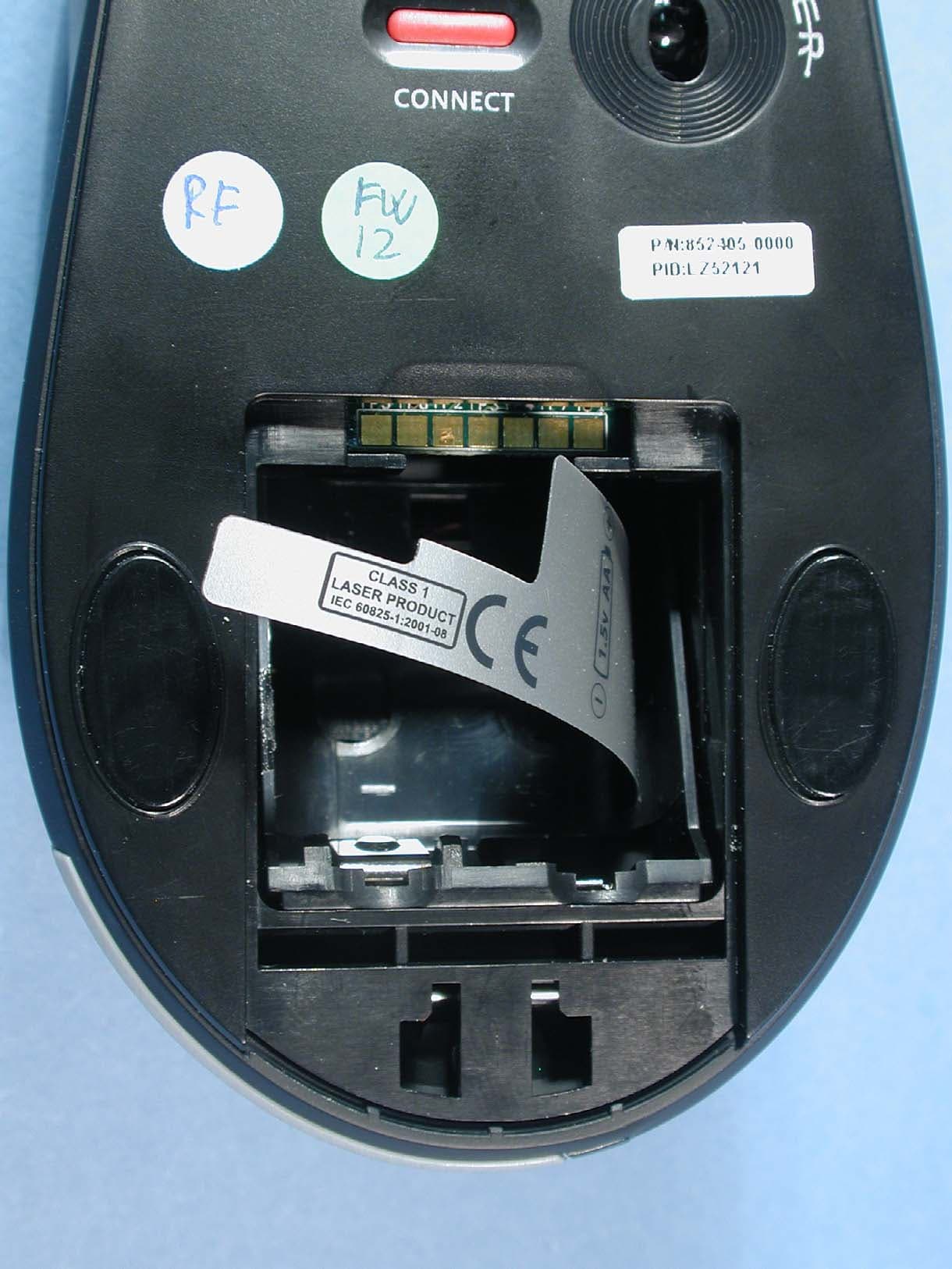
Click to zoom
Application Details
- Equipment Class
- DXX - Part 15 Low Power Communication Device Transmitter
- Date of Grant
- Aug 31, 2005
- Application Purpose
- Original Equipment
- Date of Application
- Aug 31, 2005
- Equipment Note
- Cordless Mouse
- Frequency Range
- 27.19500000 - 27.19500000
- Company
- Logitech Inc
- Country
- United States
Documents & Files
Document Text
Text extracted from the exhibit documents filed with the FCC. Open a document above to read the original.
Users Manual
2 1 3 4 5 6 Installation Guide OFF ON Logitech ® www.logitech.com 1 2 3 4 5 USB PS/2 CONNECT ON / OFF English Turn OFF computer. Español Apague el ordenador. Français Mettez l'ordinateur hors tension. Português Desligue o computador. English Turn ON computer. Español Encienda el ordenador. Français Mettez l’ordinateur sous tension. Português Ligue o computador. English To enjoy all the features of your product, you must install the software. Español Para disponer de todas las funciones del producto, debe instalar el software. Français Pour pouvoir utiliser pleinement toutes les fonctions du produit, vous devez installer le logiciel. Português Para utilizar todas as funções do produto, deve instalar o software. English Package Contents: 1. Keyboard 2. Mouse 3. Receiver 4. Four AA batteries 5. Software Español Contenido de la caja: 1. Teclado 2. Ratón 3. Receptor 4. Cuatro pilas 5. Software Français Contenu : 1. Clavier 2. Souris 3. Récepteur 4. Quatre piles 5. Logiciel Português Conteúdo do pacote: 1. Teclado 2. Rato 3. Receptor 4. Quatro pilhas 5. Software English Plug receiver cables into computer: PC desktops with PS/2 port use keyboard connector (GREEN) plus mouse connector (PURPLE). PC desktops with USB port only and PC notebooks use black USB connector only. Español Conecte al ordenador los cables del receptor: Los PC de sobremesa con puerto PS/2 usan el conector de teclado (MORADO) y el conector de ratón (VERDE). Los PC de sobremesa con puerto USB y los portátiles usan sólo el conector USB negro. Français Branchez les câbles du récepteur dans l’ordinateur: les ordinateurs de bureau avec port PS/2 utilisent le connecteur du clavier (VIOLET) et le connecteur de la souris (VERT). Les ordinateurs de bureau avec ports USB uniquement et les ordinateurs portables utilisent le connecteur USB noir uniquement. Português Ligue os cabos do receptor ao computador: PC de secretária com porta PS/2 utiliza conector de teclado(ROXO) e conector de rato (VERDE). PC de secretária somente com porta USB e PCs portáteis utilizam somente conector preto USB. English Insert 2 AA batteries in the mouse and 2 AA batteries in the keyboard. Español Coloque 2 pilas AA en el ratón y 2 pilas AA en el teclado. Français Insérez deux piles AA dans la souris et deux piles AA dans le clavier. Português Introduza as duas pilhas AA no rato e as duas pilhas AA no teclado.
Users Manual
i www.logitech.com/comfort www.logitech.com/comfort ? Connect Mouse Connect Keyboard 2 1 1 CONNECT ON / OFF 2 www.logitech.com/support WWW 1 2 3 4 5 6 6 7 8 9 10 11 12 13 Americas (USA)English: +1 702 269 3457 English 1. i Na v ™ Tilt Wheel with Cruise Control. 2. Zoom and zoom back to 100%. 3. Enhanced F-keys. 4. Digital Media Library buttons. 5. Media controls. 6. Battery LED. 7. Communication buttons. 8. Calculator. 9. Stand by. 10. Tilt wheel plus universal scroll. 11. Back 12. Forward. 13. Zoom in and out and to 100%. See the software help system and visit the QuickTour ™ software. Also visit www.logitech.com/comfort for more information about using your products and for ergonomics. Español 1. Botón rueda inclinable iNav ™ con Cruise Control. 2. Zoom y restableci- miento de valor 100% 3. Teclas F mejoradas. 4. Botones de biblioteca de medios digital. 5. Controles multimedia. 6. Diodo de estado de pila. 7. Botones de comunicación. 8. Calculadora. 9. Suspensión. 10. Botón rueda inclinable y Universal Scroll. 11. Atrás 12. Adelante. 13. Aplicar zoom y restablecer valor 100%. Consulte el sistema de ayuda del software y ejecute QuickTour ™ . En www.logitech.com/comfort encontrará más información sanitaria y sobre el uso de los productos. English Solving Setup Problems. 1. Check cable connection. 2. Place receiver away from electrical devices, and avoid metallic surfaces. 3. Check battery installation. 4. Turn ON mouse by pressing Power button for 2 seconds. Mouse is ON when LED is ON. 5. Establish connection: 1) Press Connect button on the receiver. 2) QUICKLY press Connect button (half second) under the device (LED should blink for mouse). Español Resolución de problemas de instalación. 1. Compruebe las conexiones de los cables. 2. No coloque el receptor cerca de dispositivos eléctricos o sobre superficies metálicas. 3. Compruebe la colocación de las pilas. 4. Encienda el ratón, pulsando el botón de encendido durante 2 segundos. Si el ratón está ENCENDIDO el diodo está ILUMINADO. 5. Establezca la conexión: 1) Pulse el botón Connect del receptor. 2) Pulse RÁPIDAMENTE (medio segundo) el botón Connect de la parte inferior del dispositivo (el diodo debería parpadear). Français Résolution des problèmes d’installation. 1. Vérifiez la connexion des câbles. 2. Eloignez le récepteur des autres appareils électriques et évitez les surfaces métalliques. 3. Vérifiez que les piles sont bien installées. 4. Mettez la souris sous tension en appuyant sur le bouton d'alimentation pendant deux secondes. La souris est SOUS TENSION si le témoin est ALLUME. 5. Etablissez la connexion: 1) Appuyez sur le bouton Connect du récepteur. 2) Appuyez BRIEVEMENT sur le bouton Connect (une demi-seconde) sous le dispositif (le témoin correspondant à la souris devrait clignoter). Português Resolver problemas de configuração. 1. Verifique a ligação do cabo. 2. Coloque o receptor longe de aparelhos eléctricos e evite superfícies metálicas. 3. Verifique a instalação das pilhas. 4. Ligue o rato ao premir o botão de ligar por dois segundos. O rato está LIGADO quando o LED está LIGADO. 5. Estabeleça ligação: 1) Prima o botão Connect no receptor. 2) Prima RAPIDAMENTE o botão Connect (meio segundo) na parte inferior do dispositivo (o LED do rato deve piscar). © 2005 Logitech. All rights reserved. Logitech, the Logitech logo, and other Logitech marks are owned by Logitech and may be registered. All other trademarks are the property of their respective owners. Logitech assumes no responsibility for any errors that may appear in this manual. Information contained herein is subject to change without notice. © 2005 Logitech. Tous droits réservés. Logitech, le logo Logitech et les autres marques Logitech sont la propriété exclusive de Logitech et sont susceptibles d’être des marques déposées. Toutes les autres marques sont la propriété exclusive de leurs détenteurs respectifs. Logitech décline toute responsabilité en cas d'erreurs dans ce manuel. Les informations énoncées dans le présent document peuvent faire l’objet de modifications sans avis préalable. 623877-0403.A Français 1. Roulette de défilement iNav ™ avec fonction Cruise Control ™ . 2. Zoom et retour à la taille réelle (100%). 3. Touches F optimisées. 4. Boutons de la bibliothèque média numérique 5. Contrôles média. 6. Témoin lumineux des piles. 7. Touches de communication. 8. Calculatrice. 9. Veille. 10. Roulette de défilement universel. 11. Précédente 12. Suivante. 13. Zoom avant, zoom arrière et retour à la taille réelle (100%). Reportez-vous au système d’aide logiciel et le logiciel QuickTour ™ . Pour en savoir plus sur l'utilisation des produits et leur confort, effectuez la visite guidée et accédez au site Web www.logitech.com/comfort. Português 1. Roda de inclinação iNav ™ com Cruise Control. 2. Efectua zoom e retorna o zoom a 100%. 3. Teclas F melhoradas. 4. Botões de Biblioteca de média digital. 5. Controlos de média. 6. LED das pilhas. 7. Botões de comunicação. 8. Calculadora. 9. Suspensão. 10. Roda de deslocação e Universal Scroll. 11. Retrocesso 12. Avançar. 13. Aumenta e reduz o zoom e volta para 100%. Consulte o sistema de ajuda no software e visite o software QuickTour ™ . Visite também www.logitech.com/comfort para obter mais informações sobre como utilizar os produtos e sobre ergonomia. English Important Ergonomic Information: Long periods of repetitive motion using an improperly set-up workspace, incorrect body position, and poor work habits may be associated with physical discomfort and injury to nerves, tendons, and muscles. If you feel pain, numbness, weakness, swelling, burning, cramping, or stiffness in your hands, wrists, arms, shoulders, neck, or back, see a qualified health professional. For more information, please read the Comfort Guidelines located on the Logitech® web site at http://www.logitech.com/comfort, or on the Logitech ® Software. Warning! Read the battery warning in the software help system. Warranty. Your product comes with a limited wa…
Text truncated - open the document above for the full version.
Cover Letter(s)
Logitech Europe S.A. Z.I Moulin du Choc D 1122 Romanel sur Morges Switzerland To: Telefication B.V. Attn: Dept. FCC TCB Edisonstraat 12A 6902 PK ZEVENAAR The Netherlands Subject: Request for short-term FCC confidentiality (FCC ID: DZL201959) Reference number: M-RAZ105 Date: 10 June 2005 Dear FCC TCB, Persuant to 47 CFR Section 0.459(a) & (b), Logitech Europe S.A. hereby requests short-term FCC confidentiality of the following materials submitted in support of FCC certification application for FCC ID : DZL201959 a. Label and Label placement b. Photographs of overall appearance c. Test report d. Test set-up photographs e. User’s manual f. Internal photographs g. RF exposure/Environmental Evaluation h. Cover letters Above materials contain secrets, proprietary and technical information, which would customarily be quarded from competitors under 47 CFR, section 0.457(d)(2). Disclosure or publication or any portion of this company confidential material to other parties could cause substantial competitive harm and provide unjustified benefits for competitors. Logitech Europe S.A. understands that pursuant to 47 CFR section 0.457(d)(1)(ii) disclosure of the applicant and all accompanying documentation will not be made before the date of the grant. Pascal Bornel Compliance engineer
Cover Letter(s)
Logitech Europe S.A. Z.I Moulin du Choc D 1122 Romanel sur Morges Switzerland To: Telefication B.V. Attn: Dept. FCC TCB Edisonstraat 12A 6902 PK ZEVENAAR The Netherlands Subject: Request for permanent FCC confidentiality (FCC ID: DZL201959) Reference number: M-RAZ105 Date: 10 June 2005 Dear FCC TCB, Persuant to 47 CFR Section 0.459(a) & (b), Logitech Europe S.A. hereby requests permanent FCC confidentiality of the following materials submitted in support of FCC certification application for FCC ID : DZL201959 a. Block diagram b. Schematic diagrams c. Operational description d. Bill of Material Above materials contain secrets, proprietary and technical information, which would customarily be quarded from competitors under 47 CFR, section 0.457(d)(2). Disclosure or publication or any portion of this company confidential material to other parties could cause substantial competitive harm and provide unjustified benefits for competitors. Logitech Europe S.A. understands that pursuant to 47 CFR section 0.457(d)(1)(ii) disclosure of the applicant and all accompanying documentation will not be made before the date of the grant. Pascal Bornel Compliance engineer
External Photos
Page: 2 of 16 Report number: 99654430 Photograph 1: Overview of M-RAZ105 Page: 3 of 16 Report number: 99654430 Photograph 2: Bottom view of M-RAZ105 Page: 4 of 16 Report number: 99654430 Photograph 3: Battery compartment of M-RAZ105 Page: 5 of 16 Report number: 99654430 Photograph 4: Side 1 Label of M-RAZ105
ID Label/Location Info
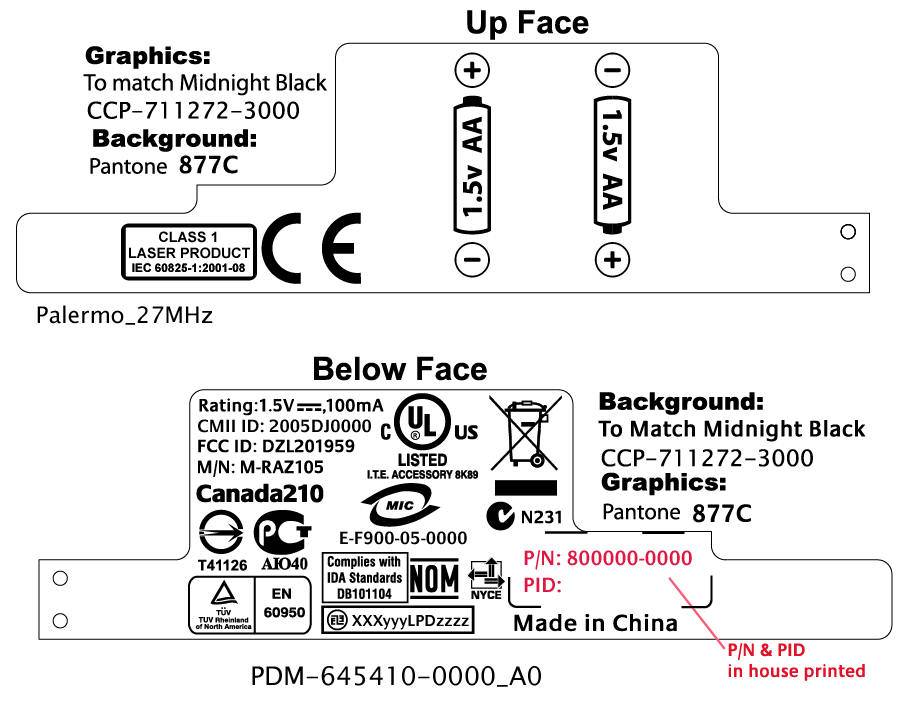
Page: 4 of 16 Report number: 99654430 Photograph 3: Battery compartment of M-RAZ105 Page: 5 of 16 Report number: 99654430 Photograph 4: Side 1 Label of M-RAZ105 Page: 6 of 16 Report number: 99654430 Photograph 5: Side 2 Label of M-RAZ105
Internal Photos
Page: 6 of 16 Report number: 99654430 Photograph 5: Side 2 Label of M-RAZ105 Page: 7 of 16 Report number: 99654430 Photograph 6: Inside view of M-RAZ105 Page: 8 of 16 Report number: 99654430 Photograph 7: Top view of M-RAZ105 PCB Page: 9 of 16 Report number: 99654430 Photograph 8: Bottom view of M-RAZ105 PCB Page: 10 of 16 Report number: 99654430 Photograph 9: Inside view of top of M-RAZ105 PCB Page: 11 of 16 Report number: 99654430 Photograph 10: Top view of M-RAZ105 without cover Page: 12 of 16 Report number: 99654430 Photograph 11: Top view of M-RAZ105 without ‘zoom’-switches Page: 13 of 16 Report number: 99654430 Photograph 12: Membrane PCB of M-RAZ105 Page: 14 of 16 Report number: 99654430 Photograph 13: Base of M-RAZ105 including battery compartment
Test Report
Radio test report 99654430 based on: FCC part 15; subpart C; section 15.227 (10-1-04 edition) Cordless Mouse Logitech Cordless Mouse M-RAZ105 Logitech AGY 735957-0000.A0 Report number: 99654430 Logitech AGY 735957-0000.A0 Contents MAIN MODULE............................................................................................................................................3 1 I NTRODUCTION ....................................................................................................................................3 2 P RODUCT .............................................................................................................................................4 3 T EST SCHEDULE ...................................................................................................................................4 4 P RODUCT DOCUMENTATION .................................................................................................................5 5 O BSERVATIONS AND COMMENTS .........................................................................................................6 6 M ODIFICATIONS TO THE SAMPLE ..........................................................................................................6 7 S UMMARY ............................................................................................................................................6 8 C ONCLUSIONS ......................................................................................................................................7 TEST RESULTS MODULE .........................................................................................................................8 1 G ENERAL INFORMATION ......................................................................................................................8 1.1 Equipment information ...................................................................................................................8 2 E MISSION TESTS ...................................................................................................................................9 2.1 Field strength of intentional signal .................................................................................................9 2.2 Field strength of unwanted emissions...........................................................................................10 USED TEST EQUIPMENT MODULE .....................................................................................................11 This report comprises of three modules. The total number of pages is: 11 Main module Page: 3 of 11 Report number: 99654430 Logitech AGY 735957-0000.A0 Main module 1 Introduction This report contains the result of tests performed by: Telefication bv Edisonstraat 12a 6902 PK Zevenaar The Netherlands Telefication complies with the accreditation criteria for test laboratories as laid down in ISO/IEC 17025:1999. The accreditation covers the quality system of the laboratory as well as the specific activities as described in the authorized annex bearing the accreditation number L021 and is granted on 30 November 1990 by the Dutch Council For Accreditation (RvA: Raad voor Accreditatie). The contents of this test report, if reproduced, shall be copied in full, unless special consent in writing for reproduction in part is granted by Telefication. Copyright of this test report is reserved to Telefication. Ordering party: Company name : Logitech Europe S.A. Address : Z.I. Moulin du Choc D Zipcode : CH-1122 City/town : Romanel sur Morges Country : Switzerland Date of order : 9 June 2005 Main module Page: 4 of 11 Report number: 99654430 Logitech AGY 735957-0000.A0 2 Product A sample of the following product was submitted for testing: Product description : Cordless Mouse Manufacturer : Logitech Europe S.A. Trade mark : Logitech Cordless Mouse Type designation : M-RAZ105 FCC ID : DZL201959 Hardware version : -- Serial number : “P”-sticker Software release : -- 3 Test schedule Tests were carried out in accordance with the specification detailed in chapter 7 “Summary” of this report. Tests were carried out at the following location: • TNO Electronic Products & Services (EPS) B.V Smidshornerweg 18 9822 TL Niekerk The Netherlands FCC listed : 90828 Industry Canada : IC3501 The samples of the product were received on: • 13 June 2005 Tests were carried out on: • 15 June 2005 Main module Page: 5 of 11 Report number: 99654430 Logitech AGY 735957-0000.A0 4 Product documentation For production of this report the following product documentation was used: Description: Date: Identification: Product description June 2005 M-RAZ105_Description_GB.doc Test instructions 10 June 2005 Testing indications for the Cordless Optical Mouse M-RAZ105.doc Circuit diagram 12 May 2005 M-RAZ105 SCH-221959-0000_B0.pdf Block diagram -- M-RAZ105 Block diagram.doc PCB lay out 12 May 2005 M-RAZ105 GER-211959-0000_B0.pdf Circuit diagram Membrane 23 February 2005 M-RAZ105_Membrane_PA1.pdf PCB lay out Membrane -- M-RAZ105_Membrane_GER.pdf Bill of Material 12 May 2005 M-RAZ105 BOM.XLS The above-mentioned documentation will be filed at Telefication for a period of 10 years following the issue of this test report. Main module Page: 6 of 11 Report number: 99654430 Logitech AGY 735957-0000.A0 5 Observations and comments During the tests the product was set in continuous transmit mode (CH1 & CH2 selectable), by means of a test mode. 6 Modifications to the sample No modifications were made to the sample. 7 Summary The product is intended for use in the following application area(s): INDUCTIVE DATA TRANSMISSION APPLICATION IN THE 27 MHz BAND The samples were tested according to the following specification(s): FCC part 15; subpart C; section 15.227 (10-1-04 edition) Main module Page: 7 of 11 Report number: 99654430 Logitech AGY 735957-0000.A0 8 Conclusions The samples of the product showed NO NON-COMPLIANCES to the specification stated in chapter 7 of this r…
Text truncated - open the document above for the full version.
Test Setup Photos
Page: 15 of 16 Report number: 99654430 Photograph 14: Test setup OATS < 30 MHz Page: 16 of 16 Report number: 99654430 Photograph 15: Test setup OATS > 30 MHz
Contact Information
Applicant
Paul Zahra(Regulatory Compliance Manager)
Technical Contact
Logitech Europe S.A.Pascal Bornel
[email protected]+41 21863 5067
Z.I. Moulin du choc D · Romanel sur Morges · Switzerland
Test Firm
Kiwa Nederland B.V.Willem Jong
[email protected]+31 889983621
Technical Specifications
| # | Rule Parts | Frequency Range | Power Output |
|---|---|---|---|
| 2 | 15C | 27.195 MHz - 27.195 MHz | - |
Other Applications from Logitech Inc
DZLS00118
Oct 06, 2011AIR SPEAKER
Equipment Class
DTS - Digital Transmission System
DZLA00032
Aug 07, 2011Nano Receiver
Equipment Class
DSS - Part 15 Spread Spectrum Transmitter
DZLA00031
Jul 24, 2011Wireless Headset H600
Equipment Class
DSS - Part 15 Spread Spectrum Transmitter
DZLS00114
Jul 20, 2011Wireless module
Equipment Class
DSS - Part 15 Spread Spectrum Transmitter
DZLA00033
Jul 18, 2011Wireless Headset H800
Equipment Class
DSS - Part 15 Spread Spectrum Transmitter