DZL201974Bluetooth Keyboard
Logitech Inc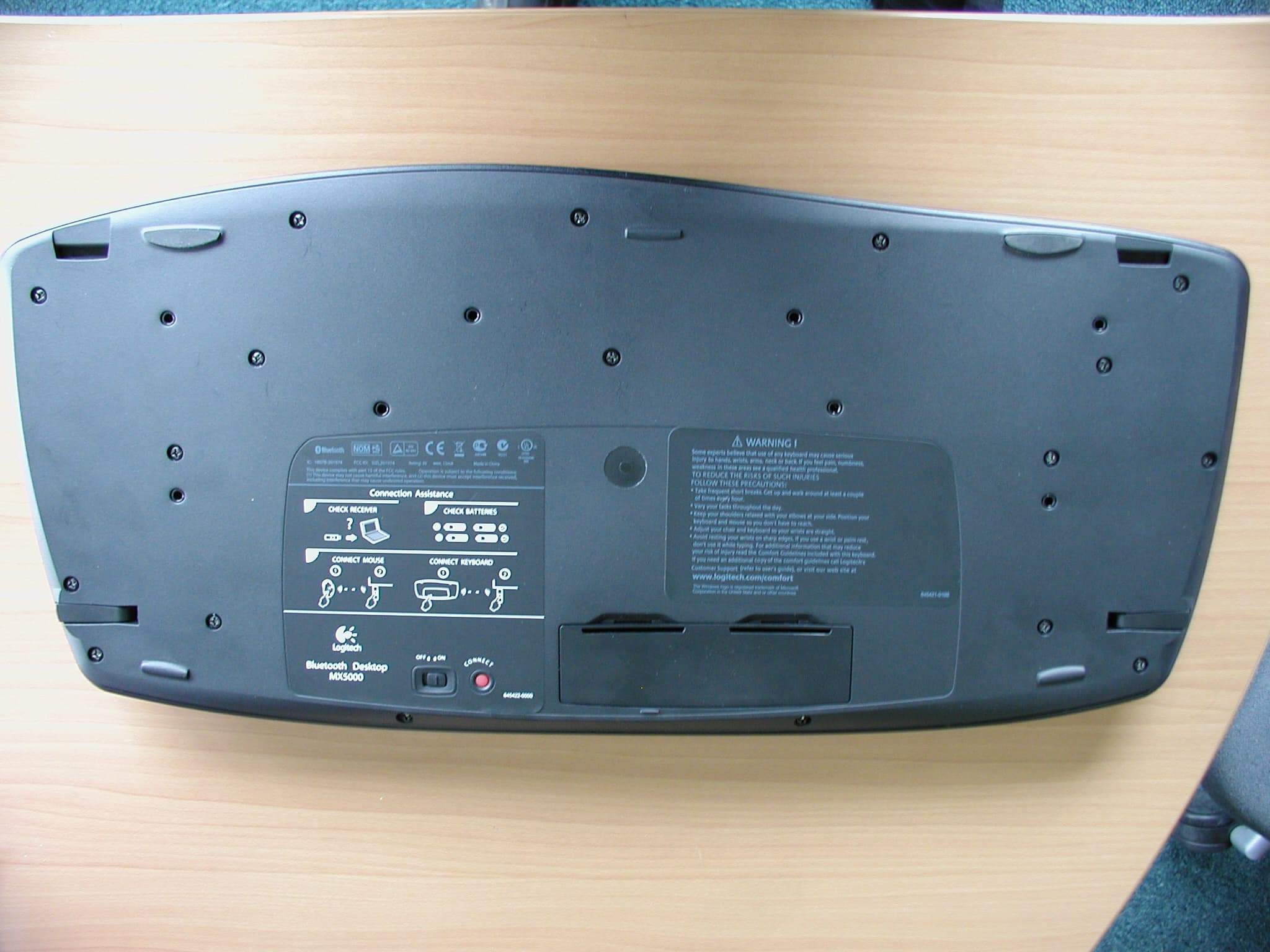
Click to zoom
Application Details
- Equipment Class
- DSS - Part 15 Spread Spectrum Transmitter
- Date of Grant
- Oct 04, 2005
- Application Purpose
- Original Equipment
- Date of Application
- Oct 04, 2005
- Equipment Note
- Bluetooth Keyboard
- Frequency Range
- 2402.00000000 - 2480.00000000
- Company
- Logitech Inc
- Country
- United States
Documents & Files
Document Text
Text extracted from the exhibit documents filed with the FCC. Open a document above to read the original.
Users Manual
Installation Guide 5 4 7 English Turn ON computer. Español Encienda el ordenador. Français Mettez l’ordinateur sous tension. Português Ligue o computador. 2 3 English Plug in USB mini-receiver into computer’s USB port. Español Conecte el minirreceptor USB al puerto USB del ordenador. Français Branchez le minirécepteur USB sur le port USB de l’ordinateur. Português Ligue o mini-receptor à porta USB do computador. USBUSB USB 1 Logitech ® www.logitech.com English Package Contents: 1. Keyboard. 2. Mouse. 3. Base station. 4. USB mini-receiver. 5. AC charger. 6. Four AA batteries. 7. Software. Español Contenido de la caja: 1. Teclado. 2. Ratón. 3. Estación base. 4. Minirreceptor USB. 5. Cargador CA. 6. Cuatro pilas alcalinas AA. 7. Software. Français Contenu: 1. Clavier 2. Souris. 3. Base. 4. Minirécepteur USB. 5. Chargeur secteur. 6. Quatre piles AA. 7. Logiciel. Português Conteúdo do pacote: 1. Teclado. 2. Rato. 3. Central. 4. Mini-receptor USB. 5. Carregador CA. 6. Quatro pilhas AA. 7. Software. 1 2 3 4 5 6 7 6 English Español Français Português ON 1 2 ON LOGITECH Bluetooth Keyboard Bluetooth Keyboard ONON English 1) Plug AC cable into back of Base Station. 2) Plug AC adapter into outlet. Español 1) Conecte el cable CA a la parte posterior de la estación base. 2) Conecte el adaptador CA a la toma de alimentación. Français 1) Branchez le cordon d'alimentation électrique sur le panneau arrière de la base. 2) Branchez l’adaptateur secteur dans la prise électrique. Português 1) Ligue o cabo CA à parte de trás da central. 2) Ligue o adaptador CA à tomada de parede. English Turn ON mouse. Do not press Connect button. Mouse is ON if LEDs are ON. Place mouse in Base Station to charge internal batteries. Charging: Initially, all mouse LEDs blink green in sequence. Charged: All LEDs turn solid green. Low Battery: First LED at bottom turns red. Español Encienda el ratón. No pulse el botón Connect. Si el ratón está ENCENDIDO los diodos están ILUMINADOS. Coloque el ratón en la estación base para cargar las pilas. Carga en curso: al principio, todos los diodos del ratón parpadean en verde de forma secuencial. Carga completada: todos los diodos permanecen verdes. Pilas descargadas: el primer diodo en la parte inferior emite una luz roja. Français Mettez la souris sous tension. N'appuyez pas sur le bouton Connect. La souris est SOUS TENSION si les témoins sont ALLUMES. Placez la souris sur sa base pour recharger les batteries internes. Chargement en cours: au début, tous les témoins de la souris clignotent en vert les uns à la suite des autres. Chargement terminé: tous les témoins verts restent allumés en continu. Piles faibles: le témoin situé en bas devient rouge. Português Ligue o rato. Não prima o botão Connect. O rato está LIGADO se os LEDs estão LIGADOS. Coloque o rato na central para carregar as pilhas internas. A carregar: Inicialmente, todas as luzes dos LEDs do rato piscam a verde em sequência. Carregado: Todas as luzes dos LEDs ficam verdes. Pilha fraca: A luz do primeiro LED na parte inferior fica vermelha. English Insert 4 AA batteries into keyboard. Follow diagram in battery compartment. Do not press Connect button. Turn ON keyboard. Keyboard is ON if LCD shows Logitech ® logo. Español Coloque 4 pilas AA en el teclado. Siga el diagrama del interior del compartimento de las pilas. No pulse el botón Connect. Encienda el teclado. Si el teclado está ENCENDIDO, el logotipo de Logitech ® aparece en la pantalla LCD. Français Insérez 4 piles AA dans le clavier. Consultez le diagramme du logement des piles. N'appuyez pas sur le bouton Connect. Mettez le clavier sous tension. Le clavier est SOUS TENSION si l'affichage LCD comporte le logo Logitech ® . Português Introduza as quatro pilhas AA no teclado. Siga o diagrama no compartimento das pilhas. Não prima o botão Connect. Ligue o teclado. O teclado está LIGADO se o LCD mostra o logótipo da Logitech ® . English To enjoy all the features of your product, you must install the software. Español Para disponer de todas las funciones del producto, debe instalar el software. Français Pour pouvoir utiliser pleinement toutes les fonctions du produit, vous devez installer le logiciel. Português Para utilizar todas as funções do produto, deve instalar o software.
Users Manual
English Solving Setup Problems (Refer to the installation pictures on the front side.): 1. Check the AC cable connection. 2. Try using the USB min-receiver in another USB port on the computer. 3. Turn on the mouse. 4. Make sure the mouse is charged (e.g., one battery LED lit green). 5. Check keyboard battery installation. 6. Turn on keyboard. The keyboard LCD should display data. 7. Establish communication (refer to the connection picture on this page): press the Connect button under the device, and then press the Connect button on the USB mini-receiver that is plugged into the computer. Español Resolución de problemas de instalación (imágenes de instalación en la parte frontal del documento): 1. Compruebe la conexión del cable CA. 2. Pruebe el funcionamiento del minirreceptor USB en otro puerto USB del ordenador. 3. Encienda el ratón. 4. Asegúrese de que el ratón está cargado (p. ej. el diodo de pilas tiene una luz verde). 5. Compruebe la colocación de las pilas del teclado. 6. Encienda el teclado. La pantalla LCD del teclado debería mostrar datos. 7. Establezca comunicación (consulte la figura correspondiente en esta página): pulse el botón Connect en la parte inferior del dispositivo y, a continuación, el botón Connect del minirreceptor USB conectado al ordenador. Français Résolution des problèmes de configuration (consultez les images d'installation sur le panneau avant): vérifiez la connexion du câble secteur. 2. Testez le minirécepteur USB sur un autre port USB de l’ordinateur. 3. Mettez la souris sous tension. 4. Vérifiez que la souris est chargée (un témoin vert allumé). 5. Vérifiez que les piles du clavier sont bien installées. 6. Mettez le clavier sous tension. L'affichage LCD du clavier devrait comporter des données. 7. Etablissez la communication (consultez l'image de connexion sur cette page): appuyez sur le bouton Connect sous le dispositif, puis sur le bouton Connect du minirécepteur USB branché dans l'ordinateur. Português Resolvendo problemas de configuração (consulte as figuras de instalação no lado da frente): 1. Verifique a ligação do cabo CA. 2. Tente utilizar o mini-receptor USB em outra porta USB no computador. 3. Ligue o rato. 4. Certifique-se de que o rato está carregado (p. ex., uma luz do LED de pilha fica verde). 5. Verifique a instalação das pilhas do teclado. 6. Ligue o teclado. O LCD do teclado deve exibir dados. 7. Estabeleça comunicação (consulte a figura de ligação nesta página): prima o botão Connect na parte inferior do dispositivo e prima o botão Connect no mini-receptor USB que está ligado ao computador. ? © 2005 Logitech. All rights reserved. Logitech, the Logitech logo, and other Logitech marks are owned by Logitech and may be registered. All other trademarks are the property of their respective owners. Logitech assumes no responsibility for any errors that may appear in this manual. Information contained herein is subject to change without notice. © 2005 Logitech. Tous droits réservés. Logitech, le logo Logitech et les autres marques Logitech sont la propriété exclusive de Logitech et sont susceptibles d’être des marques déposées. Toutes les autres marques sont la propriété exclusive de leurs détenteurs respectifs. Logitech décline toute responsabilité en cas d'erreurs dans ce manuel. Les informations énoncées dans le présent document peuvent faire l’objet de modifications sans avis préalable. 623874-0403.A 2 2 1 1 English Time and Date: 1) Enter the menu. Media Menu: 2) Go back to Time display. 3) Scroll up or down. 4) Enter the sub-menu. Media display: 5) Go back to Menu. 6) Save the current play list or radio station into the related menu. Notification: 7) Exit the display. 8) Open E-mail. Español Fecha y hora: 1) Acceso al menú. Menú de medios: 2) Regreso a pantalla de hora. 3) Desplazamiento arriba y abajo. 4) Acceso al submenú. Pantalla de medios: 5) Regreso al menú. 6) Guardar lista de reproducción o emisora actual en el menú correspondiente. Notificación: 7) Cierre de pantalla. 8) Acceso a correo electrónico. Français Date et heure: 1) Accès au menu. Menu multimédia: 2) Retour à l'affichage de l'heure. 3) Défilement vers le haut ou le bas. 4) Accès au sous-menu. Affichage multimédia: 5) Retour au menu. 6) Enregistrement de la playliste ou de la station de radio en cours dans le menu correspondant. Notification: 7) Sortie de l'affichage. 8) Ouverture du courrier électronique. Português Data e hora: 1) Insira o menu. Menu Multimédia: 2) Volte para a visualização da hora. 3) Desloque para cima ou para baixo. 4) Insira o sub-menu. Visualização de multimédia: 5) Volte para o menu. 6) Guarde a lista de reprodução actual ou estação de rádio no menu relacionado. Notificação: 7) Saia da visualização. 8) Abra o correio electrónico. 3 4 1 5 6 7 8 9 9 10 11 2 1 1 A B 4 3 2 2 2 2 www.logitech.com/bluetooth/howto www.logitech.com/bluetooth/howto English Refer to the connection procedure and product compatibility information at www.logitech.com/bluetooth/howto. To connect a Bluetooth device, open My Bluetooth Place (shortcut on desktop) and click Add a Bluetooth Device Link. Español Consulte el procedimiento de conexión y la información sobre compatibilidad de productos en www.logitech.com/bluetooth/howto. Para conectar el dispositivo Bluetooth, abra Mis sitios de Bluetooth (acceso directo en el escritorio) y haga clic en el vínculo Agregar dispositivo Bluetooth. Français Pour obtenir la procédure de connexion et des informations sur la compatibilité des produits, consultez le site Web www.logitech.com/bluetooth/howto. Pour connecter un dispositif Bluetooth, ouvrez Favoris Bluetooth (raccourci sur le Bureau) et sélectionnez Ajouter un dispositif Bluetooth. Português Consulte o procedimento de ligação e as informações de compatibilidade do produto em www.logitech.com/bluetooth/howto. Para conectar um dispositivo Bluetooth, abra My Bluetooth Places (atalho no ambiente de trabalho) e clique em Adicionar uma ligação de dispositivo Bluetooth. TM English 1) Sl…
Text truncated - open the document above for the full version.
Cover Letter(s)
15.247 (a) (1) Statement CETECOM S.A. – ITA team Page 1 of 1 Bluetooth devices 15.247 (a) (1) Statement Bluetooth devices Date: 27/01/2003 15.247 (a) (1) Statement CETECOM S.A. – ITA team Page 2 of 2 Bluetooth devices 1. Pseudorandom hop selection The generation of the hopping sequence in connection mode depends essentially on two input values: 1. LAP/UAP of the master of the connection 2. Internal master clock The LAP (lower address part) are the 24 LSB’s of the 48 BD_ADDRESS. The BD_ADDRESS is an unambiguous number of every Bluetooth unit. The UAP (upper address part) are the 24 MSB’s of the 48 BD_ADDRESS. The internal clock of a Bluetooth unit is derived from a free running clock which is never adjusted and is never turned off. For synchronisation with other units only offset are used. It has no relation to the time of the day. Its resolution is at least half the RX/TX slot length of 312.5 μs. The clock has a cycle of about one day (23h 30’). In most case it is implemented as 28 bit counter. For the deriving of the hopping sequence the entire LAP (24 bits), 4 LSB’s (4 bits) (Input 1) and the 27 MSB’s of the clock (Input 2) are used. With this input values different mathematical procedures (permutations, additions, XOR-operations) are performed to generate the sequence. This will be done at the beginning of every new transmission. The output constitutes a pseudorandom sequence covering 79 hop channels. The exact procedures for the generation of the pseudorandom hopping sequence can be found in “Bluetooth specification Version 1.1 – Part B – Baseband Specification – Chapter 11: Hop selection”. The following is a sample of a pseudorandom hopping sequence of 20 sec. 32000 hops): 34 72 31 69 28 66 25 63 22 60 19 57 16 54 13 51 10 48 07 45 04 42 01 39 77 36 74 33 71 30 68 27 65 24 62 21 59 18 12 20 09 17 61 20 58 17 00 08 76 05 49 08 46 05 67 75 64 72 37 75 34 72 55 63 52 60 25 63 22 60 43 51 40 48 13 51 10 48 31 39 28 36 01 39 77 36 19 27 16 24 68 27 65 24 70 29 55 14 64 23 49 08 58 17 43 02 52 11 37 75 34 72 43 02 28 66 37 75 20 09 17 06 14 03 11 00 22 60 07 45 16 54 01 39 76 65 73 62 70 59 67 56 78 37 63 22 72 31 57 16 66 25 51 10 60 19 45 04 42 01 51 10 36 74 45 04 28 17 25 14 22 11 19 08 30 68 15 53 24 62 09 47 18 56 03 41 12 50 76 35 73 32 03 41 67 26 76 35 59 48 56 45 53 42 50 39 61 20 46 05 55 14 40 78 49 08 34 72 43 02 28 66 25 63 34 72 19 57 28 66 52 62 49 59 46 56 43 53 40 50 37 47 34 44 31 41 28 38 25 35 22 32 19 29 12 50 09 47 61 48 58 45 77 08 09 19 47 06 58 17 67 26 64 23 37 24 34 21 53 63 64 74 23 61 34 72 31 69 14 52 49 59 32 42 19 57 02 40 37 47 20 30 72 31 04 42 11 21 22 32 62 49 59 46 01 39 77 36 58 45 41 28 52 39 35 22 59 69 56 66 29 67 26 64 47 57 44 54 17 55 14 52 35 45 32 42 05 43 02 40 23 33 20 30 72 31 69 28 11 21 08 18 60 19 57 16 78 09 75 06 48 07 45 04 66 76 63 73 36 74 33 71 38 76 21 59 32 70 15 53 26 64 09 47 20 58 03 41 00 38 11 49 73 32 05 43 69 56 66 53 63 50 60 47 69 28 52 11 63 22 46 05 78 37 75 34 44 33 41 30 72 01 77 06 38 76 43 02 60 68 65 73 26 64 31 69 56 64 45 53 22 60 11 49 30 68 27 65 75 64 72 61 24 32 29 37 69 28 74 33 12 20 17 25 57 16 62 21 63 22 60 19 57 16 54 13 37 26 42 31 31 20 36 25 39 77 36 74 33 71 30 68 13 02 18 07 07 75 12 01 15 53 12 50 09 47 06 44 14 52 11 49 59 48 56 45 08 16 13 21 53 12 58 17 75 04 01 09 41 00 46 05 71 00 60 68 37 75 26 64 45 04 42 01 11 00 08 76 39 47 44 52 05 43 10 48 27 35 32 40 72 31 77 36 78 37 75 34 72 31 69 28 52 41 57 46 46 35 51 40 54 13 51 10 48 07 45 04 28 17 33 22 22 11 27 16 30 68 27 65 24 62 21 59 35 73 32 70 29 67 26 64 27 37 32 42 21 31 26 36 15 25 20 30 09 19 14 24 13 51 02 40 56 43 45 32 01 39 69 28 44 31 33 20 60 19 65 24 24 11 29 16 60 70 57 67 24 62 21 59 18 56 15 53 42 52 39 49 73 60 78 65 18 56 23 61 73 32 70 29 18 28 15 25 49 36 54 41 73 32 78 37 51 38 48 35 45 32 42 29 14 52 11 49 38 48 35 45 02 40 78 37 26 36 23 33 69 28 66 25 14 24 11 21 59 46 56 43 53 40 50 37 59 18 48 07 53 12 42 01 35 22 32 19 29 16 26 13 35 73 24 62 29 67 18 56 09 47 06 44 33 43 30 40 76 35 73 32 21 31 18 28 64 23 61 20 09 19 06 16 52 11 49 08 76 07 73 04 42 29 39 26 36 23 33 20 77 06 66 74 43 02 32 70 57 65 62 70 23 61 28 66 39 77 36 74 05 73 02 70 41 49 30 38 07 45 75 34 29 37 15.247 (a) (1) Statement CETECOM S.A. – ITA team Page 3 of 3 Bluetooth devices 18 26 74 33 63 22 09 17 14 22 54 13 59 18 70 29 67 26 36 25 33 22 72 01 61 69 38 76 27 65 60 68 49 57 26 64 15 53 40 48 45 53 06 44 11 49 22 60 19 57 67 56 64 53 24 32 13 21 69 28 58 17 50 39 47 36 72 31 69 28 52 11 41 00 74 03 63 71 40 78 29 67 62 70 51 59 18 07 23 12 12 01 17 06 06 74 11 00 00 68 05 73 02 70 70 59 75 64 64 53 75 34 72 31 69 28 66 25 51 10 56 15 73 02 78 07 33 22 30 19 55 14 52 11 35 73 24 62 57 65 46 54 23 61 12 50 45 53 34 42 01 69 06 74 74 63 00 68 32 42 19 27 71 30 68 27 10 18 07 15 59 18 56 15 77 06 74 03 47 06 44 03 65 73 62 70 35 73 32 70 53 61 50 58 23 61 20 58 59 18 56 15 53 12 50 09 47 06 44 03 41 00 38 76 35 73 32 70 29 67 26 64 23 61 20 58 17 55 14 52 11 49 08 46 05 43 02 40 78 37 75 34 72 31 69 28 66 25 63 22 60 19 57 16 54 13 51 10 48 07 45 04 42 01 39 77 36 74 33 71 30 68 27 65 24 62 21 59 18 56 15 53 12 50 09 47 06 44 03 41 00 38 76 35 47 34 30 17 41 28 24 11 33 71 30 68 27 65 24 62 23 10 06 72 17 04 00 66 09 47 06 44 03 41 00 38 78 65 61 48 72 59 55 42 64 23 61 20 58 17 55 14 54 41 37 24 48 35 31 18 56 66 67 77 26 64 37 75 46 05 43 02 16 03 13 00 46 56 29 39 16 54 78 37 34 44 17 27 04 42 66 25 08 18 19 29 57 16 68 27 20 58 17 55 38 48 35 45 08 46 05 43 26 36 23 33 75 34 72 31 14 24 11 21 59 46 56 43 53 40 50 37 45 04 56 15 39 77 50 09 35 22 32 19 29 16 26 13 21 59 32 70 15 53 26 64 15 53 12 50 33 43 30 40 03 41 00 38 21 31 18 28 70 29 67 26 09 19 06 16 58 17 55 14 76 07 73 04 42 29 39 26 36 23 33 20 20 28 25 33 65 24 70 29 16 24 05 13 61 20 50 09 69 28 66 25 35 24 32 21 63 71 68 76 29 67 34 72 51 59 56 64 17 55 22 60 47 55 36 44 13 51 02 40 21 59 18 56 66 55 63 52 15 23 20 28 60 19 65 24 03 11 08 16 48 07 53 12 78 07 67 75 44 03 33…
Text truncated - open the document above for the full version.
Cover Letter(s)
15.247 (g) Statement CETECOM S.A. – ITA team Page 1 of 1 Bluetooth devices 15.247 (g) Statement – Bluetooth devices Date: 27/01/2003 According to Bluetooth specifications the channel hopping sequence which has a very long period length (23h 30’) does not show repetitive patterns over a short time interval, but distributes the hop frequencies equally over the 79 hopping channels during a short time interval. The generation of the hopping sequence in connection mode depends essentially on two input values: 1. LAP/UAP of the master of the connection 2. Internal master clock The LAP (lower address part) are the 24 LSB’s of the 48 BD_ADDRESS. The BD_ADDRESS is an unambiguous number of every Bluetooth unit. The UAP (upper address part) are the 24 MSB’s of the 48 BD_ADDRESS. The internal clock of a Bluetooth unit is derived from a free running clock which is never adjusted and is never turned off. For synchronisation with other units only offset are used. It has no relation to the time of the day. Its resolution is at least half the RX/TX slot length of 312.5 μs. The clock has a cycle of about one day (23h 30’). In most case it is implemented as 28 bit counter. For the deriving of the hopping sequence the entire LAP (24 bits), 4 LSB’s (4 bits) (Input 1) and the 27 MSB’s of the clock (Input 2) are used. With this input values different mathematical procedures (permutations, additions, XOR-operations) are performed to generate the sequence. This will be done at the beginning of every new transmission. The output constitutes a pseudorandom sequence covering 79 hop channels. For short transmissions the Bluetooth systems have the following behaviour: When the first connection between two devices is established, a hopping sequence is generated. If for transmitting the wanted data the complete hopping sequence is not used, the connection is ended. When a second connection is established. A new hopping sequence is generated. Due to the fact that the Bluetooth clock has a different value, because the period between the two transmission is longer (it cannot be shorter) than the minimum resolution of the clock (312,5 μs). The hopping sequence will always differ from the first one.
Cover Letter(s)
15.247 (h) Statement CETECOM S.A. – ITA team Page 1 of 1 Bluetooth devices 15.247 (h) Statement – Bluetooth devices Date: 27/01/2003 Bluetooth units which want to communicate with other units must be organised in an structure called piconet. This piconet consist of max. 8 Bluetooth units. One unit it the master of the other seven are the slaves. The master co- ordinates frequency occupation in this piconet for all units, the master determines the hopping sequence and the slave follows this sequence. Both devices shift between RX and TX time slot according to the clock of the master. As the master hop sequence is derived from its BD address which is unique for each Bluetooth device, additional masters intending to establish new piconets will allways use different hop sequence.
Cover Letter(s)
attn: Reviewing Engineer Federal Communications Commission 7435 Oakland Mills Road Columbia, MD 21046 RE: LETTER OF AGENT AUTHORIZATION September 27, 2005 To Whom It May Concern: We, the undersigned, hereby authorize MET Laboratories, Inc. to act on our behalf in all matters relating to application for equipment authorizations (FCC ID: DZL201974), including the signing of all documents relating to these matters. We also hereby certify that no party to the application authorized hereunder is subject to the denial of benefits, including FCC benefits, pursuant to Section 5301 of the Anti-Drug Abuse Act of 1988,21 U.S.C.853(a). This agreement expires one year from the current date. Sincerely, P.A. Mr. Bharat Shah Senior compliance engineer Logitech Inc. 6505 Kaiser Drive, Fremont, CA 94555, USA Phone: +1 510 795 85 00 E-mail: [email protected]
Cover Letter(s)
Federal Communication Commission Equipment Authorization Division, Application Processing Branch 7435 Oakland Mills Road Columbia, MD 21048 September 27, 2005 TO WHOM IT MAY CONCERN Pursuant to Paragraphs §0.457 and 0.459 of the Commission’s Rules (47 C.F.R.) and Section §552(b)(4) of the Freedom of Information Act, Logitech Inc. requests confidentiality for the following product: FCC ID Number Product Title/Model DZL201974 Bluetooth keyboard / Y-RAH72 For the product stated above, we request that the following information be held permanent confidential: 1) Circuit diagrams 2) Block Diagrams 3) Bill of materials 4) Operational Description For the product stated above, we request that the following information be held limited confidential: 5) External and internal photographs 6) User’s manual 7) Test set-up photos No other items submitted as part of the equipment authorization filing process are deemed confidential. The above exhibits contain Logitech Inc. trade secrets and proprietary information that could be of benefit to our competitors regarding the design of our Bluetooth devices. This material is not customarily available to the general public and we request that it be withheld from public inspection. If you have any questions, please feel free to contact me at the address shown below. Sincerely, P.A. Mr. Bharat Shah Senior compliance engineer Logitech Inc. 6505 Kaiser Drive, Fremont, CA 94555, USA Phone: +1 510 795 85 00 E-mail: [email protected]
Cover Letter(s)
Federal Communication Commission Equipment Authorization Division, Application Processing Branch 7435 Oakland Mills Road Columbia, MD 21048 September 27, 2005 TO WHOM IT MAY CONCERN We, Logitech Inc. , declare that the following product FCC ID Number Product Title/Model DZL201974 Bluetooth keyboard / Y-RAH72 Use the same radio module than the other following product FCC ID Number Product Title/Model DZL201658A Bluetooth keyboard / Y-RZ42 If you have any questions, please feel free to contact me at the address shown below. Sincerely, P.A. Mr. Bharat Shah Senior compliance engineer Logitech Inc. 6505 Kaiser Drive, Fremont, CA 94555, USA Phone: +1 510 795 85 00 E-mail: [email protected]
Cover Letter(s)
DOC-FCC009 4/14/2005 Page 1 of 3 FEDERAL COMMUNICATIONS COMMISSION - FCC FORM 731 APPLICATION FOR EQUIPMENT AUTHORIZATION Approved by OMB 3060 - 0934 Expires 02/28/2005 Item 1. Applicant's complete, legal business name: Logitech Inc. Item 2. Applicant's mailing address Line 1: 6505 Kaiser Drive, Line 2: - P.O.Box: - City: Fremont State: California Country (if foreign address): USA Zip/Postal Code: 94555 Item 3. FCC ID: DZL201974 Grantee code: DZL Equipment Product Code (14 characters maximum): 201974 Item 4. Person at the applicant's address to receive grant or for contact: First Name: Bharat Mail Stop: - Last Name: Shah Telephone: +1 510 795 85 00 Ext: - Title: Sr. Compliance engineer E-mail: [email protected] Fax No: +1 510 792 89 01 Item 5. Instead of Applicant, the original Grant is authorized to be mailed to: - Item 6. Technical Contact: Firm Name: Logitech Inc. Telephone: +1 510 795 85 00 Ext:- Fax No: +1 510 792 89 01 First Name: Bharat Middle Initial: Mr. Last Name: Shah Address Line 1: 6505 Kaiser Drive P.O.Box: - Address Line 2: - City: Fremont, California Country (if foreign address): USA Zip/Postal Code: 94555 E-mail: [email protected] Item 7. Non-Technical Contact: Firm Name: Logitech Inc. Telephone: +1 510 795 85 00 Ext:- Fax No: +1 510 792 89 01 First Name: Bharat Middle Initial: Mr. Last Name: Shah Address Line 1: 6505 Kaiser Drive P.O.Box: - Address Line 2: - City: Fremont, California Country (if foreign address): USA Zip/Postal Code: 94555 E-mail: [email protected] Item 8. * Does this application include a request for confidentiality for any portion(s) of the data contained in this application pursuant to 47 CFR § 0.459 of the Commission Rules? If "Yes" see instructions. (please mark as appropriate) Χ Yes Ο No Item 9. Does the applicant request that the Commission defer grant of this application pursuant 47 CFR § 0.457(d)(1)(ii)? (See instructions) NO If so, specify date when grant may be issued (MM/DD/YYYY format): - Item 10. * Equipment Class: Part 15 Spread Spectrum Transmitter * Description of Product as it is Marketed: Bluetooth keyboard (NOTE: This text will appear below the equipment class on the grant) Item 11. * Application is for: (please mark as appropriate) Χ Original Equipment (See instructions) Ο Change in identification of presently authorized equipment: Original FCC ID: Grant Date (MM/DD/YYYY format): Ο Class II permissive change or modification of presently authorized equipment (See instructions) DOC-FCC009 4/14/2005 Page 2 of 3 Item 12. Is the equipment in this application: * (a) a composite device subject to an additional equipment authorization? * (b) part of a system that operates with, or is marketed with, another device that requires an equipment authorization? If either of the above questions is answered "Yes" complete section 12(c). Ο Yes Χ No Ο Yes Χ No (c) The related application: Ο has been granted under the FCC ID listed to the right Ο is in the process of being filed under the FCC ID listed to the right Ο is pending with the FCC under the FCC ID listed to the right FCC ID Item 13. Name of test firm and contact person on file with the FCC, if different from applicant or contact person: Firm Name: Centro de Tecnología de las Comunicaciones, S.A. Last Name: Ms Briseño Telephone: +34 952 61 91 00 Ext: 357 Fax No. +34 952 61 91 13 E-mail: [email protected] Item 14. Enter any text that you would like to appear at the bottom of the Grant of Equipment Authorization. - Read each certification carefully before answering and signing this application Equipment Specifications: Rule Part Frequency Range (MHz) Power (W) Frequency Tolerance and Units Emission Designator Note Codes 15C 2402.0 - 2480.0 0.00047 2 PPM 1M00F1DAT WILLFUL FALSE STATEMENTS MADE ON THIS FORM ARE PUNISHABLE BY FINE AND IMPRISONMENT (U.S. CODE, TITLE 18, SECTION 1001), AND/OR REVOCATION OF ANY STATION LICENSE OR CONSTITUTION PERMIT (U.S. CODE, TITLE 47, SECTION 312(a)(1)), AND/OR FORFEITURE (U.S. CODE, TITLE 47, SECTION 503). Item 15. *SECTION 5301 (ANTI-DRUG ABUSE) CERTIFICATION: The applicant must certify that neither the applicant nor any party to the application is subject to a denial of Federal benefits, that include FCC benefits, pursuant to Section 5301 of the Anti-Drug Abuse Act of 1988, 21 U.S.C. § 862 because of a conviction for possession or distribution of a controlled substance. See 47 CFR 1.2002(b) for the definition of a "party" for these purposes. Does the applicant or authorized agent so certify? Χ Yes Ο No Item 16. APPLICANT/AGENT CERTIFICATION: I certify that I am authorized to sign this application. All of the statements herein and the exhibits attached hereto, are true and correct to the best of my knowledge and belief. IN accepting a Grant of Equipment Authorization issued by the FCC as a result of the representations made in this application, the applicant is responsible for (1) labeling the equipment with the exact FCC ID specified in this application, (2) compliance statement labeling pursuant to the applicable rules, and (3) compliance of the equipment with the applicable technical rules. If the applicant is not the actual manufacturer of the equipment, appropriate arrangements have been made with the manufacturer to ensure that production units of this equipment will continue to comply with the FCC's technical requirements. Authorizing an agent to sign this application, is done solely at the applicant's discretion; however, the applicant remains responsible for all statements in this application. If an agent has signed this application on behalf of the applicant, a written letter of authorization which includes information to enable the agent to respond to the above section 5301 (Anti-Drug Abuse) Certification statement has been provided by the applicant. It is understood that the letter of authorization must be submitted to the FCC upon request, and that the FCC reserves the right to contact the applicant directly at any time. * Sign…
Text truncated - open the document above for the full version.
Cover Letter(s)
viernes, 23 de septiembre de 2005 © 2003 Logitech. All Rights Reserved. Logitech, the Logitech logo, and other Logitech marks are owned by Logitech and may be registered. All other trademarks are the property of their respective owners. Logitech assumes no responsibility for any errors that may appear in this manual. Information contained herein is subject to change without notice. Document Part Number: The following "FCC Compliance and Advisory Statement" apply in general to all Logitech devices, and specifically to the devices listed there: Logitech 2.4 GHz devices ( power 3 mW max) : Model namesFCC IDModel namesFCC ID M-RAB81DZL201662M-RAP81DZL201828A M-RAN100DZL201866M-RBB93JNZ201943 M-RBA97DZL201945M-RAY105DZL201940 M-RBK93bJNZ201998M-RBH113DZL201966 M-RBL117DZL201992 Y-RM42DZL201658Y-RZ42DZL201658A Y-RN43DZL201678Y-RAA43DZL201678A Y-RP20DZL201661Y-RAH72DZL201974 C-BM16ADZL201657C-UJ16ADZL201657 C-BQ16ADZL201657AC-UW34DZL201958 C-UX34DZL201963C-UV35DZL201986 Logitech 27 MHz devices ( power 1 mW max): Model namesFCC IDModel namesFCC ID M-RY81JNZ211596M-RAJ89AJNZ201779 M-RAA88DZL211647M-RAK89BDZL201780 M-RAA89DZL211646M-RAJ88AJNZ201798 M-RAA93DZL201705M-RAJ89CJNZ201779 M-RAF95JNZ201740M-RAU95JNZ201893 M-RR95JNZ201721M-RAG97DZL201758 M-RAM99DZL201843M-RAA93aJNZ201759 M-RAT95AJNZ201892M-RAS88AJNZ201895 M-RAK89DDZL201780 M-RBG112JNZ211953M-RBG114JNZ202023 M-RAZ105DZL201959M-RBF111JNZ201962 Y-RK56JNZRK56587Y-RQ53DZL131139 Y-RK56AJNZRK56587Y-RR53DZL131836 Y-RQ57JNZ201774Y-RQ52DZL131836 Y-RX43DZL201824Y-RR57DZL131836 Y-RW42DZL201801Y-RR54DZL131836M Y-RK49JNZ201587Y-RAJ56AJNZ201997 Y-RR71JNZYRR71Y-RR63JNZ201968 Y-RAK73DZL202065Y-RAM74DZL134041 FCC Compliance and Advisory Statement.…
Text truncated - open the document above for the full version.
Contact Information
Applicant
Paul Zahra(Regulatory Compliance Manager)
Test Firm
DT&C Co.,Changho Lee
Technical Specifications
| # | Rule Parts | Frequency Range | Power Output | Emission |
|---|---|---|---|---|
| 1 | 15C | 2.40 GHz - 2.48 GHz | 470.00 µW | 1M00F1D |
Other Applications from Logitech Inc
DZLS00118
Oct 06, 2011AIR SPEAKER
Equipment Class
DTS - Digital Transmission System
DZLA00032
Aug 07, 2011Nano Receiver
Equipment Class
DSS - Part 15 Spread Spectrum Transmitter
DZLA00031
Jul 24, 2011Wireless Headset H600
Equipment Class
DSS - Part 15 Spread Spectrum Transmitter
DZLS00114
Jul 20, 2011Wireless module
Equipment Class
DSS - Part 15 Spread Spectrum Transmitter
DZLA00033
Jul 18, 2011Wireless Headset H800
Equipment Class
DSS - Part 15 Spread Spectrum Transmitter