DZLF0361AF-0361A
Logitech Inc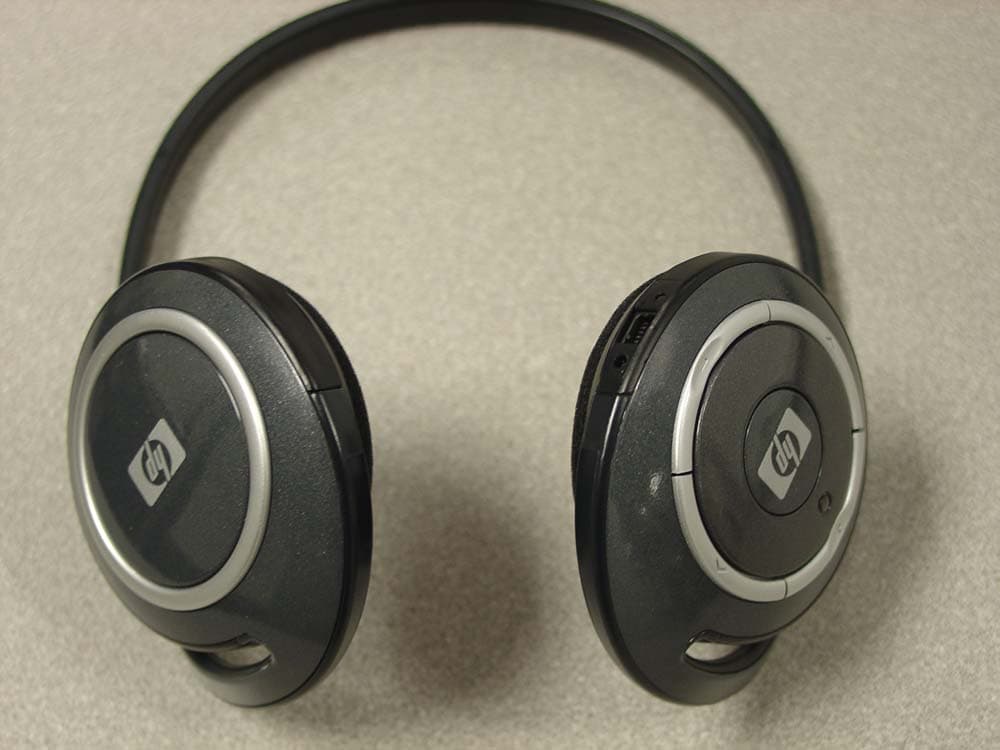
Click to zoom
Application Details
- Equipment Class
- DTS - Digital Transmission System
- Date of Grant
- Oct 31, 2004
- Application Purpose
- Original Equipment
- Date of Application
- Oct 31, 2004
- Equipment Note
- F-0361A
- Frequency Range
- 2402.00000000 - 2480.00000000
- Company
- Logitech Inc
- Country
- United States
Documents & Files
Document Text
Text extracted from the exhibit documents filed with the FCC. Open a document above to read the original.
Users Manual
User’s Guide HP iPAQ Bluetooth Stereo Headphones Document Part Number: 378962-001 November 2004 © 2004 Hewlett-Packard Development Company, L.P. Microsoft and Windows are trademarks of Microsoft Corporation in the U.S. and/or other countries. Intel is a trademark of Intel Corporation in the U.S. and/or other countries. The information contained herein is subject to change without notice. The only warranties for HP products and services are set forth in the express warranty statements accompanying such products and services. Nothing herein should be construed as constituting an additional warranty. HP shall not be liable for technical or editorial errors or omissions contained herein. User’s Guide HP iPAQ Bluetooth Stereo Headphones First Edition (November 2004) Document Part Number: 378962-001 HP iPAQ Bluetooth Stereo Headphones User’s Guide3 CAUTION: Do not wear HP iPAQ Bluetooth Stereo Headphones while operating a motor vehicle or in an area in which it is dangerous for your hearing to be impaired. Getting to Know Your HP iPAQ Bluetooth Stereo Headphones ButtonFunction ForwardTap to track forward to the next media file in the playlist. BackTap to track backward to the previous file in the playlist. Volume UpPress to increase the volume in the headphones. Volume downPress to decrease the volume in the headphones. Multi Function• Press and hold for fifteen seconds to put headphones in pairing mode. • Press and hold for three seconds to turn headphones on or off. • Press to pause/unpause audio. • After initial Bluetooth pairing, press to reestablish connection. HP iPAQ Bluetooth Stereo Headphones User’s Guide4 Installing the Headphones Driver 1. Perform a soft reset on your HP iPAQ Pocket PC by pressing the Reset button on the back or bottom of the device. For more information on performing a soft reset, refer to the User’s Guide that came with your HP iPAQ Pocket PC. 2. Backup your iPAQ Pocket PC using ActiveSync before installing the Headphones driver. 3. If the Bluetooth Radio on your Pocket PC is on, turn it off. 4. Establish a connection from your iPAQ Pocket PC to your desktop computer via ActiveSync. Refer to the User’s Guide that came with your iPAQ Pocket PC for instructions. 5. Place the CD that came with your HP iPAQ Bluetooth Stereo Headphones into an optical drive on your computer. 6. Click the button that reads “Click Here to Install Software” and follow the instructions on your screen. If asked to reset your Pocket PC, tap Reset Now. 7. Once the unit is reset, the driver is installed. Pairing the Headphones with a Pocket PC Before you can use the HP iPAQ Bluetooth Stereo Headphones, you must first pair them with an iPAQ Pocket PC with Bluetooth. To pair your headphones to a Pocket PC: 1. Make sure the batteries are charged on both the headphones and the HP iPAQ Pocket PC. 2. Make sure the headphones are turned off by pressing the Multi Function button in the center of the right earpiece of the headphones for about three seconds until the light flashes red and goes off. HP iPAQ Bluetooth Stereo Headphones User’s Guide5 3. On your Pocket PC, tap the iPAQ Wireless icon on the bottom right of the screen or, for older models, tap the Bluetooth icon 4. Turn on the Bluetooth Radio by tapping the Bluetooth icon. For older iPAQ Pocket PCs, turn on the Bluetooth Radio by tapping selecting “Turn Bluetooth ON” from the dropdown box in the bottom right corner of the screen. HP iPAQ Bluetooth Stereo Headphones User’s Guide6 5. Tap the Manager button in the Bluetooth section of the screen. For older iPAQ Pocket PC Models, tap the Bluetooth icon at the bottom right of the screen, and open the Bluetooth Manager. The following screen should appear: 6. On the headphones, press and hold the Multi Function button in the center of the right earpiece for ten to fifteen seconds until the light flashes red and blue. 7. The headphones are now in Pairing Mode. Release the button. The light will continue to flash red and blue. 8. On the HP iPAQ Pocket PC, select New, then High Quality Audio Setup from connection types. HP iPAQ Bluetooth Stereo Headphones User’s Guide7 9. An icon will appear for the BT Headphones. Tap this icon. 10. When your device discovers the headphones for the first time, you will be prompted for a Passkey. The Passkey is 0000 11. Tap OK. 12. Tap Finish. 13. When pairing is sucessful, the LED on the headphones will flash blue. 14. If no pairing occurs in the next two minutes, the headphones will return to stand-by mode, and the LED will flash blue. HP iPAQ Bluetooth Stereo Headphones User’s Guide8 Reestablishing Connection to the Headphones Once your headphones have made an initial pairing with the iPAQ Pocket PC, you can reestablish the connection easily: 1. Verify that the iPAQ Pocket PC Bluetooth Radio is turned on. 2. Turn on the headphones by holding down the Multi Function button for about two seconds, until the blue light flashes. 3. On the iPAQ Pocket PC, play the audio file. 4. Press the Multi Function button on the right earpiece of the headphones. They will re-connect with the Pocket PC and you will hear audio through the headphones. Note: You can also reconnect the headphones with the iPAQ pocket PC by going to the Bluetooth Manager and double tapping the High Quality Audio on BT-Headphones Turning the Headphones On and Off To turn the Bluetooth Headphones on, push and hold the Multi Function button for two seconds until the blue light flashes. To turn the Bluetooth Headphones off, press and hold the Multi Function button for two seconds, until the light flashes red and goes off. Using the HP iPAQ Bluetooth Stereo Headphones To play a song or other audio file, ensure that the headphones have a Bluetooth connection with the Pocket PC and simply play the file on your iPAQ Pocket PC. HP iPAQ Bluetooth Stereo Headphones User’s Guide9 To pause audio, press the Multi Function button To resume play, press the Multi Function button again. To track forward, press the Forward bu…
Text truncated - open the document above for the full version.
Cover Letter(s)
September 22, 2004 Federal Communications Commission Authorization and Evaluation Division 7435 Oakland Mills Road Columbia, Maryland 21046 To whom it may concern, We, the undersigned, hereby authorize Northwest EMC, Inc., to act on our behalf, as our agent, in the following matters related to the FCC approval of our products: report submittal, related correspondence, the signing of all documents relating to these matters, and any other lawful activity necessary to obtain such certification. Any act carried out by Northwest EMC, Inc. within the scope of this authorization shall have the same affect as our own. This authorization shall expire 12 months from original date. Sincerely, Mitchell Phillipi Sr. Compliance Engineer
Cover Letter(s)
September 20, 2004 FCC Authorization and Evaluation Division 7434 Oakland Mills Road Columbia, MD 21046 Subject: Cover Letter To Whom It May Concern: Logitech is requesting an original certification for our unlicensed Bluetooth Headphones (MN: F-0361A). The Logitech Bluetooth Headphones will operate under FCC Part 15.247 and consists of a head mounted, over the ear type transceiver. The head mounted transceiver is a low power, battery powered, cordless transceiver which is designed to be worn over the ear of the user to enable a two-way transmission with a Bluetooth compatible device. Logitech’s Bluetooth Headphones will be utilizing the frequency range of 2402MHz – 2480MHz and employing a GFSK/FHSS modulation scheme. If further clarification of Logitech’s PAN is needed, please feel free to contact me at (360) 944-3708, via e-mail at [email protected] , or fax (360) 896-2020. Sincerely, Mitchell A. Phillipi Sr. Compliance Engineer Logitech, Inc.
Cover Letter(s)
Northwest EMC TCB Approval Opinion Revision 05//02 LABT0104 Information about the Applicant Applicant: Logitech, Inc. Address: 1499 SE Tech Center Place Suite 350 City, State, Zip Vancouver, WA 98683 Test Requested By: Mitchell Phillipi Model: F-0361A FCC ID: DZLF0361A Agent Northwest EMC, Inc. Approval Type Certification Equipment Type Low power intentional radiator Rule Part 15.247 Overview Logitech is requesting an original certification for our unlicensed Bluetooth Stereo Headphones (MN: F- 0361A), FCC ID: DZLF0361A. The Logitech Bluetooth Stereo Headphones will operate under FCC Part 15.247 and consists of a head mounted, over the ear type transceiver. The head mounted transceiver is a low power, battery powered, cordless transceiver which is designed to be worn over the ear of the user to enable a two-way transmission with a Bluetooth compatible device. Logitech’s Bluetooth Stereo headphones will be utilizing the frequency range of 2402MHz – 2480MHz and employing a GFSK/FHSS modulation scheme. Findings Recommendation All items have been resolved and completed to my satisfaction; therefore I recommend this application for approval. Signature Northwest EMC TCB Approval Opinion Revision 05//02 LABT0104 Opinion Specification Requirements Description 15.207 Conducted Power Line Emissions Opinion: The Equipment meets the intent specified by the requirements listed above. Discussion: The Applicant has submitted test results in the form of a test report Reference: Technical Report Specification Requirements Description 15.247(a)(1)(ii) Bandwidth Opinion: The Equipment meets the intent specified by the requirements listed above. Discussion: The Applicant has submitted test results in the form of a test report Reference: Technical Report Specification Requirements Description 15.247(b)(1) Power Output Opinion: The Equipment meets the intent specified by the requirements listed above. Discussion: The Applicant has submitted test results in the form of a test report Reference: Technical Report Specification Requirements Description 15.247( c ) Spurious Emissions, Antenna Conducted Opinion: The Equipment meets the intent specified by the requirements listed above. Discussion: The Applicant has submitted test results in the form of a test report Reference: Technical Report Specification Requirements Description 15.247( c ) Spurious Emissions, Radiated Emissions Opinion: The Equipment meets the intent specified by the requirements listed above. Discussion: The Applicant has submitted test results in the form of a test report. Reference: Technical Report Northwest EMC TCB Approval Opinion Revision 05//02 LABT0104 Specification Requirements Description 15.247(d) Power Spectral Density Opinion: The Equipment meets the intent specified by the requirements listed above. Discussion: The Applicant has submitted test results in the form of a test report Reference: Technical Report Specification Requirements Description 15.247(c) Band Edge Compliance Opinion: The Equipment meets the intent specified by the requirements listed above. Discussion: The Applicant has submitted test results in the form of a test report. Reference: Technical Report Specification Requirements Description 2.1091/15.247(b)(5) RF Exposure Opinion: The Equipment meets the intent specified by the requirements listed above. Discussion: The Applicant has submitted MPE estimates demonstrating compliance. Reference: RF Exposure Exhibit Specification Requirements Description Additional Requirements FCC Compliance common to all Bluetooth Devices Opinion: The Equipment meets the intent specified by the requirements listed above. Discussion: The Applicant has submitted the required information in the test report. Reference: Technical Report
Cover Letter(s)
September 20,2004 Federal Communications Commission Authorization and Evaluation Division 7435 Oakland Mills Road Columbia, Maryland 21046 To whom it may concern, We hereby respectfully request that under the provision of 47 CFR 0.459, the documents listed below and attached with this application for certification be provided with confidential status. • Schematics • Theory of Operation • Frequency Block Diagrams Any exhibit / information for which we have requested confidentiality, but which may not be accorded such treatment by the FCC, should be returned to us. The documents listed above contain trade secrets that are treated as confidential by us. Substantial competitive harm to us could result should they be made available to the public. Sincerely, Mitchell Phillipi Sr. Compliance Engineer
ID Label/Location Info
Dieline - do not print FCC ID: DZLF0361A IC: 1807D - F0361A Model #: F-0361A 183136
Operational Description
Per 15.203, the antenna is internal and permanently attached. It is not intended to be serviced by the customer and is, therefore only serviceable by Logitech, Inc. authorized personnel. The antenna is an SMD antenna with 4.1dBi gain.
RF Exposure Info
Compliance with 47 CFR 15.247(b)(5) “Systems operating under the provisions of this section shall be operated in a manner that ensures that the public is not exposed to radio frequency energy levels in excess of the Commission's guidelines. See § 1.1307(b)(1) of this chapter.” The head mounted transceiver is a low power, battery powered, cordless transceiver which is designed to be worn over the ear of the user to enable a two-way transmission with a Bluetooth compatible device. It can be considered a portable transmitter per 47 CFR 2.1093(b). The antenna is internal to the unit and permanently attached. The antenna is an SMD antenna with 4.1dBi gain.. The maximum peak conducted output power is 1.05 mW. The maximum peak power is 2.69 mW (EIRP) for FCC ID: DZLF0361A. The transmit frequency is 2402 to 2480 MHz, therefore the EUT does not require routine SAR evaluation per “TCB Exclusions List”, footnote 3 (dated July 17, 2002). See below: The exposure category is “General Population”. The distance is < 2.5 cm. Therefore the “Low Threshold” is 24.5 mW (EIRP or peak conducted, whichever is highest) – above which routine SAR evaluation would be required. Since the maximum peak power of the EUT is 2.69 mW EIRP (1.05 mW peak conducted), routine SAR evaluation is not required. The applicant’s Bluetooth radio, FCC ID: DZLF0361A, is compliant with the requirements of 15.247(b)(5).
Test Report
Logitech, Inc. F-0361A October 19, 2004 Report No. LABT0103 Report Prepared By: www.nwemc.com 1-888-EMI-CERT © 2004 Northwest EMC, Inc 22975 NW Evergreen Parkway Suite 400 Hillsboro, Oregon 97124 Certificate of Test Issue Date: October 19, 2004 Logitech, Inc. Model: F-0361A Emissions Specification Test Method Pass Fail FCC 15.247(a) Occupied Bandwidth:2003 ANSI C63.4:2001 FCC 15.247(b) Output Power:2003 ANSI C63.4:2001 FCC 15.247(c) Band Edge Compliance:2003 ANSI C63.4:2001 FCC 15.247(c) Spurious Conducted Emissions:2003 ANSI C63.4:2001 FCC 15.247(c) Spurious Radiated Emissions:2003 ANSI C63.4:2001 FCC 15.247(d) Power Spectral Density:2003 ANSI C63.4:2001 FCC 15.207 AC Power Line Conducted Emissions ANSI C63.4:2001 Modifications made to the product See the Modifications section of this report Test Facility The measurement facility used to collect the data is located at: Northwest EMC, Inc. 22975 NW Evergreen Parkway, Suite 400; Hillsboro, OR 97124 Phone: (503) 844-4066 Fax: 844-3826 This site has been fully described in a report filed with and accepted by the FCC (Federal Communications Commission) and Industry Canada. Approved By: Don Facteau, IS Manager This report must not be used to claim product certification, approval, or endorsement by NVLAP, NIST, or any agency of the federal government of the United States of America. Product compliance is the responsibility of the client, therefore the tests and equipment modes of operation represented in this report were agreed upon by the client, prior to testing. This Report may only be duplicated in its entirety. The results of this test pertain only to the sample(s) tested, the specific description is noted in each of the individual sections of the test report supporting this certificate of test. Northwest EMC Revision History Revision 05/05/03 Revision Number Description Date Page Number 00 None Northwest EMC Accreditations and Authorizations Revision 04/01/04 FCC: Accredited by NVLAP for performance of FCC radio, digital, and ISM device testing. Our Open Area Test Sites, certification chambers, and conducted measurement facilities, have been fully described in reports filed with the FCC and accepted by the FCC in letters maintained in our files. Northwest EMC has been accredited by ANSI to ISO / IEC Guide 65 as a product certifier. We have been designated by the FCC as a Telecommunications Certification Body (TCB). This allows Northwest EMC to certify transmitters to FCC specifications in accordance with 47 CFR 2.960 and 2.962. NVLAP: Northwest EMC, Inc. is recognized under the United States Department of Commerce, National Institute of Standards and Technology, National Voluntary Laboratory Accreditation Program for satisfactory compliance with the requirements of ISO/IEC 17025 for Testing Laboratories. The NVLAP accreditation encompasses Electromagnetic Compatibility Testing in accordance with the European Union EMC Directive 89/336/EEC, ANSI C63.4, MIL-STD 461E, DO-160D and SAE J1113. Additionally, Northwest EMC is accredited by NVLAP to perform radio testing in accordance with the European Union R&TTE Directive 1999/5/EEC, the requirements of FCC, and the RSS radio standards for Industry Canada. Accreditation has been granted to Northwest EMC, Inc. under Certificate Numbers: 200629-0, 200630-0, and 200676-0. Industry Canada: Accredited by NVLAP for performance of Industry Canada RSS and ICES testing. Our Open Area Test Sites and certification chambers comply with RSS 212, Issue 1 (Provisional) and have been filed with Industry Canada and accepted. Northwest EMC has been accredited by ANSI to ISO / IEC Guide 65 as a product certifier. We have been designated by NIST and recognized by Industry Canada as a Certification Body (CB) per the APEC Mutual Recognition Arrangement (MRA). This allows Northwest EMC to certify transmitters to Industry Canada technical requirements. CAB: Designated by NIST and validated by the European Commission as a Conformity Assessment Body (CAB) to conduct tests and approve products to the EMC directive and transmitters to the R&TTE directive, as described in the U.S. - EU Mutual Recognition Agreement TÜV Product Service: Included in TUV Product Service Group's Listing of Recognized Laboratories. It qualifies in connection with the TUV Certification after Recognition of Agent's Testing Program for the product categories and/or standards shown in TUV's current Listing of CARAT Laboratories available from TUV. A certificate was issued to represent that this laboratory continues to meet TUV's CARAT Program requirements. Certificate No. USA0401C Northwest EMC Accreditations and Authorizations Revision 04/01/04 TÜV Rheinland: Authorized to carryout EMC tests by order and under supervision of TÜV Rheinland. This authorization is based on "Conditions for EMC- Subcontractors" of November 1992. NEMKO: Assessed and accredited by NEMKO (Norwegian testing and certification body) for European emissions and immunity testing. As a result of NEMKO's laboratory assessment, they will accept test results from Northwest EMC, Inc. for product certification (Authorization No. ELA 119). Technology International: Assessed in accordance with ISO Guide 25 defining the general international requirements for the competence of calibration and testing laboratories and with ITI assessment criteria LACO196. Based upon that assessment Interference Technology International, Ltd., has granted approval for specifications implementing the EU Directive on EMC (89/336/EEC and amendments). The scope of the approval was provided on a Schedule of Assessment supplied with the certificate and is available upon request. Australia/New Zealand: The National Association of Testing Authorities (NATA), Australia has been appointed by the ACA as an accreditation body to accredit test laboratories and competent bodies for EMC standards. Accredited test reports or assessments by competent bodies must carry the NATA logo. Test reports made by an overseas laborato…
Text truncated - open the document above for the full version.
Contact Information
Applicant
Paul Zahra(Regulatory Compliance Manager)
Technical Contact
Northwest EMC, Inc.Greg Kiemel
[email protected]503-844-4066
22975 NW Evergreen Parkway · Hillsboro, Oregon · United States
Non-Technical Contact
Northwest EMC, Inc.Vicki Albertson
[email protected]503-844-4066
Test Firm
Northwest EMC, Inc.Greg Kiemel
Technical Specifications
| # | Rule Parts | Frequency Range | Power Output |
|---|---|---|---|
| 1 | 15C | 2.40 GHz - 2.48 GHz | 1.05 mW |
Other Applications from Logitech Inc
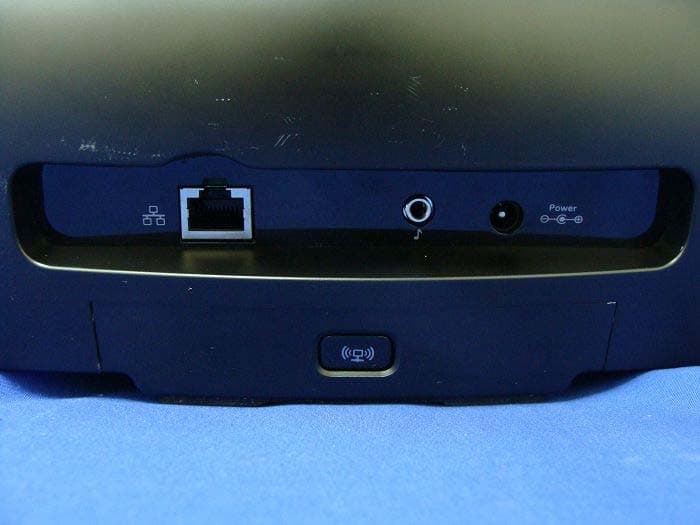
DZLS00118
Oct 06, 2011AIR SPEAKER
Equipment Class
DTS - Digital Transmission System
DZLA00032
Aug 07, 2011Nano Receiver
Equipment Class
DSS - Part 15 Spread Spectrum Transmitter
DZLA00031
Jul 24, 2011Wireless Headset H600
Equipment Class
DSS - Part 15 Spread Spectrum Transmitter
DZLS00114
Jul 20, 2011Wireless module
Equipment Class
DSS - Part 15 Spread Spectrum Transmitter
DZLA00033
Jul 18, 2011Wireless Headset H800
Equipment Class
DSS - Part 15 Spread Spectrum Transmitter