DZLYUU8727MHz cordless keyboard
Logitech Inc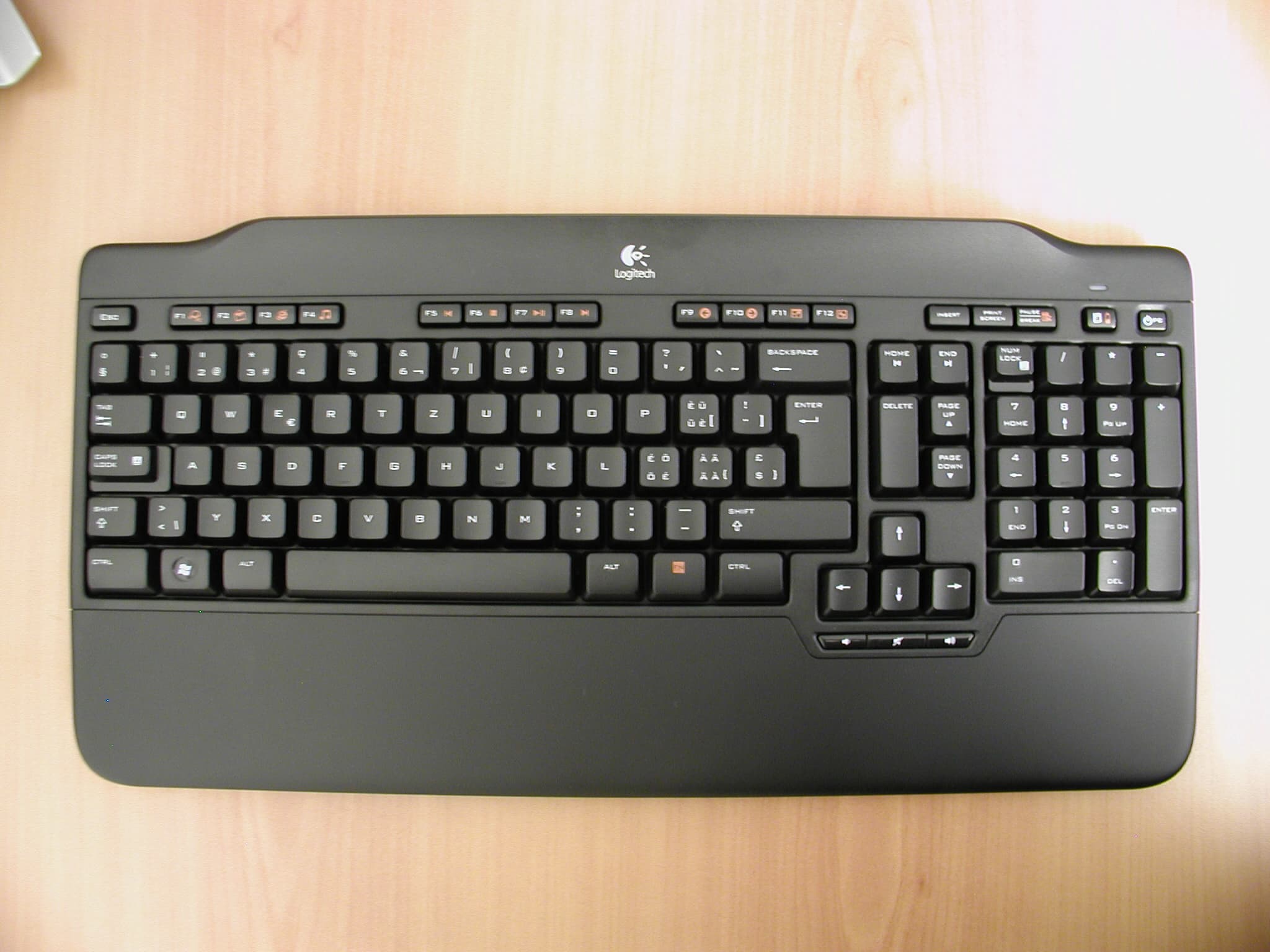
Click to zoom
Application Details
- Equipment Class
- DXX - Part 15 Low Power Communication Device Transmitter
- Date of Grant
- Jul 17, 2007
- Application Purpose
- Original Equipment
- Date of Application
- Jul 17, 2007
- Equipment Note
- 27MHz cordless keyboard
- Frequency Range
- 27.09500000 - 27.14500000
- Company
- Logitech Inc
- Country
- United States
Documents & Files
Document Text
Text extracted from the exhibit documents filed with the FCC. Open a document above to read the original.
Users Manual
User’s Guide 1 2 3 4 5 Troubleshooting and Registration Take Your Notebook to New Heights of Comfort Alto ™ Cordless Alto ™ Cordless 1 Alto ™ Cordless 2 Alto ™ Cordless 3 Alto ™ Cordless 4 Alto ™ Cordless 5 www.logitech.com/support WWW United States+1 702 269 3457 Argentina0800 555 3284 Brazil0800 891 4173 Canada+1 416 207 2782 Chile1230 020 5484 Latin America+55 11 3444 6761 Mexico001 800 578 9619 English Pull the support release button to release the notebook stand. Español Accione el botón del atril para portátil para abrirlo. Français Tirez sur le bouton de dégagement du socle. Português Puxe o botão de libertação do suporte para soltar o suporte de portátil. English 1. Raise the note- book stand. 2. Hold the stand, and then insert its table support into the recess on the expansion base. Verify that it does not move. IMPORTANT: To release the table support, pull the support release button again. Español 1. Levante el atril. 2. Sujételo e inserte el soporte del atril en la cavidad de la base de expansión. Asegúrese de que está bien encajado y no se mueve. IMPORTANTE: Para soltar el soporte del atril, vuelva a accionar el botón. Français 1. Relevez le socle d'ordinateur portable. 2. Maintenez-le et insérez son support dans l'encastrement de la base d'extension. Vérifiez la stabilité de l'ensemble IMPORTANT: Pour libérer le support, tirez de nouveau sur le bouton de dégagement du socle. Português 1. Eleve o suporte de portátil. 2. Segure no suporte e insira o suporte de mesa no encaixe na base de expansão. Verifique se não se move. IMPORTANTE: Para libertar o suporte de mesa, puxe novamente o botão de libertação do suporte. English Remove the USB cable from the back of the expansion base. Español Extraiga el cable USB de la parte posterior de la base de expansión. Français Retirez le câble USB de l'arrière de la base d'extension. Português Remova o cabo USB da parte posterior da base de expansão. English 1. Insert the expansion base’s USB cable into an available USB port on your notebook. IMPORTANT: Ensure that you do not plug in any other device before plugging in the expansion base’s USB cable. 2. Congratulations! You are now ready to use your new Alto™--no software required. Español 1. Conecte el conector USB de la base de expansión a un puerto USB disponible en el portátil. IMPORTANTE: NO conecte ningún otro dispositivo antes de conectar el cable USB de la base de expansión. 2. ¡Enhorabuena! Ya puede empezar a utilizar Alto ™ , sin necesidad de instalar ningún programa de software. Français 1. Insérez le câble USB de la base d'extension dans un port USB libre de l'ordinateur portable. IMPORTANT: Veillez à ne connecter aucun autre dispositif avant de brancher le câble USB de la base d'extension. 2. Félicitations! Vous êtes maintenant prêt à utiliser votre nouveau système Alto ™ (aucun logiciel requis). Português 1. Insira a base de expansão do cabo USB na porta USB disponível no portátil. IMPORTANTE: Certifique-se de que não liga outro dispositivo antes de ligar o cabo USB da base de expansão. 2. Parabéns! Está pronto para utilizar o novo Alto ™ – não é necessário software. c l i c k Alto ™ Cordless 6 Alto ™ Cordless 7 6 English Insert 2 AAA batteries in keyboard. Battery LED on keyboard should light green. Español Coloque 2 pilas AAA en el teclado. El diodo de las pilas del teclado debería mostrar la luz verde. Français Insérez deux piles AAA dans le clavier. En principe, le témoin lumineux des piles du clavier devrait s'allumer en vert. Português Coloque 2 pilhas AAA no teclado. O LED de pilhas verde no teclado deverá acender-se. Alto ™ Cordless 8 OPEN English Open your notebook, and then lean it against the notebook stand centered on the front wedge. Español Abra el portátil y apóyelo contra el atril, centrado en la cuña anterior. Français Ouvrez l'ordina- teur portable et placez-le de manière centrée sur le socle. Português Abra o portátil e, em seguida, incline-o contra o suporte de portátil centrado no calço frontal. English Reset Alto ™ Cordless: 1. Unplug any device connected to Alto ™ Cordless and remove the USB cable from the notebook USB port. 2. Try one of the other USB ports on your notebook. 3. Restart your notebook. 4. Check battery installation. 5. Establish communication: Press the Connect button on the dashboard of your expansion base, and then press the Connect button located in the battery cage of your keyboard. IMPORTANT: To connect high-powered USB devices to Alto ™ Cordless, purchase an AC adaptor from: www.logitech.com/. Register your new Alto ™ Cordless at http://register.logitech.com. Español Reinicie Alto ™ Cordless: 1. Si hay algún dispositivo conectado a Alto ™ Cordless, desconéctelo. Desconecte también el cable USB del puerto USB del portátil. 2. Pruebe otro puerto USB en el portátil. 3. Reinicie el portátil. 4. Compruebe la colocación de las pilas. 5. Establezca la comunicación: Pulse el botón Connect en la sección de control de la base de expansión y el botón Connect en el compartimento de la pila del teclado. IMPORTANTE: Para conectar a Alto ™ Cordless dispositivos USB de alta potencia puede adquirir un adaptador de CA a través de www.logitech.com. Registre su teclado Alto ™ Cordless en http://register.logitech.com. Français Réinitialisation du système Alto ™ Cordless: 1. Déconnectez les dispositifs du socle et retirez le câble du port USB de l'ordinateur portable. 2. Essayez de le brancher sur un autre port USB de l'ordinateur portable. 3. Redémarrez l'ordi- nateur. 4. Vérifiez que les piles sont bien installées. 5. Etablissement de la com- munication: appuyez sur le bouton Connect du panneau de la base d'extension, puis sur le bouton Connect du logement de la batterie du clavier. IMPORTANT: pour pouvoir connecter des dispositifs USB à forte consommation électrique au système Alto ™ Cordless, vous devez vous procurer un adaptateur secteur, disponible sur le site www.logitech.com. Effectuez l'enregistrement en ligne de votre système Alto ™ Cordless su…
Text truncated - open the document above for the full version.
Cover Letter(s)
Met Laboratories 914 West Patapsco Ave. Baltimore, MD 21230 July 3, 2007 RE: Permanent and Short Term Confidentiality Request To Whom It May Concern: Pursuant to Paragraphs §0.457 and 0.459 of the Commission’s Rules (47 C.F.R.) and Section §552(b)(4) of the Freedom of Information Act, Logitech Inc. requests confidentiality for the following product: FCC ID Number Product Title/Model DZLYUU87 27 MHz cordless keyboard / Y-UU87 For the product stated above, we request that the following information be held permanent confidential: 1) Circuit diagrams 2) Block Diagrams 3) Bill of materials 4) Operational Description For the product stated above, we request that the following information be held limited confidential for a period of 45 days after grant is issued: 5) External and internal photographs 6) User’s manual 7) Test set-up photos No other items submitted as part of the equipment authorization filing process are deemed confidential. The above exhibits contain Logitech Inc. trade secrets and proprietary information that could be of benefit to our competitors regarding the design of our devices. This material is not customarily available to the general public and we request that it be withheld from public inspection. If you have any questions, please feel free to contact me at the address shown below. Sincerely, P.A. Mr. Bharat Shah Senior compliance engineer Logitech Inc. 6505 Kaiser Drive, Fremont, CA 94555, USA Phone: +1 510 795 85 00 E-mail: [email protected]
Cover Letter(s)
.1 1~.JUN.a006 11:~1 . i ., HU i I:L liYliLU:: 1't~Ci:C r"..L Authorization Letter We, Logitech In. 6505 Kaser Drve Fremt, CA 94555 USA authori Cetecom S.A. Parque TecILologio de Andalucia CI Severo Ochoa 2 29590 Caans - Malaga Spain to act as our agent and to process on our behal all FCC approval activities in the UDited States of Amerca and all Industry Canada (IC) approval activities in Canada. This authorition is applcable to all Logitech and Labtec RF 4evices submitted for FCC and IC approval and shall remain in effect unti December 31, 2007, unless revoked in a Writig signed by authoried representatives of Logitech Juc. Effecve Date: J Ile 9, 2006 Deæm Ix ( :5 J f 2 000' Namte: Title: Pat Brueck Vice President WW Quaity ¿~ Sigatue "- C~~ .%¿'4 Signatue Name: Title: Cathere Valentie VP & General Counsel Company: Addess: Logitech Inc. 6505 Kaser Drve Fremont, CA 94555 USA Phone: FII't: +1 5107958500 +1 5107928901
Cover Letter(s)
MET Laboratories, Inc. Safety Certification - EMI - Telecom Environmental Simulation 33439 WESTERN AVENUE • UNION CITY, CALIFORNIA 94587 • PHONE (510) 489-6300 • FAX (510) 489-6372 July 27, 2007 Federal Communications Commission OET 7435 Oakland Mills Road Columbia, MD 21046 RE: FCC ID DZLYUU87 To Whom It May Concern: On behalf of the applicant, Logitech, Inc., we have requested removal of the test report originally submitted with this application due to the short term confidentiality agreement. We have replaced the revised report with the internal/external and test setup photographs removed. The applicant is aware that the internal/external and test setup photographs were publicly available in the original Test Report exhibit from July 18, 2007 until July 24, 2007, when the original Test Report exhibit was superseded. If you need further information, please let me know. Thank you for your assistance, Jennifer Sanchez TCB Administrator MET Laboratories, Santa Clara, CA 408-213-2359 [email protected]
External Photos
P1010049.JPG (2048 x 1536 x 24) P1010031.JPG (1902 x 1008 x 24) P1010032.JPG (1808 x 944 x 24)
ID Label/Location Info
P1010034.JPG (2048 x 1536 x 24)
Internal Photos
P1010035.JPG (2048 x 1536 x 24) P1010037.JPG (1600 x 1200 x 24) P1010048.JPG (2048 x 1536 x 24) P1010047.JPG (2048 x 1536 x 24) P1010039.JPG (1600 x 1200 x 24) P1010038.JPG (1600 x 1200 x 24) P1010044.JPG (1600 x 1200 x 24) P1010041.JPG (1600 x 1200 x 24) P1010040.JPG (1597 x 612 x 24)
RF Exposure Info
Met Laboratories 914 West Patapsco Ave. Baltimore, MD 21230 July 3, 2007 RE: RF exposure information FCC ID: DZLYUU87 FCC ID Number Product Title / Model DZLYUU87 27MHz cordless keyboard / Y-UU87 TO WHOM IT MAY CONCERN The product stated above complies with the FCC limits for Human exposure to RF emissions. This device is categorically excluded from routine environmental, because it operates at very low power level. The equipment is deemed to comply with the SAR or MPE limits without testing due to its very low power level (EIRP < 2.5 mW). Sincerely, P.A. Mr. Bharat Shah Senior compliance engineer Logitech Inc. 6505 Kaiser Drive, Fremont, CA 94555, USA Phone: +1 510 795 85 00 E-mail: [email protected]
Test Report
Report No.: 25995RET.101 Date: 2007-06-21 Page: 2 of 8 AGY-700-001127.001 FDT08_05 INDEX 1. COMPETENCE AND GUARANTEES..........................................................................................3 2. GENERAL CONDITIONS..............................................................................................................3 3. CHARACTERISTICS OF THE TEST............................................................................................3 3.1 TEST REQUESTED.................................................................................................................3 3.2 REQUIREMENTS AND METHOD........................................................................................4 4. IDENTIFICATION DATA SUPPLIED BY THE APPLICANT.....................................................5 4.1 APPLICANT.............................................................................................................................5 4.2 REPRESENTATIVE................................................................................................................5 4.3 TEST SAMPLES SUPPLIER...................................................................................................5 4.4 IDENTIFICATION OF ITEM/ITEMS TESTED.....................................................................5 5. USAGE OF SAMPLES, PERIOD OF TESTING AND ENVIRONMENTAL CONDITIONS.....6 5.1 USAGE OF SAMPLES............................................................................................................6 5.2 PERIOD OF TESTING............................................................................................................6 5.3 ENVIROMENTAL CONDITIONS..........................................................................................6 6. TEST RESULTS..............................................................................................................................8 7. REMARKS AND COMMENTS......................................................................................................8 8. SUMMARY......................................................................................................................................8 ANNEXES ANNEX A. TEST RESULTS ANNEX B. PHOTOGRAPHS Report No.: 25995RET.101 Date: 2007-06-21 Page: 3 of 8 AGY-700-001127.001 FDT08_05 1. COMPETENCE AND GUARANTEES Centro de Tecnología de las Comunicaciones (AT4 WIRELESS), S.A. is a laboratory with a measurement facility in compliance with the requirements of Section 2.948 of the FCC rules and has been added to the list of facilities whose measurements data will be accepted in conjuction with applications for Certification under Parts 15 or 18 of the Commission's Rules. Registration Number: 905266. In order to assure the traceability to other national and international laboratories, AT4 WIRELESS has a calibration and maintenance programme for its measuring equipment. AT4 WIRELESS guarantees the reliability of the data presented in this report, which is the result of measurements and tests performed to the item under test on the date and under the conditions stated on the report and is based on the knowledge and technical facilities available at AT4 WIRELESS at the time of execution of the test. AT4 WIRELESS is liable to the client for the maintenance by its personnel of the confidentiality of all information related to the item under test and the results of the test. 2. GENERAL CONDITIONS 1. This report only refers to the item that has undergone the test. 2. This report does not constitute or imply by its own an approval of the product by the Certification Bodies or competent Authorities. 3. This document is only valid if complete; no partial reproduction can be made without written approval of AT4 WIRELESS. 4. This test report cannot be used partially or in full for publicity and/or promotional purposes without previous written approval of AT4 WIRELESS and the Accreditation Bodies. 3. CHARACTERISTICS OF THE TEST 3.1 TEST REQUESTED 1. Measurements for cordless equipment operating in the 27 MHz band, according to FCC Part 15.227. Report No.: 25995RET.101 Date: 2007-06-21 Page: 4 of 8 AGY-700-001127.001 FDT08_05 3.2 REQUIREMENTS AND METHOD 1. FCC parts 15.33, 15.35, 15.227, 15.205, 15.209. The testing was performed according to the procedure in ANSI C63.4: 2003. Radiated testing was performed in AT4 WIRELESS's semi-anechoic chamber. This site has been fully described in a report submitted to the FCC and was accepted in a letter dated July 25, 2002. The instrumentation used to perform the testing is listed below: 1. Semianechoic Absorber Lined Chamber IR 11. BS. 2. Control Chamber IR 12.BC. 3. Antenna mast EM 1072 NMT. 4. Rotating table EM 1084-4. ON. 5. Multi device controller ETS 2090. 6. Bilog antenna CHASE CBL6111. 7. Antenna tripod EMCO 11968C. 8. Loop antenna HP 1196 A. 9. Semianechoic Absorber Lined Chamber IR 11. BS. 10. Spectrum analyzer R&S ESIB 26. 11. Spectrum analyzer Agilent E4440A. 12. RF pre-amplifier Schaffner CPA 9231. 13. DC power supply R&S NGPE 40/40. Report No.: 25995RET.101 Date: 2007-06-21 Page: 5 of 8 AGY-700-001127.001 FDT08_05 4. IDENTIFICATION DATA SUPPLIED BY THE APPLICANT Identification data in this section has been supplied by the client. 4.1 APPLICANT Name / Company: Logitech Inc. V.A.T.: Not provided Address: 6505 Kaiser Drive P.C.: CA 94555 City: Fremont Country: USA Telephone: +1-510-795 85 00 Fax: +1-510-792 89 01 4.2 REPRESENTATIVE Name: Bharat Shah 4.3 TEST SAMPLES SUPPLIER Name or Company: Logitech Europe, S.A. V.A.T.: 203037 Address: Z.I. Moulin du Choc D City: Romanel Sur Morges Postal code: 1122 Country: Switzerland Telephone: +41 21 863 50 67 Fax: +41 21 863 53 11 Samples undergoing test have been selected by: the client 4.4 IDENTIFICATION OF ITEM/ITEMS TESTED Product: Cordless keyboard Trade mark: Logitech Model: Y-UU87 Manufacturer: LOGITECH TECHNOLOGY Co., LTD Country of manufacture: China Manufacture site: No. 3, Songshan Road, Suzhou New Di…
Text truncated - open the document above for the full version.
Test Setup Photos
DSC00595.JPG (1280 x 960 x 24) DSC00665.JPG (1280 x 960 x 24) DSC00664.JPG (1280 x 960 x 24) DSC00663.JPG (1280 x 960 x 24) DSC00662.JPG (1280 x 960 x 24) DSC00598.JPG (1280 x 960 x 24)
Contact Information
Applicant
Paul Zahra(Regulatory Compliance Manager)
Test Firm
DEKRA Testing and Certification, S.A.U.Rafael Lopez Martin
Technical Specifications
| # | Rule Parts | Frequency Range | Power Output |
|---|---|---|---|
| 1 | 15C | 27.095 MHz - 27.145 MHz | - |
Other Applications from Logitech Inc
DZLS00118
Oct 06, 2011AIR SPEAKER
Equipment Class
DTS - Digital Transmission System
DZLA00032
Aug 07, 2011Nano Receiver
Equipment Class
DSS - Part 15 Spread Spectrum Transmitter
DZLA00031
Jul 24, 2011Wireless Headset H600
Equipment Class
DSS - Part 15 Spread Spectrum Transmitter
DZLS00114
Jul 20, 2011Wireless module
Equipment Class
DSS - Part 15 Spread Spectrum Transmitter
DZLA00033
Jul 18, 2011Wireless Headset H800
Equipment Class
DSS - Part 15 Spread Spectrum Transmitter