HN2SB555SB555 Radio in 700C
Intermec Technologies Corporation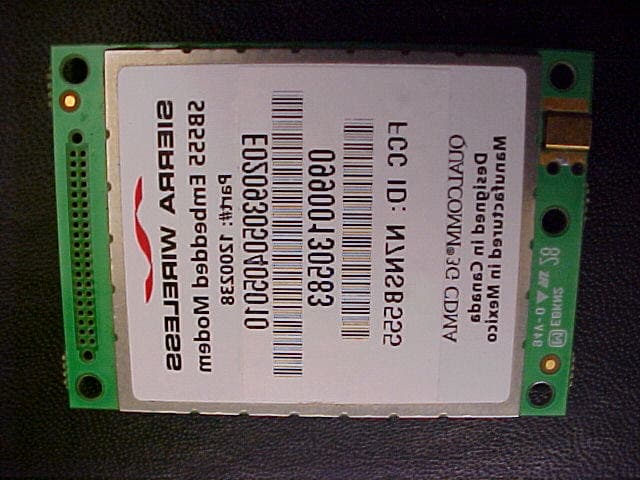
Click to zoom
Application Details
- Equipment Class
- PCB - PCS Licensed Transmitter
- Date of Grant
- Jan 08, 2003
- Application Purpose
- Original Equipment
- Date of Application
- Jan 08, 2003
- Equipment Note
- SB555 Radio in 700C
- Frequency Range
- 1850.00000000 - 1910.00000000
- Country
- United States
Documents & Files
Document Text
Text extracted from the exhibit documents filed with the FCC. Open a document above to read the original.
Users Manual
Exhibit L: 700C User Manual FCC ID: HN2SB555 235700 Series Color Mobile Computer User’s Manual Programming 7 The following programming information pertains to the 700 Series Color Mobile Computer: SCreating CAB Files(page 236) SFTP Server(page 251) SFull Screen(page 262) SKernel I/O control functions(page 264) SReboot Functions(page 280) SRemapping the Keypad(page 281) ProgrammingChapter —7 236700 Series Color Mobile Computer User’s Manual Creating CAB Files The Windows CE operating system uses a .CAB file to install an applica- tion on a Windows CE-based device. A .CAB file is composed of multiple files that are compressed into one file. Compressing multiple files into one file provides the following benefits: SAll application files are present. SA partial installation is prevented. SThe application can be installed from several sources, such as a desktop computer or a Web site. Use the CAB Wizard application (CABWIZ.EXE) to generate a .CAB file for your application. Creating Device-Specific CAB Files Do the following to create a device-specific .CAB file for an application,in the order provided: 1Create an .INF file with Windows CE-specific modifications(page 236). 2OptionalCreate a SETUP.DLL file to provide custom control of the installation process(page 248). 3Use the CAB Wizard to create the .CAB file, using the .INF file, the optional SETUP.DLL file, and the device-specific application files as parameters(page 249). Creating an .INF File An .INF file specifies information about an application for the CAB Wi- zard. Below are the sections of an .INF file: [Version] This specifies the creator of the file, version, and other relevant informa- tion. Required?Yes SSignature:“signature_name” Must be “$Windows NT$” as Windows CE is not available on Win- dows 95. SProvider:“INF_creator” The company name of the application, such as “Microsoft.” SCESignature: “$Windows CE$” EXAMPLE: [Version] Signature = “$Windows NT$” Provider = “Microsoft” CESignature = “$Windows CE$” Programming—Chapter 7 237700 Series Color Mobile Computer User’s Manual [CEStrings] This specifies string substitutions for the application name and the default installation directory. Required?Yes SAppName:app_name Name of the application. Other instances of %AppName% in the .INF file will be replaced with this string value, such as RP32. SInstallDir:default_install_dir Default installation directory on the device. Other instances of %Install- Dir% in the .INF file will be replaced with this string value. Example: \storage_card\%AppName% EXAMPLE: [CEStrings] AppName=“Game Pack” InstallDir=%CE1%\%AppName% [Strings] This section is optional and defines one or more string keys. A string key represents a string of printable characters. Required?No Sstring_key:value String consisting of letters, digits, or other printable characters. Enclose valuein double quotation marks ““”” if the corresponding string key is used in an item that requires double quotation marks. No string_keys is okay. EXAMPLE: [Strings] reg_path = Software\Microsoft\My Test App ProgrammingChapter —7 238700 Series Color Mobile Computer User’s Manual [CEDevice] Describes the platform for the targeted application. All keys in this section are optional. If a key is nonexistent or has no data, Windows CE does not perform any checking with the exception beingUnsupportedPlatforms.If theUnsupportedPlatformskey exists but no data, the previous value is not overridden. Required?Yes SProcessorType:processor_type The value that is returned bySYSTEMINFO.dwProcessorType. For example, the value for the SH3 CPU is 10003 and the MIPS CPU is 4000. SUnsupportedPlatforms:platform_family_name This lists known unsupported platform family names. If the name specified in the[CEDevice.xxx]section is different from that in the [CEDevice]section, bothplatform_family_namevalues are unsupported for the microprocessor specified by xxx. That is, the list of unsupported platform family names is appended to the previous list of unsupported names. Application Manager will not display the application for an unsupported platform. Also, a user will be warned during the setup process if the .CAB file is copied to an unsupported device. EXAMPLE: [CEDevice] UnsupportedPlatforms = pltfrm1 ; pltfrm1 is unsupported [CEDevice.SH3] UnsupportedPlatforms = ; pltfrm1 is still unsupported SVersionMin:minor_version Numeric value returned byOSVERSIONINFO.dwVersionMinor. The .CAB file is valid for the currently connected device if the version of this device is greater than or equal toVersionMin.ForWindowsCEJapa- nese language devices, set this to 2.01 SVersionMax:major_version Numeric value returned byOSVERSIONINFO.dwVersionMajor. The .CAB file is valid for the currently connected device if the version of this device is less than or equal toVersionMax. For Windows CE Japanese language devices, set this to 2.01 Note: Supported Windows CE operating system versions include 1.0, 1.01, 2.0, 2.01, and 2.10. When using these numbers, be sure to include all significant digits. SBuildMin:build_number Numeric value returned byOSVERSIONINFO.dwBuildNumber. The .CAB file is valid for the currently connected device if the version of this device is greater than or equal toBuildMin. SBuildMax:build_number Numeric value returned byOSVERSIONINFO.dwBuildNumber. The .CAB file is valid for the currently connected device if the version of this device is less than or equal toBuildMax. Programming—Chapter 7 239700 Series Color Mobile Computer User’s Manual EXAMPLE: The following code example shows three[CEDevice]sections: one that gives basic information for any CPU and two that are specific to the SH3 and the MIPS microprocessors. [CEDevice]; A “template” for all platforms UnsupportedPlatforms = pltfrm1 ; Does not supportpltfrm1 ; The following specifies version 1.0 devices only. VersionMin = 1.0 VersionMax = 1.0 [CEDevice.SH3]; Inherits all [CEDevice] settings ; This will create a .CAB file specific to SH3 devices. ProcessorType = 10…
Text truncated - open the document above for the full version.
Users Manual
Exhibit T: 700C Regulatory Manual Supplement FCC ID: HN2SB555 P/N 072719-002 Important Radio Information! Contents For Users in the United States and Canada ...................................................................................................................................2 For 700C-802.11b Configuration...................................................................................................................................2 For ABTM3 (Bluetooth-Compatible Wireless Module by Socket Communications) Configuration ...............................2 For MC45 (Wireless WAN, GSM/GPRS) Configuration ...............................................................................................3 For SB555 (Wireless WAN, CDMA/1x) Configuration..................................................................................................3 For Users Outside of the United States and Canada ......................................................................................................................4 For 700C-802.11b Configuration...................................................................................................................................4 For ABTM3 (Bluetooth-Compatible Wireless Module by Socket Communications) Configuration ...............................5 For MC45 (Wireless WAN, GSM/GPRS) Configuration ...............................................................................................6 Pour les utilisateurs en dehors du Canada et des Etat-unis .............................................................................................................7 Pour la configuration 700C-802.11b ..............................................................................................................................7 Pour la configuration ABTM3 (Module sans fil compatible avec la norme Bluetooth de Socket Communications) .........8 Pour la configuration MC45...........................................................................................................................................8 Für Benutzer außerhalb von Kanada und den Vereinigten Staaten ................................................................................................9 700C-802.11b ................................................................................................................................................................9 ABTM3 (Bluetooth-kompatibles Funkmodul von Socket Communications) ................................................................10 MC45 ..........................................................................................................................................................................10 Per gli utenti al di fuori del Canada o degli Stati Uniti ................................................................................................................11 Per la configurazione di 700C-802.11b.........................................................................................................................11 Per la configurazione di ABTM3 (modulo wireless Bluetooth-compatibile della Socket Communications)....................11 Per la configurazione di MC45 .....................................................................................................................................12 Para Usuarios Fuera de Canada o de los Estados Unidos .............................................................................................................12 Para configuração do 700C-802.11b.............................................................................................................................12 Para configuração do ABTM3 (Módulo sem fio compatível com Bluetooth da Socket Communications) .....................13 Para configuração do MC45 .........................................................................................................................................14 Para Usuários Fora do Canadá ou dos Estados Unidos ................................................................................................................14 Para la configuración de 700C-802.11b ........................................................................................................................14 Para la configuración de ABTM3 (Módulo inalámbrico compatible con Bluetooth de Socket Communications) ..........15 Para la configuración de MC45.....................................................................................................................................16 2 For Users in the United States and Canada Place this supplement in your manual. For 700C-802.11b Configuration This device complies with Part 15 of the FCC Rules and with RSS-210 of Industry Canada. Operation is subject to the following two conditions: (1) This device may not cause harmful interference, and (2) This device must accept any interference received, including interference that can cause undesired operation. Federal Communications Commission Compliance FCC Digital Emissions Compliance: This equipment has been tested and found to comply with the limits for a Class B digital device, pursuant to Part 15 of the FCC Rules. These limits are designed to provide reasonable protection against harmful interference in a residential installation. This equipment generates, uses, and can radiate radio frequency energy and, if not installed and used in accordance with the instructions, may cause harmful interference to radio communications. However, there is no guarantee that interference will not occur in a particular installation. If this equipment does cause harmful interference to radio or television reception, which can be determined by turning the equipment off and on, the user is encouraged to try to correct the interference by one or more of the following measures: • Reorient or relocate the radio or television receiving antenna. • Increase the separation between the computer equipment and receiver. • Co…
Text truncated - open the document above for the full version.
Users Manual
Exhibit L: 700C User Manual FCC ID: HN2SB555 User’s Manual 700 Series Color Mobile Computer 700 Series Color Mobile Computer User’s Manual ii SNOTICEThe information contained herein is proprietary and is provided solely for the purpose of allowing customers to operate and service Intermec manufactured equipment and is not to be released, reproduced, or used for any other purpose without written permission of Intermec. DisclaimerofWarranties.Thesamplesourcecodeincludedinthisdocumentispresentedfor reference only. The code does not necessarily represent complete, tested programs. The code is provided“ASISWITHALLFAULTS.”ALLWARRANTIESAREEXPRESSLY DISCLAIMED, INCLUDING THE IMPLIED WARRANTIES OF MERCHANTABILITY AND FITNESS FOR A PARTICULAR PURPOSE. We welcome your comments concerning this publication. Although every effort has been made to keep it free of errors, some may occur. When reporting a specific problem, please describe it briefly and include the book title and part number, as well as the paragraph or figure number and thepagenumber. Send your comments to: Intermec Technologies Corporation Publications Department 550 Second Street SE Cedar Rapids, IA 52401 ANTARES, INTERMEC, NORAND, NOR*WARE, PEN*KEY, ROUTEPOWER, TRAKKER, and TRAKKER ANTARES are registered trademarks and ArciTech, ENTERPRISE WIRELESS LAN, i-gistics, INCA, Mobile Framework, MobileLAN, TE 2000, UAP, and UNIVERSAL ACCESS POINT are trademarks of Intermec Technologies Corporation. 2002 Intermec Technologies Corporation. All rights reserved. Acknowledgments ActiveSync,ActiveX,Microsoft,MS,MS-DOS,Outlook,Pocket Outlook,Pocket PC,Windows, Windows NT,andtheWindows logoare registered trademarks andMSDN,SQL Server,Visual Basic,Visual C++,andWindows for Penare trademarks of Microsoft Corporation in the United States and/or other countries. Microsoft products are licensed to OEMs by Microsoft Licensing, Inc., a wholly owned subsidiary of Microsoft Corporation. Bluetoothis a trademark of Bluetooth SIG, Inc., U.S.A. CDMA2000is a trademark of the Telecommunications Industry Association (TIA). GSMis a registered trademark of the GSM Association. Microclean IIis a registered trademark of Foresight International. MultiMediaCardis a trademark of Infineon Technologies AG, Germany, and is licensed to MMCA (MultiMediaCard Association). SanDiskis a trademark of SanDisk Corporation. Siemensis a registered trademark of Siemens AG. Siemens product names are either trademarks or registered trademarks of Siemens or Siemens AG. This product includes software developed by the OpenSSL Project for use in the OpenSSL Toolkit. (http://www.openssl.org/) This product includes cryptographic softwarewritten by Eric Young ([email protected]) Contents iii700 Series Color Mobile Computer User’s Manual Contents Before You Beginxv.................................................................... Warranty Informationxv................................................... Safety Summaryxv........................................................ Warnings, Cautions, and Notesxvi........................................... About This Manualxvi.................................................... Format Conventions for Input From a Keyboard or Keypadxvii...................... Related Publicationsxviii................................................... Global Services and Supportxviii............................................. Web Supportxviii........................................................ Introduction About the 700 Series Color Mobile Computer2............................................... Audio System2........................................................... Speaker2................................................... Internal Microphone2........................................ External Headset Jack2........................................ Battery2................................................................ Low Battery Shutdown3....................................... System Status Maintained4.................................... CAB Files Within 700C Software Tools CD4................................... Modem Support4......................................................... Network Support4........................................................ Removeable Card Support5................................................. CompactFlash Cards5........................................ SecureDigital Cards5......................................... MultiMediaCards5........................................... Software Build Version5.................................................... What’ s New6......................................................................... 1 Contents iv700 Series Color Mobile Computer User’s Manual Pocket PC 2002 Introduction8......................................................................... Premium versus Professional Editions8...................................................... Where to Find Information10............................................................ Basic Skills11......................................................................... Buttons and Stylus11...................................................... Today Screen11.......................................................... Programs13............................................................. Navigation Bar and Command Bar14......................................... Pop-up Menus15......................................................... Notifications15.......................................................... Enter Information on Your 700 Series Computer16............................... Typing With the Soft Keyboard17............................... Using Block Recognizer17..................................... Using Letter Recognizer18..................................... Using Transcriber18.......................................... Selecting Typed Text18........................................ Writing on the Screen19......................................…
Text truncated - open the document above for the full version.
Users Manual
User’s Manual 700 Series Color Mobile Computer 700 Series Color Mobile Computer User’s Manual ii SNOTICEThe information contained herein is proprietary and is provided solely for the purpose of allowing customers to operate and service Intermec manufactured equipment and is not to be released, reproduced, or used for any other purpose without written permission of Intermec. DisclaimerofWarranties.Thesamplesourcecodeincludedinthisdocumentispresentedfor reference only. The code does not necessarily represent complete, tested programs. The code is provided“ASISWITHALLFAULTS.”ALLWARRANTIESAREEXPRESSLY DISCLAIMED, INCLUDING THE IMPLIED WARRANTIES OF MERCHANTABILITY AND FITNESS FOR A PARTICULAR PURPOSE. We welcome your comments concerning this publication. Although every effort has been made to keep it free of errors, some may occur. When reporting a specific problem, please describe it briefly and include the book title and part number, as well as the paragraph or figure number and thepagenumber. Send your comments to: Intermec Technologies Corporation Publications Department 550 Second Street SE Cedar Rapids, IA 52401 ANTARES, INTERMEC, NORAND, NOR*WARE, PEN*KEY, ROUTEPOWER, TRAKKER, and TRAKKER ANTARES are registered trademarks and ArciTech, ENTERPRISE WIRELESS LAN, i-gistics, INCA, Mobile Framework, MobileLAN, TE 2000, UAP, and UNIVERSAL ACCESS POINT are trademarks of Intermec Technologies Corporation. 2002 Intermec Technologies Corporation. All rights reserved. Acknowledgments ActiveSync,ActiveX,Microsoft,MS,MS-DOS,Outlook,Pocket Outlook,Pocket PC,Windows, Windows NT,andtheWindows logoare registered trademarks andMSDN,SQL Server,Visual Basic,Visual C++,andWindows for Penare trademarks of Microsoft Corporation in the United States and/or other countries. Microsoft products are licensed to OEMs by Microsoft Licensing, Inc., a wholly owned subsidiary of Microsoft Corporation. Bluetoothis a trademark of Bluetooth SIG, Inc., U.S.A. CDMA2000is a trademark of the Telecommunications Industry Association (TIA). GSMis a registered trademark of the GSM Association. Microclean IIis a registered trademark of Foresight International. MultiMediaCardis a trademark of Infineon Technologies AG, Germany, and is licensed to MMCA (MultiMediaCard Association). SanDiskis a trademark of SanDisk Corporation. Siemensis a registered trademark of Siemens AG. Siemens product names are either trademarks or registered trademarks of Siemens or Siemens AG. This product includes software developed by the OpenSSL Project for use in the OpenSSL Toolkit. (http://www.openssl.org/) This product includes cryptographic softwarewritten by Eric Young ([email protected]) Contents iii700 Series Color Mobile Computer User’s Manual Contents Before You Beginxv.................................................................... Warranty Informationxv................................................... Safety Summaryxv........................................................ Warnings, Cautions, and Notesxvi........................................... About This Manualxvi.................................................... Format Conventions for Input From a Keyboard or Keypadxvii...................... Related Publicationsxviii................................................... Global Services and Supportxviii............................................. Web Supportxviii........................................................ Introduction About the 700 Series Color Mobile Computer2............................................... ........................................................... ................................................... ........................................ ........................................ Battery2................................................................ Low Battery Shutdown3....................................... System Status Maintained4.................................... CAB Files Within 700C Software Tools CD4................................... Modem Support4......................................................... Network Support4........................................................ Removeable Card Support5................................................. CompactFlash Cards5........................................ SecureDigital Cards5......................................... MultiMediaCards5........................................... Software Build Version5.................................................... What’ s New6......................................................................... 1 Contents iv700 Series Color Mobile Computer User’s Manual Pocket PC 2002 Introduction8......................................................................... Premium versus Professional Editions8...................................................... Where to Find Information10............................................................ Basic Skills11......................................................................... Buttons and Stylus11...................................................... Today Screen11.......................................................... Programs13............................................................. Navigation Bar and Command Bar14......................................... Pop-up Menus15......................................................... Notifications15.......................................................... Enter Information on Your 700 Series Computer16............................... Typing With the Soft Keyboard17............................... Using Block Recognizer17..................................... Using Letter Recognizer18..................................... Using Transcriber18.......................................... Selecting Typed Text18........................................ Writing on the Screen19.................................................... Selecting the Writing19....................................... Converting Writing to Text20..…
Text truncated - open the document above for the full version.
Users Manual
To: Date:3/4/2003 15:43:22 Tim Harrington Message: The response to this correspondence was submitted as an exhibit to the exhibit type ID Label/Location Info and the description Items 1 and 4 from FCC email Feb 07 2003 Subject: audit - reply.
Attestation Statements
Exhibit O: Attestation of Equivalency to Sierra Radio FCC ID: HN2SB555 Intermec Technologies Corporation 6001 36 th Avenue West Everett, WA 98203-9280 425.356.1765 tel 425.348.2633 fax www.intermec.com December 13, 2002 Federal Communications Commission Authorization and Evaluation Division 7435 Oakland Mills Road Columbia, Maryland 21046 Re: HN2SB555 To whom it may concern, Intermec Technologies Corp. hereby declares that the CDMA transceiver module SB555 used in our 700C handheld terminal product (FCC ID: HN2SB555) is the same transceiver moduel as Sierra Wireless’ CDMA module approved under FCC ID: N7NSB555. No hardware or software modifications have been made to the module for its integration into our terminal. Please feel free to contact me, if you have any questions. Sincerely, Carl K. Turk, MSEE Sr. EMC Engineer
Attestation Statements
Intermec Technologies Corporation 6001 36 th Avenue West Everett, WA 98203-9280 425.356.1765 tel 425.348.2633 fax www.intermec.com February 16, 2003 To Whom It May Concern:: This letter is to provide justification for the mobile device categorization of Intermec Technologies Corp. Model 700C. Model 700C is a penkey computer intended for business and industrial markets in data gathering applications such as warehouse inventory tracking, parcel delivery tracking etc. The product does not have a QWERTY style keypad, and is too small for laptop applications. At the same time, as can be seen in the attached picture, it is too big to be used in regular cell phone type applications. Although it contains a speaker and a microphone, those features along with body-worn accessories such as holster, belt clip etc. have been disabled or left out in the current configuration. As configured, it can only be used in handheld computing applications using the display or the laser scan engine for data entry. Wireless transmission needs to be activated via on-screen commands. Because of that and the product’s size, it cannot transmit while in a person’s pocket. In addition, user documents provided with each product contain strong caution statements specifically prohibiting body-worn applications. If you have any questions, regarding this application, please feel free to contact me (phone: 425 356 1765, fax: 425 348 2633, email: [email protected]). Sincerely, Carl K. Turk, MSEE Sr. EMC Engineer Intermec Technologies Corp. Model 700C Picture:
Attestation Statements
Intermec Technologies Corporation 6001 36 th Avenue West Everett, WA 98203-9280 425.356.1765 tel 425.348.2633 fax www.intermec.com February 16, 2003 To Whom It May Concern:: This letter is to provide further explanation for the mobile device categorization of Intermec Technologies Corp. Model 700C. Model 700C is a penkey computer intended for business and industrial markets in data gathering applications such as warehouse inventory tracking, parcel delivery tracking etc. In its current form all SW features and hardware accessories allowing it to be used in a body- or head-worn application have been disabled. Our regulatory user documentation reflect this. However, our Technical Publication group, in anticipation of the future portable configuration of the same product, included statements and references in the User Manual, that indicate body- or head-worn use. As you see in the corrected User Manual, those statements have been removed. The product will be a true mobile application with handheld use only until a new grant application for the portable use is made supported by the appropriate SAR test reports. If you have any questions, regarding this application, please feel free to contact me (phone: 425 356 1765, fax: 425 348 2633, email: [email protected]). Sincerely, Carl K. Turk, MSEE Sr. EMC Engineer Intermec Technologies Corp.
Cover Letter(s)
Exhibit P: Request for Confidentiality FCC ID: HN2SB555 Intermec Technologies Corporation 6001 36 th Avenue West Everett, WA 98203-9280 425.348.2600 tel 425.355.9551 fax www.intermec.com December 23, 2002 Federal Communications Commission Authorization and Evaluation Division 7435 Oakland Mills Road Columbia, Maryland 21046 Re: HN2SB555 To whom it may concern, We hereby respectfully request that under the provision of 47 CFR 0.459, the documents listed below and attached with this application for certification under FCC ID: HN2SB555 be provided with confidential status. • Schematics • Frequency Block Diagram • Operational Description • Tune-up Procedure • Bill of Materials Any exhibit / information for which we have requested confidentiality, but which may not be accorded such treatment by the FCC, should be returned to us. The documents listed above contain trade secrets that are treated as confidential by us. Substantial competitive harm to us could result should they be made available to the public. Sincerely, Carl K. Turk, MSEE Sr. EMC Engineer
Cover Letter(s)
Exhibit X: Cover Letter from Agent FCC ID: HN2SB555 NORTHWEST EMC, INC. 22975 NW Evergreen Parkway, Suite 400 Hillsboro, OR 97124 January 6, 2003 Dear Application Examiner: On behalf of Intermec Corporation, Northwest EMC Inc is submitting this application for the certification of Intermec’s SB555 radio, FCC ID: HN2SB555. It is a dual-band wireless modem that supports both the 800 MHz and 1900 MHz PCS bands. It operates from 824 – 849 MHz and from 1850 – 1910 MHz, with a peak output power of 224 mW. This RF module will only be used in the applicant’s 700C hand held terminal as a mobile transmitter. The EUT can be configured with one of two different antennas. The EUT will be co-located with two other radios: FCC ID:HN22011B (802.11(b) radio), and FCC ID:HN2ABTM3-2 (Bluetooth radio). Any two of the three radios can transmit simultaneously. All three radios cannot transmit simultaneously. Each radio transmits through its own antenna. The Northw…
Text truncated - open the document above for the full version.
Contact Information
Applicant
Brian Rudick(VP & GC, Honeywell Scanning & Mobility)
Technical Contact
Northwest EMC, Inc,Greg V Kiemel
[email protected]503-844-4066
22975 NW Evergreen Parkway · Hillsboro, Oregon · United States
Non-Technical Contact
Northwest EMC, Inc.Vicki Albertson
[email protected]503-844-4066
Test Firm
Northwest EMC, Inc.Greg Kiemel
Technical Specifications
| # | Rule Parts | Frequency Range | Power Output | Emission | Tolerance |
|---|---|---|---|---|---|
| 2 | 24E | 1.85 GHz - 1.91 GHz | 224.00 mW | 1M25F9W | 2.5 ppm |
Other Applications from Intermec Technologies Corporation

HN2-BTM311
Nov 23, 2004BTM311
Equipment Class
DTS - Digital Transmission System
HN2-802CF13E
Nov 07, 2004EasyLAN
Equipment Class
DTS - Digital Transmission System
HN2WAMIG2
Nov 18, 2003802MIG2
Equipment Class
DTS - Digital Transmission System
HN2SB555-2
Sep 04, 2003SB555 Radio in 700C
Equipment Class
PCE - PCS Licensed Transmitter held to ear
HN22011B-2
Jul 28, 20032011B Radio in 700C
Equipment Class
DTS - Digital Transmission System