QIS-WS331A300Mbps Mini Wireless Router
Huawei Technologies Co.,Ltd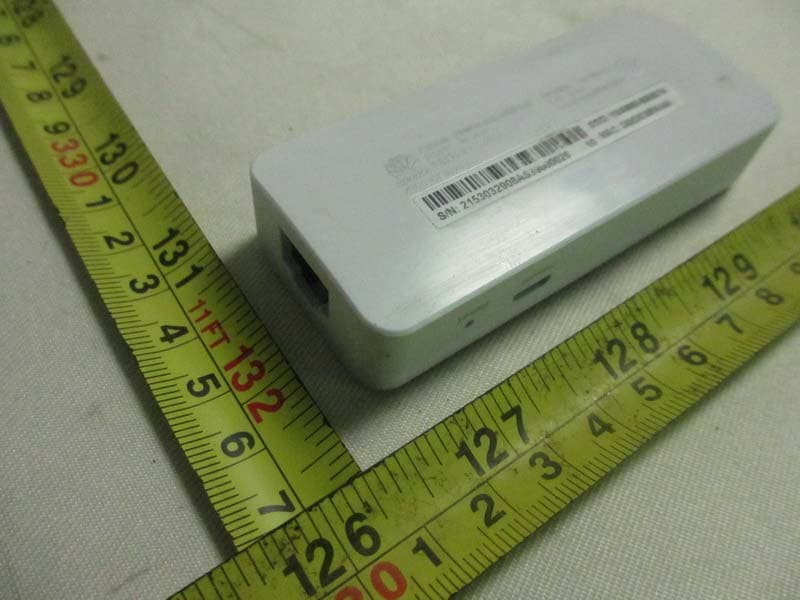
Click to zoom
Application Details
- Equipment Class
- DTS - Digital Transmission System
- Date of Grant
- Nov 07, 2013
- Application Purpose
- Original Equipment
- Date of Application
- Nov 07, 2013
- Equipment Note
- 300Mbps Mini Wireless Router
- Frequency Range
- 2412.00000000 - 2462.00000000
- Company
- Huawei Technologies Co.,Ltd
- Country
- China
Documents & Files
Document Text
Text extracted from the exhibit documents filed with the FCC. Open a document above to read the original.
Users Manual
1 WS331a 300Mbps Mini Wireless Router Quick Start 1 Connecting Cables Connect your devices in the sequence indicated in the following figure. 2 Setting up a Wireless Connection Before setting up the wireless connection, please make sure that the wireless safety lock is on status. The wireless configuration software provided by Windows is used as an example to describe how to set up a wireless connection. To obtain the default SSID, check the label on the rear panel. If the SSID and key have been changed, use the new ones. On Windows 7 Step 1 Click in the lower right corner of your desktop. Step 2 From the wireless network list, select the WLAN provided by the WS331a. Click Connect . Step 3 In the displayed dialog box, enter the WLAN password and click OK . Step 4 In the wireless network list, check the WLAN connection status. If the status is Connected , the computer is wirelessly connected to the WS331a. On Windows XP Step 1 Click in the lower right corner of your desktop. 2 Step 2 From the wireless network list, select the WLAN provided by the WS331a. Click Connect . Step 3 In the displayed dialog box, enter the WLAN password and click Connect . Step 4 In the wireless network list, check the WLAN connection status. If the status is Connected , the computer is wirelessly connected to the WS331a. 3 Setting the WS331a Step 1 Open a browser. In the address box, enter http://192.168.3.1 . Press Enter . Step 2 Enter the login user name ( admin by default) and password ( admin by default). Click Login . To protect against unauthorized access, change the user name and password after the first login. For details, see chapter 4 "Maintenance Guide". Step 3 On the Home tab, click Connect to the Internet . Then select a network connection type and set network parameters based on the network provided by your Internet service provider. You can choose Connect automatically, and WS331a will automatically select the network connection type. Step 4 On the Home tab, click Connect to Internet by WLAN , set WLAN parameters, Click Save to complete the configuration. Step 5 Reconnect your computer to the WS331a using the new SSID and key. After setting up the wireless connection, you can set the wireless safety lock to status to protect against unauthorized wireless connection. 4 Maintenance Guide Changing the Web Management Page User Name and Password The correct user name and password are required to log in to the web management page. Regular changes to the web management page user name and password can effectively prevent unauthorized users from logging in and modifying important parameters. Step 1 Log in to the web management page. Step 2 In the navigation tree, choose Account Management . Step 3 Select Change Password configuration page. Step 4 In Username , Select the user account you want to modify. Step 5 In Current password , enter the currently used password. 3 Step 6 In New password , enter a new password, in Confirm password , enter the new password again. Step 7 Click Save . After the user name and password are changed, the login page is displayed. Enter your new user name and password to log in. If you forget the password, you can press and hold the Resetbutton for 6 seconds or more, then the user name and password of the web management page will back to factory value. This operation will make your own configuration data lost, please perform this operation with caution. Appearence No. Name Description 1 Power Port Used to connect to the power adapter. 2 Reset Button Restores the WS331a to its default settings. To restore the WS331a to its default settings, press and hold the Reset button for over 6 seconds. After the WS331a is restored to its default settings, all user customized data will be lost. Use this function only when necessary. Router Mode: connects to an Ethernet device that provides Internet access, such as a modem or switch. 3 LAN Port Repeater Mode: connects to Ethernet devices, such as computers, set-top boxes (STBs), and switches. 4 No. Name Description 4 Wireless safety lock : Reject new wireless device connecting to the WS331a. : All wireless device can connect to the WS331a using the correct SSID and Key. Steady on: the WS331a is powered on. Blinking: the WS331a is being powered. 5 Status Indicator Off: the WS331a is powered off. Obtaining More Information This quick start guide will show you how to connect your WS331a to a network and access the Internet. The figures in this guide are for reference only. The appearance and display features may vary slightly depending on the actual product version. For the full user guide, visit http://consumer.huawei.com/en/. Enter WS331a in the website search box and press Enter. Please visit www.huaweidevice.com/worldwide/support/hotline for recently updated hotline and email address in your country or region. Safety information This section contains important information about the operation of your device. It also contains information about how to use the device safely. Read this information carefully before using your device. Electronic device Do not use your device if using the device is prohibited. Do not use the device if doing so causes danger or interference with other electronic devices. Interference with medical equipment Follow rules and regulations set forth by hospitals and health care facilities. Do not use your device where prohibited. Some wireless devices may affect the performance of hearing aids or pacemakers. Consult your service provider for more information. Pacemaker manufacturers recommend that a minimum distance of 15 cm be maintained between a device and a pacemaker to prevent potential interference with the pacemaker. If using a pacemaker, hold the device on the side opposite the pacemaker and do not carry the device in your front pocket. 5 Areas with flammables and explosives Do not use the device where flammables or explosives are stored (in a gas station, oil depot, or chemical plant, for example). Using …
Text truncated - open the document above for the full version.
Cover Letter(s)
Huawei Technologies Co.,Ltd Jan 03, 2013 To whom it may concern: We the undersigned, hereby authorize EMCCert DR. RAŠEK GmbH and Neutron Engineering, Inc. to act on our behalf in all manners relating to application for equipment authorization, including signing of all documents relating to these matters. Any and all acts carried out by EMCCert DR. RAŠEK GmbH and Neutron Engineering, Inc. on our behalf shall have the same affect as acts of our own. This authorization is valid until further written notice from Huawei Technologies Co., Ltd Sincerely, Signature: Name: Zhang Xinghai Title: EMC Laboratory Manager
Cover Letter(s)
Huawei Technologies Co.,Ltd October 31, 2013 Federal Communications Commission 7435 Oakland Mills Road Columbia, MD 21046 Gentlemen: This letter is to comply with Sections 0.457 and 0.459 pertaining to confidential material. Huawei Technologies Co., Ltd would like the following documents regarding this submission for FCC ID: QIS-WS331A to be kept confidential. 1. Schematic 2. Block diagram 3. Operational description The above material contains trade secrets or technical data, which would customarily be guarded from competitors. We do not want these documents to be accessible to the general public. Sincerely, Name: Zhang Xinghai Title: EMC Laboratory Manager
Cover Letter(s)
CERTIFICATE OF COMPLIANCE Ref No.: NEI-FCCE-1-1309C205 Date of Issue: Oct. 15, 2013 Authorized under Declaration of Conformity according to 47 CFR, Part 2 and Part 15 of the FCC Rules. The product listed in follows was (were) tested in the Neutron EMC Laboratory to comply with the criteria limits Class B of conducted and radiated emissions of the Technical Standards FCC Part 15, Subpart B, established by the FCC, USA. Equipment 300Mbps Mini Wireless Router Model Name WS331a; WS333a Brand Name HUAWEI Applicant Huawei Technologies Co.,Ltd. Address Bantian, Longgang District, Shenzhen China Standard(s) FCC Part 15, Subpart B: 2012 ANSI C63.4-2009 The test data, data evaluation, and equipment configuration contained in our test report (Ref No. NEI-FCCE-1-1309C205) were obtained utilizing the test procedures, test instruments, test sites that has been accredited by the Authority of TAF according to the ISO-17025 quality assessment standard and technical standard(s). The test data contained in the referenced test report relate only to the EUT sample and item(s) tested. Andy Chiu Authorized Signatory Neutron Engineering Inc. B1, No.37, Lane 365, Yang Guang St., NeiHu District 114., Taipei, Taiwan TEL:+886-2-2657-3299 FAX:+886-2-2657-3331
Cover Letter(s)
Model Declaration Letter Date: 2013-10-31 We, the undersigning company Company Name: Huawei Technologies Co.,Ltd. Address: Bantian, Longgang District, Shenzhen China Hereby confirm that the following products: Product description: 300Mbps Mini Wireless Router Type designation: WS331a; WS333a Brand: HUAWEI That All versions of the Model WS331a and WS333a are electrically equal and only the model name differs because of marketing purpose. Name: Zhang Xinghai Telephone: 86-755-89653384 E-mail: [email protected] Signature:
External Photos
Neutron Engineering Inc. Project No.: 1309C205 Page 2 of 10 Neutron Engineering Inc. Project No.: 1309C205 Page 3 of 10 Neutron Engineering Inc. Project No.: 1309C205 Page 4 of 10 Neutron Engineering Inc. Project No.: 1309C205 Page 5 of 10 Adapter: HWBYAAD71502197 Neutron Engineering Inc. Project No.: 1309C205 Page 6 of 10 Adapter: HWHKABD90900802
ID Label/Location Info
8 3 . 4 34.4 R4.6 5.0 6 . 7
Internal Photos
Neutron Engineering Inc. Project No.: 1309C205 Page 7 of 10 Neutron Engineering Inc. Project No.: 1309C205 Page 8 of 10 Neutron Engineering Inc. Project No.: 1309C205 Page 9 of 10 Neutron Engineering Inc. Project No.: 1309C205 Page 10 of 10
RF Exposure Info
Neutron Engineering Inc. FCC RF EXPOSURE REPORT FCC ID: QIS-WS331A Project No. : 1309C205 Equipment : 300Mbps Mini Wireless Router Model : WS331a; WS333a Applicant : Huawei Technologies Co.,Ltd. Address : Bantian, Longgang District, Shenzhen China According: : FCC Guidelines for Human Exposure IEEE C95.1 Neutron Engineering Inc. No.3, Jinshagang 1st Road, ShiXia, Dalang Town, Dong Guan, China. TEL : (0769) 8318-3000 FAX : (0769) 8319-6000 Neutron Engineering Inc. MPE CALCULATION METHOD: Calculation Method of RF Safety Distance: where: S = power density P = power input to the antenna G = power gain of the antenna in the direction of interest relative to an isotropic radiator R = distance to the center of radiation of the antenna Table for Field Antenna: Neutron Engineering Inc. TEST RESULTS EUT: 300Mbps Mini Wireless Router Model Name WS331a Temperature: 24 °C Relative Humidity: 60 % Pressure: 1016 hPa Test Voltage : AC 120V/60Hz Test Mode : TX B MODE /CH01, CH06, CH11 Antenna Gain (dBi) Antenna Gain (numeric) Peak Output Power (dBm) Peak Output Power (mW) Power Density (S) (mW/cm 2 ) Limit of Power Density (S) (mW/cm 2 ) Te s t Result 0.73 1.1830 16.90 48.9779 0.011533211 Complies 0.73 1.1830 16.71 46.8813 0.011039521 Complies 0.73 1.1830 16.78 47.6431 0.011218901 Complies EUT: 300Mbps Mini Wireless Router Model Name WS331a Temperature: 24 °C Relative Humidity: 60 % Pressure: 1016 hPa Test Voltage : AC 120V/60Hz Test Mode : TX G MODE /CH01, CH06, CH11 Antenna Gain (dBi) Antenna Gain (numeric) Peak Output Power (dBm) Peak Output Power (mW) Power Density (S) (mW/cm 2 ) Limit of Power Density (S) (mW/cm 2 ) Te s t Result 0.73 1.1830 15.17 32.8852 0.007743731 Complies 0.73 1.1830 15.47 35.2371 0.008297561 Complies 0.73 1.1830 15.00 31.6228 0.007446471 Complies Neutron Engineering Inc. EUT: 300Mbps Mini Wireless Router Model Name WS331a Temperature: 24 °C Relative Humidity: 60 % Pressure: 1016 hPa Test Voltage : AC 120V/60Hz Test Mode : TX N-20M MODE /CH01, CH06, CH11– ANT 0 + ANT 1 Antenna Gain (dBi) Antenna Gain (numeric) Peak Output Power (dBm) Peak Output Power (mW) Power Density (S) (mW/cm 2 ) Limit of Power Density (S) (mW/cm 2 ) Te s t Result 0.73 1.1830 17.89 61.5177 0.014486061 Complies 0.73 1.1830 18.24 66.6807 0.015701831 Complies 0.73 1.1830 18.03 63.5331 0.014960651 Complies EUT: 300Mbps Mini Wireless Router Model Name WS331a Temperature: 24 °C Relative Humidity: 60 % Pressure: 1016 hPa Test Voltage : AC 120V/60Hz Test Mode : TX N-40M MODE /CH03, CH06, CH09– ANT 0 + ANT 1 Antenna Gain (dBi) Antenna Gain (numeric) Peak Output Power (dBm) Peak Output Power (mW) Power Density (S) (mW/cm 2 ) Limit of Power Density (S) (mW/cm 2 ) Te s t Result 0.73 1.1830 16.59 45.6037 0.010738671 Complies 0.73 1.1830 16.84 48.3059 0.011374971 Complies 0.73 1.1830 16.81 47.9733 0.011296671 Complies Note: the calculation distance is 20 cm.
Test Report
Neutron Engineering Inc. Report No.: NEI-FCCP-1-1309C205 Page 1 of 150 FCC Radio Test Report FCC ID: QIS-WS331A This report concerns (check one): Original Grant Class II Change Issued Date : Oct. 15, 2013 Project No. : 1309C205 Equipment : 300Mbps Mini Wireless Router Model Name : WS331a; WS333a Applicant : Huawei Technologies Co.,Ltd. Address : Bantian, Longgang District, Shenzhen China Tested by: Neutron Engineering Inc. EMC Laboratory Date of Receipt: Sep. 26, 2013 Date of Test: Sep. 26, 2013 ~ Oct. 14, 2013 Testing Engineer : ( David Mao) Technical Manager : (Leo Hung) Authorized Signatory: (Steven Lu) Neutron Engineering Inc. No.3,Jinshagang 1st Road, ShiXia, Dalang Town, Dong Guan, China. TEL: 0769-8318-3000 FAX: 0769-8319-6000 Neutron Engineering Inc. Report No.: NEI-FCCP-1-1309C205 Page 2 of 152 Declaration Neutron represents to the client that testing is done in accordance with standard procedures as applicable and that test instruments used has been calibrated with the standards traceable to National Measurement Laboratory (NML) of R.O.C, or National Institute of Standards and Technology (NIST) of U.S.A. Neutron's reports apply only to the specific samples tested under conditions. It is manufacture’s responsibility to ensure that additional production units of this model are manufactured with the identical electrical and mechanical components. Neutron shall have no liability for any declarations, inferences o r generalizations drawn by the client or others from Neutron issued reports. Neutron’s reports must not be used by the client to claim product endorsement by the authorities or any agency of the Government. This report is the confidential property of the client. As a mutual protection to the clients, the public and Neutron-self, extracts from the test report shall not be reproduced except in full with Neutron’s authorized written approval. Neutron’s laboratory quality assurance procedures are in compliance with the ISO Guide 17025 requirements, and accredited by the conformity assessment authorities listed in this test report. Limitation For the use of the authority's logo is limited unless the Test Standard(s)/Scope(s)/Item(s) mentioned in this test report is (are) included in the conformity assessment authorities acceptance respective. Neutron Engineering Inc. Report No.: NEI-FCCP-1-1309C205 Page 3 of 152 Table of Contents Page 1 . CERTIFICATION 6 2 . SUMMARY OF TEST RESULTS 7 2.1 TEST FACILITY 8 2.2 MEASUREMENT UNCERTAINTY 8 3 . GENERAL INFORMATION 9 3.1 GENERAL DESCRIPTION OF EUT 9 3.2 DESCRIPTION OF TEST MODES 11 3.3 TABLE OF PARAMETERS OF TEXT SOFTWARE SETTING 12 3.4 BLOCK DIAGRAM SHOWING THE CONFIGURATION OF SYSTEM TESTED 13 3.5 DESCRIPTION OF SUPPORT UNITS 15 4 . EMC EMISSION TEST 16 4.1 CONDUCTED EMISSION MEASUREMENT 16 4.1.1 POWER LINE CONDUCTED EMISSION LIMITS 16 4.1.2 MEASUREMENT INSTRUMENTS LIST AND SETTING 16 4.1.3 TEST PROCEDURE 17 4.1.4 DEVIATION FROM TEST STANDARD 17 4.1.5 TEST SETUP 17 4.1.6 EUT OPERATING CONDITIONS 17 4.1.7 TEST RESULTS 18 4.2 RADIATED EMISSION MEASUREMENT 23 4.2.1 RADIATED EMISSION LIMITS 23 4.2.2 MEASUREMENT INSTRUMENTS LIST ANS SETTING 24 4.2.3 TEST PROCEDURE 25 4.2.4 DEVIATION FROM TEST STANDARD 25 4.2.5 TEST SETUP 26 4.2.6 EUT OPERATING CONDITIONS 27 4.2.7 TEST RESULTS (BETWEEN 30 – 1000 MHZ) 29 4.2.8 TEST RESULTS (ABOVE 1000 MHZ) 42 5 . BANDWIDTH TEST 90 5.1 APPLIED PROCEDURES / LIMIT 90 5.1.1 MEASUREMENT INSTRUMENTS LIST 90 5.1.2 TEST PROCEDURE 90 5.1.3 DEVIATION FROM STANDARD 90 5.1.4 TEST SETUP 90 5.1.5 EUT OPERATION CONDITIONS 90 5.1.6 TEST RESULTS 91 6 . MAXIMUM OUTPUT POWER TEST 99 Neutron Engineering Inc. Report No.: NEI-FCCP-1-1309C205 Page 4 of 152 Table of Contents Page 6.1 APPLIED PROCEDURES / LIMIT 99 6.1.1 MEASUREMENT INSTRUMENTS LIST 99 6.1.2 TEST PROCEDURE 99 6.1.3 DEVIATION FROM STANDARD 99 6.1.4 TEST SETUP 99 6.1.5 EUT OPERATION CONDITIONS 99 6.1.6 TEST RESULTS 100 7 . ANTENNA CONDUCTED SPURIOUS EMISSION 103 7.1 APPLIED PROCEDURES / LIMIT 103 7.1.1 MEASUREMENT INSTRUMENTS LIST 103 7.1.2 TEST PROCEDURE 103 7.1.3 DEVIATION FROM STANDARD 103 7.1.4 TEST SETUP 103 7.1.5 EUT OPERATION CONDITIONS 103 7.1.6 TEST RESULTS 104 8 . POWER SPECTRAL DENSITY TEST 134 8.1 APPLIED PROCEDURES / LIMIT 134 8.1.1 MEASUREMENT INSTRUMENTS LIST 134 8.1.2 TEST PROCEDURE 134 8.1.3 DEVIATION FROM STANDARD 134 8.1.4 TEST SETUP 134 8.1.5 EUT OPERATION CONDITIONS 134 8.1.6 TEST RESULTS 135 9 . EUT TEST PHOTO 149 Neutron Engineering Inc. Report No.: NEI-FCCP-1-1309C205 Page 5 of 152 REPORT ISSUED HISTORY Issued No. Description Issued Date NEI-FCCP-1-1309C205 Original Issue. Oct. 15, 2013 - - - Neutron Engineering Inc. Report No.: NEI-FCCP-1-1309C205 Page 6 of 152 1. CERTIFICATION Equipment : 300Mbps Mini Wireless Router Brand Name : HUAWEI Model Name : WS331a; WS333a Applicant : Huawei Technologies Co.,Ltd. Manufacturer : Huawei Technologies Co.,Ltd. Address : Administration Building, Huawei Base, Bantian, Longgang District ,Shenzhen 518129, P.R. China Factory : Shenzhen Allwins Technology Corporation Baoan Branch Address : Block A&M,Shasi Hi-Tech Park,Shajing Street,Shenzhen Date of Test : Sep. 26, 2013 ~ Oct. 14, 2013 Test Item : ENGINEERING SAMPLE Standard(s) : FCC Part15(2012), Subpart C(15.247) / ANSI C63.4-2009 The above equipment has been tested and found compliance with the requirement of the relative standards by Neutron Engineering Inc. EMC Laboratory. The test data, data evaluation, and equipment configuration contained in our test report (Ref No. NEI-FCCP-1-1309C205) were obtained utilizing the test procedures, test instruments, test sites that has been accredited by the Authority of TAF according to the ISO-17025 quality assessment standard and technical standard(s). Neutron Engineering Inc. Report No.: NEI-FCCP-1-1309C205 Page 7 of 152 2. SUMMARY OF TEST RESULTS Test procedures according to the technical standard(s): FCC Part15 (15.247) , Subpart C Standard(s) Section Test Item Judgment Remark 15.207 Conducted Emission PASS 15.247(d…
Text truncated - open the document above for the full version.
Test Setup Photos
Neutron Engineering Inc. Report No.: NEI-FCCP-1-1309C205 Page 149 of 152 9. EUT TEST PHOTO Conducted Measurement Photos Neutron Engineering Inc. Report No.: NEI-FCCP-1-1309C205 Page 150 of 152 Radiated Measurement Photos 9KHz~30MHz Neutron Engineering Inc. Report No.: NEI-FCCP-1-1309C205 Page 151 of 152 Radiated Measurement Photos 30MHz~1000MHz Neutron Engineering Inc. Report No.: NEI-FCCP-1-1309C205 Page 152 of 152 Radiated Measurement Photos Above 1000MHz
Contact Information
Applicant
Zhang Xinghai
Test Firm
BTL Inc.Daisy Dai
Technical Specifications
| # | Rule Parts | Frequency Range | Power Output |
|---|---|---|---|
| 1 | 15C | 2.41 GHz - 2.46 GHz | 67.00 mW |
Other Applications from Huawei Technologies Co.,Ltd

QISSUN2000
Jun 27, 2021Solar Inverter
Equipment Class
DTS - Digital Transmission System
QISCP81-1
Oct 22, 2020Watch Wireless Charger
Equipment Class
DCD - Part 15 Low Power Transmitter Below 1705 kHz
QISRRU3278
Sep 02, 2020Remote Radio Unit
Equipment Class
CBD - Citizens Band Category A and B Devices
QISR2561
Jul 11, 2020Indoor Router
Equipment Class
DTS - Digital Transmission System
QISSMARTLOGGER310
Mar 23, 2020Solar Smart Monitor & Data Logger
Equipment Class
DTS - Digital Transmission System