QISAF23LTE/3G Sharing Router
Huawei Technologies Co.,Ltd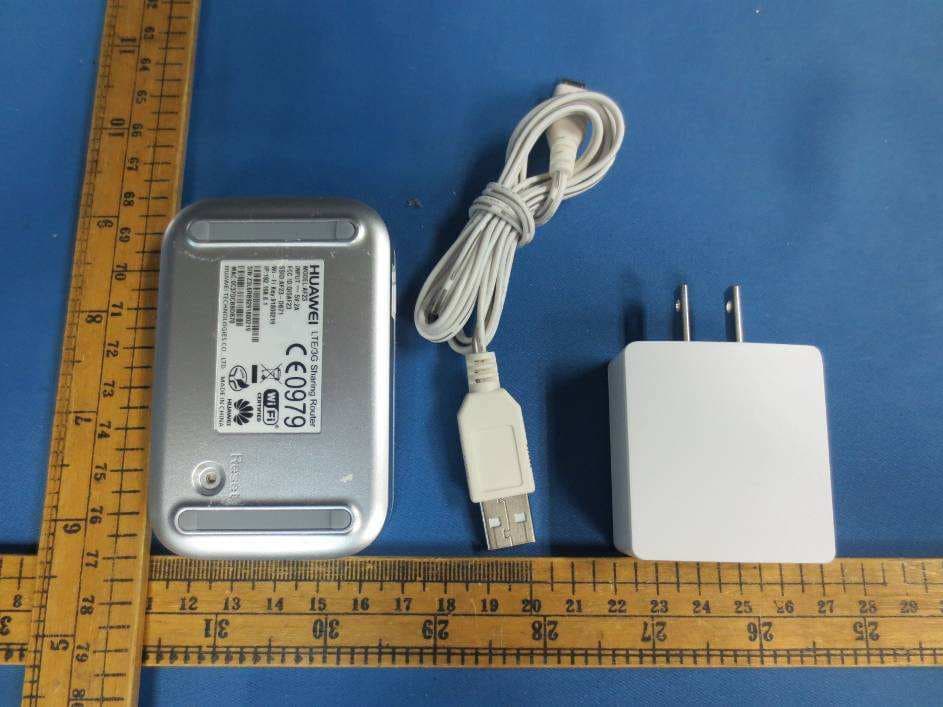
Click to zoom
Application Details
- Equipment Class
- JBP - Part 15 Class B Computing Device Peripheral
- Date of Grant
- Nov 08, 2012
- Application Purpose
- Original Equipment
- Date of Application
- Nov 08, 2012
- Equipment Note
- LTE/3G Sharing Router
- Company
- Huawei Technologies Co.,Ltd
- Country
- China
Documents & Files
Document Text
Text extracted from the exhibit documents filed with the FCC. Open a document above to read the original.
Users Manual
Thank you for choosing the HUAWEI AF23 LTE/3G Sharing Router (AF23 for short). The AF23 is a compact multi-functional router that provides Internet access via Ethernet, Wi-Fi, and USB modem. The AF23 delivers stable signals at high speeds and is compatible with a variety of LTE and 3G USB modems. The AF23 can convert Ethernet, LTE, and 3G signals into Wi-Fi signals, providing high-speed wireless broadband networks for Wi-Fi devices. Figures and functions in this guide are provided for your reference only. The appearance of the actual product may vary. Read through this guide before you start using the AF23. The actual signal strength and transmission speeds may vary, depending on the actual network condition and application environment. Getting to Know the AF23 5 7 Reset 8 1 2 3 4 6 No. Description No. Description 1 USB modem indicator 2 Ethernet port indicator 3 Wi-Fi indicator 4 Power indicator 5 Power port 6 Ethernet port 7 USB port (accommodates a USB modem) 8 Reset button Indicators Indicator Status Description Power indicator Green Steady on The AF23 is connected to a power supply. Off The AF23 is disconnected from the power supply. Wi-Fi indicator Green Steady on Wi-Fi is enabled. Off Wi-Fi is disabled. Ethernet port indicator Green Steady on The AF23 is connected to a network using a network cable. Off The AF23 is not connected to a network using a network cable. USB modem indicator Green Blinking (once every 2 seconds) The AF23 has identified the USB modem or USB storage device. The AF23 is connected to a USB modem, but there is no data transmission. Steady on The AF23 is accessing the Internet via the USB modem. Red Steady on The AF23 fails to identify the USB modem or USB storage device. The AF23 fails to connect to a USB modem. All except the power indicator Green Blinking (once every 2 seconds) The AF23 is being upgraded. All except the power indicator Green Blinking (once every 2 seconds) The AF23 is being restored to its factory settings. Using the Power Adapter Only use power adapters compatible with the AF23 and provided by a designated manufacturer (HW-050200E3W European power / HW-050200B3W British power / HW-050200U3W American power). Use of an incompatible power adapter or one from an unknown manufacturer may cause the AF23 to malfunction, fail, or could even cause a fire. Such use voids all warranties, whether expressed or implied, on the product. Configuring the AF23 Before you start using the AF23, configure it using the web management page: 1. Go to http://192.168.8.1 and enter admin as both the user name and password. 2. Configure the desired parameters. By default, the working mode is Manual. You can set it to Always on according to your needs. Notes: For details, see online help in the web management page. Using the AF23 Common Application Scenarios Notes: When you use the AF23, place it horizontally. Scenario 1: LT E/3G Sharing mode (providing Internet access for multiple users via USB modem) You can generally use the USB modem to access the Internet without performing any configurations. You can also click General Settings > Datacard in the web management page to configure multiple APN profiles manually. 1 2 3 3 1. Connect the AF23 to a power supply. 2. Connect a USB modem to the USB port. Notes: Vertically insert your USB modem into the AF23, as shown in the preceding figure. Ensure that your USB modem has Internet access. The AF23's performance may decrease when using USB modems of certain frequency bands. 3. Use another device to search for the AF23's Wi-Fi SSID, and enter the password. You can then use that device to access the Internet. Alternatively, use a network cable to connect a computer to the AF23's Ethernet port. You can then access the Internet without performing any configurations. Scenario 2: Ethernet Router mode A (providing Internet access for multiple users via Ethernet) Connect the AF23 to an Ethernet port in an office or in your home. You can generally access the Internet without performing any configurations. Set a static IP address, if required. For details, contact your network administrator. 1 3 2 1. Connect the AF23 to a power supply. 2. Connect the AF23 to an Ethernet using a network cable. Notes: Ensure that the Ethernet network has Internet access. If required, use the web management page to set a static IP address for the AF23. 3. Use another device to search for the AF23's Wi-Fi SSID, and enter the password. You can then use that device to access the Internet. Scenario 2: Ethernet Router mode B (providing Internet access for multiple users via ASDL modem) Set the PPPoE parameters the first time you use the ADSL modem. (Click General Settings > Ethernet in the web management page to set. ) For the user name and password, contact your service provider. 1 3 2 1. Connect the AF23 to a power supp l y. 2. Connect the ADSL modem to the AF23's Ethernet port. Notes: When you use the web management page to configure settings, ensure that the PPPoE user name and password are correct. 3. Use another device to search for the AF23's Wi-Fi SSID, and enter the password. You can then use that device to access the Internet. Alternatively, use a network cable to connect a computer to the AF23's Ethernet port. You can then access the Internet without performing any configurations. Scenario 3: USB Storage Sharing mode 1 2 3 3 1. Connect the AF23 to a power supply. 2. Insert the USB storage device into the AF23. Notes: The AF23 may not be compatible with some USB storage devices. 3. Devices whose Wi-Fi function has been enabled or that are connected using a network cable can use the AF23’s web management page to access the contents of the USB storage device. Restoring Factory Settings If you are uncertain of which settings you have configured or changed, you can restore the AF23 to its factory settings and reconfigure the device. Connect the AF23 to a power supply. Press and hold the Reset button for at least 5 seconds. The Wi-Fi, …
Text truncated - open the document above for the full version.
Cover Letter(s)
Letter of Agency I appoint Intertek Testing Services NA Inc. to act on our behalf in front of the Federal Communications Commission with respect to all matters relating to certification of equipment under the FCC rules until further notice. I further certify that no party (as defined in 1.2002 of CFR 47, 1995) to this application, including myself, is subject to denial of federal benefits, that includes FCC benefits, pursuant to Section 5301 of the Anti-Drug Abuse Act of 1988, 21 U.S.C.,853A. Equipment: AF23, FCC ID: QISAF23 Date: 2012-10-16 Signature: _____________________________________ Name: __ Zhang Xinghai___ Title: EMC Laboratory Manager Company: Huawei Technologies Co., Ltd. Telephone: 0086-755-89651014
Cover Letter(s)
1(2) Huawei Technologies Co., Ltd. Attention: Application Examiner Re: Request for confidentiality Applicant: Huawei Technologies Co., Ltd. FCC ID: QISAF23 To whom it may concern, Permanent Confidentiality Request is hereby submitted by Huawei Technologies Co., Ltd. to withhold permanently from public review certain portions of the application for equipment certification for the referenced FCC identifiers. This request for confidentiality is made pursuant to 47 CFR 0.457(d) and 0.459 of the FCC Rules. In particular, the following sections of the application are to be kept permanently confidential: Schematics Detailed Block diagrams Detailed Operational/Functional Description BOM list Short-term Confidentiality Request is hereby submitted by Huawei Technologies Co., Ltd. to withhold from public review for a period of 45 days from the date of the Grant of Equipment Authorization and prior to marketing, certain portions of the application for equipment certification for the referenced FCC identifiers. This request for confidentiality is made pursuant to 47 CFR 0.457(d) and 0.459 of the FCC Rules. In particular, the following sections of the application are to be kept confidential for a period of 180 days from the date of Authorization: Test setup photos External photos Internal photos User manual 2(2) Rationale for request for confidentiality: Huawei Technologies Co., Ltd. has invested considerable time and materials in research and development to produce the referenced product. [Permanent confidentiality: Disclosure of the permanently confidential portions of this application to competitors would not only give them significant competitive advantages in developing similar products, but would also disclose successful implementation of unpublished, leading edge technology developed by us.][Short term confidentiality: Disclosure of the short-term confidential portions of this application during the period of importation and/or distribution would reveal key aspects of proprietary technology to competitors and diminish the value of our investment in research and development.] If you have questions or need further information, please contact the undersigned. Sincerely, [Signature]: Zhang Xinghai [Title]: EMC Laboratory Manager [Company name] :Huawei Technologies Co., Ltd.
External Photos
External Photos
Internal Photos
Internal Photos
Test Report
• The test results reported in this test report shall refer only to the sample actually tested and shall not refer or be deemed to refer to bulk from which such a sample may be said to have been obtained. • This report is for the exclusive use of Intertek's Client and is provided pursuant to the agreement between Intertek and its Client. Intertek's responsibility and liability are limited to the terms and conditions of the agreement. Intertek assumes no liability to any party, other than to the Client in accordance with the agreement, for any loss, expense or damage occasioned by the use of this report. Only the Client is authorized to copy or distribute this report. Any use of the Intertek name or one of its marks for the sale or advertisement of the tested material, product or service must first be approved in writing by Intertek. The observations and test results referenced from this report are relevant only to the sample tested. This report by itself does not imply that the material, product, or service is or has ever been under an Intertek certification program. • For Terms And Conditions of the services, it can be provided upon request. • The evaluation data of the report will be kept for 3 years from the date of issuance. TRF No.: FCC 15C_PC_b Intertek Testing Services Shenzhen Ltd. Kejiyuan Branch 6F, D Block, Huahan Building, Langshan Road, Nanshan District, Shenzhen, P. R. China Tel: (86 755) 8601 6288 Fax: (86 755) 8601 6751 Website: www.china.intertek-etlsemko.com HUAWEI TECHNOLOGIES CO., LTD. Application For Certification FCC ID: FCC ID: QISAF23 LTE/3G Sharing Router Model: AF23 Computer Peripheral Report No.: SZ12090056-2 Prepared and Checked by: Approved by: Sign on file Eason He Engineer Billy Li Supervisor Date: 22 October 2012 INTERTEK TESTING SERVICES TRF No.: FCC 15C_PC_b FCC ID: QISAF23 i LIST OF EXHIBITS INTRODUCTION EXHIBIT 1: General Description EXHIBIT 2: System Test Configuration EXHIBIT 3: Emission Results EXHIBIT 4: Equipment Photographs EXHIBIT 5: Product Labeling EXHIBIT 6: Technical Specifications EXHIBIT 7: Instruction Manual EXHIBIT 8: Miscellaneous Information EXHIBIT 9: Test Equipment List INTERTEK TESTING SERVICES TRF No.: FCC 15C_PC_b FCC ID: QISAF23 ii MEASUREMENT / TECHNICAL REPORT HUAWEI TECHNOLOGIES CO., LTD. MODEL: AF23 FCC ID: FCC ID: QISAF23 22 October 2012 This report concerns (check one:) Original Grant X Class II Change Equipment Type: JBP-Class B Computing Device Peripheral Deferred grant requested per 47 CFR 0.457(d)(1)(ii)? Yes No X If yes, defer until: date Company Name agrees to notify the Commission by: date of the intended date of announcement of the product so that the grant can be issued on that date. Transition Rules Request per 15.37? Yes No X If no, assumed Part 15, Subpart C for intentional radiator − the new 47 CFR [10-01-11 Edition] provision. Report prepared by: Billy Li Intertek Test Services Shenzhen Ltd. Kejiyuan Branch 6F, D Block, Huahan Building, Langshan Road Nanshan District, Shenzhen, P. R. China Phone: (86 755) 8614 0645 Fax: (86 755) 8614 6751 INTERTEK TESTING SERVICES TRF No.: FCC 15C_PC_b FCC ID: QISAF23 iii Table of Contents 1.0 General Description......................................................................................... 2 1.1 Product Description...................................................................................2 1.2 Related Submittal(s) Grants ...................................................................... 2 1.3 Test Methodology......................................................................................2 1.4 Test Facility ............................................................................................... 2 2.0 System Test Configuration............................................................................. 4 2.1 Justification ............................................................................................... 4 2.2 EUT Exercising Software .......................................................................... 4 2.3 Special Accessories .................................................................................. 4 2.4 Equipment Modification ............................................................................. 4 2.5 Measurement Uncertainty ......................................................................... 5 2.6 Support Equipment List and Description ................................................... 5 3.0 Emission Results.............................................................................................. 7 3.1 Field Strength Calculation ............................................................................. 8 3.2 Radiated Emission Configuration Photograph ............................................... 9 3.3 Radiated Emission Data ............................................................................... 9 3.4 Conducted Emission Configuration Photograph .......................................... 11 3.5 Conducted Emission Data..............................................................................11 4.0 Equipment Photographs................................................................................... 15 5.0 Product Labelling .............................................................................................. 17 6.0 Technical Specifications................................................................................... 19 7.0 Instruction Manual ............................................................................................ 21 8.0 Miscellaneous Information............................................................................... 23 8.1 Emissions Test Procedures ....................................................................... 23 9.0 Test Equipment List....................................................................................... .. 26 INTERTEK TESTING SERVICES TRF No.: FCC 15C_PC_b FCC ID: QISAF23 iv List of attached file Exhibit Type File …
Text truncated - open the document above for the full version.
Test Setup Photos
Conducted Emission
Test Setup Photos
Radiated Emission
Contact Information
Applicant
Zhang Xinghai
Technical Contact
Huawei Technologies Co.,LtdLuca Chen
[email protected]86755-36834700
Bantian, Longgang District · Shenzhen · China
Non-Technical Contact
Huawei Technologies Co.,LtdLuca Chen
[email protected]86755-36834700
Test Firm
Intertek Testing Services Shenzhen Ltd.Shawn Xing
Technical Specifications
| # | Rule Parts | Frequency Range | Power Output |
|---|---|---|---|
| 1 | 15B | - | - |
Other Applications from Huawei Technologies Co.,Ltd

QISSUN2000
Jun 27, 2021Solar Inverter
Equipment Class
DTS - Digital Transmission System
QISCP81-1
Oct 22, 2020Watch Wireless Charger
Equipment Class
DCD - Part 15 Low Power Transmitter Below 1705 kHz
QISRRU3278
Sep 02, 2020Remote Radio Unit
Equipment Class
CBD - Citizens Band Category A and B Devices
QISR2561
Jul 11, 2020Indoor Router
Equipment Class
DTS - Digital Transmission System
QISSMARTLOGGER310
Mar 23, 2020Solar Smart Monitor & Data Logger
Equipment Class
DTS - Digital Transmission System