QISALE-L21Smart Phone
Huawei Technologies Co.,Ltd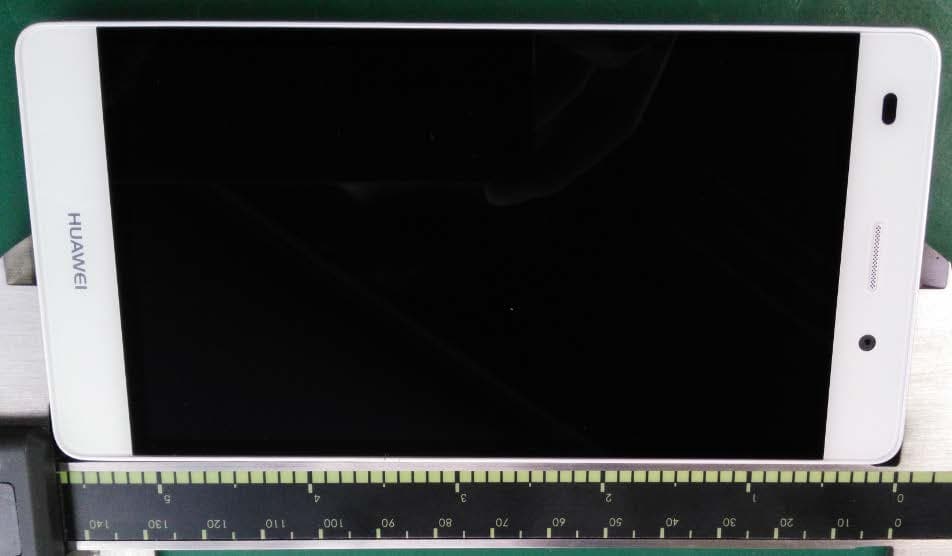
Click to zoom
Application Details
- Equipment Class
- DXX - Part 15 Low Power Communication Device Transmitter
- Date of Grant
- Apr 14, 2015
- Application Purpose
- Original Equipment
- Date of Application
- Apr 14, 2015
- Equipment Note
- Smart Phone
- Frequency Range
- 13.56000000 - 13.56000000
- Company
- Huawei Technologies Co.,Ltd
- Country
- China
Documents & Files
Document Text
Text extracted from the exhibit documents filed with the FCC. Open a document above to read the original.
Users Manual
Quick Start Guide P8 Lite For more information Read the Quick Start Guide included with your device. Go to http://consumer.huawei.com/en/ to download the user guide for your device (including safety information) and read the FAQ, privacy policy, and other information. Go to Settings > About phone > Legal information to read the legal information. Please visit http://consumer.huawei.com/en/support/hotline/ for the most up-to-date contact information for your country or region. Your phone at a glance Before you start, let's take a look at your new phone. Press and hold the power button to turn your phone on or off. To forcibly restart your phone, press and hold the power button until your phone vibrates. Headset jack Microphone Speaker Microphone Earpiece Home Return Menu Status indicator Light sensor Front camera Volume button Power button Micro USB port microSD card slot Micro-SIM card slot Getting started Follow the instructions in the following figures to set up your phone. Do not insert or remove a SIM card when your phone is turned on. Please exercise caution when using the SIM ejector pin to avoid hurting your fingers or damaging your phone. Store your pin in a safe place out of the reach of children to prevent them from swallowing it or injuring themselves by accident. The upper card slot may not support nano-SIM cards. You can insert only a microSD card into it. Locking and unlocking the screen Press the power button to lock the screen. If your phone is idle for a specified period of time, the screen will automatically lock itself. If the screen is off, press the power button to turn it on. Slide your finger in any direction to unlock the screen. Calling and messaging Touch to make a call using the dialer. You can also touch a phone number in your contacts, or a number in a message, email, web page, or other screen to place a call. Touch to send a text or multimedia message. You can save photos, audio clips, videos, and other attachments from received multimedia messages. Camera Touch . Frame the scene you want to capture. Let your camera focus automatically or touch the screen to focus on a specific object. Then touch to take a photo. Swipe left or right to switch between different capture modes. Internet connection You can access the Internet over Wi-Fi or a mobile data network. Swipe down from the status bar to open the notification panel. 4G Touch to turn on mobile data. Touch and hold to go to the Wi-Fi settings screen. Turn on Wi- Fi and connect to a Wi-Fi network. Turn off mobile data when you don't need it to reduce your mobile data usage. Phone manager Touch . You can quickly scan your phone for potential risks with one touch. Follow the onscreen instructions to use one-touch optimization, or manually clean the system storage and manage your applications. Touch the options on the screen to clear system trash, set the harassment filter, activate power saving mode, manage your applications' notification permissions, and more. Legal Notice Copyright © Huawei Technologies Co., Ltd. 2015. All rights reserved. No part of this manual may be reproduced or transmitted in any form or by any means without prior written consent of Huawei Technologies Co., Ltd. and its affiliates ("Huawei"). The product described in this manual may include copyrighted software of Huawei and possible licensors. Customers shall not in any manner reproduce, distribute, modify, decompile, disassemble, decrypt, extract, reverse engineer, lease, assign, or sublicense the said software, unless such restrictions are prohibited by applicable laws or such actions are approved by respective copyright holders. Trademarks and Permissions , , and are trademarks or registered trademarks of Huawei Technologies Co., Ltd. Android™ is a trademark of Google Inc. LTE is a trade mark of ETSI. The Bluetooth ® word mark and logos are registered trademarks owned by Bluetooth SIG, Inc. and any use of such marks by Huawei Technologies Co., Ltd. is under license. Other trademarks, product, service and company names mentioned may be the property of their respective owners. Notice Some features of the product and its accessories described herein rely on the software installed, capacities and settings of local network, and therefore may not be activated or may be limited by local network operators or network service providers. Thus, the descriptions herein may not exactly match the product or its accessories which you purchase. Huawei reserves the right to change or modify any information or specifications contained in this manual without prior notice and without any liability. Third-Party Software Statement Huawei does not own the intellectual property of the third-party software and applications that are delivered with this product. Therefore, Huawei will not provide any warranty of any kind for third party software and applications. Neither will Huawei provide support to customers who use third-party software and applications, nor be responsible or liable for the functions or performance of third-party software and applications. Third-party software and applications services may be interrupted or terminated at any time, and Huawei does not guarantee the availability of any content or service. Third-party service providers provide content and services through network or transmission tools outside of the control of Huawei. To the greatest extent permitted by applicable law, it is explicitly stated that Huawei shall not compensate or be liable for services provided by third-party service providers, or the interruption or termination of third-party contents or services. Huawei shall not be responsible for the legality, quality, or any other aspects of any software installed on this product, or for any uploaded or downloaded third-party works in any form, including but not limited to texts, images, videos, or software etc. Customers shall bear the risk for any and all effects, including incompatibility between the software and this p…
Text truncated - open the document above for the full version.
Users Manual
Quick Start Guide P8 Lite For more information Read the Quick Start Guide included with your device. Go to http://consumer.huawei.com/en/ to download the user guide for your device (including safety information) and read the FAQ, privacy policy, and other information. Go to Settings > About phone > Legal information to read the legal information. Please visit http://consumer.huawei.com/en/support/hotline/ for the most up-to-date contact information for your country or region. Your phone at a glance Before you start, let's take a look at your new phone. Press and hold the power button to turn your phone on or off. To forcibly restart your phone, press and hold the power button until your phone vibrates. Headset jack Microphone Speaker Microphone Earpiece Home Return Menu Status indicator Light sensor Front camera Volume button Power button Micro USB port microSD card slot Micro-SIM card slot Getting started Follow the instructions in the following figures to set up your phone. Do not insert or remove a SIM card when your phone is turned on. Please exercise caution when using the SIM ejector pin to avoid hurting your fingers or damaging your phone. Store your pin in a safe place out of the reach of children to prevent them from swallowing it or injuring themselves by accident. The upper card slot may not support nano-SIM cards. You can insert only a microSD card into it. Locking and unlocking the screen Press the power button to lock the screen. If your phone is idle for a specified period of time, the screen will automatically lock itself. If the screen is off, press the power button to turn it on. Slide your finger in any direction to unlock the screen. Calling and messaging Touch to make a call using the dialer. You can also touch a phone number in your contacts, or a number in a message, email, web page, or other screen to place a call. Touch to send a text or multimedia message. You can save photos, audio clips, videos, and other attachments from received multimedia messages. Camera Touch . Frame the scene you want to capture. Let your camera focus automatically or touch the screen to focus on a specific object. Then touch to take a photo. Swipe left or right to switch between different capture modes. Internet connection You can access the Internet over Wi-Fi or a mobile data network. Swipe down from the status bar to open the notification panel. 4G Touch to turn on mobile data. Touch and hold to go to the Wi-Fi settings screen. Turn on Wi- Fi and connect to a Wi-Fi network. Turn off mobile data when you don't need it to reduce your mobile data usage. Phone manager Touch . You can quickly scan your phone for potential risks with one touch. Follow the onscreen instructions to use one-touch optimization, or manually clean the system storage and manage your applications. Touch the options on the screen to clear system trash, set the harassment filter, activate power saving mode, manage your applications' notification permissions, and more. Legal Notice Copyright © Huawei Technologies Co., Ltd. 2015. All rights reserved. No part of this manual may be reproduced or transmitted in any form or by any means without prior written consent of Huawei Technologies Co., Ltd. and its affiliates ("Huawei"). The product described in this manual may include copyrighted software of Huawei and possible licensors. Customers shall not in any manner reproduce, distribute, modify, decompile, disassemble, decrypt, extract, reverse engineer, lease, assign, or sublicense the said software, unless such restrictions are prohibited by applicable laws or such actions are approved by respective copyright holders. Trademarks and Permissions , , and are trademarks or registered trademarks of Huawei Technologies Co., Ltd. Android™ is a trademark of Google Inc. LTE is a trade mark of ETSI. The Bluetooth ® word mark and logos are registered trademarks owned by Bluetooth SIG, Inc. and any use of such marks by Huawei Technologies Co., Ltd. is under license. Other trademarks, product, service and company names mentioned may be the property of their respective owners. Notice Some features of the product and its accessories described herein rely on the software installed, capacities and settings of local network, and therefore may not be activated or may be limited by local network operators or network service providers. Thus, the descriptions herein may not exactly match the product or its accessories which you purchase. Huawei reserves the right to change or modify any information or specifications contained in this manual without prior notice and without any liability. Third-Party Software Statement Huawei does not own the intellectual property of the third-party software and applications that are delivered with this product. Therefore, Huawei will not provide any warranty of any kind for third party software and applications. Neither will Huawei provide support to customers who use third-party software and applications, nor be responsible or liable for the functions or performance of third-party software and applications. Third-party software and applications services may be interrupted or terminated at any time, and Huawei does not guarantee the availability of any content or service. Third-party service providers provide content and services through network or transmission tools outside of the control of Huawei. To the greatest extent permitted by applicable law, it is explicitly stated that Huawei shall not compensate or be liable for services provided by third-party service providers, or the interruption or termination of third-party contents or services. Huawei shall not be responsible for the legality, quality, or any other aspects of any software installed on this product, or for any uploaded or downloaded third-party works in any form, including but not limited to texts, images, videos, or software etc. Customers shall bear the risk for any and all effects, including incompatibility between the software and this p…
Text truncated - open the document above for the full version.
Cover Letter(s)
Huawei Technologies Co., Ltd. Date (2015-04-8) BABT TCB Balfour House, Churchfield Road, Walton-on-Thames, Surrey, KT12 2TD Dear Sir or Madam, We, Huawei Technologies Co., Ltd. Bantian, Longgang District, Shenzhen, 518129, China hereby authorize TUV-SUD China Shenzhen Branch 6/F, H Hall, Century Craftwork Culture Square, No. 4001 Fuqiang Road, Futian District, Shenzhen 518048 P. R. China Felix Li Phone: +86-755-88286998-3243 e-mail: [email protected] to act as our agent in all matters relating to applications for equipment authorization, including the signing of all documents relating to these matters. We also hereby certify that neither we nor any party to this application are subject to denial of U.S. Federal benefits, which include FCC benefits, pursuant to section 5301 of Anti-Drug Abuse Act of 1988, U.S.C. 862 because of conviction for possession or distribution of controlled substance. This authorization is application to following FCC ID application: FCC ID: QISALE-L21 Sincerely, For and Behalf of: Huawei Technologies Co., Ltd. Zhang Xinghai EMC Laboratory Manager Address: Administration Building, Headquarters of Huawei Technologies Co., Ltd., Bantian, Longgang District, Shenzhen, 518129, P.R.C E-mail: [email protected] Tel: 0086-0755-28970299 Fax: 0086-0755-89650226
Cover Letter(s)
Statements Date (2015-04-8) BABT TCB Balfour House, Churchfield Road, Walton-on-Thames, Surrey, KT12 2TD Dear Sir or Madam, We, Huawei Technologies Co., Ltd. Bantian, Longgang District, Shenzhen, 518129, China Hereby to confirm that our device, FCC ID: QISALE-L21, is shipped with the battery pre-installed and the FCC ID is readily visible when users open the product box. Sincerely, For and Behalf of: Huawei Technologies Co., Ltd. Zhangxinghai EMC Laboratory Manager
Cover Letter(s)
Huawei Technologies Co., Ltd. Federal Communications Commission 2015/4/8 7435 Oakland Mills Road Columbia MD 21046 Subject: Request for Confidentiality FCC ID: QISALE-L21 To Whom It May Concern: Pursuant to the provisions of Sections 0.457 and 0.459 of the Commission’s rules (47 CFR §§ 0.457, 0.459), we are requesting the Commission to withhold the following attachments as confidential document from public disclosure indefinitely. Schematic Diagram Block Diagram Operational Description Bom List Tune-Up Procedure Above mentioned document contains detailed system and equipment description are considered as proprietary information in operation of the equipment. The public disclosure of above documents might be harmful to our company and would give competitor an unfair advantage in the market. ***************************************************************************** In additional to above mentioned documents, pursuant to Public Notice DA 04-1705 of the Commission’s policy, in order to comply with the marketing regulations in 47 CFR §2.803 and the importation rules in 47 CFR §2.1204, while ensuring that business sensitive information remains confidential until the actual marketing of newly authorized devices. We are requesting the Commission withholds the following documents from public viewing until 2015-4-30: External Photos Internal Photos Test Setup Photos User Manual ****************************************************************************** It is our understanding that all measurement test reports, FCC ID label format and correspondent during certification review process cannot be granted as confidential documents and those information will be available for public review once the grant of equipment authorization is issued. Best Regards Zhang Xinghai EMC Laboratory Manager Huawei Technologies Co., Ltd. Address: Administration Building, Headquarters of Huawei Technologies Co., Ltd., Bantian, Longgang District, Shenzhen, 518129, P.R.C E-mail: [email protected] Tel: 0086-0755-28970299 Fax: 0086-0755-89650226
Cover Letter(s)
Huawei Technologies Co., Ltd Huawei Industrial Base,Bantian Longgang,Shenzhen 518129, P.R China +86 755 28780808 www.huawei.com Declaration of Letter Product Type: Smart Phone Model No.: HUAWEI ALE-L21, ALE-L21 The two four models are identical, only difference is the model name. And the two models have the same technical construction, including software design, RF module, antennas, circuit design and PCB layout. There are no differences between the two models (HUAWEI ALE-L21, ALE-L21) on electrical and mechanical construction. Sincerely, For and Behalf of: Huawei Technologies Co., Ltd. Huawei Industrial Base,Bantian Longgang,Shenzhen 518129, P.R China
Cover Letter(s)
Huawei Technologies Co., Ltd. Date (2015-04-8) BABT TCB Balfour House, Churchfield Road, Walton-on-Thames, Surrey, KT12 2TD Dear Sir or Madam, We, Huawei Technologies Co., Ltd. Bantian, Longgang District, Shenzhen, 518129, China hereby authorize TUV-SUD China Shenzhen Branch 6/F, H Hall, Century Craftwork Culture Square, No. 4001 Fuqiang Road, Futian District, Shenzhen 518048 P. R. China Felix Li Phone: +86-755-88286998-3243 e-mail: [email protected] to act as our agent in all matters relating to applications for equipment authorization, including the signing of all documents relating to these matters. We also hereby certify that neither we nor any party to this application are subject to denial of U.S. Federal benefits, which include FCC benefits, pursuant to section 5301 of Anti-Drug Abuse Act of 1988, U.S.C. 862 because of conviction for possession or distribution of controlled substance. This authorization is application to following FCC ID application: FCC ID: QISALE-L21 Sincerely, For and Behalf of: Huawei Technologies Co., Ltd. Zhang Xinghai EMC Laboratory Manager Address: Administration Building, Headquarters of Huawei Technologies Co., Ltd., Bantian, Longgang District, Shenzhen, 518129, P.R.C E-mail: [email protected] Tel: 0086-0755-28970299 Fax: 0086-0755-89650226
Cover Letter(s)
Statements Date (2015-04-8) BABT TCB Balfour House, Churchfield Road, Walton-on-Thames, Surrey, KT12 2TD Dear Sir or Madam, We, Huawei Technologies Co., Ltd. Bantian, Longgang District, Shenzhen, 518129, China Hereby to confirm that our device, FCC ID: QISALE-L21, is shipped with the battery pre-installed and the FCC ID is readily visible when users open the product box. Sincerely, For and Behalf of: Huawei Technologies Co., Ltd. Zhangxinghai EMC Laboratory Manager
Cover Letter(s)
Huawei Technologies Co., Ltd. Federal Communications Commission 2015/4/8 7435 Oakland Mills Road Columbia MD 21046 Subject: Request for Confidentiality FCC ID: QISALE-L21 To Whom It May Concern: Pursuant to the provisions of Sections 0.457 and 0.459 of the Commission’s rules (47 CFR §§ 0.457, 0.459), we are requesting the Commission to withhold the following attachments as confidential document from public disclosure indefinitely. Schematic Diagram Block Diagram Operational Description Bom List Tune-Up Procedure Above mentioned document contains detailed system and equipment description are considered as proprietary information in operation of the equipment. The public disclosure of above documents might be harmful to our company and would give competitor an unfair advantage in the market. ***************************************************************************** In additional to above mentioned documents, pursuant to Public Notice DA 04-1705 of the Commission’s policy, in order to comply with the marketing regulations in 47 CFR §2.803 and the importation rules in 47 CFR §2.1204, while ensuring that business sensitive information remains confidential until the actual marketing of newly authorized devices. We are requesting the Commission withholds the following documents from public viewing until 2015-4-30: External Photos Internal Photos Test Setup Photos User Manual ****************************************************************************** It is our understanding that all measurement test reports, FCC ID label format and correspondent during certification review process cannot be granted as confidential documents and those information will be available for public review once the grant of equipment authorization is issued. Best Regards Zhang Xinghai EMC Laboratory Manager Huawei Technologies Co., Ltd. Address: Administration Building, Headquarters of Huawei Technologies Co., Ltd., Bantian, Longgang District, Shenzhen, 518129, P.R.C E-mail: [email protected] Tel: 0086-0755-28970299 Fax: 0086-0755-89650226
Cover Letter(s)
Huawei Technologies Co., Ltd Huawei Industrial Base,Bantian Longgang,Shenzhen 518129, P.R China +86 755 28780808 www.huawei.com Declaration of Letter Product Type: Smart Phone Model No.: HUAWEI ALE-L21, ALE-L21 The two four models are identical, only difference is the model name. And the two models have the same technical construction, including software design, RF module, antennas, circuit design and PCB layout. There are no differences between the two models (HUAWEI ALE-L21, ALE-L21) on electrical and mechanical construction. Sincerely, For and Behalf of: Huawei Technologies Co., Ltd. Huawei Industrial Base,Bantian Longgang,Shenzhen 518129, P.R China
External Photos
HUAWEI ALE-L21, ALE-L21 Smart Phone SECRET 4/8/2015 Page1,Total 3 External Photos of HUAWEI ALE-L21, ALE-L21 HUAWEI ALE-L21, ALE-L21 Smart Phone SECRET 4/8/2015 Page2,Total 3 01. Front-HUAWEI ALE-L21,ALE-L21 02. Back- HUAWEI ALE-L21,ALE-L21 03. Left- HUAWEI ALE-L21,ALE-L21 HUAWEI ALE-L21, ALE-L21 Smart Phone SECRET 4/8/2015 Page3,Total 3 04. Right- HUAWEI ALE-L21,ALE-L21 05. Bottom- HUAWEI ALE-L21,ALE-L21 06. Top- HUAWEI ALE-L21,ALE-L21
ID Label/Location Info
HUAWEI ALE-L21, ALE-L21 Smart Phone SECRET 2015-4-8 Page1, Total2 Label & Label Location: HUAWEI ALE-L21, ALE-L21 Smart Phone SECRET 2015-4-8 Page2, Total2
Internal Photos
HUAWEI ALE-L21, ALE-L21 Smart Phone SECRET 2015-04-08 Page1, Total4 Internal Photos of HUAWEI ALE-L21, ALE-L21 HUAWEI ALE-L21, ALE-L21 Smart Phone SECRET 2015-04-08 Page2, Total4 HUAWEI ALE-L21, ALE-L21 Smart Phone SECRET 2015-04-08 Page3, Total4 HUAWEI ALE-L21, ALE-L21 Smart Phone SECRET 2015-04-08 Page4, Total4
Test Report
©Copyright. All rights reserved by CTTL. FCC PART 15C TEST REPORT No. I15N00212-NFC For Huawei Technologies Co., Ltd Smart Phone Model Name: HUAWEI ALE-L21, ALE-L21 With Hardware Version: HL3ALICEM Software Version: ALE-L21 V100R001C900B045 FCC ID: QISALE-L21 Issued Date: Apr 1 st , 2015 Test Laboratory: FCC 2.948 Listed: No.342690 Note: The test results in this test report relate only to the devices specified in this report. This report shall not be reproduced except in full without the written approval of CTTL. Test Laboratory: CTTL, Telecommunication Technology Labs, Academy of Telecommunication Research, MIIT No.52, HuayuanNorth Road, Haidian District, Beijing, P. R. China 100191. Tel:+86(0)10-62304633, Fax:+86(0)10-62304633Email:[email protected], website:www.chinattl.com ©Copyright. All rights reserved by TMC Beijing。Page 2 of 44 REPORT HISTORY Report Number Revision Description Issue Date I15N00212-NFC Rev.0 1st edition 2015-04-01 No.I15N00212-NFC Page 3 of 44 ©Copyright. All rights reserved by CTTL. CONTENTS 1. TEST LABORATORY ......................................................................................................................... 5 1.1. T ESTING LOCATION ......................................................................................................................... 5 1.2. T ESTING ENVIRONMENT .................................................................................................................. 5 1.3. P ROJECT DATA ................................................................................................................................. 5 1.4. S IGNATURE ...................................................................................................................................... 5 2. CLIENT INFORMATION ................................................................................................................... 6 2.1. A PPLICANT INFORMATION ............................................................................................................... 6 2.2. M ANUFACTURER INFORMATION ...................................................................................................... 6 3. EQUIPMENT UNDER TEST (EUT) AND ANCILLARY EQUIPMENT (AE) ............................. 7 3.1. A BOUT EUT .................................................................................................................................... 7 3.2. I NTERNAL IDENTIFICATION OF EUT ................................................................................................ 7 3.3. I NTERNAL IDENTIFICATION OF AE ................................................................................................... 7 4. REFERENCE DOCUMENTS ............................................................................................................. 8 4.1. D OCUMENTS SUPPLIED BY APPLICANT ............................................................................................ 8 4.2. R EFERENCE DOCUMENTS FOR TESTING ........................................................................................... 8 5. TEST RESULTS ................................................................................................................................... 9 5.1. S UMMARY OF TEST RESULTS ........................................................................................................... 9 5.2. S TATE MEN TS .................................................................................................................................... 9 5.3. T ERMS USED IN THE RESULT TABLE ................................................................................................. 9 5.4. L ABORATORY ENVIRONMENT ........................................................................................................ 10 6. TEST FACILITIES UTILIZED ......................................................................................................... 11 ANNEX A: EUT PHOTOGRAPH ............................................................................................................ 12 ANNEX B: MEASUREMENT RESULTS FOR RECEIVER ................................................................ 18 B.0 ANTENNA REQUIREMENT .................................................................................................................... 18 B.1 IN BAND AND OUT OF BAND ELECTRIC FIELD STRENGTH TEST (MASK) .......................................... 19 B.2 RADIATED EMISSION BELOW 30MHZ ................................................................................................. 19 B.3 RADIATED EMISSION ≥ 30 MHZ ...................................................................................................... 20 B.4 FREQUENCY STAB IL ITY ....................................................................................................................... 21 B.5 OCCUPIED 20DB BANDWIDTH ............................................................................................................ 21 B.6 AC POWER LINE CONDUCTED EMISSION ............................................................................................ 22 ANNEX C: TEST FIGURE LIST ............................................................................................................. 27 F IG. 1 IN BAND AND OUT OF BAND ELECTRIC FIELD STRENGTH TEST (MASK) .................................... 27 F IG. 2 RADIATED EMISSION BELOW 30 MHZ ....................................................................................... 27 F IG. 3 RADIATED EMISSION ≥ 30 MHZ (AE1) .................................................................................. 28 F IG. 4 RADIATED EMISSION ≥ 30 MHZ (AE2) .................................................................................. 28 F IG. 5 RADIATED EMISSION ≥ 30 MHZ (AE3) .................................................................................. 29 No.I15N00212-NFC Page 4 of 44 ©Copyright. All rights reserved by CTTL. FIG. 6 RADIATED EMI…
Text truncated - open the document above for the full version.
Test Setup Photos
Test setup photos 1. Part 22/24/27 radiated spurious emission 2. Part22/24/27radiated spurious emission
Contact Information
Applicant
Zhang Xinghai
Test Firm
China Telecommunication Technology LabsZou Dongyi
Technical Specifications
| # | Rule Parts | Frequency Range | Power Output |
|---|---|---|---|
| 1 | 15C | 13.56 MHz - 13.56 MHz | - |
Other Applications from Huawei Technologies Co.,Ltd

QISSUN2000
Jun 27, 2021Solar Inverter
Equipment Class
DTS - Digital Transmission System
QISCP81-1
Oct 22, 2020Watch Wireless Charger
Equipment Class
DCD - Part 15 Low Power Transmitter Below 1705 kHz
QISRRU3278
Sep 02, 2020Remote Radio Unit
Equipment Class
CBD - Citizens Band Category A and B Devices
QISR2561
Jul 11, 2020Indoor Router
Equipment Class
DTS - Digital Transmission System
QISSMARTLOGGER310
Mar 23, 2020Solar Smart Monitor & Data Logger
Equipment Class
DTS - Digital Transmission System