QISAM08Bluetooth Speaker
Huawei Technologies Co.,Ltd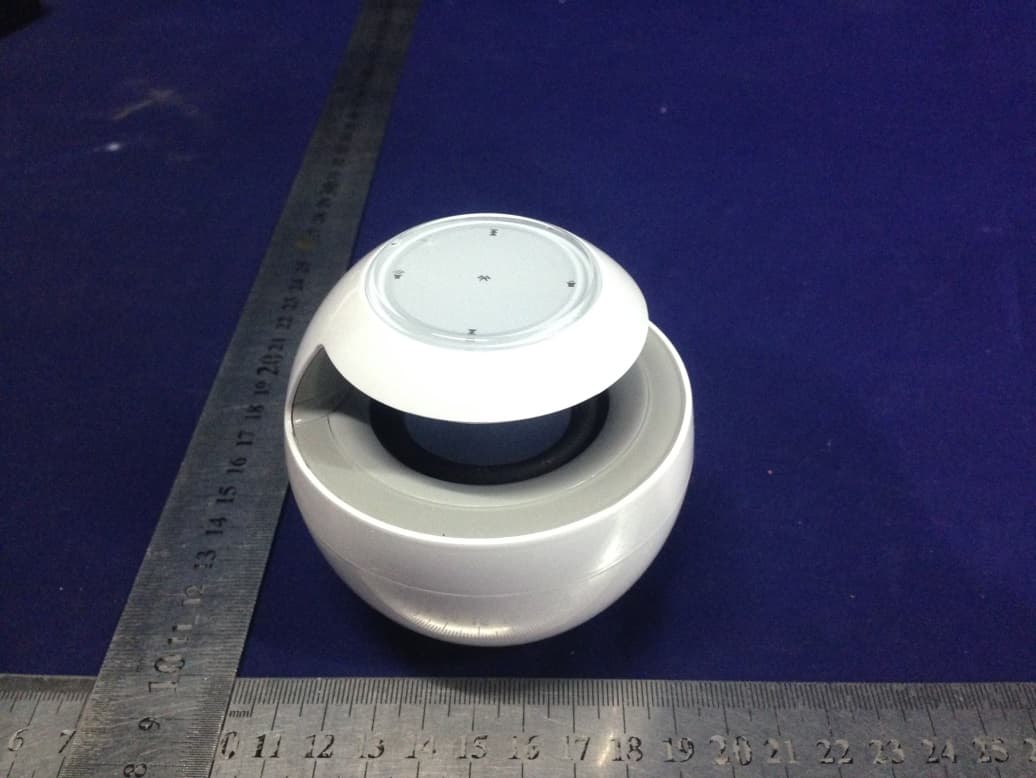
Click to zoom
Application Details
- Equipment Class
- DSS - Part 15 Spread Spectrum Transmitter
- Date of Grant
- Jun 30, 2015
- Application Purpose
- Original Equipment
- Date of Application
- Jun 30, 2015
- Equipment Note
- Bluetooth Speaker
- Frequency Range
- 2402.00000000 - 2480.00000000
- Company
- Huawei Technologies Co.,Ltd
- Country
- China
Documents & Files
Document Text
Text extracted from the exhibit documents filed with the FCC. Open a document above to read the original.
Users Manual
1. Power button Switch the power button to turn the SW AN on or off. 2. Volume up key5. Volume down key * To increase the SWAN volume, touch or touch and hold . To decrease the SWAN volume, touch or touch and hold . 3. Previous6. Next * To play the previous or next song in a playlist on a paired Bluetooth device, touch or . * When the SWAN is pairing with a Bluetooth device, touch or to switch between voice instructions and alert tones. 4. Bluetooth pair key * When music is playing, touch to pause or resume the playback. * When a call comes in, touch to answer the call or touch and hold to dismiss the call. To end the call, touch again. When you are in a call in handsfree mode, touch and hold to switch from the AM08 handsfree mode to the phone mode. To switch back, set the answer mode on your phone to Bluetooth. * When you are not in handsfree mode, touch and hold to disconnect the AM08 from its paired Bluetooth device. The SWAN is then ready to pair with another device. 7. Microphone Connecting your AM08 to Bluetooth devices I. Connecting to one Bluetooth device After you turn the AM08 on, it automatically searches for nearby Bluetooth devices and enters standby mode. On the device you want to pair with the AM08, turn on Bluetooth. After the AM08 is found on the device, touch HUAWEI AM08 to pair it with the AM08. Note: On some Bluetooth devices, you may need to enter a password to set up a connection. The default password is 0000. The next time you turn on the AM08, it automatically searches for and pairs with the Bluetooth device that it paired with previously. If no such devices are found, your AM08 will remain in standby mode. II. Connecting to two Bluetooth devices The first time you pair the AM08 with two Bluetooth devices, do the following: 1. Pair the AM08 with a Bluetooth device. 2. Touch and hold to disconnect from the device and enable the AM08 to enter the ready-to-pair mode. 3. On the second Bluetooth device, search for and pair with the AM08. 4. On the first Bluetooth device, search for and pair with the AM08. Note: The AM08 can work with only one Bluetooth device at a time. If you have two Bluetooth devices paired, pause all operations on one device to have the AM08 run the operations on the other device. If you do not clear the pairing information from two previously used devices, your AM08 will connect to them automatically when both are available. Note: Some Bluetooth devices do not support the Advanced Audio Distribution Profile (A2DP) and cannot use the AM08 to play media files. For media playback software incompatible with the AM08 will not allow the , ,and keys to work. Before using the AM08, make sure you have compatible Bluetooth devices and media playback software. Please visit http://consumer.huawei.com/en/support/hotline/ for recently updated hotline and email address in your country or region. Model: AM08 II. Indicators and port 1 2 3 4 7 6 5 Bott om viewTop view HUA WEI Bluetooth Speaker 4 5 2 3 1 Getting to know your AM08 The AM08 is a Bluetooth-capable device that lets you play music wirelessly from other Bluetooth devices. It automatically searches for nearby Bluetooth devices after you power it on. The AM08 can be paired with two Bluetooth devices simultaneously, but can work with one device at a time. When paired with your phone, the AM08 functions as a speaker and microphone when you are on a call in handsfree mode. Before you start using your SWAN, let's take a look at its features and learn how to use them. I. Power button and keys User Guide AM08 1. Key indicator This indicator turns on after the SW AN turns on or when you perform an operation. It will turn off when the AM08 is inactive for a short while. 2. Bluetooth pairing indicator When the AM08 is pairing with another device, this indicator blinks quickly. If the pairing fails, this indicator blinks slowly. If the AM08 successfully pairs with the device, this indicator turns off. 3. Breath indicator When the AM08 is on, this indicator blinks slowly. When a call comes in, this indicator blinks quickly. 4. Charging indicator When the AM08 is charging, this indicator turns on. After the battery is fully charged, this indicator turns off. 5. Charging port This port connects the AM08 to a power adapter (5 V output) through a USB cable. You may also connect the AM08 to a computer’s USB port to charge the battery. Safety information This section contains important information about the operation of your device. It also contains information about how to use the device safely. Read this information carefully before using your device. Operating environment * The device supports a transmission distance of up to 10 meters. It is recommended that you place your Bluetooth device within a 10-meter range from the speaker. * Avoid dusty, damp, or dirty environments. Avoid magnetic fields. Using the device in these environments may result in circuit malfunctions. * Ideal operating temperatures are 10 to 35. Ideal storage temperatures are -10 to 40. Extreme heat or cold may damage your device or accessories. * Do not expose your device to direct sunlight (such as on a car dashboard) for prolonged periods. * To protect your device or accessories from fire or electrical shock hazards, avoid rain and moisture. * Keep the device away from sources of heat and fire, such as a heater, microwave oven, stove, water heater, radiator, or candle. * Do not place sharp metal objects, such as pins, near the earpiece or speaker. The earpiece may attract these objects and result in injury. * Do not allow children or pets to bite or suck the device or accessories. Doing so may result in damage or explosion. * Observe local laws and regulations, and respect the privacy and legal rights of others. Child's safet * Comply with all precautions with regard to child's safety. Letting children play with the device or its accessories may be dangerous. The device includes detachable parts that may present a choking hazard. Keep away from chi…
Text truncated - open the document above for the full version.
Cover Letter(s)
Huawei Technologies Co.,Ltd Federal Communications Commission Authorization and Evaluation Division 1435 Oakland Mills Road Columbia, MD 21046 Date: 2015-06-16 SUBJECT: FCC Application for QISAM08 To Whom It May Concern: We, the undersigned, hereby authorize Lisa Wang at SHENZHEN EMTEK CO., LTD. on our behalf, to apply to the Federal Communications Commission on our equipment. Any and all acts carried out by SHENZHEN EMTEK CO., LTD. on our behalf shall have the same effect as acts of our own. This is to advise that we are in full compliance with the Anti- Drug Abuse Act. We, the applicant, are not subject to a denial of federal benefits pursuant to Section 5301 of the Anti-Drug Act of 1988, 21 USC853a, and no party to the application is subject to a denial of federal benefits pursuant to that section. Regards, Huawei Technologies Co.,Ltd Zhang Xinghai/ EMC Laboratory Manager
Cover Letter(s)
Rev 11/20/07 Huawei Technologies Co.,Ltd Federal Communications Commission Authorization and Evaluation Division Confidentiality Request regarding application for certification of FCC ID: QISAM08 Pursuant to Sections 0.457 and 0.459 of the Commission’s Rules, we hereby request confidential treatment of information accompanying this application as outlined below: Exhibit Type File Name Block Diagram Schematic Diagram Circuit Description QISAM08_BlcokDiagram.pdf QISAM08_SchematicDiagram.pdf QISAM08_CircuitDescription.pdf The above materials contain trade secrets and proprietary information not customarily released to the public. The public disclosure of these materials may be harmful to the applicant and provide unjustified benefits to its competitors. Sincerely, Huawei Technologies Co.,Ltd (signature) Zhang Xinghai / EMC Laboratory Manager 2015-06-16
ID Label/Location Info
1:1 图 27X27MM 消银龙贴纸 银底黑字 光面 75# 机身认证贴纸 A0 AM08AM08 20150603 蓝色线为裁切线 Bluetooth Speaker Model: AM08 OFFON Made in China FCC ID:QISAM08 5V 1A IC: 6369A-AM08 Huawei Technology Co.,Ltd. 2102451780JNXXXXXXXX Bluetooth Speaker Model: AM08 OFFON Made in China FCC ID:QISAM08 5V 1A IC: 6369A-AM08 Huawei Technology Co.,Ltd. 2102451780JNXXXXXXXX 5MM 1MM 7MM Bluetooth Speaker Model: AM08 OFFON Made in China FCC ID:QISAM08 5V 1A IC: 6369A-AM08 Huawei Technology Co.,Ltd. 2102451780JNXXXXXXXX 说明: 蓝色线部分需要模切 蓝色虚线为定位线 黑色为印刷内容 2102451780JN55000001为流水码 不需要条码化 公差范围:±0.2mm 此处为 流水码 不需要条码化 流水码编号: 类别代码(2位)+Item(8位)+ EMS代码(2位)+年(1位)+月(1位)+流水号(6位) (共20位) 此为流水号,每单不同, 检验依据参考流水号资料 JN1780
Internal Photos
Antenna Antenna BT Module There is no any connection between the PCB antenna and the module, so the PCB antenna is disabled.
RF Exposure Info
FCC ID: QISAM08 Portable device According to §15.247(e)(i) and §1.1307(b)(1), systems operating under the provisions of this section shall be operated in a manner that ensures that the public is not exposed to radio frequency energy level in excess of the Commission’s guidelines. According to KDB447498 D01 General RF Exposure Guidance V05 The 1-g and 10-g SAR test exclusion thresholds for 100 MHz to 6 GHz at test separation distances ≤ 50 mm are determined by: [(max. power of channel, including tune-up tolerance, mW)/(min. test separation distance, mm)] * [√f(GHz)] ≤ 3.0 for 1-g SAR and ≤ 7.5 for 10-g extremity SAR, where f(GHz) is the RF channel transmit frequency in GHz; Power and distance are rounded to the nearest mW and mm before calculation; The result is rounded to one decimal place for comparison; The test exclusions are applicable only when the minimum test separation distance is ≤ 50 mm and for transmission frequencies between 100 MHz and 6 GHz. We used a distance 50mm to calculated Maximum measured transmitter power: Transmit Frequency (GHz) Mode Measured power (dBm) Tune-up power (dBm) Max tune-up power (dBm) Result calculation 1-g SAR 2.402 GFSK 2.684 2.0±1 3.0 0.6185 3.0 2.441 GFSK 4.428 4.0±1 5.0 0.9881 3.0 2.480 GFSK 5.691 5.0±1 6.0 1.2539 3.0 2.402 1/4Π-DQPSK 1.313 2.0±1 3.0 0.6185 3.0 2.441 1/4Π-DQPSK 3.487 4.0±1 5.0 0.9881 3.0 2.480 1/4Π-DQPSK 5.157 5.0±1 6.0 1.2539 3.0 2.402 8DPSK 1.992 2.0±1 3.0 0.6185 3.0 2.441 8DPSK 4.139 4.0±1 5.0 0.9881 3.0 2.480 8DPSK 5.825 5.0±1 6.0 1.2539 3.0 Conclusion: For the max result : 1.2539≤ 3.0 for 1-g SAR extremity SAR, No SAR is required. SHENZHEN EMTEK CO., LTD. Lisa Wang/EMC Manager
Test Report
TRF No.:FCC 15.247/A Page 1 of 63 Report No.: ES150601007E Ver.1.0 Shenzhen EMTEK Co.,Ltd. Building 69, Majialong Industry Zone, Nanshan District, Shenzhen,Guangdong,China www.emtek.com.cn Tel: +86-755-2695 4280 Fax: +86-755-2695 4282 Access to the World FCC 47 CFR PART 15 SUBPART C CERTIFICATION TEST REPORT For Bluetooth Speaker MODEL No.: AM08 FCC ID: QISAM08 Trademark: HUAWEI and honor REPORT NO.: ES150601007E ISSUE DATE: June 10, 2015 Prepared for Huawei Technologies Co., Ltd Administration Building, Headquarters of Huawei Technologies Co., Ltd. Bantian, Longgang District, Shenzhen, P. R. China Prepared by SHENZHEN EMTEK CO., LTD. Bldg 69, Majialong Industry Zone, Nanshan District, Shenzhen, Guangdong, China TEL: 86-755-26954280 FAX: 86-755-26954282 TRF No.:FCC 15.247/A Page 2 of 63 Report No.: ES150601007E Ver.1.0 Shenzhen EMTEK Co.,Ltd. Building 69, Majialong Industry Zone, Nanshan District, Shenzhen,Guangdong,China www.emtek.com.cn Tel: +86-755-2695 4280 Fax: +86-755-2695 4282 Access to the World Table of Contents 1 TEST RESULT CERTIFICATION ............................................................................................................. 3 2 EUT TECHNICAL DESCRIPTION............................................................................................................ 4 3 SUMMARY OF TEST RESULT ................................................................................................................ 5 4 TEST METHODOLOGY ........................................................................................................................... 6 4.1 General Description Of Applied Standards .................................................................................... 6 4.2 Measurement Equipment Used ..................................................................................................... 6 4.3 Description Of Test Modes ............................................................................................................. 7 5 FACILITIES AND ACCREDITATIONS ...................................................................................................... 8 5.1 Facilities ......................................................................................................................................... 8 5.2 Laboratory Accreditations And Listings .......................................................................................... 8 6 TEST SYSTEM UNCERTAINTY .............................................................................................................. 9 7 SETUP OF EQUIPMENT UNDER TEST ............................................................................................... 10 7.1 Radio Frequency Test Setup 1 ..................................................................................................... 10 7.2 Radio Frequency Test Setup 2 ..................................................................................................... 10 7.3 Conducted Emission Test Setup .................................................................................................. 12 7.4 Block Diagram Configuration Of Test System .............................................................................. 13 7.5 Support Equipment ...................................................................................................................... 13 8 FREQUENCY HOPPING SYSTEM REQUIREMENTS ......................................................................... 14 8.1 Standard Applicable ..................................................................................................................... 14 8.2 EUT Pseudorandom Frequency Hopping Sequence................................................................... 14 8.3 Equal Hopping Frequency Use .................................................................................................... 15 8.4 Frequency Hopping System ........................................................................................................ 15 9 TEST REQUIREMENTS ........................................................................................................................ 16 9.1 20db Bandwidth ........................................................................................................................... 16 9.2 Carrier Frequency Separation ...................................................................................................... 22 9.3 Number Of Hopping Frequencies ................................................................................................ 28 9.4 Average Time Of Occupancy (Dwell Time) .................................................................................. 30 9.5 Maximum Peak Conducted Output Power ................................................................................... 33 9.6 Conducted Suprious Emission ..................................................................................................... 39 9.7 Radiated Spurious Emission ........................................................................................................ 46 9.8 Conducted Emission Test ............................................................................................................ 60 9.9 Antenna Application ..................................................................................................................... 63 TRF No.:FCC 15.247/A Page 3 of 63 Report No.: ES150601007E Ver.1.0 Shenzhen EMTEK Co.,Ltd. Building 69, Majialong Industry Zone, Nanshan District, Shenzhen,Guangdong,China www.emtek.com.cn Tel: +86-755-2695 4280 Fax: +86-755-2695 4282 Access to the World 1 TEST RESULT CERTIFICATION Applicant: Huawei Technologies Co., Ltd Administration Building, Headquarters of Huawei Technologies Co., Ltd. Bantian, Longgang District, Shenzhen, P. R. China Manufacturer: SHENZHEN FENDA TECHNOLOGY CO., LTD. Fenda Hi-Tech Park, Zhoushi Road, Shiyan Town, Baoan District, Shenzhen City, Gua…
Text truncated - open the document above for the full version.
Test Setup Photos
Radiated Spurious Emission Conducted Emission Te s t
Contact Information
Applicant
Zhang Xinghai
Test Firm
EMTEK (Shenzhen) Co., Ltd.David Lee
Technical Specifications
| # | Rule Parts | Frequency Range | Power Output |
|---|---|---|---|
| 1 | 15C | 2.40 GHz - 2.48 GHz | 3.80 mW |
Other Applications from Huawei Technologies Co.,Ltd

QISSUN2000
Jun 27, 2021Solar Inverter
Equipment Class
DTS - Digital Transmission System
QISCP81-1
Oct 22, 2020Watch Wireless Charger
Equipment Class
DCD - Part 15 Low Power Transmitter Below 1705 kHz
QISRRU3278
Sep 02, 2020Remote Radio Unit
Equipment Class
CBD - Citizens Band Category A and B Devices
QISR2561
Jul 11, 2020Indoor Router
Equipment Class
DTS - Digital Transmission System
QISSMARTLOGGER310
Mar 23, 2020Solar Smart Monitor & Data Logger
Equipment Class
DTS - Digital Transmission System