QISAP6310SN-GNWLAN Access Point
Huawei Technologies Co.,Ltd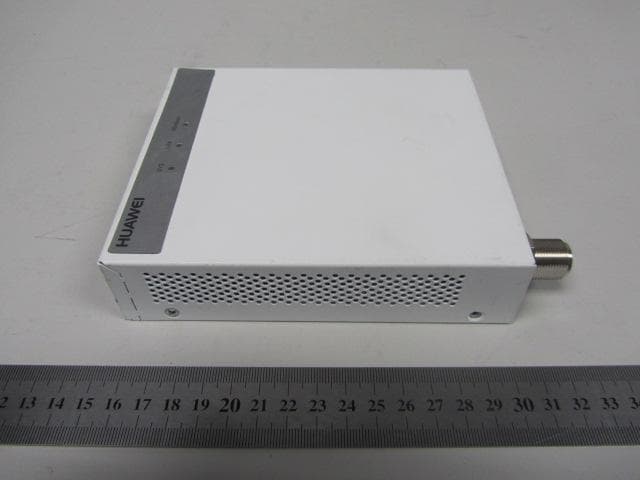
Click to zoom
Application Details
- Equipment Class
- DTS - Digital Transmission System
- Date of Grant
- Aug 29, 2012
- Application Purpose
- Original Equipment
- Date of Application
- Aug 09, 2012
- Equipment Note
- WLAN Access Point
- Frequency Range
- 2412.00000000 - 2462.00000000
- Company
- Huawei Technologies Co.,Ltd
- Country
- China
Documents & Files
Document Text
Text extracted from the exhibit documents filed with the FCC. Open a document above to read the original.
Users Manual
AP6310SN-GN Wireless LAN Access Point Quick Start Guide HUAWEI TECHNOLOGIES CO., LTD. Huawei Technologies Co., Ltd. Address: Administration Building,Huawei Technologies Co., Ltd.,Bantian,Longgang District,Shenzhen,People’s Republic of China Postcode: 518129 Website: http://www.huawei.com Email: [email protected] Copyright © Huawei Technologies Co., Ltd. 2012. All rights reserved. No part of this document may be reproduced or transmitted in any form or by any means without prior written consent of Huawei Technologies Co., Ltd. Trademarks and Permissions and other Huawei trademarks are trademarks of Huawei Technologies Co., Ltd. All other trademarks and trade names mentioned in this document are the property of their respective holders. Notice The purchased products, services and features are stipulated by the contract made between Huawei and the customer. All or part of the products, services and features described in this document may not be within the purchase scope or the usage scope. Unless otherwise specified in the contract, all statements, information, and recommendations in this document are provided "AS IS" without warranties, guarantees or representations of any kind, either express or implied. The information in this document is subject to change without notice. Every effort has been made in the preparation of this document to ensure accuracy of the contents, but all statements, information, and recommendations in this document do not constitute the warranty of any kind, express or implied. 1 Symbol Conventions The symbols that may be found in this document are defined as follows. SymbolDescription NOTE CAUTION Indicates a potentially hazardous situation, which if not avoided, could result in equipment damage, data loss, performance degradation, or unexpected results. Provides additional information to emphasize or supplement important points of the main text. 2 Change History Changes between document issues are cumulative. Therefore,the latest document issue contains all the changes in previous issues. Change in Issue 01 (2012-05-30) Initial commercial release. Change in Issue 02 (2012-07-30) Based on issue 01 (2012-05-30), this issue has the following updates: The following content is modified: Product name and product certificate. Please download the detailed product documents from "http://support.huawei.com/support/". The detailed path is as follows: Technical Support->Documentation->Access Network -> WLAN ->WLAN -> Product Documentation -> AP6310SN. AP6310SN-GN Quick Start Guide Before performing Installation, confirm that the installation accessories and tools are available. Installation accessories: Technical Support Huawei Technologies Co., Ltd. Address:Administration Building,Huawei Technologies Co., Ltd.,Bantian,Longgang District,Shenzhen,People’s Republic of China Postcode:518129 Email:[email protected] Website:http://www.huawei.com Flat-head screwdriver Device Overview Interfaces Unpack the equipment. Ensure that all items listed in the package list are included in the shipment. If any item is missing, contact the supplier. Front view 4 5 6 8 Connected to the power adapter. Connected to a PoE power supply or switch, or connected to the Ethernet. Description No. Name 2.4G antenna port 12 V DC ETH/PoE Console Connected to an RF cable. Packing List Expansion bolt Sheetmetal wall-mounting bracket Installation tools: Phillips screwdriver Maker Wire stripper Utility knife Cable cutter RJ45 Crimping tool Combination pliers Diagonal pliers ESD gloves COAX crimping tool Adjustable wrench Measuring tape Hammer drill Multimeter Hammer Level Vacuum cleaner Network Cable tester Indicators 123 45678 Connected to the maintenance terminal. 7 Default 3 1 2 3 Description No. Name SYS Wireless Link SYS status indicator,For details about indicator, see the Power-on. Link status indicator,For details about indicator, see the Power-on. Wireless status indicator,For details about indicator, see the Power-on. Press and hold down the Reset button for 3 seconds to restore the factory settings and restart the AP. 6mm drill bit 1 2 3 4 5 1 Item Quantity Unit AP device Sheetmetal wall-mounting bracket 6 Ground cable connector Power adapter 8 9 1 Warranty card Certificate of Conformance Expansion bolt Toxic or Hazardous Substance & Elements Declaration 1 1 1 4 2 1 PCS PCS PCS PCS PCS PCS PCS PCS Item Quantity Unit 1 PCS7 Quick Start Guide (including the printed packing list) Installing the AP Select an appropriate installation position and leave more than 20 cm space above and around the device for cooling air circulation. AP6310SN-GN dimensions (unit: mm) without a backplane support The AP6310SN-GN can be installed using a sheetmetal wall-mounting bracket (for wall-mounting, T-rail mounting, and ceiling-mounting installation). To wall-mount the device using a wall-mounting bracket, perform the following operations: 3 5 Recommended AP6310SN-GN installation space (unit: mm) 1 5 0 1 3 0 1. Attach the wall-mounting bracket to the wall, adjust the installation position, and use the marker, level, and measuring tape to mark the drilling positions where expansion bolts are installed. 3. Fix the wall-mounting bracket to the wall, and use the Phillips screwdriver to fasten three self-tapping screws into the expansion tubes. 2. Use #6 drill bit to drill 25-30 mm deep holes in the drilling positions. Hammer the expansion tubes into the holes until the expansion tubes are embedded into the wall. 4. Align the holes at the rear side of the AP with the hooks on the bracket and hang the AP on the bracket. Hold the AP with one hand and press the AP downwards with another hand to secure the AP on the bracket. The AP can be installed with antennas upwards or downwards, which depends on cable routing. Field strength 场强示意 Underfloor cabling Overhead cabling 59mm 8 5 m m 4 Installing the AP Install the T-rail: 1) Fix a clip holder at the rear side of the AP with two M3*6 screws. The wall-mounting bracket is fixed …
Text truncated - open the document above for the full version.
Users Manual
AP Series Product Compliance and Safety Manual Issue 01 Date 2012-07-31 HUAWEI TECHNOLOGIES CO., LTD. Issue (2012-8-15) Huawei Technologies Proprietary i Copyright © Huawei Technologies Co., Ltd. 2011. All rights reserved. No part of this document may be reproduced or transmitted in any form or by any means without prior written consent of Huawei Technologies Co., Ltd. Trademarks and Permissions and other Huawei trademarks are trademarks of Huawei Technologies Co., Ltd. All other trademarks and trade names mentioned in this document are the property of their respective holders. Notice The purchased products, services and features are stipulated by the contract made between Huawei and the customer. All or part of the products, services and features described in this document may not be within the purchase scope or the usage scope. Unless otherwise specified in the contract, all statements, information, and recommendations in this document are provided "AS IS" without warranties, guarantees or representations of any kind, either express or implied. The information in this document is subject to change without notice. Every effort has been made in the preparation of this document to ensure accuracy of the contents, but all statements, information, and recommendations in this document do not constitute the warranty of any kind, express or implied. Huawei Technologies Co., Ltd. Address: Huawei Industrial Base Bantian, Longgang Shenzhen 518129 People's Republic of China Website: http://www.huawei.com Email: [email protected] Compliance and Safety Manual Contents Issue (2012-8-15) Huawei Technologies Proprietary iii About This Document Intended Audience This document describes Electromagnetic Compatibility (EMC) and other safety standards compliance and information about the AP. This document provides the general safety guidelines for handling, installing or operating the AP. This document is intended for: Maintenance engineers Technical support engineers Installation engineers Network planning engineers Symbol Conventions The symbols that may be found in this document are defined as follows. Symbol Description Indicates a hazard with a high level of risk, which if not avoided, will result in death or serious injury. Indicates a hazard with a medium or low level of risk, which if not avoided, could result in minor or moderate injury. Indicates a potentially hazardous situation, which if not avoided, could result in equipment damage, data loss, performance degradation, or unexpected results. Indicates a tip that may help you solve a problem or save time. Provides additional information to emphasize or supplement important points of the main text. Contents Compliance and Safety Manual iv Huawei Technologies Proprietary Issue (2012-8-15) Change History Changes between document issues are cumulative. Therefore, the latest document issue contains all the changes in previous issues. Changes in Issue 01 (2012-07-31) Initial commercial release. Compliance and Safety Manual Contents Issue (2012-8-15) Huawei Technologies Proprietary v Contents 1 Regulatory Compliance Statement ......................................................................................... 1-1 1.1 European Community CE Certification DoC ................................................................................................ 1-2 2 Regulatory Compliance Information ..................................................................................... 2-1 2.1 Regulatory Compliance Standards ................................................................................................................ 2-1 2.2 European Directives Compliance .................................................................................................................. 2-3 2.3 USA Regulatory Compliance ........................................................................................................................ 2-4 2.3.1 FCC Part 15.......................................................................................................................................... 2-4 2.3.2 FCC Part 68.......................................................................................................................................... 2-5 2.4 Canada Regulatory Compliance .................................................................................................................... 2-5 2.4.1 RSS-Gen & RSS-210 statement ........................................................................................................... 2-5 2.5 CISPR 22 Compliance .................................................................................................................................. 2-5 3 Safety Information ..................................................................................................................... 3-6 3.1 Overview ....................................................................................................................................................... 3-7 3.1.1 Safety Precautions ................................................................................................................................ 3-7 3.1.2 General Requirements .......................................................................................................................... 3-7 3.2 Electricity Safety ........................................................................................................................................... 3-9 3.2.1 High Voltage ........................................................................................................................................ 3-9 3.2.2 Thunderstorm ....................................................................................................................................... 3-9 3.2.3 Tools ..................................................................................................................................................…
Text truncated - open the document above for the full version.
Cover Letter(s)
Huawei Technologies Co.,Ltd. Federal Communications Commission 2012-04-26 7435 Oakland Mills Road Columbia MD 21046 Subject: Request for Confidentiality FCC ID: QISAP6310SN-GN To Whom It May Concern: Pursuant to the provisions of Sections 0.457 and 0.459 of the Commission’s rules (47 CFR §§ 0.457, 0.459), we are requesting the Commission to withhold the following attachments as confidential document from public disclosure indefinitely. y Schematic diagram y Block Diagram y Operational description Above mentioned document contains detailed system and equipment description are considered as proprietary information in operation of the equipment. The public disclosure of above documents might be harmful to our company and would give competitor an unfair advantage in the market. In additional to above mentioned documents, pursuant to Public Notice DA 04-1705 of the Commission’s policy, in order to comply with the marketing regulations in 47 CFR §2.803 and the importation rules in 47 CFR §2.1204, while ensuring that business sensitive information remains confidential until the actual marketing of newly authorized devices. We are requesting the Commission withholds the following documents from public viewing for 180 days after the date the grant of equipment authorization is issued: y External Photos y Internal Photos y Test Setup Photos y Users Manual It is our understanding that all measurement test reports, FCC ID label format and correspondent during certification review process cannot be granted as confidential documents and those information will be available for public review once the grant of equipment authorization is issued. Best Regards Zhang Xinghai EMC Laboratory Manager Huawei Technologies Co., Ltd. E-mail: [email protected] Fax: 0086-0755-89650226
External Photos
Pictures of AP6310SN-GN Photo-01 External front view of EUT Photo-02 External left view of EUT Photo-03 External rear view of EUT Photo-04 External right view of EUT Photo-05 External top view of EUT Photo-06 External bottom view of EUT
ID Label/Location Info
AP6310SN-GN:
Internal Photos
Photo documentation of internal of AP6310SN-GN Internal Photographs Supplement filename Description Photo-01 Internal View-Top Photo-02 Internal View-Bottom Photo-01 Internal View-TOP Photo-02 Internal View-BOTTOM
RF Exposure Info
Reliability Laboratory of Huawei Technologies Co., Ltd. Administration Building, Headquarters of Huawei Technologies Co., Ltd., Bantian, Longgang District, Shenzhen, 518129, P.R.C Tel: +86 755 28780808 Fax: +86 755 89652518 Confidential Information of Huawei. No Spreading without Permission Page 1 of 2 Declaration of Electromagnetic Field Health Compliance for AP6310SN-GN To whom it may concern, As to the product AP6310SN-GN made by Huawei Technologies Co., Ltd., we declare that it complies with the Basic restrictions/Reference levels for electric, magnetic and electromagnetic fields as specified in 47CFR §1.1310 based on the following calculation model assessment: 1. The power density according to far-field model is: 2 ),( 4R GP S Where: P = input power of the antenna. G = antenna gain relative to an isotropic antenna. , = elevation and azimuth angles. R = distance from the antenna to the point of investigation. 2. For single or multiple RF sources, the calculated power density should comply with following: 1 , i iLimit i S S Where: i S = the power density when the f is i . iLimit S , = the reference level requirement for power density when f is i . 3. The calculation of the power density or safe distance is: NOTE 1: The RF exposure evaluation is base on the far-field and the radiation exposure is over-estimated. NOTE 2: The maximum output power level is taken into account as a worst case for the purpose of the calculation of power density or safe distance. NOTE 3: The minimum antenna feed cable loss (assumed no cable loss) is taken into account as a worst case for the purpose of the calculation of power density or safe distance. NOTE 4: The maximum antenna radiation exposure orientation and maximum antenna gain is taken into account as a worst case for the purpose of the calculation of power density or safe distance. Reliability Laboratory of Huawei Technologies Co., Ltd. Administration Building, Headquarters of Huawei Technologies Co., Ltd., Bantian, Longgang District, Shenzhen, 518129, P.R.C Tel: +86 755 28780808 Fax: +86 755 89652518 Confidential Information of Huawei. No Spreading without Permission Page 2 of 2 RF Source Calculation RF Source #1 f = 2400 to 2483.5 MHz iLimit S , = 10 2 W/m P = 0.167 W (= 22.22 dBm, measured max. for a peak value) G = 2 (= 3 dBi) , = The worst condition is considered, i.e. the maximum G is used. R > 0.2 m i S < 2 ),( 4R GP = 0.66 2 W/m iLimit i S S , < 0.066 RF Source(s) Combination i iLimit i S S , < 0.066 (Less than 1, so complied) Person responsible for making this declaration: Signature : Print Name : Zhang Weimin Position/Title : RF Engineer Date : July 16, 2012
Test Report
For the best experience, open this PDF portfolio in Acrobat 9 or Adobe Reader 9, or later. Get Adobe Reader Now!
Test Setup Photos
RF Test Report of AP6310SN-GN V200R001 FCC ID: QISAP6310SN-GN, IC ID: 6369A-AP6310SN Security Level: Public Report No: SYBH(R)002032012EB-4 Huawei Proprietary and Confidential Copyright © Huawei Technologies Co., Ltd. Page 325 of 329 Appendix H: Photos of Test Setups RF Test Report of AP6310SN-GN V200R001 FCC ID: QISAP6310SN-GN, IC ID: 6369A-AP6310SN Security Level: Public Report No: SYBH(R)002032012EB-4 Huawei Proprietary and Confidential Copyright © Huawei Technologies Co., Ltd. Page 326 of 329 1 Test Setup 2 1.1 Radiated (cabinet/case emissions with impedance matching for antenna-port) 1.1.1 Measurement Setup from 30 MHz to 1 GHz 1.1.2 Measurement Setup from 1 GHz to 3 GHz, 3 GHz to 18 GHz RF Test Report of AP6310SN-GN V200R001 FCC ID: QISAP6310SN-GN, IC ID: 6369A-AP6310SN Security Level: Public Report No: SYBH(R)002032012EB-4 Huawei Proprietary and Confidential Copyright © Huawei Technologies Co., Ltd. Page 327 of 329 1.1.3 Measurement Setup from 18 GHz to 26.5 GHz RF Test Report of AP6310SN-GN V200R001 FCC ID: QISAP6310SN-GN, IC ID: 6369A-AP6310SN Security Level: Public Report No: SYBH(R)002032012EB-4 Huawei Proprietary and Confidential Copyright © Huawei Technologies Co., Ltd. Page 328 of 329 1.2 Radiated (Only for IC Requirement - Receiver Spurious Emissions) 1.2.1 Measurement Setup from 30 MHz to 1 GHz 1.2.2 Measurement Setup from 1 GHz to 8 GHz RF Test Report of AP6310SN-GN V200R001 FCC ID: QISAP6310SN-GN, IC ID: 6369A-AP6310SN Security Level: Public Report No: SYBH(R)002032012EB-4 Huawei Proprietary and Confidential Copyright © Huawei Technologies Co., Ltd. Page 329 of 329 2 Test Setup 3 END
Contact Information
Applicant
Zhang Xinghai
Test Firm
Huawei Technologies Co., LTDZhou Fengyum
Technical Specifications
| # | Rule Parts | Frequency Range | Power Output |
|---|---|---|---|
| 1 | 15C | 2.41 GHz - 2.46 GHz | 167.00 mW |
Other Applications from Huawei Technologies Co.,Ltd

QISSUN2000
Jun 27, 2021Solar Inverter
Equipment Class
DTS - Digital Transmission System
QISCP81-1
Oct 22, 2020Watch Wireless Charger
Equipment Class
DCD - Part 15 Low Power Transmitter Below 1705 kHz
QISRRU3278
Sep 02, 2020Remote Radio Unit
Equipment Class
CBD - Citizens Band Category A and B Devices
QISR2561
Jul 11, 2020Indoor Router
Equipment Class
DTS - Digital Transmission System
QISSMARTLOGGER310
Mar 23, 2020Solar Smart Monitor & Data Logger
Equipment Class
DTS - Digital Transmission System