QISAP6510DN-AGNOutdoor Wireless LAN Access Point
Huawei Technologies Co.,Ltd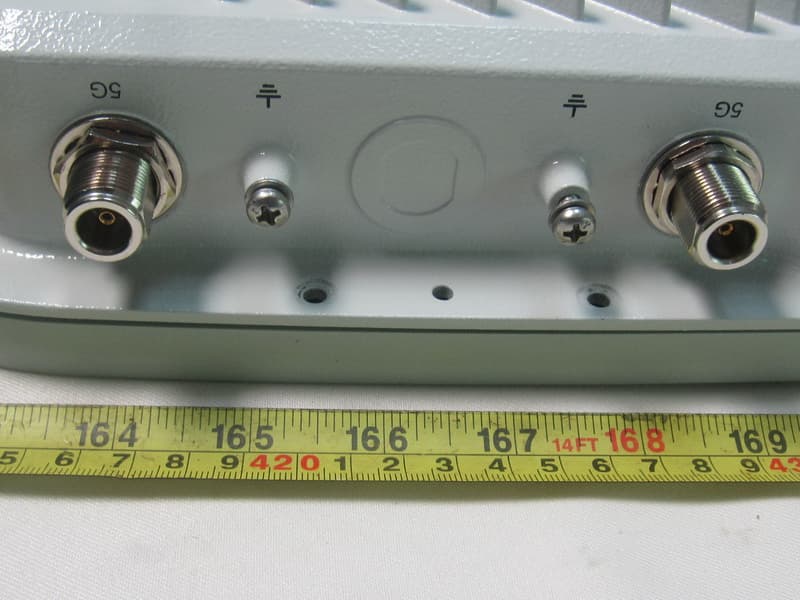
Click to zoom
Application Details
- Equipment Class
- DTS - Digital Transmission System
- Date of Grant
- Mar 06, 2013
- Application Purpose
- Original Equipment
- Date of Application
- Nov 17, 2012
- Equipment Note
- Outdoor Wireless LAN Access Point
- Frequency Range
- 5745.00000000 - 5825.00000000
- Company
- Huawei Technologies Co.,Ltd
- Country
- China
Documents & Files
Document Text
Text extracted from the exhibit documents filed with the FCC. Open a document above to read the original.
Users Manual
AP6510DN-AGN-US Outdoor Wireless LAN Access Point Quick Start Guide HUAWEI TECHNOLOGIES CO., LTD. Huawei Technologies Co., Ltd. Address: Huawei Technologies Co., Ltd. Bantian,Longgang Shenzhen 518129 People’s Republic of China Website: http://enterprise.huawei.com Copyright © Huawei Technologies Co., Ltd. 2012. All rights reserved. No part of this document may be reproduced or transmitted in any form or by any means without prior written consent of Huawei Technologies Co., Ltd. Trademarks and Permissions and other Huawei trademarks are trademarks of Huawei Technologies Co., Ltd. All other trademarks and trade names mentioned in this document are the property of their respective holders. Notice The purchased products, services and features are stipulated by the contract made between Huawei and the customer. All or part of the products, services and features described in this document may not be within the purchase scope or the usage scope. Unless otherwise specified in the contract, all statements, information, and recommendations in this document are provided "AS IS" without warranties, guarantees or representations of any kind, either express or implied. The information in this document is subject to change without notice. Every effort has been made in the preparation of this document to ensure accuracy of the contents, but all statements, information, and recommendations in this document do not constitute the warranty of any kind, express or implied. 1 Symbol Conventions The symbols that may be found in this document are defined as follows. SymbolDescription NOTE CAUTION Indicates a potentially hazardous situation, which if not avoided, could result in equipment damage, data loss, performance degradation, or unexpected results. Provides additional information to emphasize or supplement important points of the main text. 2 Change History Changes between document issues are cumulative. Therefore,the latest document issue contains all the changes in previous issues. Change in Issue 01 (2012-09-30) Initial commercial release. AP6510DN-AGN-US Quick Start Guide 技术支持 Before performing Installation, confirm that the installation accessories and tools are available. Installation tools: Technical Support Huawei Technologies Co., Ltd. Address: Huawei Industrial Base Bantian,Longgang Shenzhen 518129 People’s Republic of China Website: http://enterprise.huawei.com Installation suite Expansion bolt M4X12 hexagon socket head cap screw Hoop Installation accessories: Device Overview Packing List Unpack the equipment. Ensure that all items listed in the package list are included in the shipment. If any item is missing, contact the supplier. Ports and indicators 5G antenna port 6 7 2.4G antenna port Connected to the feeder. Connected to the feeder. Item Description SN Product functions 3 1 2 3 4 1 1 4 Item Quantity Unit AP device PCS PCS PCS Installation suite 1 PCS Network port connector 5 2 Expansion bolt PCS 6 2 M4X12 hexagon socket head cap screw PCS 10 1 Item Quantity Unit PCS Warranty card Certificate of Conformance Hoop 7 1 PCS Quick Start Guide (including the printed packing list) 8 1 PCS 9 Toxic or Hazardous Substance & Elements Declaration 1 PCS 12345 Item Description SN SYS Wireless Default 1 SYS status indicator. 2 3 4 5 Link ETH/POE port Link status indicator. Wireless status indicator. Used for Ethernet connections. Press and hold down the Reset button for 3 seconds to restore the factory settings and restart the AP. 6677 Phillips screwdriver Hammer Maker Flat-head screwdriver Diagonal pliers Adjustable wrench ESD gloves COAX crimping tool Measuring tape Wire stripper RJ45 Crimping tool Multimeter Level Vacuum cleaner Network cable tester Hammer drill Hex key 6mm drill bit No.No. Installing an AP ● Select an appropriate installation position and leave space above and around the device for cooling air circulation. ● Outdoors Aps are used for hotspot coverage and often installed against walls or poles. The pole diameter is 48 mm to 114 mm. AP6510DN-AGN-US dimensions (unit: mm) without a backplane support. Recommended AP6510DN-AGN-US installation space (unit: mm). ● Installing the AP6510DN-AGN-US against a Wall: 33083 3 0 6 Hexagon socket head cap screw Field strength 场强示意 1. Fix the wall-mounting bracket to the wall, adjust the installation position, and use the marker, level, and measuring tape to mark the drilling positions where expansion bolts are installed. 2. Use #8 drill bit to drill 35 mm to 40 mm deep holes in the drilling positions and install expansion bolts. Screw the nut into the expansion tube, hammer the expansion bolt into a hole until the flat washer is flattened against the wall, and remove the nuts, spring washer, and flat washer in order. Flat washer Spring washer Nuts 3. Use four M4*12 hexagon socket head cap screws to fasten the wall-mounting bracket to the AP. 4. Pinch the wall-mounting bracket on the expansion bolts, and fasten the flat washer, spring washer, and nuts in order. 5. Slide the AP into the wall-mounting bracket to complete installation. 4 64mm 3 7 m m Installing an AP 上电调试 3 ● Installing the AP6510DN-AGN-US against a vertical pole: Field strength 场强示意 NOTE Lock hole Security lock 1. Determine the AP installation position, slide the hoop through the hole of the wall-mounting bracket and attach it to the pole, And use the screwdriver to secure screws on the hoop. 2. Slide the AP that has the connector fastened into the wall- mounting bracket. ● The procedure for installing the AP6510DN-AGN-US against a horizontal pole is similar to the procedure for installing the AP6510DN-AGN-US against a vertical pole. ● Installing the Security Lock To prevent unauthorized personnel from moving the AP, lock the AP. The preceding figure shows the security lock. The carrier should purchase the security lock and determine the position for installing the security lock. 5 Installing Cables ● AP6510DN-AGN-US external cable arrangement drawing 3. Put the network cable through the…
Text truncated - open the document above for the full version.
Users Manual
AP Series Product Compliance and Safety Manual Issue 01 Date 2012-10-24 HUAWEI TECHNOLOGIES CO., LTD. Issue (2012-10-24) Huawei Technologies Proprietary i Copyright © Huawei Technologies Co., Ltd. 2011. All rights reserved. No part of this document may be reproduced or transmitted in any form or by any means without prior written consent of Huawei Technologies Co., Ltd. Trademarks and Permissions and other Huawei trademarks are trademarks of Huawei Technologies Co., Ltd. All other trademarks and trade names mentioned in this document are the property of their respective holders. Notice The purchased products, services and features are stipulated by the contract made between Huawei and the customer. All or part of the products, services and features described in this document may not be within the purchase scope or the usage scope. Unless otherwise specified in the contract, all statements, information, and recommendations in this document are provided "AS IS" without warranties, guarantees or representations of any kind, either express or implied. The information in this document is subject to change without notice. Every effort has been made in the preparation of this document to ensure accuracy of the contents, but all statements, information, and recommendations in this document do not constitute the warranty of any kind, express or implied. Huawei Technologies Co., Ltd. Address: Huawei Industrial Base Bantian, Longgang Shenzhen 518129 People's Republic of China Website: http://www.huawei.com Email: [email protected] Compliance and Safety Manual Contents Issue (2012-10-24) Huawei Technologies Proprietary iii About This Document Intended Audience This document describes Electromagnetic Compatibility (EMC) and other safety standards compliance and information about the AP. This document provides the general safety guidelines for handling, installing or operating the AP. This document is intended for: Maintenance engineers Technical support engineers Installation engineers Network planning engineers Symbol Conventions The symbols that may be found in this document are defined as follows. Symbol Description Indicates a hazard with a high level of risk, which if not avoided, will result in death or serious injury. Indicates a hazard with a medium or low level of risk, which if not avoided, could result in minor or moderate injury. Indicates a potentially hazardous situation, which if not avoided, could result in equipment damage, data loss, performance degradation, or unexpected results. Indicates a tip that may help you solve a problem or save time. Provides additional information to emphasize or supplement important points of the main text. Contents Compliance and Safety Manual iv Huawei Technologies Proprietary Issue (2012-10-24) Change History Changes between document issues are cumulative. Therefore, the latest document issue contains all the changes in previous issues. Changes in Issue 01 (2012-10-24) Initial commercial release. Compliance and Safety Manual Contents Issue (2012-10-24) Huawei Technologies Proprietary v Contents 1 Regulatory Compliance Statement ......................................................................................... 1-1 2 Regulatory Compliance Information ..................................................................................... 2-1 2.1 Regulatory Compliance Standards ................................................................................................................ 2-1 2.2 USA Regulatory Compliance ........................................................................................................................ 2-2 2.2.1 FCC Part 15.......................................................................................................................................... 2-2 2.3 Canada Regulatory Compliance .................................................................................................................... 2-3 2.3.1 RSS-Gen & RSS-210 statement ........................................................................................................... 2-3 3 Safety Information ..................................................................................................................... 3-4 3.1 Overview ....................................................................................................................................................... 3-5 3.1.1 Safety Precautions ................................................................................................................................ 3-5 3.1.2 General Requirements .......................................................................................................................... 3-5 3.2 Electricity Safety ........................................................................................................................................... 3-7 3.2.1 High Voltage ........................................................................................................................................ 3-7 3.2.2 Thunderstorm ....................................................................................................................................... 3-7 3.2.3 Tools ..................................................................................................................................................... 3-8 3.2.4 High Electrical Leakage ....................................................................................................................... 3-8 3.2.5 Power Cable ......................................................................................................................................... 3-8 3.2.6 Fuse ...................................................................................................................................................... 3-9 3.2.7 Electrostatic Discharge.................................................................................................…
Text truncated - open the document above for the full version.
Users Manual
AP6510DN-AGN-US Outdoor Wireless LAN Access Point V200R002C00 Product Description Issue01 Date2012-09-10 HUAWEI TECHNOLOGIES CO., LTD. Copyright © Huawei Technologies Co., Ltd. 2012. All rights reserved. No part of this document may be reproduced or transmitted in any form or by any means without prior written consent of Huawei Technologies Co., Ltd. Trademarks and Permissions and other Huawei trademarks are trademarks of Huawei Technologies Co., Ltd. All other trademarks and trade names mentioned in this document are the property of their respective holders. Notice The purchased products, services and features are stipulated by the contract made between Huawei and the customer. All or part of the products, services and features described in this document may not be within the purchase scope or the usage scope. Unless otherwise specified in the contract, all statements, information, and recommendations in this document are provided "AS IS" without warranties, guarantees or representations of any kind, either express or implied. The information in this document is subject to change without notice. Every effort has been made in the preparation of this document to ensure accuracy of the contents, but all statements, information, and recommendations in this document do not constitute a warranty of any kind, express or implied. Huawei Technologies Co., Ltd. Address:Huawei Industrial Base Bantian, Longgang Shenzhen 518129 People's Republic of China Website:http://www.huawei.com Email:[email protected] Issue 01 (2012-09-10)Huawei Proprietary and Confidential Copyright © Huawei Technologies Co., Ltd. i Contents 1 Product Orientation and Characteristics...................................................................................1 2 Product Structure...........................................................................................................................5 3 Functions and Features.................................................................................................................9 4 Technical Specifications.............................................................................................................12 AP6510DN-AGN-US Outdoor Wireless LAN Access Point Product DescriptionContents Issue 01 (2012-09-10)Huawei Proprietary and Confidential Copyright © Huawei Technologies Co., Ltd. ii 1 Product Orientation and Characteristics Product Orientation The AP6510DN-AGN-US is an outdoor dual-band access point (AP) that supports 2.4 GHz and 5 GHz frequency bands, and has enhanced coverage performance and protection capabilities. It supports wireless bridging, complies with IEEE 802.11a/b/g/n,connects a large number of users, and works as a Fit AP. The AP6510DN-AGN-US has the following advantages: lHigh reliability lHigh security lSimple network deployment lAutomatic AC discovery and configuration lReal-time management and maintenance . The AP6510DN-AGN-US is recommended for use in residential or commercial properties without wired resources. The AP6510DN-AGN-US APs can be deployed at both ends of a commercial street or in the building opposite to a commercial property. The APs must be equipped with external antennas to implement wireless signal coverage. The AP6510DN-AGN-US is for use in Fit AP and bridge networking scenarios. AP6510DN-AGN-US Outdoor Wireless LAN Access Point Product Description1 Product Orientation and Characteristics Issue 01 (2012-09-10)Huawei Proprietary and Confidential Copyright © Huawei Technologies Co., Ltd. 1 Figure 1-1 Fit AP networking AP n AP1 ...... NMS AC Authentication system Switch Management channel between NMS and AC Management channel between the AC and the AP and data channel Where data flows are encapsulated with CAPWAP Channel where data flows are not encapsulated with CAPWAP Business users Residential users WLAN teminal In this networking, the AP6510DN-AGN-US functions as a Fit AP that provides only data forwarding functions. The AC is responsible for user access, authentication, AP management, and configurations of security protocols, routing, and QoS. Figure 1-2 WDS networking (point-to-point) AP 1 AP 2 LAN Segment 1 LAN Segment 2 AP6510DN-AGN-US Outdoor Wireless LAN Access Point Product Description1 Product Orientation and Characteristics Issue 01 (2012-09-10)Huawei Proprietary and Confidential Copyright © Huawei Technologies Co., Ltd. 2 Figure 1-3 WDS networking (point-to-multipoint) AP 2 AP 1 AP 3 AP 4 LAN Segment 1 LAN Segment 2 LAN Segment 3 LAN Segment 4 In this networking, the AP6510DN-AGN-US connects two or more independent wired or wireless LANs through wireless links to realize communication between the LANs. In a Wireless Distribution System (WDS), the AP6510DN-AGN-US supports point-to-point, point-to- multipoint networking modes. The AP implements wireless bridging and access functions using 5 GHz and 2.4 GHz frequency bands. Product Characteristics The AP6510DN-AGN-US has the following characteristics on the WLAN. Product Characteristics Description Highly reliable wireless access lComplies with IEEE 802.11 a/b/g/n. lSupports2x2 MIMO, and provides a maximum rate of 300 Mbit/s for each radio. lUses Wi-Fi Multimedia (WMM) to implement priority scheduling based on the service type (voice, video, or data), and supports priority mapping on the air interface and wired interface. lSupports wired link integrity check. lSupports load balancing. lSupports roaming without service interruptions. lSupports AC Dual-Link Backup. lSupports the beamforming technique. lUses the latest 802.11n chip to provide higher performance and wider coverage. lHas a strong coverage capability. lUses a metal shell and a design that dissipates heat for high reliability. AP6510DN-AGN-US Outdoor Wireless LAN Access Point Product Description1 Product Orientation and Characteristics Issue 01 (2012-09-10)Huawei Proprietary and Confidential Copyright © Huawei Technologies Co., Ltd. 3 Product Characteristics Description Comprehensive user access con…
Text truncated - open the document above for the full version.
Users Manual
AP6510DN-AGN-US Outdoor Wireless LAN Access Point Quick Start Guide HUAWEI TECHNOLOGIES CO., LTD. Huawei Technologies Co., Ltd. Address: Huawei Technologies Co., Ltd. Bantian,Longgang Shenzhen 518129 People’s Republic of China Website: http://enterprise.huawei.com Copyright © Huawei Technologies Co., Ltd. 2012. All rights reserved. No part of this document may be reproduced or transmitted in any form or by any means without prior written consent of Huawei Technologies Co., Ltd. Trademarks and Permissions and other Huawei trademarks are trademarks of Huawei Technologies Co., Ltd. All other trademarks and trade names mentioned in this document are the property of their respective holders. Notice The purchased products, services and features are stipulated by the contract made between Huawei and the customer. All or part of the products, services and features described in this document may not be within the purchase scope or the usage scope. Unless otherwise specified in the contract, all statements, information, and recommendations in this document are provided "AS IS" without warranties, guarantees or representations of any kind, either express or implied. The information in this document is subject to change without notice. Every effort has been made in the preparation of this document to ensure accuracy of the contents, but all statements, information, and recommendations in this document do not constitute the warranty of any kind, express or implied. 1 Symbol Conventions The symbols that may be found in this document are defined as follows. SymbolDescription NOTE CAUTION Indicates a potentially hazardous situation, which if not avoided, could result in equipment damage, data loss, performance degradation, or unexpected results. Provides additional information to emphasize or supplement important points of the main text. 2 Change History Changes between document issues are cumulative. Therefore,the latest document issue contains all the changes in previous issues. Change in Issue 01 (2012-09-30) Initial commercial release. AP6510DN-AGN-US Quick Start Guide 技术支持 Before performing Installation, confirm that the installation accessories and tools are available. Installation tools: Technical Support Huawei Technologies Co., Ltd. Address: Huawei Industrial Base Bantian,Longgang Shenzhen 518129 People’s Republic of China Website: http://enterprise.huawei.com Installation suite Expansion bolt M4X12 hexagon socket head cap screw Hoop Installation accessories: Device Overview Packing List Unpack the equipment. Ensure that all items listed in the package list are included in the shipment. If any item is missing, contact the supplier. Ports and indicators 5G antenna port 6 7 2.4G antenna port Connected to the feeder. Connected to the feeder. Item Description SN Product functions 3 1 2 3 4 1 1 4 Item Quantity Unit AP device PCS PCS PCS Installation suite 1 PCS Network port connector 5 2 Expansion bolt PCS 6 2 M4X12 hexagon socket head cap screw PCS 10 1 Item Quantity Unit PCS Warranty card Certificate of Conformance Hoop 7 1 PCS Quick Start Guide (including the printed packing list) 8 1 PCS 9 Toxic or Hazardous Substance & Elements Declaration 1 PCS 12345 Item Description SN SYS Wireless Default 1 SYS status indicator. 2 3 4 5 Link ETH/POE port Link status indicator. Wireless status indicator. Used for Ethernet connections. Press and hold down the Reset button for 3 seconds to restore the factory settings and restart the AP. 6677 Phillips screwdriver Hammer Maker Flat-head screwdriver Diagonal pliers Adjustable wrench ESD gloves COAX crimping tool Measuring tape Wire stripper RJ45 Crimping tool Multimeter Level Vacuum cleaner Network cable tester Hammer drill Hex key 6mm drill bit No.No. Installing an AP ● Select an appropriate installation position and leave space above and around the device for cooling air circulation. ● Outdoors Aps are used for hotspot coverage and often installed against walls or poles. The pole diameter is 48 mm to 114 mm. AP6510DN-AGN-US dimensions (unit: mm) without a backplane support. Recommended AP6510DN-AGN-US installation space (unit: mm). ● Installing the AP6510DN-AGN-US against a Wall: 33083 3 0 6 Hexagon socket head cap screw Field strength 场强示意 1. Fix the wall-mounting bracket to the wall, adjust the installation position, and use the marker, level, and measuring tape to mark the drilling positions where expansion bolts are installed. 2. Use #8 drill bit to drill 35 mm to 40 mm deep holes in the drilling positions and install expansion bolts. Screw the nut into the expansion tube, hammer the expansion bolt into a hole until the flat washer is flattened against the wall, and remove the nuts, spring washer, and flat washer in order. Flat washer Spring washer Nuts 3. Use four M4*12 hexagon socket head cap screws to fasten the wall-mounting bracket to the AP. 4. Pinch the wall-mounting bracket on the expansion bolts, and fasten the flat washer, spring washer, and nuts in order. 5. Slide the AP into the wall-mounting bracket to complete installation. 4 64mm 3 7 m m Installing an AP 上电调试 3 ● Installing the AP6510DN-AGN-US against a vertical pole: Field strength 场强示意 NOTE Lock hole Security lock 1. Determine the AP installation position, slide the hoop through the hole of the wall-mounting bracket and attach it to the pole, And use the screwdriver to secure screws on the hoop. 2. Slide the AP that has the connector fastened into the wall- mounting bracket. ● The procedure for installing the AP6510DN-AGN-US against a horizontal pole is similar to the procedure for installing the AP6510DN-AGN-US against a vertical pole. ● Installing the Security Lock To prevent unauthorized personnel from moving the AP, lock the AP. The preceding figure shows the security lock. The carrier should purchase the security lock and determine the position for installing the security lock. 5 Installing Cables ● AP6510DN-AGN-US external cable arrangement drawing 3. Put the network cable through the…
Text truncated - open the document above for the full version.
Users Manual
AP Series Product Compliance and Safety Manual Issue 01 Date 2012-10-24 HUAWEI TECHNOLOGIES CO., LTD. Issue (2012-10-24) Huawei Technologies Proprietary i Copyright © Huawei Technologies Co., Ltd. 2011. All rights reserved. No part of this document may be reproduced or transmitted in any form or by any means without prior written consent of Huawei Technologies Co., Ltd. Trademarks and Permissions and other Huawei trademarks are trademarks of Huawei Technologies Co., Ltd. All other trademarks and trade names mentioned in this document are the property of their respective holders. Notice The purchased products, services and features are stipulated by the contract made between Huawei and the customer. All or part of the products, services and features described in this document may not be within the purchase scope or the usage scope. Unless otherwise specified in the contract, all statements, information, and recommendations in this document are provided "AS IS" without warranties, guarantees or representations of any kind, either express or implied. The information in this document is subject to change without notice. Every effort has been made in the preparation of this document to ensure accuracy of the contents, but all statements, information, and recommendations in this document do not constitute the warranty of any kind, express or implied. Huawei Technologies Co., Ltd. Address: Huawei Industrial Base Bantian, Longgang Shenzhen 518129 People's Republic of China Website: http://www.huawei.com Email: [email protected] Compliance and Safety Manual Contents Issue (2012-10-24) Huawei Technologies Proprietary iii About This Document Intended Audience This document describes Electromagnetic Compatibility (EMC) and other safety standards compliance and information about the AP. This document provides the general safety guidelines for handling, installing or operating the AP. This document is intended for: Maintenance engineers Technical support engineers Installation engineers Network planning engineers Symbol Conventions The symbols that may be found in this document are defined as follows. Symbol Description Indicates a hazard with a high level of risk, which if not avoided, will result in death or serious injury. Indicates a hazard with a medium or low level of risk, which if not avoided, could result in minor or moderate injury. Indicates a potentially hazardous situation, which if not avoided, could result in equipment damage, data loss, performance degradation, or unexpected results. Indicates a tip that may help you solve a problem or save time. Provides additional information to emphasize or supplement important points of the main text. Contents Compliance and Safety Manual iv Huawei Technologies Proprietary Issue (2012-10-24) Change History Changes between document issues are cumulative. Therefore, the latest document issue contains all the changes in previous issues. Changes in Issue 01 (2012-10-24) Initial commercial release. Compliance and Safety Manual Contents Issue (2012-10-24) Huawei Technologies Proprietary v Contents 1 Regulatory Compliance Statement ......................................................................................... 1-1 2 Regulatory Compliance Information ..................................................................................... 2-1 2.1 Regulatory Compliance Standards ................................................................................................................ 2-1 2.2 USA Regulatory Compliance ........................................................................................................................ 2-2 2.2.1 FCC Part 15.......................................................................................................................................... 2-2 2.3 Canada Regulatory Compliance .................................................................................................................... 2-3 2.3.1 RSS-Gen & RSS-210 statement ........................................................................................................... 2-3 3 Safety Information ..................................................................................................................... 3-4 3.1 Overview ....................................................................................................................................................... 3-5 3.1.1 Safety Precautions ................................................................................................................................ 3-5 3.1.2 General Requirements .......................................................................................................................... 3-5 3.2 Electricity Safety ........................................................................................................................................... 3-7 3.2.1 High Voltage ........................................................................................................................................ 3-7 3.2.2 Thunderstorm ....................................................................................................................................... 3-7 3.2.3 Tools ..................................................................................................................................................... 3-8 3.2.4 High Electrical Leakage ....................................................................................................................... 3-8 3.2.5 Power Cable ......................................................................................................................................... 3-8 3.2.6 Fuse ...................................................................................................................................................... 3-9 3.2.7 Electrostatic Discharge.................................................................................................…
Text truncated - open the document above for the full version.
Contact Information
Applicant
Zhang Xinghai
Test Firm
Huawei Technologies Co., LTDZhou Fengyum
Technical Specifications
| # | Rule Parts | Frequency Range | Power Output |
|---|---|---|---|
| 2 | 15C | 5.75 GHz - 5.83 GHz | 741.00 mW |
Other Applications from Huawei Technologies Co.,Ltd

QISSUN2000
Jun 27, 2021Solar Inverter
Equipment Class
DTS - Digital Transmission System
QISCP81-1
Oct 22, 2020Watch Wireless Charger
Equipment Class
DCD - Part 15 Low Power Transmitter Below 1705 kHz
QISRRU3278
Sep 02, 2020Remote Radio Unit
Equipment Class
CBD - Citizens Band Category A and B Devices
QISR2561
Jul 11, 2020Indoor Router
Equipment Class
DTS - Digital Transmission System
QISSMARTLOGGER310
Mar 23, 2020Solar Smart Monitor & Data Logger
Equipment Class
DTS - Digital Transmission System