QISDA3100On-board diagnostic device (OBD) supporting 2G/3G and BT
Huawei Technologies Co.,Ltd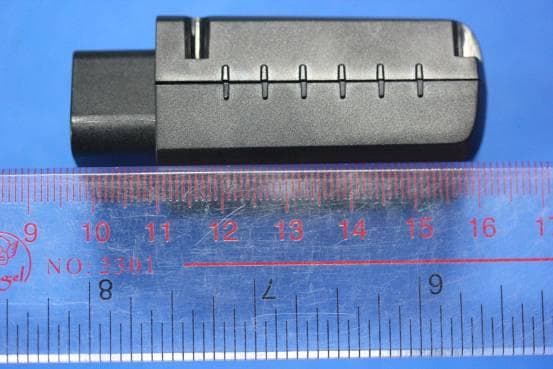
Click to zoom
Application Details
- Equipment Class
- JBP - Part 15 Class B Computing Device Peripheral
- Date of Grant
- Aug 18, 2013
- Application Purpose
- Original Equipment
- Date of Application
- Aug 18, 2013
- Equipment Note
- On-board diagnostic device (OBD) supporting 2G/3G and BT
- Company
- Huawei Technologies Co.,Ltd
- Country
- China
Documents & Files
Document Text
Text extracted from the exhibit documents filed with the FCC. Open a document above to read the original.
Users Manual
1 Warnings and precautions This section contains important information about the operation of your device. It also contains information about how to use the device safely. Read this information carefully before using your device. Electronic device Do not use your device if using the device is prohibited. Do not use the device if doing so causes danger or interference with other electronic devices. Accessories Using an unapproved or incompatible charger or battery may cause fire, explosion or other hazards. Choose only accessories approved for use with this model by the device manufacturer. The use of any other types of accessories may void the warranty, may violate local regulations and laws, and may be dangerous. Please contact your retailer for information about the availability of approved accessories in your area. Operating environment Avoid dusty, damp, or dirty environments. Avoid magnetic fields. Using or charging your device in these environments may result in circuit malfunctions. Do not use your device during thunderstorms to protect your device against any danger caused by lightning. Connect the device only to products with the USB-IF logo or with USB-IF compliance program completion. Observe local laws and regulations, and respect the privacy and legal rights of others. Do not touch the device's internal antenna. Otherwise, communication quality may be reduced or the device may emit unintended levels of radio frequency (RF) energy. Ideal operating temperatures are -10 °C to +55 °C. Extreme heat or cold may damage your device or accessories. Do not expose your device to direct sunlight (such as on a car dashboard) for prolonged periods. Do not place your device or accessories on or in heating devices, such as microwave ovens, stoves, water heaters, or radiators. Batteries may explode if overheated. Do not allow children or pets to bite or suck the device or accessories. Doing so may result in damage or explosion. Keep the device and accessories in a well-ventilated and cool area away from direct sunlight. Do not enclose or cover your device with towels or other objects. Do not place the device in a container with poor heat dissipation, such as a box or bag. The device should be installed and operated with a minimum distance of 20 cm between the radiator and your body. Child's safety Comply with all precautions with regard to child's safety. Letting children play with the device or its accessories may be dangerous. The device includes detachable parts that may present a choking hazard. Keep away from children. The device and its accessories are not intended for use by children. Children should only use the device with adult supervision. Interference with medical equipment Follow rules and regulations set forth by hospitals and health care facilities. Do not use your device where prohibited. Some wireless devices may affect the performance of hearing aids or pacemakers. Consult your service provider for more information. If you are using an electronic medical device, consult your doctor or device manufacturer to confirm whether radio waves affect device operation. Areas with flammables and explosives Do not use the device where flammables or explosives are stored (in a gas station, oil depot, or chemical plant, for example). Using your device in these environments increases the risk of explosion or fire. In addition, follow the instructions indicated in text or symbols. Do not store or transport the device in containers with flammable liquids, gases, or explosives. Traffic security Observe local laws and regulations while using the device. To reduce the risk of accidents, do not use your wireless device while driving. RF signals may affect the electronic systems of motor vehicles. For more information, consult the vehicle manufacturer. Do not place the device over the air bag or in the air bag deployment area in a motor vehicle. Doing so may hurt you because of the strong force when the air bag inflates. Do not use your device while flying in an aircraft or immediately before boarding. Using wireless devices in an aircraft may disrupt wireless networks, present a hazard to aircraft operation, or be illegal. Cleaning and maintenance Before you clean or maintain the device, stop all applications, power it off, and disconnect all cables connected to it. Do not use any chemical detergent, powder, or other chemical agents (such as alcohol and benzene) to clean the device or accessories. These substances may cause damage to parts or present a fire hazard. Use a clean, soft, and dry cloth to clean the device and accessories. Keep the device and accessories dry. Protect them from water and humidity. Do not touch the device or accessories with wet hands. Doing so may lead to short circuits, malfunctions, or electric shocks. Do not place magnetic storage media, such as magnetic cards and floppy disks, near the device. Radiation from the device may erase the information on magnetic storage media. Do not expose the device or accessories to extreme heat or cold. These environments may interfere with proper function and may lead to fire or explosion. Do not dismantle the device or accessories. This voids the warranty and releases the manufacturer from liability for damage. FCC Statement This device should be installed and operated with a minimum distance of 20 cm between the device and your body. 15.19 NOTICE: This device complies with Part 15 of the FCC Rules Operation is subject to the following two conditions: This device may not cause harmful interference, and This device must accept any interference received, including interference that may cause undesired operation. 15.21 NOTICE: Changes or modifications made to this device not expressly approved by Huawei Technologies Co., Ltd. may void the FCC authorization to operate this device. 15.105 NOTE: This device has been tested and found to comply with the limits…
Text truncated - open the document above for the full version.
Users Manual
DA3100 Evaluation Sample User Manual V1.2 Security Level 2013-05-30 Huawei Proprietary - Restricted Distribution Page1, Total12 1. Introduction DA3100 is an on-board diagnostic (OBD-II) device that enables collection of data from vehicle OBD-II port, GPS and Accelerometer. It supports 2G/3G and Bluetooth 4.0 LE (optional) communication with telematics service terminal (TST) servers and smart phones respectively. 2. Objective This manual provides users with guidance of DA3100’s installation, viewing and processing of data collected. Section 3 describes viewing of data collected on Huawei’s demo web portal. For performance evaluation proposes, section 4 outlines the steps to amend server address and message format decoding at the server of choice. 3. Functional Usage 3.1. DA3100 Installation i. Insert a valid 2/3G SIM into the SIM slot with the contact points facing the bottom as follow: Note: only support GSM, GPRS and WCDMA ii. Plug it into the vehicle OBD-II connector with the ignition on. Location varies between vehicles. Normally, it is below the dashboard near the leg room area. DA3100 Evaluation Sample User Manual V1.2 Security Level 2013-05-30 Huawei Proprietary - Restricted Distribution Page2, Total12 3.2. DA3100 Operation Steps Step Pre-condition Action Response Remark 1 Ignition On and locate the OBD-II connection Plug DA3100 into the vehicle OBD-II connection All 3 LEDs will be On for 3 sec. If any LED is off, it indicates that particular LED is faulty. 2 Step 1 DA3100 checking vehicle OBD-II protocol a. OBD LED Flashing with Cellular and Power LED On for 20 sec. a. Vehicle OBD-II supported b. OBD LED Off with Cellular and Power LED On for 20 sec. b. Vehicle OBD-II not supported 3 Step 2 DA3100 registering network a. Cellular LED Flashing with Power LED On and OBD LED status as in Step 2 a. Carrier network registration success b. Cellular LED Off with Power LED On and OBD LED status as in Step 2 b. Carrier network registration fails. Disconnect and repeat step 1 4 Step 3a Setting APN through SMS as described in Section 3.3 (i) a. SMS reply OK a. APN set success b. SMS reply fail or no SMS reply b. Repeat Step 4 after 5 sec. Possible fault: SIM does not support APN or server is down 5 Step 4a Data view as described in Section 3.4 a. If vehicle OBD-II supported as in Step 2a a. Data view display VIN code read from vehicle b. If vehicle OBD-II not supported as in Step 2b b. Data view display VIN code as “OBD fail” 6 Ignition Off DA3100 to go into sleep mode and heartbeat send according to SMS setting as described in Section 3.3 (iv) All 3 LEDs Off and heartbeat send Data view display VIN code as “Heartbeat” 7 Step 6 Ignition On DA3100 back to status before ignition Off DA3100 Evaluation Sample User Manual V1.2 Security Level 2013-05-30 Huawei Proprietary - Restricted Distribution Page3, Total12 3.3. Configuration through SMS Device can be configured via SMS commands. These commands are sent to the device SIM number and the device will reply with an SMS response. Below are the commands and responses. i. Set the APN according to the network carrier provided (Note: APN MUST be set upon initialization of device usage. There is no default setting) SMS Command: +MTP:1000,<USN>,<PWD>,<NAME> Response (via SMS): Tips:APN UserName:<USN>,APN Password:<PWD>,APN Name: <NAME> setting ok! <USN>: APN user name, blank if not applicable <PWD>: APN password, blank if not applicable <NAME>: APN name ii. Set the data upload time (default is 30 second) SMS Command: +MTP:1001,<TIME> Response (via SMS): Tips:MTP Report Period:<TIME> setting ok! < TIME >: upload time in seconds (min is 1 second) iii. Retrieve system parameters and status for settings confirmation SMS Command: +MTP:1002 Response (via SMS): Tips:SoftVer:<VER>,APN UserName:<USN>,APN Password:<PWD>,APN Name:<NAME>,IP:<IP>,PORT: <PORT>,Report Period: < TIME >,Server Connect Status:OK! <VER>: software version, eg. V1.000.20130108 <USN>: APN user name, blank if not applicable <PWD>: APN password, blank if not applicable <IP>: IP address, eg. 172.22.44.33 (Note: Huawei server IP address) <PORT>: Port number, eg. 12001 (Note: Huawei server port number) <TIME>: upload time in seconds iv. Set the heartbeat time (default is 1 second) SMS Command: +MTP:1004,<TIME> Response (via SMS): Tips:Heartbeat Period:<TIME> setting ok! < TIME >: heartbeat time in seconds DA3100 Evaluation Sample User Manual V1.2 Security Level 2013-05-30 Huawei Proprietary - Restricted Distribution Page4, Total12 3.4. Web Data View (TST) i. Log on to http://124.238.215.168:8080/TSP-PORTAL/ ii. Enter the following: Username: 88888888888 Password: 11111111 iii. Click on “Road Safety” Click on “Road Safety” Login Password Username DA3100 Evaluation Sample User Manual V1.2 Security Level 2013-05-30 Huawei Proprietary - Restricted Distribution Page5, Total12 Screen change to the following: iv. Click on “OBD Display” Click on “OBD Display” DA3100 Evaluation Sample User Manual V1.2 Security Level 2013-05-30 Huawei Proprietary - Restricted Distribution Page6, Total12 v. Select drop list for device serial and select as follows: vi. Click on the “Detail” to view the other data Note: Receive Time is based on the time the server received the data. Server time error could cause this to be inaccurate. For accurate timing, please refer to the UTC time under “Detail” Drop list “Detail” DA3100 Evaluation Sample User Manual V1.2 Security Level 2013-05-30 Huawei Proprietary - Restricted Distribution Page7, Total12 Detail data as follows: DA3100 Evaluation Sample User Manual V1.2 Security Level 2013-05-30 Huawei Proprietary - Restricted Distribution Page8, Total12 4. Performance Usage This section allows users to send data message to their server and decode it. The installation and configuration settings are identical as described in section 3.1 and 3.2 respectively. Additional SMS command is available to set the IP and Port number of the user server. This must be set before data can be sent to the …
Text truncated - open the document above for the full version.
Cover Letter(s)
1(2) Huawei Technologies Co., Ltd. Attention: Application Examiner Re: Request for confidentiality Applicant: Huawei Technologies Co., Ltd. FCC ID: QISDA3100 To whom it may concern, Permanent Confidentiality Request is hereby submitted by Huawei Technologies Co., Ltd. to withhold permanently from public review certain portions of the application for equipment certification for the referenced FCC identifiers. This request for confidentiality is made pursuant to 47 CFR 0.457(d) and 0.459 of the FCC Rules. In particular, the following sections of the application are to be kept permanently confidential: Schematics Detailed Block diagrams Detailed Operational/Functional Description BOM list/tune-up procedure Short-term Confidentiality Request is hereby submitted by Huawei Technologies Co., Ltd. to withhold from public review for a period of 180 days from the date of the Grant of Equipment Authorization and prior to marketing, certain portions of the application for equipment certification for the referenced FCC identifiers. This request for confidentiality is made pursuant to 47 CFR 0.457(d) and 0.459 of the FCC Rules. For the purpose of extending short term confidentiality request in this application, we are requesting the commission to extend 180 days. Test setup photos External photos Internal photos User manual 2(2) Rationale for request for confidentiality: Huawei Technologies Co., Ltd. has invested considerable time and materials in research and development to produce the referenced product. [Permanent confidentiality: Disclosure of the permanently confidential portions of this application to competitors would not only give them significant competitive advantages in developing similar products, but would also disclose successful implementation of unpublished, leading edge technology developed by us.][Short term confidentiality: Disclosure of the short-term confidential portions of this application during the period of importation and/or distribution would reveal key aspects of proprietary technology to competitors and diminish the value of our investment in research and development.] If you have questions or need further information, please contact the undersigned. Sincerely, [Signature]: Zhang Xinghai [Title]: EMC Laboratory Manager [Company name] :Huawei Technologies Co., Ltd.
External Photos
DA3100 SECRET Page1, Total7 External Photos of DA3100 DA3100 SECRET Page2, Total7 DA3100 SECRET Page3, Total7 DA3100 SECRET Page4, Total7 DA3100 SECRET Page5, Total7 DA3100 SECRET Page6, Total7 DA3100 SECRET Page7, Total7
ID Label/Location Info
DA3100 SECRET Page1, Total1 ID Label Location_ DA3100
Internal Photos
DA3100 SECRET Page1, Total10 Internal Photos of DA3100 DA3100 SECRET Page2, Total10 DA3100 SECRET Page3, Total10 DA3100 SECRET Page4, Total10 DA3100 SECRET Page5, Total10 DA3100 SECRET Page6, Total10 DA3100 SECRET Page7, Total10 DA3100 SECRET Page8, Total10 DA3100 SECRET Page9, Total10 DA3100 SECRET Page10, Total10
Test Report
EMC Test Report Product Name: OBD BOX Model Number: DA3100 Report No: SYBH(Z-EMC) 088072013-2 FCC ID: QISDA3100 Reliability Laboratory of Huawei Technologies Co., Ltd. Administration Building, Headquarters of Huawei Technologies Co., Ltd., Bantian, Longgang District, Shenzhen, 518129, P.R.C Tel: +86 755 28780808 Fax: +86 755 89652518 FCC Test Report of DA3100 FCC ID: QISDA3100 Security Level: secret Report No: SYBH(Z-EMC)088072013-2 Confidential Information of Huawei. No Distribution without Written Permission Page2, Total15 Notice 1. The laboratory has obtained the accreditation of China National Accreditation Service for Conformity Assessment (CNAS), and accreditation number: L0310. 2. The laboratory has passed the accreditation by The American Association for Laboratory Accreditation (A2LA). The accreditation number is 2174.01. 3. The laboratory has been listed on the US Federal Communications Commission list of test facilities recognized to perform electromagnetic emissions measurements. The site recognition number is 97456. 4. The laboratory has been listed by industry Canada to perform electromagnetic emission measurement. The site recognition number is 6369A-2. 5. The test report is invalid if not marked with "exclusive stamp for the test report". 6. The test report is invalid if not marked with the stamps or the signatures of the persons responsible for performing, revising and approving the test report. 7. The test report is invalid if there is any evidence of erasure and/or falsification. 8. If there is any dissidence for the test report, please file objection to the test centre within 15 days from the date of receiving the test report. 9. Normally, the test report is only responsible for the samples that have undergone the test. 10. Context of the test report cannot be used partially or in full for publicity and/or promotional purposes without previous written approval of the laboratory. FCC Test Report of DA3100 FCC ID: QISDA3100 Security Level: secret Report No: SYBH(Z-EMC)088072013-2 Confidential Information of Huawei. No Distribution without Written Permission Page3, Total15 Applicant: Huawei Technologies Co., Ltd. Address: Administration Building, Headquarters of Huawei Technologies Co., Ltd., Bantian, Longgang District, Shenzhen, 518129, P.R.C Date of Receipt Test Item: July.22, 2013 Start Date of Test: July.29, 2013 End Date of Test: Aug.01, 2013 Test Result: Pass Approved By 2013-08-07 Liu Chunlin (Lab Manager) Date Name Signature Operator 2013-08-07 Zheng Ke (Test Engineer) Date Name Signature FCC Test Report of DA3100 FCC ID: QISDA3100 Security Level: secret Report No: SYBH(Z-EMC)088072013-2 Confidential Information of Huawei. No Distribution without Written Permission Page4, Total15 Modification Record No. Last Report No. Modification Description 1 NA First report FCC Test Report of DA3100 FCC ID: QISDA3100 Security Level: secret Report No: SYBH(Z-EMC)088072013-2 Confidential Information of Huawei. No Distribution without Written Permission Page5, Total15 TABLE OF CONTENT 1 General Information ............................................................................................................................. 6 1.1 EUT Description ........................................................................................................................... 6 1.2 Test Site Information .................................................................................................................... 7 1.3 Applied Standards ........................................................................................................................ 7 2 Summary of Results ............................................................................................................................. 8 3 System Configuration during EMC Test .............................................................................................. 9 3.1 Test Mode ..................................................................................................................................... 9 3.2 Test System Configuration ........................................................................................................... 9 3.3 Cables Used during Test ............................................................................................................ 10 3.4 Associated Equipment Used during Test .................................................................................. 10 4 Electromagnetic Interference (EMI) ................................................................................................... 11 4.1 Radiated Disturbance 30MHz to 18GHz ................................................................................... 11 5 Main Test Instruments ........................................................................................................................ 13 6 System Measurement Uncertainty .................................................................................................... 13 7 Test Data and Graph .......................................................................................................................... 14 7.1 Radiated Disturbance ................................................................................................................. 14 FCC Test Report of DA3100 FCC ID: QISDA3100 Security Level: secret Report No: SYBH(Z-EMC)088072013-2 Confidential Information of Huawei. No Distribution without Written Permission Page6, Total15 1 General Information 1.1 EUT Description EUT Description Product Name OBD BOX Model Number DA3100 Input voltage DC 12V TX Frequency GSM 850:824 MHz To 849 MHz GSM1900:1850MHz To 1910MHz WCDMA BAND II:1850 MHz To 1910 MHz WCDMA BAND V: 824 MHz To 849 MHz Bluetooth:2400MHz to 2483.5MHz RX Frequency GSM850:869MHz To 894MHz GSM1900:1930MHz To 1990MHz WCDMA BAND II:1930 MHz To 1990 MHz WCDMA BAND V: 869MHz To 894MHz GPS: 1575.42MHz; Bluetooth:2400MHz to 2483.5MHz S/N S9Y01B9371500012 …
Text truncated - open the document above for the full version.
Test Setup Photos
FCC Test Report of DA3100 FCC ID: QISDA3100 Security Level: secret Report No: SYBH(Z-EMC)088072013-2 Confidential Information of Huawei. No Distribution without Permission Page1, Total4 Photos of EUT FCC Test Report of DA3100 FCC ID: QISDA3100 Security Level: secret Report No: SYBH(Z-EMC)088072013-2 Confidential Information of Huawei. No Distribution without Permission Page2, Total4 Figure1 EUT Appearance FCC Test Report of DA3100 FCC ID: QISDA3100 Security Level: secret Report No: SYBH(Z-EMC)088072013-2 Confidential Information of Huawei. No Distribution without Permission Page3, Total4 Photos of Test Setup FCC Test Report of DA3100 FCC ID: QISDA3100 Security Level: secret Report No: SYBH(Z-EMC)088072013-2 Confidential Information of Huawei. No Distribution without Permission Page4, Total4 1 Radiated Emissions Radiated Disturbance Emissions (below 1GHz) Radiated Disturbance Emissions (1GHz to18GHz) ----------------------------------------------------------- END-----------------------------------------------------------
Contact Information
Applicant
Zhang Xinghai
Test Firm
Huawei Technologies Co., LTDZhou Fengyum
Technical Specifications
| # | Rule Parts | Frequency Range | Power Output |
|---|---|---|---|
| 1 | 15B | - | - |
Other Applications from Huawei Technologies Co.,Ltd

QISSUN2000
Jun 27, 2021Solar Inverter
Equipment Class
DTS - Digital Transmission System
QISCP81-1
Oct 22, 2020Watch Wireless Charger
Equipment Class
DCD - Part 15 Low Power Transmitter Below 1705 kHz
QISRRU3278
Sep 02, 2020Remote Radio Unit
Equipment Class
CBD - Citizens Band Category A and B Devices
QISR2561
Jul 11, 2020Indoor Router
Equipment Class
DTS - Digital Transmission System
QISSMARTLOGGER310
Mar 23, 2020Solar Smart Monitor & Data Logger
Equipment Class
DTS - Digital Transmission System