QISDP300Desktop Presence
Huawei Technologies Co.,Ltd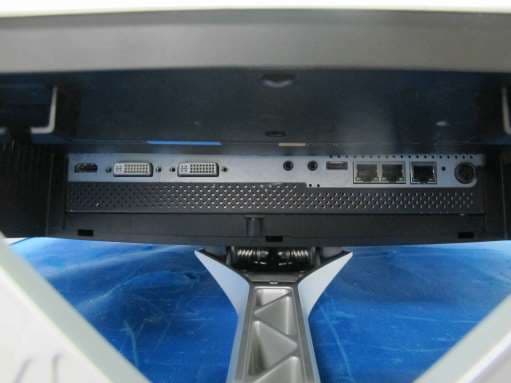
Click to zoom
Application Details
- Equipment Class
- DSS - Part 15 Spread Spectrum Transmitter
- Date of Grant
- Nov 11, 2015
- Application Purpose
- Original Equipment
- Date of Application
- Nov 04, 2015
- Equipment Note
- Desktop Presence
- Frequency Range
- 2402.00000000 - 2480.00000000
- Company
- Huawei Technologies Co.,Ltd
- Country
- China
Documents & Files
Document Text
Text extracted from the exhibit documents filed with the FCC. Open a document above to read the original.
Users Manual
HUAWEI DP300 Desktop Presence V500R002C00 User Guide Issue01 Date2015-09-15 HUAWEI TECHNOLOGIES CO., LTD. Copyright © Huawei Technologies Co., Ltd. 2015. All rights reserved. No part of this document may be reproduced or transmitted in any form or by any means without prior written consent of Huawei Technologies Co., Ltd. Trademarks and Permissions and other Huawei trademarks are trademarks of Huawei Technologies Co., Ltd. All other trademarks and trade names mentioned in this document are the property of their respective holders. Notice The purchased products, services and features are stipulated by the contract made between Huawei and the customer. All or part of the products, services and features described in this document may not be within the purchase scope or the usage scope. Unless otherwise specified in the contract, all statements, information, and recommendations in this document are provided "AS IS" without warranties, guarantees or representations of any kind, either express or implied. The information in this document is subject to change without notice. Every effort has been made in the preparation of this document to ensure accuracy of the contents, but all statements, information, and recommendations in this document do not constitute a warranty of any kind, express or implied. Huawei Technologies Co., Ltd. Address:Huawei Industrial Base Bantian, Longgang Shenzhen 518129 People's Republic of China Website: http://e.huawei.com Issue 01 (2015-09-15)Huawei Proprietary and Confidential Copyright © Huawei Technologies Co., Ltd. i About This Document Overview This guide describes features of the HUAWEI DP300 desktop presence (DP300 or endpoint for short), as well as its routine operations, for example, using the touchscreen to hold, join, or control conferences. In a video conference, users can interact with the videoconferencing system through the DP300 display using the touchscreen or remote control. lTouchscreen (default): Perform operations on the screen by touches, such as tap and slide. In this case, the DP300 display is called touchscreen. lRemote control: Perform operations on the screen using the remote control. In this case, the DP300 display is called remote control screen. The main user interface (UI) of the DP300 is the touchscreen. Except for 3 Understanding the Display and Remote Control, 5.2 Understanding the Web Interface, 5.3 Understanding the Remote Control Screen, and 6.5 Controlling a Conference that involve the web interface or remote control, the screen mentioned elsewhere in this guide refers to the touchscreen. Before you use the product, refer to the product vendor for version mapping information and to confirm compatibility with other videoconferencing equipment. To obtain other documents for this product, log in to http://e.huawei.com, choose Support > Product Support > UC&C > Telepresence and Videoconferencing > Telepresence Endpoints > Desktop Device > DP300, and download the documents. Intended Audience This document is intended for: lCommon users (main users): Perform conferencing operations using the touchscreen or remote control, rather than system configurations. lAdministrator users: Perform conferencing operations and system configurations using the touchscreen, remote control, or web interface. Symbol Conventions The symbols that may be found in this document are defined as follows. HUAWEI DP300 Desktop Presence User GuideAbout This Document Issue 01 (2015-09-15)Huawei Proprietary and Confidential Copyright © Huawei Technologies Co., Ltd. ii SymbolDescription Indicates an imminently hazardous situation which, if not avoided, will result in death or serious injury. Indicates a potentially hazardous situation which, if not avoided, could result in death or serious injury. Indicates a potentially hazardous situation which, if not avoided, may result in minor or moderate injury. Indicates a potentially hazardous situation which, if not avoided, could result in equipment damage, data loss, performance deterioration, or unanticipated results. NOTICE is used to address practices not related to personal injury. Calls attention to important information, best practices and tips. NOTE is used to address information not related to personal injury, equipment damage, and environment deterioration. Change History Updates between document issues are cumulative. Therefore, the latest document issue contains all updates made in previous issues. Changes in Issue 01 (2015-09-15) This issue is the first official release. HUAWEI DP300 Desktop Presence User GuideAbout This Document Issue 01 (2015-09-15)Huawei Proprietary and Confidential Copyright © Huawei Technologies Co., Ltd. iii Contents About This Document.....................................................................................................................ii 1 Safety Precautions.........................................................................................................................1 2 Overview.........................................................................................................................................7 3 Understanding the Display and Remote Control...................................................................9 4 Powering On the DP300.............................................................................................................13 5 Understanding the UI.................................................................................................................17 5.1 Understanding the Touchscreen...................................................................................................................................18 5.2 Understanding the Web Interface.................................................................................................................................21 5.3 Understanding the Remote Control Screen...................................................................................................…
Text truncated - open the document above for the full version.
Users Manual
HUAWEI DP300 Desktop Presence V500R002C00 Security Maintenance Issue 01 Date2015-09-15 HUAWEI TECHNOLOGIES CO., LTD. Copyright © Huawei Technologies Co., Ltd. 2015. All rights reserved. No part of this document may be reproduced or transmitted in any form or by any means without prior written consent of Huawei Technologies Co., Ltd. Trademarks and Permissions and other Huawei trademarks are trademarks of Huawei Technologies Co., Ltd. All other trademarks and trade names mentioned in this document are the property of their respective holders. Notice The purchased products, services and features are stipulated by the contract made between Huawei and the customer. All or part of the products, services and features described in this document may not be within the purchase scope or the usage scope. Unless otherwise specified in the contract, all statements, information, and recommendations in this document are provided "AS IS" without warranties, guarantees or representations of any kind, either express or implied. The information in this document is subject to change without notice. Every effort has been made in the preparation of this document to ensure accuracy of the contents, but all statements, information, and recommendations in this document do not constitute a warranty of any kind, express or implied. Huawei Technologies Co., Ltd. Address:Huawei Industrial Base Bantian, Longgang Shenzhen 518129 People's Republic of China Website:http://e.huawei.com Issue 01 (2015-09-15)Huawei Proprietary and Confidential Copyright © Huawei Technologies Co., Ltd. i About This Document Overview This document introduces security maintenance operations of HUAWEI DP300 desktop presence (DP300 or endpoint for short). Before you use the product, refer to the product vendor for version mapping information and to confirm compatibility with other videoconferencing equipment. Intended Audience This document is intended for: lTechnical support engineers lMaintenance engineers Symbol Conventions The symbols that may be found in this document are defined as follows: SymbolDescription Indicates an imminently hazardous situation which, if not avoided, will result in death or serious injury. Indicates a potentially hazardous situation which, if not avoided, could result in death or serious injury. Indicates a potentially hazardous situation which, if not avoided, may result in minor or moderate injury. Indicates a potentially hazardous situation which, if not avoided, could result in equipment damage, data loss, performance deterioration, or unanticipated results. NOTICE is used to address practices not related to personal injury. HUAWEI DP300 Desktop Presence Security MaintenanceAbout This Document Issue 01 (2015-09-15)Huawei Proprietary and Confidential Copyright © Huawei Technologies Co., Ltd. ii SymbolDescription Calls attention to important information, best practices and tips. NOTE is used to address information not related to personal injury, equipment damage, and environment deterioration. Related Documents Document TitleDescriptionDocument Location HUAWEI DP300 Desktop Presence V500R002C00 Quick Installation Guide Describes the packaged items and provides guidance for quick installation, and common configuration. Access http://e.huawei.com and choose Support > Product Support > UC&C > Telepresence and Videoconferencing > Telepresence Endpoints > Desktop Device. HUAWEI DP300 Desktop Presence V500R002C00 Quick Start Guide Describes the touchscreen and the remote controlled UI, and provides quick instructions in commonly- used endpoint functions. HUAWEI DP300 Desktop Presence V500R002C00 User Guide Describes the methods for operating the endpoint. HUAWEI DP300 Desktop Presence V500R002C00 Administrator Guide Describes how to configure, manage, and troubleshooting the endpoint. HUAWEI DP300 Desktop Presence V500R002C00 Command Reference Describes the functions, parameters, formats, usage guidelines, and examples of all endpoint commands. HUAWEI DP300 Desktop Presence V500R002C00 Communication Matrix Describes the ports, protocols, IP addresses, and authentication modes for the communication of the endpoint. Change History Changes between document issues are cumulative. The latest document issue contains all the changes made in earlier issues. HUAWEI DP300 Desktop Presence Security Maintenance About This Document Issue 01 (2015-09-15)Huawei Proprietary and Confidential Copyright © Huawei Technologies Co., Ltd. iii Issue 01 (2015-09-15) This issue is used for first office application (FOA). HUAWEI DP300 Desktop Presence Security MaintenanceAbout This Document Issue 01 (2015-09-15)Huawei Proprietary and Confidential Copyright © Huawei Technologies Co., Ltd. iv Contents About This Document.....................................................................................................................ii 1 Overview.........................................................................................................................................1 1.1 Purpose of Security Maintenance...................................................................................................................................1 1.2 What Is Layered Security Maintenance..........................................................................................................................1 2 Application Layer Security..........................................................................................................3 2.1 Setting the Interaction Mode..........................................................................................................................................3 2.2 Application Layer Account List.....................................................................................................................................3 2.2.1 Administrator Password for the Display.....................................................................................................................3 2.2.2 Web …
Text truncated - open the document above for the full version.
Cover Letter(s)
Huawei Technologies Co., Ltd. Federal Communications Commission 2015-10-26 7435 Oakland Mills Road Columbia MD 21046 Subject: Request for Confidentiality FCC ID: QISDP300 To Whom It May Concern: Pursuant to the provisions of Sections 0.457 and 0.459 of the Commission’s rules (47 CFR §§ 0.457, 0.459), we are requesting the Commission to withhold the following attachments as confidential document from public disclosure indefinitely. Schematic diagram Block Diagram Parts list (BOM) Information Operational description Tune-up procedure Above mentioned document contains detailed system and equipment description are considered as proprietary information in operation of the equipment. The public disclosure of above documents might be harmful to our company and would give competitor an unfair advantage in the market. It is our understanding that all measurement test reports, FCC ID label format and correspondent during certification review process cannot be granted as confidential documents and those information will be available for public review once the grant of equipment authorization is issued. Best Regards Zhang Xinghai EMC Laboratory Manager Huawei Technologies Co., Ltd. E-mail: [email protected] Fax: 0086-0755-89650226
ID Label/Location Info
HUAWEI DP300 HUAWEI DP300 Name: Name: +19 V; +19 V; 7.89 A7.89 A Model: Model: Desktop Presence Desktop Presence CMIIT ID: CMIIT ID: FCC ID: QISDP300 FCC ID: QISDP300 02310LDYM01_HUAWEI DP300 DC +19V 7.89A 0 2 3 1 0 L D Y M 0 1 _ H U A W E I D P 3 0 0 D C + 1 9 V 7 . 8 9 A zhuxiaofen liuhaili yangsiming D 19-Sep-2015 19-Sep-2015 19-Sep-2015 19-Sep-2015 Label Location
Internal Photos
Bluetooth Module Wi-Fi Module
RF Exposure Info
Declaration of Compliance for RF Exposure Evaluation Product Name: Desktop Presence Product Model: HUAWEI DP300 Applicant: Huawei Technologies Co., Ltd. Administration Building, Headquarters of Huawei Technologies Co., Ltd., Bantian, Longgang District, Shenzhen, 518129, P.R.C Document Number: SYBH(R)01904420EB-1 FCC ID: QISDP300 Persons responsible for making this declaration: ____________________________ Zhang Weimin September 22, 2015 (Prepared by) ____________________________ Ren Huasheng September 22, 2015 (Approved by Senior Engineer) Reliability Laboratory of Huawei Technologies Co., Ltd. Administration Building, Headquarters of Huawei Technologies Co., Ltd., Bantian, Longgang District, Shenzhen, 518129, P.R.C Tel: +86 755 28780808 Fax: +86 755 89652518 Declaration of Compliance for RF Exposure Evaluation for HUAWEI DP300 Security Level: Public Document No.: SYBH(R)01904420EB-1 Huawei Proprietary and Confidential Copyright © Huawei Technologies Co., Ltd. Page 2 of 4 To whom it may concern, As to the product(s) involved in this document, we declare that they comply with the following standards(s): 47CFR FCC Part 1 & OET Bulletin 65 The compliance is demonstrated based on the following calculation model assessment: 1. The power density according to far-field model is: 2 ),( 4R GP S Where: P = input power of the antenna. G = antenna gain relative to an isotropic antenna. , = elevation and azimuth angles. R = distance from the antenna to the point of investigation. 2. For single or multiple RF sources, the calculated power density should comply with following: 1 , i iLimit i S S Where: i S = the power density when the f is i . iLimit S , = the reference level requirement for power density when f is i . f = operating frequency. 3. The calculation of the power density or safe distance is: NOTE 1: The RF exposure evaluation is base on the far-field and the radiation exposure is over-estimated. NOTE 2: The maximum output power level is taken into account as a worst case for the purpose of the calculation of power density or safe distance. NOTE 3: The minimum antenna feed cable loss (assumed no cable loss) is taken into account as a worst case for the purpose of the calculation of power density or safe distance. NOTE 4: The maximum antenna radiation exposure orientation and maximum antenna gain is taken into account as a worst case for the purpose of the calculation of power density or safe distance. RF Source Calculation for Individual Source RF Source #1 (Bluetooth system) f = 2400 to 2483.5 MHz iLimit S , = 10 2 W/m P , ),( G = EIRP (= ),( GP ): EIRP (*) = W (= dBm, all ports) Declaration of Compliance for RF Exposure Evaluation for HUAWEI DP300 Security Level: Public Document No.: SYBH(R)01904420EB-1 Huawei Proprietary and Confidential Copyright © Huawei Technologies Co., Ltd. Page 3 of 4 ),( GP : P (*) = 0.00155 W (=1.89 dBm, per port) ),( G = 1.5849 (=2.0 dBi) _______________________ (*) : The value is from: measured max (See relevant RF report), rated + declared tolerance, max allowed by RF standard. And, the transmission duty cycle is: ignored, used, that is: % (for mode: ). , = The worst condition is considered, i.e. the max G is used. R 0.2 m (the minimum Safe Distance) i S 2 ),( 4R GP = 0.0049 2 W/m iLimit i S S , 4.9e-4 RF Source #2 (WLAN system) f = 2400 to 2483.5 MHz iLimit S , = 10 2 W/m P , ),( G = EIRP (= ),( GP ): EIRP (*) = W (= dBm, all ports) ),( GP : P (*) = 0.1545 W (=21.89 dBm, per port) ),( G = 1.5849 (=2.0 dBi) _______________________ (*) : The value is from: measured max (See relevant RF report), rated + declared tolerance, max allowed by RF standard. And, the transmission duty cycle is: ignored, used, that is: % (for mode: ). , = The worst condition is considered, i.e. the max G is used. R 0.2 m (the minimum Safe Distance) i S 2 ),( 4R GP = 0.487 2 W/m iLimit i S S , 0.0487 RF Sources Calculation for Simultaneous Transmission Sources Declaration of Compliance for RF Exposure Evaluation for HUAWEI DP300 Security Level: Public Document No.: SYBH(R)01904420EB-1 Huawei Proprietary and Confidential Copyright © Huawei Technologies Co., Ltd. Page 4 of 4 RF Source #1 + RF Source #2 i iLimit i S S , = 0.05 Whole Product Calculation for Whole Product Whole Product Limit S S = 0.05 (Less than 1, so complied) NOTE: The result is the worst case of each individual source and simultaneous transmission sources (if applicable). Consequently, beyond the specified distance showed above: Considering the lower RF field exposure levels and relevant research results collected to date by international organizations, there is no convincing scientific evidence that the RF signals from this product cause adverse effects on human health. END
Test Report
Report No.: BTL-FCCP-1-1507C176 Page 1 of 109 FCC Radio Test Report FCC ID: QISDP300 This report concerns (check one): Original Grant Class II Change Project No. : 1507C176 Equipment : Desktop Presence Model Name : HUAWEI DP300 Applicant : Huawei Technologies Co.,Ltd. Address : Administration Building, Headquarters of Huawei Technologies Co., Ltd., Bantian, Longgang District Shenzhen China Date of Receipt : Jul. 15, 2015 Date of Test : Jul. 15, 2015 ~ Aug. 31, 2015 Issued Date : Sep. 01, 2015 Tested by : BTL Inc. Testing Engineer : (Shawn Xiao) Technical Manager : (David Mao) Authorized Signatory : (Steven Lu) BTL INC. No.3, Jinshagang 1st Road, Shixia, Dalang Town, Dongguan, Guangdong, China. TEL: +86-769-8318-3000 FAX: +86-769-8319-6000 Report No.: BTL-FCCP-1-1507C176 Page 2 of 109 Declaration BTL represents to the client that testing is done in accordance with standard procedures as applicable and that test instruments used has been calibrated with the standards traceable to National Measurement Laboratory (NML) of CHINA, or National Institute of Standards and Technology (NIST) of U.S.A. BTL's reports apply only to the specific samples tested under conditions. It is manufacture’s responsibility to ensure that additional production units of this model are manufactured with the identical electrical and mechanical components. BTL shall have no liability for any declarations, inferences or generalizations drawn by the client or others from BTL issued reports. BTL’s report must not be used by the client to claim product certification, approval, or endorsement by NVLAP, NIST, or any agency of the Federal Government. This report is the confidential property of the client. As a mutual protection to the clients, the public and BTL-self, extracts from the test report shall not be reproduced except in full with BTL’s authorized written approval. BTL’s laboratory quality assurance procedures are in compliance with the ISO Guide 17025 requirements, and accredited by the conformity assessment authorities listed in this test report. Limitation For the use of the authority's logo is limited unless the Test Standard(s)/Scope(s)/Item(s) mentioned in this test report is (are) included in the conformity assessment authorities acceptance respective. Report No.: BTL-FCCP-1-1507C176 Page 3 of 109 Table of Contents Page 1 . CERTIFICATION 7 2 . SUMMARY OF TEST RESULTS 8 2.1 TEST FACILITY 9 2.2 MEASUREMENT UNCERTAINTY 9 3 . GENERAL INFORMATION 10 3.1 GENERAL DESCRIPTION OF EUT 10 3.2 DESCRIPTION OF TEST MODES 12 3.3 TABLE OF PARAMETERS OF TEXT SOFTWARE SETTING 12 3.4 BLOCK DIAGRAM SHOWING THE CONFIGURATION OF SYSTEM TESTED 13 3.5 DESCRIPTION OF SUPPORT UNITS 13 4 . EMC EMISSION TEST 14 4.1 CONDUCTED EMISSION MEASUREMENT 14 4.1.1 POWER LINE CONDUCTED EMISSION LIMITS 14 4.1.2 TEST PROCEDURE 14 4.1.3 DEVIATION FROM TEST STANDARD 14 4.1.4 TEST SETUP 15 4.1.5 EUT OPERATING CONDITIONS 15 4.1.6 EUT TEST CONDITIONS 15 4.1.7 TEST RESULTS 15 4.2 RADIATED EMISSION MEASUREMENT 16 4.2.1 RADIATED EMISSION LIMITS 16 4.2.2 TEST PROCEDURE 17 4.2.3 DEVIATION FROM TEST STANDARD 17 4.2.4 TEST SETUP 18 4.2.5 EUT OPERATING CONDITIONS 19 4.2.6 EUT TEST CONDITIONS 19 4.2.7 TEST RESULTS (9KHZ TO 30MHZ) 19 4.2.8 TEST RESULTS (30MHZ TO 1000 MHZ) 20 4.2.9 TEST RESULTS (ABOVE 1000 MHZ) 20 5 . NUMBER OF HOPPING CHANNEL 21 5.1 APPLIED PROCEDURES 21 5.1.1 TEST PROCEDURE 21 5.1.2 DEVIATION FROM STANDARD 21 5.1.3 TEST SETUP 21 5.1.4 EUT OPERATION CONDITIONS 21 5.1.5 EUT TEST CONDITIONS 21 5.1.6 TEST RESULTS 21 Report No.: BTL-FCCP-1-1507C176 Page 4 of 109 Table of Contents Page 6 . AVERAGE TIME OF OCCUPANCY 22 6.1 APPLIED PROCEDURES / LIMIT 22 6.1.1 TEST PROCEDURE 22 6.1.2 DEVIATION FROM STANDARD 22 6.1.3 TEST SETUP 22 6.1.4 EUT OPERATION CONDITIONS 23 6.1.5 EUT TEST CONDITIONS 23 6.1.6 TEST RESULTS 23 7 . HOPPING CHANNEL SEPARATION MEASUREMENT 24 7.1 APPLIED PROCEDURES / LIMIT 24 7.1.1 TEST PROCEDURE 24 7.1.2 DEVIATION FROM STANDARD 24 7.1.3 TEST SETUP 24 7.1.4 EUT TEST CONDITIONS 24 7.1.5 TEST RESULTS 24 8 . BANDWIDTH TEST 25 8.1 APPLIED PROCEDURES 25 8.1.1 TEST PROCEDURE 25 8.1.2 DEVIATION FROM STANDARD 25 8.1.3 TEST SETUP 25 8.1.4 EUT OPERATION CONDITIONS 25 8.1.5 EUT TEST CONDITIONS 25 8.1.6 TEST RESULTS 25 9 . PEAK OUTPUT POWER TEST 26 9.1 APPLIED PROCEDURES / LIMIT 26 9.1.1 TEST PROCEDURE 26 9.1.2 DEVIATION FROM STANDARD 26 9.1.3 TEST SETUP 26 9.1.4 EUT OPERATION CONDITIONS 26 9.1.5 EUT TEST CONDITIONS 26 9.1.6 TEST RESULTS 26 10 . ANTENNA CONDUCTED SPURIOUS EMISSION 27 10.1 APPLIED PROCEDURES / LIMIT 27 10.1.1 TEST PROCEDURE 27 10.1.2 DEVIATION FROM STANDARD 27 10.1.3 TEST SETUP 27 10.1.4 EUT OPERATION CONDITIONS 27 10.1.5 EUT TEST CONDITIONS 27 10.1.6 TEST RESULTS 27 11 . MEASUREMENT INSTRUMENTS LIST 28 Report No.: BTL-FCCP-1-1507C176 Page 5 of 109 Table of Contents Page ATTACHMENT A - CONDUCTED EMISSION 34 ATTACHMENT B - RADIATED EMISSION (9KHZ-30MHZ) 37 ATTACHMENT C - RADIATED EMISSION (30MHZ TO 1000MHZ) 39 ATTACHMENT D - RADIATED EMISSION (ABOVE 1000MHZ) 46 ATTACHMENT E - NUMBER OF HOPPING CHANNEL 71 ATTACHMENT F - AVERAGE TIME OF OCCUPANCY 73 ATTACHMENT G - HOPPING CHANNEL SEPARATION MEASUREMENT 86 ATTACHMENT H - BANDWIDTH 91 ATTACHMENT I - PEAK OUTPUT POWER 96 ATTACHMENT J - ANTENNA CONDUCTED SPURIOUS EMISSION 101 Report No.: BTL-FCCP-1-1507C176 Page 6 of 109 REPORT ISSUED HISTORY Issued No. Description Issued Date BTL-FCCP-1-1507C176 Original Issue. Sep. 01, 2015 Report No.: BTL-FCCP-1-1507C176 Page 7 of 109 1. CERTIFICATION Equipment : Desktop Presence Brand Name : HUAWEI Model Name : HUAWEI DP300 Applicant : Huawei Technologies Co.,Ltd. Manufacturer : Huawei Technologies Co.,Ltd. Address : Administration Building, Huawei Base, Bantian, Longgang District, Shenzhen, 518129, P.R.China Factory : Huawei Technologies Co.,Ltd. Address : Administration Building, Huawei Base, Bantian, Longgang District, Shenzhen, 518129, P.R.China Date of Test : Jul. 15, 2015 ~ Aug. 31, 2015 Test Sample : Engineering Sample Standard(s) : FCC Part15, Su…
Text truncated - open the document above for the full version.
Test Setup Photos
Report No.: BTL-FCCP-1-1507C176 Page 30 of 109 11.1. EUT TEST PHOTO Conducted Measurement Photos Report No.: BTL-FCCP-1-1507C176 Page 31 of 109 Radiated Measurement Photos 9KHz to 30MHz Report No.: BTL-FCCP-1-1507C176 Page 32 of 109 Radiated Measurement Photos 30MHz to 1000MHz Report No.: BTL-FCCP-1-1507C176 Page 33 of 109 Radiated Measurement Photos Above 1000MHz
Contact Information
Applicant
Zhang Xinghai
Test Firm
BTL Inc.Daisy Dai
Technical Specifications
| # | Rule Parts | Frequency Range | Power Output |
|---|---|---|---|
| 1 | 15C | 2.40 GHz - 2.48 GHz | 1.50 mW |
Other Applications from Huawei Technologies Co.,Ltd

QISSUN2000
Jun 27, 2021Solar Inverter
Equipment Class
DTS - Digital Transmission System
QISCP81-1
Oct 22, 2020Watch Wireless Charger
Equipment Class
DCD - Part 15 Low Power Transmitter Below 1705 kHz
QISRRU3278
Sep 02, 2020Remote Radio Unit
Equipment Class
CBD - Citizens Band Category A and B Devices
QISR2561
Jul 11, 2020Indoor Router
Equipment Class
DTS - Digital Transmission System
QISSMARTLOGGER310
Mar 23, 2020Solar Smart Monitor & Data Logger
Equipment Class
DTS - Digital Transmission System