QISE219HSDPA USB Modem
Huawei Technologies Co.,Ltd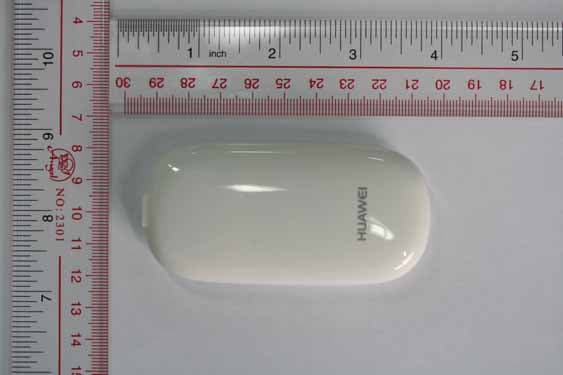
Click to zoom
Application Details
- Equipment Class
- JBP - Part 15 Class B Computing Device Peripheral
- Date of Grant
- Nov 18, 2007
- Application Purpose
- Original Equipment
- Date of Application
- Nov 18, 2007
- Equipment Note
- HSDPA USB Modem
- Company
- Huawei Technologies Co.,Ltd
- Country
- China
Documents & Files
Document Text
Text extracted from the exhibit documents filed with the FCC. Open a document above to read the original.
Users Manual
Copyright © 2007 Huawei Technologies Co., Ltd. All Rights Reserved No part of this manual may be reproduced or transmitted in any form or by any means without prior written consent of Huawei Technologies Co., Ltd. Trademarks and HUAWEI are trademarks of Huawei Technologies Co., Ltd. All other trademarks mentioned in this manual are the property of their respective holders. Notice The information in this manual is subject to change without notice. Every effort has been made in the preparation of this manual to ensure accuracy of the contents, but all statements, information, and recommendations in this manual do not constitute the warranty of any kind, expressed or implied. i Table of Contents Getting Started............................................................................................................1 Preparing E219...........................................................................................................2 Installation Instructions..............................................................................................2 Safety Information......................................................................................................4 1 Thank you for choosing E219 HSDPA USB Modem (hereinafter referred to as the E219) from Huawei. Note: This manual briefs the profile of the E219, and the preparation, and installation process. For the operation of the management program, see User Manual.. Getting Started 1. Getting to Know the E219 The following figure shows the E219 profile. 1 2 3 1) USIM/SIM Card Slot 2) USB Interface 3) Indicator This indicator indicates the status of E219. ü Off: The E219 is powered off. ü Green, Blinking twice every 2.7 seconds: The E219 is searching for a network or no network is available. ü Green, Blinking twice every 2.9 seconds: The GSM network is normal. ü Blue, Blinking once every 2.9 seconds: The WCDMA network is normal. ü Green: GPRS data service is established. ü Cyan: HSDPA data service is established. ü Blue: WCDMA data service is established. 2. Computer Configuration Requirements To use the E219, configure a computer according to the following items: ü Central processing unit (CPU): Pentium 4, 1 GHz or above ü Memory: 128 MB RAM or above ü Hard disk: 50 MB or above ü Operating system (OS): Windows XP, Windows 2000, or Windows Vista ü Universal serial bus (USB) modem interface: USB 2.0 full speed ü Display resolution: 800 % 600 or above (1024 % 768 is recommended) 2 Note: ü Improper configuration may degrade the computer performance. ü For Windows XP, it is recommended to install patches such as Service Pack 2 or above. ü For Windows 2000, it is recommended to install patches such as Service Pack 4 or above. Preparing E219 1) Remove the UMTS subscriber identity module/subscriber identity module (USIM/SIM) card slot from the E219. Then insert the USIM/SIM card into the card slot, as shown in the following figure. Make sure that the USIM/SIM card is fully in place. 2) Insert the card slot into the E219, as shown in the following figure. Installation Instructions The installation procedures of the E219 Manager vary with operating systems (OSs). Refer to the actual installation instructions during the installation process. 1. Connecting the E219 with a Computer Note: First, power on a computer. Then connect the E219 with the computer. Otherwise, the normal installation of the E219 can be affected. The following figure is the sketch map of the data cable. Auxiliary USB data cable Mini-USB Connector Mini-USB data cable 3 1) Plug the mini-universal series bus (USB) connector into the E219. 2) Plug the connectors of the main USB data cable and the auxiliary USB data cable into the USB interfaces of the computer. PC 3) The OS automatically detects and recognizes the new hardware and displays on the status area of the desktop, indicating that the E219 is connected to the computer successfully. 2. Installing the E219 Manager 1) Connect the E219 to a computer. 2) The installation wizard automatically starts. If the installation wizard does not respond, double-click the AutoRun.exe file in the driver path to manually install the E219 Manager. 3) Follow the instructions to install the E219 Manager. Note: Do not disconnect the E219 during the installation process. 4) If the installation succeeds, the shortcut icon of the Manager appears on the desktop. 3. Removing the E219 To remove the E219, use the hardware deleting function of Windows. 1) Double-click on the status area of the desktop; the "Safely Remove Hardware" prompt is displayed. 2) Select "Huawei Mass Storage USB Device" to stop. 3) At the prompt, remove the E219. 4 Safety Information Please read the safety information carefully to ensure the correct and safe use of your wireless device. General Recommendations for Use Always handle your wireless device with care and keep it in a clean and dust-free place. Do not expose your wireless device to open flames or lit tobacco products. ü Always keep your wireless device dry. ü Do not drop, throw or try to bend your wireless device. ü Do not paint or scratch your wireless device. ü Do not attempt to disassemble your wireless device. Doing so will void warranty. Only authorized personnel are allowed to do so. ü Keep your wireless device in normal temperature. Your wireless device can only operate between -5ºC and +55 ºC. ü Use approved accessories only. Do not connect your wireless device to any incompatible products. Obey Laws and Regulations ü Do not operate your wireless device where it may be unsafe to do so or where you are required not to do so. ü To deactivate your wireless device, close all applications using the wireless device first and then remove the wireless device from your PC. ü Obey all local laws, regulations, rules, orders, signs and notices while using the wireless device. Signs about the use of mobile phones should also be obeyed as referring to other wireless equipment including wireless devices. Electronic D…
Text truncated - open the document above for the full version.
Cover Letter(s)
Huawei Technologies Co., Ltd. AddressHuawei Industrial Base,Bantian Longgang,Shenzhen 518129, P.R China Post ZIP518129 Page 1/1 To: CETECOM Fax : NULL From:Zhang Xinghai Fax:0086-755-89652518 Tel:0086-755-89651014 Email address: [email protected] Http: www.huawei.com SubjectLetter of Confidentiality Federal Communications Commission 7435 Oakland Mills Road Columbia, MD 21046 Gentlemen: This letter is to comply with the Code of Federal Regulations Title 47 Section 0.457 and 0.459 pertaining to confidential material. Huawei Technologies Co., Ltd. would like the following documents regarding this submission for FCC ID: QISE219 to be kept confidential: 1. Schematic diagram. 2. Block Diagram. 3. Parts list (BOM) Information. 4. Operational description. 5. Turn-up procedure The above material contains trade secrets or technical data, which would customarily be guarded from competitors. We do not want these documents to be accessible to the general public. Sincerely, For and Behalf of: Huawei Technologies Co., Ltd. Zhang Xinghai EMC Laboratory Manager
External Photos
E219 SECRET Page1,Total 5 External Photos of HUAWEI E219 E219 SECRET Page2,Total 5 E219 SECRET Page3,Total 5 E219 SECRET Page4,Total 5 E219 SECRET Page5,Total 5
ID Label/Location Info
E219 Page1, Total 1 ID Label _E219 E219 Page1, Total 1 ID Label Location_E219
Internal Photos
E219 SECRET Page1,Total 6 Internal Photos of HUAWEI E219 E219 SECRET Page2,Total 6 E219 SECRET Page3,Total 6 E219 SECRET Page4,Total 6 E219 SECRET Page5,Total 6 E219 SECRET Page6,Total 6
Test Report
Report on EMC Test of HSDPA USB MODEM Security Level: for internal use only Report No: SYBH(R)220202007EB- 1 Confidential Information of Huawei. No Distribution without Written Permission Page1, Total27 Report on EMC Test of HSDPA USB MODEM M/N: E219 Report No: SYBH(R)220202007EB-1 Reliability Laboratory of Huawei Technologies Co., Ltd. Address: Huawei Technologies Co., Ltd. Bantian Longgang District Shenzhen, P.R. China Post Code: 518129 Tel: +86 755 89651014 Fax: +86 755 89652518 Report on EMC Test of HUAWEI HSDPA/UMTS/EDGE/GPRS/GSM USB MODEM Report No: SYBH(R)220202007EB-1 Confidential Information of Huawei. No Distribution without Written Permission Page 2, Total27 Notice 1 1. The laboratory has obtained the accreditation of China National Accreditation Committee for Laboratories (CNAL), and accreditation number: L0310. 2. The laboratory has obtained the accreditation of THE AMERICAN ASSOCIATION FOR LABORATORY ACCREDITATION (A2LA), and Accreditation Council Certificate Number: 2174.01. 3. The laboratory has been listed on the US Federal Communications Commission list of test facilities recognized to perform electromagnetic emissions measurements. The site recognition number is 97456. 4. The laboratory has been listed by industry Canada to perform electromagnetic emission measurement. The site recognition number is 6369A-1. 5. The laboratory also has been listed by the VCCI to perform EMC measurements. The accreditation number is R2364, C2583, and T256. 6. The test report is invalid if not marked with "exclusive stamp for the test report". 7. Any copy of the test report is invalid if not re-marked with the "exclusive stamp for the test report". 8. The test report is invalid if not marked with the stamps or the signatures of the persons responsible for performing, revising and approving the test report. 9. The test report is invalid if there is any evidence of erasure and/or falsification. 10. If there is any dissidence for the test report, please file objection to the test centre within 15 days from the date of receiving the test report. 11. Normally, the test report is only responsible for the samples that have undergone the test. 12. Context of the test report cannot be used partially or in full for publicity and/or promotional purposes without previous written approval of the laboratory. Report on EMC Test of HUAWEI HSDPA/UMTS/EDGE/GPRS/GSM USB MODEM Report No: SYBH(R)220202007EB-1 Confidential Information of Huawei. No Distribution without Written Permission Page 3, Total27 Notice 2 Modification Information: Table 1 Modification Information 1 2 3 4 5 6 Modification Information 7 Report on EMC Test of HUAWEI HSDPA/UMTS/EDGE/GPRS/GSM USB MODEM Report No: SYBH(R)220202007EB-1 Confidential Information of Huawei. No Distribution without Written Permission Page 4, Total27 REPORT ON HSDPA USB MODEM M/N: E219 REGULATION FCC CFR47 Part 15: Subpart B; FCC CFR47 Part 24 Subpart E;: START OF TEST Sep.10, 2007 END OF TEST Sep.20, 2007 Final Judgement: Pass Approver 2007-09-21 张兴海 Date Name Signature Reviewer 2007-09-21 余 辉 Date Name Signature Operator 2007-09-21 张 飞 Date Name Signature Report on EMC Test of HUAWEI HSDPA/UMTS/EDGE/GPRS/GSM USB MODEM Report No: SYBH(R)220202007EB-1 Confidential Information of Huawei. No Distribution without Written Permission Page 5, Total27 REPORT BODY CONTENT 1 Status.........................................................................................................................................6 1.1 Product Information....................................................................................................................6 1.2 Applied Standard.......................................................................................................................6 1.3 Test Site.....................................................................................................................................7 1.4 Test environment condition........................................................................................................7 2 Summary of Results..................................................................................................................8 3 Equipment Specification............................................................................................................9 3.1 General Description...................................................................................................................9 3.2 Technical Data...........................................................................................................................9 3.3 Sub-Assembly Identity.............................................................................................................10 4 System Configuration during EMC Test..................................................................................11 4.1 Cables Used during Test.........................................................................................................11 4.2 Associated Equipment Used during Test................................................................................11 4.3 Test Configurations and Test Mode.........................................................................................11 4.4 Test conditions and test Connections......................................................................................11 5 Electromagnetic Interference (EMI).........................................................................................13 5.1 Radiated Disturbance 30MHz to 1000MHz.............................................................................13 5.2 Conducted Disturbance 0.15 MHz to 30MHz..........................................................................14 5.3 Radiated Spurious Emissions..................................................................................................15 6 Main Test Instruments....................................................................................…
Text truncated - open the document above for the full version.
Test Setup Photos
Report on EMC Test of HUAWEI HSDPA/UMTS/EDGE/GPRS/GSM USB MODEM Report No: SYBH(R)220202007EB-1 Confidential Information of Huawei. No Distribution without Written Permission Page 25, Total27 9 Photographs of Test Set-ups 9.1 Radiated Emissions Radiated Disturbance Emission 9.2 Radiated Spurious Emissions Radiated Spurious Emission 30M~2GHz Report on EMC Test of HUAWEI HSDPA/UMTS/EDGE/GPRS/GSM USB MODEM Report No: SYBH(R)220202007EB-1 Confidential Information of Huawei. No Distribution without Written Permission Page 26, Total27 Radiated Spurious Emission 2G~18GHz Radiated Spurious Emission 18G~26.5GHz Report on EMC Test of HUAWEI HSDPA/UMTS/EDGE/GPRS/GSM USB MODEM Report No: SYBH(R)220202007EB-1 Confidential Information of Huawei. No Distribution without Written Permission Page 27, Total27 9.3 Conducted Emissions Conducted Emissions of AC Power Port ------------------------------------------------------------------------------------------- END
Contact Information
Applicant
Zhang Xinghai
Test Firm
Huawei Technologies Co., LTDZhou Fengyum
Technical Specifications
| # | Rule Parts | Frequency Range | Power Output |
|---|---|---|---|
| 1 | 15B | - | - |
Other Applications from Huawei Technologies Co.,Ltd

QISSUN2000
Jun 27, 2021Solar Inverter
Equipment Class
DTS - Digital Transmission System
QISCP81-1
Oct 22, 2020Watch Wireless Charger
Equipment Class
DCD - Part 15 Low Power Transmitter Below 1705 kHz
QISRRU3278
Sep 02, 2020Remote Radio Unit
Equipment Class
CBD - Citizens Band Category A and B Devices
QISR2561
Jul 11, 2020Indoor Router
Equipment Class
DTS - Digital Transmission System
QISSMARTLOGGER310
Mar 23, 2020Solar Smart Monitor & Data Logger
Equipment Class
DTS - Digital Transmission System