QISETS8221Cordless Phone
Huawei Technologies Co.,Ltd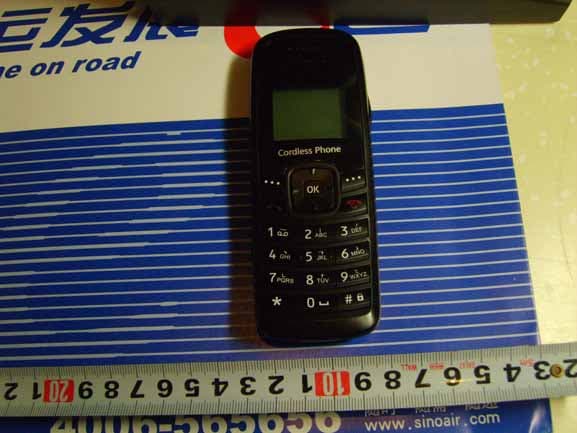
Click to zoom
Application Details
- Equipment Class
- JBP - Part 15 Class B Computing Device Peripheral
- Date of Grant
- Jul 16, 2009
- Application Purpose
- Original Equipment
- Date of Application
- Jul 16, 2009
- Equipment Note
- Cordless Phone
- Company
- Huawei Technologies Co.,Ltd
- Country
- China
Documents & Files
Document Text
Text extracted from the exhibit documents filed with the FCC. Open a document above to read the original.
Users Manual
ETS8021 8221 8521 Cordless Phone Copyright © 2007 Huawei Technologies Co., Ltd. and other Huawei trademarks are the trademarks or registered trademarks of Huawei Technologies Co., Ltd. in the People’s Republic of China and certain other countries. All other trademarks mentioned in this manual are the property of their respective holders. The information in this manual is subject to change without notice. Every effort has been made in the preparation of this manual to ensure accuracy of the contents, but all statements, information, and recommendations in this manual do not constitute the warranty of any kind, express or implied. Huawei Technologies Co., Ltd. Address: Huawei Industrial Base, Bantian, Longgang, Shenzhen 518129, People's Republic of China Te l : +86-755-28780808 Global Hotline: +86-755-28560808 E-mail: [email protected] Website: www.huawei.com Your Cordless Phone Earpiece # Key Key End/Power Key Microphone Number Keys Left Soft Key Send Key Screen Right Soft Key Navigation Key Charger Interface Headset Jack 1 Note z This is a sketch. Your cordless phone may be different. It is subject to your actual one. z To achieve the optimal effect, use the cordless phone away from the charger stand. z FCC Class B Statement: z This equipment has been tested and found to comply with the limits for a Class B digital device, pursuant to part 15 of the FCC Rules. These limits are designed to provide reasonable protection against harmful interference in a residential installation. This equipment generates, uses and can radiate radio frequency energy and, if not installed and used in accordance with the instructions, may cause harmful interference to radio communications. However, there is no guarantee that interference will not occur in a particular installation. If this equipment does cause harmful interference to radio or television reception, which can be determined by turning the equipment off and on, the user is encouraged to try to correct the interference by one or more of the following measures: z —Reorient or relocate the receiving antenna. z —Increase the separation between the equipment and receiver. z —Connect the equipment into an outlet on a circuit different from that to which the receiver is connected. z —Consult the dealer or an experienced radio/ TV technician for help. 2 Keys and Functions Press... To... z View the dialed calls in the standby mode. z Make or answer a call. z Power on the cordless phone by pressing and holding it. z Power off the cordless phone by pressing and holding it in standby mode. z End a call or reject an incoming call. z Return to the home screen. Select the option displayed on the lower left corner of the screen. Select the option displayed on the lower right corner of the screen. z Display the Schedule interface (up key ), the FM Radio interface (down key), the Call History interface (left key), and the Message Edit interface (right key) in the standby mode. z During a call, press left key or right key to adjust the volume of the earpiece, or press up key or down key to adjust the volume of the microphone. Number Keys z Enter numbers and characters. z Speed-dial cordless phone numbers in the standby mode (by pressing and holding the 1-9 keys). z Select a submenu item labeled with the corresponding number. 3 Press... To... * key Perform different operations for different functions of the cordless phone. # key z Lock the keypad in the standby mode (by pressing and holding it). z Perform different operations for different functions of the cordless phone. Screen Icons Icon Description IconDescription Network signal strength Battery power level Calling Alarm clock is on z Message received z Memory for messages is full, when the icon is blinking Keypad is locked / Remind by sound / Without sound remind Remind by vibration 4 5 Menu Tree Phone Book Messages CallHistory 1. Search 2. Add New 3. Groups 4. Speed Dial 5. Copy All(*) 6. Delete All 7. My Phone Num 8. Memory Status 1. Write Message 2. Inbox 3. Outbox 4. Draft 5. Voice Mail 6. Message Settings 7. Delete All 1. Missed Calls 2. Received Calls 3. Dialed Calls 4. Call Duration 5. Delete All Fun&Utility Profiles Settings 1. Alarm 2. Schedule 3. Calculator 4. Stopwatch 5. World Clock 6. Line Game 7. Smash Game 1. General 2. Silent 3. Outdoor 4. Headset 5. Quiet 1. Display 2. Call Settings 3. Phone Settings 4. Security FM Radio (*) Copy All(*): If the UIM card is available, the Copy All Sub-item is displayed under the Phone Book item. Note z FM Radio function is optional. Whether your cordless phone has this function, please contact your network operator. z Please use a headset compatible with your cordless phone when enjoying the FM Radio function. z The USB connector is used only for charging. 6 Installing the UIM Card and Battery Consult the network operator if a UIM card is needed. Make sure that the golden area on the UIM card is facing downwards and the cut-off edge is correctly fit to that of the card holder. Charging the Battery 1. Connect the cordless phone to the charger stand. 2. Connect one power adapter connector to the charger stand. 3. Connect the charger to an AC power socket. During the charging, the animation of charging icon is displayed. 4. When the cordless phone is fully charged, disconnect the charger from the AC power socket first. Then disconnect the charger stand from the charger. 5. When the charging icon becomes static, the cordless phone is fully charged. Using the Function Menu 1. In the standby mode, press to display the Menu interface. 2. Press Up or Down key to scroll in the menu. 3. Press to display the menu. 4. Display the submenu in either of the ways: 7 z Press Up or Down key to scroll to a submenu item and press to select the submenu. z Press the Number key corresponding to the number of a submenu to select it. 5. Press to return to the previous menu or return to the home screen. 6. Press to return to the home screen. Making a Call 1. In the standby mode, enter a ph…
Text truncated - open the document above for the full version.
External Photos
HUAWEI ETS8221 Cordless Phone SECRET Page1, Total5 Photo documentation of external of product HUAWEI ETS8221 Cordless Phone SECRET Page2, Total5 HUAWEI ETS8221 Cordless Phone SECRET Page3, Total5 HUAWEI ETS8221 Cordless Phone SECRET Page4, Total5 HUAWEI ETS8221 Cordless Phone SECRET Page5, Total5 -
ID Label/Location Info
HUAWEI ETS8221 Cordless Phone SECRET Page1, Total1 ETS8221 ID Location
Test Report
EMC Test Report Product Name: Cordless Phone Model Number: ETS8221 Report No: SYBHZ(R)E053062009EB-1 Reliability Laboratory of Huawei Technologies Co., Ltd. Huawei Base, Bantian, Longgang District, Shenzhen 518129, P.R. China Tel: +86 755 28780808 Fax: +86 755 89652518 Notice 1 Report No: SYBHZ(R)E053062009EB-1 Confidential Information of Huawei. No Distribution without Written Permission Page1, Total22 Report onEMC Test of Cordless Phone Report No: SYBHZ(R)E053062009EB-1 Confidential Information of Huawei. No Distribution without Written Permission Page2, Total22 1. The laboratory has obtained the accreditation of China National Accreditation Service for Conformity Assessment (CNAS), and accreditation number: L0310. 2. The laboratory has obtained the accreditation of THE AMERICAN ASSOCIATION FOR LABORATORY ACCREDITATION (A2LA), and Accreditation Council Certificate Number: 2174.01. 3. The laboratory has been listed on the US Federal Communications Commission list of test facilities recognized to perform electromagnetic emissions measurements. The site recognition number is 97456. 4. The laboratory has been listed by industry Canada to perform electromagnetic emission measurement. The site recognition number is 6369A-1. 5. The laboratory also has been listed by the VCCI to perform EMC measurements. The accreditation number is R2364, C2583, and T256. 6. The test report is invalid if not marked with "exclusive stamp for the test report". 7. The test report is invalid if not marked with the stamps or the signatures of the persons responsible for performing, revising and approving the test report. 8. The test report is invalid if there is any evidence of erasure and/or falsification. 9. If there is any dissidence for the test report, please file objection to the test centre within 15 days from the date of receiving the test report. 10. Normally, the test report is only responsible for the samples that have undergone the test. 11. Context of the test report cannot be used partially or in full for publicity and/or promotional purposes without previous written approval of the laboratory. Report onEMC Test of Cordless Phone Notice 2 Modification Information: Table 1 Modification Information 1 2 3 4 5 6 Modification Information 7 Report No: SYBHZ(R)E053062009EB-1 Confidential Information of Huawei. No Distribution without Written Permission Page3, Total22 Report onEMC Test of Cordless Phone REPORT ON Cordless Phone M/N: ETS8221 REGULATION FCC CFR47 Part 15: Subpart B; FCC CFR47 Part 22: Subpart H; START OF TEST Jun.06, 2009 END OF TEST Jun.16, 2009 Final Judgement: Pass Approver 2009-06-25 张兴海 Date Name Signature Reviewer 2009-06-17 余 辉 Date Name Signature 2009-06-15 徐广义 Date Name Signature Report No: SYBHZ(R)E053062009EB-1 Confidential Information of Huawei. No Distribution without Written Permission Page4, Total22 Report onEMC Test of Cordless Phone Report No: SYBHZ(R)E053062009EB-1 Confidential Information of Huawei. No Distribution without Written Permission Page5, Total22 REPORT BODY CONTENT 1.1 Product Information.......................................................................................................................6 1.2 Applied Standard ..........................................................................................................................6 1.3 Test Site ........................................................................................................................................7 1.4 Test environment condition...........................................................................................................7 3.1 General Description ......................................................................................................................9 3.2 Sub-Assembly Identity ..................................................................................................................9 4.1 Cables Used during Test ............................................................................................................11 4.2 Associated Equipment Used during Test ...................................................................................11 4.3 Test Configurations and Test Mode............................................................................................11 4.4 Test conditions and test Connections.........................................................................................11 5.1 Radiated Disturbance 30MHz to 1000MHz................................................................................13 5.2 Conducted Disturbance 0.15 MHz to 30MHz.............................................................................14 5.3 Radiated Spurious Emissions .....................................................................................................14 8.1 Radiated Disturbance .................................................................................................................19 8.2 Conducted Disturbance ..............................................................................................................20 8.3 Radiated Spurious Emission..................................................................................................... ..21 Report onEMC Test of Cordless Phone Report No: SYBHZ(R)E053062009EB-1 Confidential Information of Huawei. No Distribution without Written Permission Page6, Total22 1 Status 1.1 Product Information CLIENT: Huawei Technologies Co., Ltd. ADDRESS: Bantian Longgang District Shenzhen, P.R. China MANUFACTURING DESCRIPTION Cordless Phone MANUFACTURERS MODEL NUMBER ETS8221 1.2 Applied Standard FCC Measurement Specification FCC Limits Part(s) Description Result - 15.107 Conducted Emission at Power Port PASS - 15.109 Radiated Emission of Enclosure in Idle Mode PASS 2.1051 22.917 Radiated Spurious Emission PASS Report onEMC Test of Cordless Phone Report No: SYBHZ(R)E053062009EB-1 Confidential Information of Huawei. No Distribution without Written Permission Page…
Text truncated - open the document above for the full version.
Contact Information
Applicant
Zhang Xinghai
Test Firm
Huawei Technologies Co., LTDZhou Fengyum
Technical Specifications
| # | Rule Parts | Frequency Range | Power Output |
|---|---|---|---|
| 1 | 15B | - | - |
Other Applications from Huawei Technologies Co.,Ltd

QISSUN2000
Jun 27, 2021Solar Inverter
Equipment Class
DTS - Digital Transmission System
QISCP81-1
Oct 22, 2020Watch Wireless Charger
Equipment Class
DCD - Part 15 Low Power Transmitter Below 1705 kHz
QISRRU3278
Sep 02, 2020Remote Radio Unit
Equipment Class
CBD - Citizens Band Category A and B Devices
QISR2561
Jul 11, 2020Indoor Router
Equipment Class
DTS - Digital Transmission System
QISSMARTLOGGER310
Mar 23, 2020Solar Smart Monitor & Data Logger
Equipment Class
DTS - Digital Transmission System