QISG7300AGSM Mobile Phone
Huawei Technologies Co.,Ltd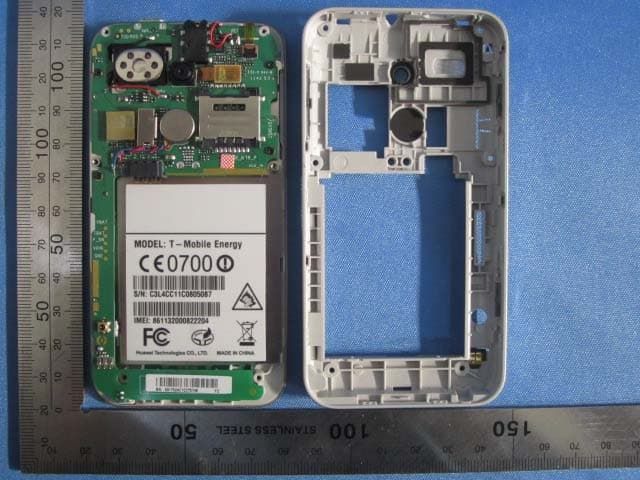
Click to zoom
Application Details
- Equipment Class
- DSS - Part 15 Spread Spectrum Transmitter
- Date of Grant
- Jan 16, 2012
- Application Purpose
- Original Equipment
- Date of Application
- Jan 16, 2012
- Equipment Note
- GSM Mobile Phone
- Frequency Range
- 2402.00000000 - 2480.00000000
- Company
- Huawei Technologies Co.,Ltd
- Country
- China
Documents & Files
Document Text
Text extracted from the exhibit documents filed with the FCC. Open a document above to read the original.
Users Manual
Copyright © Huawei Technologies Co., Ltd. 2011. All rights reserved. Trademarks and Permissions , , and are trademarks or registered trademarks of Huawei Technologies Co., Ltd. Other trademarks, product, service and company names mentioned are the property of their respective owners. NO WARRANTY THE CONTENTS OF THIS MANUAL ARE PROVIDED “AS IS”. EXCEPT AS REQUIRED BY APPLICABLE LAWS, NO WARRANTIES OF ANY KIND, EITHER EXPRESS OR IMPLIED, INCLUDING BUT NOT LIMITED TO, THE IMPLIED WARRANTIES OF MERCHANTABILITY AND FITNESS FOR A PARTICULAR PURPOSE, ARE MADE IN RELATION TO THE ACCURACY, RELIABILITY OR CONTENTS OF THIS MANUAL. TO THE MAXIMUM EXTENT PERMITTED BY APPLICABLE LAW, IN NO CASE SHALL HUAWEI TECHNOLOGIES CO., LTD BE LIABLE FOR ANY SPECIAL, INCIDENTAL, INDIRECT, OR CONSEQUENTIAL DAMAGES, OR LOST PROFITS, BUSINESS, REVENUE, DATA, GOODWILL OR ANTICIPATED SAVINGS. i Contents 1 Getting to Know Your Phone................................................1 Your Phone ........................................................................................... 1 Keys and Functions ........................................................................... 2 Main Screen Icons ............................................................................. 3 2 Getting Started .......................................................................5 Installing the SIM Card and the Battery................................... 5 Removing the Battery and the SIM Card................................. 5 Installing a microSD Card............................................................... 6 Charging the Battery........................................................................ 6 Calibrating the Screen ..................................................................... 7 Accessing a Shortcut Menu........................................................... 7 Working with the Main Menu ...................................................... 8 Viewing Other Parts of the Home Screen ............................... 9 Phone Lock .........................................................................................10 Mass Storage .....................................................................................11 PIN and PUK ......................................................................................12 Locking the Screen..........................................................................13 3 Voice Services ...................................................................... 14 Making a Call.....................................................................................14 Receiving a call.................................................................................15 4 Text Input ............................................................................. 15 Changing the Text Input Mode..................................................15 ii Multi-Tap Input Mode ...................................................................16 Predictive Input Mode ...................................................................17 Entering Digits ..................................................................................18 Entering Symbols .............................................................................18 5 Message ................................................................................ 19 Writing and Sending a Text Message .....................................19 Writing and Sending a Multimedia Message ......................19 Backuping or Restoring Text Message and Multimedia message...............................................................................................21 Viewing the Inbox and Sent Messages ..................................22 6 Email...................................................................................... 23 Creating an Email Account ..........................................................23 Activating an Email Account.......................................................23 Writing and Sending an Email ...................................................23 7 Voice Mail............................................................................. 24 8 Phonebook ........................................................................... 25 Creating a Contact ..........................................................................25 Searching for a Contact ................................................................25 Setting the Preferred Storage.....................................................26 Copying Contacts ............................................................................26 Contact Group...................................................................................27 Backuping or Restoring Contacts .............................................28 9 Multimedia ........................................................................... 28 Camera .................................................................................................28 Video Recorder.................................................................................29 iii Media Player ......................................................................................30 Image Viewer ....................................................................................31 Photo Editor .......................................................................................31 FM Radio .............................................................................................32 Sound Recorder................................................................................33 Ebook Reader ....................................................................................33 10 WAP Browser ..................................................................... 34 Editing the Data Account .............................................................34 Connecting to the Network ........................................................35 Co…
Text truncated - open the document above for the full version.
Cover Letter(s)
Declaration Letter To whom it may concern: We, HUAWEI TECHNOLOGIES CO., LTD declared that our product GSM Mobile Phone, item No.: HUAWEI G7300 were identical inside, since the electrical circuit design, layout, components used and internal wiring were identical for the above items between single SIM card mobile phone and double SIM card mobile phone. With only difference being the SIM card slot, the single SIM card mobile phone has one SIM card slot, the double SIM card mobile phone has two SIM card slots. Sincerely yours Client’s signature Client’s name / title Zhang Xinghai/Manager Contact information / address Tel:0755-89650288 Administration Building, Huawei Base, Bantian, Longgang District, Shenzhen 518129
Internal Photos
Double SIM card mobile phone Single SIM card mobile phone
Test Setup Photos
Radiated Emission Conducted Emissiion
Contact Information
Applicant
Zhang Xinghai
Technical Contact
Global United Technology Services Co., Ltd.Hans Hu
[email protected]+86-0755-2779 8480
2nd Floor, Block No.2, Laodong Industrial Zone · Shenzhen · China
Non-Technical Contact
Global United Technology Services Co., Ltd.Annie Long
[email protected]+86-0755-2779 8480
Test Firm
Global United Technology Service Co., LtdRobinson Lo
Technical Specifications
| # | Rule Parts | Frequency Range | Power Output |
|---|---|---|---|
| 1 | 15C | 2.40 GHz - 2.48 GHz | 1.13 mW |
Other Applications from Huawei Technologies Co.,Ltd

QISSUN2000
Jun 27, 2021Solar Inverter
Equipment Class
DTS - Digital Transmission System
QISCP81-1
Oct 22, 2020Watch Wireless Charger
Equipment Class
DCD - Part 15 Low Power Transmitter Below 1705 kHz
QISRRU3278
Sep 02, 2020Remote Radio Unit
Equipment Class
CBD - Citizens Band Category A and B Devices
QISR2561
Jul 11, 2020Indoor Router
Equipment Class
DTS - Digital Transmission System
QISSMARTLOGGER310
Mar 23, 2020Solar Smart Monitor & Data Logger
Equipment Class
DTS - Digital Transmission System