QISH883GHSPA/UMTS/GPRS/GSM/EDGE Mobile Phone with BT
Huawei Technologies Co.,Ltd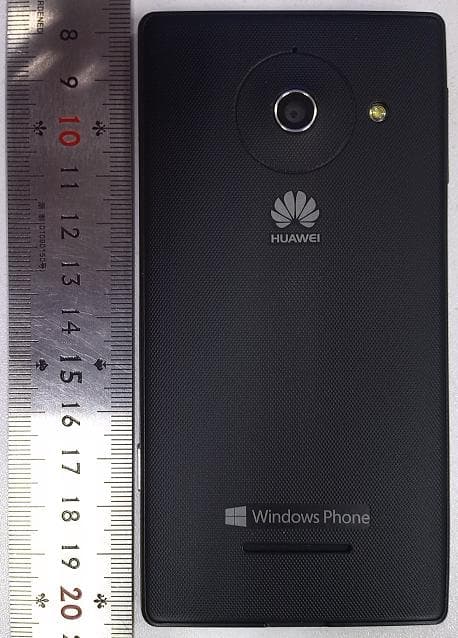
Click to zoom
Application Details
- Equipment Class
- DSS - Part 15 Spread Spectrum Transmitter
- Date of Grant
- Feb 19, 2013
- Application Purpose
- Original Equipment
- Date of Application
- Feb 19, 2013
- Equipment Note
- HSPA/UMTS/GPRS/GSM/EDGE Mobile Phone with BT
- Frequency Range
- 2402.00000000 - 2480.00000000
- Company
- Huawei Technologies Co.,Ltd
- Country
- China
Documents & Files
Document Text
Text extracted from the exhibit documents filed with the FCC. Open a document above to read the original.
Users Manual
Welcome to HUAWEI Model: H883G TracFone part number: H02230TTV HUAWEI W1 Quick Start COA label Earpiece Volume button Start button Back button Microphone Micro USB port Search button Camera button Proximity sensor Status indicator Front camera Power buttonHeadset jack 1 Getting to know your phone From any screen, you can: >To return to the previous screen or exit the current application, tap . >To view running applications, tap and hold . >To return to the Start screen, tap . >To open the voice controller, tap and hold . >To open Bing search, tap . >To take a screenshot, press the power button and tap simultaneously. 1 Installation 1 Open the battery cover. 2 Insert the SIM card and microSD card into their slots with the metal contacts facing down. 3 Install the battery. 4 Close the battery cover. 12 34 a b a Powering on Press and hold the power button until your phone vibrates. a Powering off Press and hold the power button until the slide down to power off message is displayed on the screen. Slide down to power off your phone. a Locking the screen When not using your phone, press the power button to lock its screen. If idle for a specified period, your phone will automatically lock its screen. a Unlocking the screen Press the power button to wake the screen. Then slide your finger up the screen to unlock it. 1 Get started 1 Sign in to your phone You need to sign in with a Microsoft account to do all kinds of things on your phone. Use it to: >Download apps, music, and games from the Windows Phone Store. >Create backups of your phone settings to guard against mishaps. >Play Xbox games. >Use find my phone to ring, lock, or erase your phone, or find it on a map. >Get your Facebook, Twitter, and LinkedIn feeds on your People Hub. >Automatically upload your photos and videos to SkyDrive. >Listen to music using an Xbox Music Pass * . A Microsoft account is the email address and password you use to sign in to Hotmail, Xbox, Windows, Messenger, SkyDrive, and more. If you're not sure whether you already have one, or if you have more than one and need to choose between them, go to windowsphone.com to learn more. * Xbox Music Pass is a monthly music subscription service. Some Windows Phone Store content may not be available via Xbox Music Pass and may vary over time. 1 Make it yours Pin just about anything you want to your Start screen: apps, songs, map locations, favorite websites, OneNote notes, photo albums, and a lot more. When you pin a contact to Start, you'll get their Facebook, Twitter, and LinkedIn updates right from that Tile, plus see when they've called or sent you any messages. And it's like speed dial: calling them—or texting them or emailing them—is just a tap away. >To pin most things to Start, tap and hold the item until the menu appears, or tap > pin to start. For others, you can just tap pin . >To move, remove, or resize a Tile, just tap and hold it, then arrange it however you'd like. a Choose your color Choose a theme color and it'll show up all around your phone: on Start, in your App list, in Messaging, and more. You can also make your background either white or black. 1. On Start , flick left to the App list, then tap Settings . 2. Ta p theme, then tap Accent color or Background to choose your look. a Pick ringtones and sounds You can assign ringtones to people and choose sounds for alerts. Pick just the right chirps, jingles, rings, or songs to suit your tastes. To change a ringtone for a contact: 1. On Start, tap People, then flick to all. 2. Tap the contact you want to change, then tap . 3. Ta p ringtone, then tap the ringtone you want to assign. To change any other ringtone or alert: 1. On Start, flick left to the App list, then tap Settings > ringtones + sounds . 2. Tap the type of ringtone or alert you want to change, then choose the sound you want to use. You can also create your own ringtones. For more information, go to windowsphone.com. 1 See what's new, at a glance You don't even have to unlock your phone to get a picture of what's happening in your day. And you get to choose what you want to see, including: >Phone calls and voicemails. >Text messages. >Email messages. >Upcoming calendar appointments. >Game notifications. >Notifications from some of the apps you get in the Store. You can also pick the image that greets you when you turn on your phone. Pick one you like best, or show an image from Bing. If you're playing music, we can also show you a picture of the artist. To choose what you'd like to see on your lock screen: 1. On Start, flick to the App list, then tap Settings . 2. Ta p lock screen. 1 People a Get your contacts on your phone Adding your email accounts and social networks—Facebook, Twitter, and LinkedIn—is the easiest way to get your contacts set up on your phone. You'll see your friends' updates in the People Hub, you can browse their albums in the Photos Hub, and your friends' Tiles will show what they're up to. Plus, you'll see when anyone replies to something you've posted on your Me Tile. To set up an account: 1. On Start, flick left to the App list, then tap Settings . 2. Ta p email + accounts. Getting your contacts from your old phone is also easy. With your old SIM card in your new phone, go to Settings , flick left to applications, tap people, then tap import SIM contacts. If you need help getting other sorts of contacts on your phone, go to windowsphone.com. a Create new contacts It's easy to quickly create a contact from a phone number. Just tap the number in your call history, then tap save . Or, to start from scratch, tap new in the People Hub contact list. If you save a contact to your Microsoft account, it'll be synced to the cloud automatically. That way, your contacts are backed up if you lose your phone, and you can see them from anywhere you sign in to Hotmail or Outlook.com. a Rooms and Groups Rooms and Groups are a great way to stay in touch with the people who matter most to you. With Rooms, you send a text message inviting …
Text truncated - open the document above for the full version.
Cover Letter(s)
Huawei Technologies Co.,Ltd. Federal Communications Commission 2013-01-31 7435 Oakland Mills Road Columbia MD 21046 Subject: Request for Confidentiality FCC ID: QISH883G To Whom It May Concern: Pursuant to the provisions of Sections 0.457 and 0.459 of the Commission’s rules (47 CFR §§ 0.457, 0.459), we are requesting the Commission to withhold the following attachments as confidential document from public disclosure indefinitely. Schematic Diagram Block Diagram Operational Description Bom List Tune-Up Procedure Above mentioned document contains detailed system and equipment description are considered as proprietary information in operation of the equipment. The public disclosure of above documents might be harmful to our company and would give competitor an unfair advantage in the market. ***************************************************************************** In additional to above mentioned documents, pursuant to Public Notice DA 04-1705 of the Commission’s policy, in order to comply with the marketing regulations in 47 CFR §2.803 and the importation rules in 47 CFR §2.1204, while ensuring that business sensitive information remains confidential until the actual marketing of newly authorized devices. We are requesting the Commission withholds the following documents from public viewing until 2013-05-30: External Photos Internal Photos Test Setup Photos User Manual ****************************************************************************** It is our understanding that all measurement test reports, FCC ID label format and correspondent during certification review process cannot be granted as confidential documents and those information will be available for public review once the grant of equipment authorization is issued. Best Regards Zhang Xinghai EMC Laboratory Manager Huawei Technologies Co., Ltd. E-mail: [email protected] Fax: 0086-0755-89650226
External Photos
HUAWEI H883G, HUAWEI W1-U34, H883G, W1-U34; HSPA/UMTS/GPRS/GSM/EDGE Mobile Phone with Bluetooth; Ascend W1 SECRET Page1,Total 5 External Photos of HUAWEI H883G, HUAWEI W1-U34, H883G, W1-U34 HUAWEI H883G, HUAWEI W1-U34, H883G, W1-U34; HSPA/UMTS/GPRS/GSM/EDGE Mobile Phone with Bluetooth; Ascend W1 SECRET Page2,Total 5 HUAWEI H883G, HUAWEI W1-U34, H883G, W1-U34; HSPA/UMTS/GPRS/GSM/EDGE Mobile Phone with Bluetooth; Ascend W1 SECRET Page3,Total 5 HUAWEI H883G, HUAWEI W1-U34, H883G, W1-U34; HSPA/UMTS/GPRS/GSM/EDGE Mobile Phone with Bluetooth; Ascend W1 SECRET Page4,Total 5 HUAWEI H883G, HUAWEI W1-U34, H883G, W1-U34; HSPA/UMTS/GPRS/GSM/EDGE Mobile Phone with Bluetooth; Ascend W1 SECRET Page5,Total 5
ID Label/Location Info
HUAWEI H883G, HUAWEI W1-U34, H883G, W1-U34; HSPA/UMTS/GPRS/GSM/EDGE Mobile Phone with Bluetooth; Ascend W1 SECRET Page1, Total 4 Label Location HUAWEI H883G, HUAWEI W1-U34, H883G, W1-U34 HUAWEI H883G, HUAWEI W1-U34, H883G, W1-U34; HSPA/UMTS/GPRS/GSM/EDGE Mobile Phone with Bluetooth; Ascend W1 SECRET Page2, Total 4 HUAWEI H883G, HUAWEI W1-U34, H883G, W1-U34; HSPA/UMTS/GPRS/GSM/EDGE Mobile Phone with Bluetooth; Ascend W1 SECRET Page3, Total 4 HUAWEI H883G, HUAWEI W1-U34, H883G, W1-U34; HSPA/UMTS/GPRS/GSM/EDGE Mobile Phone with Bluetooth; Ascend W1 SECRET Page4, Total 4 HUAWEI H883G, HUAWEI W1-U34, H883G, W1-U34; HSPA/UMTS/GPRS/GSM/EDGE Mobile Phone with Bluetooth; Ascend W1 SECRET Page5, Total 4 The label is in the battery compartment. HUAWEI H883G, HUAWEI W1-U34, H883G, W1-U34; HSPA/UMTS/GPRS/GSM/EDGE Mobile Phone with Bluetooth; Ascend W1 SECRET Page6, Total 4 HUAWEI H883G, HUAWEI W1-U34, H883G, W1-U34; HSPA/UMTS/GPRS/GSM/EDGE Mobile Phone with Bluetooth; Ascend W1 SECRET Page7, Total 4 HUAWEI H883G, HUAWEI W1-U34, H883G, W1-U34; HSPA/UMTS/GPRS/GSM/EDGE Mobile Phone with Bluetooth; Ascend W1 SECRET Page8, Total 4 HUAWEI H883G, HUAWEI W1-U34, H883G, W1-U34; HSPA/UMTS/GPRS/GSM/EDGE Mobile Phone with Bluetooth; Ascend W1 SECRET Page9, Total 4
ID Label/Location Info
Huawei Technologies Co.,Ltd Bantian, Longgang District, Shenzhen, 518129 Guangdong, P.R.China Tel: +86-755-2878-1879 ; Fax: +86-755-2878-1889 Date: February 5, 2013 Statement We, Huawei Technologies Co.,Ltd, states that our device, FCC ID: QISH883G, has a battery, But the battery will not be placed in the battery compartment when delivery, it is visible to the users as they purchase the products and install the battery. For and Behalf of: Huawei Technologies Co., Ltd. Zhang Xinghai EMC Laboratory Manager
Internal Photos
HUAWEI H883G, HUAWEI W1-U34, H883G, W1-U34; HSPA/UMTS/GPRS/GSM/EDGE Mobile Phone with Bluetooth; Ascend W1 SECRET Page1,Total 9 Internal Photos of HUAWEI H883G, HUAWEI W1-U34, H883G, W1-U34 HUAWEI H883G, HUAWEI W1-U34, H883G, W1-U34; HSPA/UMTS/GPRS/GSM/EDGE Mobile Phone with Bluetooth; Ascend W1 SECRET Page2,Total 9 HUAWEI H883G, HUAWEI W1-U34, H883G, W1-U34; HSPA/UMTS/GPRS/GSM/EDGE Mobile Phone with Bluetooth; Ascend W1 SECRET Page3,Total 9 HUAWEI H883G, HUAWEI W1-U34, H883G, W1-U34; HSPA/UMTS/GPRS/GSM/EDGE Mobile Phone with Bluetooth; Ascend W1 SECRET Page4,Total 9 HUAWEI H883G, HUAWEI W1-U34, H883G, W1-U34; HSPA/UMTS/GPRS/GSM/EDGE Mobile Phone with Bluetooth; Ascend W1 SECRET Page5,Total 9 HUAWEI H883G, HUAWEI W1-U34, H883G, W1-U34; HSPA/UMTS/GPRS/GSM/EDGE Mobile Phone with Bluetooth; Ascend W1 SECRET Page6,Total 9 HUAWEI H883G, HUAWEI W1-U34, H883G, W1-U34; HSPA/UMTS/GPRS/GSM/EDGE Mobile Phone with Bluetooth; Ascend W1 SECRET Page7,Total 9 HUAWEI H883G, HUAWEI W1-U34, H883G, W1-U34; HSPA/UMTS/GPRS/GSM/EDGE Mobile Phone with Bluetooth; Ascend W1 SECRET Page8,Total 9 HUAWEI H883G, HUAWEI W1-U34, H883G, W1-U34; HSPA/UMTS/GPRS/GSM/EDGE Mobile Phone with Bluetooth; Ascend W1 SECRET Page9,Total 9
Test Report
FCC RF Test Report Product Name: HSPA/UMTS/GPRS/GSM/EDGE Mobile Phone with Bluetooth; Ascend W1 Product Model: HUAWEI H883G, HUAWEI W1-U34, H883G, W1-U34 Report Number: SYBH(Z-RF)020122012-2002 FCC ID: QISH883G Reliability Laboratory of Huawei Technologies Co., Ltd. Administration Building, Headquarters of Huawei Technologies Co., Ltd., Bantian, Longgang District, Shenzhen, 518129, P.R.C Tel: +86 755 28780808 Fax: +86 755 89652518 RF Test Report of H883G FCC ID: QISH883G Report No: SYBH(Z-RF)020122012-2002 Huawei Proprietary and Confidential Copyright © Huawei Technologies Co., Ltd. Page 2 of 18 Notice 1. The laboratory has Passed the accreditation by China National Accreditation Service for Conformity Assessment (CNAS). The accreditation number is L0310. 2. The laboratory has Passed the accreditation by The American Association for Laboratory Accreditation (A2LA). The accreditation number is 2174.01. 3. The laboratory has been listed by the US Federal Communications Commission to perform electromagnetic emission measurements. The site recognition number is 97456. 4. The laboratory has been listed by Industry Canada to perform electromagnetic emission measurements. The recognition numbers of test site are 6369A-2. 5. The laboratory has been listed by the VCCI to perform EMC measurements. The accreditation numbers of test site No.1 are R-2364, G-415, C-2583, and T-256, and the accreditation numbers of test site No.2 are R-3760, G-485, C-4210 and T-1237. 6. The test report is invalid if not marked with the signatures of the persons responsible for preparing and approving the test report. 7. The test report is invalid if there is any evidence of erasure and/or falsification. 8. The test report is only valid for the test samples. 9. Content of the test report, in part or in full, cannot be used for publicity and/or promotional purposes without prior written approval from the laboratory. RF Test Report of H883G FCC ID: QISH883G Report No: SYBH(Z-RF)020122012-2002 Huawei Proprietary and Confidential Copyright © Huawei Technologies Co., Ltd. Page 3 of 18 Applicant: Huawei Technologies Co., Ltd. Address: Administration Building, Headquarters of Huawei Technologies Co., Ltd., Bantian, Longgang District, Shenzhen, 518129, P.R.C Product Name: HSPA/UMTS/GPRS/GSM/EDGE Mobile Phone with Bluetooth; Ascend W1 Product Model: HUAWEI H883G, HUAWEI W1-U34, H883G, W1-U34 Date of Receipt Sample: 2012-12-23 Start Date of Test: 2012-12-24 End Date of Test: 2013-01-08 Test Result: Pass Approved by Senior Engineer: 2013-01-12 Dai Linjun Date Name Signature Prepared by: 2013-01-12 Zhong Yaning Date Name Signature RF Test Report of H883G FCC ID: QISH883G Report No: SYBH(Z-RF)020122012-2002 Huawei Proprietary and Confidential Copyright © Huawei Technologies Co., Ltd. Page 4 of 18 Modification Record No. Last Report No. Modification Description 1 First report. RF Test Report of H883G FCC ID: QISH883G Report No: SYBH(Z-RF)020122012-2002 Huawei Proprietary and Confidential Copyright © Huawei Technologies Co., Ltd. Page 5 of 18 CONTENT 1 General Information ................................................................................................................................................ 6 1.1 Applied Standard ........................................................................................................................................ 6 1.2 Test Location.............................................................................................................................................. 6 1.3 Test Environment Condition ....................................................................................................................... 6 2 Test Summary ........................................................................................................................................................ 7 3 Description of the Equipment under Test (EUT) ..................................................................................................... 8 3.1 General Description ................................................................................................................................... 8 3.2 EUT Identity ............................................................................................................................................... 8 3.3 Technical Description ................................................................................................................................. 9 4 General Test Conditions / Configurations ............................................................................................................. 10 4.1 EUT Configurations .................................................................................................................................. 10 4.2 Test Environments ................................................................................................................................... 11 4.3 Test Setups .............................................................................................................................................. 12 4.4 Test Conditions ........................................................................................................................................ 15 5 Main Test Instruments .......................................................................................................................................... 18 RF Test Report of H883G FCC ID: QISH883G Report No: SYBH(Z-RF)020122012-2002 Huawei Proprietary and Confidential Copyright © Huawei Technologies Co., Ltd. Page 6 of 18 1 General Information 1.1 Applied Standard Applied Rules: 47 CFR FCC Part 2, Subpart J (2011-10-1 Edition) 47 CFR FCC Part 15, Subpart C (2011-10-1 Edition) Test Method: FCC PUBLIC NOTICE DA 00-705 Filing and Measurement Guidelines for Frequency Hopping Spread Spectrum Systems (Released March 30, 2000) ANSI C63.4-2003/-2009, American National Standard for Methods of M…
Text truncated - open the document above for the full version.
Test Setup Photos
Photos of Test Setup 1.1 For GSM&WCDMA 1.1.1 2、Radiated Spurious Emissions Radiated Spurious Emission (below 3GHz) Radiated Spurious Emission (3GHz to18GHz) Radiated Spurious Emission (18GHz to26.5GHz) 1.2 For Bluetooth 1.2.1 Radiated Spurious Emissions Radiated Spurious Emission (below 1GHz) Radiated Spurious Emission (1GHz to18GHz) Radiated Spurious Emission (above 18GHz) 1.2.2 Conducted Emissions Conducted Emissions for AC Ports 1.3 For WLAN 1.3.1 Radiated Spurious Emissions Radiated Spurious Emission (below 1GHz) Radiated Spurious Emission (1GHz to18GHz) Radiated Spurious Emission (above 18GHz) 1.3.2 Conducted Emissions Conducted Emissions for AC Ports END
Contact Information
Applicant
Zhang Xinghai
Test Firm
cetecom advanced GmbHGerald Schmidt
Technical Specifications
| # | Rule Parts | Frequency Range | Power Output |
|---|---|---|---|
| 1 | 15C | 2.40 GHz - 2.48 GHz | 12.00 mW |
Other Applications from Huawei Technologies Co.,Ltd

QISSUN2000
Jun 27, 2021Solar Inverter
Equipment Class
DTS - Digital Transmission System
QISCP81-1
Oct 22, 2020Watch Wireless Charger
Equipment Class
DCD - Part 15 Low Power Transmitter Below 1705 kHz
QISRRU3278
Sep 02, 2020Remote Radio Unit
Equipment Class
CBD - Citizens Band Category A and B Devices
QISR2561
Jul 11, 2020Indoor Router
Equipment Class
DTS - Digital Transmission System
QISSMARTLOGGER310
Mar 23, 2020Solar Smart Monitor & Data Logger
Equipment Class
DTS - Digital Transmission System