QISHG8245GPON Terminal
Huawei Technologies Co.,Ltd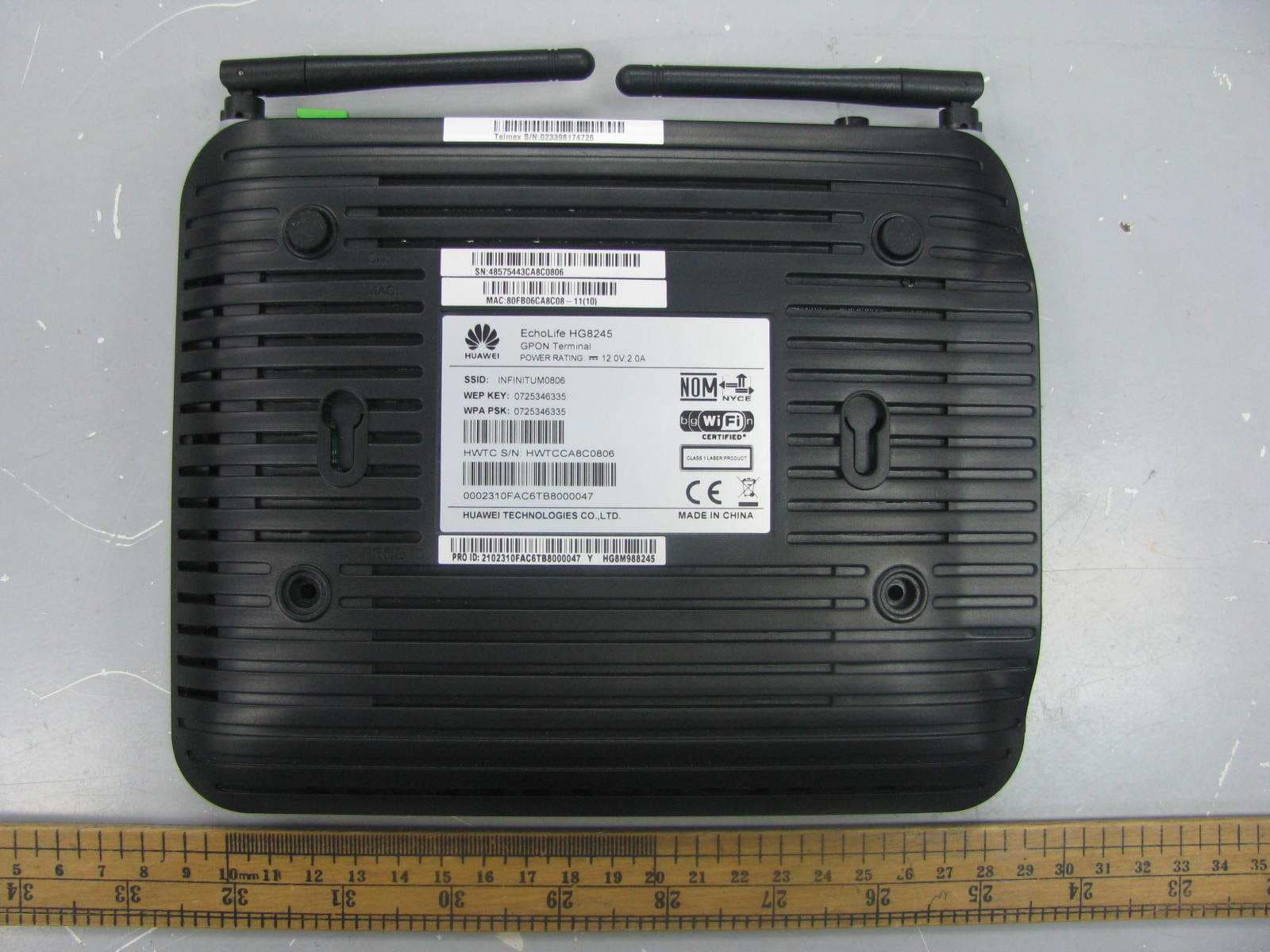
Click to zoom
Application Details
- Equipment Class
- DTS - Digital Transmission System
- Date of Grant
- Nov 30, 2011
- Application Purpose
- Original Equipment
- Date of Application
- Nov 30, 2011
- Equipment Note
- GPON Terminal
- Frequency Range
- 2422.00000000 - 2452.00000000
- Company
- Huawei Technologies Co.,Ltd
- Country
- China
Documents & Files
Document Text
Text extracted from the exhibit documents filed with the FCC. Open a document above to read the original.
Users Manual
Quick Start EchoLife HG8245 GPON Terminal Huawei Proprietary and Confidential Copyright © Huawei Technologies Co., Ltd. EchoLife HG8245 GPON Terminal V100R002C06 Quick Start Issue01 Date2011-06-30 BOM number31505131 Huawei Technologies Co., Ltd. provides customers with comprehensive technical support. Please feel free to contact our local offices or headquarters. Huawei Technologies Co., Ltd. Address: Huawei Industrial Base Bantian, Longgang Shenzhen 518129 People's Republic of China Web site:http://www.huawei.com Tel:0755-28560000 4008302118 Fax:0755-28560111 Email:[email protected] Huawei Proprietary and Confidential Copyright © Huawei Technologies Co., Ltd. Copyright © Huawei Technologies Co., Ltd. 2011.All rights reserved. No part of this document may be reproduced or transmitted in any form or by any means without prior written consent of Huawei Technologies Co., Ltd. Trademarks and Permissions and other Huawei trademarks are trademarks of Huawei Technologies Co., Ltd. All other trademarks and trade names mentioned in this document are the property of their respective holders. Notice The information in this document is subject to change without notice. Unless otherwise stated, this guide serves only as a guide. All statements, information, and recommendations in this document do not constitute a warranty of any kind, expressed or implied. Changes or modifications not expressly approved by the party responsible for compliance could void the user's authority to operate the equipment. Safety Precautions Basic Requirements � Keep the device dry when it is stored, transported, and used. � Prevent any violent collision when the device is stored, transported, and used. � Install the device in strict compliance with the requirements of the supplier. � Do not disassemble the device without permission. In the case of a device fault, contact the authorized service center. � Do not change the structure, safety design, or performance design of the device without prior authorization. � Observe relevant laws and regulations and respect legal rights of others when using the device. Environmental Requirements � Install the device in a well-ventilated environment that is free from direct sunlight. � Keep the device clean and free from dust. � Keep the device away from water sources or damp areas. � Do not place any object on the device, so that the device will not be damaged due to overheating or deformation. � Reserve a space of at least 10 cm above and around the device for heat dissipation. � During the installation, keep the device away from heat sources or exposed fire sources such as electric heaters and candles. � During the installation, keep the device away from electric appliances that generate strong magnetic or electric fields, such as microwave ovens, refrigerators, and mobile phones. Instructions for Cleaning � Before cleaning the device, stop the device, switch off the power, and disconnect all cables, including the power cable, optical fiber, and network cable. � Use a clean, soft, and dry cloth to clean the shell of the device. Do not use any cleaning agent or spray to clean the shell of the device. To use the device properly and safely, r ead the safety precautions carefully before using the device and strictly observe these precautions when using the device. 1 Safety Precautions Instructions for Use � Use only the accessories delivered or recommended by the supplier, for example, the power adapter and battery. � The power supply voltage of the device must meet the requirements for the input voltage of the device. � Keep the power plug clean and dry to prevent electric shocks or any other hazard. � Dry your hands before connecting or disconnecting cables. � Stop the device and switch off the power before connecting or disconnecting cables. � Switch off the power and disconnect all cables, including the power cable, optical fiber, and network cable, during periods of lightning activities. � Switch off the power and then remove the power plug if the device is to be unused for a long time. � Pr event water or other liquid from entering the device. If any liquid enters the device accidentally, immediately switch off the power and disconnect all cables, including the power cable, optical fiber, and network cable. In the case of a device fault, contact the authorized service center. � Do not crush, pull, drag, or excessively bend the cables as doing so may damage the device and cause the device to malfunction. � Do not use damaged or deteriorating cables. � Do not look into the optical port without eye protection. � If an abnormality occurs, for example, smoke, unusual sound, and smell, stop the device immediately, switch off the power, disconnect all cables (such as the power cable, optical cable, and network cable) to the device, and contact the authorized service center. � Pr event objects, such as metal, from entering the device through the heat dissipation hole. � Do not scratch or abrade the shell of the device. Otherwise, the fallen coating may lead to device abnormalities (such as short-circuit) and bodily allergy . � Keep the device out of the reach of children as the components or accessories may be swallowed. � Keep the running device at least 20 cm away from the human body. Environmental Protection � Dispose of the device or batteries properly and hand them over to the certified recycling station. � Dispose of the packing materials, expired batteries, and old or abandoned devices in accordance to local laws and regulations (recycling them is strongly recommended). 2 3 After opening the pr oduct packaging, check each item against the following checklist. Contact the supplier if there are any discrepancies. GPON terminalPower adapter Quick StartNetwork cable Packing List NOTE The figures shown in this document may differ from the actual products, but the difference does not affect the functions of the products. 4 Product Overview Appearance and ports of the HG8245 1 Optical por…
Text truncated - open the document above for the full version.
Cover Letter(s)
2011/9/26 To whom it may concern, Letter of Agency I, an officer of Huawei Technologies Co., Ltd. do hereby authorize Intertek Testing Services (Mr. Shawn Xing) to act on our behalf in front of the Federal Communications Commission with respect to all matters relating to certification of equipment under Part 15 and/or Part 95 of the FCC Rules until further notice. I further certify that no party (as defined in §1.2002(b) of CFR 47, 2007) to this application, including myself, is subject to a denial of federal benefits, that includes FCC benefits, pursuant to Section 5301 of the Anti-Drug Abuse Act of 1988, 21 U.S.C., 862. Regards, Zhangxinghai EMC Laboratory Manager
Cover Letter(s)
2011/9/26 To whom it may concern, Request for Permanent Confidentiality Under FCC Part 15 Certification FCC ID:QISHG8245 Request is hereby submitted by Huawei Technologies Co., Ltd. to withhold permanently from public review certain portions of the application for equipment certification for the referenced FCC identifiers. This request for confidentiality is made pursuant to 47 CFR § 0.457(d) and 0.459 of the FCC Rules. In particular, the following sections of the application are to be kept permanently confidential and Huawei Technologies Co., Ltd.reserves the right to discern which parties can obtain access to these information: Schematics Detailed Block diagrams Detailed Operational/Functional Description The rationale for request for confidentiality is as followings: This information represents intellectual property of Huawei Technologies Co., Ltd. and it is subject to competition. We have invested considerable time and materials in research and development to produce the referenced product. Disclosure of the permanently confidential portions of this application to competitors would not only give them significant competitive advantages in developing similar products, but would also disclose successful implementation of unpublished, leading edge technology developed by us. If you have questions or need further information, please contact the undersigned. Regards, ZhangXinghai EMC Laboratory Manager
External Photos
External Photos
ID Label/Location Info
Label Size and Location
Internal Photos
Internal Photos Antenna (left) Antenna (right)
RF Exposure Info
Model: HG8245, FCC ID: QISHG8245 RF Exposures Evaluation for single antenna transmissions For Maximum Permissible Exposure (MPE) evaluation of the product, the maximum power density at 20 cm from this transmitter shall be less than the General Population / Uncontrolled MPE limit in OET Bulletin 65. For the product of tested model of HG8245, the measured maximum conducted output power is 18.1dBm. From these data, the exposed power density at a distance (R) of 20cm from the center of radiation of the antenna can be calculated according to OET Bulletin 65 as follow: Antenna Gain max = 2dBi The EIRP(max) = P*G = 20.1dBm = 102.3mW The power density at 20 cm from the antenna = EIRP / 4πR^2 < 0.0204 mW/cm^2 where: S = power density (in appropriate units, e.g. mW/cm2) P = power input to the antenna (in appropriate units, e.g., mW) G = power gain of the antenna in the direction of interest relative to an isotropic radiator R = distance to the center of radiation of the antenna (appropriate units, e.g., cm) In the frequency range of 1,500 - 100,000MHz, the MPE limit is 1.0 mWcm-2 for general population and uncontrolled exposure. As the measured power density at 20cm from the transmitter is lower than the MPE limit, the compliance to the MPE limit can be ensured by indicating the minimum 20cm separation between the transmitter's radiating structures and body of the user or nearby persons. The following RF exposure statement is proposed to be included in the user manual: “FCC RF Radiation Exposure Statement Caution: To maintain compliance with the FCC’s RF exposure guidelines, place the product at least 20cm from nearby persons.” Model: HG8245, FCC ID: QISHG8245 RF Exposures Evaluation for both antenna transmissions The HG8245 base unit has totally 2 antennas. The KDB 447498: A Mobile Multi-transmitter MPE Estimation MPE spreadsheet is used for estimating MPE limits for these 2 antennas’ simultaneous transmission. The information of operating frequency (MHz), power (W), antenna gain (dBi), location (X and Y coordinates showed on page 2) for each antenna are entered in the MPE spreadsheet. The power densities of up to 2 antennas located within a 90 cm² region at 1cm intervals are estimated first. Then the power densities computed for each antenna are summed. The plot “% MPE Contour” displays the result in percentages of the frequency-dependent power density limits. As the measured power density at 20cm from the transmitter is lower than the MPE limit (the compliance boundary for simultaneous transmission), the compliance to the MPE limit can be ensured by indicating the minimum 20cm separation between the transmitter’s radiating structures and body of the user or nearby persons. X,Y=(0,0) Antenna 1 X,Y=(-8.5,2.5) Antenna 2 X,Y=(8.5,2.5) WiFi Antenna region 802.11n (20M) Antenna No. Total 1 2 3 4 5 6 Tx Status On On Off Off Off Off Frequency MHz 2450 2450 0 0 0 0 MPE Limit mW/cm 2 1.00 1.00 0.00 0.00 0.00 0.00 Max % MPE % 0.9 0.4 0.4 0.0 0.0 0.0 0.0 Power (W) 0.028 0.014 0.014 0.000 0.000 0.000 0.000 Antenna Gain dBi 2.00 2.00 0.00 0.00 0.00 0.00 EIRP (W) 0.04 0.022 0.022 0.000 0.000 0.000 0.000 X (cm) -8.5 8.5 0.0 0.0 0.0 0.0 Y (cm) 2.5 2.5 0.0 0.0 0.0 0.0 Sector FALSE FALSE FALSE FALSE FALSE FALSE Arc FALSE FALSE FALSE FALSE FALSE FALSE θ 1 0 0 0 0 0 0 θ 2 input 0 0 0 0 0 0 θ 1 0 0 0 0 0 0 θ 2 degs actual 0 0 0 0 0 0 802.11n (40M) Antenna No. Total 1 2 3 4 5 6 Tx Status On On Off Off Off Off Frequency MHz 2450 2450 0 0 0 0 MPE Limit mW/cm 2 1.00 1.00 0.00 0.00 0.00 0.00 Max % MPE % 1.6 0.8 0.8 0.0 0.0 0.0 0.0 Power (W) 0.052 0.026 0.026 0.000 0.000 0.000 0.000 Antenna Gain dBi 2.00 2.00 0.00 0.00 0.00 0.00 EIRP (W) 0.08 0.041 0.041 0.000 0.000 0.000 0.000 X (cm) -8.5 8.5 0.0 0.0 0.0 0.0 Y (cm) 2.5 2.5 0.0 0.0 0.0 0.0 Sector FALSE FALSE FALSE FALSE FALSE FALSE Arc FALSE FALSE FALSE FALSE FALSE FALSE θ 1 0 0 0 0 0 0 θ 2 input 0 0 0 0 0 0 θ 1 0 0 0 0 0 0 θ 2 degs actual 0 0 0 0 0 0
Test Report
Intertek Testing Services Shenzhen Ltd. Kejiyuan Branch 6F, D Block, Huahan Building, Langshan Road, Nanshan District, Shenzhen, P. R. China Tel: (86 755) 8601 6288 Fax: (86 755) 8601 6751 Website: www.china.intertek-etlsemko.com October 15, 2011 Huawei Technologies Co.,Ltd Bantian,Longgang District, Shenzhen, 518129 China Dear Xinghai Zhang: Enclosed you will find your file copy of a Part 15 report (FCC ID: QISHG8245). For your reference, TCB will normally take another 5 days for reviewing the report. Approval will then be granted when no query is sorted. Please contact me if you have any questions regarding the enclosed material. Sincerely, Shawn Xing Manager Enclosure • The test results reported in this test report shall refer only to the sample actually tested and shall not refer or be deemed to refer to bulk from which such a sample may be said to have been obtained. • This report is for the exclusive use of Intertek's Client and is provided pursuant to the agreement between Intertek and its Client. Intertek's responsibility and liability are limited to the terms and conditions of the agreement. Intertek assumes no liability to any party, other than to the Client in accordance with the agreement, for any loss, expense or damage occasioned by the use of this report. Only the Client is authorized to copy or distribute this report. Any use of the Intertek name or one of its marks for the sale or advertisement of the tested material, product or service must first be approved in writing by Intertek. The observations and test results referenced from this report are relevant only to the sample tested. This report by itself does not imply that the material, product, or service is or has ever been under an Intertek certification program. • For Terms And Conditions of the services, it can be provided upon request. • The evaluation data of the report will be kept for 3 years from the date of issuance. TRF no.: FCC 15C_Txa FCC ID: QISHG8245 Intertek Testing Services Shenzhen Ltd. Kejiyuan Branch 6F, D Block, Huahan Building, Langshan Road, Nanshan District, Shenzhen, P. R. China Tel: (86 755) 8601 6288 Fax: (86 755) 8601 6751 Website: www.china.intertek-etlsemko.com Huawei Technologies Co.,Ltd Application For Certification GPON Terminal (WiFi Transceiver) (FCC ID: QISHG8245) Model: HG8245 SZ11080403-1 Billy Li October 15, 2011 INTERTEK TESTING SERVICE TRF no.: FCC 15C_TXa FCC ID: QISHG8245 i LIST OF EXHIBITS INTRODUCTION EXHIBIT 1: Summary of Tests EXHIBIT 2: General Description EXHIBIT 3: System Test Configuration EXHIBIT 4: Measurement Results EXHIBIT 5: Equipment Photographs EXHIBIT 6: Product Labeling EXHIBIT 7: Technical Specifications EXHIBIT 8: Instruction Manual EXHIBIT 9: Miscellaneous Information EXHIBIT 10: Request EXHIBIT 11: Test Equipment List INTERTEK TESTING SERVICES TRF No.: FCC 15C_TXa FCC ID: QISHG8245 ii MEASUREMENT/TECHNICAL REPORT Huawei Technologies Co.,Ltd - MODEL: HG8245 FCC ID: QISHG8245 This report concerns (check one) Original Grant X Class II Change Equipment Type: DTS - Part 15 Digital Transmission Systems (WiFi transmitter portion) Deferred grant requested per 47 CFR 0.457(d)(1)(ii)? Yes No X If yes, defer until : date Company Name agrees to notify the Commission by: date of the intended date of announcement of the product so that the grant can be issued on that date. Transition Rules Request per 15.37? Yes No X If no, assumed Part 15, Subpart C for intentional radiator - the new 47 CFR [10-01-10 Edition] provision. Report prepared by: Shawn Xing Intertek Testing Services Shenzhen Ltd. Kejiyuan Branch 6F, Block D, Huahan Building, Langshan Road, Nanshan District, Shenzhen, P. R. China Phone: (86 755) 8601 6288 Fax: (86 755) 8601 6751 INTERTEK TESTING SERVICES TRF No.: FCC 15C_TXa FCC ID: QISHG8245 iii Table of Contents 1.0 Summary of test results .............................................................................. 2 2.0 General Description................................................................................................4 2.1 Product Description ....................................................................................... 4 2.2 Related Submittal(s) Grants .......................................................................... 5 2.3 Test Methodology.......................................................................................... 5 2.4 Test Facility ................................................................................................... 5 3.0 System Test Configuration ................................................................................. 7 3.1 Justification ................................................................................................... 7 3.2 EUT Exercising Software............................................................................... 7 3.3 Details of EUT and Description of Peripherals............................................... 8 3.4 Measurement Uncertainty.............................................................................. 8 3.5 Equipment Modification ................................................................................. 8 3.6 Support Equipment List and Description....................................................... 9 4.0 Measurement Results.......................................................................................... 11 4.1 Maximum Conducted Output Power at Antenna Terminals.......................... 11 4.2 Minimum 6dB RF Bandwidth ....................................................................... 13 4.3 Maximum Power Density ................................................................................15 4.4 Out of Band Conducted Emissions ...............................................................19 4.5 Out of Band Radiated Emissions ................................................................. 20 4.6 Transmitter Radiated Emissions in Restricted Bands................................... 21 4.7 Field Strength Calcula…
Text truncated - open the document above for the full version.
Test Report
802.11b 802.11g 802.11n (20MHz) Antenna J33 802.11n (20MHz) Antenna J34 802.11n (40MHz) Antenna J33 802.11n (40MHz) Antenna J34
Test Report
802.11b 802.11g 802.11n (20MHz) Antenna J33 802.11n (20MHz) Antenna J34 802.11n (40MHz) Antenna J33 802.11n (40MHz) Antenna J34
Test Report
802.11b 802.11g 802.11n (20MHz) Antenna J33 802.11n (20MHz) Antenna J34 802.11n (40MHz) Antenna J33 802.11n (40MHz) Antenna J34
Test Report
802.11b 802.11g 802.11n (20MHz) Antenna J33 802.11n (20MHz) Antenna J34 802.11n (40MHz) Antenna J33 802.11n (40MHz) Antenna J34
Test Setup Photos
Radiated Photos
Test Setup Photos
Conducted Photos
Contact Information
Applicant
Zhang Xinghai
Technical Contact
Intertek Testing Services Shenzhen Ltd. Kejiyuan BShawn Xing
[email protected](86-755) 8614 0603
6F, D Block, Huahan Building, Langshan Road · Shenzhen · China
Non-Technical Contact
Intertek Testing Services Shenzhen Ltd. Kejiyuan BShawn Xing
[email protected](86-755) 8614 0603
Test Firm
Intertek Testing Services Shenzhen Ltd.Shawn Xing
Technical Specifications
| # | Rule Parts | Frequency Range | Power Output |
|---|---|---|---|
| 2 | 15C | 2.42 GHz - 2.45 GHz | 53.00 mW |
Other Applications from Huawei Technologies Co.,Ltd

QISSUN2000
Jun 27, 2021Solar Inverter
Equipment Class
DTS - Digital Transmission System
QISCP81-1
Oct 22, 2020Watch Wireless Charger
Equipment Class
DCD - Part 15 Low Power Transmitter Below 1705 kHz
QISRRU3278
Sep 02, 2020Remote Radio Unit
Equipment Class
CBD - Citizens Band Category A and B Devices
QISR2561
Jul 11, 2020Indoor Router
Equipment Class
DTS - Digital Transmission System
QISSMARTLOGGER310
Mar 23, 2020Solar Smart Monitor & Data Logger
Equipment Class
DTS - Digital Transmission System