QISK4305HSPA + USB Stick, with GSM/GPRS/EDGE
Huawei Technologies Co.,Ltd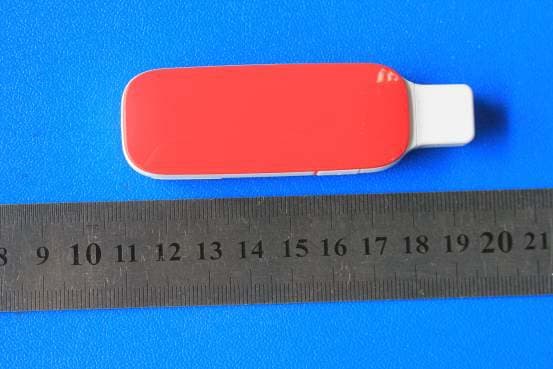
Click to zoom
Application Details
- Equipment Class
- PCB - PCS Licensed Transmitter
- Date of Grant
- Sep 03, 2012
- Application Purpose
- Original Equipment
- Date of Application
- Sep 03, 2012
- Equipment Note
- HSPA + USB Stick, with GSM/GPRS/EDGE
- Frequency Range
- 1850.20000000 - 1909.80000000
- Company
- Huawei Technologies Co.,Ltd
- Country
- China
Documents & Files
Document Text
Text extracted from the exhibit documents filed with the FCC. Open a document above to read the original.
Users Manual
Copyright © Huawei Technologies Co., Ltd. 2012. All rights reserved. No part of this document may be reproduced or transmitted in any form or by any means without prior written consent of Huawei Technologies Co., Ltd. The product described in this manual may include copyrighted software of Huawei Technologies Co., Ltd. and possible licensors. Customers shall not in any manner reproduce, distribute, modify, decompile, disassemble, decrypt, extract, reverse engineer, lease, assign, or sublicense the said software, unless such restrictions are prohibited by applicable laws or such actions are approved by respective copyright holders under licenses. Trademarks and Permissions , , and are trademarks or registered trademarks of Huawei Technologies Co., Ltd. Other trademarks, product, service and company names mentioned are the property of their respective owners. Notice Some features of the product and its accessories described herein rely on the software installed, capacities and settings of local network, and may not be activated or may be limited by local network operators or network service providers, thus the descriptions herein may not exactly match the product or its accessories you purchase. Huawei Technologies Co., Ltd. reserves the right to change or modify any information or specifications contained in this manual without prior notice or obligation. NO WARRANTY THE CONTENTS OF THIS MANUAL ARE PROVIDED “AS IS”. EXCEPT AS REQUIRED BY APPLICABLE LAW S, NO WARRANTIES OF ANY KIND, EITHER EXPRESS OR IMPLIED, INCLUDING BUT NOT LIMITED TO, THE IMPLIED WARRANTIES OF MERCHANTABILITY AND FITNESS FOR A PARTICULAR PURPOSE, ARE MADE IN RELATION TO THE ACCURACY, RELIABILITY OR CONTENTS OF THIS MANUAL. TO THE MAXIMUM EXTENT PERMITTED BY APPLICABLE LAW, IN NO CASE SHALL HUAWEI TECHNOLOGIES CO., LTD. BE LIABLE FOR ANY SPECIAL, INCIDENTAL, INDIRECT, OR CONSEQUENTIAL DAMAGES, OR LOST PROFITS, BUSINESS, REVENUE, DATA, GOODWILL OR ANTICIPATED SAVINGS. Import and Export Regulations Customers shall comply with all applicable export or import laws and regulations and will obtain all necessary governmental permits and licenses in order to export, re-export or import the product mentioned in this manual including the software and technical data therein. Warnings and Precautions This section contains important information pertaining to the operating instructions of your device. It also contains information about how to use your device safely. Read this information carefully before using the device. Electronic Device Do not use your device if using the device is prohibited. Do not use the device when using the device causes danger or interference with electronic devices. Medical Device Follow rules and regulations set forth by hospitals and health care facilities. Do not use your device when using the device is prohibited. Some wireless devices may affect the performance of hearing aids or pacemakers. For any such problems, consult your service provider. If you are using an electronic medical device, consult the doctor or the device manufacturer to confirm whether radio waves affect the operation of this device. Potentially Explosive Atmosphere Do not use your device in any area with a potentially explosive atmosphere, and comply with all signs and instructions. Areas that may have potentially explosive atmospheres include the areas where you would normally be advised to turn off your vehicle engine. Triggering of sparks in such areas could cause an explosion or a fire, resulting in bodily injuries or even deaths. Do not use your device at refueling points such as service stations. Comply with restrictions on the use of radio equipment in fuel depots, storage, and distribution areas, and chemical plants. In addition, adhere to restrictions in areas where blasting operations are in progress. Before using the device, watch out for areas that have potentially explosive atmospheres that are often, but not always, clearly marked. Such locations include areas below the deck on boats, chemical transfer or storage facilities, and areas where the air contains chemicals or particles such as grain, dust, or metal powders. Ask the manufacturers of vehicles using liquefied petroleum gas (such as propane or butane) whether this device can be safely used in their vicinity. Traffic Security Observe local laws and regulations while using the device. To prevent accidents, do not use your wireless device while driving. RF signals may affect electronic systems of motor vehicles. For more information, consult the vehicle manufacturer. In a motor vehicle, do not place the device over the air bag or in the air bag deployment area. Otherwise, the device may hurt you owing to the strong force when the air bag inflates. Do not use your device while flying in an aircraft and before boarding an aircraft. Using wireless devices in an aircraft may cause danger to the operation of the aircraft and disrupt the wireless telephone network. It may also be considered illegal. Operating Environment Do not use the device in dusty, damp, and dirty places or places with magnetic fie lds. Otherwise, it may result in malfunction of the circuit. On a stormy day with thunder, do not use your device when it is being charged, to prevent any danger caused by lightning. While using the device, observe the local laws and regulations, and respect others' privacy and legal rights. Keep the ambient temperature between -10°C to +45°C for using the device. Safety of Children Comply with all precautions with regard to children's safety. Letting the child play with your device or its accessories, which may include parts that can be detached from the device, may be dangerous, as it may present a choking hazard. Ensure that small children are kept away from the device and accessories. Accessories Use the accessories delivered only by the manufacturer. Using accessories of other manufacturers or vendors with this device model may invalidate any ap…
Text truncated - open the document above for the full version.
Users Manual
Thank you for choosing the Mobile Broadband USB Stick. With your USB Stick, you can access a wireless network at high speed. Note: This guide briefly describes the appearance of the USB Stick and the procedures for using the USB Stick. For details about how to set the management parameters, see help information on the web management page. Getting to Know Your USB Stick The following figure shows the appearance of the USB Stick. It is provided only for your reference. The actual product may be different. 1 2 4 5 3 n USB Connector It connects the USB Stick to a PC. o Indicator It indicates the status of the USB Stick. z Green, blinking twice every 3s: The USB Stick is powered on. z Green, blinking once every 3s: The USB Stick is registering with a 2G network. z Blue, blinking once every 3s: The USB Stick is registering with a 3G/3G+ network. z Green, solid: The USB Stick is connected to a 2G network. z Blue, solid: The USB Stick is connected to a 3G network. z Cyan, solid: The USB Stick is connected to a 3G+ network. z Off: The USB Stick is removed. p MicroSD Card Slot It holds a microSD card. q SIM/USIM Card Slot It holds a Subscriber Identity Module (SIM)/Universal Subscriber Identity Module (USIM) card. Getting Your USB Stick Ready Install the SIM/USIM card 1. Remove the cover of the USB Stick. 2. Insert the USIM/SIM card and the micro SD card into the card slots. Make sure that the cards are properly inserted. 3. Install the cover of the USB Stick. Note: z Ensure that the beveled edge of the SIM/USIM card is properly aligned with that of the SIM/USIM card slot. z Do not remove the SIM/USIM card when the card is in use. Otherwise, the card as well as your USB Stick may get damaged and the data stored on the card may be corrupted. Using Your USB Stick The procedure for installing the management program depends on your computer's operating system. The following sections are based on Windows XP. Connecting to a Network 1. Insert the USB Stick into one of your computer's USB ports. The computer identifies the new hardware and starts its installation automatically. 2. When the installation is complete, the USB Stick's web management page is displayed and the USB Stick connects to the network automatically. The USB Stick's web management page will be automatically displayed every time the USB Stick is inserted into the computer. Note: z If the computer does not start the USB Stick's installation automatically, find the AutoRun.exe file in the USB Stick's root directory, and double-click the file to run it. z If you are not connected to the network, access http://192.168.1.1 to check the device status. z If you cannot access http://192.168.1.1, disconnect other network connections, such as an Ethernet or Wireless Fidelity (Wi-Fi) connection, remove and then insert the USB Stick, or restart the computer. Disconnecting from a Network Remove the USB Stick from the computer. Note: If you do not need to connect to a network, it is recommended that you remove the USB Stick from your computer to eliminate unwanted data traffic. Viewing Service Information Visit http://192.168.1.1 to view your service information. Version: V100R001_01 Part Number: 31010***
Users Manual
Safety Information
Cover Letter(s)
HUAWEI Technologies Co., Ltd. Date (27/08/2012) BABT TCB, Balfour House, Churchfield Road, Walton-on-Thames, Surrey, KT12 2TD Dear Sir or Madam, We, Huawei Technologies Co., Ltd. Bantian, Longgang District, Shenzhen, 518129, China hereby authorize TUV-SUD China Shenzhen Branch 6/F, H Hall, Century Craftwork Culture Square, No. 4001 Fuqiang Road, Futian District, Shenzhen 518048 P. R. China Louis Lin Phone: +86-755-88286998 e-mail: [email protected] to act as our agent in all matters relating to applications for equipment authorization, including the signing of all documents relating to these matters. We also hereby certify that neither we nor any party to this application are subject to denial of U.S. Federal benefits, which include FCC benefits, pursuant to section 5301 of Anti-Drug Abuse Act of 1988, U.S.C. 862 because of conviction for possession or distribution of controlled substance. This authorization is application to following FCC ID application: FCC ID: QISK4305 Sincerely, For and Behalf of: Huawei Technologies Co., Ltd. EMC Laboratory Manager
Cover Letter(s)
Huawei Technologies Co., Ltd. Address:Huawei Industrial Base,Bantian Longgang,Shenzhen 518129, P.R China Post ZIP:518129 Page :1/1 To: Jiangsu TüV Product Service Ltd. -Shenzhen Branch Fax : NULL From: Zhang Xin hai Fax:0086-755-89652518 Tel:0086-755-89651014 Email address: [email protected] Http: www.huawei.com Subject:Letter of Confidentiality Federal Communications Commission 7435 Oakland Mills Road Columbia, MD 21046 Gentlemen: This letter is to comply with the Code of Federal Regulations Title 47 Section 0.457 and 0.459 pertaining to confidential material. Huawei Technologies Co., Ltd. would like the following documents regarding this submission for FCC ID: QISK4305 to be kept confidential: 1. Schematic diagram. 2. Block Diagram. 3. Parts list (BOM) Information. 4. Operational description. 5. Turn-up procedure The above material contains trade secrets or technical data, which would customarily be guarded from competitors. We do not want these documents to be accessible to the general public. Sincerely, For and Behalf of: Huawei Technologies Co., Ltd. Zhang Xinghai EMC Laboratory Manager
Cover Letter(s)
Statements Date (27/08/2012) BABT TCB Balfour House, Churchfield Road, Walton-on-Thames, Surrey, KT12 2TD Dear Sir or Madam, We, Huawei Technologies Co., Ltd. Bantian, Longgang District, Shenzhen, 518129, China Hereby to confirm that our device, HSPA+ USB Stick, Models: K4305, FCC ID: QISK4305, the cover can be removed during package and the FCC ID is readily visible when users open the product box. Sincerely, For and Behalf of: Huawei Technologies Co., Ltd. EMC Laboratory Manager
External Photos
K4305 SECRET Page1, Total7 External Photos of K4305 K4305 SECRET Page2, Total7 K4305 SECRET Page3, Total7 K4305 SECRET Page4, Total7 K4305 SECRET Page5, Total7 K4305 SECRET Page6, Total7 K4305 SECRET Page7, Total7
ID Label/Location Info
K4305 SECRET Page 1 Total 1 ID Label Location_ K4305
ID Label/Location Info
K4305 SECRET Page 1 Total 1 ID Label K4305:
Internal Photos
K4305 SECRET Page1, Total3 Internal Photos of K4305 K4305 SECRET Page2, Total3 K4305 SECRET Page3, Total3
RF Exposure Info
Report No. RHA1208-0066SAR01 Page 1 of 99 TESTING No. L2264 OET 65 TEST REPORT Product Name HSPA+ USB Stick Model K4305 FCC ID QISK4305 Client Huawei Technologies Co., Ltd. TA Technology (Shanghai) Co., Ltd. TA Technology (Shanghai) Co., Ltd. Test Report Report No. RHA1208-0066SAR01 Page 2 of 99 GENERAL SUMMARY Product Name HSPA+ USB Stick Model K4305 FCC ID QISK4305 Report No. RHA1208-0066SAR01 Client Huawei Technologies Co., Ltd. Manufacturer Huawei Technologies Co., Ltd. Reference Standard(s) IEEE Std C95.1, 1999: IEEE Standard for Safety Levels with Respect to Human Exposure to Radio Frequency Electromagnetic Fields, 3 kHz to 300 GHz. SUPPLEMENT C Edition 01-01 to OET BULLETIN 65 Edition 97-01 June 2001 including DA 02-1438, published June 2002: Evaluating Compliance with FCC Guidelines for Human Exposure to Radio frequency Electromagnetic Fields Additional Information for Evaluation Compliance of Mobile and Portable Devices with FCC Limits for Human Exposure to Radio frequency Emissions. RSS-102 Issue 4 March 2010: Radio Frequency (RF) Exposure Compliance of Radiocommunication Apparatus (All Frequency Bands). KDB 447498 D02 SAR Procedures for Dongle Xmtr v02: SAR Measurement Procedures for USB Dongle Transmitters. KDB 941225 D03 SAR Test Reduction GSM/GPRS/EDGE vo1:Recommended SAR Test Reduction Procedures for GSM/GPRS/EDGE Conclusion This portable wireless equipment has been measured in all cases requested by the relevant standards. Test results in Chapter 7 of this test report are below limits specified in the relevant standards. General Judgment: Pass (Stamp) Date of issue: August 28 th 2012 Comment The test result only responds to the measured sample. Approved by Director Revised by SAR Manager Performed by SAR Engineer TA Technology (Shanghai) Co., Ltd. Test Report Report No. RHA1208-0066SAR01 Page 3 of 99 TABLE OF CONTENT 1. General Information ........................................................................................................................ 5 1.1. Notes of the Test Report.......................................................................................................... 5 1.2. Testing Laboratory ................................................................................................................... 5 1.3. Applicant Information ............................................................................................................... 6 1.4. Manufacturer Information ......................................................................................................... 6 1.5. Information of EUT................................................................................................................... 7 1.6. The Maximum SAR 1g Values of Each Tested Mode ................................................................ 8 1.7. The Maximum Conducted Power of Each Tested Mode.......................................................... 9 1.8. Test Date ................................................................................................................................. 9 2. SAR Measurements System Configuration ................................................................................... 10 2.1. SAR Measurement Set-up .....................................................................................................10 2.2. DASY5 E-field Probe System ................................................................................................ 11 2.2.1. ES3DV3 Probe Specification ...........................................................................................11 2.2.2. E-field Probe Calibration ................................................................................................. 12 2.3. Other Test Equipment ............................................................................................................12 2.3.1. Device Holder for Transmitters ....................................................................................... 12 2.3.2. Phantom .........................................................................................................................13 2.4. Scanning Procedure ..............................................................................................................13 2.5. Data Storage and Evaluation ................................................................................................. 15 2.5.1. Data Storage...................................................................................................................15 2.5.2. Data Evaluation by SEMCAD ......................................................................................... 15 3. Laboratory Environment................................................................................................................ 17 4. Tissue-equivalent Liquid ....................................................................................................... ........ 18 4.1. Tissue-equivalent Liquid Ingredients...................................................................................... 18 4.2. Tissue-equivalent Liquid Properties ....................................................................................... 19 5. System Check ............................................................................................................................... 20 5.1. Description of System Check ................................................................................................. 20 5.2. System Check Results ...........................................................................................................21 6. Operational Conditions during Test ............................................................................................... 22 6.1. General Description of Test Procedures................................................................................ 22 6.2. GSM Test Configuration .............................................................…
Text truncated - open the document above for the full version.
Test Report
FCC RF Test Report Product Name: HSPA+ USB Stick Model Number: K4305 Report No: SYBH(Z-RF)009082012-2001 FCC ID:QISK4305 Reliability Laboratory of Huawei Technologies Co., Ltd. Huawei Base, Bantian, Longgang District, Shenzhen 518129, P.R. China Tel: +86 755 28780808 Fax: +86 755 89652518 FCC Test Report of K4305 FCC ID: QISK4305 Report No: SYBH(Z-RF)009082012-2001 Confidential Information of Huawei. No Distribution without Written Permission Page2, Total17 Notice 1. The laboratory has obtained the accreditation of China National Accreditation Service for Conformity Assessment (CNAS), and accreditation number: L0310. 2. The laboratory has been listed on the US Federal Communications Commission list of test facilities recognized to perform electromagnetic emissions measurements. The site recognition number is 97456. 3. The laboratory has been listed by industry Canada to perform electromagnetic emission measurement. The site recognition number is 6369A-2. 4. The test report is invalid if not marked with "exclusive stamp for the test report". 5. The test report is invalid if not marked with the stamps or the signatures of the persons responsible for performing, revising and approving the test report. 6. The test report is invalid if there is any evidence of erasure and/or falsification. 7. If there is any dissidence for the test report, please file objection to the test centre within 15 days from the date of receiving the test report. 8. Normally, the test report is only responsible for the samples that have undergone the test. 9. Context of the test report cannot be used partially or in full for publicity and/or promotional purposes without previous written approval of the laboratory. FCC Test Report of K4305 FCC ID: QISK4305 Report No: SYBH(Z-RF)009082012-2001 Confidential Information of Huawei. No Distribution without Written Permission Page3, Total17 Applicant: Huawei Technologies Co., Ltd. Address: Huawei Base, Bantian, Longgang District, Shenzhen 518129, P.R. China Date of Receipt Test Item: Aug., 05, 2012 Start Date of Test: Aug., 06, 2012 End Date of Test: Aug., 13, 2012 Test Result: Pass Approved By Senior Engineer Date Name Signature Aug., 20, 2012 Dai Linjun Reviewed By Date Name Signature Aug., 20, 2012 Cousy Xu Operated By Date Name Signature Aug., 20, 2012 Huang Qiuliang FCC Test Report of K4305 FCC ID: QISK4305 Report No: SYBH(Z-RF)009082012-2001 Confidential Information of Huawei. No Distribution without Written Permission Page4, Total17 Contents 1 General Information5 .................................................................................................................................. 1.1 APPLIED STANDARD ............................................................................................................................... 5 1.2 TEST LOCATION ..................................................................................................................................... 5 1.3 TEST ENVIRONMENTAL CONDITION ......................................................................................................... 5 2 Summary6 .................................................................................................................................................... 3 Product Description7 .................................................................................................................................. 3.1 PRODUCT INFORMATION ........................................................................................................................ 7 4 Test Description8 ........................................................................................................................................ 4.1 SUPPORTED FREQUENCY RANGE ........................................................................................................... 8 4.2 TRANSMITTER / RECEIVER CHARACTERISTICS ......................................................................................... 8 4.3 ANTENNA GAIN ...................................................................................................................................... 8 5 General Test Conditions / Configurations9 ............................................................................................... 5.1 RF CHANNELS UNDER TEST ................................................................................................................... 9 5.2 TEST MODES ......................................................................................................................................... 9 5.3 TEST ENVIRONMENT .............................................................................................................................. 9 5.4 TEST SETUP ........................................................................................................................................ 10 5.5 TEST CONDITIONS ............................................................................................................................... 14 6 Main Test Instruments16 ............................................................................................................................ 7 Test Results17 ............................................................................................................................................. 8 Measurement Uncertainty17 ....................................................................................................................... FCC Test Report of K4305 FCC ID: QISK4305 Report No: SYBH(Z-RF)009082012-2001 Confidential Information of Huawei. No Distribution without Written Permission Page5, Total17 1 General Information 1.1 Applied Standard Applied Rules: 47 CFR FCC Part 2:2011, Subpart J 47 CFR FCC Part 22:2011, Subpart H ANSI/TIA 603C:2004 1.2 Test Location Test Location 1: Reliability Laboratory of Huawei Technologies Co., Ltd. Address: Huawei Base, Bantian, Longgang District, Shenzhen 518129, P.R. China 1.3 Tes…
Text truncated - open the document above for the full version.
Test Report
FCC RF Test Report Product Name: HSPA+ USB Stick Model Number: K4305 Report No: SYBH(Z-RF)009082012-2002 FCC ID:QISK4305 Reliability Laboratory of Huawei Technologies Co., Ltd. Huawei Base, Bantian, Longgang District, Shenzhen 518129, P.R. China Tel: +86 755 28780808 Fax: +86 755 89652518 FCC Test Report of K4305 FCC ID: QISK4305 Report No: SYBH(Z-RF)009082012-2002 Confidential Information of Huawei. No Distribution without Written Permission Page2, Total18 Notice 1. The laboratory has obtained the accreditation of China National Accreditation Service for Conformity Assessment (CNAS), and accreditation number: L0310. 2. The laboratory has been listed on the US Federal Communications Commission list of test facilities recognized to perform electromagnetic emissions measurements. The site recognition number is 97456. 3. The laboratory has been listed by industry Canada to perform electromagnetic emission measurement. The site recognition number is 6369A-2. 4. The test report is invalid if not marked with "exclusive stamp for the test report". 5. The test report is invalid if not marked with the stamps or the signatures of the persons responsible for performing, revising and approving the test report. 6. The test report is invalid if there is any evidence of erasure and/or falsification. 7. If there is any dissidence for the test report, please file objection to the test centre within 15 days from the date of receiving the test report. 8. Normally, the test report is only responsible for the samples that have undergone the test. 9. Context of the test report cannot be used partially or in full for publicity and/or promotional purposes without previous written approval of the laboratory. FCC Test Report of K4305 FCC ID: QISK4305 Report No: SYBH(Z-RF)009082012-2002 Confidential Information of Huawei. No Distribution without Written Permission Page3, Total18 Applicant: Huawei Technologies Co., Ltd. Address: Huawei Base, Bantian, Longgang District, Shenzhen 518129, P.R. China Date of Receipt Test Item: Aug., 05, 2012 Start Date of Test: Aug., 06, 2012 End Date of Test: Aug., 13, 2012 Test Result: Pass Approved By Senior Engineer Date Name Signature Aug., 20, 2012 Dai Linjun Reviewed By Date Name Signature Aug., 20, 2012 Cousy Xu Operated By Date Name Signature Aug., 20, 2012 Huang Qiuliang FCC Test Report of K4305 FCC ID: QISK4305 Report No: SYBH(Z-RF)009082012-2002 Confidential Information of Huawei. No Distribution without Written Permission Page4, Total18 Contents 1 General Information5 .................................................................................................................................. 1.1 APPLIED STANDARD ............................................................................................................................... 5 1.2 TEST LOCATION ..................................................................................................................................... 5 1.3 TEST ENVIRONMENTAL CONDITION ......................................................................................................... 5 2 Summary6 .................................................................................................................................................... 3 Product Description7 .................................................................................................................................. 3.1 PRODUCT INFORMATION ........................................................................................................................ 7 4 Test Description8 ........................................................................................................................................ 4.1 SUPPORTED FREQUENCY RANGE ........................................................................................................... 8 4.2 TRANSMITTER / RECEIVER CHARACTERISTICS ......................................................................................... 8 4.3 ANTENNA GAIN ...................................................................................................................................... 9 5 General Test Conditions / Configurations10 ............................................................................................. 5.1 RF CHANNELS UNDER TEST ................................................................................................................. 10 5.2 TEST MODES ....................................................................................................................................... 10 5.3 TEST ENVIRONMENT ............................................................................................................................ 10 5.4 TEST SETUP ........................................................................................................................................ 11 5.5 TEST CONDITIONS ............................................................................................................................... 15 6 Main Test Instruments17 ............................................................................................................................ 7 Test Results18 ............................................................................................................................................. 8 Measurement Uncertainty18 ....................................................................................................................... FCC Test Report of K4305 FCC ID: QISK4305 Report No: SYBH(Z-RF)009082012-2002 Confidential Information of Huawei. No Distribution without Written Permission Page5, Total18 1 General Information 1.1 A…
Text truncated - open the document above for the full version.
Contact Information
Applicant
Zhang Xinghai
Test Firm
Huawei Technologies Co., LTDZhou Fengyum
Technical Specifications
| # | Rule Parts | Frequency Range | Power Output | Emission | Tolerance |
|---|---|---|---|---|---|
| 4 | 24E | 1.85 GHz - 1.91 GHz | 830.00 mW | 256KG7W | 25 Hz |
Other Applications from Huawei Technologies Co.,Ltd

QISSUN2000
Jun 27, 2021Solar Inverter
Equipment Class
DTS - Digital Transmission System
QISCP81-1
Oct 22, 2020Watch Wireless Charger
Equipment Class
DCD - Part 15 Low Power Transmitter Below 1705 kHz
QISRRU3278
Sep 02, 2020Remote Radio Unit
Equipment Class
CBD - Citizens Band Category A and B Devices
QISR2561
Jul 11, 2020Indoor Router
Equipment Class
DTS - Digital Transmission System
QISSMARTLOGGER310
Mar 23, 2020Solar Smart Monitor & Data Logger
Equipment Class
DTS - Digital Transmission System