QISM650cdma2000 Digital Mobile Phone
Huawei Technologies Co.,Ltd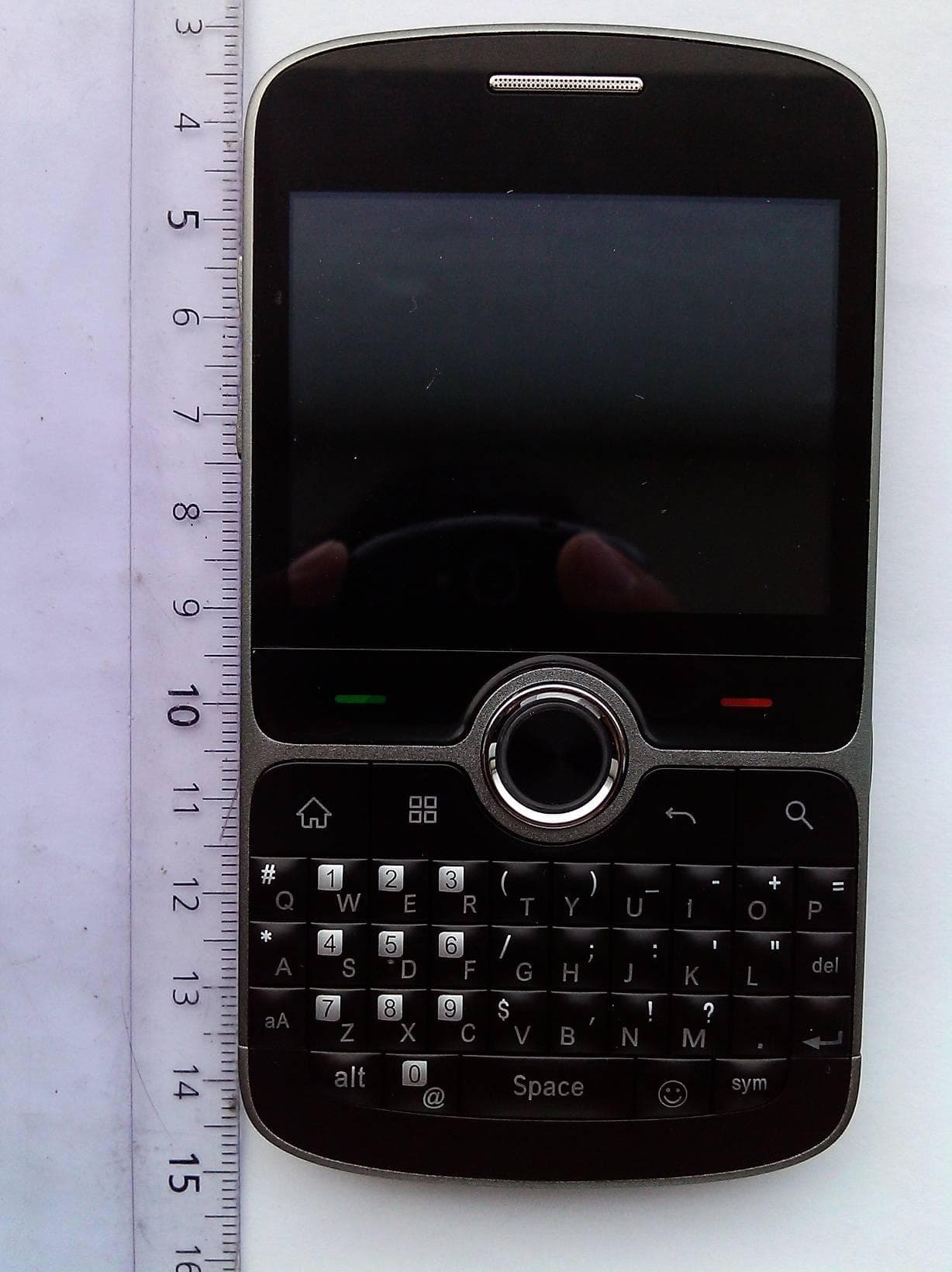
Click to zoom
Application Details
- Equipment Class
- DTS - Digital Transmission System
- Date of Grant
- Jul 21, 2011
- Application Purpose
- Original Equipment
- Date of Application
- Jul 21, 2011
- Equipment Note
- cdma2000 Digital Mobile Phone
- Frequency Range
- 2412.00000000 - 2462.00000000
- Company
- Huawei Technologies Co.,Ltd
- Country
- China
Documents & Files
Document Text
Text extracted from the exhibit documents filed with the FCC. Open a document above to read the original.
Users Manual
Welcome to Huawei User Guide HUAWEI M650/ M650 HUAWEI C8350/C8350 Contents 1 Reading Before Proceeding...................................................1 1.1 Safety Precautions....................................................................... 1 1.2 Personal Information and Data Security ...................................... 2 1.3 Legal Notice................................................................................. 3 2 Getting to Know Your Mobile Phone......................................5 2.1 Mobile Phone View ...................................................................... 6 2.2 Installing Your Mobile Phone ....................................................... 8 2.3 Power On or Off Your Mobile Phone ......................................... 10 2.4 Using the Touchscreen.............................................................. 11 2.5 Locking and Unlocking the Screen ............................................ 11 2.6 Home Screen............................................................................. 12 2.7 Application List........................................................................... 16 2.8 microSD Card ............................................................................ 17 3 Calling..................................................................................18 3.1 Making a Call ............................................................................. 18 3.2 Answering or Rejecting a Call.................................................... 19 3.3 Other Operations During a Call ................................................. 21 3.4 Call log....................................................................................... 22 3.5 Recording Calls ......................................................................... 22 3.6 Using Airplane Mode ................................................................. 22 4 Contacts...............................................................................23 4.1 Opening the Contacts Application ............................................. 23 4.2 Adding a Contact ....................................................................... 23 4.3 Adding a Contact to Your Favorites........................................... 23 4.4 Searching for a Contact ............................................................. 23 4.5 Editing a Contact ....................................................................... 24 4.6 Communicating with Your Contacts........................................... 24 4.7 Deleting a Contact ..................................................................... 25 ii 4.8 Streams ..................................................................................... 25 4.9 Managing Groups ...................................................................... 26 4.10 Joining and Separating Contacts............................................. 27 4.11 Sending Contacts .................................................................... 28 5 Using the Keypad ................................................................28 5.1 Choosing an Input Method......................................................... 28 5.2 Using the Phone Keypad ........................................................... 28 5.3 Customizing Keyboard Settings................................................. 30 6 Messaging ...........................................................................30 6.1 SMS and MMS........................................................................... 30 6.2 Email .......................................................................................... 33 7 Getting Connected...............................................................35 7.1 GPRS/3G................................................................................... 35 7.2 Wi-Fi .......................................................................................... 36 7.3 Sharing Your Phone’s Data Connection .................................... 37 7.4 Browser...................................................................................... 37 7.5 Bluetooth.................................................................................... 39 8 Entertainment ......................................................................41 8.1 Camera ...................................................................................... 41 8.2 Using the Gallery ....................................................................... 43 8.3 Enjoying the Music..................................................................... 44 9 Google Services ..................................................................46 9.1 Creating a Google Account........................................................ 46 9.2 Using Gmail ............................................................................... 47 9.3 Using Talk.................................................................................. 48 9.4 Using Maps................................................................................ 49 9.5 Using YouTube .......................................................................... 50 9.6 Using Market.............................................................................. 51 10 Synchronizing Information .................................................52 iii 10.1 Managing Your Accounts......................................................... 53 10.2 Customizing Your Account Synchronization ............................ 54 11 Calendar & Tools ...............................................................55 11.1 AppInstaller.............................................................................. 55 11.2 Using the Smart Traffic ............................................................ 56 11.3 Using All Backup...................................................................... 56 11.4 Using the Calendar .................................................................. 57 11.5 Usin…
Text truncated - open the document above for the full version.
Users Manual
56 2. In the applications list, select applications you want to install. You can touch , and then touch Deselect all or Select all to select and deselect all applications. 3. Touch > Install. The applications you select will be installed in your phone. 11.2 Using the Smart Traffic Smart Traffic allows you to enter the total amount of traffic included in your 2G/3G monthly package and set traffic notification thresholds. When your traffic reaches these thresholds, you will be notified. 11.2.1 Using the Smart Traffic When Smart Traffic is opened for the first time, it will request you to enter the monthly traffic limit and notification thresholds. 1. On the Home screen, touch > Smart Traffic. 2. Enter the monthly traffic limit in the Monthly package field. 3. Touch Next. 4. Enter the notification thresholds in the daily traffic reminder and monthly traffic reminder fields. 5. Touch Finish. 6. You can now view your data traffic in Traffic statistics. You can modify the monthly traffic limit and notification thresholds in Settings. 11.3 Using All Backup You can back up data using All Backup, which provides the following options: Backup to SD, Restore from SD, and Quick Backup. 11.3.1 Backing up data by using Backup to SD 1. On the Home screen, touch > All Backup. 57 2. Touch Backup to SD. 3. Enter a file name in the Filename: field. 4. In the Backup contents: field, select the contents you want to back up. 5. Touch Backup to back up the selected data. To cancel the backup, touch Cancel. 11.4 Using the Calendar Use Calendar to create and manage events, meetings, and appointments. Depending on your synchronization settings, the calendar on your phone can be synchronized with the internet-based calendar you use. 11.4.1 Opening the Calendar Touch > Calendar to open the application. To access Google calendar, touch , and then touch More > Calendars. 11.4.2 Creating an Event 1. On any calendar view, touch . Then touch New event to open the Event details screen. If you have more than one calendar, select the calendar where you want to save the event. 2. Enter the event name. • If there is a time frame for the event, touch From and To to set the beginning and end times of the event. • If the event is a special occasion such as a birthday or a day-long activity, set the date for From and To, and then select the All day check box. 3. Enter the location of the event and a description. 4. Set the time of your event reminder in Reminders, and then specify in Repetition whether the event recurs and, if it does, how frequently. 5. Touch Done. To quickly create an event in the Day, Week, or Month view, touch and hold an 58 empty time slot, and then touch New event. A new event details screen will appear with the selected time slot and date in the From and To fields. 11.4.3 Setting an Event Reminder 1. On any calendar view, touch an event to view its details or an event summary. 2. Touch the Add reminder button to add a reminder. Or touch the reminder’s “-” button to delete an existing reminder. 3. Touch the reminder time, and then touch the length of time before the event when you want to be reminded. When the time comes, you will receive a notification about the event. 11.4.4 Setting the synchronize and display 1. On any calendar view, touch . Then touch More > Calendars. The Calendars screen displays all the calendars you have added or subscribed to for each account that is configured to synchronize events to your phone, organized by account. (Calendars for accounts you have configured not to synchronize Calendar events are not included in the list.) 2. Touch the icon next to a calendar to change whether it is synchronize and whether it is display. You remain subscribed to Calendars that you configure not to store on the phone and you can still work with them with Google Calendar on the web. 3. Touch OK. 11.4.5 Customizing the Calendar Settings On any calendar view, touch . Then touch More > Settings. • Hide declined events: Select to hide events for which you have declined invitations. • Set alerts & notifications: Touch to set event reminders to alert you, send you a notification, or to turn off event notifications on your mobile phone. • Select ringtone: Touch to select the ringtone to sound when you receive an event reminder. • Vibrate: Select to vibrate the mobile phone when you receive an event notification. 59 • Default reminder time: Touch to select the default time before an event for event reminders to occur. 11.5 Using the File Manager File Manager is like having a pocket-sized personal assistant (PA), letting you organize, edit, and delete files and folders. 11.5.1 Opening the File Manager On the Home screen, touch > File Manager to open the application. 11.5.2 Creating a Folder 1. On the File Manager screen, access the directory of the folder you want to create. 2. Press to open the options panel, and then touch More > New folder. 3. Enter the name of the new folder in the text box. 4. Touch Save. 11.5.3 Moving or Copying a File 1. On the File Manager screen, press to show the options panel, and then touch Cut or Copy. 2. Touch the file or folder you want to move or copy. When selected, a check mark will appear. To select all files, press to open the options panel. Then touch Select all to select all files in a folder (touch Unselect all to cancel the selection). 3. Press to open the options panel, and then touch Done to cut or copy the file. 4. Now select the path to where you want the file to be copied or moved. Press to open the options panel, and then touch Paste to move or copy the file to the selected path. 11.5.4 Doing a Quick Search for a File 1. On the File Manager screen, touch a folder to access the directory where the file you want is located. 60 2. Press to open the options panel, and then touch Search. 3. Write a key word of the name of your file in the search box. 4. Touch Search. Your mobile phone will start the search. 5. A list of search results will be displayed. Touch a fi…
Text truncated - open the document above for the full version.
Cover Letter(s)
Huawei Technologies Co., Ltd. Address:Huawei Industrial Base,Bantian Longgang,Shenzhen 518129, P.R China Post ZIP:518129 Page :1/1 To: CECTCOM Fax : NULL From:Zhang Xinghai Fax:0086-755-89652518 Tel:0086-755-89651014 Email address: [email protected] Http: www.huawei.com Subject:Letter of Confidentiality Federal Communications Commission 7435 Oakland Mills Road Columbia, MD 21046 Gentlemen: This letter is to comply with the Code of Federal Regulations Title 47 Section 0.457 and 0.459 pertaining to confidential material. Huawei Technologies Co., Ltd. would like the following documents regarding this submission for FCC ID: QISM650 to be kept confidential: 1. Schematic diagram 2. Block Diagram. 3. Parts list (BOM) Information. 4. Operational description. 5. Tune-up procedure The above material contains trade secrets or technical data, which would customarily be guarded from competitors. W e do not want these documents to be accessible to the general public. Sincerely, For and Behalf of: Huawei Technologies Co., Ltd. Zhang Xinghai EMC Laboratory Manager
Cover Letter(s)
Huawei Technologies Co., Ltd. Administration Building, Huawei Base, Bantian, Longgang District, Shenzhen 518129 P.R.C. +86 755 28780808 www.huawei.com Huawei internal reference RCT-US-01-01 USA FCC Short Term Confidentiality Request template Effective date: 2007-01-06 Version 1.1 Short Term Confidentiality Request 07/08/2011 Federal Communications Commission Office of Engineering and Technology Equipment Authorization Division 7345 Oakland Mills Road Columbia, Maryland 21046 Subject: SHORT-TERM Confidentiality Request for FCC ID: QISM650 Product Name: cdma2000 Digital Mobile Phone Product Model: PCDM650KT/HUAWEI M650/ M650/HUAWEI C8350/C8350 To whom maybe concern: Pursuant to sections 0.457 and 0.459 of CFR 47 and to avoid premature release of sensitive information prior to marketing or release of the product to the public, Huawei Technologies Co., Ltd requests the following documents contained in this certification application be temporarily withheld from public disclosure for an initial period of 45 days: 1. External Photos 2. Internal Photos 3. Test Setup Photos 4. Users Manual The applicant also acknowledges that they will also provide appropriate notice to CETECOM should either of the following occur: A) If the applicant requires additional 45 day extension periods they will notify CETECOM with a new request letter at least 7 days prior to the short-term confidentiality expiration date-[Note: up to maximum of 3 extensions only are allowed], or b) Immediately notify CETECOM in the event the information regarding the product of the product is made available to the public CETECOM will then release the documents listed above for public disclosure pursuant to FCC Public Notice DA 04-1705.
External Photos
PCDM650KT/HUAWEI M650/ M650/HUAWEI C8350/C8350 cdma2000 Digital Mobile Phone SECRET Page1,Total 7 External Photos of PCDM650KT/HUAWEI M650/ M650/HUAWEI C8350/C8350 PCDM650KT/HUAWEI M650/ M650/HUAWEI C8350/C8350 cdma2000 Digital Mobile Phone SECRET Page2,Total 7 PCDM650KT/HUAWEI M650/ M650/HUAWEI C8350/C8350 cdma2000 Digital Mobile Phone SECRET Page3,Total 7 PCDM650KT/HUAWEI M650/ M650/HUAWEI C8350/C8350 cdma2000 Digital Mobile Phone SECRET Page4,Total 7 PCDM650KT/HUAWEI M650/ M650/HUAWEI C8350/C8350 cdma2000 Digital Mobile Phone SECRET Page5,Total 7 PCDM650KT/HUAWEI M650/ M650/HUAWEI C8350/C8350 cdma2000 Digital Mobile Phone SECRET Page6,Total 7 PCDM650KT/HUAWEI M650/ M650/HUAWEI C8350/C8350 cdma2000 Digital Mobile Phone SECRET Page7,Total 7
ID Label/Location Info
PCDM650KT/HUAW EI M650/ M650/HUAW EI C8350/C8350 cdma2000 Digital Mobile Phone SECRET Page1, Total 6 Label Location PCDM650KT/HUAW EI M650/ M650/HUAW EI C8350/C8350 PCDM650KT/HUAW EI M650/ M650/HUAW EI C8350/C8350 cdma2000 Digital Mobile Phone SECRET Page2, Total 6 PCDM650KT/HUAW EI M650/ M650/HUAW EI C8350/C8350 cdma2000 Digital Mobile Phone SECRET Page3, Total 6 PCDM650KT/HUAW EI M650/ M650/HUAW EI C8350/C8350 cdma2000 Digital Mobile Phone SECRET Page4, Total 6 PCDM650KT/HUAW EI M650/ M650/HUAW EI C8350/C8350 cdma2000 Digital Mobile Phone SECRET Page5, Total 6 PCDM650KT/HUAW EI M650/ M650/HUAW EI C8350/C8350 cdma2000 Digital Mobile Phone SECRET Page6, Total 6
Internal Photos
PCDM650KT/HUAWEI M650/ M650/HUAWEI C8350/C8350 cdma2000 Digital Mobile Phone SECRET Page1,Total 8 Internal Photos of PCDM650KT/HUAWEI M650/M650/HUAWEI C8350/C8350 PCDM650KT/HUAWEI M650/ M650/HUAWEI C8350/C8350 cdma2000 Digital Mobile Phone SECRET Page2,Total 8 PCDM650KT/HUAWEI M650/ M650/HUAWEI C8350/C8350 cdma2000 Digital Mobile Phone SECRET Page3,Total 8 PCDM650KT/HUAWEI M650/ M650/HUAWEI C8350/C8350 cdma2000 Digital Mobile Phone SECRET Page4,Total 8 PCDM650KT/HUAWEI M650/ M650/HUAWEI C8350/C8350 cdma2000 Digital Mobile Phone SECRET Page5,Total 8 PCDM650KT/HUAWEI M650/ M650/HUAWEI C8350/C8350 cdma2000 Digital Mobile Phone SECRET Page6,Total 8 PCDM650KT/HUAWEI M650/ M650/HUAWEI C8350/C8350 cdma2000 Digital Mobile Phone SECRET Page7,Total 8 PCDM650KT/HUAWEI M650/ M650/HUAWEI C8350/C8350 cdma2000 Digital Mobile Phone SECRET Page8,Total 8
RF Exposure Info
Report No. RZA1106 -1064SAR01R1 Page 1 of 195 TESTING No. L2264 OET 65 TEST REPORT Product Name cdma2000 Digital Mobile Phone Model PCDM650KT/HUAWEI M650/ M650/HUAWEI C8350/C8350 FCC ID QISM650 Client Huawei Technologies Co., Ltd. TA Technology (Shanghai) Co., Ltd. TA Technology (Shanghai) Co., Ltd. Test Report Report No. RZA1106 -1064SAR01R1 Page 2 of 195 GENERAL SUMMARY Product Name cdma2000 Digital Mobile Phone Model PCDM650KT/HUAWEI M650/ M650/HUAWEI C8350/C8350 FCC ID QISM650 Report No. RZA1106-1064SAR01R1 Client Huawei Technologies Co., Ltd. Manufacturer Huawei Technologies Co., Ltd. Standard(s) IEEE Std C95.1, 1999: IEEE Standard for Safety Levels with Respect to Human Exposure to Radio Frequency Electromagnetic Fields, 3 kHz to 300 GHz. IEEE Std 1528™-2003: IEEE Recommended Practice for Determining the Peak Spatial-Average Specific Absorption Rate (SAR) in the Human Head from Wireless Communications Devices: Measurement Techniques. SUPPLEMENT C Edition 01-01 to OET BULLETIN 65 Edition 97-01 June 2001 including DA 02-1438 June 19, 2002: Evaluating Compliance with FCC Guidelines for Human Exposure to Radiofrequency Electromagnetic Fields Additional Information for Evaluation Compliance of Mobile and Portable Devices with FCC Limits for Human Exposure to Radiofrequency Emissions. RSS-102 Issue 4 March 2010: Radio Frequency (RF) Exposure Compliance of Radiocommunication Apparatus (All Frequency Bands). KDB 941225 D06 Hot Spot SAR v01 SAR Evaluation Procedures for Portable Devices with Wireless Router Capabilities Conclusion This portable wireless equipment has been measured in all cases requested by the relevant standards. Test results in Chapter 7 of this test report are below limits specified in the relevant standards. General Judgment: Pass (Stamp) Date of issue: July 8 th , 2011 Comment The test result only responds to the measured sample. Approved by Director Revised by SAR Manager Performed by SAR Engineer TA Technology (Shanghai) Co., Ltd. Test Report Report No. RZA1106 -1064SAR01R1 Page 3 of 195 TABLE OF CONTENT 1. General Information ..................................................................................................................... 5 1.1. Notes of the Test Report.......................................................................................................... 5 1.2. Testing Laboratory.................................................................................................................... 5 1.3. Applicant Information................................................................................................................ 6 1.4. Manufacturer Information ......................................................................................................... 6 1.5. Information of EUT ................................................................................................................... 7 1.6. The Maximum SAR 1g Vaules.................................................................................................... 8 1.7. Conducted Power of Each Tested Mode................................................................................ 10 1.8. Test Date................................................................................................................................ 10 2. Operational Conditions during Test ............................................................................................ 11 2.1. General Description of Test Procedures ................................................................................. 11 2.2. Information for the Measurement of CDMA 1x Devices.......................................................... 11 2.2.1. Output Power Verification ............................................................................................ 11 2.2.2. Head SAR Measurement............................................................................................. 11 2.2.3. Body SAR Measurement ............................................................................................. 11 2.3. Handsets with Ev-Do .............................................................................................................. 12 2.4. WIFI Test Configuration .......................................................................................................... 13 2.5. Test Positions ......................................................................................................................... 14 2.5.1. Against Phantom Head ................................................................................................ 14 2.5.2. Body Worn Configuration............................................................................................. 14 3. SAR Measurements System Configuration ................................................................................ 15 3.1. SAR Measurement Set-up......................................................................................................15 3.2. DASY5 E-field Probe System ................................................................................................. 16 3.2.1. EX3DV4 Probe Specification ....................................................................................... 16 3.2.2. E-field Probe Calibration .............................................................................................. 17 3.3. Other Test Equipment ............................................................................................................. 17 3.3.1. Device Holder for Transmitters .................................................................................... 17 3.3.2. Phantom...................................................................................................................... 18 3.4. Scanning Procedure ............................................................................................................... 18 3.5. Data Storage and Evaluation ......................................…
Text truncated - open the document above for the full version.
RF Exposure Info
TA Technology (Shanghai) Co., Ltd. Test Report Report No. RZA1106 -1064SAR01R1 Page 71 of 195 CDMA PCS Left Cheek High Date/Time: 6/29/2011 9:38:25 AM Communication System: CDMA PCS; Frequency: 1908.75 MHz;Duty Cycle: 1:1 Medium parameters used (interpolated): f = 1908.75 MHz; σ = 1.44 mho/m; ε r = 40; ρ = 1000 kg/m 3 Ambient Temperature:22.3 °C Liquid Temperature: 21.5°C Phantom section: Left Section DASY5 Configuration: Probe: EX3DV4 - SN3677; ConvF(7.94, 7.94, 7.94); Calibrated: 11/24/2010 Electronics: DAE4 Sn871; Calibrated: 11/18/2010 Phantom: SAM2; Type: SAM; Serial: TP-1524 Measurement SW: DASY5, V5.0 Build 120; SEMCAD X Version 13.4 Build 45 Cheek High/Area Scan (61x101x1): Measurement grid: dx=15mm, dy=15mm Maximum value of SAR (interpolated) = 0.834 mW/g Cheek High/Zoom Scan (7x7x7)/Cube 0: Measurement grid: dx=5mm, dy=5mm, dz=5mm Reference Value = 9.73 V/m; Power Drift = -0.102 dB Peak SAR (extrapolated) = 1.24 W/kg SAR(1 g) = 0.786 mW/g; SAR(10 g) = 0.472 mW/g Maximum value of SAR (measured) = 0.849 mW/g Figure 29 CDMA PCS Left Hand Touch Cheek Channel 1175 TA Technology (Shanghai) Co., Ltd. Test Report Report No. RZA1106 -1064SAR01R1 Page 72 of 195 CDMA PCS Left Cheek Middle Date/Time: 6/29/2011 7:17:18 AM Communication System: CDMA PCS; Frequency: 1880 MHz;Duty Cycle: 1:1 Medium parameters used: f = 1880 MHz; σ = 1.4 mho/m; ε r = 40.1; ρ = 1000 kg/m 3 Ambient Temperature:22.3 °C Liquid Temperature: 21.5°C Phantom section: Left Section DASY5 Configuration: Probe: EX3DV4 - SN3677; ConvF(7.94, 7.94, 7.94); Calibrated: 11/24/2010 Electronics: DAE4 Sn871; Calibrated: 11/18/2010 Phantom: SAM2; Type: SAM; Serial: TP-1524 Measurement SW: DASY5, V5.0 Build 120; SEMCAD X Version 13.4 Build 45 Cheek Middle/Area Scan (61x101x1): Measurement grid: dx=15mm, dy=15mm Maximum value of SAR (interpolated) = 0.947 mW/g Cheek Middle/Zoom Scan (7x7x7)/Cube 0: Measurement grid: dx=5mm, dy=5mm, dz=5mm Reference Value = 12 V/m; Power Drift = 0.059 dB Peak SAR (extrapolated) = 1.38 W/kg SAR(1 g) = 0.892 mW/g; SAR(10 g) = 0.547 mW/g Maximum value of SAR (measured) = 0.990 mW/g Figure 30 CDMA PCS Left Hand Touch Cheek Channel 600 TA Technology (Shanghai) Co., Ltd. Test Report Report No. RZA1106 -1064SAR01R1 Page 73 of 195 CDMA PCS Left Cheek Low Date/Time: 6/29/2011 7:58:55 AM Communication System: CDMA PCS; Frequency: 1851.25 MHz;Duty Cycle: 1:1 Medium parameters used: f = 1852 MHz; σ = 1.39 mho/m; ε r = 40.2; ρ = 1000 kg/m 3 Ambient Temperature:22.3 °C Liquid Temperature: 21.5°C Phantom section: Left Section DASY5 Configuration: Probe: EX3DV4 - SN3677; ConvF(7.94, 7.94, 7.94); Calibrated: 11/24/2010 Electronics: DAE4 Sn871; Calibrated: 11/18/2010 Phantom: SAM2; Type: SAM; Serial: TP-1524 Measurement SW: DASY5, V5.0 Build 120; SEMCAD X Version 13.4 Build 45 Cheek Low/Area Scan (61x101x1): Measurement grid: dx=15mm, dy=15mm Maximum value of SAR (interpolated) = 0.627 mW/g Cheek Low/Zoom Scan (7x7x7)/Cube 0: Measurement grid: dx=5mm, dy=5mm, dz=5mm Reference Value = 9.67 V/m; Power Drift = -0.115 dB Peak SAR (extrapolated) = 0.888 W/kg SAR(1 g) = 0.570 mW/g; SAR(10 g) = 0.352 mW/g Maximum value of SAR (measured) = 0.627 mW/g Figure 31 CDMA PCS Left Hand Touch Cheek Channel 25 TA Technology (Shanghai) Co., Ltd. Test Report Report No. RZA1106 -1064SAR01R1 Page 74 of 195 CDMA PCS Left Tilt Middle Date/Time: 6/29/2011 9:19:26 AM Communication System: CDMA PCS; Frequency: 1880 MHz;Duty Cycle: 1:1 Medium parameters used: f = 1880 MHz; σ = 1.4 mho/m; ε r = 40.1; ρ = 1000 kg/m 3 Ambient Temperature:22.3 °C Liquid Temperature: 21.5°C Phantom section: Left Section DASY5 Configuration: Probe: EX3DV4 - SN3677; ConvF(7.94, 7.94, 7.94); Calibrated: 11/24/2010 Electronics: DAE4 Sn871; Calibrated: 11/18/2010 Phantom: SAM2; Type: SAM; Serial: TP-1524 Measurement SW: DASY5, V5.0 Build 120; SEMCAD X Version 13.4 Build 45 Tilt Middle/Area Scan (61x101x1): Measurement grid: dx=15mm, dy=15mm Maximum value of SAR (interpolated) = 0.482 mW/g Tilt Middle/Zoom Scan (7x7x7)/Cube 0: Measurement grid: dx=5mm, dy=5mm, dz=5mm Reference Value = 18.8 V/m; Power Drift = -0.011 dB Peak SAR (extrapolated) = 0.642 W/kg SAR(1 g) = 0.393 mW/g; SAR(10 g) = 0.218 mW/g Maximum value of SAR (measured) = 0.432 mW/g Figure 32 CDMA PCS Left Hand Tilt 15° Channel 600 TA Technology (Shanghai) Co., Ltd. Test Report Report No. RZA1106 -1064SAR01R1 Page 75 of 195 CDMA PCS Right Cheek High Date/Time: 6/29/2011 1:44:58 PM Communication System: CDMA PCS; Frequency: 1908.75 MHz;Duty Cycle: 1:1 Medium parameters used (interpolated): f = 1908.75 MHz; σ = 1.44 mho/m; ε r = 40; ρ = 1000 kg/m 3 Ambient Temperature:22.3 °C Liquid Temperature: 21.5°C Phantom section: Right Section DASY5 Configuration: Probe: EX3DV4 - SN3677; ConvF(7.94, 7.94, 7.94); Calibrated: 11/24/2010 Electronics: DAE4 Sn871; Calibrated: 11/18/2010 Phantom: SAM2; Type: SAM; Serial: TP-1524 Measurement SW: DASY5, V5.0 Build 120; SEMCAD X Version 13.4 Build 45 Cheek High/Area Scan (61x101x1): Measurement grid: dx=15mm, dy=15mm Maximum value of SAR (interpolated) = 0.801 mW/g Cheek High/Zoom Scan (7x7x7)/Cube 0: Measurement grid: dx=5mm, dy=5mm, dz=5mm Reference Value = 10.5 V/m; Power Drift = 0.102 dB Peak SAR (extrapolated) = 1.09 W/kg SAR(1 g) = 0.711 mW/g; SAR(10 g) = 0.442 mW/g Maximum value of SAR (measured) = 0.752 mW/g Figure 33 CDMA PCS Right Hand Touch Cheek Channel 1175 TA Technology (Shanghai) Co., Ltd. Test Report Report No. RZA1106 -1064SAR01R1 Page 76 of 195 CDMA PCS Right Cheek Middle Date/Time: 6/29/2011 11:47:59 AM Communication System: CDMA PCS; Frequency: 1880 MHz;Duty Cycle: 1:1 Medium parameters used: f = 1880 MHz; σ = 1.4 mho/m; ε r = 40.1; ρ = 1000 kg/m 3 Ambient Temperature:22.3 °C Liquid Temperature: 21.5°C Phantom section: Right Section DASY5 Configuration: Probe: EX3DV4 - SN3677; ConvF(7.94, 7.94, 7.94); Calibrated: 11/24/2010 Electronics: DAE4 Sn871; Calibrated: 11/18/2010 Phantom: SAM2; Type: SAM; Serial: TP-1524 Measurement SW: DASY5, V5.0 Build 120; SEMCAD X Versi…
Text truncated - open the document above for the full version.
RF Exposure Info
TA Technology (Shanghai) Co., Ltd. Test Report Report No. RZA1106 -1064SAR01R1 Page 145 of 195 ANNEX D: Probe Calibration Certificate TA Technology (Shanghai) Co., Ltd. Test Report Report No. RZA1106 -1064SAR01R1 Page 146 of 195 TA Technology (Shanghai) Co., Ltd. Test Report Report No. RZA1106 -1064SAR01R1 Page 147 of 195 TA Technology (Shanghai) Co., Ltd. Test Report Report No. RZA1106 -1064SAR01R1 Page 148 of 195 TA Technology (Shanghai) Co., Ltd. Test Report Report No. RZA1106 -1064SAR01R1 Page 149 of 195 TA Technology (Shanghai) Co., Ltd. Test Report Report No. RZA1106 -1064SAR01R1 Page 150 of 195 TA Technology (Shanghai) Co., Ltd. Test Report Report No. RZA1106 -1064SAR01R1 Page 151 of 195 TA Technology (Shanghai) Co., Ltd. Test Report Report No. RZA1106 -1064SAR01R1 Page 152 of 195 TA Technology (Shanghai) Co., Ltd. Test Report Report No. RZA1106 -1064SAR01R1 Page 153 of 195 TA Technology (Shanghai) Co., Ltd. Test Report Report …
Text truncated - open the document above for the full version.
Contact Information
Applicant
Zhang Xinghai
Test Firm
Huawei Technologies Co., LTDZhou Fengyum
Technical Specifications
| # | Rule Parts | Frequency Range | Power Output |
|---|---|---|---|
| 1 | 15C | 2.41 GHz - 2.46 GHz | 108.00 mW |
Other Applications from Huawei Technologies Co.,Ltd

QISSUN2000
Jun 27, 2021Solar Inverter
Equipment Class
DTS - Digital Transmission System
QISCP81-1
Oct 22, 2020Watch Wireless Charger
Equipment Class
DCD - Part 15 Low Power Transmitter Below 1705 kHz
QISRRU3278
Sep 02, 2020Remote Radio Unit
Equipment Class
CBD - Citizens Band Category A and B Devices
QISR2561
Jul 11, 2020Indoor Router
Equipment Class
DTS - Digital Transmission System
QISSMARTLOGGER310
Mar 23, 2020Solar Smart Monitor & Data Logger
Equipment Class
DTS - Digital Transmission System