QISR201Vodafone Mobile Wi-Fi
Huawei Technologies Co.,Ltd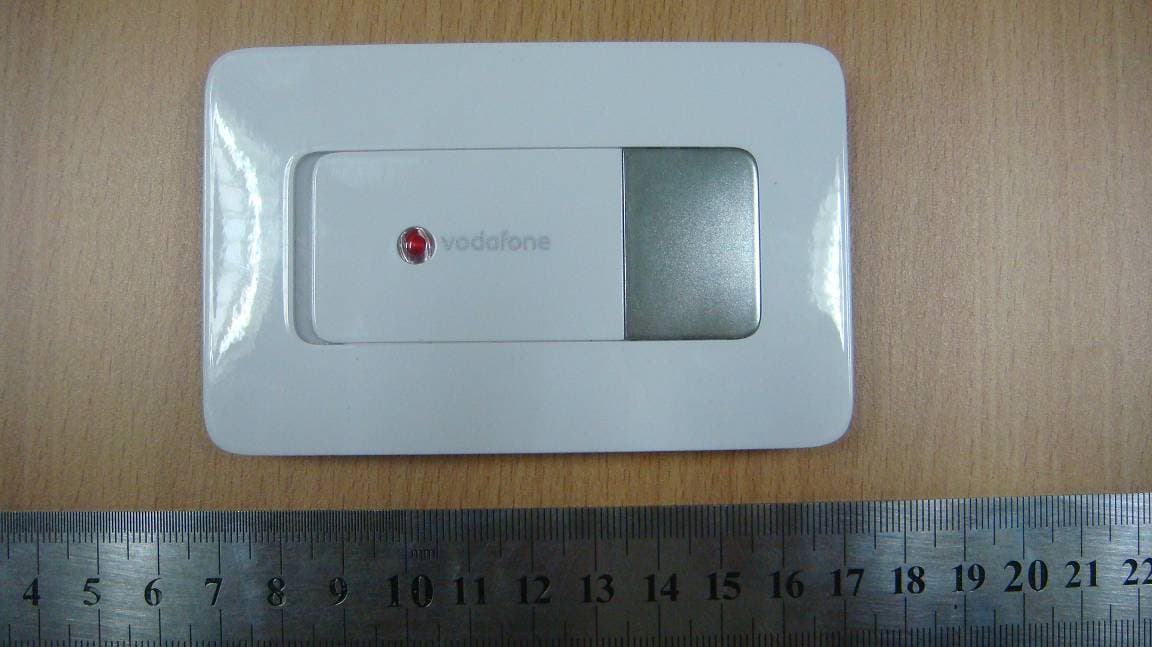
Click to zoom
Application Details
- Equipment Class
- PCB - PCS Licensed Transmitter
- Date of Grant
- May 05, 2010
- Application Purpose
- Original Equipment
- Date of Application
- May 05, 2010
- Equipment Note
- Vodafone Mobile Wi-Fi
- Frequency Range
- 1852.40000000 - 1907.60000000
- Company
- Huawei Technologies Co.,Ltd
- Country
- China
Documents & Files
Document Text
Text extracted from the exhibit documents filed with the FCC. Open a document above to read the original.
Users Manual
Copyright And Safety Information Copyright © Huawei Technologies Co., Ltd. 2010. All rights reserved. No part of this document may be reproduced or transmitted in any form or by any means without prior written consent of Huawei Technologies Co., Ltd. The product described in this manual may include copyrighted software of Huawei Technologies Co., Ltd and possible licensors. Customers shall not in any manner reproduce, distribute, modify, decompile, disassemble, decrypt, extract, reverse engineer, lease, assign, or sublicense the said software, unless such restrictions are prohibited by applicable laws or such actions are approved by respective copyright holders under licenses. Trademarks and Permissions , HUAWEI, and are trademarks or registered trademarks of Huawei Technologies Co., Ltd. Other trademarks, product, service and company names mentioned are the property of their respective owners. Notice Some features of the product and its accessories described herein rely on the software installed, capacities and settings of local network, and may not be activated or may be limited by local network operators or network service providers, thus the descriptions herein may not exactly match the product or its accessories you purchase. Huawei Technologies Co., Ltd reserves the right to change or modify any information or specifications contained in this manual without prior notice or obligation. NO WARRANTY THE CONTENTS OF THIS MANUAL ARE PROVIDED “AS IS”. EXCEPT AS REQUIRED BY APPLICABLE LAWS, NO WARRANTIES OF ANY KIND, EITHER EXPRESS OR IMPLIED, INCLUDING BUT NOT LIMITED TO, THE IMPLIED WARRANTIES OF MERCHANTABILITY AND FITNESS FOR A PARTICULAR PURPOSE, ARE MADE IN RELATION TO THE ACCURACY, RELIABILITY OR CONTENTS OF THIS MANUAL. TO THE MAXIMUM EXTENT PERMITTED BY APPLICABLE LAW, IN NO CASE SHALL HUAWEI TECHNOLOGIES CO., LTD BE LIABLE FOR ANY SPECIAL, INCIDENTAL, INDIRECT, OR CONSEQUENTIAL DAMAGES, OR LOST PROFITS, BUSINESS, REVENUE, DATA, GOODWILL OR ANTICIPATED SAVINGS. Import and Export Regulations Customers shall comply with all applicable export or import laws and regulations and will obtain all necessary governmental permits and licenses in order to export, re-export or import the product mentioned in this manual including the software and technical data therein. Safety Information This section contains important information pertaining to the operating instructions of your device. It also contains information about how to use the device safely. Read this information carefully before using your device. NOTE : z If the E5 is placed in an environment with poor ventilation, it will get heated after used for a long time. When the E5 gets heated to a certain extent, it will switch off or disconnect from the network automatically to protect itself. In this case, please expose the E5 in a well-ventilated place for heat dissipation and then restart the E5. z Use the compatible charger delivered only by the manufacturer with this device model. Using charger of other device model, other manufacturers or vendors may invalidate any approval or warranty applicable to the device, result in the non-operation of the device, and cause danger. z Charger is an optional accessory. If the charger is not provided in the package, you can contact your service provider to buy one yourself. Electronic Device Do not use your device if using your device is prohibited. Do not use the device when using your device causes danger or interference with electronic devices. Medical Device z Follow rules and regulations set forth by hospitals and health care facilities. Do not use your device when using the device is prohibited. z Some wireless devices may affect the performance of hearing aids or pacemakers. For any such problems, consult your service provider. z If you are using an electronic medical device, consult the doctor or the device manufacturer to confirm whether radio waves affect the operation of this device. Potentially Explosive Atmosphere Do not use your device in any area with a potentially explosive atmosphere, and comply with all signs and instructions. Areas that may have potentially explosive atmospheres include the areas where you would normally be advised to turn off your vehicle engine. Triggering of sparks in such areas could cause an explosion or a fire, resulting in bodily injuries or even deaths. Do not use your device at refueling points such as service stations. Comply with restrictions on the use of radio equipment in fuel depots, storage, and distribution areas, and chemical plants. In addition, adhere to restrictions in areas where blasting operations are in progress. Before using the device, watch out for areas that have potentially explosive atmospheres that are often, but not always, clearly marked. Such locations include areas below the deck on boats, chemical transfer or storage facilities, and areas where the air contains chemicals or particles such as grain, dust, or metal powders. Ask the manufacturers of vehicles using liquefied petroleum gas (such as propane or butane) whether this device can be safely used in their vicinity. Traffic Security z Observe local laws and regulations while using the device. To prevent accidents, do not use your wireless device while driving. z RF signals may affect electronic systems of motor vehicles. For more information, consult the vehicle manufacturer. z In a motor vehicle, do not place the device over the air bag or in the air bag deployment area. Otherwise, the device may hurt you owing to the strong force when the air bag inflates. z Do not use your device while flying in an aircraft and before boarding an aircraft. Using wireless devices in an aircraft may cause danger to the operation of the aircraft and disrupt the wireless telephone network. It may also be considered illegal. Operating Environment z Do not use or charge the device in dusty, damp, and dirty places or places with magnetic fields. Otherwise, it may result in a malfunction of …
Text truncated - open the document above for the full version.
Users Manual
Quick Start Guide Vodafone Mobile Wi-Fi Vodafone R201 2 Welcome to the world of mobile communications 1Introduction 2Device Overview 3Getting Started 7Connecting To The Vodafone Mobile Wi-Fi 8Configuration 9Web UI Information 10Power Saving Modes 11Battery Charging 12Advanced Configuration 1 s The Vodafone Mobile Wi-Fi R201 allows several Wi-Fi enabled devices (for example PCs, mobile gaming devices, digital music players) to share a secure mobile internet connection. The device is battery, mains or USB powered, and this fl exibility allows the device to be positioned for best mobile coverage and then share this coverage between several devices via Wi-Fi. The Vodafone R201 is DLNA certifi ed. This allows the device to act as a Digital Media Server, streaming music, videos and photos from a MicroSDHC™ card (not included) to other DLNA-certifi ed devices. It can also be confi gured as a shared network drive to allow fi les to be shared among several Wi-Fi devices. System Requirements To use the Vodafone Mobile Wi-Fi R201 you need a device with Wi-Fi capability (supporting WiFi 802.11 b/g) and an internet browser. End User Licence Agreement (EULA) Please ensure that you have read and accept the software EULA for your country before using the Vodafone Mobile Broadband software or device. The EULA is available at the following location: www.support.vodafone.com/VodafoneMobileWiFi/R201 Introduction 2 Device Overview Tip: The Mobile Broadband Connectivity / Power LED will be lit while the device is booting up. It will fl ash every 2 seconds when the device is not connected, and will fl ash every 10 seconds when the Vodafone Mobile Wi-Fi is connected to the Mobile Broadband Network, or in power save (sleep) mode. When the R201 is switched off, the LED will be off, but if it is still being charged, a large battery charging icon will be displayed on the Device Status Screen. Tip: The Wi-Fi Connectivity icon will also show the number of users connected to the device, for example 3 users. Device Status Screen Power switch – slide right to switch on and left to switch off Power / Mobile Broadband Connectivity LED WPS / Display button Device Status Screen Micro USB slot Mobile Broadband operator &time 3G connectivity & SMS ‘message waiting’ Wi-Fi connectivity & WPS information Mobile Broadband signal strength Battery charge 3 Getting Started (1/4) 1. To prepare the Vodafone Mobile Wi-Fi R201, you need to insert your SIM (and MicroSDHC card if you are using one for fi le sharing and streaming) and insert and charge the battery before use. 2. Unclip and slide open the back of the device and insert the SIM and MicroSDHC card (if used) as shown, then insert the battery. Note: Before replacing the back cover please make a note of your Wi-Fi security details which include a secure network WPA2 Key and a Network Name (SSID). The WPA2 Key and the SSID are unique to your device and can be found on a label on the inside of the back cover. These details will be needed if your PC operating system does not support WPS (Wireless Protected Setup) security. WPS is found in both Microsoft ® Windows Vista™ and Windows ® 7. Tip: The whole of the back cover is released by sliding it (towards the Micro USB slot end of the device) in order to release the clips, then the cover will lift off. Tip: WPS security is an additional manual security measure to safeguard and simplify access to the Vodafone Mobile Wi-Fi by pressing the WPS button when requested by the Windows Operating System instead of manually entering the WPA2 Key. WPS is an integral part of both Vista and Windows 7 operating systems. For more information on WPS confi guration please refer to the Advanced Confi guration Guide. Insert SIM Insert MicroSDHC card SSID and WPA2 Key Factory reset button 4 Getting Started (2/4) 3. On fi rst use, plug the Vodafone Mobile Wi-Fi into the mains supply, turn the mains power on but do not switch the device on to enable the battery to fully charge before use (approximately 3 hours). A battery charging icon will be displayed in the Status Screen on the front of the device. 4. After the battery is charged, switch the R201 on by sliding the switch on the face of the device to the right. The Power / Connectivity LED on the front of the R201 will be illuminated, and the device will go through its start-up sequence. 5. The Vodafone Mobile Wi-Fi will automatically connect to the Mobile Broadband network when it is powered on. If required, this default automatic network connection can be changed to a manual connection via the web UI of the device. Tip: The fl exibility of 3 potential power sources (battery, mains or USB) means that the Vodafone Mobile Wi-Fi can be situated where you get best network coverage (for example, you may get a better signal near a window). Wi-Fi or Micro USB connectivity means devices accessing the Vodafone R201 can be situated wherever is convenient for you. You may want to experiment with different Vodafone Mobile Wi-Fi locations to maximise the 3G signal strength (5 bars on the R201 Status Screen). 5 Getting Started (3/4) 6. The Status Screen icons tell you about the state of your device and if action is required. Power: On (intermittent fl ash) / Off (unlit) Mobile Broadband Operator / Time: The mobile broadband network the device is connected to is displayed, alternating with the current time 3G Connectivity / SMS information: Shows the type of network connection (HSPA, 3G, GPRS/EDGE), and if there is an unread SMS waiting it will alternate with a message icon Wi-Fi Connectivity / WPS information: Shows the number of users connected by Wi- Fi , alternatively if a WPS action is required from the user then the screen will look as follows : Battery Charge: Discharged (0%) Charging (10%) Charging (30%) Charging (60%) Charged (100%) Mobile Broadband Signal Excellent signal (connected) Excellent signal (not connected) Connection failed Roaming WPS PIN requiredWPS Push Button validation required Note: During cha…
Text truncated - open the document above for the full version.
Cover Letter(s)
Huawei Technologies Co., Ltd. Address:Huawei Industrial Base,Bantian Longgang,Shenzhen 518129, P.R China Post ZIP:518129 Page :1/1 To: Compliance Certification Services Fax : NULL From:Zhang Xinghai Fax:0086-755-89652518 Tel:0086-755-89651014 Email address: [email protected] Http: www.huawei.com Subject:Letter of Confidentiality Federal Communications Commission 7435 Oakland Mills Road Columbia, MD 21046 Gentlemen: This letter is to comply with the Code of Federal Regulations Title 47 Section 0.457 and 0.459 pertaining to confidential material. Huawei Technologies Co., Ltd. would like the following documents regarding this submission for FCC ID: QISR201 to be kept confidential: 1. Schematic diagram. 2. Block Diagram. 3. Parts list (BOM) Information. 4. Operational description. 5. Turn-up procedure The above material contains trade secrets or technical data, which would customarily be guarded from competitors. We do not want these documents to be accessible to the general public. Sincerely, For and Behalf of: Huawei Technologies Co., Ltd. Zhang Xinghai EMC Laboratory Manager
Cover Letter(s)
Huawei Technologies Co., Ltd. Administration Building, Huawei Base, Bantian, Longgang District, Shenzhen 518129 P.R.C. +86 755 28780808 www.huawei.com Huawei internal reference RCT-US-01-01 USA FCC Short Term Confidentiality Request template Effective date: 2007-01-06 Version 1.1 Short Term Confidentiality Request 05/05/2010 Federal Communications Commission Office of Engineering and Technology Equipment Authorization Division 7345 Oakland Mills Road Columbia, Maryland 21046 Subject: SHORT-TERM Confidentiality Request for FCC ID: QISR201 Product Name: Vodafone Mobile Wi-Fi Product Model: R201 To whom maybe concern: Pursuant to sections 0.457 and 0.459 of CFR 47 and to avoid premature release of sensitive information prior to marketing or release of the product to the public, Huawei Technologies Co., Ltd requests the following documents contained in this certification application be temporarily withheld from public disclosure for an initial period of 90 days: 1. External Photos 2. Internal Photos 3. Test Setup Photos 4. Users Manual The applicant also acknowledges that they will also provide appropriate notice to Compliance Certification Services should either of the following occur: A) If the applicant requires additional 45 day extension periods they will notify Compliance Certification Services with a new request letter at least 7 days prior to the short-term confidentiality expiration date-[Note: up to maximum of 3 extensions only are allowed], or b) Immediately notify Compliance Certification Services in the event the information regarding the product of the product is made available to the public Compliance Certification Services will then release the documents listed above for public disclosure pursuant to FCC Public Notice DA 04-1705.
Cover Letter(s)
Federal Communication Commissions 7435 Oakland Mills Road Columbia MD 21046 Subject: Request to apply permanent and short term confidentiality on submitted files Ref: Applicant:Huawei Technologies Co., Ltd. FCC ID: QISR201 Grant Date: 05/06/2010 To Whom It May Concern: Huawei Technologies Co., Ltd.would like to request the FCC permission to mark the following files as short term confidential files again. -External photos -Internal photos -Test setup photos -User manual Huawei Technologies Co., Ltd.acknowledges external photos, internal photos, test setup photos, user manual and antenna specification are available for public access from 08/04/2010 until Best Regards Zhang Xinghai /EMC manager date: 08/17/2010 08/17/2010.
External Photos
R201 Vodafone Mobile Wi-Fi SECRET Page 1 Total 5 External Photos of R201 Vodafone Mobile Wi-Fi R201 Vodafone Mobile Wi-Fi SECRET Page 2 Total 5 R201 Vodafone Mobile Wi-Fi SECRET Page 3 Total 5 R201 Vodafone Mobile Wi-Fi SECRET Page 4 Total 5 R201 Vodafone Mobile Wi-Fi SECRET Page 5 Total 5
ID Label/Location Info
R201 Vodafone Mobile Wi-Fi SECRET ID Label Location_R201 Back shell Page1, Total 1
ID Label/Location Info
R201 Vodafone Mobile Wi-Fi SECRET Page 1 Total 1 R201:
Internal Photos
R201 Vodafone Mobile Wi-Fi SECRET Internal Photos of R201 Vodafone Mobile Wi-Fi Page 1 Total 4 R201 Vodafone Mobile Wi-Fi SECRET Page 2 Total 4 R201 Vodafone Mobile Wi-Fi SECRET Page 3 Total 4 R201 Vodafone Mobile Wi-Fi SECRET Page 4 Total 4
RF Exposure Info
R201 Electromagnetic Radiation Exposure Estimation 1 Maximum Permissible Exposure (MPE) Estimation for R201 1 Introduction R201 is a UMTS/GSM Vodafone Mobile Wi-Fi. It can be used as a WiFi Access Point, Max to 5 WiFi stations can be associating with R201 simultaneity. It also can be used as a USB modem by connecting with PC via USB cable. It supports wireless internet accessing function. The data service rate is HSUPA 5.75Mbps, and HSDPA 7.2Mbps. The WCDMA frequency is BAND I , BAND II and BAND VIII. The GPRS/EDGE frequency is 850/900/1800/1900 MHz. The WiFi frequency is 2.4G. 2 Limits and Guidelines on Exposure to Electromagnetic Fields According to the FCC Part 2.1091( which reference the part1.1310), we know: mobile device (transmitting device designed to be used in other than fixed locations and to generally be used in such a way that a separation distance of at least 20 centimeters is normally maintained between the transmitters radiating structure(s) and the body of the user or nearby persons). And the Cellular radiotelephone service and PCS services are subject to routine environmental evaluation for RF exposure prior to equipment authorization or use if they operate at frequencies of 1.5 GHz or below and their effective radiated power (ERP) is 1.5 watts or more, or if they operate at frequencies above 1.5 GHz and their ERP is 3 watts or more. Uncontrolled limits are used for general public. General population/uncontrolled exposure apply in situations is which the general public may be exposed, or in which persons that are exposed as a consequence of their employment may not be fully aware of the potential for exposure or can not exercise control over their exposure. The exposure levels can be expressed in terms of power density, electric field strength, or magnetic field strength, as averaged over 30 minutes for the general public and 6 minutes for trained personnel. The exposure criterion is frequency dependent, and a chart covering the range from 3 kHz to 100 GHz can be found in NCRP No.86 (references IEEE C95.1-1999). Below are the limits. R201 Electromagnetic Radiation Exposure Estimation 2 Limits for Occupational/Controlled Exposure Frequency Range (MHz) Electric Field Strength (E) (V/m) Magnetic Field Strength (H) (A/m) Power Density (S) (mW/cm 2 ) 0.3-3.0 3.0-30 30-300 300-1500 15,00-100,000 614 1842/f 61.4 -- -- 16.3/f 16.3/f 0.163 -- -- (100)* (900/f 2 )* 1.0 f/300 5 Limits for General Population/Uncontrolled Exposure Frequency Range (MHz) Electric Field Strength (E) (V/m) Magnetic Field Strength (H) (A/m) Power Density (S) (mW/cm 2 ) 0.3-1.34 1.34-30.0 30-300 300-1500 15,00-100,000 614 824/f 27.5 -- -- 1.63 2.19/f 0.073 -- -- (100)* (180/f 2 )* 0.2 f/1500 1 Power density S [mW/cm2] for controlled area at 850 MHz ,(TX: 824MHz – 849MHz) 75.2 300 824 300 )( === MHzf S mW/cm 2 Power density S [mW/cm2] for uncontrolled area at 850 MHz 55.0 1500 824 1500 )( === MHzf S mW/cm 2 Power density S [mW/cm2] for uncontrolled area at 1900/2400 MHz S=1 mW/cm 2 Reference levels are provided for exposure assessment to determine whether the basic restrictions on exposure of humans to electromagnetic fields are exceeded. The basic restrictions on exposure to electromagnetic fields are based directly on established health effects and biological considerations. R201 Electromagnetic Radiation Exposure Estimation 3 3 Location of EUT The source of the radiation is mounted on terminal; generally the direction of the antenna position is uprightness tabletop. The highest level of emission would be expected in close vicinity of the antenna and in line of sight to the antenna. 4 Prediction of the Exposure to Electromagnetic Fields Calculations can be made on a site by site basis to ensure the power density is below the limits given above, or guidelines can be done beforehand to ensure the minimum distances from the antenna is maintained through the site planning. The calculations are based on FCC OET 65 Appendix B. 4.1 Calculation of the Safe Distance Below method describes a theoretical approach to calculate possible exposure to electromagnetic radiation around a base station transceiver antenna. Precise statements are basically only possible either with measurements or complex calculations considering the complexity of the environment (e.g. soil conditions, near buildings and other obstacles) which causes reflections, scattering of electromagnetic fields. The maximum output power (given in EIRP) of a base station is usually limited by license conditions of the network operator. A rough estimation of the expected exposure in power flux density on a given point can be made with the following equation. The calculations are based on FCC OET 65 Appendix B. π∗∗ ∗ = )(4 )( 2 mr GWP S numeric Whereas: P = Maximum output power in W of the site G numeric = Numeric gain of the antenna relative to isotropic antenna R = distance between the antenna and the point of exposure in meters 4.2 Technical Description R201 Technical Specification: Cellular Band R201 Electromagnetic Radiation Exposure Estimation 4 ERP: 32.88 dBm for GSM850MHz Transmitter frequency band GSM850 Frequency range: 850M: Uplink:824 M~849M; Downlink:869 M~894M PCS Band EIRP: 31.11 dBm for GSM1900MHz 22.99 dBm for WCDMA1900MHz Transmitter frequency band GSM1900 WCDMA1900 Frequency range: 1900M: Uplink:1850 M~1910M; Downlink:1930M~1990M 1900M: Uplink:1850 M~1910M; Downlink:1930M~1990M For Wlan, the max conducted output power is 15.73dBm, and it’s antenna’s max gain is 0.08dBi, so we can get the max EIRP 15.81dBm. EIRP: 38.1mW (15.81 dBm) for WLAN Transmitter frequency band 2400~2483.5MHz 4.3 Estimation of compliance boundary for indoor antenna 1) Cellular Band: GSM850 For the final determination of the compliance boundary the model for far-field calculation is used since this overestimates the field strength in the near-field region. Thus the calculated compliance boundary should be rather more conservative and on the safe side. For EUT the fol…
Text truncated - open the document above for the full version.
RF Exposure Info
Report No.: RZA2010-1181 TESTING No. L2264 OET 65 TEST REPORT Product Name Vodafone Mobile Wi-Fi Model R201 FCC ID QISR201 Client Huawei Technologies Co., Ltd. TA Technology (Shanghai) Co., Ltd. GENERAL SUMMARY Product Name Vodafone Mobile Wi-Fi Model R201 FCC ID QISR201 Report No. RZA2010-1181 Client Huawei Technologies Co., Ltd. Manufacturer Huawei Technologies Co., Ltd. Reference Standard(s) IEEE Std C95.1, 1999: IEEE Standard for Safety Levels with Respect to Human Exposure to Radio Frequency Electromagnetic Fields, 3 kHz to 300 GHz. SUPPLEMENT C Edition 01-01 to OET BULLETIN 65 Edition 97-01 June 2001 including DA 02-1438, published June 2002: Evaluating Compliance with FCC Guidelines for Human Exposure to Radio frequency Electromagnetic Fields Additional Information for Evaluation Compliance of Mobile and Portable Devices with FCC Limits for Human Exposure to Radio frequency Emissions. KDB 447498 D01 Mobile and Portable Device RF Exposure Procedures and Equipment Authorization Policies Conclusion This portable wireless equipment has been measured in all cases requested by the relevant standards. Test results in Chapter 7 of this test report are below limits specified in the relevant standards. General Judgment: Pass (Stamp) Date of issue: August 2 nd , 2010 Comment The test result only responds to the measured sample. Approved by Yang Weizhong Revised by Ling Minbao Performed by Zhang Sheng TA Technology (Shanghai) Co., Ltd. Test Report Report No. RZA2010-1181 Page 3 of 123 TABLE OF CONTENT 1. General Information ........................................................................................................................ 5 1.1. Notes of the test report............................................................................................................ 5 1.2. Testing laboratory .................................................................................................................... 5 1.3. Applicant Information ............................................................................................................... 6 1.4. Manufacturer Information ......................................................................................................... 6 1.5. Information of EUT................................................................................................................... 7 1.6. The Maximum SAR 1g Values and Conducted Power of each tested band .............................. 8 1.7. Test Date ................................................................................................................................. 8 2. Operational Conditions during Test ................................................................................................. 9 2.1. General description of test procedures .................................................................................... 9 2.2. GSM Test Configuration ........................................................................................................... 9 2.3. WCDMA Test Configuration ................................................................................................... 10 2.4. HSDPA Test Configuration ..................................................................................................... 10 2.5. HSUPA Test Configuration ..................................................................................................... 13 2.6. Position of module in Portable devices .................................................................................. 15 3. SAR Measurements System Configuration ................................................................................... 16 3.1. SAR Measurement Set-up .....................................................................................................16 3.2. DASY4 E-field Probe System ................................................................................................ 17 3.2.1. EX3DV4 Probe Specification .......................................................................................... 17 3.2.2. E-field Probe Calibration ................................................................................................. 18 3.3. Other Test Equipment ............................................................................................................18 3.3.1. Device Holder for Transmitters ....................................................................................... 18 3.3.2. Phantom .........................................................................................................................19 3.4. Scanning procedure............................................................................................................... 19 3.5. Data Storage and Evaluation ................................................................................................. 21 3.5.1. Data Storage...................................................................................................................21 3.5.2. Data Evaluation by SEMCAD ......................................................................................... 21 3.6. System check......................................................................................................................... 24 3.7. Equivalent Tissues ................................................................................................................. 25 4. Laboratory Environment................................................................................................................ 25 5. Characteristics of the Test ............................................................................................................. 26 5.1. Applicable Limit Regulations .................................................................................................. 26 5.2. Applicable Measurement Standards...................................................................................... 26 6. Conducted …
Text truncated - open the document above for the full version.
Test Report
FCC Test Report of HUAWEI R201 FCC ID:QISR201 Security Level: Public Report No: SYBHZ(R)E037042010EB-2 Confidential Information of Huawei. No Distribution without Permission Page1, Total44 Appendix A Modulation Characteristics According to FCC Part 2.1047 & Part22 Subpart H FCC Test Report of HUAWEI R201 FCC ID:QISR201 Security Level: Public Report No: SYBHZ(R)E037042010EB-2 Confidential Information of Huawei. No Distribution without Permission Page2, Total44 Channel 128(TM1:GPRS) FCC Test Report of HUAWEI R201 FCC ID:QISR201 Security Level: Public Report No: SYBHZ(R) E037042010EB-2 Confidential Information of Huawei. No Distribution without Permission Page3, Total44 Channel 192(TM1:GPRS) FCC Test Report of HUAWEI R201 FCC ID:QISR201 Security Level: Public Report No: SYBHZ(R) E037042010EB-2 Confidential Information of Huawei. No Distribution without Permission Page4, Total44 Channel 251(TM1:GPRS) FCC Test Report of HUAWEI R201 FCC ID:QISR201 Security Level: Public Report No: SYBHZ(R) E037042010EB-2 Confidential Information of Huawei. No Distribution without Permission Page5, Total44 Channel 128(TM2:EDGE) FCC Test Report of HUAWEI R201 FCC ID:QISR201 Security Level: Public Report No: SYBHZ(R) E037042010EB-2 Confidential Information of Huawei. No Distribution without Permission Page6, Total44 Channel 192(TM2:EDGE) FCC Test Report of HUAWEI R201 FCC ID:QISR201 Security Level: Public Report No: SYBHZ(R) E037042010EB-2 Confidential Information of Huawei. No Distribution without Permission Page7, Total44 Channel 251(TM2:EDGE) FCC Test Report of HUAWEI R201 FCC ID:QISR201 Security Level: Public Report No: SYBHZ(R) E037042010EB-2 Confidential Information of Huawei. No Distribution without Permission Page8, Total44 Appe…
Text truncated - open the document above for the full version.
Contact Information
Applicant
Zhang Xinghai
Technical Contact
Huawei Technologies Co., LtdAmy Lei
[email protected]+86 755 36834612
Administration Building, Huawei Base, · ShenZhen · China
Non-Technical Contact
Huawei Technologies Co., LtdAmy Lei
[email protected]+86 755 36834612
Test Firm
Huawei Technologies Co., LTDZhou Fengyum
Technical Specifications
| # | Rule Parts | Frequency Range | Power Output | Emission | Tolerance |
|---|---|---|---|---|---|
| 5 | 24E | 1.85 GHz - 1.91 GHz | 200.00 mW | 4M19F9W | 2.5 ppm |
Other Applications from Huawei Technologies Co.,Ltd

QISSUN2000
Jun 27, 2021Solar Inverter
Equipment Class
DTS - Digital Transmission System
QISCP81-1
Oct 22, 2020Watch Wireless Charger
Equipment Class
DCD - Part 15 Low Power Transmitter Below 1705 kHz
QISRRU3278
Sep 02, 2020Remote Radio Unit
Equipment Class
CBD - Citizens Band Category A and B Devices
QISR2561
Jul 11, 2020Indoor Router
Equipment Class
DTS - Digital Transmission System
QISSMARTLOGGER310
Mar 23, 2020Solar Smart Monitor & Data Logger
Equipment Class
DTS - Digital Transmission System