QISR226Mobile WiFi
Huawei Technologies Co.,Ltd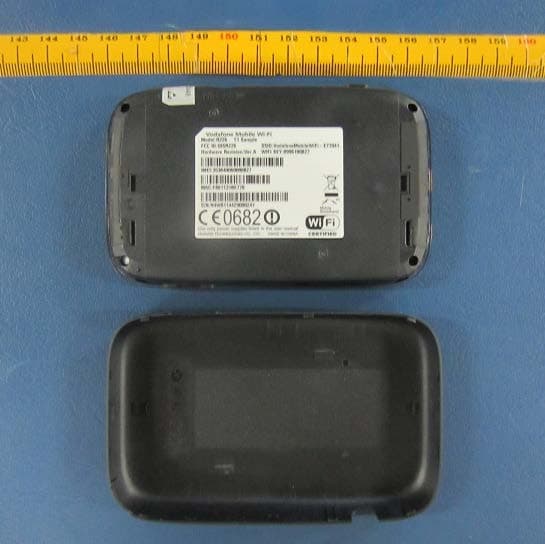
Click to zoom
Application Details
- Equipment Class
- DTS - Digital Transmission System
- Date of Grant
- Jul 31, 2014
- Application Purpose
- Original Equipment
- Date of Application
- Jul 26, 2014
- Equipment Note
- Mobile WiFi
- Frequency Range
- 5775.00000000 - 5775.00000000
- Company
- Huawei Technologies Co.,Ltd
- Country
- China
Documents & Files
Document Text
Text extracted from the exhibit documents filed with the FCC. Open a document above to read the original.
Users Manual
RF Exposure Your device contains a transmitter and a receiver. When it is ON, it receives and transmits RF energy. When your device is in use, the system handling your connection controls the power level at which your device transmits. Specific Absorption Rate (SAR) Your wireless device is a radio transmitter and receiver. It is designed not to exceed the limits for exposure to radio waves recommended by international guidelines. These guidelines were developed by the independent scientific organisation ICNIRP and include safety margins designed to assure the protection of all persons, regardless of age and health. The guidelines use a unit of measurement known as the Specific Absorption Rate, or SAR. The SAR limit for wireless devices is 2 watts/kilogram (W/kg) and the highest SAR value for this device when tested complied with this limit. Body worn operation Important safety information regarding radio frequency radiation (RF) exposure To ensure compliance with RF exposure guidelines the device must be used with a minimum of 1.5 cm separation from the body. Failure to observe these instructions could result in your RF exposure exceeding the relevant guideline limits. CE Approval (European Union) The wireless device is approved to be used in the member states of the EU. The manufacturer declares that the wireless device is in compliance with the essential requirements and other relevant provisions of the Radio and Telecommunications Terminal Equipment Directive 1999/5/EC (R&TTE Directive). FCC Statement FCC Compliance (when US bands are supported) Federal Communications Commission Notice (United States): Before a wireless device model is available for sale to the public, it must be tested and certified to the FCC that it does not exceed the limit established by the government-adopted requirement for safe exposure. The SAR limit for battery operated standalone wireless routers adopted by the USA is 1.6 watts/kilogram (W/kg) averaged over one gram of tissue. The highest SAR value reported to the FCC for this device type was compliant with this limit. This device complies with part 15 of the FCC Rules. Operation is subject to the condition that this device does not cause harmful interference. Caution: Changes or modifications not expressly approved by the manufacturer could void the user’s authority to operate the equipment. NOTE: This equipment has been tested and found to comply with the limits for a Class B digital device, pursuant to part 15 of the FCC Rules. These limits are designed to provide reasonable protection against harmful interference in a residential installation. This equipment generates, uses and can radiate radio frequency energy and, if not installed and used in accordance with the instructions, may cause harmful interference to radio communications. However, there is no guarantee that interference will not occur in a particular installation. If this equipment does cause harmful interference to radio or television reception, which can be determined by turning the equipment off and on, the user is encouraged to try to correct the interference by one or more of the following measures: • Reorient or relocate the receiving antenna. • Increase the separation between the equipment and receiver. • Connect the equipment into an outlet on a circuit different from that to which the receiver is connected. • Consult the dealer or an experienced radio/TV technician for help. Distraction Driving Full attention must be given to driving at all times in order to reduce the risk of an accident. Using this device while driving causes distraction and can lead to an accident. You must comply with local laws and regulations restricting the use of wireless devices while driving. Operating machinery Full attention must be given to operating the machinery in order to reduce the risk of an accident. Product Handling You alone are responsible for how you use your device and any consequences of its use. You must always switch off your device wherever the use of a mobile phone is prohibited. If your device has clip-on covers, do not use it without the covers attached and do not remove or change them while using the device. Use of your device is subject to safety measures designed to protect users and their environment. • Always treat your device and its accessories with care and keep it in a clean and dust-free place. • Do not expose your device or its accessories to open flames or lit tobacco products. Safety Manual Vodafone Mobile Wi-Fi Read the Safety Information section of this safety manual below Do not use hand-held while driving Small parts may cause a choking hazard Keep away from pacemakers and other personal medical devices Switch off when instructed in hospitals and medical facilities Switch off when instructed in aircrafts and airports Switch off in explosive environments Do not use while re-fuelling For body-worn operation maintain antenna separation of 1.5 cm Do not dispose of in a fire Avoid contact with magnetic media Avoid Extreme Temperatures Avoid contact with liquid, keep dry Do not try and disassemble Do not rely on this device for emergency communications Only use approved accessories • Do not expose your device or its accessories to liquid, moisture or high humidity. • Do not drop, throw or try to bend your device or its accessories. • Do not use harsh chemicals, cleaning solvents, or aerosols to clean the device or its accessories. • Do not paint your device or its accessories. • Do not attempt to disassemble your device or its accessories: only authorised personnel must do so. • Do not expose your device or its accessories to extreme temperatures, minimum –5 and maximum +55 degrees Celsius. For optimal performance operate within a range of minimum 0 and maximum +35 degrees Celsius. • Do not use your device in an enclosed environment or where heat dissipation is poor. Prolonged use in such space may cause excessive heat and raise ambient temperature, which will lead to autom…
Text truncated - open the document above for the full version.
Users Manual
Quickstart Guide Vodafone Mobile Wi-Fi R226 1 Welcome 2 Device overview 3 Getting started 5 Mobile Wi-Fi Web app 6 Web app overview 7 Current network panel 8 Mobile Wi-Fi Monitor app 9 Hints and tips 10 Glossary Welcome to the world of mobile communications 1 Your Vodafone Mobile Wi-Fi creates a personal por table Wi-Fi network. Use it to share your secure mobile broadband internet connection with other Wi-Fi-enabled devices, such as computers, Apple ® iPhone, iPad or iPod touch, Android smar tphones and tablets like the Samsung ® Galaxy Tab, or mobile gaming devices like Nintendo ® DSi. You can use batter y, mains or USB to power your Vodafone Mobile Wi-Fi. This fl exibility makes it easy to position your Vodafone Mobile Wi-Fi to get the best mobile coverage. Your Vodafone Mobile Wi-Fi uses open source programs licensed under the GNU GPL (Version 2.0), BSD (Version 3.0), OpenSSL, Zlib/libpng, LGPL and Apache License. You can download the source code free of charge from: http://vodafone.com/r226 for a period of three years from the distribution of this product. Copyright © Huawei Technologies Co., Ltd. 2014. All Rights Reserved Your Vodafone Mobile Wi-Fi is made exclusively for Vodafone by Huawei. No par t of this guide may be reproduced or transmitted in any form or by any means without prior written consent of Huawei. Welcome Notice Licenses 2 Device overview Menu key Status display Tes t s o cket Micro USB socket Power on/off 4 5 3 1 2 Tip: To save power the display is dimmed after 18 seconds, and switches off after a fur ther 6 seconds. The display can be switched on by briefly touching the poweron/off button. The display will also switch on whenever the status of the device changes. 5 3 1 2 4 Roaming indicator Connect duration Indicative cumulative upload & download data volume Wi-Fi status and number of users Unread messages Network signal Battery Network operator or additional information Bearer Network signal: Connecting to network Excellent - not connected Excellent - connected Unable to connect Battery: Fully charged Discharged 3 Step 1 Insert your SIM and optionally a MicroSD card. Step 2 Plug your Vodafone Mobile Wi-Fi into the mains* or your computer to charge it while you are using it. Getting started Tip: Charge your Mobile Wi-Fi fully (mains: 3 hours) before using it in batter y mode. *Please only use the correct charger for your region –HW-050200X3W, where “x” will be one of U, E, B, A , or J, depending on your region. For details about a specific charger, please contact your mobile network operator. micro SIM micro SD micro SIM micro SD Replace back coverInser t MicroSD cardInsert SIM Remove back cover 4 Step 3 Press and hold the power button for 3 seconds to switch on your Vodafone Mobile Wi-Fi. It will begin connecting to the mobile broadband network. Step 4 You may need to enter your PIN to unlock your SIM. Also, when your Vodafone Mobile Wi-Fi connects to the mobile network for the fi rst time, you may be asked to activate your SIM. Activation is not always necessar y, so you may not see this. Step 5 On your computer or device, select your Vodafone Mobile Wi-Fi network’s name (its ‘SSID’) from the list of available networks, click Connect and enter the secure Wi-Fi network key (the ‘ WPA2 password’). The name and key are on the back cover of your Vodafone Mobile Wi-Fi and also on a printed reminder card. Congratulations - you are connected to the internet via Vodafone Mobile Wi-Fi. Getting started 5 To check the status of your mobile broadband and Wi-Fi networks, manage SMS text messages or change the settings of your Mobile Wi-Fi, you can use the Vodafone Mobile Wi-Fi Web app: Connect to your Vodafone Mobile Wi-Fi via Wi-Fi or with a USB cable – If you installed your Vodafone Mobile Wi-Fi via USB, double-click the – Vodafone Mobile Wi-Fi icon that was created on your desktop Alternatively - and particularly if you did not install via USB - open – http://VodafoneMobile.wifi or http://192.168.0.1 in your web browser. To use the Vodafone Mobile Wi-Fi Web app via a USB cable or via Wi-Fi, you need: A computer with at least Windows XP – ® SP3, or An Apple Mac with at least OS X – ® 10.6 Snow Leopard. You can also manage your Vodafone Mobile Wi-Fi via its Wi-Fi network, but not via a USB cable, using: Linux or Windows – ® 8 RT, or iPhone, iPad, iPod touch, or any other smartphone or tablet. – Mobile Wi-Fi Web app Tip: Save the addresses for your Mobile Wi-Fi as favourites in your web browser. 6 Navigation tabs: Select Mobile Wi-Fi, Storage, SMS or Account view Navigation bar: Select an area within each view Current network panel: Status of mobile broadband network, Wi-Fi n etwork, batter y and connected devices Content area: Content for current area Context help: Help for current area Language selection: Defaults to browser language Login/Logout: For advanced settings. The default password is ‘admin’. Web app overview 4 5 6 7 3 1 2 4 5 3 6 1 2 7 7 The Current network panel appears on the right-hand side of ever y view in the Mobile Wi-Fi Web app, giving you a quick summar y of the status of your Mobile Wi-Fi. Below it are additional panels for batter y, Wi-Fi and the status of other devices sharing your Wi-Fi network. Current network panel 8 Mobile Wi-Fi Monitor app If you have an Apple iOS ® or Android device, you can also check the status of your Mobile Wi-Fi using the Vodafone Mobile Wi-Fi Monitor app. Download the app from the iTunes or Google Play app stores. iPad / tabletiPhone / smartphone 9 Hints and tips Wi-Fi security Please ensure that the Wi-Fi securit y settings meet your personal requirements. To change the admin password, open the Vodafone Mobile Wi-Fi Web app: – Enter ‘admin’ into the Password fi eld and click ‘Login’ – Select Router on the Navigation bar – Select ‘Router Settings’ from the left-hand Menu bar. To change your Wi-Fi network name (SSID) and the key: – Select Wi-Fi on the Navigation bar – Select ‘Security’ from the left-hand Menu bar. Further…
Text truncated - open the document above for the full version.
Cover Letter(s)
Huawei Technologies Co., Ltd. Address:Administration Building, Headquarters of Huawei Technologies Co., Ltd., Bantian, Longgang District, Shenzhen, 518129, P.R.C Post ZIP:518129 Page :1/1 To: TUVPS Fax : NULL From:Zhang Xinghai Fax:0086-755-89650226 Tel:0086-755-28970299 Email address: [email protected] Http: www.huawei.com Subject:Letter of Authorization 2014-07-21 To whom it may concern: We the undersigned, hereby authorize TUVPS to act on our behalf in all manners relating to application for equipment authorization, including signing of all documents relating to these matters. Any and all acts carried out by TUVPS on our behalf shall have the same affect as acts of our own. This authorization is valid until further written notice from Huawei Technologies Co., Ltd. . Sincerely, For and Behalf of: Huawei Technologies Co., Ltd. Zhang Xinghai EMC Laboratory Manager
Cover Letter(s)
Huawei Technologies Co.,Ltd. Federal Communications Commission 2014-07-21 7435 Oakland Mills Road Columbia MD 21046 Subject: Request for Confidentiality FCC ID: QISR226 To Whom It May Concern: Pursuant to the provisions of Sections 0.457 and 0.459 of the Commission’s rules (47 CFR §§ 0.457, 0.459), we are requesting the Commission to withhold the following attachments as confidential document from public disclosure indefinitely. Schematic Diagram PCB files Block Diagram Operational Description Bom List Tune-Up Procedure KDB Inquiry No.: 770541 Above mentioned document contains detailed system and equipment description are considered as proprietary information in operation of the equipment. The public disclosure of above documents might be harmful to our company and would give competitor an unfair advantage in the market. ***************************************************************************** In additional to above mentioned documents, pursuant to Public Notice DA 04-1705 of the Commission’s policy, in order to comply with the marketing regulations in 47 CFR §2.803 and the importation rules in 47 CFR §2.1204, while ensuring that business sensitive information remains confidential until the actual marketing of newly authorized devices. We are requesting the Commission withholds the following documents from public viewing until 2014-08-22: External Photos Internal Photos Test Setup Photos User Manual ****************************************************************************** It is our understanding that all measurement test reports, FCC ID label format and correspondent during certification review process cannot be granted as confidential documents and those information will be available for public review once the grant of equipment authorization is issued. Best Regards Zhang Xinghai EMC Laboratory Manager Huawei Technologies Co., Ltd. E-mail: [email protected] Tel: 0086-0755-28970299 Fax: 0086-0755-89650226
Cover Letter(s)
Huawei Technologies Co.,Ltd. Date: July 21, 2014 Statement We, Huawei Technologies Co., Ltd., states that our device, FCC ID: QISR226, Its cover can be removed during package and the FCC ID is readily visible when users open the product box. For and Behalf of: Huawei Technologies Co., Ltd. Zhang Xinghai EMC Laboratory Manager Address: Administration Building, Headquarters of Huawei Technologies Co., Ltd., Bantian, Longgang District, Shenzhen, 518129, P.R.C E-mail: [email protected] Te l : 0086-0755-28970299 Fax: 0086-0755-89650226
External Photos
R226 SECRET 2014-7-21 Page1, Total5 External Photos of R226 R226 SECRET 2014-7-21 Page2, Total5 R226 SECRET 2014-7-21 Page3, Total5 R226 SECRET 2014-7-21 Page4, Total5 R226 SECRET 2014-7-21 Page5, Total5
ID Label/Location Info
R226 SECRET Page 1 Total 1 ID Label R226:
ID Label/Location Info
R226 SECRET Page1, Total 1 ID Label Location_ R226 When we remove the cover,we can see the ID label。
Internal Photos
R226 SECRET 2014-7-21 Page1, Total2 Internal Photos of R226 R226 SECRET 2014-7-21 Page2, Total2
RF Exposure Info
Administration Building, Headquarters of Huawei Technologies Co., Ltd., Bantian, Longgang District, Shenzhen, 518129, P.R.C Tel: +86 755 28780808 Fax: +86 755 89652518 FCC SAR Compliance Test Report Product Name: Mobile WiFi Model: R226 Report No.: SYBH(Z-SAR)039052014-2 FCC ID: QISR226 APPROVED (Lab Manager) PREPARED (Test Engineer) BY DATE 2014-07-17 2014-07-17 The test results of this test report relate exclusively to the item(s) tested . The HUAWEI does not assume responsibility for any conclusions and generalisations drawn from the test results with regard to other specimens or samples of the type of the equipment represented by the test item. The test report may only be reproduced or published in full. Reproduction or publication of extracts from the report requires the prior written approval of HUAWEI. Reliability Laboratory of Huawei Technologies Co., Ltd. Report No.: SYBH(Z-SAR)039052014-2 FCC ID:QISR226 2014-07-17 Page 2 of 65 Table of Contents 1 General Information ............................................................................................................................................... 4 1.1 Statement of Compliance .............................................................................................................................. 4 1.2 RF exposure limits ......................................................................................................................................... 5 1.3 EUT Description ............................................................................................................................................ 6 1.3.1 General Description ............................................................................................................................... 8 1.4 Test specification(s) ...................................................................................................................................... 9 1.5 Testing laboratory .......................................................................................................................................... 9 1.6 Applicant and Manufacturer .......................................................................................................................... 9 1.7 Application details .......................................................................................................................................... 9 1.8 Ambient Condition ........................................................................................................................................ 9 2 SAR Measurement System ............................................................................................................................... 10 2.1 SAR Measurement Set-up ......................................................................................................................... 10 2.2 Test environment ......................................................................................................................................... 11 2.3 Data Acquisition Electronics description .................................................................................................... 11 2.4 Probe description ......................................................................................................................................... 12 2.5 Phantom description .................................................................................................................................... 13 2.6 Device holder description ............................................................................................................................ 14 2.7 Test Equipment List ..................................................................................................................................... 15 3 SAR Measurement Procedure .......................................................................................................................... 16 3.1 Scanning procedure .................................................................................................................................... 16 3.2 Spatial Peak SAR Evaluations .................................................................................................................... 17 3.3 Data Storage and Evaluation ...................................................................................................................... 18 4 System Verification Procedure ............................................................................................................................ 20 4.1 Tissue Verification ....................................................................................................................................... 20 4.2 System Check ............................................................................................................................................. 22 4.3 System check Procedure............................................................................................................................. 23 5 SAR measurement variability and uncertainty .................................................................................................... 24 5.1 SAR measurement variability ...................................................................................................................... 24 5.2 SAR measurement uncertainty ................................................................................................................... 24 6 SAR Test Configuration ...................................................................................................................................... 25 6.1 GSM Test Configuration .............................................................................................................................. 25 6.2 UMTS Test Configuration ...........................................................................................…
Text truncated - open the document above for the full version.
RF Exposure Info
Report No.: SYBH (Z-SAR)039052014-2 FCC ID:QISR226 Appendix A. System Check Plots Table of contents SystemPerformanceCheck-D835-EX-Body SystemPerformanceCheck-D835-EX-Body SystemPerformanceCheck-D1900-EX-Body SystemPerformanceCheck-D2450-EX-Body SystemPerformanceCheck-D2600-EX-Body SystemPerformanceCheck-D5200-EX-Body SystemPerformanceCheck-D5800-EX-Body SystemPerformanceCheck-D5800-EX-Body Date: 2014-6-9 Test Laboratory: HUAWEI SAR/HAC Lab SystemPerformanceCheck-D835-EX-Body DUT: Dipole 835 MHz D835V2; Type: D835V2; Serial: D835V2 - SN:4d059 Communication System: UID 0, CW; Frequency: 835 MHz;Duty Cycle: 1:1 Medium parameters used: f = 835 MHz; σ = 1.007 S/m; ε r = 54.117; ρ = 1000 kg/m 3 Phantom section: Flat Section DASY Configuration: lProbe: EX3DV4 - SN3736; ConvF(9.08, 9.08, 9.08); Calibrated: 2014-4- 24; lSensor-Surface: 3mm (Mechanical Surface Detection), z = 1.0, 31.0 lElectronics: DAE4 Sn851; Calibrated: 2013-7-31 lPhantom: SAM4; Type: SAM; Serial: TP-1620 lDASY52 52.8.7(1137); SEMCAD X 14.6.10(7331) Configuration/d=15mm, Pin=250mW/Area Scan (6x14x1): Measurement grid: dx=15mm, dy=15mm Maximum value of SAR (measured) = 2.87 W/kg Configuration/d=15mm, Pin=250mW/Zoom Scan (5x5x7)/Cube 0: Measurement grid: dx=8mm, dy=8mm, dz=5mm Reference Value = 50.99 V/m; Power Drift = 0.08 dB Peak SAR (extrapolated) = 3.77 W/kg SAR(1 g) = 2.55 W/kg; SAR(10 g) = 1.67 W/kg Maximum value of SAR (measured) = 2.98 W/kg 0 dB = 2.98 W/kg = 4.74 dBW/kg Date: 2014-6-14 Test Laboratory: HUAWEI SAR/HAC Lab SystemPerformanceCheck-D835-EX-Body DUT: Dipole 835 MHz D835V2; Type: D835V2; Serial: D835V2 - SN:4d059 Communication System: UID 0, CW; Frequency: 835 MHz;Duty Cycle: 1:1 Medium parameters used: f = 835 MHz; σ = 1.005 S/m; ε r = 53.882; ρ = 1000 kg/m 3 Phantom section: Flat Section DASY Configuration: lProbe: EX3DV4 - SN3744; ConvF(9.07, 9.07, 9.07); Calibrated: 2013-7- 26; lSensor-Surface: 3mm (Mechanical Surface Detection), z = 1.0, 31.0 lElectronics: DAE4 Sn851; Calibrated: 2013-7-31 lPhantom: SAM3; Type: SAM; Serial: TP-1597 lDASY52 52.8.8(1222); SEMCAD X 14.6.10(7331) Configuration/d=15mm, Pin=250mW/Area Scan (6x14x1): Measurement grid: dx=15mm, dy=15mm Maximum value of SAR (measured) = 2.80 W/kg Configuration/d=15mm, Pin=250mW/Zoom Scan (5x5x7)/Cube 0: Measurement grid: dx=8mm, dy=8mm, dz=5mm Reference Value = 51.31 V/m; Power Drift = 0.07 dB Peak SAR (extrapolated) = 3.73 W/kg SAR(1 g) = 2.54 W/kg; SAR(10 g) = 1.68 W/kg Maximum value of SAR (measured) = 2.95 W/kg 0 dB = 2.95 W/kg = 4.70 dBW/kg Date: 2014-6-9 Test Laboratory: HUAWEI SAR/HAC Lab SystemPerformanceCheck-D1900-EX-Body DUT: Dipole 1900 MHz D1900V2; Type: D1900V2; Serial: D1900V2 - SN:5d143 Communication System: UID 0, CW; Frequency: 1900 MHz;Duty Cycle: 1:1 Medium parameters used: f = 1900 MHz; σ = 1.546 S/m; ε r = 52.223; ρ = 1000 kg/m 3 Phantom section: Flat Section DASY Configuration: lProbe: EX3DV4 - SN3736; ConvF(7.35, 7.35, 7.35); Calibrated: 2014-4- 24; lSensor-Surface: 3mm (Mechanical Surface Detection), z = 1.0, 31.0 lElectronics: DAE4 Sn851; Calibrated: 2013-7-31 lPhantom: SAM3; Type: SAM; Serial: TP-1597 lDASY52 52.8.7(1137); SEMCAD X 14.6.10(7331) Configuration/d=10mm, Pin=250mW/Area Scan (5x9x1): Measurement grid: dx=15mm, dy=15mm Maximum value of SAR (measured) = 13.5 W/kg Configuration/d=10mm, Pin=250mW/Zoom Scan (5x5x7)/Cube 0: Measurement grid: dx=8mm, dy=8mm, dz=5mm Reference Value = 88.31 V/m; Power Drift = 0.07 dB Peak SAR (extrapolated) = 19.6 W/kg SAR(1 g) = 10.8 W/kg; SAR(10 g) = 5.64 W/kg Maximum value of SAR (measured) = 13.7 W/kg 0 dB = 13.7 W/kg = 11.37 dBW/kg Date: 2014-6-15 Test Laboratory: HUAWEI SAR/HAC Lab SystemPerformanceCheck-D2450-EX-Body DUT: Dipole 2450 MHz D2450V2; Type: D2450V2; Serial: D2450V2 - SN:860 Communication System: UID 0, CW; Frequency: 2450 MHz;Duty Cycle: 1:1 Medium parameters used: f = 2450 MHz; σ = 1.958 S/m; ε r = 51.188; ρ = 1000 kg/m 3 Phantom section: Flat Section DASY Configuration: lProbe: EX3DV4 - SN3744; ConvF(6.91, 6.91, 6.91); Calibrated: 2013-7- 26; lSensor-Surface: 3mm (Mechanical Surface Detection), z = 1.0, 31.0 lElectronics: DAE4 Sn851; Calibrated: 2013-7-31 lPhantom: SAM4; Type: SAM; Serial: TP-1620 lDASY52 52.8.7(1137); SEMCAD X 14.6.10(7331) Configuration/d=10mm, Pin=250mW/Area Scan (6x11x1): Measurement grid: dx=12mm, dy=12mm Maximum value of SAR (measured) = 15.1 W/kg Configuration/d=10mm, Pin=250mW/Zoom Scan (7x7x7)/Cube 0: Measurement grid: dx=5mm, dy=5mm, dz=5mm Reference Value = 83.79 V/m; Power Drift = -0.18 dB Peak SAR (extrapolated) = 26.2 W/kg SAR(1 g) = 12.7 W/kg; SAR(10 g) = 5.85 W/kg Maximum value of SAR (measured) = 16.6 W/kg 0 dB = 16.6 W/kg = 12.20 dBW/kg Date: 2014-7-1 Test Laboratory: HUAWEI SAR/HAC Lab SystemPerformanceCheck-D2600-EX-Body DUT: Dipole 2600 MHz D2600V2; Type: D2600V2; Serial: D2600V2 - SN:1021 Communication System: UID 0, CW; Frequency: 2600 MHz;Duty Cycle: 1:1 Medium parameters used: f = 2600 MHz; σ = 2.127 S/m; ε r = 50.586; ρ = 1000 kg/m 3 Phantom section: Flat Section DASY Configuration: lProbe: EX3DV4 - SN3744; ConvF(6.75, 6.75, 6.75); Calibrated: 2013-7- 26; lSensor-Surface: 3mm (Mechanical Surface Detection), z = 1.0, 31.0 lElectronics: DAE4 Sn851; Calibrated: 2013-7-31 lPhantom: SAM4; Type: SAM; Serial: TP-1620 lDASY52 52.8.7(1137); SEMCAD X 14.6.10(7331) Configuration/d=10mm, Pin=250mW/Area Scan (6x11x1): Measurement grid: dx=12mm, dy=12mm Maximum value of SAR (measured) = 16.6 W/kg Configuration/d=10mm, Pin=250mW/Zoom Scan (7x7x7)/Cube 0: Measurement grid: dx=5mm, dy=5mm, dz=5mm Reference Value = 75.56 V/m; Power Drift = 0.19 dB Peak SAR (extrapolated) = 30.0 W/kg SAR(1 g) = 13.9 W/kg; SAR(10 g) = 6.13 W/kg Maximum value of SAR (measured) = 18.6 W/kg 0 dB = 18.6 W/kg = 12.70 dBW/kg Date: 2014-6-22 Test Laboratory: HUAWEI SAR/HAC Lab SystemPerformanceCheck-D5200-EX-Body DUT: Dipole D5GHzV2; Type: D5GHzV2; Serial: D5GHzV2 - SN:1155 Communication System: UID 0, CW; Frequency: 5200 MHz;Duty Cycle: 1:1 Medium parameters used:…
Text truncated - open the document above for the full version.
RF Exposure Info
Report No.:SYBH (Z-SAR)039052014-2 FCC ID: QISR226 Appendix B. SAR Measurement Plots Table of contents GSM850 Body GSM1900 Body UMTS Band V Body UMTS Band II Body LTE Band V Body LTE Band VII Body WiFi 2.4G Body WiFi 5G Body Date: 2014-6-10 Test Laboratory: HUAWEI SAR/HAC Lab R226 GSM850 GPRS 2TS 190CH Back side 10mm DUT: R226; Type: Mobile WiFi; Serial: SAR2 Communication System: UID 0, HW-GSM\GPRS\EGPRS-2TS (0); Frequency: 836.6 MHz;Duty Cycle: 1:4.10015 Medium parameters used: f = 837 MHz; σ = 1.009 S/m; ε r = 54.1; ρ = 1000 kg/m 3 Phantom section: Flat Section DASY Configuration: lProbe: EX3DV4 - SN3736; ConvF(9.08, 9.08, 9.08); Calibrated: 2014-4-24; lSensor-Surface: 3mm (Mechanical Surface Detection), z = 1.0, 31.0 lElectronics: DAE4 Sn851; Calibrated: 2013-7-31 lPhantom: SAM4; Type: SAM; Serial: TP-1620 lDASY52 52.8.7(1137); SEMCAD X 14.6.10(7331) Configuration/Body/Area Scan (7x11x1): Measurement grid: dx=15mm, dy=15mm Maximum value of SAR (measured) = 0.765 W/kg Configuration/Body/Zoom Scan (5x5x7)/Cube 0: Measurement grid: dx=8mm, dy=8mm, dz=5mm Reference Value = 23.05 V/m; Power Drift = 0.08 dB Peak SAR (extrapolated) = 0.958 W/kg SAR(1 g) = 0.678 W/kg; SAR(10 g) = 0.471 W/kg Maximum value of SAR (measured) = 0.773 W/kg 0 dB = 0.773 W/kg = -1.12 dBW/kg Date: 2014-6-10 Test Laboratory: HUAWEI SAR/HAC Lab R226 GSM1900 GPRS 2TS 661CH Back side 10mm DUT: R226; Type: Mobile WiFi; Serial: SAR2 Communication System: UID 0, HW-GSM\GPRS\EGPRS-2TS (0); Frequency: 1880 MHz;Duty Cycle: 1:4.10015 Medium parameters used: f = 1880 MHz; σ = 1.521 S/m; ε r = 52.27; ρ = 1000 kg/m 3 Phantom section: Flat Section DASY Configuration: lProbe: EX3DV4 - SN3736; ConvF(7.35, 7.35, 7.35); Calibrated: 2014-4-24; lSensor-Surface: 3mm (Mechanical Surface Detection), z = 1.0, 31.0 lElectronics: DAE4 Sn851; Calibrated: 2013-7-31 lPhantom: SAM3; Type: SAM; Serial: TP-1597 lDASY52 52.8.7(1137); SEMCAD X 14.6.10(7331) Configuration/Body/Area Scan (7x11x1): Measurement grid: dx=15mm, dy=15mm Maximum value of SAR (measured) = 0.872 W/kg Configuration/Body/Zoom Scan (5x5x7)/Cube 0: Measurement grid: dx=8mm, dy=8mm, dz=5mm Reference Value = 10.06 V/m; Power Drift = -0.01 dB…
Text truncated - open the document above for the full version.
Contact Information
Applicant
Zhang Xinghai
Test Firm
Huawei Technologies Co., LTDZhou Fengyum
Technical Specifications
| # | Rule Parts | Frequency Range | Power Output |
|---|---|---|---|
| 5 | 15C | 5.78 GHz - 5.78 GHz | 125.00 mW |
Other Applications from Huawei Technologies Co.,Ltd

QISSUN2000
Jun 27, 2021Solar Inverter
Equipment Class
DTS - Digital Transmission System
QISCP81-1
Oct 22, 2020Watch Wireless Charger
Equipment Class
DCD - Part 15 Low Power Transmitter Below 1705 kHz
QISRRU3278
Sep 02, 2020Remote Radio Unit
Equipment Class
CBD - Citizens Band Category A and B Devices
QISR2561
Jul 11, 2020Indoor Router
Equipment Class
DTS - Digital Transmission System
QISSMARTLOGGER310
Mar 23, 2020Solar Smart Monitor & Data Logger
Equipment Class
DTS - Digital Transmission System