QISRIO-L01Smart Phone
Huawei Technologies Co.,Ltd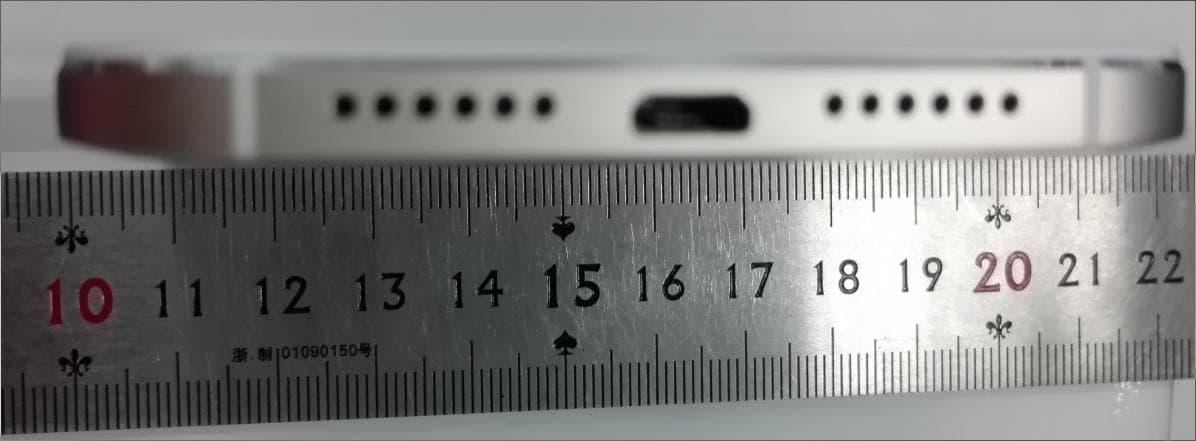
Click to zoom
Application Details
- Equipment Class
- JBP - Part 15 Class B Computing Device Peripheral
- Date of Grant
- Jul 26, 2015
- Application Purpose
- Original Equipment
- Date of Application
- Jul 26, 2015
- Equipment Note
- Smart Phone
- Company
- Huawei Technologies Co.,Ltd
- Country
- China
Documents & Files
Document Text
Text extracted from the exhibit documents filed with the FCC. Open a document above to read the original.
Users Manual
Quick Start Guide RIO-L01 For more information Read the Quick Start Guide included with your device. Go to http://consumer.huawei.com/en/ to download the user guide for your device (including safety information) and read the FAQ, privacy policy, and other information. Go to Settings > About phone > Legal information to read the legal information. Please visit http://consumer.huawei.com/en/support/hotline/ for the most up-to-date contact information for your country or region. All pictures and illustrations in this guide, including but not limited to the phone color, size, and display content, are for your reference only. The actual product may vary. Nothing in this guide constitutes a warranty of any kind, express or implied. Your phone at a glance Before you start, let's take a look at your new phone. Press and hold the power button to turn your phone on or off. To forcibly restart your phone, press and hold the power button until your phone vibrates. Light sensor Headset jack Power button Volume button Micro USB port Front camera Earpiece Status indicator Microphone Home Return Recent Speaker Getting started Follow the instructions in the following figures to set up your phone. Do not insert or remove a SIM card while your phone is on. Please exercise caution when using the SIM ejector pin to avoid hurting your fingers or damaging your phone. Store your pin in a safe place out of the reach of children to prevent them from swallowing it or injuring themselves by accident. Caution Insert the SIM card into the correct card slot to ensure that it can be recognized by the phone. 1 3dual cardsingle card or 2 slot1 slot2 4 Locking and unlocking the screen Press the power button to lock the screen. If your phone is idle for a specified period of time, the screen will automatically lock itself. If the screen is off, press the power button to turn it on. Slide your finger in any direction to unlock the screen. Swipe up from the bottom of the screen to open the control panel for magazine unlock. You can also quickly launch commonly used applications without unlocking the screen. Calling and messaging Touch to make a call using the dialer. You can also touch a phone number in your contacts, or a number in a message, email, web page, or other source to place a call. Touch to send a text or multimedia message. You can save photos, audio clips, videos, and other attachments from received multimedia messages. Camera Touch . Frame the scene you want to capture. Let your camera focus automatically or touch the screen to focus on a specific object. Then touch to take a photo. Swipe left or right to switch between different capture modes. Light painting mode uses long exposure times to capture illuminated objects in a dark background. Time-lapse mode lets you record the slow transformation of objects or scenes, such as a blooming flower or the setting sun. Internet connection You can access the Internet over Wi-Fi or a mobile data network. Swipe down from the status bar to open the notification panel. Touch to turn on mobile data. Touch and hold to go to the Wi-Fi settings screen. Turn on Wi- Fi and connect to a Wi-Fi network. Turn off mobile data when you don't need it to reduce your mobile data usage. Backing up data Touch . Touch to open the settings menu. You can set how often you want to back up your data by following the onscreen instructions. Touch and select the data that you want to back up, such as your contacts, messages, and photos. Then follow the onscreen instructions to complete the backup. Phone manager Touch . You can quickly scan your phone for potential risks with one touch. Follow the onscreen instructions to use one-touch optimization, or manually clean the system storage and manage your applications. Touch the options on the screen to clean your system trash, set the harassment filter, activate power saving mode, manage your applications' notification permissions, and more. Screen off gestures Touch and then . Turn on screen off gestures. When the screen is off, you can turn it on or open an app using a predefined gesture. One-hand layout Swipe the navigation bar to the left or right to adjust the screen display area so that you can use the phone with one hand. When in the dialer, contacts, messages, or email app, swipe down on the screen to access the content on the top of the screen with one hand. Safety information This section contains important information about the operation of your device. It also contains information about how to use the device safely. Read this information carefully before using your device. Electronic device Do not use your device if using the device is prohibited. Do not use the device if doing so causes danger or interference with other electronic devices. Interference with medical equipment • Follow rules and regulations set forth by hospitals and health care facilities. Do not use your device where prohibited. • Some wireless devices may affect the performance of hearing aids or pacemakers. Consult your service provider for more information. • Pacemaker manufacturers recommend that a minimum distance of 15 cm be maintained between a device and a pacemaker to prevent potential interference with the pacemaker. If using a pacemaker, hold the device on the side opposite the pacemaker and do not carry the device in your front pocket. Protecting your hearing when using a headset • To prevent possible hearing damage, do not listen at high volume levels for long periods. • Using a headset at high volumes may damage your hearing. To reduce this risk, lower the headset volume to a safe and comfortable level. • Exposure to high volumes while driving may cause distraction and increase your risk of an accident. Areas with flammables and explosives • Do not use the device where flammables or explosives are stored (in a gas station, oil depot, or chemical plant, for example). Using your device in these environments increases the risk of explosion or fire. In addition,…
Text truncated - open the document above for the full version.
Cover Letter(s)
Huawei Technologies Co., Ltd. Address:Huawei Industrial Base, Bantian, Longgang, Shenzhen, P.R China Post ZIP:518129 Page :1/1 To: TUVPS Fax : NULL From:Zhang Xinghai Fax:0086-0755-89650226 Tel:0086-0755-28970299 Email address: [email protected] Http: www.huawei.com Subject:Letter of Authorization 2015-07-09 To whom it may concern: We the undersigned, hereby authorize TUVPS to act on our behalf in all manners relating to application for equipment authorization, including signing of all documents relating to these matters. Any and all acts carried out by TUVPS on our behalf shall have the same affect as acts of our own. This authorization is valid until further written notice from Huawei Technologies Co., Ltd. . Sincerely, For and Behalf of: Huawei Technologies Co., Ltd. Zhang Xinghai EMC Laboratory Manager
Cover Letter(s)
Huawei Technologies Co.,Ltd. Federal Communications Commission 2015-7-09 7435 Oakland Mills Road Columbia MD 21046 Subject: Request for Confidentiality FCC ID: QISRIO-L01 To Whom It May Concern: Pursuant to the provisions of Sections 0.457 and 0.459 of the Commission’s rules (47 CFR §§ 0.457, 0.459), we are requesting the Commission to withhold the following attachments as confidential document from public disclosure indefinitely. Schematic Diagram Block Diagram Operational Description Bom List Tune-Up Procedure Above mentioned document contains detailed system and equipment description are considered as proprietary information in operation of the equipment. The public disclosure of above documents might be harmful to our company and would give competitor an unfair advantage in the market. ***************************************************************************** In additional to above mentioned documents, pursuant to Public Notice DA 04-1705 of the Commission’s policy, in order to comply with the marketing regulations in 47 CFR §2.803 and the importation rules in 47 CFR §2.1204, while ensuring that business sensitive information remains confidential until the actual marketing of newly authorized devices. We are requesting the Commission withholds the following documents from public viewing until 2015-10-09: External Photos Internal Photos Test Setup Photos User Manual ****************************************************************************** It is our understanding that all measurement test reports, FCC ID label format and correspondent during certification review process cannot be granted as confidential documents and those information will be available for public review once the grant of equipment authorization is issued. Best Regards Zhang Xinghai EMC Laboratory Manager Huawei Technologies Co., Ltd. E-mail: [email protected] Fax: 0086-0755-89650226
Cover Letter(s)
Huawei Technologies Co.,Ltd Administration Building, Headquarters of Huawei Technologies Co., Ltd., Bantian, Longgang District,Shenzhen,518129,P.R.C Tel: 0086-0755-28970299 ; Fax: 0086-0755-89650226 Date: July 15, 2015 Statement We, Huawei Technologies Co.,Ltd, states that our device, FCC ID: QISRIO-L01, has a battery, But the battery will be placed in the battery compartment when delivery, it is not visible to the users as they purchase the products. For and Behalf of: Huawei Technologies Co., Ltd. Zhang Xinghai EMC Laboratory Manager
External Photos
HUAWEI RIO-L01,RIO-L01 Smart Phone SECRET Page1,Total 5 External Photos of HUAWEI RIO-L01, RIO-L01 HUAWEI RIO-L01,RIO-L01 Smart Phone SECRET Page2,Total 5 HUAWEI RIO-L01,RIO-L01 Smart Phone SECRET Page3,Total 5 HUAWEI RIO-L01,RIO-L01 Smart Phone SECRET Page4,Total 5 HUAWEI RIO-L01,RIO-L01 Smart Phone SECRET Page5,Total 5
ID Label/Location Info
HUAWEI RIO-L01,RIO-L01 Smart Phone SECRET Page1, Total 4 HUAWEI RIO-L01, RIO-L01 HUAWEI RIO-L01,RIO-L01 Smart Phone SECRET Page2, Total 4 HUAWEI RIO-L01,RIO-L01 Smart Phone SECRET Page3, Total 4 HUAWEI RIO-L01,RIO-L01 Smart Phone SECRET Page4, Total 4
Internal Photos
HUAWEI RIO-L01,RIO-L01 Smart Phone SECRET Page1,Total 6 Internal Photos of HUAWEI RIO-L01, RIO-L01 HUAWEI RIO-L01,RIO-L01 Smart Phone SECRET Page2,Total 6 HUAWEI RIO-L01,RIO-L01 Smart Phone SECRET Page3,Total 6 HUAWEI RIO-L01,RIO-L01 Smart Phone SECRET Page4,Total 6 HUAWEI RIO-L01,RIO-L01 Smart Phone SECRET Page5,Total 6 HUAWEI RIO-L01,RIO-L01 Smart Phone SECRET Page6,Total 6
Test Report
Report No.: BTL-FCCE-1-1505C116 Page 1 of 94 FCCE Test Report FCC ID: QISRIO-L01 Project No. : 1505C116 Equipment : Smart Phone Model Name : HUAWEI RIO-L01, RIO-L01 Applicant : HUAWEI Technologies Co., Ltd Address : Huawei Industrial Base,Bantian Longgang,Shenzhen 518129, P.R China Date of Receipt : May 13, 2015 Date of Test : May 13, 2015 ~ May 24, 2015 Issued Date : May 25, 2015 Tested by : BTL Inc. Testing Engineer : (Pike Lee) Technical Manager : (Jeff Yang) Authorized Signatory : (Andy Chiu) BTL INC. B1, No. 37, Lane 365, Yang-Guang St., Nei-Hu District, Taipei City 114, Taiwan. TEL: +886-2-2657-3299 FAX: +886-2-2657-3331 Report No.: BTL-FCCE-1-1505C116 Page 2 of 94 Declaration BTL represents to the client that testing is done in accordance with standard procedures as applicable and that test instruments used has been calibrated with the standards traceable to National Measurement Laboratory (NML) of R.O.C., or National Institute of Standards and Technology (NIST) of U.S.A. BTL's reports apply only to the specific samples tested under conditions. It is manufacture’s responsibility to ensure that additional production units of this model are manufactured with the identical electrical and mechanical components. BTL shall have no liability for any declarations, inferences or generalizations drawn by the client or others from BTL issued reports. BTL’s report must not be used by the client to claim product certification, approval, or endorsement b y NVLAP, NIST, or any agency of the Federal Government. This report is the confidential property of the client. As a mutual protection to the clients, the public and BTL-self, extracts from the test report shall not be reproduced except in full with BTL’s authorized written approval. BTL’s laboratory quality assurance procedures are in compliance with the ISO Guide 17025 requirements, and accredited by the conformity assessment authorities listed in this test report. Limitation For the use of the authority's logo is limited unless the Test Standard(s)/Scope(s)/Item(s) mentioned in this test report is (are) included in the conformity assessment authorities acceptance respective. Report No.: BTL-FCCE-1-1505C116 Page 3 of 94 Table of Contents Page 1 . CERTIFICATION 5 2 . SUMMARY OF TEST RESULTS 6 2.1 TEST FACILITY 7 2.2 MEASUREMENT UNCERTAINTY 7 3 . GENERAL INFORMATION 8 3.1 GENERAL DESCRIPTION OF EUT 8 3.2 DESCRIPTION OF TEST MODES 9 3.3 BLOCK DIAGRAM SHOWING THE CONFIGURATION OF SYSTEM TESTED 10 3.4 DESCRIPTION OF SUPPORT UNITS 11 4 . EMC EMISSION TEST 12 4.1 CONDUCTED EMISSION MEASUREMENT 12 4.1.1 POWER LINE CONDUCTED EMISSION 12 4.1.2 TEST PROCEDURE 12 4.1.3 DEVIATION FROM TEST STANDARD 12 4.1.4 TEST SETUP 13 5.1.5 EUT OPERATING CONDITIONS 13 5.1.6 TEST RESULTS 13 4.2 RADIATED EMISSION MEASUREMENT 14 4.2.1 LIMITS OF RADIATED EMISSION MEASUREMENT 14 4.2.2 TEST PROCEDURE 15 4.2.3 DEVIATION FROM TEST STANDARD 15 4.2.4 TEST SETUP 16 4.2.5 EUT OPERATING CONDITIONS 16 5.2.6 TEST RESULTS (30 TO 1000 MHZ) 17 5.2.7 TEST RESULTS (ABOVE 1000 MHZ) 17 5 . MEASUREMENT INSTRUMENTS LIST 18 6 . EUT TEST PHOTO 19 ATTACHMENT A - CONDUCTED EMISSION 22 ATTACHMENT B - RADIATED EMISSION (30MHZ TO 1000MHZ) 41 ATTACHMENT C - RADIATED EMISSION (ABOVE 1000MHZ) 62 Report No.: BTL-FCCE-1-1505C116 Page 4 of 94 REPORT ISSUED HISTORY Issued No. Description Issued Date BTL-FCCE-1-1505C116 Original Issue. May 25, 2015 Report No.: BTL-FCCE-1-1505C116 Page 5 of 94 1. CERTIFICATION Equipment : Smart Phone Brand Name : HUAWEI Model Name : HUAWEI RIO-L01, RIO-L01 Applicant : HUAWEI Technologies Co., Ltd Manufacturer : Huawei Industrial Base,Bantian Longgang,Shenzhen 518129, P.R China Address : HUAWEI Technologies Co., Ltd Factory : Huawei Industrial Base,Bantian Longgang,Shenzhen 518129, P.R China Address : HUAWEI Technologies Co., Ltd Date of Test : May 13, 2015 ~ May 24, 2015 Standard(s) : FCC Part 15, Subpart B:2014 ANSI C63.4-2009 The above equipment has been tested and found compliance with the requirement of the relative standards by BTL Inc. The test data, data evaluation, and equipment configuration contained in our test report (Ref No. BTL-FCCE-1-1505C116) were obtained utilizing the test procedures, test instruments, test sites that has been accredited by the Authority of TAF according to the ISO-17025 quality assessment standard and technical standard(s). Report No.: BTL-FCCE-1-1505C116 Page 6 of 94 2. SUMMARY OF TEST RESULTS Test procedures according to the technical standard(s): EMC Emission Standard(s) Test Item Limit Judgment Remark FCC Part15, Subpart B:2014 ANSI C63.4-2009 Conducted Emission Class B PASS Radiated Emission Class B PASS NOTE: (1) ” N/A” denotes test is not applicable in this test report. Report No.: BTL-FCCE-1-1505C116 Page 7 of 94 2.1 TEST FACILITY The test facilities used to collect the test data in this report is at the location of B1, No. 37, Lane 365, Yang-Guang St.,Nei-Hu District, Taipei City 114, Taiwan. 2.2 MEASUREMENT UNCERTAINTY Where relevant, the following measurement uncertainty levels have been estimated for tests performed on the EUT as specified in CISPR 16-4-2. The BTL measurement uncertainty is less than the CISPR 16-4-2 U cispr requirement. The reported uncertainty of measurement y ± U, where expanded uncertainty U is based on a standard uncertainty multiplied by a coverage factor of k=2, providing a level of confidence of approximately 95%. A. Conducted Measurement : Test Site Method Measurement Frequency Range U, (dB) NOTE C02 CISPR 150 KHz ~ 30MHz 2.59 B. Radiated Measurement : Test Site Method Measurement Frequency Range Ant. H / V U, (dB) NOTE CB08 CISPR 30MHz ~ 200MHz V 3.22 30MHz ~ 200MHz H 3.55 200MHz ~ 1,000MHz V 3.24 200MHz ~ 1,000MHz H 3.11 1,000MHz ~18,000MHz V 4.05 1,000MHz ~ 18,000MHz H 3.97 18,000MHz ~ 40,000MHz V 4.04 18,000MHz ~ 40,000MHz H 4.01 Note: Unless specifically mentioned, the uncertainty of measurement has not been taken into account to declare the compliance or non-compliance to the specification. Repor…
Text truncated - open the document above for the full version.
Test Setup Photos
Report No.: BTL-FCCE-1-1505C116 Page 19 of 94 6. EUT TEST PHOTO Conducted Measurement Photos Report No.: BTL-FCCE-1-1505C116 Page 20 of 94 Radiated Measurement Photos 30MHz to 1000MHz Report No.: BTL-FCCE-1-1505C116 Page 21 of 94 Radiated Measurement Photos Above 1000MHz
Contact Information
Applicant
Zhang Xinghai
Test Firm
Huawei Technologies Co., LTDZhou Fengyum
Technical Specifications
| # | Rule Parts | Frequency Range | Power Output |
|---|---|---|---|
| 1 | 15B | - | - |
Other Applications from Huawei Technologies Co.,Ltd

QISSUN2000
Jun 27, 2021Solar Inverter
Equipment Class
DTS - Digital Transmission System
QISCP81-1
Oct 22, 2020Watch Wireless Charger
Equipment Class
DCD - Part 15 Low Power Transmitter Below 1705 kHz
QISRRU3278
Sep 02, 2020Remote Radio Unit
Equipment Class
CBD - Citizens Band Category A and B Devices
QISR2561
Jul 11, 2020Indoor Router
Equipment Class
DTS - Digital Transmission System
QISSMARTLOGGER310
Mar 23, 2020Solar Smart Monitor & Data Logger
Equipment Class
DTS - Digital Transmission System