QIST201T201 Mobile Phone
Huawei Technologies Co.,Ltd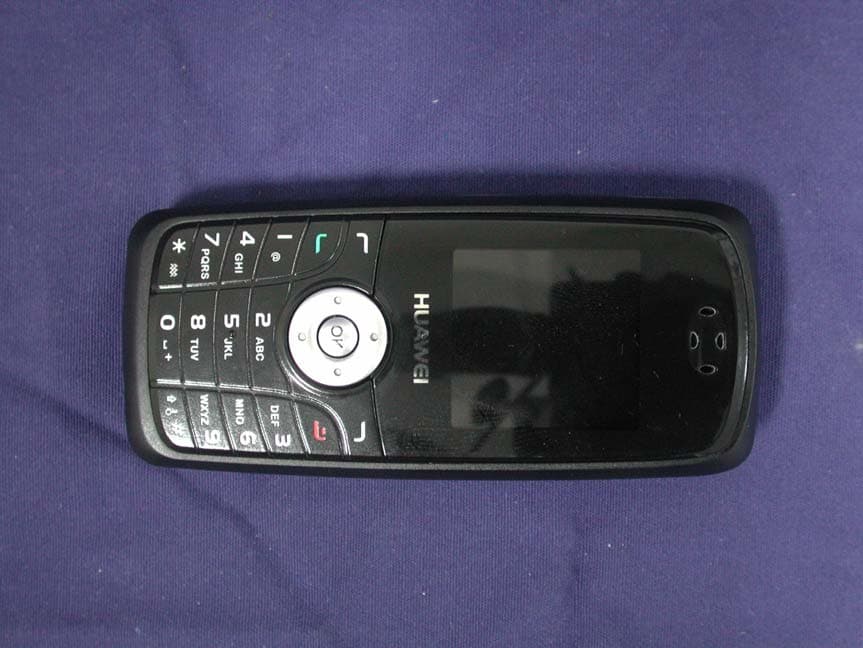
Click to zoom
Application Details
- Equipment Class
- PCE - PCS Licensed Transmitter held to ear
- Date of Grant
- Oct 30, 2007
- Application Purpose
- Original Equipment
- Date of Application
- Oct 16, 2007
- Equipment Note
- T201 Mobile Phone
- Frequency Range
- 1850.20000000 - 1909.80000000
- Company
- Huawei Technologies Co.,Ltd
- Country
- China
Documents & Files
Document Text
Text extracted from the exhibit documents filed with the FCC. Open a document above to read the original.
Users Manual
T201 Mobile Phone Copyright © 2007 Huawei Technologies Co., Ltd. and other Huawei trademarks are the trademarks or registered trademarks of Huawei Technologies Co., Ltd. in the People’s Republic of China and certain other countries. All other trademarks mentioned in this manual are the property of their respective holders. The information in this manual is subject to change without notice. Every effort has been made in the preparation of this manual to ensure accuracy of the contents, but all statements, information, and recommendations in this manual do not constitute the warranty of any kind, express or implied. Huawei Technologies Co., Ltd. Address: Huawei Industrial Base, Bantian, Longgang, Shenzhen 518129, People's Republic of China Tel: +86-755-28780808 Global Hotline: +86-755-28560808 E-mail: [email protected] Website: www.huawei.com Table of Contents Your Phone ............................................................................... 1 Keys and Functions .................................................................. 2 Screen Icons.............................................................................. 3 Menu Tree ................................................................................. 5 Installing the SIM Card and Battery.... 錯誤 ! 尚未定義書籤。 Removing the Battery and SIM Card....................................... 6 Charging the Battery................................................................. 6 Using the Function Menu ......................................................... 7 Making a Call ........................................................................... 8 Answering a Call ...................................................................... 8 Security ..................................................................................... 9 PIN and PUK ............................................................................ 9 Locking the Keypad.................................................................. 9 Text Input Modes .................................................................... 10 Warnings and Precautions ...................................................... 10 1 Your Phone 2 Keys and Functions Press... To... z Follow the prompt shown on screen, press to access the following options: “Menu”, “Select”, “OK ”or “Option”, etc. z Press to access In-Call Menu during calls. z In the editing mode, press to clear the screen or delete characters. z In the menu mode, press to return to upper level menu. z In the idle mode access to Contacts easily by simply pressing Quick Search Contacts Access key. z Press up and down arrow to scroll through the lists when accessing menus or setting options. z Press up arrowto access the “Calendar”. z Press down arrowto access to the “Contacts”. z Press left arrowto access to the “Alarm clock ”. z Press right arrowto access to the “Write message ”. z Press middle keyto access to the “Fun &Tools ”. 3 Press... To... z Press to reject an incoming call. z Press and hold to turn on /off the phone. z Press to end an active call during calls. z Press and back to the idle mode. z Press to place a call or answer an incoming call. z In the idle mode, press to access the call records and view the phone numbers dialed or missed recently with 10 entries each. Screen Icons Icon Description IconDescription or Indicates signal strength and alternate line service. Voice Message It is shown when there is an unread incoming voice message. Battery Charge Indicator The longer the bar, the more power is available in the battery. Silencer It is shown when the ringer volume is set to Level 0 or the Call Alert is set to No ringer & Vibrator. 4 Icon Description IconDescription Roaming It shows that you are using a network other than your home network. Mute It is shown when you set Profiles to Mute in the Settings menu. Short Message It is solid when there is an unread incoming text message. It flashes when the memory is full. Vibrator It is shown when Call Alert is set to Vibrator Only. Alarm It is shown when you enable the alarm. Earphone Indicates the connection of an earphone. Missing call Indicates that you have missed calls. 5 Menu Tree 1 Phone settings 2 Display settings 3 Network settings 4 Call settings 5 Shortcut 1SMS 2 3 Info service Messages 1 2 Incoming call 3 Outgoing call 4 Missed call 5 Call duration 6 Message counter 1 2 3 4 5 1 2 Voice mailbox 3 Messages 1 2 3 4 5 6 All records Call Register Contacts 1 2 3 Search 4 Storage status 5 Speed dial 6 Fixed dial 1 2 3 4 5 6 Create View 7 Enable FND Caller groups 8 Delete all entrie s 9 Copy 10 Settings Profiles 1 General 2 Conference 3 Outdoor 4Mute 5Customize 1 2 3 4 5 Fun&Tools 1BMI 2 Countdown 3 Stopwatch 4 Calendar 1 2 3 4 Games 1ELF 2 Snake 3 Settings 1 2 3 Organizer 1 2 3 To do list 4 World clock 5 Calculater 6 Unit converter 1 2 3 4 5 6 Alarm clock Calendar 7 Currency STK 6 Installing the SIM Card and Battery. Make sure that the angled corner is on the lower right-hand side with the golden metallic contact surface facing downward. Removing the Battery and SIM Card Make sure that your phone is powered off. Charging the Battery Use only the approved battery and charger supplied by the phone manufacturer. 1. Insert the connector of the travel charger into the charger jack at the bottom of the phone. 2. If your phone is powered on, after you have connected the charger to the AC power supply socket, the battery indicator will start scrolling while charging begins. You can also use your phone while charging it. If the phone is powered off, "Charging" will be displayed on screen. 7 3. When the battery is fully charged, the battery indicator stops scrolling. If the phone is powered off, it will inform you with the message of "Charging completed" displayed on the screen. Note: ¾ When charging the battery for the first time, charge it for at least 12 hours. ¾ Charging duration may vary with major voltage variations. ¾ For optimum battery performance, five hours o…
Text truncated - open the document above for the full version.
ID Label/Location Info
Huawei Technologies Co.,Ltd Huawei Base BanTian Longgang Shenzhen 518129 P.R.C FCC ID Label The FCC ID and DoC Label will be placed on the equipment as shown in the photograph below.
RF Exposure Info
Report No:079240R-HPUSP09V01 Page: 1 of 26 Version:1.0 SAR Test Report Product Name : GSM Mobile Phone Model No. : T201 Applicant : Huawei Technologies Co.,Ltd Address : Huawei Base BanTian Longgang Shenzhen 51829 P.R.C Date of Receipt:2007/09/17 Issued Date :2007/10/09 Report No. :079240R-HPUSP09V01 The test results relate only to the samples tested. The test report shall not be reproduced except in full without the written approval of QuieTek Corporation. Report No:079240R-HPUSP09V01 Page: 2 of 26 Version:1.0 Test Report Certification Issued Date: 2007/10/09 Report No.:079240R-HPUSP09V01 Product Name : GSM Mobile Phone Applicant : Huawei Technologies Co.,Ltd Address : Huawei Base BanTian Longgang Shenzhen 51829 P.R.C Manufacturer : Huawei Technologies Co.,Ltd Trade Name : Huawei Model No. : T201 Applicable Standard : FCC Oet65 Supplement C June 2001 IEEE Std. 1528-2003 47CFR § 2.1093 Test Result : Max. SAR Measurement (1g) GSM 850MHz: 0.922 W/kg PCS 1900MHz: 0.637 W/kg The test results relate only to the samples tested. The test report shall not be reproduced except in full without the written approval of QuieTek Corporation. Documented By : (Engineering Adm. Assistant / Nicole Huang) Tested By : (Senior Engineer / Shine Hsu) Approved By : (Deputy Manager /Vincent Lin) Report No:079240R-HPUSP09V01 Page: 3 of 26 Version:1.0 TABLE OF CONTENTS Description Page 1. General Information.............................................................................. 5 1.1 EUT Description ............................................................................................................5 1.2 Test Environment ...........................................................................................................5 2. SAR Measurement System .................................................................. 6 2.1 ALSAS-10U System Description .................................................................................. 6 2.1.1 Applications ................................................................................................................ 6 2.1.2 Area Scans................................................................................................................... 6 2.1.3 Zoom Scan (Cube Scan Averaging)............................................................................ 7 2.1.4 ALSAS-10U Interpolation and Extrapolation Uncertainty......................................... 7 2.2 Isotropic E-Field Probe .................................................................................................. 7 2.2.1 Isotropic E-Field Probe Specification ......................................................................... 9 2.3 Boundary Detection Unit and Probe Mounting Device ................................................. 9 2.4 Daq-Paq (Analog to Digital Electronics) ..................................................................... 10 2.5 Axis Articulated Robot ................................................................................................ 10 2.6 ALSAS Universal Workstation.................................................................................... 11 2.7 Universal Device Positioner......................................................................................... 11 2.8 Phantom Types............................................................................................................. 11 2.8.1 APREL SAM Phantoms ........................................................................................... 12 2.8.2 APREL Laboratories Universal Phantom ................................................................. 12 3. Tissue Simulating Liquid ................................................................... 13 3.1 The composition of the tissue simulating liquid .......................................................... 13 3.2 Tissue Calibration Result ............................................................................................. 13 3.3 Tissue Dielectric Parameters for Head and Body Phantoms ....................................... 15 4. SAR Measurement Procedure ........................................................... 16 4.1 SAR System Validation................................................................................................ 16 4.1.1 Validation Dipoles..................................................................................................... 16 4.1.2 Validation Result ....................................................................................................... 16 4.2 Arrangement Assessment Setup ................................................................................... 17 4.2.1 Test Positions of Device Relative to Head................................................................ 17 4.2.1.1 Definition of the “Cheek” Position ........................................................................ 17 4.2.1.2 Definition of the “Tilted” Position......................................................................... 18 4.2.2 Test Positions for body-worn.................................................................................... 19 4.3 SAR Measurement Procedure ...................................................................................... 19 Report No:079240R-HPUSP09V01 Page: 4 of 26 Version:1.0 4.3.1 SAR Measurement Procedure ................................................................................... 20 5. SAR Exposure Limits ......................................................................... 21 6. Test Equipment List............................................................................ 22 7. Measurement Uncertainty .................................................................. 23 8. Test Results......................................................................................... 24 8.1 SAR Test Results Summary ......................................................................................... 24 Appendix ...…
Text truncated - open the document above for the full version.
RF Exposure Info
Appendix E. Dipole Calibration Data Validation Dipole 1900MHz P/N: ALS-D-1900-S-2 S/N: QTK-318
Test Report
Report No.:079240R-HP-US-P07V01 Page: 1 of 42 Version:1.0 Test Report Product Name : GSM Mobile Phone Model No : T201 FCC ID : QIST201 Applicant : Huawei Technologies Co.,Ltd Address : Huawei Base BanTian Longgang Shenzhen 51829 P.R.C Date of Receipt:2007/09/19 Issued Date :2007/10/09 Report No. :079240R-HP-US-P07V01 The test results relate only to the samples tested. The test report shall not be reproduced except in full without the written approval of QuieTek Corporation. This report must not be used to claim product endorsement by NVLAP any agency of the U.S. Government Report No.:079240R-HP-US-P07V01 Page: 2 of 42 Version:1.0 Test Report Certification Issued Date : 2007/10/09 Report No.: 079240R-HP-US-P07V01 Test results relate only to the samples tested. The test report shall not be reproduced except in full without the written approval of QuieTek Corporation. This report must not be used to claim product endorsement by NVLAP any agency of the U.S. Government Product Name : GSM Mobile Phone Applicant : Huawei Technologies Co.,Ltd Address : Huawei Base BanTian Longgang Shenzhen 51829 P.R.C Manufacturer : Huawei Technologies Co.,Ltd Model No. : T201 Rated Voltage : AC 120V/60Hz EUT Voltage : DC 3.7V (Battery) Measurement Standard : FCC CFR Title 47 Part 2 22 24 Measurement Reference : TIA/EIA 603-A Test Result : Complied Documented By : (Engineering Adm. Assistant / Nicole Huang) Tested By : (Senior Engineer / Shine Hsu) Approved By : (Deputy Manager /Vincent Lin) Accredited by NIST (NVLAP) NVLAP Lab Code: 200533-0 Report No.:079240R-HP-US-P07V01 Page: 3 of 42 Version:1.0 TABLE OF CONTENTS Description Page 1. GENERAL INFORMATION ............................................................................................ 4 1.1. EUT Description ........................................................................................................... 4 1.2. Operational Description............................................................................................... 4 1.3. Configuration of tested System .................................................................................. 5 1.4. EUT Setup Procedures ................................................................................................ 5 1.5. Test Facility ...................................................................................................................6 1.6. Type of Emission .......................................................................................................... 6 1.7. DC voltages and DC currents ...................................................................................... 6 2. Peak Power Output ...................................................................................................... 7 2.1. Test Equipment............................................................................................................. 7 2.2. Test Setup .....................................................................................................................7 2.3. Limits ............................................................................................................................. 8 2.4. Test Procedure.............................................................................................................. 8 2.5. Test Specification ......................................................................................................... 8 2.6. Test Result of Peak Power Output .............................................................................. 9 3. Modulation Characteristics ....................................................................................... 13 3.1. Test Equipment........................................................................................................... 13 3.2. Test Setup ................................................................................................................... 13 3.3. Modulation Description.............................................................................................. 13 3.4. Test Specification ....................................................................................................... 14 3.5. Test Result of Modulation.......................................................................................... 15 4. Occupied Bandwidth.................................................................................................. 16 4.1. Test Equipment........................................................................................................... 16 4.2. Test Setup ................................................................................................................... 16 4.3. Test Procedure............................................................................................................ 16 4.4. Test Specification ....................................................................................................... 17 4.5. Test Result of Occupied Bandwidth ......................................................................... 18 5. Spurious Emission At Antenna Terminals (+/-1MHz) .............................................. 22 5.1. Test Equipment........................................................................................................... 22 5.2. Setup ...........................................................................................................................22 5.3. Limits ........................................................................................................................... 23 5.4. Test Procedure............................................................................................................ 23 5.5. Test Specification ....................................................................................................... 23 5.6. Test Result of Spurious Emission At Antenna Terminals (+/-1MHz)...................... 24 6. Spurious Emission .....................…
Text truncated - open the document above for the full version.
Contact Information
Applicant
Zhang Xinghai
Test Firm
DEKRA Testing and Certification Co., Ltd.Sky Hsu
Technical Specifications
| # | Rule Parts | Frequency Range | Power Output | Emission | Tolerance |
|---|---|---|---|---|---|
| 2 | 24E | 1.85 GHz - 1.91 GHz | 500.00 mW | 300KGXW | 0.1 ppm |
Other Applications from Huawei Technologies Co.,Ltd

QISSUN2000
Jun 27, 2021Solar Inverter
Equipment Class
DTS - Digital Transmission System
QISCP81-1
Oct 22, 2020Watch Wireless Charger
Equipment Class
DCD - Part 15 Low Power Transmitter Below 1705 kHz
QISRRU3278
Sep 02, 2020Remote Radio Unit
Equipment Class
CBD - Citizens Band Category A and B Devices
QISR2561
Jul 11, 2020Indoor Router
Equipment Class
DTS - Digital Transmission System
QISSMARTLOGGER310
Mar 23, 2020Solar Smart Monitor & Data Logger
Equipment Class
DTS - Digital Transmission System