QISU1300WCDMA/GPRS/GSM Mobile Phone with Bluetooth
Huawei Technologies Co.,Ltd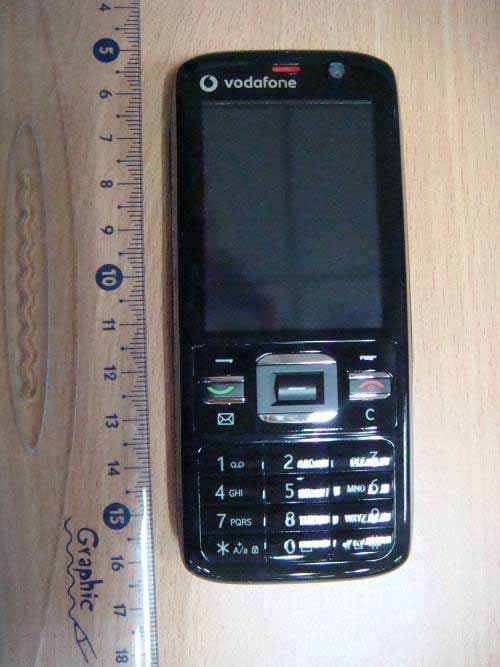
Click to zoom
Application Details
- Equipment Class
- JBP - Part 15 Class B Computing Device Peripheral
- Date of Grant
- Mar 19, 2008
- Application Purpose
- Original Equipment
- Date of Application
- Mar 19, 2008
- Equipment Note
- WCDMA/GPRS/GSM Mobile Phone with Bluetooth
- Company
- Huawei Technologies Co.,Ltd
- Country
- China
Documents & Files
Document Text
Text extracted from the exhibit documents filed with the FCC. Open a document above to read the original.
Users Manual
Wonderful Communication, Mobile LifeWelcome to U1300 Mobile Phone from Huawei Technologies Co., Ltd. HUAWEI U1300 Mobile PhoneUser Guide U121.book Page 1 Wednesday, March 12, 2008 7:41 PM Notice Copyright © 2008 Huawei Technologies Co., Ltd.All Rights Reserved 1 No part of this manual may be reproduced or transmitted in any form or by any means without prior written consent of Huawei Technologies Co., Ltd. 2 Trademarks 3 and HUAWEI are trademarks of Huawei Technologies Co., Ltd. All other trademarks men-tioned in this manual are the properties of their respective holders. 4 Notice 5 The information in this manual is subject to change without notice. Every effort has been made in the prepar ation of this manual to ensure accuracy of the contents, but all statements, information, and recommendations in this man-ual do not constitute a warranty of any kind, expressed or implied. 6 Please read the safety precautions carefully to ensure the correct and safe use of your wireless device. For detailed information, refer to the 7 section “Warnings and Precautions”. Huawei Technologies Co., Ltd.Address: 8 Administration Building, Huawei Technologies Co., Ltd., Bantian, Longgang District, Shenzhen, P. R. China Postal Code: 518129 Website: http://www.huawei.com U121.book Page 2 Wednesday, March 12, 2008 7:41 PM 9 Please read the safety precautions carefully to ensure the correct and safe use of your wireless device. For detailed information, refer to the 10 section “Warnings and Precautions”. Do not switch on your phone when it is prohibited to use mobile phones or when the phone may cause interfer-ence or danger.Do not use your phone while driving.Follow any rules or regulations in hospitals and health care facilities. Switch off your phone near medical apparatus.Switch off your phone in aircraft. The phone may cause interference to control signals of the aircraft.Switch off your phone near high-preci-sion electronic dev ices. The phone may affect the performance of these devices. Do not attempt to disassemble your phone or its accessories. Only qualified personnel are allowed to service or repair the phone.Do not place your phone or its accesso-ries in containers with strong electro-magnetic field.Do not place magnetic storage media near your phone. Radiation from the phone may erase the information stored on them.Do not put your phone in a high-temperature place or use it in a place with flammable gas such as a gas station.Keep your phone and its accessories away from children. Do not allow children to use your phone without guidance.Use only approved batteries and chargers to avoid the risk of explosions. Safety Precautions U121.book Page 3 Wednesday, March 12, 2008 7:41 PM Observe any laws or regulations on the use of wireless device. Respect others’ privacy and legal rights when using your wireless device.Strictly follow the relevant instructions on 57 of this manual while using the USB cable. Otherwise your phone or PC may be damaged. U121.book Page 4 Wednesday, March 12, 2008 7:41 PM 1 1 Table of Contents Table of Contents 1Getting to Know Your Phone 1 Packing List ................................................1Your Phone ................................................2 Getting Started 6 Loading the SIM Card ................................6Unloading the SIM Card .............................7Charging the Battery ..................................7Loading/Removing a Memory Card............8Powering On/Off .........................................9 Call Service 11 Making or Answering Calls .......................11Operations During a Voice Call ................12Operations During a Video Call ...............13 Calls .........................................................14 Text Input 15 T9 ® Input Method ....................................15 Traditional Input Method ..........................15"123" Numeric Input Method ....................16Symbol Input Method ...............................16Input Different Languages ........................16 Contacts 17 Making Calls from the Contacts ...............17Searching for a Contact............................17Viewing Contacts in Phone/SIM ...............17Other Operations ......................................17Groups......................................................18 Messaging 20 Messages................................................. 20Email ........................................................ 22Broadcast Inbox ....................................... 25Templates ................................................ 25 Music 26 Music Library............................................ 26Playlists .................................................... 27 Organiser & Tools 28 Alarms ...................................................... 28Calendar .................................................. 28Task ......................................................... 29Memo ....................................................... 30Synchronise ............................................. 30Calculator ................................................. 31Unit converter........................................... 31Currency converter .................................. 32Voice recorder.......................................... 32World Time............................................... 33Stopwatch ................................................ 33Timer ........................................................ 33Service dial number ................................. 33 My Files 34Browser 35 Open homepage ...................................... 35Open new page........................................ 35Bookmarks ............................................... 35 U121.book Page 1 Wednesday, March 12, 2008 7:41 PM 2 Saved pages ............................................35History ......................................................36Resume ....................................................36Settings ...................................................…
Text truncated - open the document above for the full version.
Users Manual
Broadcast Inbox 25 Messaging 6 3 Return to the Account screen. Select Options > Set as default to activate this account. After completing all settings, press Back . Note For the account settings, contact your your service provider. Broadcast Inbox The broadcast messages are saved in the broadcast inbox. You can set the broadcast message.Select Messaging > Settings > Broadcast to set the following items.• Service: to enable or disable this service.• Subscription: to subscri be to broadcast channels or cancel the subscription. • Language: to select the language of the broadcast. • Silent alert: to set whether to use an alert when there is a new broadcast message. • Auto delete: to set whether to auto delete earlier messages when the broadcast inbox memory is full. Templates You can save the frequently-used SMS or MMS as template for your convenience. U121.book Page 25 Wednesday, March 12, 2008 7:41 PM 26 7 Music Music enables you to manage your music files easily and conveniently. It also enables you to purchase a wide variety of latest music. Music Library You can play various music files, including those sup-plied with the phone, recorded by using the phone, downloaded from the Internet, and attached to email. You can also enjoy the online audio files.In music library, select Options > Add tracks , you can add the music files in the handset or memory card to the music library. You can also select Options > Refresh , and all music files in the music folder of the handset and memory card are automatically added to the music library. Function Options During PlayingDuring playing the music file, select Options for the following operations.• Now playing: To access the current playlist.• Mute/Unmute: To mute or unmute the music.• Playlists: To access the music playlist.• Bookmarks: To access the bookmark list. • Info.: To view the information of the music files.• Video camera: To enable the video camera func- tion. • Shuffle: To enable/disable the random play.• Loop: To play current music circularly, loop all music or close. • Equalizer: To select the music style.• Streaming setting: To set the streaming setting.• Exit: To exit the music play screen. Screen Operations During PlayingDuring playing the music file, you can perform the fol-lowing operations on the music file. Operation Description Press the up scroll key to access the current playlist.Press the down scroll key to go back to the beginning of the current music file.Press the right scroll key to access the next music file. Press and hold the right scroll key to fast forward the current music file. U121.book Page 26 Wednesday, March 12, 2008 7:41 PM Playlists 27 Music 7 Playlists Selecting this option, you can rename and edit the playlist as well as play the music in the playlist. Press the left scroll key to access the last music file. Press and hold the left scroll key to fast backward the current music file. / Press to pause the playing. Press again to resume the playing. Press the volume keys to adjust the vol-ume. Operation Description U121.book Page 27 Wednesday, March 12, 2008 7:41 PM 28 8 Organiser & Tools This function provides you with various helpful tools. You can access the Organiser & Tools screen by selecting Organiser & Tools from the main menu. Alarms You can set several alarm clocks. You can also set alarm time, alarm tones and the cycle period for alarm clocks. Setting Alarm ClocksEnter alarm function, you can select one alarm from the list, and then press to set an alarm clock. In the screen for editing alarm clock, you can set the following items: alarm time, message, the sound function, the vibration function, Alert tone, the snooze function, the alarm cycle.Alarm PromptWhen it is time for an alarm clock to ring, the selected alarm tone is played and a prompt displayed. You can stop the ringing by pressing any key. The prompt allows you to snooze or stop the alarm prompt. If your phone is powered off, the alarm clock will still ring. When the alarm rings, you can choose to power on the phone. Stopping the Alarm ClockSelect an alarm clock from the list, and press the left function key to deactivate it. Calendar With this function, you can view the calendar and manage your schedules.New ScheduleEnter calendar function, you can select Options > New to create the schedule events for the current day.In the screen for editing schedule, you can set the fol-lowing items: schedule subject, start/end time of the schedule, schedule location, schedule category, schedule content, whether the sound is on, the vibration function, alert tone, alert type, alert cycle, and alert image. U121.book Page 28 Wednesday, March 12, 2008 7:41 PM Task 29 Organiser & Tools 8 Note You can create up to 500 schedules in total and 15 for each day. While creating a new schedule, you need to set the alarm on before setting the alarm time, the alarm cycle, the alarm tone and the image. Calendar FunctionsEnter calendar function and select Options . You can perform the following operations.• New: To create a new schedule.• Go to: To go to a certain date directly from the Month view screen. • Display: To view all event s, specified events, Calen- dar files and to back up all schedules to a memory card. • View mode: To view the calendar in three different modes: month view, week view, and day view. • Delete event: To delete all past events, specific period events or all events. • Management: To backup all schedules to the mem- ory card or to restore all schedules from the mem-ory card to the phone. • Settings: To set save location, main view, week begin day. • Memory status: To view the memory status, includ- ing the used space and the total space. Schedule PromptWhen it is time to remind you of a schedule, the selected ringtone is played and a prompt displayed. You can stop the ringing by pressing any key. From the prompt, you can snooze or stop the prompt. Task You can define and manage tasks to be conducted before a certain time. Your phone can remi…
Text truncated - open the document above for the full version.
Cover Letter(s)
Huawei Technologies Co., Ltd. AddressHuawei Industrial Base,Bantian Longgang,Shenzhen 518129, P.R China Post ZIP518129 Page 1/1 To: CETECOM Fax : NULL From:Zhang Xinghai Fax:0086-755-89652518 Tel:0086-755-89651014 Email address: [email protected] Http: www.huawei.com SubjectLetter of Confidentiality Federal Communications Commission 7435 Oakland Mills Road Columbia, MD 21046 Gentlemen: This letter is to comply with the Code of Federal Regulations Title 47 Section 0.457 and 0.459 pertaining to confidential material. Huawei Technologies Co., Ltd. would like the following documents regarding this submission for FCC ID: QISU1300 to be kept confidential: 1. Schematic diagram. 2. Block Diagram. 3. Parts list (BOM) Information. 4. Operational description. 5. Tune-up procedure The above material contains trade secrets or technical data, which would customarily be guarded from competitors. We do not want these documents to be accessible to the general public. Sincerely, For and Behalf of: Huawei Technologies Co., Ltd. Zhang Xinghai EMC Laboratory Manager
Cover Letter(s)
Huawei Technologies Co., Ltd. Administration Building, Huawei Base, Bantian, Longgang District, Shenzhen 518129 P.R.C. +86 755 28780808 www.huawei.com Huawei internal reference RCT-US-01-01 USA FCC Short Term Confidentiality Request template Effective date: 2007-01-06 Version 1.1 Short Term Confidentiality Request 2008-03-12 Federal Communications Commission Office of Engineering and Technology Equipment Authorization Division 7345 Oakland Mills Road Columbia, Maryland 21046 Subject: SHORT-TERM Confidentiality Request for FCC ID: QISU1300 Product Name: WCDMA/GPRS/GSM Mobile Phone With Bluetooth Product Model: U1300/V725/Vodafone 725 To whom maybe concern: Pursuant to sections 0.457 and 0.459 of CFR 47 and to avoid premature release of sensitive information prior to marketing or release of the product to the public, Huawei Technologies Co., Ltd requests the following documents contained in this certification application be temporarily withheld from public disclosure for an initial period of 90 days: 1. External Photos 2. Internal Photos 3. Test Setup Photos 4. Users Manual The applicant also acknowledges that they will also provide appropriate notice to CETECOM should either of the following occur: A) If the applicant requires additional 45 day extension periods they will notify CETECOM with a new request letter at least 7 days prior to the short-term confidentiality expiration date-[Note: up to maximum of 3 extensions only are allowed], or b) Immediately notify CETECOM in the event the information regarding the product of the product is made available to the public. CETECOM will then release the documents listed above for public disclosure pursuant to FCC Public Notice DA 04-1705. Sincerely,
External Photos
U1300/V725/Vodafone 725 WCDMA/GPRS/GSM Mobile Phone SECRET Page1,Total 7 External Photos of U1300/V725/Vodafone 725 U1300/V725/Vodafone 725 WCDMA/GPRS/GSM Mobile Phone SECRET Page2,Total 7 U1300/V725/Vodafone 725 WCDMA/GPRS/GSM Mobile Phone SECRET Page3,Total 7 U1300/V725/Vodafone 725 WCDMA/GPRS/GSM Mobile Phone SECRET Page4,Total 7 U1300/V725/Vodafone 725 WCDMA/GPRS/GSM Mobile Phone SECRET Page5,Total 7 U1300/V725/Vodafone 725 WCDMA/GPRS/GSM Mobile Phone SECRET Page6,Total 7 U1300/V725/Vodafone 725 WCDMA/GPRS/GSM Mobile Phone SECRET Page7,Total 7
ID Label/Location Info
U1300 /V725/Vodafone 725 WCDMA/GPRS/GSM Mobile Phone SECRET Page1, Total 1 U1300 ID Location
Internal Photos
U1300/V725/Vodafone 725 WCDMA/GPRS/GSM Mobile Phone SECRET Page1,Total7 Internal Photos of U1300/V725/Vodafone 725 U1300/V725/Vodafone 725 WCDMA/GPRS/GSM Mobile Phone SECRET Page2,Total7 U1300/V725/Vodafone 725 WCDMA/GPRS/GSM Mobile Phone SECRET Page3,Total7 U1300/V725/Vodafone 725 WCDMA/GPRS/GSM Mobile Phone SECRET Page4,Total7 U1300/V725/Vodafone 725 WCDMA/GPRS/GSM Mobile Phone SECRET Page5,Total7 U1300/V725/Vodafone 725 WCDMA/GPRS/GSM Mobile Phone SECRET Page6,Total7 U1300/V725/Vodafone 725 WCDMA/GPRS/GSM Mobile Phone SECRET Page7,Total7
Test Report
Report on EMC Test of WCDMA/GPRS/GSM Mobile Phone With Bluetooth Report No: SYBH(R)028012008EB-1 Confidential Information of Huawei. No Distribution without Written Permission Page1, Total21 EMC Test Report Product Name: WCDMA/GPRS/GSM Mobile Phone With Bluetooth Model Number: U1300/V725/Vodafone 725 Report No: SYBH(R)028012008EB-1 Reliability Laboratory of Huawei Technologies Co., Ltd. Huawei Base, Bantian, Longgang District, Shenzhen 518129, P.R. China Tel: +86 755 28780808 Fax: +86 755 89652518 Report on EMC Test of WCDMA/GPRS/GSM Mobile Phone With Bluetooth Report No: SYBH(R)028012008EB-1 Confidential Information of Huawei. No Distribution without Written Permission Page2, Total21 Notice 1 1. The laboratory has obtained the accreditation of China National Accreditation Service for Conformity Assessment (CNAS), and accreditation number: L0310. 2. The laboratory has obtained the accreditation of THE AMERICAN ASSOCIATION FOR LABORATORY ACCREDITATION (A2LA), and Accreditation Council Certificate Number: 2174.01. 3. The laboratory has been listed on the US Federal Communications Commission list of test facilities recognized to perform electromagnetic emissions measurements. The site recognition number is 97456. 4. The laboratory has been listed by industry Canada to perform electromagnetic emission measurement. The site recognition number is 6369A-1. 5. The laboratory also has been listed by the VCCI to perform EMC measurements. The accreditation number is R2364, C2583, and T256. 6. The test report is invalid if not marked with "exclusive stamp for the test report". 7. The test report is invalid if not marked with the stamps or the signatures of the persons responsible for performing, revising and approving the test report. 8. The test report is invalid if there is any evidence of erasure and/or falsification. 9. If there is any dissidence for the test report, please file objection to the test centre within 15 days from the date of receiving the test report. 10. Normally, the test report is only responsible for the samples that have undergone the test. 11. Context of the test report cannot be used partially or in full for publicity and/or promotional purposes without previous written approval of the laboratory. Report on EMC Test of WCDMA/GPRS/GSM Mobile Phone With Bluetooth Report No: SYBH(R)028012008EB-1 Confidential Information of Huawei. No Distribution without Written Permission Page3, Total21 Notice 2 Modification Information: Table 1 Modification Information 1 2 3 4 5 6 Modification Information 7 Report on EMC Test of WCDMA/GPRS/GSM Mobile Phone With Bluetooth Report No: SYBH(R)028012008EB-1 Confidential Information of Huawei. No Distribution without Written Permission Page4, Total21 REPORT ON EMC Test of WCDMA/GPRS/GSM Mobile Phone With Bluetooth M/N: U1300/V725/Vodafone 725 REGULATION FCC CFR47 Part 15: Subpart B; START OF TEST Feb.18, 2008 END OF TEST Feb.25, 2008 Final Judgement: Pass Approver 2008-02-28 张兴海 Date Name Signature Reviewer 2008-02-28 余 辉 Date Name Signature Operator 2008-02-28 张 飞 Date Name Signature Report on EMC Test of WCDMA/GPRS/GSM Mobile Phone With Bluetooth Report No: SYBH(R)028012008EB-1 Confidential Information of Huawei. No Distribution without Written Permission Page5, Total21 REPORT BODY CONTENT 1 Status.........................................................................................................................................6 1.1 Product Information....................................................................................................................6 1.2 Applied Standard.......................................................................................................................6 1.3 Test Site.....................................................................................................................................7 1.4 Test environment condition........................................................................................................7 2 Summary of Results..................................................................................................................8 3 Equipment Specification............................................................................................................9 3.1 General Description...................................................................................................................9 3.2 Sub-Assembly Identity...............................................................................................................9 4 System Configuration during EMC Test..................................................................................10 4.1 Cables Used during Test.........................................................................................................10 4.2 Associated Equipment Used during Test................................................................................10 4.3 Test Configurations and Test Mode.........................................................................................10 4.4 Test conditions and test Connections......................................................................................10 5 Electromagnetic Interference (EMI).........................................................................................12 5.1 Radiated Disturbance 30MHz to 1000MHz.............................................................................12 5.2 Conducted Disturbance 0.15 MHz to 30MHz..........................................................................13 5.3 Radiated Spurious Emissions..................................................................................................14 6 Main Test Instruments.............................................................................................................16 7 System Measurement Uncertainty...........................................................................................17 8 Graph and Data of Emission Test............…
Text truncated - open the document above for the full version.
Test Setup Photos
FCC Test Report of U1300/V725/Vodafone 725 FCC ID: QISU1300 Security Level: secret Report No: SYBH(R)028012008EB-1 Confidential Information of Huawei. No Distribution without Permission Page1, Total6 Photo of EUT FCC Test Report of U1300/V725/Vodafone 725 FCC ID: QISU1300 Security Level: secret Report No: SYBH(R)028012008EB-1 Confidential Information of Huawei. No Distribution without Permission Page2, Total6 U1300 Appearance FCC Test Report of U1300/V725/Vodafone 725 FCC ID: QISU1300 Security Level: secret Report No: SYBH(R)028012008EB-1 Confidential Information of Huawei. No Distribution without Permission Page3, Total6 Photos of Test Setup FCC Test Report of U1300/V725/Vodafone 725 FCC ID: QISU1300 Security Level: secret Report No: SYBH(R)028012008EB-1 Confidential Information of Huawei. No Distribution without Permission Page4, Total6 1 Radiated Emissions Radiated Disturbance 2 Radiated Spurious Emissions Radiated Spurious Emission (below 2GHz) FCC Test Report of U1300/V725/Vodafone 725 FCC ID: QISU1300 Security Level: secret Report No: SYBH(R)028012008EB-1 Confidential Information of Huawei. No Distribution without Permission Page5, Total6 Radiated Spurious Emission (2GHz to18GHz) Radiated Spurious Emission 18G~26.5GHz FCC Test Report of ETS8221 FCC ID: QISETS8221 Security Level: Public Report No: SYBH(R)028012008EB-1 Confidential Information of Huawei. No Distribution without Permission Page6, Total6 3 Conducted Emissions Conducted Emissions for AC Ports
Contact Information
Applicant
Zhang Xinghai
Test Firm
Huawei Technologies Co., LTDZhou Fengyum
Technical Specifications
| # | Rule Parts | Frequency Range | Power Output |
|---|---|---|---|
| 1 | 15B | - | - |
Other Applications from Huawei Technologies Co.,Ltd

QISSUN2000
Jun 27, 2021Solar Inverter
Equipment Class
DTS - Digital Transmission System
QISCP81-1
Oct 22, 2020Watch Wireless Charger
Equipment Class
DCD - Part 15 Low Power Transmitter Below 1705 kHz
QISRRU3278
Sep 02, 2020Remote Radio Unit
Equipment Class
CBD - Citizens Band Category A and B Devices
QISR2561
Jul 11, 2020Indoor Router
Equipment Class
DTS - Digital Transmission System
QISSMARTLOGGER310
Mar 23, 2020Solar Smart Monitor & Data Logger
Equipment Class
DTS - Digital Transmission System