QISU8110HSDPA/UMTS/GPRS/GSM/EDGE Mobile Phone with BT and WLAN
Huawei Technologies Co.,Ltd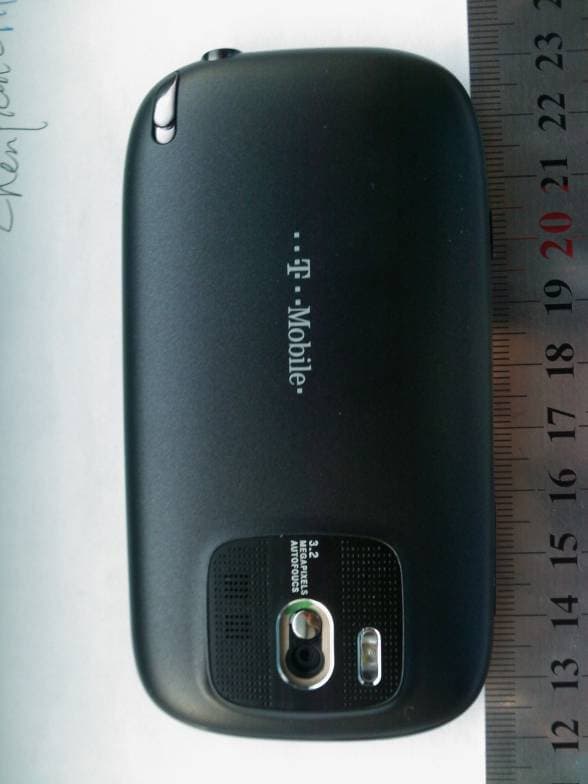
Click to zoom
Application Details
- Equipment Class
- PCE - PCS Licensed Transmitter held to ear
- Date of Grant
- Mar 03, 2010
- Application Purpose
- Original Equipment
- Date of Application
- Mar 02, 2010
- Equipment Note
- HSDPA/UMTS/GPRS/GSM/EDGE Mobile Phone with BT and WLAN
- Frequency Range
- 1850.20000000 - 1909.80000000
- Company
- Huawei Technologies Co.,Ltd
- Country
- China
Documents & Files
Document Text
Text extracted from the exhibit documents filed with the FCC. Open a document above to read the original.
Users Manual
i Contents Getting to Know Your Mobile Phone . . . . . . . . . . . . . . . . . . . . . 1 What You Will Find in Your Box. . . . . . . . . . . . . . . . . . . . . . . . . . . . . . . . . 1 Mobile Phone View . . . . . . . . . . . . . . . . . . . . . . . . . . . . . . . . . . . . . . . . . . . 2 Installing the SIM Card and Battery . . . . . . . . . . . . . . . . . . . . . . . . . . . . . 3 Turning Your Mobile Phone On and Off . . . . . . . . . . . . . . . . . . . . . . . . . 6 Using the Touchscreen. . . . . . . . . . . . . . . . . . . . . . . . . . . . . . . . . . . . . . . . 7 Locking and Unlocking the Screen . . . . . . . . . . . . . . . . . . . . . . . . . . . . . 8 Home Screen . . . . . . . . . . . . . . . . . . . . . . . . . . . . . . . . . . . . . . . . . . . . . . . . 9 Canvas . . . . . . . . . . . . . . . . . . . . . . . . . . . . . . . . . . . . . . . . . . . . . . . . . . . . . 17 Using the microSD™ Card as the USB Mass Storage . . . . . . . . . . . . 23 Customizing Your Mobile Phone Settings . . . . . . . . . . . . . . . . . . . . . . 24 Calling . . . . . . . . . . . . . . . . . . . . . . . . . . . . . . . . . . . . . . . . . . . . . . 27 Making a Call . . . . . . . . . . . . . . . . . . . . . . . . . . . . . . . . . . . . . . . . . . . . . . . 27 Answering or Rejecting a Call . . . . . . . . . . . . . . . . . . . . . . . . . . . . . . . . . 28 Other Operations During a Call . . . . . . . . . . . . . . . . . . . . . . . . . . . . . . . . 29 Ending a Call. . . . . . . . . . . . . . . . . . . . . . . . . . . . . . . . . . . . . . . . . . . . . . . . 30 Using the Call Log . . . . . . . . . . . . . . . . . . . . . . . . . . . . . . . . . . . . . . . . . . . 30 Customising the Call Settings . . . . . . . . . . . . . . . . . . . . . . . . . . . . . . . . . 31 Using the Airplane Mode . . . . . . . . . . . . . . . . . . . . . . . . . . . . . . . . . . . . . 31 My Phonebook . . . . . . . . . . . . . . . . . . . . . . . . . . . . . . . . . . . . . . 32 Your Contacts . . . . . . . . . . . . . . . . . . . . . . . . . . . . . . . . . . . . . . . . . . . . . . . 32 Groups . . . . . . . . . . . . . . . . . . . . . . . . . . . . . . . . . . . . . . . . . . . . . . . . . . . . . 36 Getting down and QWERTY . . . . . . . . . . . . . . . . . . . . . . . . . . . 44 Using the Onscreen Keyboard . . . . . . . . . . . . . . . . . . . . . . . . . . . . . . . . 44 Inputting Text, Numbers, and Symbols . . . . . . . . . . . . . . . . . . . . . . . . . 48 Customising the Input Settings . . . . . . . . . . . . . . . . . . . . . . . . . . . . . . . . 50 Messaging . . . . . . . . . . . . . . . . . . . . . . . . . . . . . . . . . . . . . . . . . . 51 ii SMS and MMS . . . . . . . . . . . . . . . . . . . . . . . . . . . . . . . . . . . . . . . . . . . . . . 51 Email . . . . . . . . . . . . . . . . . . . . . . . . . . . . . . . . . . . . . . . . . . . . . . . . . . . . . . . 56 Getting Connected . . . . . . . . . . . . . . . . . . . . . . . . . . . . . . . . . . . 59 Network Connections . . . . . . . . . . . . . . . . . . . . . . . . . . . . . . . . . . . . . . . . 59 GPRS/3G. . . . . . . . . . . . . . . . . . . . . . . . . . . . . . . . . . . . . . . . . . . . . . . . . . . 59 Wi-Fi . . . . . . . . . . . . . . . . . . . . . . . . . . . . . . . . . . . . . . . . . . . . . . . . . . . . . . . 60 Browser . . . . . . . . . . . . . . . . . . . . . . . . . . . . . . . . . . . . . . . . . . . . . . . . . . . . 61 Bluetooth . . . . . . . . . . . . . . . . . . . . . . . . . . . . . . . . . . . . . . . . . . . . . . . . . . . 69 Modem Behaviour . . . . . . . . . . . . . . . . . . . . . . . . . . . . . . . . . . . . . . . . . . . 71 Entertainment . . . . . . . . . . . . . . . . . . . . . . . . . . . . . . . . . . . . . . . 72 Taking Pictures and Recording Videos . . . . . . . . . . . . . . . . . . . . . . . . . 72 Using the Gallery . . . . . . . . . . . . . . . . . . . . . . . . . . . . . . . . . . . . . . . . . . . . 76 Using the Music . . . . . . . . . . . . . . . . . . . . . . . . . . . . . . . . . . . . . . . . . . . . . 81 Listening to the FM Radio . . . . . . . . . . . . . . . . . . . . . . . . . . . . . . . . . . . . 86 Google Services . . . . . . . . . . . . . . . . . . . . . . . . . . . . . . . . . . . . . 88 Creating a Google Account . . . . . . . . . . . . . . . . . . . . . . . . . . . . . . . . . . . 88 Adding another Google Accounts . . . . . . . . . . . . . . . . . . . . . . . . . . . . . 89 Using Gmail. . . . . . . . . . . . . . . . . . . . . . . . . . . . . . . . . . . . . . . . . . . . . . . . . 89 Using Google Talk™ . . . . . . . . . . . . . . . . . . . . . . . . . . . . . . . . . . . . . . . . . 91 Using Google Maps™ . . . . . . . . . . . . . . . . . . . . . . . . . . . . . . . . . . . . . . . . 94 Using YouTube™ . . . . . . . . . . . . . . . . . . . . . . . . . . . . . . . . . . . . . . . . . . . . 96 Using Android™ Market . . . . . . . . . . . . . . . . . . . . . . . . . . . . . . . . . . . . . . 97 Synchronizing Information . . . . . . . . . . . . . . . . . . . . . . . . . . . . 99 Using the T-Mobile or Google Server to synchronise . . . . . . . . . . . . . 99 Using the Google Server to Synchronise . . . . . . . . . . . . . . . . . . . . . . 101 Using the RoadSync to synchronize . . . . . . . . . . . . . . . . . . . . . . . . . . 102 Using the PC Suite to Synchronize. . . . . . . . . . . . . . . . . . . . . . . . . . . . 103 Using Other Applications. . . . . . . . . . . . . . . . . . . . . . . . . . . . . 106 Using the Calendar . . . . . . . . . . . . . . . . . . . . . . . . . . . . . . . . . . . . . . . . . 106 Using the Alarm . . . . . . . . . . . . . . . . . . . . . . . . . . . . . . . . . . . . . . . . . . . . 108 Using the Notepad . . . . . . . . . . . . . . . . . . . . . . . . . . . . . . . . . . . . . . . . . . 109 Using the Calculator . . . . . . . . . . . . . . . . . . . . . . . . . . . . . . . . . . . . . . . . 109 Using the Sound Recorder. . . . . . . . . . . . . . . . . . . . . . . . . . . . .…
Text truncated - open the document above for the full version.
Users Manual
Getting down and QWERTY 57 Android keyboard panel 7Touch to add a carriage return. 8 Delete a character to the left side of the cursor. Touch and hold to delete all the characters on the left side of the cursor. 9Touch to see more candidate words. 1Change from upper case to lower case. 2Change from the text mode to the symbol/number mode. 3Touch to insert a space. 4Touch to insert a smile in your text. 5 Delete a character on the left of the cursor. Touch and hold to delete all the characters on the left of the cursor. 1 4 5 2 3 Getting down and QWERTY 58 How to use the landscape keyboard When entering text, you can choose to use the landscape orientation of the onscreen keyboard, by turning the mobile phone sideways, to find the larger horizontal onscreen keyboard easier to use. Inputting Text, Numbers, and Symbols With the onscreen keyboard, you can conveniently enter text, numbers, and symbols. How to type in intelligent mode The intelligent input mode features accurate selection, intelligent correction, and predictive input. To enable the function, please refer to “Customizing the Inputting Settings” on page 60. 1. Touch the keys with your desired letters in turn. You do not need to consider the position of the letter on the key. 2. The candidate words will be displayed above the keyboard panel according to your input. If word suggestions is enabled, the suggested word is highlighted. 3. Enter the desired text: •Touch space key to enter the suggested word and insert a space. •Touch the desired word to enter it. Tip: The Intelligent input mode has a powerful mistyping correction engine. Even if all the letters are mistyped, TouchPal can still predict the right word. How to type in normal mode If you do not like using the intelligent mode, you can just type in the normal way: •In the Full QWERTY keyboard layout, start typing your word by pressing the letter keys. Getting down and QWERTY 59 • You can flick upwards on a key to make it type in upper case. Flick downwards for a symbol. To enable the function, please refer to “Customizing the Inputting Settings” on page 60. • Touch and hold the key you need to display the character list. Editing text You can edit the text you enter in text fields and use menu commands to cut, copy, and paste text, within or across applications. How to edit text 1. Touch the text field that contains the text to edit. 2. Use the Navigation key to move the cursor to the location where you want to add or delete text. 3. Type, cut, paste, or delete text. 4. Press the Back key when you are finished typing, to close the keyboard. How to select text 1. Touch the text field or other portion of the screen that contains the text to select. 2. Use the Navigation key to move the cursor to the beginning or end of the text to select. 3. Press and hold the OK key, or touch and hold the text field. A options menu opens for cutting, copying, and performing other tasks with the text field. 4. Touch Select text. Or touch Select all to select all the text in the text field. 5. Press the Navigation key to select the text you want. 6. Press and hold the OK key again (or touch and hold the text field) to open a menu you can use to cut or copy your selection, select all the text, or stop selecting text. How to cut or copy text 1. Select the text to cut or copy. Getting down and QWERTY 60 2. Press and hold the OK key, or touch and hold the selected text. 3. Touch Cut or Copy in the menu that opens. How to paste text 1. Copy the text to paste. 2. Touch the field where you want to paste the text. 3. Use the Navigation key to move the cursor to the location where you want to paste the text. 4. Press and hold the OK key, or touch and hold the text field. 5. Touch Paste in the options menu. Customizing the Inputting Settings Touch Main Menu > Settings > Language & keyboard > TouchPal to customize the TouchPal settings. Word predictionSelect to have the word prediction while typing. Key press sound Select to play a brief sound each time you touch a key on the onscreen keyboard. Key press vibration Select to have the phone vibrate briefly each time you touch a key on the onscreen keyboard. Layout in portrait mode Select the layout in portrait mode. Layout in landscape mode Select the layout in landscape mode. Swipe to switch layout When the check box is selected, you can swipe horizontally over the keyboard to switch layout. Getting down and QWERTY 61 Open the application menu, and then touch Settings > Language & keyboard > Android keyboard to customise the Android keyboard settings. Mixed language input When the check box is selected, the mobile phone will auto detect language if no more than 3 languages selected. Select languagesSelect the language you may use. Predict next word When the check box is selected, you can get the predict next word while typing. Correct mistyping Select to automatically correct some common misspellings as you type. Slide-down symbols When the check box is selected, you can slide down on keys to input symbols. Relevant words When the check box is selected, you can slide on candidates for relevant words. Help Access the online user manual for using TouchPal TouchPalView the version of TouchPal. Vibrate on keypress Select to have the phone vibrate briefly each time you touch a key on the onscreen keyboard. Sound on keypress Select to play a brief sound each time you touch a key on the onscreen keyboard. Getting down and QWERTY 62 Auto-capitalizatio n Select to have the onscreen keyboard automatically capitalize the first letter of the first word after a period, the first word in a text field, and each word in name fields. Quick fixes Select to automatically correct some common misspellings as you type. Show suggestions Select to show suggested words in a strip above the onscreen keyboard as you type. Auto-complete Select to automatically enter a suggested word, highlighted in orange in the strip above the keyboard, when you enter a space or punctuation. 63 Mess…
Text truncated - open the document above for the full version.
Cover Letter(s)
Huawei Technologies Co., Ltd. Address:Huawei Industrial Base,Bantian Longgang,Shenzhen 518129, P.R China Post ZIP:518129 Page :1/1 To: CETECOM Fax : NULL From:Zhang Xinghai Fax:0086-755-89652518 Tel:0086-755-89651014 Email address: [email protected] Http: www.huawei.com Subject:Letter of Confidentiality Federal Communications Commission 7435 Oakland Mills Road Columbia, MD 21046 Gentlemen: This letter is to comply with the Code of Federal Regulations Title 47 Section 0.457 and 0.459 pertaining to confidential material. Huawei Technologies Co., Ltd. would like the following documents regarding this submission for FCC ID: QISU8110 to be kept confidential: 1. Schematic diagram. 2. Block Diagram. 3. Parts list (BOM) Information. 4. Operational description. 5. Tune-up procedure The above material contains trade secrets or technical data, which would customarily be guarded from competitors. We do not want these documents to be accessible to the general public. Sincerely, For and Behalf of: Huawei Technologies Co., Ltd. Zhang Xinghai EMC Laboratory Manager
Cover Letter(s)
Huawei Technologies Co., Ltd. Administration Building, Huawei Base, Bantian, Longgang District, Shenzhen 518129 P.R.C. +86 755 28780808 www.huawei.com Huawei internal reference RCT-US-01-01 USA FCC Short Term Confidentiality Request template Effective date: 2007-01-06 Version 1.1 Short Term Confidentiality Request 2010-03-01 Federal Communications Commission Office of Engineering and Technology Equipment Authorization Division 7345 Oakland Mills Road Columbia, Maryland 21046 Subject: SHORT-TERM Confidentiality Request for FCC ID: QISU8110 Product Name: HSDPA/UMTS/GPRS/GSM/EDGE Mobile Phone with Bluetooth Product Model: T-Mobile Pulse Mini/Pulse Mini/Selina/HUAWEI U8110/U8110 To whom maybe concern: Pursuant to sections 0.457 and 0.459 of CFR 47 and to avoid premature release of sensitive information prior to marketing or release of the product to the public, Huawei Technologies Co., Ltd requests the following documents contained in this certification application be temporarily withheld from public disclosure for an initial period of 90 days: 1. External Photos 2. Internal Photos 3. Test Setup Photos 4. Users Manual The applicant also acknowledges that they will also provide appropriate notice to CETECOM should either of the following occur: A) If the applicant requires additional 45 day extension periods they will notify CETECOM with a new request letter at least 7 days prior to the short-term confidentiality expiration date-[Note: up to maximum of 3 extensions only are allowed], or b) Immediately notify CETECOM in the event the information regarding the product of the product is made available to the public CETECOM will then release the documents listed above for public disclosure pursuant to FCC Public Notice DA 04-1705.
External Photos
T-Mobile Pulse Mini/Pulse Mini/Selina/HUAWEI U8110/U8110 HSDPA/UMTS/GPRS/GSM/EDGE Mobile Phone with Bluetooth SECRET Page1,Total 7 External Photos of T-Mobile Pulse Mini/Pulse Mini/Selina/HUAWEI U8110/U8110 T-Mobile Pulse Mini/Pulse Mini/Selina/HUAWEI U8110/U8110 HSDPA/UMTS/GPRS/GSM/EDGE Mobile Phone with Bluetooth SECRET Page2,Total 7 T-Mobile Pulse Mini/Pulse Mini/Selina/HUAWEI U8110/U8110 HSDPA/UMTS/GPRS/GSM/EDGE Mobile Phone with Bluetooth SECRET Page3,Total 7 T-Mobile Pulse Mini/Pulse Mini/Selina/HUAWEI U8110/U8110 HSDPA/UMTS/GPRS/GSM/EDGE Mobile Phone with Bluetooth SECRET Page4,Total 7 T-Mobile Pulse Mini/Pulse Mini/Selina/HUAWEI U8110/U8110 HSDPA/UMTS/GPRS/GSM/EDGE Mobile Phone with Bluetooth SECRET Page5,Total 7 T-Mobile Pulse Mini/Pulse Mini/Selina/HUAWEI U8110/U8110 HSDPA/UMTS/GPRS/GSM/EDGE Mobile Phone with Bluetooth SECRET Page6,Total 7 T-Mobile Pulse Mini/Pulse Mini/Selina/HUAWEI U8110/U8110 HSDPA/UMTS/GPRS/GSM/EDGE Mobile Phone with Bluetooth SECRET Page7,Total 7
ID Label/Location Info
T-Mobile Pulse Mini/Pulse Mini/Selina/HUAWEI U8110/U8110 HSDPA/UMTS/GPRS/GSM/EDGE Mobile Phone with Bluetooth SECRET Page1, Total 4 Label Location T-Mobile Pulse Mini/Pulse Mini/Selina/HUAWEI U8110/U8110 T-Mobile Pulse Mini/Pulse Mini/Selina/HUAWEI U8110/U8110 HSDPA/UMTS/GPRS/GSM/EDGE Mobile Phone with Bluetooth SECRET Page2, Total 4 T-Mobile Pulse Mini/Pulse Mini/Selina/HUAWEI U8110/U8110 HSDPA/UMTS/GPRS/GSM/EDGE Mobile Phone with Bluetooth SECRET Page3, Total 4 T-Mobile Pulse Mini/Pulse Mini/Selina/HUAWEI U8110/U8110 HSDPA/UMTS/GPRS/GSM/EDGE Mobile Phone with Bluetooth SECRET Page4, Total 4 T-Mobile Pulse Mini/Pulse Mini/Selina/HUAWEI U8110/U8110 HSDPA/UMTS/GPRS/GSM/EDGE Mobile Phone with Bluetooth SECRET Page5, Total 4 T-Mobile Pulse Mini/Pulse Mini/Selina/HUAWEI U8110/U8110 HSDPA/UMTS/GPRS/GSM/EDGE Mobile Phone with Bluetooth SECRET Page6, Total 4 T-Mobile Pulse Mini/Pulse Mini/Selina/HUAWEI U8110/U8110 HSDPA/UMTS/GPRS/GSM/EDGE Mobile Phone with Bluetooth SECRET Page7, Total 4
Internal Photos
T-Mobile Pulse Mini/Pulse Mini/Selina/HUAWEI U8110/U8110 HSDPA/UMTS/GPRS/GSM/EDGE Mobile Phone with Bluetooth SECRET Page1,Total 7 Internal Photos of T-Mobile Pulse Mini/Pulse Mini/Selina/HUAWEI U8110/U8110 T-Mobile Pulse Mini/Pulse Mini/Selina/HUAWEI U8110/U8110 HSDPA/UMTS/GPRS/GSM/EDGE Mobile Phone with Bluetooth SECRET Page2,Total 7 T-Mobile Pulse Mini/Pulse Mini/Selina/HUAWEI U8110/U8110 HSDPA/UMTS/GPRS/GSM/EDGE Mobile Phone with Bluetooth SECRET Page3,Total 7 T-Mobile Pulse Mini/Pulse Mini/Selina/HUAWEI U8110/U8110 HSDPA/UMTS/GPRS/GSM/EDGE Mobile Phone with Bluetooth SECRET Page4,Total 7 T-Mobile Pulse Mini/Pulse Mini/Selina/HUAWEI U8110/U8110 HSDPA/UMTS/GPRS/GSM/EDGE Mobile Phone with Bluetooth SECRET Page5,Total 7 T-Mobile Pulse Mini/Pulse Mini/Selina/HUAWEI U8110/U8110 HSDPA/UMTS/GPRS/GSM/EDGE Mobile Phone with Bluetooth SECRET Page6,Total 7 T-Mobile Pulse Mini/Pulse Mini/Selina/HUAWEI U8110/U8110 HSDPA/UMTS/GPRS/GSM/EDGE Mobile Phone with Bluetooth SECRET Page7,Total 7
RF Exposure Info
Report No.: RZA2010-0168FCC TESTING No. L2264 OET 65 TEST REPORT Product Name HSDPA/UMTS/GPRS/GSM/EDGE Mobile Phone with Bluetooth Model T-Mobile Pulse Mini/Pulse Mini/Selina/HUAWEI U8110/U8110 FCC ID QISU8110 Client HUAWEI Technologies Co., Ltd. TA Technology (Shanghai) Co., Ltd. GENERAL SUMMARY Product Name HSDPA/UMTS/GPRS/GSM/EDGE Mobile Phone with Bluetooth Model T-Mobile Pulse Mini/ Pulse Mini/Selina/ HUAWEI U8110/U8110 FCC ID QISU8110 Report No. RZA2010-0168FCC Client HUAWEI Technologies Co., Ltd. Manufacturer HUAWEI Technologies Co., Ltd. Standard(s) ANSI/IEEE Std C95.1-1999: IEEE Standard for Safety Levels with Respect to Human Exposure to Radio Frequency Electromagnetic Fields, 3 kHz to 300 GHz. IEEE 1528–2003: Recommended Practice for Determining the Peak Spatial-Average Specific Absorption Rate (SAR) in the Human Head Due to Wireless Communications Devices: Experimental Techniques. OET Bulletin 65 supplement C, published June 2001 including DA 02-1438, published June 2002: Additional Information for Evaluating Compliance of Mobile and Portable Devices with FCC Limits. Transition Period for the Phantom Requirements of Supplement C to OET Bulletin 65. IEC 62209-1:2006 Human exposure to radio frequency fields from hand-held and body-mounted wireless communication devices – Human models, instrumentation, and procedures –Part 1: Procedure to determine the Specific Absorption Rate (SAR) for hand-held devices used in close proximity to the ear. (frequency range of 300 MHz to 3 GHz). IEC 62209-2:2008(106/162/CDV): Human exposure to radio frequency fields from handheld and body-mounted wireless communication devices – Human models, instrumentation, and procedures –Part 2: Procedure to determine the Specific Absorption Rate (SAR)for wireless communication devices used in close proximity to the human body. ( frequency rang of 30MHz to 6GHz ) Conclusion Localized Specific Absorption Rate (SAR) of this portable wireless equipment has been measured in all cases requested by the relevant standards cited in Clause 5.2 of this test report. Maximum localized SAR is below exposure limits specified in the relevant standards cited in Clause 5.1 of this test report. General Judgment: Pass (Stamp) Date of issue: February 8 th , 2010 Comment The test result only responds to the measured sample. Approved by Yang Weizhong Revised by Ling Minbao Performed by Li Jinchang TA Technology (Shanghai) Co., Ltd. Test Report Report No. RZA2010-0168FCC Page 3of 75 TABLE OF CONTENT 1. General Information ..................................................................................................................... 5 1.1. Notes of the test report.........................................................................................................5 1.2. Testing laboratory .................................................................................................................5 1.3. Applicant Information ............................................................................................................6 1.4. Manufacturer Information ......................................................................................................6 1.5. Information of EUT................................................................................................................7 1.6. Test Date ..............................................................................................................................8 2. Operational Conditions during Test ..............................................................................................9 2.1. General description of test procedures .................................................................................9 2.2. GSM Test Configuration ........................................................................................................9 3. SAR Measurements System Configuration ................................................................................ 10 3.1. SAR Measurement Set-up ..................................................................................................10 3.2. DASY 4 E-field Probe System............................................................................................. 11 3.2.1. EX3DV4 Probe Specification ....................................................................................... 11 3.2.2. E-field Probe Calibration ..............................................................................................12 3.3. Other Test Equipment .........................................................................................................12 3.3.1. Device Holder for Transmitters ....................................................................................12 3.3.2. Phantom......................................................................................................................13 3.4. Scanning procedure............................................................................................................13 3.5. Data Storage and Evaluation ..............................................................................................15 3.5.1. Data Storage................................................................................................................15 3.5.2. Data Evaluation by SEMCAD ......................................................................................15 3.6. System check......................................................................................................................18 3.7. Equivalent Tissues ..............................................................................................................19 4. Laboratory Environment............................................................................................................. 19 5. Characteristics of the Test .......................................................................................................... 20 5.1. Applicable Limit Regulati…
Text truncated - open the document above for the full version.
Test Report
FCC Test Report Product Name: HSDPA/UMTS/GPRS/GSM/EDGE Mobile Phone with Bluetooth Model Number:T-Mobile Pulse Mini/Pulse Mini/Selina/ HUAWEI U8110/U8110 Report No: SYBHZ(R)E028012010EB-2 FCC ID:QISU8110 Reliability Laboratory of Huawei Technologies Co., Ltd. Huawei Base, Bantian, Longgang District, Shenzhen 518129, P.R. China Tel: +86 755 28780808 Fax: +86 755 89652518 FCC Test Report of T-Mobile Pulse Mini/Pulse Mini/Selina/HUAWEI U8110/U8110 FCC ID: QISU8110 Security Level: Public Report No: SYBHZ(R)E028012010EB-2 Confidential Information of Huawei. No Distribution without Written Permission Page2, Total30 Notice 1. The laboratory has obtained the accreditation of China National Accreditation Service for Conformity Assessment (CNAS), and accreditation number: L0310. 2. The laboratory has obtained the accreditation of THE AMERICAN ASSOCIATION FOR LABORATORY ACCREDITATION (A2LA), and Accreditation Council Certificate Number: 2174.01. 3. The laboratory has been listed on the US Federal Communications Commission list of test facilities recognized to perform electromagnetic emissions measurements. The site recognition number is 97456. 4. The laboratory has been listed by industry Canada to perform electromagnetic emission measurement. The site recognition number is 6369A-1. 5. The laboratory also has been listed by the VCCI to perform EMC measurements. The accreditation number is R2364, C2583, and T256. 6. The test report is invalid if not marked with "exclusive stamp for the test report". 7. The test report is invalid if not marked with the stamps or the signatures of the persons responsible for performing, revising and approving the test report. 8. The test report is invalid if there is any evidence of erasure and/or falsification. 9. If there is any dissidence for the test report, please file objection to the test centre within 15 days from the date of receiving the test report. 10. Normally, the test report is only responsible for the samples that have undergone the test. 11. Context of the test report cannot be used partially or in full for publicity and/or promotional purposes without previous written approval of the laboratory. FCC Test Report of T-Mobile Pulse Mini/Pulse Mini/Selina/HUAWEI U8110/U8110 FCC ID: QISU8110 Security Level: Public REPORT ON FCC Test of HSDPA/UMTS/GPRS/GSM/EDGE Mobile Phone with Bluetooth M/N: T-Mobile Pulse Mini/Pulse Mini/Selina/ HUAWEI U8110/U8110 Report No: SYBHZ(R)E028012010EB-2 FCC ID:QISU8110 REGULATION FCC CFR47 Part 2: Subpart J; FCC CFR47 Part 24: Subpart E; CONCLUSION PASS General Manager 2010.01.29 Date Name signature Technical Responsibility For Area of Testing 2010.01.29 Date Name signature Test Lab Engineer 2010.01.29 Date Name signature Report No: SYBHZ(R)E028012010EB-2 Confidential Information of Huawei. No Distribution without Written Permission Page3, Total30 FCC Test Report of T-Mobile Pulse Mini/Pulse Mini/Selina/HUAWEI U8110/U8110 FCC ID: QISU8110 Security Level: Public Report No: SYBHZ(R)E028012010EB-2 Confidential Information of Huawei. No Distribution without Written Permission Page4, Total30 Contents 1 Summary.................................................................................................................................................... 5 2 Product Description................................................................................................................................6 2.1 PRODUCTION INFORMATION................................................................................................................... 6 2.2 MODIFICATION INFORMATION.................................................................................................................. 6 3 Test Site Description................................................................................................................................. 7 3.1 TESTING PERIOD................................................................................................................................... 7 3.2 GENERAL SET UP DESCRIPTION............................................................................................................. 7 4 Product Description.................................................................................................................................. 8 4.1 TECHNICAL CHARACTERISTICS............................................................................................................... 8 4.2 EUT IDENTIFICATION LIST.................................................................................................................... 10 5 Main Test Instruments............................................................................................................................. 12 6 Transmitter Measurements..................................................................................................................... 13 6.1 EFFECTIVE ISOTROPICALLY RADIATED POWER OF TRANSMITTER (EIRP)................................................ 13 6.2 CONDUCTED POWER OF TRANSMITTER................................................................................................. 16 6.3 MODULATION CHARACTERISTICS.......................................................................................................... 18 6.4 OCCUPIED BANDWIDTH........................................................................................................................ 20 6.5 BAND EDGES COMPLIANCE.................................................................................................................. 22 6.6 SPURIOUS EMISSION AT ANTENNA TERMINAL........................................................................................ 24 6.7 FREQUENCY STABILITY........................................................................................................................ 26 7 System Measurement Uncertainty......................................................................................................…
Text truncated - open the document above for the full version.
Test Report
EMC Test Report Product Name: HSDPA/UMTS/GPRS/GSM/EDGE Mobile Phone with Bluetooth Model Number: T-Mobile Pulse Mini/Pulse Mini/Selina/HUAWEI U8110/U8110 Report No: SYBHZ(R)E028012010EB-1 Reliability La…
Text truncated - open the document above for the full version.
Contact Information
Applicant
Zhang Xinghai
Test Firm
Huawei Technologies Co., LTDZhou Fengyum
Technical Specifications
| # | Rule Parts | Frequency Range | Power Output | Emission | Tolerance |
|---|---|---|---|---|---|
| 2 | 24E | 1.85 GHz - 1.91 GHz | 920.00 mW | 300KG7W | 0.01 ppm |
Other Applications from Huawei Technologies Co.,Ltd

QISSUN2000
Jun 27, 2021Solar Inverter
Equipment Class
DTS - Digital Transmission System
QISCP81-1
Oct 22, 2020Watch Wireless Charger
Equipment Class
DCD - Part 15 Low Power Transmitter Below 1705 kHz
QISRRU3278
Sep 02, 2020Remote Radio Unit
Equipment Class
CBD - Citizens Band Category A and B Devices
QISR2561
Jul 11, 2020Indoor Router
Equipment Class
DTS - Digital Transmission System
QISSMARTLOGGER310
Mar 23, 2020Solar Smart Monitor & Data Logger
Equipment Class
DTS - Digital Transmission System