QISU8150-BHSDPA/UMTS/GSM/GPRS/EDGE Mobile Phone with Bluetooth and WLAN
Huawei Technologies Co.,Ltd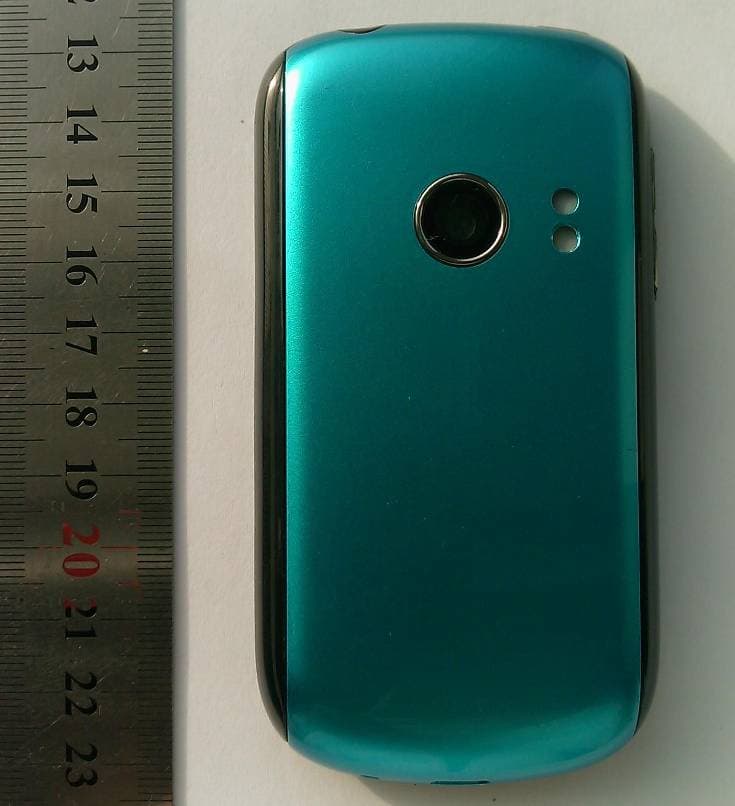
Click to zoom
Application Details
- Equipment Class
- JBP - Part 15 Class B Computing Device Peripheral
- Date of Grant
- Aug 11, 2010
- Application Purpose
- Original Equipment
- Date of Application
- Aug 11, 2010
- Equipment Note
- HSDPA/UMTS/GSM/GPRS/EDGE Mobile Phone with Bluetooth and WLAN
- Company
- Huawei Technologies Co.,Ltd
- Country
- China
Documents & Files
Document Text
Text extracted from the exhibit documents filed with the FCC. Open a document above to read the original.
Users Manual
HUAWEI U8150-B User Guide http://www.huaweidevice.com 1. What is in your box Your phone box contains the following items: • Mobile phone• Battery • Charger• USB cable • Headset• Quick start guide • Safety information 2. Phone at a glance • : Press to open the menu on an active screen. • : Touch and hold to open the Recent panel. • : Press to go to the Call log screen. Earpiece Touch screen Home Menu Back OK Search SendEnd Microphone Navigation Headset jackPower Volume keys Charge/Data port Wrist strap hold Speaker Camera Status indicator 3. Before getting started Installing the SIM card Installing the microSD card* and the battery ★ ★ *microSD★card★is★optional. 4. Charging the battery 12 12 The color of the status indicator tells the battery status of your mobile phone. • Green: Fully charged (when connected to charger). • Orange: Charging (when connected to charger). • Red: Battery low. 5. Powering on or off your mobile phone Powering on your mobile phone Pressto power on your mobile phone. The first time you do this, you will be asked to sign in to your account and set up your mobile phone. L L Note:LYouLneedLanLInternetLconnectionLtoLsetLupL accounts. Powering off your mobile phone Press and holdto open the Phone options menu, and then touch Power off. 6. Using the Touchscreen • Touch: Touch a desired item with your finger to confirm your selection or start an application. • Touch and hold: Touch and hold the screen until your mobile phone responds. For example, you can always touch and hold the screen to open the options menu of the active screen. • Flick: Flick your finger vertically or horizo ntally across the screen. • Drag: Touch and hold yo ur desired item with your finger. Then, drag the item to any part of the screen to move the item. 7. Home screen Home screen view ★ ★ Touch★and★hold★the★small★dots★on★the★lower★left★or★ right★of★the★screen★to★view★thumbnails★of★the★Home★ sc reen ★an d ★it s ★ex tensions, ★wh ich ★yo u ★ca n ★to uch ★to★ open. Locking the screen • When your mobile phone is on, pressto lock the screen. When the screen is locked, you can still receive messages and calls. • If you leave your mobile phone idle for a while, the screen will lock automatically. 10:23 AM Touch to open the Phone screen. Touch to open the Launcher screen. Touch to open Browser. Notifications bar: Displays the reminders and status icons of your phone. Flick down to open the notifications panel. Display area: Shows the operation and display areas of your phone. Interface switching dots: Indicate the number of the screens on the left or right. Touch the left or right dots to switch between the screens. Unlocking the screen 1. Press,, orto wake up the screen. 2. Drag the lock icon from left to right to unlock the screen. Adding a new screen item 1. Touch and hold a blank area on the Home screen until the Add to Home screen menu is displayed. 2. Select an item to add it to the Home screen. 8. Getting your contacts into the phone Importing contacts from a SIM card 1. In the contact list, press, and then touch Import/ Export. 2. Touch Import from SIM card. Wait for the SIM card contents to be loaded. 3. Select the check boxes of the contacts you want to import. ★ You can press , and then touch Import all to import all contacts from SIM card . Adding a contact 1. In the contact list, press, and then touch New contact. 2. Enter the contact's name, and then add detailed information such as phone number or address. 3. When you are finished, touch Done to save the contact information. 9. Making a call Making a call with the dialer 1. To make a call, you can use the Phone application. 2. Touch the appropriate numeric keys to enter the phone number. 3. Press or touchto initiate the call. 4. When finished, press . Answering an incoming call • Pressor dragto the right to answer the call. Rejecting an incoming call • Pressor dragto the left to reject a call. 10. Entering text Using the onscreen keyboard • Touch the space where you will enter your text to show the keyboard. • Press to hide the keyboard. Switching the input method Touch and hold the space where you enter your text until the Edit text menu is displayed. Touch Input method. 11. Sending a message 1. Touch Launcher > Messaging > New message. 2. Enter a phone number in the To field. 3. Touch the Type to compose text box to start entering your message. ★ On the edit messages screen, pressto display the options panel. Touch Add subject to add the message subject or touch Attach to add a picture, music, or video file. 4. When you finished editing message, touch Send to send the message. 12. Getting connected Connecting to a wireless network 1. On the Home screen, press> Settings. 2. Touch Wireless & networks > Mobile networks, and then select the Data enabled check box to turn on date services. ★ If you do not need a wireless network, you can uncheck the Data enabled check box to save data traffic costs. Connecting to a Wi-Fi network 1. On the Home screen, press> Settings. 2. Touch Wireless & networks, and then select the Wi-Fi check box to turn on Wi-Fi. 3. Touch Wi-Fi settings. You will see a list of detected Wi- Fi networks in the Wi-Fi networks section. 4. Touch a Wi-Fi network to connect to it. When you connected to a Wi-Fi network, will display on the notifications bar. Sharing data connection as a portable Wi-Fi hotspot 1. On the Home screen, press> Settings. 2. Touch Wireless & networks > Tethering & portable hotspot. 3. Select the Portable Wi-Fi hotspot check box to share your data connection. ★ When Portable Wi-Fi hotspot is selected, you can touch Portable Wi-Fi hotspot settings to change its network name or secure it. Opening a web page On the Home screen, touchto open the browser. ★ ★ When★both★of★the★known/open★Wi-Fi★networks★and★the★ wireless★networks★are★available,★your★phone★selects★a★ Wi -Fi ★ne twork ★fo r ★in ternet ★ac cess. 13. Using the microSD card as USB mass storage To transfer your favorite music and pictures from your …
Text truncated - open the document above for the full version.
Cover Letter(s)
Huawei Technologies Co., Ltd. Address:Huawei Industrial Base,Bantian Longgang,Shenzhen 518129, P.R China Post ZIP:518129 Page :1/1 To: Jiangsu TÜV Product Service Ltd. – Shenzhen Branch Fax : NULL From:Zhang Xinghai Fax:0086-755-89652518 Tel:0086-755-89651014 Email address: [email protected] Http: www.huawei.com Subject:Letter of Confidentiality Federal Communications Commission 7435 Oakland Mills Road Columbia, MD 21046 Gentlemen: This letter is to comply with the Code of Federal Regulations Title 47 Section 0.457 and 0.459 pertaining to confidential material. Huawei Technologies Co., Ltd. would like the following documents regarding this submission for FCC ID: QISU8150-B to be kept confidential: 1. Schematic diagram. 2. Block Diagram. 3. Parts list (BOM) Information. 4. Operational description. 5. Tune-up procedure The above material contains trade secrets or technical data, which would customarily be guarded from competitors. We do not want these documents to be accessible to the general public. Sincerely, For and Behalf of: Huawei Technologies Co., Ltd. Zhang Xinghai EMC Laboratory Manager
Cover Letter(s)
Huawei Technologies Co., Ltd. Address:Huawei Industrial Base, Bantian, Longgang, Shenzhen, P.R China Post ZIP:518129 Page :1/1 To: Jiangsu TÜV Product Service Ltd. – Shenzhen Branch Fax : NULL From:Zhang Xinghai Fax:0086-755-89652518 Tel:0086-755-89651014 Email address: [email protected] Http: www.huawei.com Subject:Letter of Authorization 2010-7-13 To whom it may concern: FCC ID: QISU8150-B We the undersigned, hereby authorize Louis lin of Jiangsu TÜV Product Service Ltd. – Shenzhen Branch to act on our behalf in all manners relating to application for equipment authorization, including signing of all documents relating to these matters. Any and all acts carried out by Louis lin of Jiangsu TÜV Product Service Ltd. – Shenzhen Branch on our behalf shall have the same affect as acts of our own. This authorization is valid until further written notice from Huawei Technologies Co., Ltd. . Sincerely, For and Behalf of: Huawei Technologies Co., Ltd. Zhang Xinghai EMC Laboratory Manager
External Photos
U8150-B HUAWEI IDEOS SERIES; HSDPA/UMTS/GPRS/GSM/EDGE Mobile Phone with Bluetooth; IDEOS SECRET Page1,Total 4 External Photos of U8150-B U8150-B HUAWEI IDEOS SERIES; HSDPA/UMTS/GPRS/GSM/EDGE Mobile Phone with Bluetooth; IDEOS SECRET Page2,Total 4 U8150-B HUAWEI IDEOS SERIES; HSDPA/UMTS/GPRS/GSM/EDGE Mobile Phone with Bluetooth; IDEOS SECRET Page3,Total 4 U8150-B HUAWEI IDEOS SERIES; HSDPA/UMTS/GPRS/GSM/EDGE Mobile Phone with Bluetooth; IDEOS SECRET Page4,Total 4
ID Label/Location Info
U8150-B HUAWEI IDEOS SERIES; HSDPA/UMTS/GPRS/GSM/EDGE Mobile Phone with Bluetooth; IDEOS SECRET Page1, Total 2 ID Label U8150-B U8150-B HUAWEI IDEOS SERIES; HSDPA/UMTS/GPRS/GSM/EDGE Mobile Phone with Bluetooth; IDEOS SECRET Page2, Total 2
ID Label/Location Info
U8150-B HUAWEI IDEOS SERIES; HSDPA/UMTS/GPRS/GSM/EDGE Mobile Phone with Bluetooth; IDEOS SECRET Page1, Total 2 Label Location U8150-B U8150-B HUAWEI IDEOS SERIES; HSDPA/UMTS/GPRS/GSM/EDGE Mobile Phone with Bluetooth; IDEOS SECRET Page2, Total 2
Internal Photos
U8150-B HUAWEI IDEOS SERIES; HSDPA/UMTS/GPRS/GSM/EDGE Mobile Phone with Bluetooth; IDEOS SECRET Page1,Total 7 Internal Photos of U8150-B U8150-B HUAWEI IDEOS SERIES; HSDPA/UMTS/GPRS/GSM/EDGE Mobile Phone with Bluetooth; IDEOS SECRET Page2,Total 7 U8150-B HUAWEI IDEOS SERIES; HSDPA/UMTS/GPRS/GSM/EDGE Mobile Phone with Bluetooth; IDEOS SECRET Page3,Total 7 U8150-B HUAWEI IDEOS SERIES; HSDPA/UMTS/GPRS/GSM/EDGE Mobile Phone with Bluetooth; IDEOS SECRET Page4,Total 7 U8150-B HUAWEI IDEOS SERIES; HSDPA/UMTS/GPRS/GSM/EDGE Mobile Phone with Bluetooth; IDEOS SECRET Page5,Total 7 U8150-B HUAWEI IDEOS SERIES; HSDPA/UMTS/GPRS/GSM/EDGE Mobile Phone with Bluetooth; IDEOS SECRET Page6,Total 7 U8150-B HUAWEI IDEOS SERIES; HSDPA/UMTS/GPRS/GSM/EDGE Mobile Phone with Bluetooth; IDEOS SECRET Page7,Total 7
Test Report
Report No: SYBHZ(R)E014062010EB-1 Confidential Information of Huawei. No Distribution without Written Permission Page1, Total38 EMC Test Report Product Name: HUAWEI IDEOS SERIES; HSDPA/UMTS/GPRS/GSM/EDGE Mobile Phone with Bluetooth; IDEOS Model Number: U8150-B Report No: SYBHZ(R)E014062010EB-1 FCC ID:QISU8150-B Reliability Laboratory of Huawei Technologies Co., Ltd. Huawei Base, Bantian, Longgang District, Shenzhen 518129, P.R. China Tel: +86 755 28780808 Fax: +86 755 89652518 FCC Test Report of U8150-B FCC ID: QISU8150-B Report No: SYBHZ(R)E014062010EB-1 Confidential Information of Huawei. No Distribution without Written Permission Page2, Total38 Notice 1 1. The laboratory has obtained the accreditation of China National Accreditation Service for Conformity Assessment (CNAS), and accreditation number: L0310. 2. The laboratory has obtained the accreditation of THE AMERICAN ASSOCIATION FOR LABORATORY ACCREDITATION (A2LA), and Accreditation Council Certificate Number: 2174.01. 3. The laboratory has been listed on the US Federal Communications Commission list of test facilities recognized to perform electromagnetic emissions measurements. The site recognition number is 97456. 4. The laboratory has been listed by industry Canada to perform electromagnetic emission measurement. The site recognition number is 6369A-1. 5. The laboratory also has been listed by the VCCI to perform EMC measurements. The accreditation number is R2364, C2583, and T256. 6. The test report is invalid if not marked with "exclusive stamp for the test report". 7. The test report is invalid if not marked with the stamps or the signatures of the persons responsible for performing, revising and approving the test report. 8. The test report is invalid if there is any evidence of erasure and/or falsification. 9. If there is any dissidence for the test report, please file objection to the test centre within 15 days from the date of receiving the test report. 10. Normally, the test report is only responsible for the samples that have undergone the test. 11. Context of the test report cannot be used partially or in full for publicity and/or promotional purposes without previous written approval of the laboratory. FCC Test Report of U8150-B FCC ID: QISU8150-B Report No: SYBHZ(R)E014062010EB-1 Confidential Information of Huawei. No Distribution without Written Permission Page3, Total38 Notice 2 Modification Information: Modification Information Modification Information 1 2 3 4 5 6 7 FCC Test Report of U8150-B FCC ID: QISU8150-B Report No: SYBHZ(R)E014062010EB-1 Confidential Information of Huawei. No Distribution without Written Permission Page4, Total38 REPORT ON EMC TEST OF HUAWEI IDEOS SERIES;HSDPA/UMTS/GPRS/GSM/EDGE Mobile Phone with Bluetooth; IDEOS M/N: U8150-B REGULATION FCC CFR47 Part 15: Subpart B; FCC CFR47 Part 22: Subpart H; FCC CFR47 Part 24: Subpart E; START OF TEST Jun.09, 2010 END OF TEST Jun.12, 2010 Final Judgement: Pass Approver 2010-07-02 张兴海 Date Name Signature Operator 2010-07-02 温剑锋 Date Name Signature FCC Test Report of U8150-B FCC ID: QISU8150-B Report No: SYBHZ(R)E014062010EB-1 Confidential Information of Huawei. No Distribution without Written Permission Page5, Total38 REPORT BODY CONTENT 1 Status ............................................................................................................................................... 6 1.1 Product Information ......................................................................................................................... 6 1.2 Applied Standard ............................................................................................................................. 6 1.3 Test Site ........................................................................................................................................... 6 1.4 Test environment condition ............................................................................................................. 6 2 Summary of Results ........................................................................................................................ 7 3 Equipment Specification ................................................................................................................. 8 3.1 General Description......................................................................................................................... 8 3.2 Sub-Assembly Identity .................................................................................................................... 8 4 System Configuration during EMC Test ......................................................................................... 9 4.1 Cables Used during Test ................................................................................................................ 9 4.2 Associated Equipment Used during Test ....................................................................................... 9 4.3 Test Configurations and Test Mode ............................................................................................... 9 4.4 Test conditions and test Connections .......................................................................................... 10 5 Electromagnetic Interference (EMI) .............................................................................................. 12 5.1 Radiated Disturbance 30MHz to 18GHz ...................................................................................... 12 5.2 Conducted Disturbance 0.15 MHz to 30MHz............................................................................... 13 5.3 Radiated Spurious Emissions ....................................................................................................... 14 6 Main Test Instruments ................................................................................................................... 16 7 System Measurement Uncertainty .........................................................…
Text truncated - open the document above for the full version.
Test Setup Photos
FCC Test Report of U8150-B FCC ID: QISU8150-B Security Level: secret Report No: SYBHZ(R)E014062010EB-1 Confidential Information of Huawei. No Distribution without Permission Page1, Total6 Photos of EUT FCC Test Report of U8150-B FCC ID: QISU8150-B Security Level: secret Report No: SYBHZ(R)E014062010EB-1 Confidential Information of Huawei. No Distribution without Permission Page2, Total6 Figure1 EUT Appearance FCC Test Report of U8150-B FCC ID: QISU8150-B Security Level: secret Report No: SYBHZ(R)E014062010EB-1 Confidential Information of Huawei. No Distribution without Permission Page3, Total6 Photos of Test Setup FCC Test Report of U8150-B FCC ID: QISU8150-B Security Level: secret Report No: SYBHZ(R)E014062010EB-1 Confidential Information of Huawei. No Distribution without Permission Page4, Total6 1 Radiated Emissions Radiated Disturbance (30MHz-1GHz) Radiated Disturbance (above 1GHz) FCC Test Report of U8150-B FCC ID: QISU8150-B Security Level: secret Report No: SYBHZ(R)E014062010EB-1 Confidential Information of Huawei. No Distribution without Permission Page5, Total6 2 Radiated Spurious Emissions Radiated Spurious Emission (below 2GHz) Radiated Spurious Emission (2GHz to18GHz) FCC Test Report of U8150-B FCC ID: QISU8150-B Security Level: secret Report No: SYBHZ(R)E014062010EB-1 Confidential Information of Huawei. No Distribution without Permission Page6, Total6 Radiated Spurious Emission 18G~26.5GHz 3 Conducted Emissions Conducted Emissions for AC Ports
Contact Information
Applicant
Zhang Xinghai
Test Firm
Huawei Technologies Co., LTDZhou Fengyum
Technical Specifications
| # | Rule Parts | Frequency Range | Power Output |
|---|---|---|---|
| 1 | 15B | - | - |
Other Applications from Huawei Technologies Co.,Ltd

QISSUN2000
Jun 27, 2021Solar Inverter
Equipment Class
DTS - Digital Transmission System
QISCP81-1
Oct 22, 2020Watch Wireless Charger
Equipment Class
DCD - Part 15 Low Power Transmitter Below 1705 kHz
QISRRU3278
Sep 02, 2020Remote Radio Unit
Equipment Class
CBD - Citizens Band Category A and B Devices
QISR2561
Jul 11, 2020Indoor Router
Equipment Class
DTS - Digital Transmission System
QISSMARTLOGGER310
Mar 23, 2020Solar Smart Monitor & Data Logger
Equipment Class
DTS - Digital Transmission System